

Here are today’s @MacStoriesDeals on iOS, Mac, and Mac App Store apps that are on sale for a limited time, so get them before they end!
Posts in iPad
#MacStoriesDeals - Friday

Access Extra Content and Perks
Founded in 2015, Club MacStories has delivered exclusive content every week for nearly a decade.
What started with weekly and monthly email newsletters has blossomed into a family of memberships designed for every MacStories fan.
Club MacStories: Weekly and monthly newsletters via email and the web that are brimming with apps, tips, automation workflows, longform writing, early access to the MacStories Unwind podcast, periodic giveaways, and more;
Club MacStories+: Everything that Club MacStories offers, plus an active Discord community, advanced search and custom RSS features for exploring the Club’s entire back catalog, bonus columns, and dozens of app discounts;
Club Premier: All of the above and AppStories+, an extended version of our flagship podcast that’s delivered early, ad-free, and in high-bitrate audio.
Kickstarter: The InfiniteLoop iPad Stand

Designer / Engineer Tim Gushue lives in San Francisco and works in the consumer electronics field. Tim designs products that make sense, questioning what is truly necessary in a product to help solve a problem in a simple and elegant way. He also sounds like an Apple fan, and a minimalist, so many of us can relate to this project called InfiniteLoop.
The InfiniteLoop is a “simple solution to making the iPad truly useful.” It helps improve the iPad’s versatility when reading in bed, watching a movie, sitting in a plane, or doing FaceTime on the go. It was born out of the frustration with not being able to find an iPad stand that could accommodate all uses.
The InfiniteLoop is a maluable 4 foot loop that you can manipulate to virtually any shape to hold up almost any tablet. It’s made up of a patented co-molded metal and plastic band. Since it can be bent into any shape, you can get almost any angle you need, all with this “loop.” It also comes with suction caps and adjustable side slips to allow it to fit any iPad or tablet on the market. When you’re not using the InfiniteLoop, it rolls up into a coil and can fit in your pocket, purse, backpack, anywhere you can think of.
Video after the break. Read more
Access Extra Content and Perks
Founded in 2015, Club MacStories has delivered exclusive content every week for nearly a decade.
What started with weekly and monthly email newsletters has blossomed into a family of memberships designed for every MacStories fan.
Club MacStories: Weekly and monthly newsletters via email and the web that are brimming with apps, tips, automation workflows, longform writing, early access to the MacStories Unwind podcast, periodic giveaways, and more;
Club MacStories+: Everything that Club MacStories offers, plus an active Discord community, advanced search and custom RSS features for exploring the Club’s entire back catalog, bonus columns, and dozens of app discounts;
Club Premier: All of the above and AppStories+, an extended version of our flagship podcast that’s delivered early, ad-free, and in high-bitrate audio.
Legal Disclaimer In iOS 5 Further Hints At Apple Mapping Service

Tipped off by a reader, MacRumors has found that the legal disclaimers in iOS 5 contain new references to a number of third party companies that provide various mapping services. The disclaimers come under a new section called “Map Data” that is not present in previous disclaimers and is completely separate to the section which deals in the disclaimer which deals with licenses used by Google for its mapping service that is used by Apple in the Maps app.
Today’s discovery comes after a number of other revelations, together they form what seems to be the suggestion that Apple is looking (or potentially actively working on) its own mapping solution that could replace Google Maps on iOS. Some of those clues include its acquisition of mapping companies Placebase and Poly9 and its recruitment of employees with navigation software expertise. The location log debacle also revealed that Apple was “collecting anonymous traffic data to build a crowd-sourced traffic database”.
MacRumors had a look into all the companies newly listed in the legal disclaimer and gave a quick description of each of them (included below). Noting two companies in particular that suggest Apple may be developing its own maps service. Urban Mapping provides some extensive additional data such as a wide range of demographic information that can be layed on top of traditional data. Waze, however, is experienced in developing crowd-sourced traffic data - it also has a popular app in the App Store now which demonstrates a lot of their services.
- CoreLogic offers Parcel data which marks boundaries for of properties to provide positional accuracy in location-based solutions.
- Getchee provides location and market data on China, India and Southeast Asia.
- Increment P Corp provides location and traffic data for Japan.
- Localeze provides local business listings.
- MapData Sciences Pty Ltd. Inc provides mapping data for Australia and New Zealand.
- DMTI provides postal code data for Canada.
- TomTom offers global TeleAtlas mapping data which is also licensed by Google for their map solution.
- Urban Mapping provides in-depth neighborhood data such as crime, demographics, school performance, economic indicators and more.
- Waze offers real-time maps and traffic information based on crowd sourced data.
Whilst this doesn’t provide concrete proof of whether Apple is working on its own mapping service, we are fairly sure it (if it exists) will not be launching with iOS 5. This is likely related to the fact that Google recently renewed its agreement with Apple to provide Google Maps to iOS.
Jump the break to see some screenshots of the new legal disclaimer which features these new companies.
[Via MacRumors]
Access Extra Content and Perks
Founded in 2015, Club MacStories has delivered exclusive content every week for nearly a decade.
What started with weekly and monthly email newsletters has blossomed into a family of memberships designed for every MacStories fan.
Club MacStories: Weekly and monthly newsletters via email and the web that are brimming with apps, tips, automation workflows, longform writing, early access to the MacStories Unwind podcast, periodic giveaways, and more;
Club MacStories+: Everything that Club MacStories offers, plus an active Discord community, advanced search and custom RSS features for exploring the Club’s entire back catalog, bonus columns, and dozens of app discounts;
Club Premier: All of the above and AppStories+, an extended version of our flagship podcast that’s delivered early, ad-free, and in high-bitrate audio.
Instagallery Updates to 1.2.2: We Catch Up with all the New Features
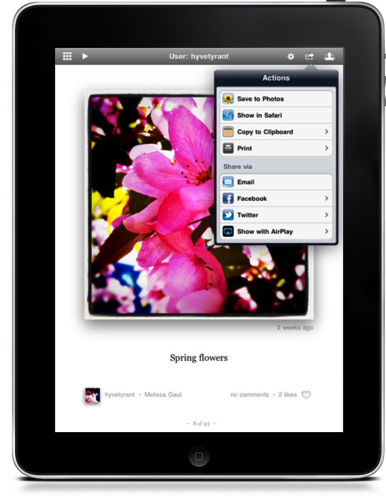
There’s a pair of updates to Instagallery which we first briefly covered in March as an Instagram browser for your iPad, and they bring a ton of functionality to the $1.99 preview-based app that’s sure to excite many Instagram fans.
The update to version 1.2 delivered social sharing to Facebook and Twitter, the ability to open images in Safari, a grid view so you can browse photos quickly, AirPlay so you can get Instagram on your big screen TV, improvements to commenting and tagging, TextExpander support, a history view to browse recent photos, and printing to AirPrint enabled servers amongst of slew of other features.
Yesterday, Instagallery was updated to version 1.2.2 which added translations for foreign languages, author bio and website information, and lots of performance tweaks to keep browsing snappy.
Instagallery is available for $1.99 in the App Store, universally for the iPhone, iPod touch, and iPad.
Access Extra Content and Perks
Founded in 2015, Club MacStories has delivered exclusive content every week for nearly a decade.
What started with weekly and monthly email newsletters has blossomed into a family of memberships designed for every MacStories fan.
Club MacStories: Weekly and monthly newsletters via email and the web that are brimming with apps, tips, automation workflows, longform writing, early access to the MacStories Unwind podcast, periodic giveaways, and more;
Club MacStories+: Everything that Club MacStories offers, plus an active Discord community, advanced search and custom RSS features for exploring the Club’s entire back catalog, bonus columns, and dozens of app discounts;
Club Premier: All of the above and AppStories+, an extended version of our flagship podcast that’s delivered early, ad-free, and in high-bitrate audio.
Bloomberg: Next iPhone To Feature A5 Processor And 8 Megapixel Camera

According to Bloomberg, which has decided to enter into the iPhone 5 rumor mill, the next iPhone will feature a more powerful chip and a more advanced camera. Their report of the iPhone 5 including the A5 chip corroborates what is largely expected – it is the chip that is currently included in the iPad 2.
The report also claims that the “more advanced camera” will feature an 8-megapixel sensor, something that Sony’s Howard Stringer had said earlier this year. It’s an increase from what is currently used in the iPhone 4, which is a 5-megapixel camera. Similarly there have been previous reports have an 8-megapixel camera throughout this year.
The next iPhone will, according to this Bloomberg report, be similar in design to the current iPhone 4. It comes after yesterdays report from BGR which backed up an article from This is my next earlier this year which claimed the iPhone 5 would feature an all new design.
Bloomberg’s sources, not identified, also claim that Apple is trialling a new iPad that includes a higher resolution display – one that would be similar to the Retina display in the iPhone 4. Apparently the display will have roughly one-third more resolution than the current iPad and also have increased touch responsiveness.
The report ends with a somewhat bizarre suggestion that Apple is “working to finish a cheaper version of the iPhone” that would be targeted to developing countries. Bloomberg says that it would use similar chips to what is included in the current iPhone 4 but would be smaller in size.
[Via Bloomberg]
Access Extra Content and Perks
Founded in 2015, Club MacStories has delivered exclusive content every week for nearly a decade.
What started with weekly and monthly email newsletters has blossomed into a family of memberships designed for every MacStories fan.
Club MacStories: Weekly and monthly newsletters via email and the web that are brimming with apps, tips, automation workflows, longform writing, early access to the MacStories Unwind podcast, periodic giveaways, and more;
Club MacStories+: Everything that Club MacStories offers, plus an active Discord community, advanced search and custom RSS features for exploring the Club’s entire back catalog, bonus columns, and dozens of app discounts;
Club Premier: All of the above and AppStories+, an extended version of our flagship podcast that’s delivered early, ad-free, and in high-bitrate audio.
#MacStoriesDeals - Tuesday

Here are today’s @MacStoriesDeals on iOS, Mac, and Mac App Store apps that are on sale for a limited time, so get them before they end!
Access Extra Content and Perks
Founded in 2015, Club MacStories has delivered exclusive content every week for nearly a decade.
What started with weekly and monthly email newsletters has blossomed into a family of memberships designed for every MacStories fan.
Club MacStories: Weekly and monthly newsletters via email and the web that are brimming with apps, tips, automation workflows, longform writing, early access to the MacStories Unwind podcast, periodic giveaways, and more;
Club MacStories+: Everything that Club MacStories offers, plus an active Discord community, advanced search and custom RSS features for exploring the Club’s entire back catalog, bonus columns, and dozens of app discounts;
Club Premier: All of the above and AppStories+, an extended version of our flagship podcast that’s delivered early, ad-free, and in high-bitrate audio.
Nuance Acquires Note-Taking App Noterize

Noterize, which was a fairly popular note-taking app that had been featured by Apple in its Iconic ad, had mysteriously disappeared from the App Store a little while ago. TUAW is today reporting that the absence was because Noterize had been acquired by Nuance.
The Noterize app was particularly well known for its fairly innovative and intuitive annotation and markup features, which you can still view in their promotional video here. Perhaps the most obvious reason for this acquisition could be because Nuance is interesting in releasing their own note-taking app with similar annotation and markup features and have them complemented by voice recognition and dictation. Users could then create a note on a PDF and dictate the contents of the note rather than type it out.
This acquisition of Noterize comes after a number of news pieces over the past few weeks relating to talk over Apple doing a deal with Nuance to feature voice recognition and dictation in iOS 5. There was even the supposedly leaked screenshots of an internal iOS 5 build that showed settings that seemed to back up the rumors.
[Via TUAW]
Access Extra Content and Perks
Founded in 2015, Club MacStories has delivered exclusive content every week for nearly a decade.
What started with weekly and monthly email newsletters has blossomed into a family of memberships designed for every MacStories fan.
Club MacStories: Weekly and monthly newsletters via email and the web that are brimming with apps, tips, automation workflows, longform writing, early access to the MacStories Unwind podcast, periodic giveaways, and more;
Club MacStories+: Everything that Club MacStories offers, plus an active Discord community, advanced search and custom RSS features for exploring the Club’s entire back catalog, bonus columns, and dozens of app discounts;
Club Premier: All of the above and AppStories+, an extended version of our flagship podcast that’s delivered early, ad-free, and in high-bitrate audio.
Link Your Computer And iOS Device With myPhoneDesktop: Double Pass Giveaway!
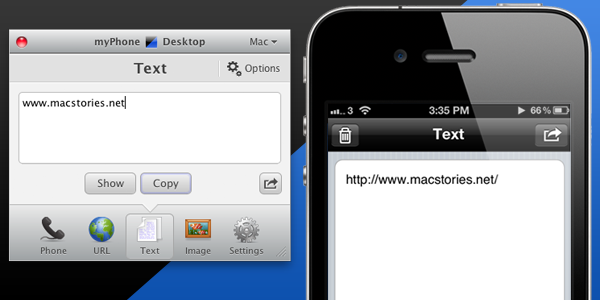
We’ve talked about myPhoneDesktop before on MacStories but we thought it deserved a short ‘re-review’ to accompany today’s giveaway. Keeping it simple, the premise of myPhoneDesktop is that it provides a portal through which you can easily transfer data and information from your desktop computer to your iPhone or iPad.
Broadly speaking the app transfers four types of data including phone data (both numbers and text messages), website URLs, text and images. When you send any of that data from your computer, and there is both a desktop and web client, it will be pushed straight to your device with a notification.
But where I think the app becomes most powerful is when you have the data on your iPhone or iPad. In the corner of the app it has the “Open in” icon where it literally has a wealth of options for your data. There is everything from the obligatory search with Google, to send by email, add to contact, send SMS or launching another app with that data. Importantly, the developers aren’t resting on their laurels, since we last talked about myPhoneDesktop there have been a few updates that continue to add more app integrations including Navigon and InstaTodo.
In reality I have only just scraped the surface of what this app can do, for example it also integrates with Google Voice and Skype, so make sure to check out the myPhoneDesktop website to learn more and get your own copy. Today we’re giving away 5 ‘double passes’ of myPhone desktop – in other words the five winners will receive two promo codes, perfect to give one copy to a iPhone-toting friend or family member, or (god forbid) use it as a belated Father’s Day gift. Details of the give away are past the break.
Access Extra Content and Perks
Founded in 2015, Club MacStories has delivered exclusive content every week for nearly a decade.
What started with weekly and monthly email newsletters has blossomed into a family of memberships designed for every MacStories fan.
Club MacStories: Weekly and monthly newsletters via email and the web that are brimming with apps, tips, automation workflows, longform writing, early access to the MacStories Unwind podcast, periodic giveaways, and more;
Club MacStories+: Everything that Club MacStories offers, plus an active Discord community, advanced search and custom RSS features for exploring the Club’s entire back catalog, bonus columns, and dozens of app discounts;
Club Premier: All of the above and AppStories+, an extended version of our flagship podcast that’s delivered early, ad-free, and in high-bitrate audio.
Wacom Launches Bamboo Paper, Promotes iPad Note-Taking With A Stylus
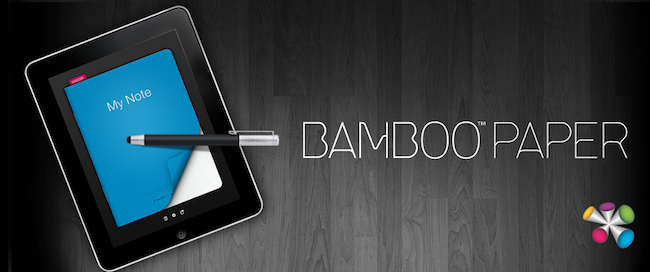
Wacom may have been fairly well known for its stylus based displays that many digital artists used, but in recent years it has started to shift its focus towards the consumer market with its Bamboo range of products. A few months ago it launched the Bamboo Stylus, a high-end stylus designed for the iPad and just a few days ago it released Bamboo Paper – an app for the iPad designed for note-taking with the Bamboo Stylus.
Whilst it isn’t the most fully featured note taking app, it offers a strong set of features and although Wacom recommends their stylus when using the app, it still works with just a finger. Your notebook can have an unlimited number of pages and there is also the option to add ruled lines or a graphing grid to the pages. Where the app falls a little short compared to some other similar apps is that it only offers 3 options for the brush thickness and 6 brush colors.
Some of the other features of Bamboo Paper include the ability to bookmark pages, mirror the display to a TV or projector, as well as print, email or save note pages or even entire notebooks. Whilst the app works well with just a finger, the Wacom video demonstrating Bamboo Paper with a Bamboo Stylus does look really interesting – jump the break to view it.
Bamboo Paper for the iPad is available in the App Store for free until July, at which point it will cost $1.99.
Access Extra Content and Perks
Founded in 2015, Club MacStories has delivered exclusive content every week for nearly a decade.
What started with weekly and monthly email newsletters has blossomed into a family of memberships designed for every MacStories fan.
Club MacStories: Weekly and monthly newsletters via email and the web that are brimming with apps, tips, automation workflows, longform writing, early access to the MacStories Unwind podcast, periodic giveaways, and more;
Club MacStories+: Everything that Club MacStories offers, plus an active Discord community, advanced search and custom RSS features for exploring the Club’s entire back catalog, bonus columns, and dozens of app discounts;
Club Premier: All of the above and AppStories+, an extended version of our flagship podcast that’s delivered early, ad-free, and in high-bitrate audio.