This Week's Sponsor:

Dropzone 5

Improve your Drag-and-Drop Workflow


Posts in iPad

Motorola Teases New Tablet, Calls iPad “A Giant iPhone”

Look, I’m excited for the Android 3.0 “Honeycomb” update that will likely be teased by some tablet makers at CES 2011, but I just can’t get Motorola’s advertising campaigns.

In their latest teaser video of a tablet that they’ll unveil at CES 2011 (which we assume is the same Android chief Andy Rubin demoed at Dive Into Mobile) Motorola focuses on the “tablet evolution” by listing several tablets from the past (such as the Rosetta Stone, or Egyptian’s hieroglyphs) and making fun of their “features”. The Rosetta Stone, for instance, is labelled as “low-resolution”.

Motorola, though, also took the time to include the iPad and Samsung Galaxy Tab in the teaser video. And guess what, the iPad is called a “giant iPhone”.

We look forward to seeing Motorola unveiling their Android tablet at CES. [via Engadget] Read more

Access Extra Content and Perks

Founded in 2015, Club MacStories has delivered exclusive content every week for nearly a decade.

What started with weekly and monthly email newsletters has blossomed into a family of memberships designed for every MacStories fan.

Learn more here and from our Club FAQs.

Club MacStories: Weekly and monthly newsletters via email and the web that are brimming with apps, tips, automation workflows, longform writing, early access to the MacStories Unwind podcast, periodic giveaways, and more;

Club MacStories+: Everything that Club MacStories offers, plus an active Discord community, advanced search and custom RSS features for exploring the Club’s entire back catalog, bonus columns, and dozens of app discounts;

Club Premier: All of the above and AppStories+, an extended version of our flagship podcast that’s delivered early, ad-free, and in high-bitrate audio.

Learn more here and from our Club FAQs.


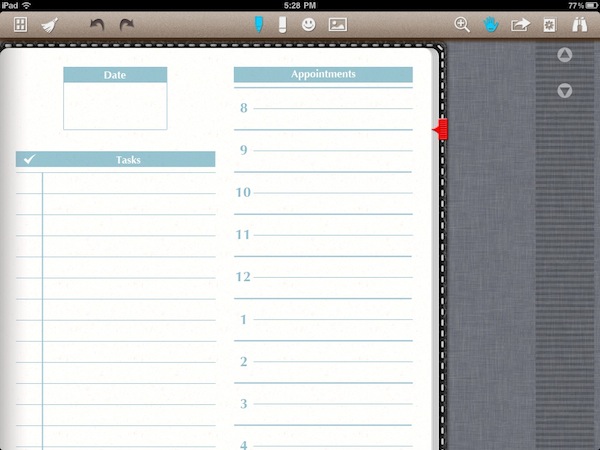
Noteshelf 3.0 Adds AirPrint, Multitasking, Photo Album Integration

Noteshelf is, in my opinion, the best handwriting app for the iPad. As I wrote in my review in October, of all the note taking and handwriting apps for iPad I had tried Noteshelf managed to stand out because of its excellent wrist protection mode, smooth digital ink, templates and overall UI design. The first version of Noteshelf was good, but the 2.1 one was even better as the developer added Evernote and Dropbox support, finer ink, more notebooks.

I have been using Noteshelf for months and haven’t really looked back. Plus, it works great with my Pogo Sketch and the AluPen review unit I got last week. Read more

Access Extra Content and Perks

Founded in 2015, Club MacStories has delivered exclusive content every week for nearly a decade.

What started with weekly and monthly email newsletters has blossomed into a family of memberships designed for every MacStories fan.

Learn more here and from our Club FAQs.

Club MacStories: Weekly and monthly newsletters via email and the web that are brimming with apps, tips, automation workflows, longform writing, early access to the MacStories Unwind podcast, periodic giveaways, and more;

Club MacStories+: Everything that Club MacStories offers, plus an active Discord community, advanced search and custom RSS features for exploring the Club’s entire back catalog, bonus columns, and dozens of app discounts;

Club Premier: All of the above and AppStories+, an extended version of our flagship podcast that’s delivered early, ad-free, and in high-bitrate audio.

Learn more here and from our Club FAQs.


First Infinity Blade Update Coming Tomorrow, For Free

According to a tweet from the official Infinity Blade account, the widely anticipated first free update for one of the most successful iOS games ever is coming tomorrow in the App Store, two days ahead of the iTunes Connect shutdown for developers.

Tomorrow’s update will include five new weapons, five new shields, five new helmets and a new armor set. This equipment will allow users to raise the level cap to 45, but there’s more. New areas will be included, namely dungeons. There will be a new enemy to face and more details about the God King will be revealed.

Infinity Blade for iPhone, iPad and iPod touch is available at $5.99 in the App Store. The update that will go live tomorrow won’t include a multiplayer mode (it seems like that’s coming in January), but it’ll be free for all existing users. No in-app purchase to unlock the new stuff.

We can’t wait.

Access Extra Content and Perks

Founded in 2015, Club MacStories has delivered exclusive content every week for nearly a decade.

What started with weekly and monthly email newsletters has blossomed into a family of memberships designed for every MacStories fan.

Learn more here and from our Club FAQs.

Club MacStories: Weekly and monthly newsletters via email and the web that are brimming with apps, tips, automation workflows, longform writing, early access to the MacStories Unwind podcast, periodic giveaways, and more;

Club MacStories+: Everything that Club MacStories offers, plus an active Discord community, advanced search and custom RSS features for exploring the Club’s entire back catalog, bonus columns, and dozens of app discounts;

Club Premier: All of the above and AppStories+, an extended version of our flagship podcast that’s delivered early, ad-free, and in high-bitrate audio.

Learn more here and from our Club FAQs.


Angry Birds 1.5 for iPad: 15 New Levels, Game Center, Mighty Eagle

Right ahead of Christmas, here comes an Angry Birds HD update for iPad that should grant the millions of Angry Birds and tablet owners out there hours of fun while unwrapping their presents.

Angry Birds HD 1.5 adds Game Center integration, 15 new levels (the previous update added 15 new levels, too), a new “frontier badlands” theme, a new golden egg and the long-awaited Mighty Eagle. Looks like a massive update and it’s no surprise that it’s been approved before the iTunes Connect holiday shutdown.

Angry Birds HD is available at $4.99 here.

Access Extra Content and Perks

Founded in 2015, Club MacStories has delivered exclusive content every week for nearly a decade.

What started with weekly and monthly email newsletters has blossomed into a family of memberships designed for every MacStories fan.

Learn more here and from our Club FAQs.

Club MacStories: Weekly and monthly newsletters via email and the web that are brimming with apps, tips, automation workflows, longform writing, early access to the MacStories Unwind podcast, periodic giveaways, and more;

Club MacStories+: Everything that Club MacStories offers, plus an active Discord community, advanced search and custom RSS features for exploring the Club’s entire back catalog, bonus columns, and dozens of app discounts;

Club Premier: All of the above and AppStories+, an extended version of our flagship podcast that’s delivered early, ad-free, and in high-bitrate audio.

Learn more here and from our Club FAQs.


iLunascape iPad Browser Adds Firefox Sync

iLunascape is a third-party browser for the iPad which is available for free in the App Store and we mentioned several times in the past. It’s not exactly a “full-featured” alternative browser like the excellent iCab or Atomic, yet it comes with a neat tabbed interface that makes it simple to switch between multiple websites open at once.

iLunascape doesn’t overwhelm you with functionalities, but it’s OK for most people looking for a sweet alternative to Safari.

The latest 1.3 version, released last week, adds the possibility to sync bookmarks back to the desktop thanks to Firefox Sync, which apparently opened up its API to allow other browsers to access a user’s sync settings. The new version also lets you save images and use bookmarklets. Firefox Sync is one of the best ways to keep tabs synchronized and accessible between computers and devices.

iLunascape for iPad is free and available here.

Access Extra Content and Perks

Founded in 2015, Club MacStories has delivered exclusive content every week for nearly a decade.

What started with weekly and monthly email newsletters has blossomed into a family of memberships designed for every MacStories fan.

Learn more here and from our Club FAQs.

Club MacStories: Weekly and monthly newsletters via email and the web that are brimming with apps, tips, automation workflows, longform writing, early access to the MacStories Unwind podcast, periodic giveaways, and more;

Club MacStories+: Everything that Club MacStories offers, plus an active Discord community, advanced search and custom RSS features for exploring the Club’s entire back catalog, bonus columns, and dozens of app discounts;

Club Premier: All of the above and AppStories+, an extended version of our flagship podcast that’s delivered early, ad-free, and in high-bitrate audio.

Learn more here and from our Club FAQs.


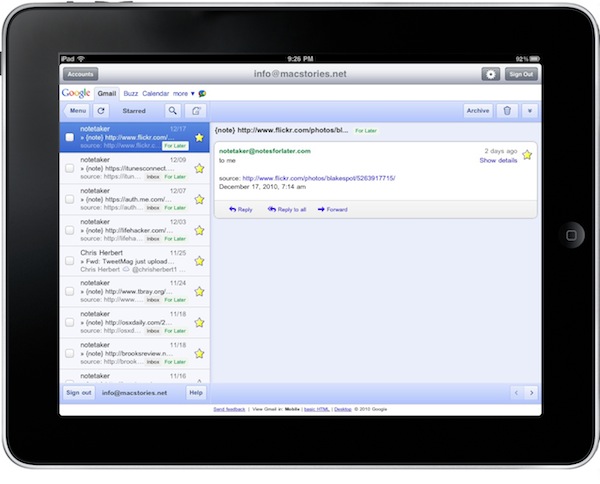
Mailboxes Comes Back To Offer The Best Gmail Wrapper for iPad

In the past months, I’ve tried a lot of iPad apps to access multiple Gmail accounts. Sure, I could use Apple’s Mail app to manage them. The problem is, Apple Mail doesn’t let me access most of the features of Gmail and I love the Gmail web UI for iPad. Also, Google has been busy updating Gmail to make it play nicer with mobile devices (smoother scrolling, better selections in the left panel) and these native “wrappers” provide a way to quickly switch between accounts with the tap of a button.

So far I’ve tried Mailboxes, MailWrangler, MultiG and Mailroom on the iPhone. On the Mac I use Mailplane (which is simply amazing) and on the tablet I’ve sticked with MultiG for several weeks. Until Google changed something on its backend, MultiG stopped working and the developer didn’t release an update. I had to change, and I went back to Apple Mail because of all the alternatives I had tested none of them managed to top the excellence of MultiG. Read more

Access Extra Content and Perks

Founded in 2015, Club MacStories has delivered exclusive content every week for nearly a decade.

What started with weekly and monthly email newsletters has blossomed into a family of memberships designed for every MacStories fan.

Learn more here and from our Club FAQs.

Club MacStories: Weekly and monthly newsletters via email and the web that are brimming with apps, tips, automation workflows, longform writing, early access to the MacStories Unwind podcast, periodic giveaways, and more;

Club MacStories+: Everything that Club MacStories offers, plus an active Discord community, advanced search and custom RSS features for exploring the Club’s entire back catalog, bonus columns, and dozens of app discounts;

Club Premier: All of the above and AppStories+, an extended version of our flagship podcast that’s delivered early, ad-free, and in high-bitrate audio.

Learn more here and from our Club FAQs.


Someone Haz An iPad Game for Cats

Soon after the iPad came out in April, early adopters had fun trying to make their pets interact with it. As usual on the Internet, cats videos made the rounds. I mean, they’re just so adorable, right?

Wait, because someone actually developed an iPad game for cats. Not to be used by humans. Seriously, it’s real and live in the App Store for free. All your lovely cat haz to do? Chase teh mouse on screen.

Check out the video below. I want Steve Jobs demoing this on stage at the next Apple event. Or maybe the Apple Design Awards. [via Laughing Squid] Read more

Access Extra Content and Perks

Founded in 2015, Club MacStories has delivered exclusive content every week for nearly a decade.

What started with weekly and monthly email newsletters has blossomed into a family of memberships designed for every MacStories fan.

Learn more here and from our Club FAQs.

Club MacStories: Weekly and monthly newsletters via email and the web that are brimming with apps, tips, automation workflows, longform writing, early access to the MacStories Unwind podcast, periodic giveaways, and more;

Club MacStories+: Everything that Club MacStories offers, plus an active Discord community, advanced search and custom RSS features for exploring the Club’s entire back catalog, bonus columns, and dozens of app discounts;

Club Premier: All of the above and AppStories+, an extended version of our flagship podcast that’s delivered early, ad-free, and in high-bitrate audio.

Learn more here and from our Club FAQs.


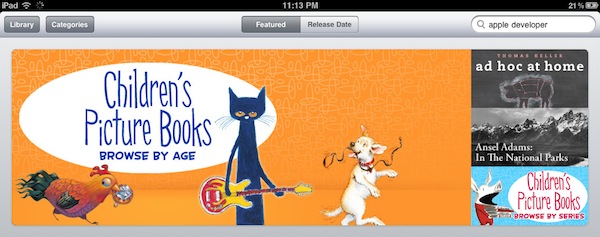
Children’s Picture Books Go Live In The iBookstore

With the release of iBooks 1.2, Apple added the possibility to display illustrated books in its ebook reading application. The illustrated books weren’t available in the Store on the iBooks 1.2 launch day, but they are now. And they’re featured in the homepage of the iBookstore with a series of banners that want you to notice the availability of the Children’s Picture Books.

Most of the books in the Store are sold at $9.99, but there are many ranging from $3.99 to $12.99. The format of illustrated books is different, and you’ll have to manually zoom in iBooks if you want to get a closer look at the details. I don’t get why the app doesn’t open them in full-screen by default. Anyway, go check on the iBookstore, as there are plenty of them.

[via Macgasm] Read more

Access Extra Content and Perks

Founded in 2015, Club MacStories has delivered exclusive content every week for nearly a decade.

What started with weekly and monthly email newsletters has blossomed into a family of memberships designed for every MacStories fan.

Learn more here and from our Club FAQs.

Club MacStories: Weekly and monthly newsletters via email and the web that are brimming with apps, tips, automation workflows, longform writing, early access to the MacStories Unwind podcast, periodic giveaways, and more;

Club MacStories+: Everything that Club MacStories offers, plus an active Discord community, advanced search and custom RSS features for exploring the Club’s entire back catalog, bonus columns, and dozens of app discounts;

Club Premier: All of the above and AppStories+, an extended version of our flagship podcast that’s delivered early, ad-free, and in high-bitrate audio.

Learn more here and from our Club FAQs.


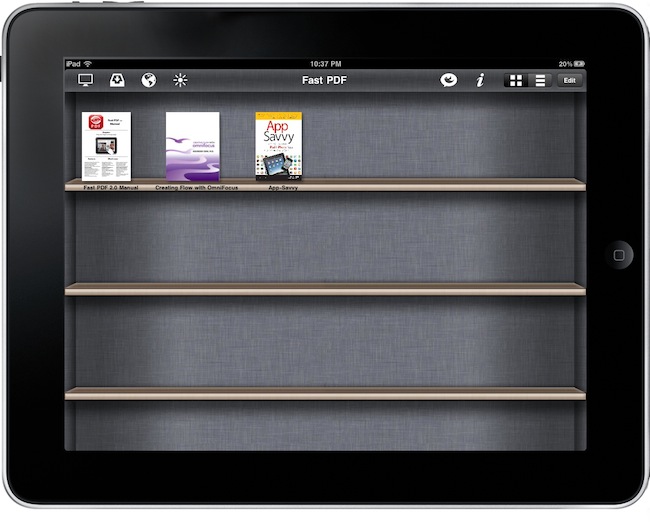
Fast PDF 2.0 Offers A Solid Alternative To iBooks

When I reviewed the first version of Fast PDF (universal, $2.99) in late June, I called it “what iBooks for PDFs should be”. It was a few days after Apple released an updated version of iBooks with PDF support, which many – including us – didn’t really like. That version of iBooks (1.1) had poor PDF support as it didn’t let you highlight words, flip through pages or organize documents in collections. iBooks 1.2, released last week, still doesn’t let you highlight or flip through, but at least it’s got the long-requested collection feature. Plus, Apple optimized the engine to make opening large PDF files faster. I noticed that last week.

A few days ago the App Store saw the release of Fast PDF 2.0 as well. A major new version of the app I reviewed in June and used as the default PDF reader on my iPad for months. How does it compare to iBooks 1.2? What’s new? Read more

Access Extra Content and Perks

Founded in 2015, Club MacStories has delivered exclusive content every week for nearly a decade.

What started with weekly and monthly email newsletters has blossomed into a family of memberships designed for every MacStories fan.

Learn more here and from our Club FAQs.

Club MacStories: Weekly and monthly newsletters via email and the web that are brimming with apps, tips, automation workflows, longform writing, early access to the MacStories Unwind podcast, periodic giveaways, and more;

Club MacStories+: Everything that Club MacStories offers, plus an active Discord community, advanced search and custom RSS features for exploring the Club’s entire back catalog, bonus columns, and dozens of app discounts;

Club Premier: All of the above and AppStories+, an extended version of our flagship podcast that’s delivered early, ad-free, and in high-bitrate audio.

Learn more here and from our Club FAQs.