Posts in Featured

Photoshop For iPad To Be Updated With Support For Layers

Photography Bay got to go hands on with an updated Photoshop app for the iPad, which will bring support for layers and new features to compared original and edited photos. Recently, the Photoshop app was updated to its second version which included multitasking support and an update to utilize the Retina Display on the iPhone. Back in November, Adobe’s John Nack offered some insight as to what features would arrive in future app updates after a brief survey. Electronista notes that an updated Photoshop would, “help address the lack of content creation, one of the most commonly cited flaws of the platform.” Maybe the author hasn’t been paying attention, but while Adobe is updating Photoshop, many other photo editors such as Photogene, Masque, and PhotoForge have existed for a while. An update to Photoshop is still, however, a welcome addition to the iPad. While the Photography bay was able to snap some blurry demo photos and video, the video hasn’t been published online and has been noted to be published later tonight.

[Photography Bay via Electronista]

Access Extra Content and Perks

Founded in 2015, Club MacStories has delivered exclusive content every week for nearly a decade.

What started with weekly and monthly email newsletters has blossomed into a family of memberships designed for every MacStories fan.

Learn more here and from our Club FAQs.

Club MacStories: Weekly and monthly newsletters via email and the web that are brimming with apps, tips, automation workflows, longform writing, early access to the MacStories Unwind podcast, periodic giveaways, and more;

Club MacStories+: Everything that Club MacStories offers, plus an active Discord community, advanced search and custom RSS features for exploring the Club’s entire back catalog, bonus columns, and dozens of app discounts;

Club Premier: All of the above and AppStories+, an extended version of our flagship podcast that’s delivered early, ad-free, and in high-bitrate audio.

Learn more here and from our Club FAQs.


Apple Announces Q2 2011 Conference Call For April 20

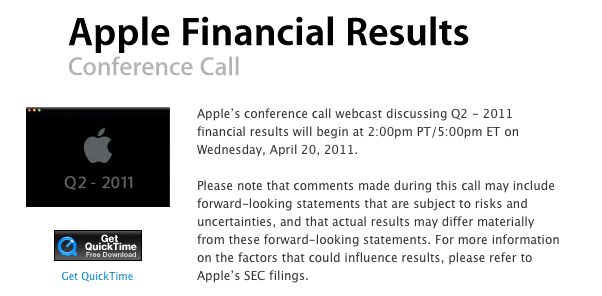
As widely anticipated in the past few days, Apple has scheduled its q2 2011 earnings call for April 20, 2011. The conference call will be streamed live on Apple’s website (audio-only) here.

Apple’s conference call webcast discussing Q2 - 2011 financial results will begin at 2:00pm PT/5:00pm ET on Wednesday, April 20, 2011.

Please note that comments made during this call may include forward-looking statements that are subject to risks and uncertainties, and that actual results may differ materially from these forward-looking statements.

In Q1 2011, Apple posted a record revenue of $26.74 billion with 7.33 million iPads sold, 16.24 million iPhones and 4.13 million Macs. The company posted record net quarterly profit of $6 billion, or $6.43 per diluted share. 19.45 million iPods were sold during the quarter. In the year-ago quarter, Apple posted revenue of $13.50 billion with 2.94 million Macs sold, 8.75 million iPhones and 10.89 million iPods sold.

The Q2 2011 earnings call is expected to provide more insight into Verizon iPhone sales numbers and the iPad 2, which was released on March 11 in the US and also went on sale last week in 25 more countries – just in time to fit into Apple’s second fiscal quarter window.


Access Extra Content and Perks

Founded in 2015, Club MacStories has delivered exclusive content every week for nearly a decade.

What started with weekly and monthly email newsletters has blossomed into a family of memberships designed for every MacStories fan.

Learn more here and from our Club FAQs.

Club MacStories: Weekly and monthly newsletters via email and the web that are brimming with apps, tips, automation workflows, longform writing, early access to the MacStories Unwind podcast, periodic giveaways, and more;

Club MacStories+: Everything that Club MacStories offers, plus an active Discord community, advanced search and custom RSS features for exploring the Club’s entire back catalog, bonus columns, and dozens of app discounts;

Club Premier: All of the above and AppStories+, an extended version of our flagship podcast that’s delivered early, ad-free, and in high-bitrate audio.

Learn more here and from our Club FAQs.


Week Calendar 3.0 Is A Powerful iCal Alternative for iPhone

In the past months, I’ve taken a look at different calendar applications for the iPhone and iPad that aim at bringing more functionalities (either through particular interface approaches, extended Google Calendar support, or other features) to a device’s built-in calendar software from Apple. The iOS calendar app, a tiny version of iCal for the desktop, is fast and elegant and works just fine for most users, but sometimes you want or need more from a mobile calendar or agenda. For instance, the possibility to have more views available (rather than the List, Day and Month ones designed by Apple) or “do more” with events and reminders. And while I know most of MacStories readers are huge fans of Calvetica and Cloud Calendar for the iPhone and iPad, respectively, I’m pretty sure some of you have been looking for a slightly more “powerful” or, dare I say, “geeky” alternative to Calendar.app. If so, meet Week Calendar.

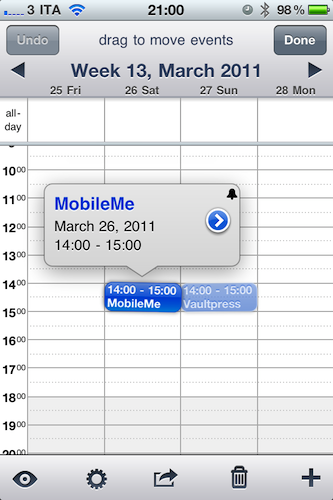
The name says it all: Week Calendar’s biggest feature is the weekly view that’s the focus of the entire experience and undoubtedly something that Apple’s calendar app really lacks. In the app’s weekly view you can pinch & zoom vertically or horizontally to show / hide hours and days, double-tap to focus on a specific event or rotate to landscape mode to gain an even broader view. Tapping on the top toolbar allows you to select a date to jump to, whilst selecting an event opens a desktop-like popup with related information. Tap on the popup, and you get to another screen with all the details you’ve entered and buttons to share, print (that’s right, AirPrint) or create a template off the event itself. You can edit an event at any time, and even display the assigned location on a map. Something that I really like about Week Calendar (well, weekly view aside): you can link contacts from the Address Book to an event. Like I said, everything’s pretty full-featured to offer a wide array of options and choices.

“Choices” seems to be a prerogative of Week Calendar: from the main screen, an iPad-like popover lets you switch between 7 different views: List + Search, Day, Week, Month, Year, Agenda, and Today. The “Go to a Day” shortcut lets you manually enter a date to open. Switching between sections and views felt fast and highly responsive to me, although I have to say I’ve only configured the app with two calendars: my personal one, and US Holidays. The app comes with this kind of optional, built-in subscriptions that you can activate from the Settings. Speaking of which, there’s a lot of stuff to choose from in there: from Time Zone support and “Week starts at” to an auto-coloring system for events with a specific title, you can stay assured the option you’re looking for has been implemented in Week Calendar. I can see how many will prefer the simplicity of an app like Calvetica, but sometimes an application for “nerds & power users” is more than welcome. Other features of Week Calendar that impressed me for the quality of the implementation were fullscreen support (you can activate it with a single / double tap and choose what UI elements to hide), possibility to cut and drag & drop events in any view for easy re-arrangement and TextExpander integration.

Week Calendar is an app that needs to be used for weeks – even months – to be fully appreciated. There’s so much stuff to play with, configure and customize it’s not really easy to fit everything into a single article – plus, I believe all these options have the added value of turning the app into a completely different experience depending on how you use calendars. So, head over the App Store now and buy Week Calendar 3.0 – at $1.99 it’s possibly the most “serious” calendar app for iPhone I’ve seen so far. Read more

Access Extra Content and Perks

Founded in 2015, Club MacStories has delivered exclusive content every week for nearly a decade.

What started with weekly and monthly email newsletters has blossomed into a family of memberships designed for every MacStories fan.

Learn more here and from our Club FAQs.

Club MacStories: Weekly and monthly newsletters via email and the web that are brimming with apps, tips, automation workflows, longform writing, early access to the MacStories Unwind podcast, periodic giveaways, and more;

Club MacStories+: Everything that Club MacStories offers, plus an active Discord community, advanced search and custom RSS features for exploring the Club’s entire back catalog, bonus columns, and dozens of app discounts;

Club Premier: All of the above and AppStories+, an extended version of our flagship podcast that’s delivered early, ad-free, and in high-bitrate audio.

Learn more here and from our Club FAQs.


Official Vimeo iPhone App Now Available

Popular video service Vimeo finally released its long-awaited iPhone app in the App Store, it’s free and, from a first quick test, it seems packed with functionalities. Vimeo fans have been asking for months (years?) to have the possibility to browse videos in a native interface and upload media directly from their devices, but Vimeo delivered more than expected and it definitely appears the wait was well worth it.

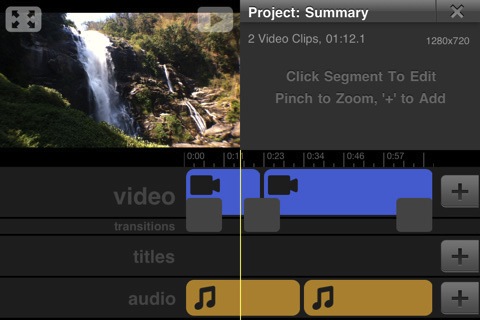
Besides letting you browse Vimeo sections, your videos, likes and tags, the Vimeo app packs a full-featured video editor that allows you to record new material and edit it with transitions, titles, audio and video trimming support. The UI is quite polished and elegant, and the app feels responsive although not just as fast as Apple’s iMovie. The fact that Vimeo, however, managed to release an uploading tool that’s also a movie editor with lots of functionalities is just great. You can combine videos together and control volume levels, add music or your own recordings from the iPod library and decide whether videos should be saved to the camera roll or uploaded to Vimeo. The Project Summary panel in the video editor gives you additional details on the video you’re editing, such as the total amount of clips you’ve inserted, duration and resolution. Even pinch to zoom is supported. Furthermore, the Vimeo app gives you control over the quality of the uploads – you can send raw footage or edited videos in SD or HD off to the service’s servers. Last, uploads can be paused and resumed. I love this feature.

The “My Stuff” tab in the bottom toolbar lets you watch your video inbox, likes and watch later queue – perfect if you usually save a lot of videos for later from the desktop browser and you want to watch them on the iPhone whenever you want. Your own videos come with the stats you know and love like daily views, likes and comment, and you can also manage those videos by sending them to a specific group, channel or album. Sharing to Facebook, Twitter, Tumblr, WordPress, Email and SMS is supported, too.

The Vimeo iPhone app looks like a real gem, and I’ll be testing it with my iPhone videos throughout the week. It’s pretty clear however that lots of work went into this app, which brings the complete Vimeo experience to the iPhone with a sweet interface and several features previously only available on the desktop web browser. You can find Vimeo for iPhone in the App Store. More screenshots below. Read more

Access Extra Content and Perks

Founded in 2015, Club MacStories has delivered exclusive content every week for nearly a decade.

What started with weekly and monthly email newsletters has blossomed into a family of memberships designed for every MacStories fan.

Learn more here and from our Club FAQs.

Club MacStories: Weekly and monthly newsletters via email and the web that are brimming with apps, tips, automation workflows, longform writing, early access to the MacStories Unwind podcast, periodic giveaways, and more;

Club MacStories+: Everything that Club MacStories offers, plus an active Discord community, advanced search and custom RSS features for exploring the Club’s entire back catalog, bonus columns, and dozens of app discounts;

Club Premier: All of the above and AppStories+, an extended version of our flagship podcast that’s delivered early, ad-free, and in high-bitrate audio.

Learn more here and from our Club FAQs.


Camera+ 2.2 Released: Adds “Clarity” Photo Enhancement Feature

MacStories-favorite alternative image processing / photo taking app Camera+ by tap tap tap was updated a few minutes ago to version 2.2 – and this update, among a series of fixes that improve the stability and performance of the app, introduces a big new photo enhancement feature called “Clarity”.

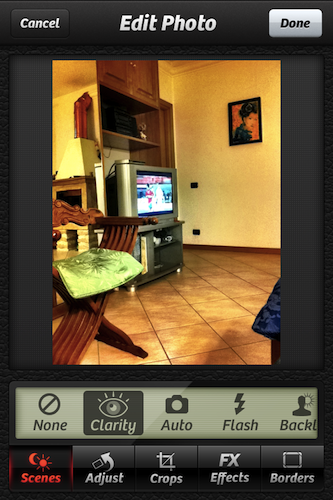
Clarity is a big step forward from the HDR technique implemented by Apple in the default Camera application for iOS: it’s a 1-tap image enhancement that will make your photos look better in most scenarios (direct sunlight, low-light) and it doesn’t have the issues that usually come with multi-exposure HDR such alignement problems. Once you take your photos in Camera+ and jump to the lightbox (which, by the way, feels faster and more responsive in 2.2), all you need to do is edit, tap “scenes” then Clarity to improve your photo’s quality. Clarity will make more details come out, balance light and dark spots when necessary and, overall, give your photo a more “realistic” feel by re-adding the details and colors that might go missing with a standard digital shot. If you’re a Camera+ owner, just try it and you’ll see.

Version 2.2 also gives a whole new meaning the “+” in the apps’ icon as, finally, there’s a new way to activate focus and exposure controls in the camera view: the two-finger gesture is still there, but you can now tap on the “+” button to split between focus and exposure controls. It’s really handy and I like it.

Camera+ 2.2 is a great update, and the app is still available at $0.99 in the App Store. Camera+ is a powerful, yet intuitive, alternative to Camera.app, and it looks like tap tap tap are really serious about adding features that outperform Apple’s own implementation in reliability and speed. Recommended.

Some examples of Clarity compared to Apple’s HDR below. Read more

Access Extra Content and Perks

Founded in 2015, Club MacStories has delivered exclusive content every week for nearly a decade.

What started with weekly and monthly email newsletters has blossomed into a family of memberships designed for every MacStories fan.

Learn more here and from our Club FAQs.

Club MacStories: Weekly and monthly newsletters via email and the web that are brimming with apps, tips, automation workflows, longform writing, early access to the MacStories Unwind podcast, periodic giveaways, and more;

Club MacStories+: Everything that Club MacStories offers, plus an active Discord community, advanced search and custom RSS features for exploring the Club’s entire back catalog, bonus columns, and dozens of app discounts;

Club Premier: All of the above and AppStories+, an extended version of our flagship podcast that’s delivered early, ad-free, and in high-bitrate audio.

Learn more here and from our Club FAQs.


Amazon Launches Cloud Player for Web, Android Devices

Monday night just got a lot more interesting. Amazon has just announced their own music streaming service for the web (for all you MacBook Pro and MacBook Air owners), and Android if you’re living on the edge like I am. Current (existing) Amazon customers can get 5 GB of cloud storage free, with an upgrade to a 20 GB (free for one year) upon the purchase of a hot new album. Appropriately called a Cloud Drive, Amazon enables you to upload 5GB of your music collection (non-DRM) to the digital shelf for playback on Amazon’s Cloud Player for the Web, or Cloud Player for Android. If you’re a loyal Amazon customer, those MP3 purchases can be saved right to your cloud space thus removing the need to download to your computer. As a bonus, storing purchased Amazon MP3s to the Cloud Drive doesn’t count against your total storage. Awesome stuff! To get music to the cloud, you can use Amazon’s MP3 Uploader tool, which will scan your iTunes library and playlists so you can decide what to upload. You can check out the new addition to the Amazon family via the source link below.

Might I add, “Game on?”

Update: There’s much more to cloud storage than just meager 5 GB and 20 GB plans. Past the break, we’ve got a handy chart with prices for up to 1000 GB of cloud storage. Sure it’ll cost you, but the fact that you can actually buy that much cloud storage is intriguing (and slightly frightening).

[Amazon via Engadget]

Read more

Access Extra Content and Perks

Founded in 2015, Club MacStories has delivered exclusive content every week for nearly a decade.

What started with weekly and monthly email newsletters has blossomed into a family of memberships designed for every MacStories fan.

Learn more here and from our Club FAQs.

Club MacStories: Weekly and monthly newsletters via email and the web that are brimming with apps, tips, automation workflows, longform writing, early access to the MacStories Unwind podcast, periodic giveaways, and more;

Club MacStories+: Everything that Club MacStories offers, plus an active Discord community, advanced search and custom RSS features for exploring the Club’s entire back catalog, bonus columns, and dozens of app discounts;

Club Premier: All of the above and AppStories+, an extended version of our flagship podcast that’s delivered early, ad-free, and in high-bitrate audio.

Learn more here and from our Club FAQs.


Rumor: Siri “A Big Part” Of iOS 5, Demo At WWDC

Following this morning’s formal announcement from Apple about the WWDC ‘11, a number of reports surfaced indicating this year’s conference will be a software-related event, with the focus on iOS and Mac OS X Lion. Several bloggers and journalists have reported there won’t be a single hardware announcement at the WWDC, meaning a new iPhone – for the first time in years – won’t be announced at the June event.

Such an announcement, of course, lead many to speculate what features of iOS 5 (Lion has already been demoed and released as a preview to developers) will exactly make their way to the WWDC stage. TechCrunch now reports Siri, the startup bought by Apple last year, will play a big role in iOS 5 and a first demo of the integration of the technology will be shown at the WWDC.

Oh, and one more thing. Following our report on iOS 5, we heard a tiny bit more about it.

A year ago, Apple bought Siri, a virtual personal assistant startup that had released a very cool iPhone app. The Siri team and technology are now said to be a big part of iOS 5.

The use of Siri’s artificial intelligence and assistance technology is said to be deeply integrated into the OS for all the different services offered. And the team is now putting the finishing touches on the elements that will be demoed at WWDC, we hear. This tech may also be opened to developers for use in third-party apps — though that information isn’t quite as concrete.

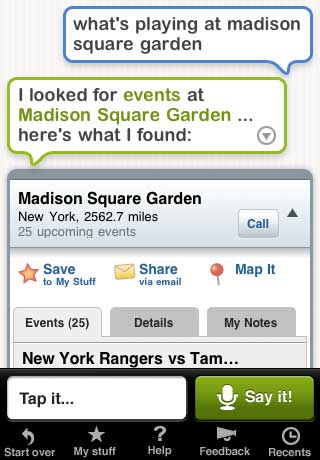
The Siri iPhone app is still available in the App Store for free, and it allows users to “speak” to their iPhones to book restaurants, movie tickets, taxis and much more. Siri is undoubtedly a great piece of technology and this rumor, combined with previous reports of Apple looking to improve speech recognition functionalities and navigation in iOS, certainly backs up the theories of Cupertino engineers building a completely new OS focused on speech, new maps and more “human” interactions.

Another report by TechCrunch yesterday pointed to iOS 5 being released this fall with new location and music services. With an iOS 5 beta (likely) to become available at the WWDC in June and the time needed for developers to update their apps, it makes sense for Apple to wait until their usual September music event to launch the new OS and cloud services. In the meantime, you can check out the old Siri demo video and product description below. Read more

Access Extra Content and Perks

Founded in 2015, Club MacStories has delivered exclusive content every week for nearly a decade.

What started with weekly and monthly email newsletters has blossomed into a family of memberships designed for every MacStories fan.

Learn more here and from our Club FAQs.

Club MacStories: Weekly and monthly newsletters via email and the web that are brimming with apps, tips, automation workflows, longform writing, early access to the MacStories Unwind podcast, periodic giveaways, and more;

Club MacStories+: Everything that Club MacStories offers, plus an active Discord community, advanced search and custom RSS features for exploring the Club’s entire back catalog, bonus columns, and dozens of app discounts;

Club Premier: All of the above and AppStories+, an extended version of our flagship podcast that’s delivered early, ad-free, and in high-bitrate audio.

Learn more here and from our Club FAQs.


Apple Australia Lets You Reserve An iPad 2 For Pickup

If you’re on the hunt for an iPad 2 and live in Australia you might just have a good chance of snapping one up from an Apple Store by reserving one online. That’s right, Apple Australia is letting customers reserve iPad 2’s for pick-up at an Apple Store and the next day no less!

There is however a (large) caveat in that you can only reserve an iPad 2 if that particular store has them in stock – and after going live only 3 hours ago I’ve looked through most of the Australian Apple Stores and none have stock of any of the 12 models.  Apple Stores do however receive stock fairly frequently, at least a few times a week so keep checking if you’ve missed out in this first batch of reservable iPad 2’s.

If you live close enough to an Australian Apple retail store and want to reserve an iPad 2 for pickup, jump over to the Apple retail site. At this stage it seems that Apple isn’t offering to do reserve iPad 2’s in any other country but one would suspect they may transition this system internationally and hopefully soon as it sure beats going to an Apple store everyday to ask if they have the model you want in stock.

[Via MacTalk]


Access Extra Content and Perks

Founded in 2015, Club MacStories has delivered exclusive content every week for nearly a decade.

What started with weekly and monthly email newsletters has blossomed into a family of memberships designed for every MacStories fan.

Learn more here and from our Club FAQs.

Club MacStories: Weekly and monthly newsletters via email and the web that are brimming with apps, tips, automation workflows, longform writing, early access to the MacStories Unwind podcast, periodic giveaways, and more;

Club MacStories+: Everything that Club MacStories offers, plus an active Discord community, advanced search and custom RSS features for exploring the Club’s entire back catalog, bonus columns, and dozens of app discounts;

Club Premier: All of the above and AppStories+, an extended version of our flagship podcast that’s delivered early, ad-free, and in high-bitrate audio.

Learn more here and from our Club FAQs.


Apple Design Awards 2011 To Feature Both iOS and Mac Apps

Together with the official announcement of WWDC 2011, Apple also put a teaser page up for the Apple Design Awards, which recognize “apps that demonstrate technical excellence, innovation and outstanding design.” Unlike last year, this year’s ADAs will feature both iOS and Mac apps: in 2010, Mac software was surprisingly excluded and iOS was the focus. Steve Jobs said that it was “just the normal cycle of things”. Among the winners of the 2010 edition: Flight Control HD, Star Walk and Doodle Jump.

At the WWDC 2011 Apple will award outstanding apps for the iPhone, iPad and Mac. Apps that  are “currently on the App Store and demonstrate excellence in the following areas:”

  • Design: Well designed apps are delightful, elegant, intuitive, engaging, exciting, compelling, and reliable.
  • Innovation: Innovative apps are revolutionary, inspirational, unique, and do things in completely new and exciting ways.
  • Technical excellence: Technically advanced apps have excellent performance and make extensive use of the latest Apple technologies to deliver innovative, platform differentiating, and advanced features.

To be eligible for the Apple Design Awards 2011, apps must be available in the App Store by May 23. More details and frequently asked questions here.

Access Extra Content and Perks

Founded in 2015, Club MacStories has delivered exclusive content every week for nearly a decade.

What started with weekly and monthly email newsletters has blossomed into a family of memberships designed for every MacStories fan.

Learn more here and from our Club FAQs.

Club MacStories: Weekly and monthly newsletters via email and the web that are brimming with apps, tips, automation workflows, longform writing, early access to the MacStories Unwind podcast, periodic giveaways, and more;

Club MacStories+: Everything that Club MacStories offers, plus an active Discord community, advanced search and custom RSS features for exploring the Club’s entire back catalog, bonus columns, and dozens of app discounts;

Club Premier: All of the above and AppStories+, an extended version of our flagship podcast that’s delivered early, ad-free, and in high-bitrate audio.

Learn more here and from our Club FAQs.