Posts in Featured

MacBook Air Supplies Dwindle, June Or July Refresh Imminent

We’ve previously reported on rumors of a June or July refresh for the MacBook Air and it looks like that time frame is firming up. 9to5 Mac today reported on reports they received in which supplies and shipments for the MacBook Air are constrained – a typical pattern ahead of product refreshes.

The refresh is likely to be minor with a specification bump and inclusion of Thunderbolt ports that have so far made it on to the MacBook Pro and iMac lines earlier this year. Similarly, Intel’s Sandy Bridge processors are also expected to make it into the refreshed MacBook Air, reports from two weeks ago suggest that Intel is working on ULV (ultra-low voltage) i5 and i7 processors, which would be perfect for the Air.

Prices for the current MacBook Air seem to reinforce an imminent update, with the refurbished models selling for only $829 on Apple’s website and Best Buy selling the base model for only $938.

[Via 9to5 Mac]

Access Extra Content and Perks

Founded in 2015, Club MacStories has delivered exclusive content every week for nearly a decade.

What started with weekly and monthly email newsletters has blossomed into a family of memberships designed for every MacStories fan.

Learn more here and from our Club FAQs.

Club MacStories: Weekly and monthly newsletters via email and the web that are brimming with apps, tips, automation workflows, longform writing, early access to the MacStories Unwind podcast, periodic giveaways, and more;

Club MacStories+: Everything that Club MacStories offers, plus an active Discord community, advanced search and custom RSS features for exploring the Club’s entire back catalog, bonus columns, and dozens of app discounts;

Club Premier: All of the above and AppStories+, an extended version of our flagship podcast that’s delivered early, ad-free, and in high-bitrate audio.

Learn more here and from our Club FAQs.


Opera Mini 6 for iPad Reviewed

There isn’t any stiff competition on the iPad when it comes to third party browsers, but one could arguably assert that Opera has a widely recognizable name when it comes to the mobile browser space; we’re sure the Opera community would enjoy additional exposure on iOS alongside the dominant focus on Android. Unfortunately, Opera’s attention to Android has tended to be a problem when it comes to curating its iOS app. When Opera for the iPhone launched to the surprise of many in 2010, the app fell by the wayside with a lack of enthusiasm and was seemingly forgotten about as Opera for the iPhone never updated to take advantage of the Retina Display. Opera had seemingly lost interest in supporting iOS, that is until an updated Opera Mini 6 landed on the App Store as a universal app, bringing an updated interface and some extra polish to their mobile app. It remains to be seen whether Opera will continue to provide consistent updates to their mobile browser on iOS, but that doesn’t mean we won’t provide our take on the current “red O”.

Read more

Access Extra Content and Perks

Founded in 2015, Club MacStories has delivered exclusive content every week for nearly a decade.

What started with weekly and monthly email newsletters has blossomed into a family of memberships designed for every MacStories fan.

Learn more here and from our Club FAQs.

Club MacStories: Weekly and monthly newsletters via email and the web that are brimming with apps, tips, automation workflows, longform writing, early access to the MacStories Unwind podcast, periodic giveaways, and more;

Club MacStories+: Everything that Club MacStories offers, plus an active Discord community, advanced search and custom RSS features for exploring the Club’s entire back catalog, bonus columns, and dozens of app discounts;

Club Premier: All of the above and AppStories+, an extended version of our flagship podcast that’s delivered early, ad-free, and in high-bitrate audio.

Learn more here and from our Club FAQs.


TypeTool Chooses The Right Font For Your App, Becomes Powerful With Photoshop Touch SDK

Earlier this month, Adobe updated Photoshop to support the new Photoshop Touch SDK, which allows developers to build mobile apps that tie into and complement the full desktop version of Photoshop. Adobe themselves built three iPad apps that demonstrated the capabilities of the SDK, whilst they are neat we have been waiting to see how other developers would take advantage of the SDK in building innovative mobile apps.

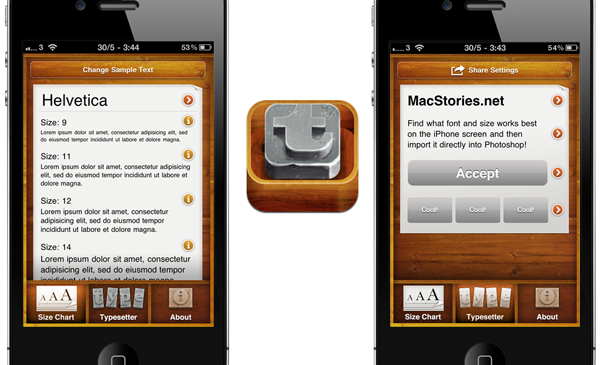
TypeTool from appland is one of the first apps that takes advantage of the SDK. In essence, TypeTool is a simple app that aims to make the life of an iPhone designer or developer that much easier by assisting them in choosing the right font and font size for their app. There are two main features in TypeTool, the first of which is a size chart where you can preview what various fonts look like from sizes of 9pt to 32pt. The second key feature is the Typesetter where you can build up a basic UI, trying different fonts and font sizes to see how they look together.

Where the Photoshop Touch SDK comes in is with the Typesetter, previously TypeTool would let you email yourself the details of what fonts you choose, and a screenshot of what the fonts look like. However you can now opt to directly send your configuration into Photoshop, which will create a document that mirrors what you see on the iPhone with the specific fonts and sizes that you specified. From there you could either build up the rest of the design around the imported text or choose to copy over the text into an existing Photoshop document.

TypeTool is available on the iPhone for $2.99, to export to Photoshop you will need to have version 12.0.4 and be on the same network. The developers are considering building an iPad version as well as adding some more “designer tools” and increasing the usage of the Photoshop Touch SDK within the app.

If you’re you a developer of an iOS app that takes advantage of the Photoshop Touch SDK or know of a really innovative app that does, please let us know! Jump the break for some more screenshots.

Read more

Access Extra Content and Perks

Founded in 2015, Club MacStories has delivered exclusive content every week for nearly a decade.

What started with weekly and monthly email newsletters has blossomed into a family of memberships designed for every MacStories fan.

Learn more here and from our Club FAQs.

Club MacStories: Weekly and monthly newsletters via email and the web that are brimming with apps, tips, automation workflows, longform writing, early access to the MacStories Unwind podcast, periodic giveaways, and more;

Club MacStories+: Everything that Club MacStories offers, plus an active Discord community, advanced search and custom RSS features for exploring the Club’s entire back catalog, bonus columns, and dozens of app discounts;

Club Premier: All of the above and AppStories+, an extended version of our flagship podcast that’s delivered early, ad-free, and in high-bitrate audio.

Learn more here and from our Club FAQs.


Google Rolling Out Revamped Mobile Search UI

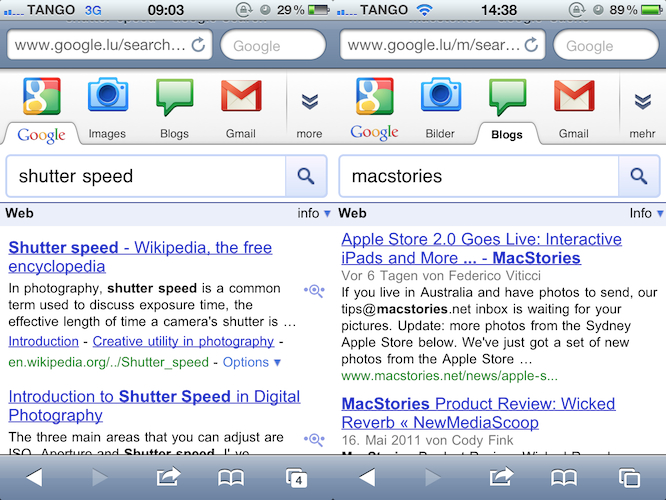
As noted by some of our readers overnight, Google is rolling out a revamped search interface which better showcases all the services offered by Google and allows you to easily and quickly switch between Search, Images, Gmail, Blogs and more. The new page design is not available for everyone (I can’t see it on my iPhone 4 in Italy), as it’s apparently slowly propagating internationally. MacStories reader Kevin, however, managed to grab some screenshots of the updated mobile interface; a new bar at the top provides links to Google Search, Images, Blogs and Gmail, and a “more” button to expand the bar and reveal the icons seen in the screenshots above. Another section of the new top bar displays the Google account you’re currently logged in with, as well as two tabs for Search and Apps. In the Apps section, Google has a Gmail shortcut that takes you to the usual mobile mail interface for iOS devices. Other services are likely visible in the Search tab of international Google domains, as our reader could only see the new design on Google.lu.

Google has updated several of its online services and web apps over the past months to be more functional on iOS and Android devices. Together with Instant and App Store search results, Google made lots of changes to Gmail mobile, improved the weather widget and completely revamped the Maps web app last week. Check out more screenshots below. [Thanks, Kevin] Read more

Access Extra Content and Perks

Founded in 2015, Club MacStories has delivered exclusive content every week for nearly a decade.

What started with weekly and monthly email newsletters has blossomed into a family of memberships designed for every MacStories fan.

Learn more here and from our Club FAQs.

Club MacStories: Weekly and monthly newsletters via email and the web that are brimming with apps, tips, automation workflows, longform writing, early access to the MacStories Unwind podcast, periodic giveaways, and more;

Club MacStories+: Everything that Club MacStories offers, plus an active Discord community, advanced search and custom RSS features for exploring the Club’s entire back catalog, bonus columns, and dozens of app discounts;

Club Premier: All of the above and AppStories+, an extended version of our flagship podcast that’s delivered early, ad-free, and in high-bitrate audio.

Learn more here and from our Club FAQs.


iOS 5 To Feature “Completely Revamped” Notifications and Widgets

TechCrunch reports today a couple of interesting tidbits about the upcoming WWDC and the announcements Apple is expected to make at the developer event. First off, MG Siegler says the reports of Apple issuing invites to British and Australian press seen as “proof” of an iPhone 5 / iPhone 4S announcement are incorrect, as Apple clearly stated months ago that WWDC ‘11 would be about software and the “future of iOS and Mac OS X.” As the iPhone PR team is handling these invites, TechCrunch notes the team is the same that covers major iOS announcements, which is obviously why Apple wants journalists at the WWDC keynote – to unveil iOS 5. As for the new features in the OS, MG Siegler quickly mentions iOS 5 will feature “completely revamped” notifications and widgets – two parts of iOS that were long rumored to be going under a complete rewrite at Cupertino. On another interesting note, he says Nuance’s voice-recognition technology (which Apple is rumored to implement with some licensing deals on iOS and OS X Lion) isn’t being used in the current internal version of Voice Control for iOS 5. Voice Control is a functionality that allows users to quickly call a contact or control music playback only using their voice.

The second bit of information we have heard is about iOS5 itself. First of all, while we’ve been leading the reports of Nuance technology being fully baked into iOS 5, one place we’ve heard it won’t be used (at least not yet) is Voice Control. That’s odd since it’s perhaps the most obvious usage. But apparently, in the builds of iOS 5 currently being tested, the little-used feature hasn’t changed at all, we hear.

That could obviously change before the release (which is still likely months away, even though it will be previewed at WWDC), but apparently the Nuance technology is meant for bigger things more core to the OS than that one feature.

The other big news for iOS5 — and yes, I’ve completely buried the lede here, thanks for reading! — two things: completely revamped notifications and widgets.

A series of fan-made concept videos in the past weeks showed how Apple could improve notifications, bring more powerful voice-recognition features and implement Lion-like Dashboard and home screen widgets, capturing the interest of Apple watchers and fans that have been looking forward to a better management of notifications and the possibility to turn some apps into widgets visible on the iPhone’s Home screen. Apple was also rumored to be considering an acquisition to improve the iOS notification system, though the report failed to provide additional details (many pointed to Boxcar as the ideal notification app for iOS) leading us to believe that Apple itself has rebuilt notifications from the ground-up for the new iOS. The WWDC kicks off in San Francisco on June 6, and Apple is expected to make a formal announcement about the keynote (and speaker) in the next days.

Access Extra Content and Perks

Founded in 2015, Club MacStories has delivered exclusive content every week for nearly a decade.

What started with weekly and monthly email newsletters has blossomed into a family of memberships designed for every MacStories fan.

Learn more here and from our Club FAQs.

Club MacStories: Weekly and monthly newsletters via email and the web that are brimming with apps, tips, automation workflows, longform writing, early access to the MacStories Unwind podcast, periodic giveaways, and more;

Club MacStories+: Everything that Club MacStories offers, plus an active Discord community, advanced search and custom RSS features for exploring the Club’s entire back catalog, bonus columns, and dozens of app discounts;

Club Premier: All of the above and AppStories+, an extended version of our flagship podcast that’s delivered early, ad-free, and in high-bitrate audio.

Learn more here and from our Club FAQs.


OS X Lion Nearing Public Release?

According to a report from TUAW, Mac OS X Lion has gone “live for internal testing” at Apple last week. Whilst it’s not clear what that means, we assume Apple has begun widespread internal testing of a new build of the OS that’s nearing GM status. TUAW suggests Lion might see a public release at WWDC in two weeks, or at least sooner than previously expected considering many had pointed at Lion on track for a late July / August release:

This suggests the new OS might possibly ship as early as WWDC with an “available today” mention at the keynote – or it might not. But Lion is looking to be one step closer to availability for Apple customers.

The latest developer preview of OS X Lion brought minor graphical changes to apps Apple had already updated in previous DP builds, as well as tweaks and performance improvements to make the OS more stable and faster. Developer builds of Lion have been seeded through the Mac App Store with a redeem code system, though Apple is also believed to make the OS available on DVDs or portable USB keys for users with slow Internet connections, unable of downloading GBs of data from the Mac App Store.

Access Extra Content and Perks

Founded in 2015, Club MacStories has delivered exclusive content every week for nearly a decade.

What started with weekly and monthly email newsletters has blossomed into a family of memberships designed for every MacStories fan.

Learn more here and from our Club FAQs.

Club MacStories: Weekly and monthly newsletters via email and the web that are brimming with apps, tips, automation workflows, longform writing, early access to the MacStories Unwind podcast, periodic giveaways, and more;

Club MacStories+: Everything that Club MacStories offers, plus an active Discord community, advanced search and custom RSS features for exploring the Club’s entire back catalog, bonus columns, and dozens of app discounts;

Club Premier: All of the above and AppStories+, an extended version of our flagship podcast that’s delivered early, ad-free, and in high-bitrate audio.

Learn more here and from our Club FAQs.


iCloud Will Scan iTunes Libraries, “Mirror” Songs Online

In a post detailing the current state of cloud-based music services from Google and Amazon, Businessweek relays some information on Apple’s upcoming iCloud service, rumored to include streaming of iTunes collections to a variety of devices and computers and said to be formally introduced at the WWDC keynote on June 6. Similarly to a rumor posted a few months ago that indicated Apple was working on a solution to let users backup & upload their collections to the cloud directly from the desktop, Businessweek says “three people briefed on the talks” (between Apple and music labels) have suggested Apple will provide a scanning tool that quickly mirrors songs to iCloud’s servers, also offering a way to replace those songs with better-quality versions if quality is not deemed “good enough.”

Armed with licenses from the music labels and publishers, Apple will be able to scan customers’ digital music libraries in iTunes and quickly mirror their collections on its own servers, say three people briefed on the talks. If the sound quality of a particular song on a user’s hard drive isn’t good enough, Apple will be able to replace it with a higher-quality version. Users of the service will then be able to stream, whenever they want, their songs and albums directly to PCs, iPhones, iPads, and perhaps one day even cars.

Businessweek also briefly mentions Apple could use a subscription-based model to give users access to these functionalities and stream songs they purchased or uploaded. Whilst the general consensus among bloggers seems to be that Apple will either allow users to upload entire music collections or listen to songs they don’t own like Spotify enables subscribers to access the company’s online database with a subscription, the technical details on Apple’s iCloud service are still unclear. A patent design suggested Apple could make users sync small bits of music locally and fetch the rest online to avoid buffering between songs; others claimed it will be a simple system revolving around uploads and streaming like Amazon’s Cloud Player; several reports also pointed at Apple building a new service that combines subscriptions, partial uploads and scanning tools to reduce upload times on a user’s end. Businessweek seems to believe the latter option, with a subscription-based payment and a desktop utility that scans iTunes and somehow mirrors everything quickly to the cloud.

Access Extra Content and Perks

Founded in 2015, Club MacStories has delivered exclusive content every week for nearly a decade.

What started with weekly and monthly email newsletters has blossomed into a family of memberships designed for every MacStories fan.

Learn more here and from our Club FAQs.

Club MacStories: Weekly and monthly newsletters via email and the web that are brimming with apps, tips, automation workflows, longform writing, early access to the MacStories Unwind podcast, periodic giveaways, and more;

Club MacStories+: Everything that Club MacStories offers, plus an active Discord community, advanced search and custom RSS features for exploring the Club’s entire back catalog, bonus columns, and dozens of app discounts;

Club Premier: All of the above and AppStories+, an extended version of our flagship podcast that’s delivered early, ad-free, and in high-bitrate audio.

Learn more here and from our Club FAQs.


Instagram 1.8 Released: New Comment Screen, Autocomplete, Speed

A few days after announcing 4.25 million users in 7 months and roughly two weeks after the latest 1.7 update, Instagram just released version 1.8 in the App Store, adding the usual speed and stability optimizations and a couple of new interesting features. The app went under some speed-related updates before, but now it feels snappier than ever, really: I’m sure the future version 1.9 will make this statement obsolete, but Instagram 1.8 is fast at opening new screens, loading photos and comments. Speaking of which, the team reorganized the comment section to make it faster and more interactive – check out the screenshot above or simply try to leave a comment to a photo and see how it works for you. You get full access to a comment interface that, if you’re viewing your own photo, allows you to delete comment with a swipe or by hitting the gear icon in the upper right corner. In the text entry field, Instagram now comes with username autocompletion for faster writing and replies – just type the “@” symbol and Instagram will retrieve a list of users you can address a reply to. But more importantly, version 1.8 now lets me double-tap on photos to like them, which is incredibly more intuitive than hitting a dedicated heart-shaped button. Overall, it’s (once again) a nice update.

Get Instagram 1.8 in the App Store.

Access Extra Content and Perks

Founded in 2015, Club MacStories has delivered exclusive content every week for nearly a decade.

What started with weekly and monthly email newsletters has blossomed into a family of memberships designed for every MacStories fan.

Learn more here and from our Club FAQs.

Club MacStories: Weekly and monthly newsletters via email and the web that are brimming with apps, tips, automation workflows, longform writing, early access to the MacStories Unwind podcast, periodic giveaways, and more;

Club MacStories+: Everything that Club MacStories offers, plus an active Discord community, advanced search and custom RSS features for exploring the Club’s entire back catalog, bonus columns, and dozens of app discounts;

Club Premier: All of the above and AppStories+, an extended version of our flagship podcast that’s delivered early, ad-free, and in high-bitrate audio.

Learn more here and from our Club FAQs.


Amazon Launches Mac App Store Competitor: Mac Download Store

Amazon has it’s eyes set on Apple again. Today they have launched the Mac Download Store. It features over 250 titles like from Microsoft Office (which the Mac App Store does not have), Adobe Elements and Call of Duty 4. The games are available for purchase via “an install-less download process.” Amazon says for Mac downloads, you don’t need to install any software, the Downloader will launch within the browser. It also appears that the Amazon Mac Download Store will also support trial versions of software that can be upgraded within the app unlike the Mac App Store.

Amazon is even launching a special with the Mac Download Store. “Save $5 on Mac Software and Game Downloads” - Celebrate our new Mac downloads stores and save $5 on any Mac game or software product through June 1, 2011. To save, click the “Buy and download” button on the product you have chosen, then enter the code SAVE5MAC in the “Gift Cards and Promotions” box. Limit 1 discount per customer.

There is no official press release from Amazon yet, but The Loop and All Things D have both confirmed that the Mac Download Store is here.

Update: We’re hearing the new Amazon Mac Download Store currently offers no way for independent developers to submit their applications – we’re told Amazon simply worked with existing, established sellers like Microsoft, Adobe and others to set up the new web interface and download system. No indie dev channel has been implemented yet, apparently.

Access Extra Content and Perks

Founded in 2015, Club MacStories has delivered exclusive content every week for nearly a decade.

What started with weekly and monthly email newsletters has blossomed into a family of memberships designed for every MacStories fan.

Learn more here and from our Club FAQs.

Club MacStories: Weekly and monthly newsletters via email and the web that are brimming with apps, tips, automation workflows, longform writing, early access to the MacStories Unwind podcast, periodic giveaways, and more;

Club MacStories+: Everything that Club MacStories offers, plus an active Discord community, advanced search and custom RSS features for exploring the Club’s entire back catalog, bonus columns, and dozens of app discounts;

Club Premier: All of the above and AppStories+, an extended version of our flagship podcast that’s delivered early, ad-free, and in high-bitrate audio.

Learn more here and from our Club FAQs.