
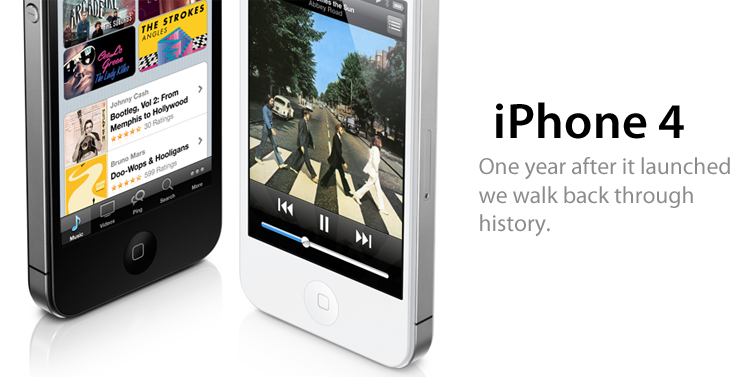
Today is June 24, 2011. Believe it or not, it has already been one year since the iPhone 4 went on sale across the US, UK, France, Germany and Japan to literally millions of people who eagerly waited in line to get their hands on the latest and greatest iPhone yet. The history of the iPhone 4 has been remarkable, controversial and fascinating, filled with prototype leaks, criminal investigations, amazing technology, scandals, mystical white unicorns, new carrier allegiances and more. Come along with me as we mark the one-year anniversary of the iPhone 4 with a walk down memory lane.
Posts in Featured
iPhone 4: A Retrospective, One Year Since It Launched

Access Extra Content and Perks
Founded in 2015, Club MacStories has delivered exclusive content every week for nearly a decade.
What started with weekly and monthly email newsletters has blossomed into a family of memberships designed for every MacStories fan.
Club MacStories: Weekly and monthly newsletters via email and the web that are brimming with apps, tips, automation workflows, longform writing, early access to the MacStories Unwind podcast, periodic giveaways, and more;
Club MacStories+: Everything that Club MacStories offers, plus an active Discord community, advanced search and custom RSS features for exploring the Club’s entire back catalog, bonus columns, and dozens of app discounts;
Club Premier: All of the above and AppStories+, an extended version of our flagship podcast that’s delivered early, ad-free, and in high-bitrate audio.
WWDC 2011 Session Videos Now Available
Right on schedule less than two weeks after WWDC, Apple has uploaded the session videos to its Developer portal and made them available for registered developers to download in iTunes, provided they log in with their Apple ID. Whilst the landing page for the WWDC 2011 Session Videos went live for a few minutes yesterday, the videos were not available yet. The videos are now available both in SD and HD at developer.apple.com/itunes. 109 files of sessions covering new iOS 5 topics like Notification Center and iMessage, new iCloud features, OS X Lion and memory management for developers can be downloaded now, for free and viewed on any iPhone 4, iPad, Apple TV, Mac and iPod touch 4th gen.
As usual, Apple reminds you that “content presented within the session videos and slides is Apple Confidential Information and is subject to the Registered Apple Developer Agreement.” The official Developer Videos webpage hasn’t been updated yet to reflect the changes, but the 2011 Sessions are available on iTunes.
Categories covered at WWDC 2011 include:
- Apple Platforms Kickoff
- App Frameworks
- Core OS
- Developer Tools
- Graphics, Media, and Games
- Internet and Web
Sessions can be downloaded as videos, or digital booklet slides.
Access Extra Content and Perks
Founded in 2015, Club MacStories has delivered exclusive content every week for nearly a decade.
What started with weekly and monthly email newsletters has blossomed into a family of memberships designed for every MacStories fan.
Club MacStories: Weekly and monthly newsletters via email and the web that are brimming with apps, tips, automation workflows, longform writing, early access to the MacStories Unwind podcast, periodic giveaways, and more;
Club MacStories+: Everything that Club MacStories offers, plus an active Discord community, advanced search and custom RSS features for exploring the Club’s entire back catalog, bonus columns, and dozens of app discounts;
Club Premier: All of the above and AppStories+, an extended version of our flagship podcast that’s delivered early, ad-free, and in high-bitrate audio.
Mac OS X 10.6.8 Now Available
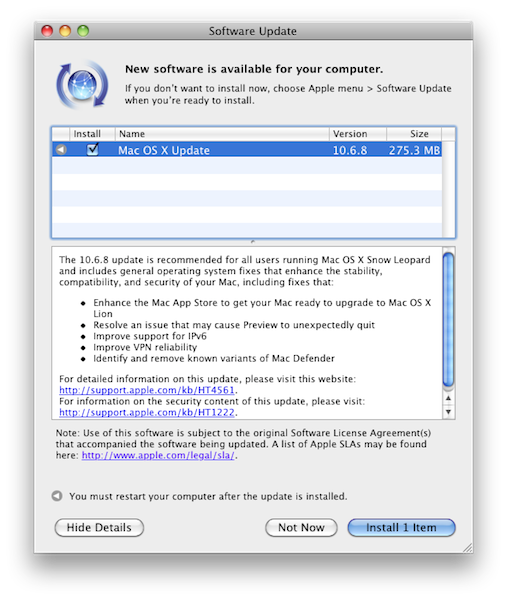
Apple has just released a new version of Mac OS X Snow Leopard, reaching version 10.6.8. The update is available now in the Software Update control panel, or Apple’s website. Among various bug fixes including issues with Preview and the well-known Mac Defender malware, 10.6.8 “enhances” the Mac App Store to get it ready for Lion in July.
Changelog:
- Enhance the Mac App Store to get your Mac ready to upgrade to Mac OS X Lion
- Resolve an issue that may cause Preview to unexpectedly quit
- Improve support for IPv6
- Improve VPN reliability
- Identify and remove known variants of Mac Defender
Below are the direct links for all the updates (including Security) Apple released today:
Access Extra Content and Perks
Founded in 2015, Club MacStories has delivered exclusive content every week for nearly a decade.
What started with weekly and monthly email newsletters has blossomed into a family of memberships designed for every MacStories fan.
Club MacStories: Weekly and monthly newsletters via email and the web that are brimming with apps, tips, automation workflows, longform writing, early access to the MacStories Unwind podcast, periodic giveaways, and more;
Club MacStories+: Everything that Club MacStories offers, plus an active Discord community, advanced search and custom RSS features for exploring the Club’s entire back catalog, bonus columns, and dozens of app discounts;
Club Premier: All of the above and AppStories+, an extended version of our flagship podcast that’s delivered early, ad-free, and in high-bitrate audio.
Review: #NowPlaying with NowPlayer
There are many iPhone audio player apps available, yet only a few really stand out. My Artists, which we have reviewed in the past, is one of our favorites and is very feature filled. Notes on artists, links to videos, and lyrics are just some some of the extended features. However, most of the time I don’t need these features and if I’m on AT&T’s stellar EDGE network, many of these features take too long to load on my iPhone.
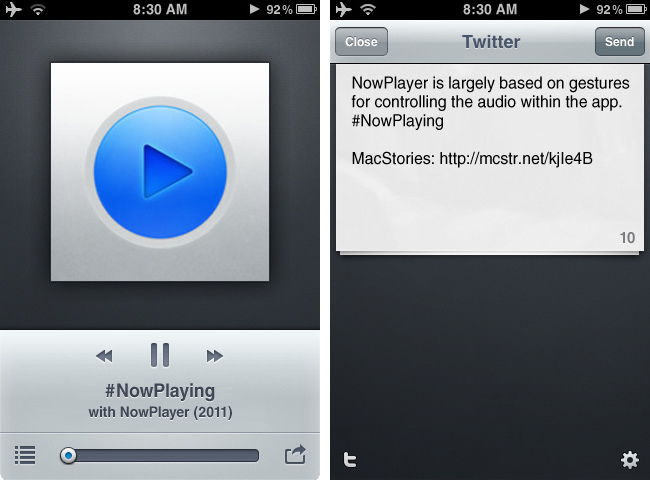
I jumped on a new beta some time ago from @misecia for an app called NowPlayer. Without ever using it, but only seeing mock-ups on Dribbble, I was very interested. The interface is sexy and every pixel has been placed perfectly. Now, I know that usability is important too, and this app doesn’t fall short in that category either. NowPlayer is largely based on gestures for controlling the audio within the app: you can control your music with swiping or tapping with your finger on screen. These gesture controls are perfect for when you’re exercising or typing up a review and don’t want to look over at your iPhone’s display. The gesture system is totally customizable too: two-finger tap is used to play/pause, but it can be changed to a double tap if you desire; you can then perform a three finger tap to auto-send a tweet, swipe left/right to change tracks, swipe up/down to change the volume, and double tap with two fingers to change shuffle mode. There are a few Easter eggs for extra options, some still haven’t been found! Don’t worry, as there are onscreen controls, too, and they are minimal and look great as well. Read more
Access Extra Content and Perks
Founded in 2015, Club MacStories has delivered exclusive content every week for nearly a decade.
What started with weekly and monthly email newsletters has blossomed into a family of memberships designed for every MacStories fan.
Club MacStories: Weekly and monthly newsletters via email and the web that are brimming with apps, tips, automation workflows, longform writing, early access to the MacStories Unwind podcast, periodic giveaways, and more;
Club MacStories+: Everything that Club MacStories offers, plus an active Discord community, advanced search and custom RSS features for exploring the Club’s entire back catalog, bonus columns, and dozens of app discounts;
Club Premier: All of the above and AppStories+, an extended version of our flagship podcast that’s delivered early, ad-free, and in high-bitrate audio.
“Undivided” Music Video Created Entirely Using Brushes On The iPad

The Brushes app for iPhone and iPad has been covered a number of times here on MacStories for some amazing creations that it has enabled on the Apple devices. Today we bring you the music video for “Undivided” – the debut single for the group Blush featuring Snoop Dogg, and yes, it was created entirely using the Brushes iPad app.
Using the Brushes feature that records of every stroke made, animator Shawn Harris meticulously drew more than 7000 strokes to create the four-minute music video. We’ve embedded both the music video and a making of video after the break, be sure to check both out, it is very impressive.
[Via Mashable]
Access Extra Content and Perks
Founded in 2015, Club MacStories has delivered exclusive content every week for nearly a decade.
What started with weekly and monthly email newsletters has blossomed into a family of memberships designed for every MacStories fan.
Club MacStories: Weekly and monthly newsletters via email and the web that are brimming with apps, tips, automation workflows, longform writing, early access to the MacStories Unwind podcast, periodic giveaways, and more;
Club MacStories+: Everything that Club MacStories offers, plus an active Discord community, advanced search and custom RSS features for exploring the Club’s entire back catalog, bonus columns, and dozens of app discounts;
Club Premier: All of the above and AppStories+, an extended version of our flagship podcast that’s delivered early, ad-free, and in high-bitrate audio.
Stratus: Finally, A Beautiful CloudApp Client for iPhone and iPad
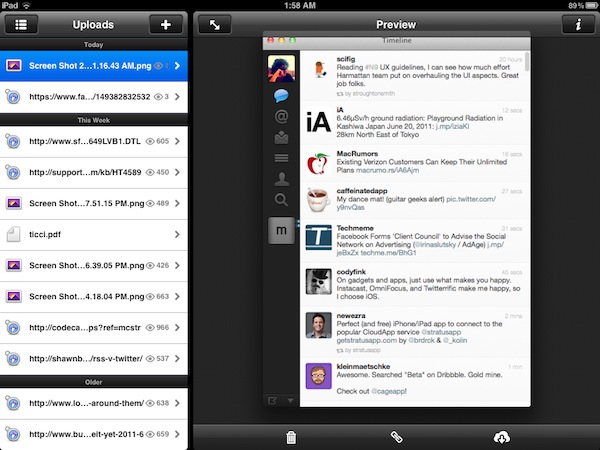
CloudApp, the service I use on a daily basis to share links with my Twitter friends and files with my co-workers, never had a unified experience for the iPhone and iPad. Launched as a Mac-only desktop utility with an online interface to browse and manage your uploads, CloudApp later gained much needed functionalities like real-time streams for uploads and view counts, as well as custom domains for Pro users, and a redesigned web app with more options for downloads, inline viewing, and file sharing. Overall, I think CloudApp is the easiest and most powerful way to share items on the web, and manage what you’ve shared from a great-looking web counterpart. The Mac app has also been updated recently to include a flexible plugin architecture, more keyboard shortcuts, and live updating results in the menubar. But as far as iOS goes, and especially the iPad, CloudApp has never seen a huge adoption from developers.
On the iPhone, however, there was a nice surprise called Cloud2go that impressed me since its first release for the solid feature set, elegant interface, and overall nice implementation of CloudApp’s basic functionalities like clipboard integration and uploads. The app was updated a few months ago to include the aforementioned live streams, as well as a slew of other improvements that have undoubtedly turned Cloud2go into the CloudApp client to have on the iPhone. But it didn’t have an iPad version.
Today, developers Jeff Broderick and Kolin Krewinkel have released Stratus, a free CloudApp client for iPhone and iPad that I’ve been testing over the past months and it’s become my go-to app when it comes to uploading and sharing links with CloudApp, as well as managing what’s already in my account. Read more
Access Extra Content and Perks
Founded in 2015, Club MacStories has delivered exclusive content every week for nearly a decade.
What started with weekly and monthly email newsletters has blossomed into a family of memberships designed for every MacStories fan.
Club MacStories: Weekly and monthly newsletters via email and the web that are brimming with apps, tips, automation workflows, longform writing, early access to the MacStories Unwind podcast, periodic giveaways, and more;
Club MacStories+: Everything that Club MacStories offers, plus an active Discord community, advanced search and custom RSS features for exploring the Club’s entire back catalog, bonus columns, and dozens of app discounts;
Club Premier: All of the above and AppStories+, an extended version of our flagship podcast that’s delivered early, ad-free, and in high-bitrate audio.
My 10 Favorite Apps To Share Content Between iOS and OS X
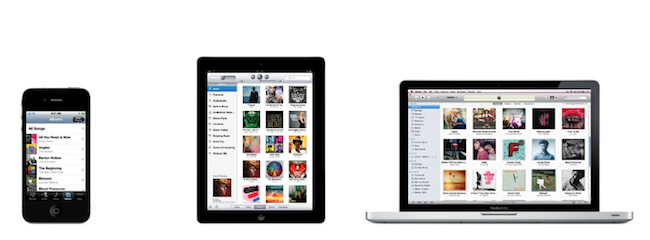
Let’s face it, if you’re a Mac user who also happens to have an iPhone, iPad, or both, chances are you’ve been there before: with two devices in hand and a computer on your desk, how do you share stuff between them? What are the apps that enable you to share content across different devices, simultaneously and perhaps over the Internet as well?
In this post I’ve collected 10 iOS apps that are making my workflow more streamlined and connected on a daily basis, but before I delve deeper into the list I think I should define the “content” from this page’s title and the kind of “stuff” I want (and need) to share. With Lion approaching its final release in July and iCloud set to deliver a state-of-the-art OTA experience for users and developers alike, it seems like Apple has taken the necessary steps to free iOS devices from the need of a cable, building new features aimed at easing the process of sharing content between different machines and devices. Take Lion as an example: AirDrop, a new menu baked into the Finder, will allow Mac users to easily share files and documents with computers (and thus friends) nearby, over a WiFi network. Or, perhaps more importantly, the new iCloud APIs with instant push and cross-platform sync will enable developers to build better applications that take advantage of the cloud to keep their data synced and always up to date with the most recent changes. Whilst services and apps have been syncing content through their own backends for years, it’s the promise of a free iCloud infrastructure from Apple that’s convincing developers to ditch third-party solutions like Dropbox to rewrite their software with iCloud in mind. We’ll see the first result in September.
So what’s the content to share? What’s the stuff I find myself needing to share across devices every day? Links, photos, screenshots, PDFs, notes – you name it: as OS X and iOS become more intertwined on each software update, data needs to easily get out from one app to another. And in spite of an iCloud on the horizon, there hasn’t been a universal solution to share anything between a Mac and an iPhone.
In this article, I take a look at 10 iOS apps and services with some sort of Mac counterparts that have helped me over the past months in getting data out of my iPad and iPhone, and onto my MacBook Pro, iMac, and the cloud in general. Read more
Access Extra Content and Perks
Founded in 2015, Club MacStories has delivered exclusive content every week for nearly a decade.
What started with weekly and monthly email newsletters has blossomed into a family of memberships designed for every MacStories fan.
Club MacStories: Weekly and monthly newsletters via email and the web that are brimming with apps, tips, automation workflows, longform writing, early access to the MacStories Unwind podcast, periodic giveaways, and more;
Club MacStories+: Everything that Club MacStories offers, plus an active Discord community, advanced search and custom RSS features for exploring the Club’s entire back catalog, bonus columns, and dozens of app discounts;
Club Premier: All of the above and AppStories+, an extended version of our flagship podcast that’s delivered early, ad-free, and in high-bitrate audio.
Agenda: An Elegant Calendar App Powered By Gestures
If all developers were to follow Apple’s recent paradigms when it comes to designing applications for the average iOS and OS X user, we’d end up having tons of different apps using the same faux leather / paper / linen / notebook interface elements. Take a look at the Address Book and Calendar apps on Lion, or the recent introduction of Reminders on iOS 5: as Apple’s OSes move forward, the trend in UI design seems to be that of creating software that resembles old, real-life counterparts people are accustomed to. And while you can argue this started back in 2007 with the Notes and Calculator apps for iPhone OS, there’s no doubt the launch of the iPad last year and the upcoming Lion added fuel to the fire with their skeuomorphic interfaces.
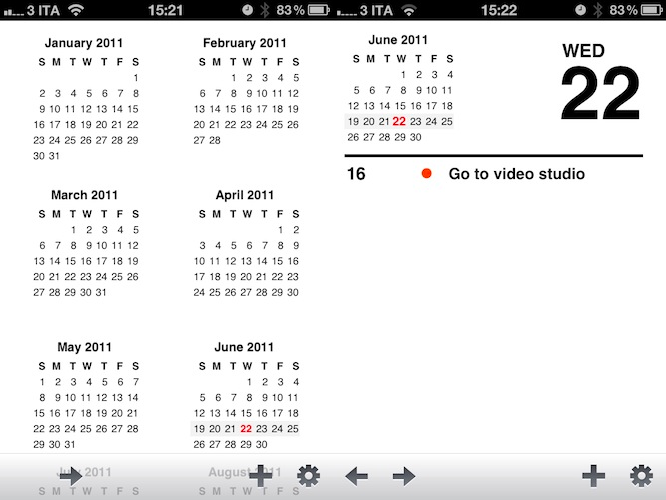
Agenda, a new app by Ken Yarmosh of Savvy Apps, looks like your old paper calendar but, luckily for us, adds modern interaction schemes and ideas that help revitalizing the old concept of month sheets, notes, and calendars in general. Rather than mimicking a calendar but resorting to the usual menus and navigation buttons to get around monthly views, days, and events, Agenda enables you to swipe horizontally on screen to go back (and open) any view. For example, the app starts in a beautiful and elegant view that lets you see an entire year worth of events; with a swipe to the left, the app slides to the current month. With another swipe, the monthly view becomes a weekly one, with a list of your upcoming events; another swipe, and you can open the current day of the week. Swipe again, and you’re brought to a single-event view of what you have to do at a specific time of the day. Obviously, all these actions can be activated with regular taps, too: tap on a specific month, and Agenda will open it with its slide animation. Same applies for days in the monthly, or weekly views. However, it’s very clear the developer put the focus on the ease of use of gestures, rather than normal taps: swiping to move between views is intuitive and fun, whereas swiping vertically will allow you to navigate between months, and days of the week in the sections provided by Agenda. It almost feels like Windows Phone 7’s UI principles of swiping between views have been ported to a native iPhone application, without the Metro interface of course. Once again: you can get around Agenda’s interface by simply tapping on screen, but there’s no denying this app was built with gestures in mind and the possibility of swiping to get to the view you need.
As far as adding new events goes, Agenda relies on the standard iOS calendar functionalities to lay out the event creation menu and integration with calendars already configured on your iPhone. Agenda can access any MobileMe (even iCloud for iOS 5 users), Exchange or Google calendar set up on your device, and adding new events uses Apple’s default window to assign a title, location, time, invitees, and so forth.
Overall, Agenda is a nice complement to Apple’s default calendar solution for iPhone in the way it keeps things minimal, letting you focus on seeing what you have to do and what’s upcoming, rather than supercharging calendars with additional functionalities most users won’t ever need. Agenda is clean, easy to use, and powered by a great gesturing system that makes using the app incredibly simple and intuitive. Get it here at $2.99.
Access Extra Content and Perks
Founded in 2015, Club MacStories has delivered exclusive content every week for nearly a decade.
What started with weekly and monthly email newsletters has blossomed into a family of memberships designed for every MacStories fan.
Club MacStories: Weekly and monthly newsletters via email and the web that are brimming with apps, tips, automation workflows, longform writing, early access to the MacStories Unwind podcast, periodic giveaways, and more;
Club MacStories+: Everything that Club MacStories offers, plus an active Discord community, advanced search and custom RSS features for exploring the Club’s entire back catalog, bonus columns, and dozens of app discounts;
Club Premier: All of the above and AppStories+, an extended version of our flagship podcast that’s delivered early, ad-free, and in high-bitrate audio.
The MacStories Productivity Giveaway

The great thing about working at MacStories is we get exposed to a ton of brilliant applications that solidify our workflows and give us different perspectives on how to get things done. All of us have various tools that work for us, and just as we like to share our findings we occasionally tussle over our tools of choice. Any of us could get by with just the basics, but the Mac is made so much better when you come to appreciate and enjoy all the great software that’s available to us. The four of us working at MacStories put our heads together and picked out five of our favorite applications to share with you guys in hopes of loading up your summer Macs with a great selection of productive software. As you can see in the banner, we have a great lineup we’d love to share with you.
Reeder for the Mac (Up to 5 winners): Certainly we have the occasional NNW vs. Reeder clash behind the scenes, but all of us agree that Reeder is something really special for the Mac. It takes your RSS feeds and puts them in a beautiful interface that can be as minimal or expanded as you need it to be, and it works fluidly with gestures on newer Macs. My favorite feature: Readability works extremely well with linked posts, formatting the original article for Reeder without distracting web nonsense. If you love it for the iPad and iPhone, Reeder for Mac is a must have.
Notefile for iOS (Up to 3 winners): When it comes down to it, we just want an easy way to sync notes, reminders, and to-do lists between our Macs and iOS devices. Dropbox is nice, but it’s not as automatic as Junecloud’s Notefile. You’d think it already had iCloud support, pulling down your most recent notes from the Dashboard widget or onto your iPhone. We think this is a great replacement for Apple’s Notes, and we absolutely love how simple Notefile is in its entirety.
Alfred Powerpack for Mac (Up to 3 winners): Alfred is really fantastic for Mac users who want to take it to the next level. If you’re looking for an edge in productivity, Alfred is a swiss-army knife that’ll launch documents, recall snippets from the clipboard, and call on apps with a few simple keystrokes. Search Amazon, Google, Wikipedia, and the IMDb right from your desktop. Alfred is free to download, but the Powerpack adds file system navigation, clipboard history, terminal control, an iTunes remote, and email integration to the already powerful launcher.
Fantastical for Mac (Up to 5 winners): Fantastical is the iCal companion that makes it easy to manage your schedule of meetings, client reviews, and other events through plain english. If you wanted to meet me at Brian’s Bar and Grill at four o’clock on Saturday, you could totally just type that in… and it’d just work. Fantastical is amazing.
Courier for Mac (Up to 5 winners): Productivity doesn’t always have to extend into the workplace. We’re always looking for better ways to get files online, and Courier for the Mac allows us to do just that. Simply drag and drop pictures and movies to upload them to your personal accounts such as Facebook and Flickr — web interfaces are a thing of the past.
We’re giving out a total of twenty one apps to twenty one lucky winners, and we want to thank all of the developers for hooking us up and helping us give you guys some great software. For your chance to win one of these great apps, you’ll need to check out the giveaway rules past the break!
Access Extra Content and Perks
Founded in 2015, Club MacStories has delivered exclusive content every week for nearly a decade.
What started with weekly and monthly email newsletters has blossomed into a family of memberships designed for every MacStories fan.
Club MacStories: Weekly and monthly newsletters via email and the web that are brimming with apps, tips, automation workflows, longform writing, early access to the MacStories Unwind podcast, periodic giveaways, and more;
Club MacStories+: Everything that Club MacStories offers, plus an active Discord community, advanced search and custom RSS features for exploring the Club’s entire back catalog, bonus columns, and dozens of app discounts;
Club Premier: All of the above and AppStories+, an extended version of our flagship podcast that’s delivered early, ad-free, and in high-bitrate audio.