Posts in Featured

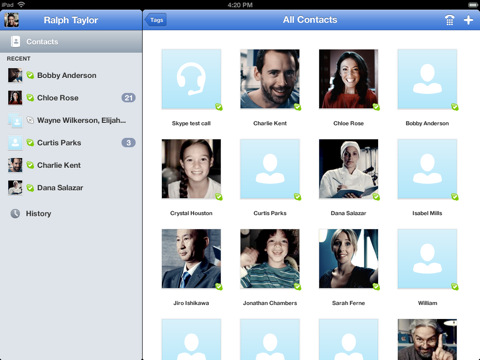
Skype for iPad Released

Skype for iPad, first “leaked” online back in late June, has finally been released for free in the App Store as a standalone app, as noticed by TUAW. The app isn’t a universal update for the iPhone version, meaning you’ll have to download it as a separate app on your iPad, and it’s not yet available in the US App Store. The app will likely be released in the US Store later today, perhaps in a few hours.

Skype for iPad features an all-new interface design with larger contact pictures, a buddy list on the left, and possibility of starting a new video-calling session in full-screen with video being captured from the iPad’s rear or front-facing cameras. The app can do video and audio calling both on WiFi and 3G, much like the iPhone version already can.

A list of features from the iTunes page:

  • Talk face-to-face or show what you’re seeing with front and back-facing cameras.
  • Use Skype for iPad to call anyone else on Skype – and enjoy near CD quality (SILK) sound.
  • Instant message and add emoticons to personalize your messages.
  • Make cheap calls to landlines or mobiles from your iPad.
  • Get an Online Number from Skype so people can call you on your iPad.
  • Pay As You Go with Skype Credit - great for when you’re using Skype every now and again.
  • Pay monthly with a subscription – best if you use Skype a lot.

We will update this story with more details on the app and first impressions as soon as we get our hands on it. More screenshots and original “leaked” promo video below.

Update: Skype for the iPad is now live in the United States. Download it here.

Update 2: We have first impressions and some screenshots up past the break.

Update 3: Skype has pulled the app from the App Store, saying that it went live “prematurely”.

Update 4: It appears the app is back and can be downloaded from the App Store.

Read more

Access Extra Content and Perks

Founded in 2015, Club MacStories has delivered exclusive content every week for nearly a decade.

What started with weekly and monthly email newsletters has blossomed into a family of memberships designed for every MacStories fan.

Learn more here and from our Club FAQs.

Club MacStories: Weekly and monthly newsletters via email and the web that are brimming with apps, tips, automation workflows, longform writing, early access to the MacStories Unwind podcast, periodic giveaways, and more;

Club MacStories+: Everything that Club MacStories offers, plus an active Discord community, advanced search and custom RSS features for exploring the Club’s entire back catalog, bonus columns, and dozens of app discounts;

Club Premier: All of the above and AppStories+, an extended version of our flagship podcast that’s delivered early, ad-free, and in high-bitrate audio.

Learn more here and from our Club FAQs.


Apple’s iCloud Beta Goes Live on the Web

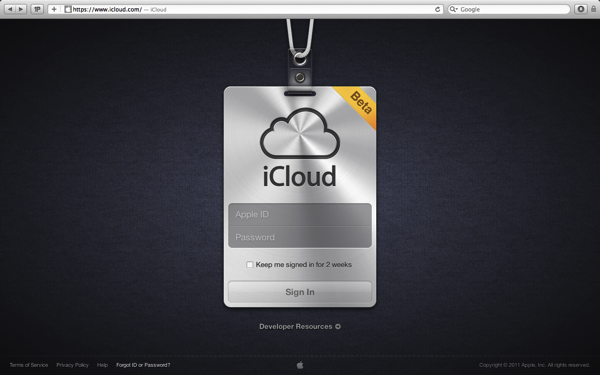
Apple’s finally done something pretty awesome with their iCloud domain — this evening the iCloud.com website has gone live giving developers access to their mail, contacts, calendars, and iWork documents through the web. Developers testing iCloud’s features can log in and play around with a gorgeous interface that mimicks a lot of iOS interface elements. For example, if you type in the wrong password at the login, you’ll get iOS-style dialog boxes in the browser. It’s cool stuff!

Visit www.icloud.com

Read more

Access Extra Content and Perks

Founded in 2015, Club MacStories has delivered exclusive content every week for nearly a decade.

What started with weekly and monthly email newsletters has blossomed into a family of memberships designed for every MacStories fan.

Learn more here and from our Club FAQs.

Club MacStories: Weekly and monthly newsletters via email and the web that are brimming with apps, tips, automation workflows, longform writing, early access to the MacStories Unwind podcast, periodic giveaways, and more;

Club MacStories+: Everything that Club MacStories offers, plus an active Discord community, advanced search and custom RSS features for exploring the Club’s entire back catalog, bonus columns, and dozens of app discounts;

Club Premier: All of the above and AppStories+, an extended version of our flagship podcast that’s delivered early, ad-free, and in high-bitrate audio.

Learn more here and from our Club FAQs.


Apple Store Observations on the New MacBook Air

I checked in at 11:35. Late for my 11:15 appointment, the Apple Store representative offered to fit me in at 13:00 for a brief MacBook repair. I could replace the fan myself — which unfortunately wasn’t rattling that morning as it had been in previous days — but there’s too many screws to remove and I wanted an excuse to test out the MacBook Air. For an hour I visited with the both 11“ and 13” MacBook models, getting a feel for the weight and size while opening every app I could, playing music or fullscreen videos, and getting to know whatever neighbors who casually stopped into the Apple Store to check out Apple’s latest machines. You could say the MacBook Air is pretty great (there’s no denying that), but I found the people to be much more interesting.

Read more

Access Extra Content and Perks

Founded in 2015, Club MacStories has delivered exclusive content every week for nearly a decade.

What started with weekly and monthly email newsletters has blossomed into a family of memberships designed for every MacStories fan.

Learn more here and from our Club FAQs.

Club MacStories: Weekly and monthly newsletters via email and the web that are brimming with apps, tips, automation workflows, longform writing, early access to the MacStories Unwind podcast, periodic giveaways, and more;

Club MacStories+: Everything that Club MacStories offers, plus an active Discord community, advanced search and custom RSS features for exploring the Club’s entire back catalog, bonus columns, and dozens of app discounts;

Club Premier: All of the above and AppStories+, an extended version of our flagship podcast that’s delivered early, ad-free, and in high-bitrate audio.

Learn more here and from our Club FAQs.


Adobe Releases ‘Edge’, A New Tool To Create HTML5 Animations And Webpages

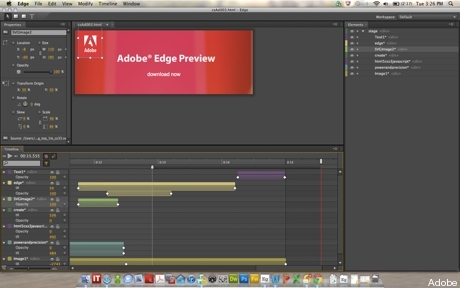
Despite some significant opposition to Apple’s push for HTML5 web development (and rejection of Flash on iOS devices), Adobe has in recent times made some significant moves to embrace HTML5 including the recent release of a Flash to HTML5 conversion tool. However this past weekend Adobe released Edge, a new piece of software that aims to help web developers create HTML5 web pages and animations.

Adobe Edge is a new web motion and interaction design tool that allows designers to bring animated content to websites, using web standards like HTML5, JavaScript, and CSS3.

The move by Adobe is a significant one, and whilst at the moment is only in a ‘1.0’ beta, Edge will likely become a core piece of Adobe’s software repertoire. In its current form, Edge, is fairly limited to basic animations and can only handle a single page layout – however just like Adobe’s Dreamweaver, web developers can view and modify the code generated by Edge. TUAW, asking about integration with other Adobe products received a response that said integration would come, but at a later date.

However despite the promise of Edge, Adobe remains adamant that Flash is not dying. Instead, John Cole, creative solutions architect at Adobe claims “Flash and HTML5 will co-exist in the long term” – despite also admitting that HTML5 “will be big”. You can download the first beta of Edge from Adobe’s Lab website here.

[Via TUAW, The Inquirer]

Access Extra Content and Perks

Founded in 2015, Club MacStories has delivered exclusive content every week for nearly a decade.

What started with weekly and monthly email newsletters has blossomed into a family of memberships designed for every MacStories fan.

Learn more here and from our Club FAQs.

Club MacStories: Weekly and monthly newsletters via email and the web that are brimming with apps, tips, automation workflows, longform writing, early access to the MacStories Unwind podcast, periodic giveaways, and more;

Club MacStories+: Everything that Club MacStories offers, plus an active Discord community, advanced search and custom RSS features for exploring the Club’s entire back catalog, bonus columns, and dozens of app discounts;

Club Premier: All of the above and AppStories+, an extended version of our flagship podcast that’s delivered early, ad-free, and in high-bitrate audio.

Learn more here and from our Club FAQs.


Alfred for Mac Gets Extensions, Growl Support, New Lion Theme

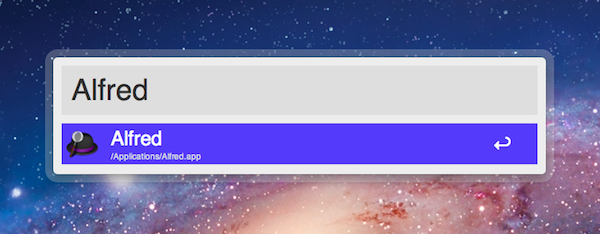
Alfred, the application launcher for the Mac, received a fairly substantial update today which brings important new functionalities such as extension support, Growl integration for action outputs, a new theme inspired by OS X Lion, and several bug fixes. Personally, I’ve been a big fan of Alfred since its first release last year, and I’ve followed the development closely as I switched from Quicksilver (which came back from a long hiatus a few months ago) and started looking into the customizable search and launch environment offered by Alfred. In the past months, in fact, Alfred evolved into a minimal, yet powerful application launcher capable of doing a bunch of other things such as filesystem navigation, clipboard management, AppleScript launching and dictionary. I was particularly impressed with the 0.9 version, which allowed users to assign a keyboard shortcut to any AppleScript on your machine, similarly to how the popular FastScripts lets you pair a shortcut with a script.

Whilst the developers are still planning a major 1.0 release that will likely see the Powerpack (a set of premium additional features) become available as in-app purchase on Lion’s Mac App Store, Alfred 0.9.9 has been publicly released today and, in spite of what the version number suggests, it is a milestone release that sets the path for future Alfred versions and the kind of integration with the system the developers are willing to bake into their application launcher . Read more

Access Extra Content and Perks

Founded in 2015, Club MacStories has delivered exclusive content every week for nearly a decade.

What started with weekly and monthly email newsletters has blossomed into a family of memberships designed for every MacStories fan.

Learn more here and from our Club FAQs.

Club MacStories: Weekly and monthly newsletters via email and the web that are brimming with apps, tips, automation workflows, longform writing, early access to the MacStories Unwind podcast, periodic giveaways, and more;

Club MacStories+: Everything that Club MacStories offers, plus an active Discord community, advanced search and custom RSS features for exploring the Club’s entire back catalog, bonus columns, and dozens of app discounts;

Club Premier: All of the above and AppStories+, an extended version of our flagship podcast that’s delivered early, ad-free, and in high-bitrate audio.

Learn more here and from our Club FAQs.


1Password Safari Extension Gets Complete Redesign with New Features

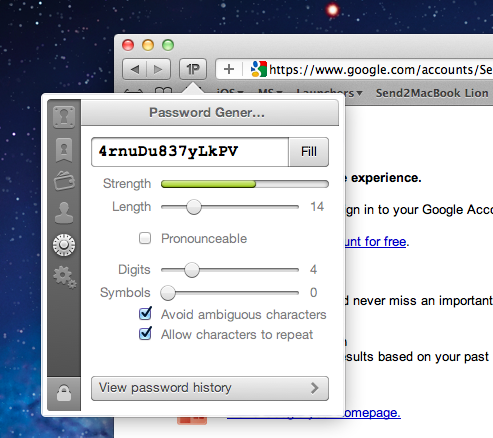
Ever since the release of OS X Lion and Safari 5.1, the Agile Bits team has been busy updating its 1Password Safari extension to work with the new OS and the updated version of the browser, which brings major changes both on Snow Leopard and Lion. Whilst initial Lion support (alongside Firefox 5 and Fluid 1.0 compatibility) was rolled out on June 20, Agile Bits spent the last month releasing new public and beta versions of 1Password for Mac, tweaking its extension engine and re-implementing features requested by their customers in an attempt to bring old functionalities back to Lion and Safari 5.1. First came support for Safari 5.1 on Snow Leopard (which has less features than its Lion counterpart, but still is a major upgrade from Safari 5.0), then Agile Bits released 1Password 3.7 for Mac through the public beta channel, adding features like copy to clipboard from the extension, universal unlock (if 1Password is already unlocked, so is the Safari extension), improved Auto Submit and a bunch of other changes and optimizations throughout the app and extension. You can read more about 3.7 beta here.

In the meantime though, Agile Bits was working on a complete redesign for the Safari extension, teased on the developer’s blog exactly a week ago. The new extension is now live, and as usual it needs to be installed from 1Password’s desktop Preferences panel (more information here). Read more

Access Extra Content and Perks

Founded in 2015, Club MacStories has delivered exclusive content every week for nearly a decade.

What started with weekly and monthly email newsletters has blossomed into a family of memberships designed for every MacStories fan.

Learn more here and from our Club FAQs.

Club MacStories: Weekly and monthly newsletters via email and the web that are brimming with apps, tips, automation workflows, longform writing, early access to the MacStories Unwind podcast, periodic giveaways, and more;

Club MacStories+: Everything that Club MacStories offers, plus an active Discord community, advanced search and custom RSS features for exploring the Club’s entire back catalog, bonus columns, and dozens of app discounts;

Club Premier: All of the above and AppStories+, an extended version of our flagship podcast that’s delivered early, ad-free, and in high-bitrate audio.

Learn more here and from our Club FAQs.


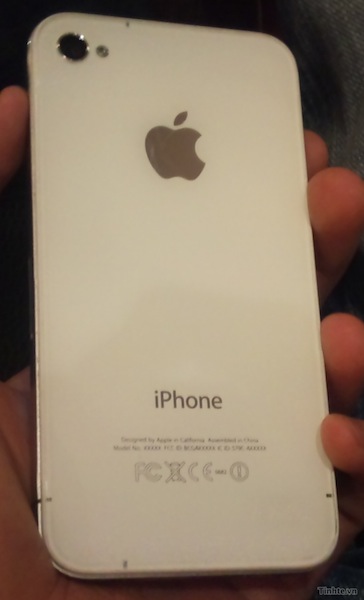
Leaked Photos of Supposed iPhone ‘Light’ Surface Online

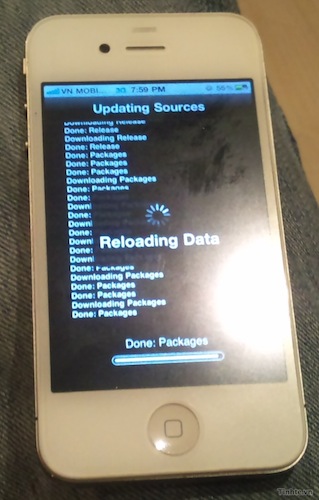
On Vietnamese forum Tinhte, a user has uploaded the above photo which he claims is a new “light” version of the iPhone 4 - potentially the rumored iPhone 4S that has been milling around in recent months. The photographs posted seem to show a nearly identical product to the iPhone 4, with the exception that there is no glass front and back panel. Instead the iPhone is plastered with a translucent plastic on either side with the familiar stainless steel banding around it.

According to information leakage, predictable from the English website, the more likely Apple will introduce the iPhone 4s (cheap version) and the iPhone 5 next month. And it looks like the iPhone that you see below is the iPhone 4s.

On the whole we’re fairly skeptical of this photo, except for the fact that in the past, Tinhte has been somewhat successful at leaking Apple prototypes, including this internal iOS 4 build and last year’s MacBook refresh. As for the possibility of a cheaper iPhone launching this year, not only has the rumor mill been churning out stories fairly frequently but Tim Cook conceded in this month’s earning call that Apple would be doing “clever things” to address the pre-paid mobile market and wouldn’t “cede any market”.

[Tinhte via TechCrunch]

Access Extra Content and Perks

Founded in 2015, Club MacStories has delivered exclusive content every week for nearly a decade.

What started with weekly and monthly email newsletters has blossomed into a family of memberships designed for every MacStories fan.

Learn more here and from our Club FAQs.

Club MacStories: Weekly and monthly newsletters via email and the web that are brimming with apps, tips, automation workflows, longform writing, early access to the MacStories Unwind podcast, periodic giveaways, and more;

Club MacStories+: Everything that Club MacStories offers, plus an active Discord community, advanced search and custom RSS features for exploring the Club’s entire back catalog, bonus columns, and dozens of app discounts;

Club Premier: All of the above and AppStories+, an extended version of our flagship podcast that’s delivered early, ad-free, and in high-bitrate audio.

Learn more here and from our Club FAQs.


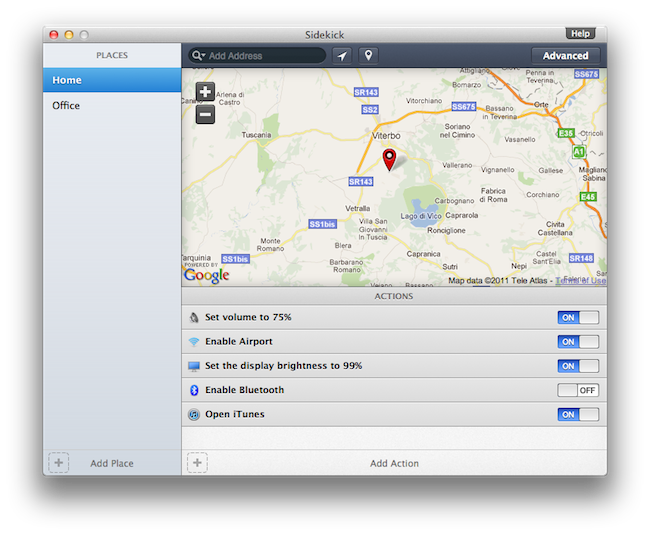
Sidekick Automates Your Mac’s Settings Based On Your Location

Last week, I ordered a new MacBook Air from Apple’s website. My MacBook Pro was getting old, so I decided it was time for an upgrade – and the new MacBook Airs looked like a worthy upgrade. As with the Apple online store’s tradition, the computer showed up at my doorstep in roughly three days. As soon as I got it, I opened it up, set up my personal information, and connected it to the Internet to start downloading my first apps. I was at my office, and in less than two hours I had my new MacBook Air up and running with my favorite applications, Dropbox, work documents, and so forth. A few hours later, when it was time to go home for dinner, I took my MacBook Air, got home, and placed it on the desk in my room. Thirty minutes later, I opened the MacBook’s lid again, fired up Spotify and Google Chrome, launched MacStories’ internal chat URL, and opened iTunes to check for app updates. Sure, the computer was new, but the pattern of actions that followed the opening of the lid wasn’t uncommon: this is what I do every day after dinner. I fire up some music, talk to my co-workers overseas, and browse iTunes. My laptop may be changing location travelling from my office to my house and everything in between (usually a coffee shop downtown), but the workflow is the same.

Sidekick, a new app by Oomph, aims at automating the tedious process of changing your Mac’s settings basing on the location of your computer. Read more

Access Extra Content and Perks

Founded in 2015, Club MacStories has delivered exclusive content every week for nearly a decade.

What started with weekly and monthly email newsletters has blossomed into a family of memberships designed for every MacStories fan.

Learn more here and from our Club FAQs.

Club MacStories: Weekly and monthly newsletters via email and the web that are brimming with apps, tips, automation workflows, longform writing, early access to the MacStories Unwind podcast, periodic giveaways, and more;

Club MacStories+: Everything that Club MacStories offers, plus an active Discord community, advanced search and custom RSS features for exploring the Club’s entire back catalog, bonus columns, and dozens of app discounts;

Club Premier: All of the above and AppStories+, an extended version of our flagship podcast that’s delivered early, ad-free, and in high-bitrate audio.

Learn more here and from our Club FAQs.


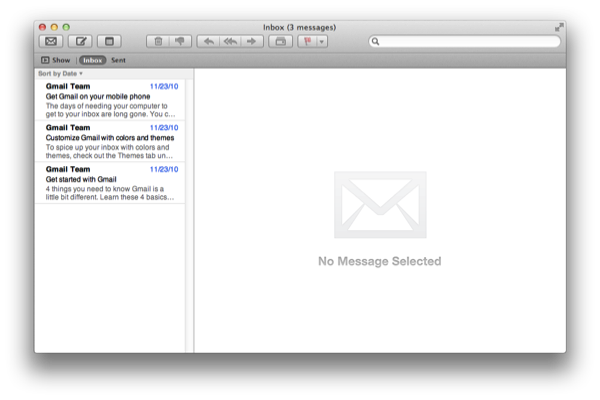
Getting Started with Mail in Lion

Maybe you’re new to Lion (welcome newly acquainted Mac users), or maybe you’re not much of a Mail user to begin with. Well, “Hello From Cupertino, CA”! Much of the hype around Lion has revolved around the iOS-inspired changes made to Mail, which aims to make reading messages, composing email, and navigating through conversations really easy. To do this, Mail likes to hide the Mailbox List, while getting you comfortable with the new Favorites Bar. Lion’s new vertical message list and message-preview pane better make use of wide-screen displays, especially while full-screen. If you’re not familiar with this terminology yet, don’t worry. Grab a cup of coffee, your favorite morning or afternoon pastry, and get ready to set up Lion with your account.

Read more

Access Extra Content and Perks

Founded in 2015, Club MacStories has delivered exclusive content every week for nearly a decade.

What started with weekly and monthly email newsletters has blossomed into a family of memberships designed for every MacStories fan.

Learn more here and from our Club FAQs.

Club MacStories: Weekly and monthly newsletters via email and the web that are brimming with apps, tips, automation workflows, longform writing, early access to the MacStories Unwind podcast, periodic giveaways, and more;

Club MacStories+: Everything that Club MacStories offers, plus an active Discord community, advanced search and custom RSS features for exploring the Club’s entire back catalog, bonus columns, and dozens of app discounts;

Club Premier: All of the above and AppStories+, an extended version of our flagship podcast that’s delivered early, ad-free, and in high-bitrate audio.

Learn more here and from our Club FAQs.