Posts in Featured

iCloud “Beta” Website Briefly Shows Reminders, Notes Web Apps

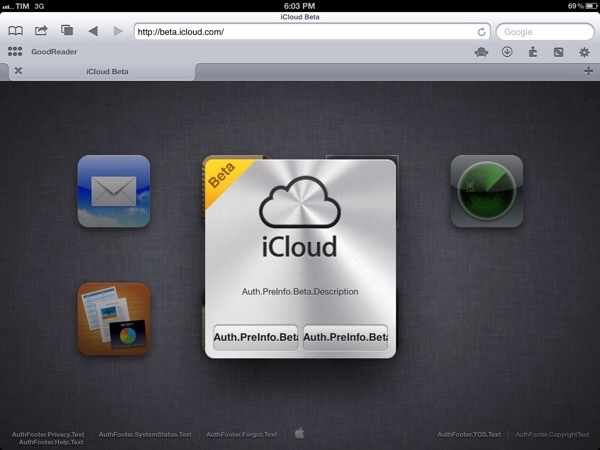
A few minutes ago, developer Steve Troughton-Smith tweeted a photo showing a “beta” login page for iCloud.com, Apple’s suite of web applications to access iCloud services like Mail and Calendar. The photo showed Apple’s icon-based navigation for iCloud.com, with the addition of Reminders and Notes icons in what appears to be an internal version of iCloud.com carrying future features. The login page clearly states the beta version of iCloud.com is available to developers running the latest versions of OS X and iOS.

Available at beta.icloud.com, I managed to grab a screenshot before Apple quickly pulled the website and started redirecting it to iCloud’s public website. The beta page showed a testing environment, and I was able to see the Notes icon in the background, as tweeted by Troughton-Smith.

The accidental availability of iCloud’s beta webpage seems to suggest Apple will announce more web-based functionality for the service at its upcoming WWDC event in June. Just last week, a series of web notifications were briefly showed on iCloud.com.

Update: Courtesy of reader Benjamin Crozat, here’s a larger screenshot showing the just-pulled iCloud.com website. It appears Apple also had a testing website available at developer.icloud.com, which has started redirecting to the company’s public iCloud product website as well.

Update #2: As noted by Tom Klaver, strings in website’s code suggest a beta of iOS 6 will be necessary to use the new web apps. The icon Apple was using for Reminders is also available on Apple’s servers here.

Update #3: Interestingly enough, other code strings from developer.icloud.com point to a new developer icon on Apple’s servers. Currently, Apple offers a developer portal for iCloud at developer.apple.com/icloud with links to downloads and documentation. As several developers have wished for Apple to provide more debugging tools for iCloud-enabled apps, however, it wouldn’t be a surprise to see new web-based tools for iCloud being unveiled at WWDC.

Image via SlideToLock:

Access Extra Content and Perks

Founded in 2015, Club MacStories has delivered exclusive content every week for nearly a decade.

What started with weekly and monthly email newsletters has blossomed into a family of memberships designed for every MacStories fan.

Learn more here and from our Club FAQs.

Club MacStories: Weekly and monthly newsletters via email and the web that are brimming with apps, tips, automation workflows, longform writing, early access to the MacStories Unwind podcast, periodic giveaways, and more;

Club MacStories+: Everything that Club MacStories offers, plus an active Discord community, advanced search and custom RSS features for exploring the Club’s entire back catalog, bonus columns, and dozens of app discounts;

Club Premier: All of the above and AppStories+, an extended version of our flagship podcast that’s delivered early, ad-free, and in high-bitrate audio.

Learn more here and from our Club FAQs.


Adobe Launches Creative Cloud, Proto, Collage for iPad, Updates Touch Apps

This morning, Adobe officially launched Creative Cloud, the company’s new subscription-based service that gives users access to CS6 applications, Touch apps, and other tools for a monthly fee. Described as a “digital hub” to download apps, access online services, and share files, Creative Cloud comes with various online storage options to store files directly on Adobe’s servers and access them at any time from connected apps, such as the Touch ones released or updated today.

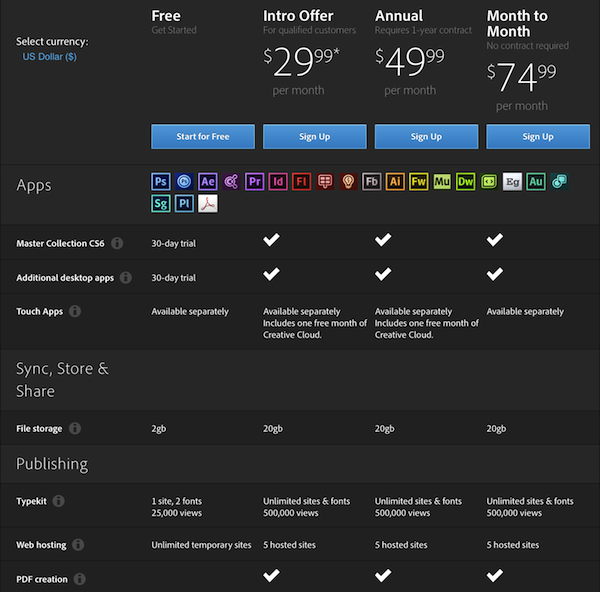
Creative Cloud starts at $29.99 per month with a one year contract for qualified customers (all registered users with CS3 or later); standard pricing, as detailed in the image below, starts at $49.99 per month with a one year contract, or $74.99 per month with no contract required. Unsurprisingly, Adobe maintained the same pricing scheme for European customers, with subscriptions starting at €29.99, €49.99 and €74.99. The Adobe Touch Apps, available on the App Store, will give users with an Adobe ID one free month of Creative Cloud with “2GB of cloud storage plus the ability to sync between tablet and desktop, access files from the web, and easily share with others.”

Read more

Access Extra Content and Perks

Founded in 2015, Club MacStories has delivered exclusive content every week for nearly a decade.

What started with weekly and monthly email newsletters has blossomed into a family of memberships designed for every MacStories fan.

Learn more here and from our Club FAQs.

Club MacStories: Weekly and monthly newsletters via email and the web that are brimming with apps, tips, automation workflows, longform writing, early access to the MacStories Unwind podcast, periodic giveaways, and more;

Club MacStories+: Everything that Club MacStories offers, plus an active Discord community, advanced search and custom RSS features for exploring the Club’s entire back catalog, bonus columns, and dozens of app discounts;

Club Premier: All of the above and AppStories+, an extended version of our flagship podcast that’s delivered early, ad-free, and in high-bitrate audio.

Learn more here and from our Club FAQs.


Say Hello To Amazing Alex, The Next Game From The Makers Of Angry Birds

Rovio’s CEO today revealed on Finnish TV that the next Rovio game will be called Amazing Alex and will launch within two months. Rovio will be reworking the game a little and it will center around Alex (the main character) who is a “curious young boy who loves to build things”.

“The quality pressure is high. We want to maintain the high standard Angry Birds fans have come to enjoy,” Hed said.

It’ll be based off of Casey’s Contraptions (see above image) which Rovio yesterday acquired to, from developers Snappy Touch and Mystery Coconut. On that acquisition, Rovio’s VP of franchise development, Ville Heijari, said yesterday that “The gameplay is a perfect fit in our arsenal with its approachable, fun and highly addictive take on the physics puzzler genre”. He also noted that Rovio was “reworking the title to enhance it”, so that it was in the Rovio style of “expect the unexpected”.

The Next Web points out that Rovio already owns the domain amazingalex.com as WHOIS records show. Today’s news comes after a stunning week for Rovio, hitting 1 billion Angry Birds downloads and revealing first-quarter revenues of 75.4 million euros (roughly US$106.3 M).

[yle, via The Next Web]

Access Extra Content and Perks

Founded in 2015, Club MacStories has delivered exclusive content every week for nearly a decade.

What started with weekly and monthly email newsletters has blossomed into a family of memberships designed for every MacStories fan.

Learn more here and from our Club FAQs.

Club MacStories: Weekly and monthly newsletters via email and the web that are brimming with apps, tips, automation workflows, longform writing, early access to the MacStories Unwind podcast, periodic giveaways, and more;

Club MacStories+: Everything that Club MacStories offers, plus an active Discord community, advanced search and custom RSS features for exploring the Club’s entire back catalog, bonus columns, and dozens of app discounts;

Club Premier: All of the above and AppStories+, an extended version of our flagship podcast that’s delivered early, ad-free, and in high-bitrate audio.

Learn more here and from our Club FAQs.


Pocket 4.1 Adds Dark Theme, Pagination, Refinements

Following a massive 4.0 update that saw Read It Later turn into Pocket (our review), founder Nate Weiner told us the new platform they had built would allow them to ”iterate and move faster than ever before”. Less than a month after Pocket’s launch, a major 4.1 update has been released today, bringing some new features and several refinements to the app that wants to make “save for later” mainstream.

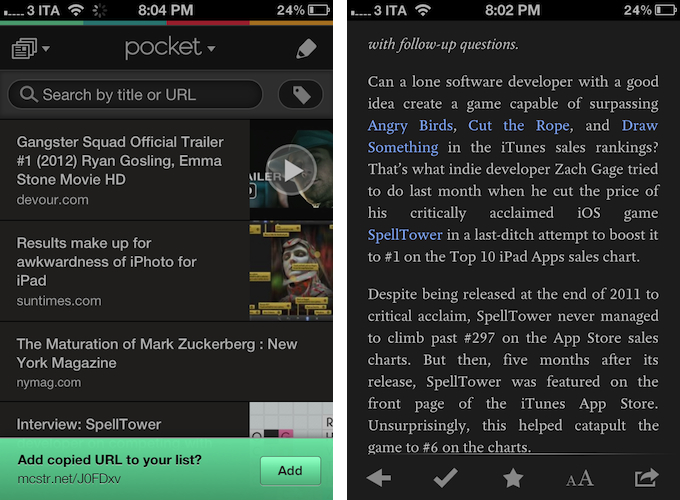
In my original review, I noted how there was no way to manually add links into Pocket, either with a “+” button or through automatic clipboard detection for URLs, like Instapaper does. Pocket 4.1 introduces a subtle, good-looking dialog for added URLs that gracefully slides up from the bottom of the screen every time you launch Pocket with a URL available in the iOS clipboard. I still think Pocket should also have a manual button to enter new URLs, but the addition of clipboard integration improved my app-switching workflow nevertheless.

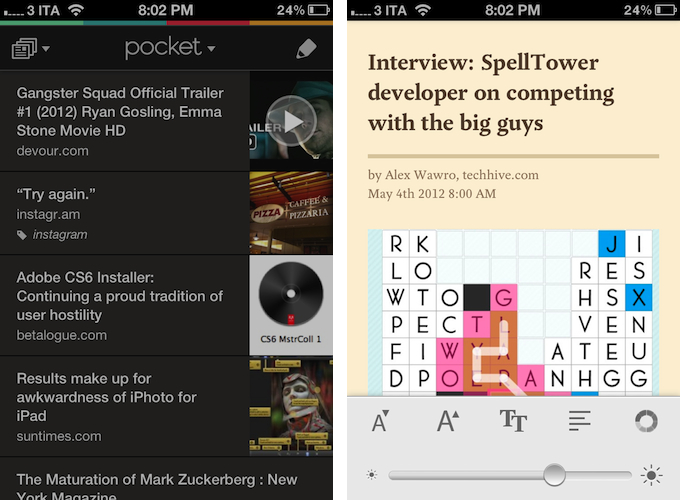
The most important changes in Pocket 4.1 are visual, as the app adds a bunch of new options to customize the look of the reading view and improve readability in different settings. New dark and sepia themes focus on high-contrast reading, and an application-wide dark option has also been enabled to make the UI easier on the eye for those who like to use Pocket at night. I like the new dark theme, as it really helps in navigating the inbox when I’m using Pocket while my girlfriend is sleeping and I don’t want to wake her with my iPhone’s display. Plus, the overall design of the theme is reminiscent of the old Read It Later in some way, which is a nice cameo. I am no fan of Sepia, but I guess it’s good to have options.

In the reading view itself, the Pocket team increased the maximum font size supported by the app – good for visually impaired users – and created a new pagination mode that lets you conveniently read long articles as single pages. Switching between “classic mode” and pagination isn’t a setting – rather, you can activate “page flipping”, as the team calls it, by swiping left or right on screen. The effect is pleasant, responsive, but I prefer to read my articles as #longreads I can scroll.

A minor change that I am deeply enjoying in version 4.1 is support for Devour and TED. For those not familiar with Devour, it is a website that collects “awesome videos” from YouTube every day, embedding them in a clean, neatly designed layout that is easy and fun to browse every day. Pocket 4.1 saves Devour.com URLs as video thumbnails, which support the fancy video player introduced in version 4.0.

Pocket 4.0 was a great app, but the improvements made to the service lately and this new version have turned the product into an experience that fits my reading and watching habits even more. You can find Pocket 4.1 on the App Store.

Access Extra Content and Perks

Founded in 2015, Club MacStories has delivered exclusive content every week for nearly a decade.

What started with weekly and monthly email newsletters has blossomed into a family of memberships designed for every MacStories fan.

Learn more here and from our Club FAQs.

Club MacStories: Weekly and monthly newsletters via email and the web that are brimming with apps, tips, automation workflows, longform writing, early access to the MacStories Unwind podcast, periodic giveaways, and more;

Club MacStories+: Everything that Club MacStories offers, plus an active Discord community, advanced search and custom RSS features for exploring the Club’s entire back catalog, bonus columns, and dozens of app discounts;

Club Premier: All of the above and AppStories+, an extended version of our flagship podcast that’s delivered early, ad-free, and in high-bitrate audio.

Learn more here and from our Club FAQs.


The Magic Of Words, Or: Why I Am Addicted to SpellTower

I still remember the day when Chris recommended this game to me – SpellTower. When I looked at the game’s website for the first time, I asked myself whether it could be a new subject for my Inspiring UI series. Although I concluded that it would not fit the series, the website nevertheless looked like the game could be worth my time. Zach Gage, the developer, promotes SpellTower with a nice scrollable site, containing some lovely designed icons and symbols, large, mono-colored backgrounds, and some moving CSS3 flavour. It is a lovely website you should take a look at – whether you’re interested in games or not – just for the sake of admiring Zach’s work as a web designer.

But since I am interested in iOS games and I was curious to see if the game could live up to the site’s promise, I downloaded SpellTower for the ludicrously low price of $1.99 (actually, it’s currently on sale for $0.99, so please head over to the App Store to get it first, then continue reading afterwards). Allow me now to shortly recap what playing SpellTower is all about (the app features a one-minute tutorial, which also interactively explains the game’s concept). To summarize it in one sentence: to me, SpellTower is like Tetris with words.

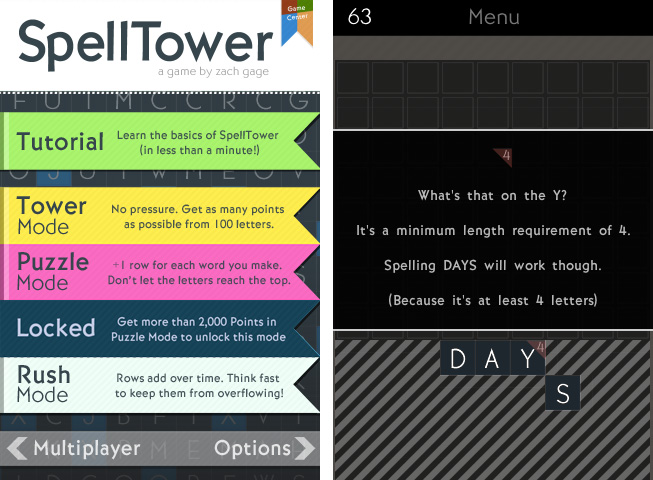
Random blocks with letters arranged in twelve rows cover the screen, and you have to connect letters located abreast of each other. Some letters need to be included into certain minimum lengths, indicated by a small number in the top right of their square block, and words touching black boxes without letters will delete them. Blue colored letters included in a word (these are letters which are hard to incorporate into words, like “Z” or “J”) delete a whole row and generate a lot of points. Apart from those special features, the game follows one simple rule: the more letters a word has, and the more rare those letters are (a “Q” is obviously more valuable than an “E”), the more points you earn. That’s all there is to say about the game’s concept: you can start playing SpellTower within seconds, a prior condition a game needs to get you addicted to it.

This principle is translated into five different game modes, two of which you can unlock by reaching extraordinary results in the two basic ones: tower mode, where the screen is completely filled up with letters and the goal is to make as many points with them as possible; and the more tactical puzzle mode, which starts off with five rows, adding one row for each word you spell until the letters reach the top and the game ends. You can also play rush mode, which is the closest match to the idea of Tetris: rows add over time (whether you spell words or not), and you need to quickly eliminate them to prevent a letter from reaching the top. While I’m not the best at puzzle and rush mode — I do not even reach the 1000 points mark, and to unlock the fifth mode you need more than 2000 points — playing the tower mode always is a lot of unconstrained fun and makes me coming back again and again.

So, how exactly is this addiction accomplished? I think it’s a combination of three factors that Zach managed to mix perfectly: UI design, highscore competition, and a vocabulary learning process. Read more

Access Extra Content and Perks

Founded in 2015, Club MacStories has delivered exclusive content every week for nearly a decade.

What started with weekly and monthly email newsletters has blossomed into a family of memberships designed for every MacStories fan.

Learn more here and from our Club FAQs.

Club MacStories: Weekly and monthly newsletters via email and the web that are brimming with apps, tips, automation workflows, longform writing, early access to the MacStories Unwind podcast, periodic giveaways, and more;

Club MacStories+: Everything that Club MacStories offers, plus an active Discord community, advanced search and custom RSS features for exploring the Club’s entire back catalog, bonus columns, and dozens of app discounts;

Club Premier: All of the above and AppStories+, an extended version of our flagship podcast that’s delivered early, ad-free, and in high-bitrate audio.

Learn more here and from our Club FAQs.


10.7.4 OS X Update Now Available: Fixes “Stuck Reopen Windows” Bug [Update: Safari 5.1.7 also Released]

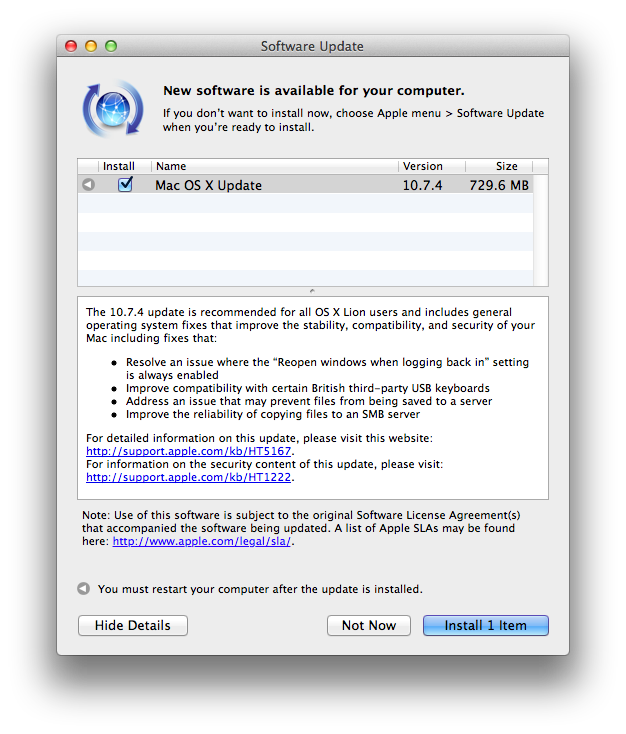
Apple has released 10.7.4 for OS X, which brings significant bug fixes, network improvements, and Safari 5.1.6 (a performance and stability update). Release notes for the 730 MB download can be found on Apple’s support pages.

Download links for the 10.7.4 update have been posted below:

The OS X Lion v10.7.4 Update includes fixes that:

  • Resolve an issue in which the “Reopen windows when logging back in” setting is always enabled.
    Improve compatibility with certain British third-party USB keyboards.
  • Addresses permission issues that may be caused if you use the Get Info inspector function “Apply to enclosed items…” on your home directory. For more information, see this article.
  • Improve Internet sharing of PPPoE connections.
  • Improve using a proxy auto-configuration (PAC) file.
  • Address an issue that may prevent files from being saved to an SMB server.
  • Improve printing to an SMB print queue.
  • Improve performance when connecting to a WebDAV server.
  • Enable automatic login for NIS accounts.
  • Include RAW image compatibility for additional digital cameras.
  • Improve the reliability of binding and logging into Active Directory accounts.
  • The OS X Lion v10.7.4 Update includes Safari 5.1.6, which contains stability improvements.

Also released, contrary to the 10.7.4 release notes, is a separate download for Safari 5.1.7. This update disables out-of-date versions of Adobe’s Flash Player to address security concerns, but a manual fix is provided if you’d like to reenable the outdated Flash Player installed on your system. Information about Safari 5.1.7 can be found on the following support page. You can check Software Update, or download 5.1.7 from Apple’s website.

Safari 5.1.7 for OS X Lion and Safari 5.1.7 for OS X Snow Leopard disable out-of-date versions of Adobe Flash Player.

Out-of-date versions of Adobe Flash Player do not include the latest security updates and will be disabled to help keep your Mac secure. If Safari 5.1.7 detects an out-of-date version of Flash Player on your system, you will see a dialog informing you that Flash Player has been disabled. The dialog provides the option to go directly to Adobe’s website, where you can download and install an updated version of Flash Player.

Access Extra Content and Perks

Founded in 2015, Club MacStories has delivered exclusive content every week for nearly a decade.

What started with weekly and monthly email newsletters has blossomed into a family of memberships designed for every MacStories fan.

Learn more here and from our Club FAQs.

Club MacStories: Weekly and monthly newsletters via email and the web that are brimming with apps, tips, automation workflows, longform writing, early access to the MacStories Unwind podcast, periodic giveaways, and more;

Club MacStories+: Everything that Club MacStories offers, plus an active Discord community, advanced search and custom RSS features for exploring the Club’s entire back catalog, bonus columns, and dozens of app discounts;

Club Premier: All of the above and AppStories+, an extended version of our flagship podcast that’s delivered early, ad-free, and in high-bitrate audio.

Learn more here and from our Club FAQs.


Latest Evernote Updates Show A Promising Future

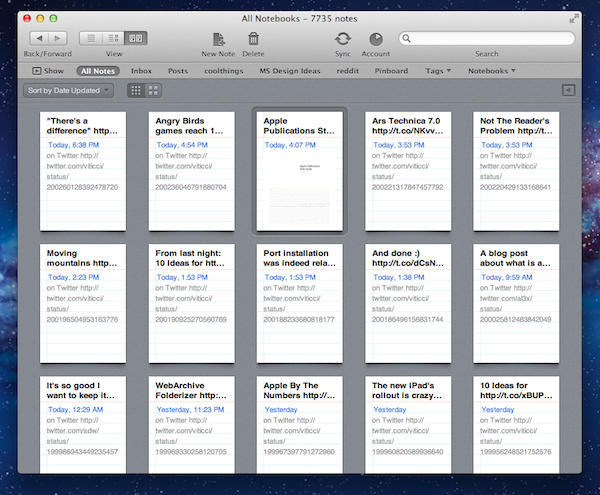
Yesterday, Evernote rolled out two major updates for its iOS and Mac apps. As a daily Evernote user who relies on the app to research posts, save PDFs, annotate images, and generally archive just about anything through IFTTT, I was pleased to see the improvements made in these versions are taking Evernote into a direction I like.

First, the iOS app. Focused on iOS 5 and the iPhone version, Evernote 4.2 brings a more accessible way of applying rich text and switching between editing and composing. Prior to version 4.2, users had to select text and hit a button in the top toolbar to bring up rich text editing – a process that was cumbersome and not as responsive and stable as one would expect from a top-notch iOS app. Evernote 4.2 abandons the separate text editing workflow and interface for a better, more integrated way of displaying text controls alongside the system’s keyboard. A new button will now let you easily switch between typing and editing, while retaining the same options that made Evernote a must-have among note-takers looking for rich text support. I like how selected text will remain selected if you switch between the keyboard and text formatting panel; surprisingly, however, Evernote still hasn’t managed to fit a Cancel button into the note editing screen. Read more

Access Extra Content and Perks

Founded in 2015, Club MacStories has delivered exclusive content every week for nearly a decade.

What started with weekly and monthly email newsletters has blossomed into a family of memberships designed for every MacStories fan.

Learn more here and from our Club FAQs.

Club MacStories: Weekly and monthly newsletters via email and the web that are brimming with apps, tips, automation workflows, longform writing, early access to the MacStories Unwind podcast, periodic giveaways, and more;

Club MacStories+: Everything that Club MacStories offers, plus an active Discord community, advanced search and custom RSS features for exploring the Club’s entire back catalog, bonus columns, and dozens of app discounts;

Club Premier: All of the above and AppStories+, an extended version of our flagship podcast that’s delivered early, ad-free, and in high-bitrate audio.

Learn more here and from our Club FAQs.


Rovio: Angry Birds Games Reach 1 Billion Downloads

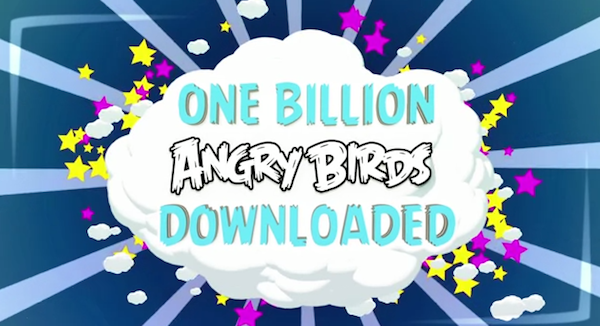
With a blog post and a video published this morning, Finnish game maker Rovio announced the Angry Birds franchise has reached 1 billion game downloads across all platforms. Just two weeks ago, Rovio said the latest entry in the series – Angry Birds Space – had become the fastest growing mobile game to date with 50 million downloads in 35 days. Today’s numbers mark an important milestone for Rovio, which earlier this week revealed its financial results for the year 2011 for the first time, hinting at a possible IPO in the future. In 2011, the company reported revenue of €75.4 million ($106,3 million), with earnings before tax of €48,0 million ($67.6 million) or 64% of total revenue in 2011, and hired 196 people.

Angry Birds downloads had reached 648 million by the end of 2011, confirming the company saw an additional 352 million downloads across all platforms in the first five months of 2012. The original Angry Birds for iPhone was launched in December 2009, and it took 6 months to reach 5 million downloads. Angry Birds is, according to Apple, the top paid iPhone app of all time, with other entries in the top free and paid charts for iPhone and iPad as well.

Angry Birds games are now available on a variety of platforms, including iOS, Android, OS X, Facebook, Google Chrome, and Sony’s PSP and Play Station 3. In November 2011, Rovio announced Angry Birds games had reached half a billion downloads.

Access Extra Content and Perks

Founded in 2015, Club MacStories has delivered exclusive content every week for nearly a decade.

What started with weekly and monthly email newsletters has blossomed into a family of memberships designed for every MacStories fan.

Learn more here and from our Club FAQs.

Club MacStories: Weekly and monthly newsletters via email and the web that are brimming with apps, tips, automation workflows, longform writing, early access to the MacStories Unwind podcast, periodic giveaways, and more;

Club MacStories+: Everything that Club MacStories offers, plus an active Discord community, advanced search and custom RSS features for exploring the Club’s entire back catalog, bonus columns, and dozens of app discounts;

Club Premier: All of the above and AppStories+, an extended version of our flagship podcast that’s delivered early, ad-free, and in high-bitrate audio.

Learn more here and from our Club FAQs.


10 Ideas for iCloud.com Notifications

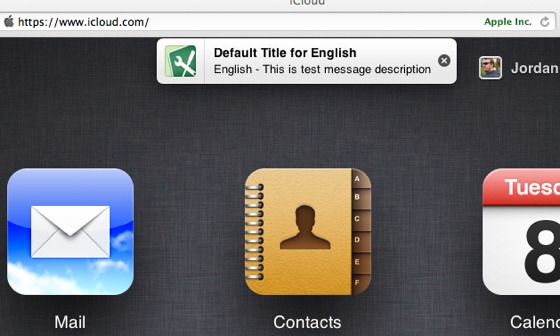
As noted by MacRumors earlier today, Apple appears to be testing a new browser-based notification system for iCloud.com. Judging from the screenshot that clearly shows a testing environment being accidentally brought to a user’s attention, the system appears to be similar in terms of design to what Apple introduced with iOS 5 last year.

While it’s not clear whether Apple may be planning to revamp iCloud.com completely to include notifications or if today’s spotted banner is the sign of something else, with WWDC ‘12 approaching I thought it might be interesting to run down some possible implementations.

iCloud.com is an option, and not a central part of the experience Apple is envisioning with iCloud and devices going forward. Mobile devices and computers are integrated with iCloud in a way that iCloud itself becomes the operating system. The browser-based, neatly-designed iCloud.com is a way to access some of iCloud’s content through the open web (as long as you have a modern browser). While not fundamental to the experience, I believe there are some additions Apple could make to improve iCloud.com and turn it into a viable substitute to native iCloud interfaces. Specifically, web notifications could play very well in various scenarios.

iMessage on the web: The first beta of Messages for OS X left many disappointed, and an iMessage web app could obviate the need of a unified iChat/iMessage desktop app, while providing a great solution for browser notifications.

Email and calendar alerts: An obvious one, yet a possibly great system to receive notifications while browsing other sections of iCloud.com.

App-free notifications: Assuming Apple is really testing notifications for iCloud.com, I’d be interested in knowing whether their idea is to display notifications exclusively on iCloud.com while open. In fact, while I always forget to visit iCloud.com on my Mac, a notification system for (not from) iCloud.com would be perfect to remind me to visit and use the web app. I don’t think this is going to happen, as I see such system being more a way to simply display alerts inside iCloud.com.

Jump-to-section: And if such system is being built to notify users of changes while on iCloud.com, I would expect to be able to click on a notification, and have iCloud automatically open the associated section of the site.

Document changes: Right now, we don’t know why Apple is building a notification system for iCloud.com. We don’t even know whether the “leaked” banner could be linked to a future public feature, or an internal use-only functionality. However, it would be nice if a notification system for iCloud.com could inform users of changes to documents stored on iCloud.com. This plays well with the next point…

Sharing and collaborative features: Apple is discontinuing iWork.com, and the company hasn’t announced any plans for a possible revamped sharing system for documents. iCloud.com notifications could inform users of changes to a document edited by someone else, and they wouldn’t necessarily require a web-based editing interface to go with (though a Google Docs-like solution for iCloud users would be an amazing addition to my workflow).

Find My iPhone and Find My Friends: Notifications could tell users about a found device, or a family member nearby, though I assume those would only be a nice extra compared to the functionality already enabled in the respective native apps.

Game Center: Apple’s social gaming service is getting a dedicated app with Mountain Lion, but for the sake of options, iCloud.com could gain a web counterpart – with notifications to stay on top of friend requests and more.

Twitter: on iOS 5, users can configure their Twitter accounts at a system level to tweet and log into other apps. On Mountain Lion, desktop users will enjoy support for Twitter notifications directly into Notification Center. It would be nice if everyone else got nice little banners for Twitter replies and DMs on iCloud.com – clicking on them could take you directly to Twitter’s website, and it would offer a way to stay on top of Twitter even when using iCloud.com.

Presence: I have written about this idea in my iOS 6 wish list. If Apple is extending notifications to iCloud.com, the issue of notification overload could potentially increase again. Regardless of what kind of notifications for iCloud.com Apple is working on, there should be a way for iCloud to understand whether you are actively using an iPhone, iPad, Mac, or web browser.

Wildcard: App updates: This is my wildcard, and I do hope Apple will consider such functionality someday. Right now, I use AppShopper to get notifications for updates to the apps I already own. With complete access to my purchase history and iTunes on the desktop, Apple could easily notify my iCloud account of updates available on the App Store, and provide an easy way to click through and start a download.

Once again when it comes to iCloud, I’m just speculating on the direction Apple may be taking with its cloud service, admittedly the most promising platform the company is building for the next decade. Having thrown my two cents at this other side of the discussion, I look forward to seeing whether today’s alleged notification system will materialize in a finished product on June 11.

Access Extra Content and Perks

Founded in 2015, Club MacStories has delivered exclusive content every week for nearly a decade.

What started with weekly and monthly email newsletters has blossomed into a family of memberships designed for every MacStories fan.

Learn more here and from our Club FAQs.

Club MacStories: Weekly and monthly newsletters via email and the web that are brimming with apps, tips, automation workflows, longform writing, early access to the MacStories Unwind podcast, periodic giveaways, and more;

Club MacStories+: Everything that Club MacStories offers, plus an active Discord community, advanced search and custom RSS features for exploring the Club’s entire back catalog, bonus columns, and dozens of app discounts;

Club Premier: All of the above and AppStories+, an extended version of our flagship podcast that’s delivered early, ad-free, and in high-bitrate audio.

Learn more here and from our Club FAQs.