Posts in Featured

My New Dropbox List-Making App: TaskAgent 2.2

In the past few months, I have been refining my Dropbox-powered writing workflow, adding new tools and checking out updates to existing ones in order to achieve a reliable, yet seamless environment for quick notes, longer articles, and lists. In particular, I mentioned TaskAgent, an iOS app to manage lists through easily formatted text files inside Dropbox.

In TaskAgent, I keep lists of apps I want to buy or update, and lists of stories I want to work on. These lists can be archived and retrieved later, and they exist as standalone .txt files in my Dropbox. If I want, I can add items to my lists using TextDrop, GoodReader, or TextEdit on my Mac; I guess it’d be nice to have a dedicated TaskAgent Mac app with the possibility of entering items with keyboard shortcuts.

See, on my computer and iOS devices, I keep lists. I have the aforementioned work-oriented lists of apps and posts I’d like to work on. I have lists of apps I want to recommend for our Inspiring UI series, and I have lists of developers I want to interview. But I also keep lists of podcasts I want to check out, movies I want to buy, groceries I need to pick up, and ideas I want to submit to a developer as feedback for his beta app.

In my mind and in my workflow, lists and tasks are separate entities. A list may contain items that will become tasks; my OmniFocus keeps the things I know I have to do – neatly organized and synced to the cloud. Over time, I have found the separation of lists and tasks to be necessary to properly divide my organization skills in two distinct areas: remembering Vs. doing. And I have found TaskAgent 2.2, released today, to be the best app at enhancing this text-based setup on the iPhone and iPad.

From a core functionality standpoint, TaskAgent 2.2 isn’t too dissimilar from the versions we have previously covered here at MacStories. However, alongside a much simpler formatting syntax and a slew of new features, TaskAgent 2.2 impressed me thanks to its completely redesigned interface and Dropbox sync engine.

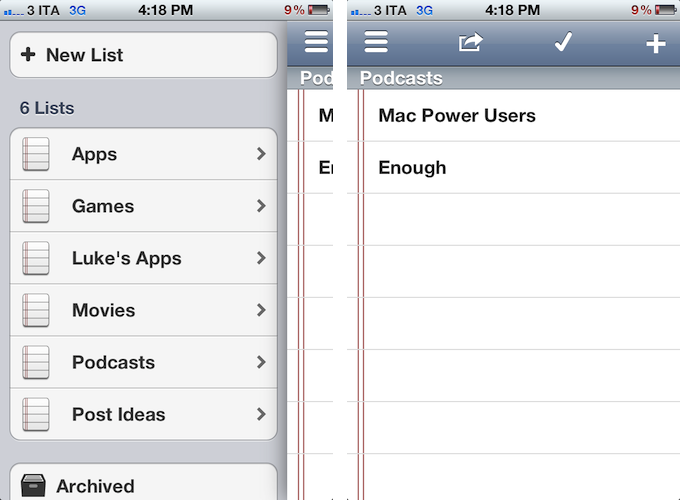
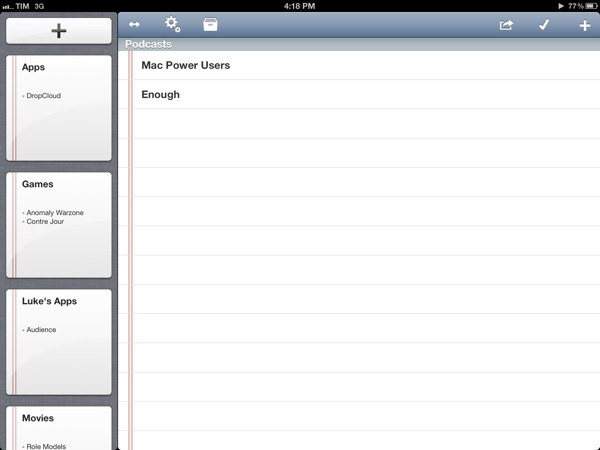
On the iPad, large “notebook thumbnail previews” adorn a sidebar that can be dismissed with a button in the upper toolbar. On the iPhone, lists are shown through a Facebook-like panel that also contains shortcuts to create a new lists, enter the Settings, or open Archived lists (which aren’t permanently deleted). TaskAgent 2.2 cleverly uses these new list previews to bring up functionalities that would have otherwise been buried in sub-menus within the main interface. A tap & hold on a list will reveal options to quickly delete, rename, duplicate, or archive a list. To avoid the guilty remorse of having too many items in a list, TaskAgent now lets you hide the “0 out of x completed” description, so you’ll focus exclusively on managing your lists without feeling bad about having too many items inside them.

One of TaskAgent’s previously often criticized feature was its New Item dialog. Version 2.2 does away with uninspired blue alert boxes and introduces a new quick way of entering items one after the another: on the iPad, that’s a popover, while on the iPhone the menu has been rendered as another panel on the right. Depending on your settings, new items will be added at the top or bottom of a list, and you can enter multiple ones in a row without having to tap Done every time. The overall workflow is incredibly faster.

TaskAgent 2.2 is unarguably a better version of the app, and, to me, the best solution to manage lists on iOS while retaining the capability of editing them anywhere as long as I can open a .txt file. I can access my lists from my browser with TextDrop or from iOS using GoodReader and ReaddleDocs. I can associate TaskAgent’s folder (which can be moved anywhere inside Dropbox) with a text editor and start editing right away. I can quickly append new items to a specific list file using Alfred, and if I want, I can share a list to Evernote as well, as TaskAgent supports that service, too.

TaskAgent makes lists “open” and available anywhere. Only $1.99 for a limited time.
Access Extra Content and Perks

Founded in 2015, Club MacStories has delivered exclusive content every week for nearly a decade.

What started with weekly and monthly email newsletters has blossomed into a family of memberships designed for every MacStories fan.

Learn more here and from our Club FAQs.

Club MacStories: Weekly and monthly newsletters via email and the web that are brimming with apps, tips, automation workflows, longform writing, early access to the MacStories Unwind podcast, periodic giveaways, and more;

Club MacStories+: Everything that Club MacStories offers, plus an active Discord community, advanced search and custom RSS features for exploring the Club’s entire back catalog, bonus columns, and dozens of app discounts;

Club Premier: All of the above and AppStories+, an extended version of our flagship podcast that’s delivered early, ad-free, and in high-bitrate audio.

Learn more here and from our Club FAQs.


Four Years of App Store: Developers Weigh In On Search, Discovery, and Curation

“The App Store is a grand slam, with a staggering 10 million applications downloaded in just three days”. That’s how Apple co-founder and late CEO Steve Jobs saluted the launch of the company’s new storefront for iOS (née iPhone OS) applications on July 14, 2008. Almost four years and over 25 billion downloads later, the App Store has evolved into a brand that spans two platforms (iOS and OS X), three different iOS devices (iPhone, iPod touch, iPad), a variety of Macs, and that hosts over 600,000 apps from more than 200,000 registered developers. Albeit minimal in terms of revenue for a company that makes billions off iPhones and iPads, the App Store created a new economy that nurtures an ecosystem ultimately aimed at selling more devices, as well as showing consumers that, nowadays, software is revolutionizing the way they approach work, entertainment, and other personal tasks. In spite of its tremendous growth, however, little has been done to improve a basic premise of the App Store: finding new apps.

“Discovery and search has been a huge concern of mine for a long time”, said Craig Hockenberry, Principal at design and development studio The Iconfactory. Hockenberry and his team were among the first developers to support the App Store in 2008 with Twitterrific, a Twitter client for iPhone that has expanded to the iPad and Mac, with different versions available on the App Store and Mac App Store. In 2009, a year after the App Store launched, Hockenberry offered a series of suggestions to Apple in order to improve certain aspects of the App Store – namely, following early discussions with developers that decided to sell software on the “iTunes App Store”, he noted how there was “still much room for improvement” to turn the App Store into a viable and reliable business platform for developers who weren’t simply interested in experimenting with it.

Hockenberry’s “Year two” post still rings true today, in spite of the functionalities that Apple fixed, improved, or brought to the App Store in the past four years. For instance, Apple created a “New and Noteworthy” section on the homepage of the App Store that is refreshed on a weekly basis to showcase apps Apple deems worthy of attention; promotional codes, which Hockenberry listed as one of the tools that had helped them sell more products, were made available internationally in late 2010; either on print, its website, or YouTube, Apple has kept pushing ad campaigns to educate iOS and Mac users on the importance and convenience of the App Store.

The very motto that started the app revolution, however, didn’t meet an equal amount of attention by Apple in terms of improvements for the infrastructure behind it. As Hockenberry wrote in 2009, “it’s incredibly hard to find the “that” in “there’s an app for that.” Between keyword spamming and the sheer volume of choices in each category, customers can’t find what they want”.

Read more

Access Extra Content and Perks

Founded in 2015, Club MacStories has delivered exclusive content every week for nearly a decade.

What started with weekly and monthly email newsletters has blossomed into a family of memberships designed for every MacStories fan.

Learn more here and from our Club FAQs.

Club MacStories: Weekly and monthly newsletters via email and the web that are brimming with apps, tips, automation workflows, longform writing, early access to the MacStories Unwind podcast, periodic giveaways, and more;

Club MacStories+: Everything that Club MacStories offers, plus an active Discord community, advanced search and custom RSS features for exploring the Club’s entire back catalog, bonus columns, and dozens of app discounts;

Club Premier: All of the above and AppStories+, an extended version of our flagship podcast that’s delivered early, ad-free, and in high-bitrate audio.

Learn more here and from our Club FAQs.


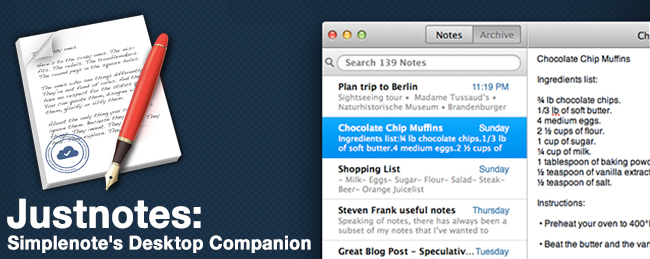
Justnotes is Simplenote’s Desktop Companion and a Little More

I already know what you’re thinking: “Justnotes looks a lot like nvALT.” You wouldn’t be wrong in thinking that Justnotes is visually reminiscient of Notational Velocity and its poweruser fork, nvALT, but it wouldn’t be fair to judge without getting hands on. I’d posit Justnotes as an alternative to TextEdit on OS X — it’s a container for creating, sorting, and archiving text files. Otherwise, Justnotes is simply the desktop counterpart to Simplenote… With a twist.

Read more

Access Extra Content and Perks

Founded in 2015, Club MacStories has delivered exclusive content every week for nearly a decade.

What started with weekly and monthly email newsletters has blossomed into a family of memberships designed for every MacStories fan.

Learn more here and from our Club FAQs.

Club MacStories: Weekly and monthly newsletters via email and the web that are brimming with apps, tips, automation workflows, longform writing, early access to the MacStories Unwind podcast, periodic giveaways, and more;

Club MacStories+: Everything that Club MacStories offers, plus an active Discord community, advanced search and custom RSS features for exploring the Club’s entire back catalog, bonus columns, and dozens of app discounts;

Club Premier: All of the above and AppStories+, an extended version of our flagship podcast that’s delivered early, ad-free, and in high-bitrate audio.

Learn more here and from our Club FAQs.


Apple To Reject Mac Apps With “Hotkey Functionality” Starting June 1? [Updated]

According to TUAW, Apple will start rejecting Mac apps with “hotkey functionality” starting June 1, when the deadline for Sandboxing will become active for Mac App Store developers.

Apparently, Apple will allow hotkey apps that are already in the Mac App Store before June to offer only bug fixes. New apps and any apps that add features (i.e. non-bugfix releases) will not be allowed to support hotkeys.

TUAW has been told that Apple will be rejecting all apps with hotkey functionality starting June 1, regardless of whether the new features are hotkey related or not. Basically, if you’re developing one of those apps, an app that assumes you can still add hotkeys, don’t bother submitting it to the Mac App Store.

While TUAW doesn’t specifically mention any Mac app that would be subject to this new restriction, it is safe to assume that by “hotkey functionality” they mean desktop applications that allow users to set up keyboard shortcuts to activate other apps or system locations (such as Apptivate), or an app’s specific functionality (such as Alfred’s hotkey to show a search box, or OmniFocus’ hotkey-based Quick Entry panel).

I spoke to various developers of Mac apps with system-wide hotkey functionality, and they were unaware of the changes that Apple may begin to enforce on June 1. Currently, there is no mention of such specific change in the Mac App Store Review Guidelines (or Sandboxing FAQs), and the APIs used by the developers I contacted aren’t deprecated in the latest Mountain Lion Developer Preview, updated yesterday. Some developers told me Apple may have rejected some apps that registered hotkeys without a user’s explicit consent, but according to TUAW the issue is different, and related to the kind of control and experience that Apple wants on the Mac App Store, rather than technical limitations or APIs.

Initially pushed back from November 2011 to March 2012, and then again to June 1, 2012, Sandboxing for Mac apps has found a considerable amount of skepticism in the Apple developer community, as it would pose a threat to existing Mac apps that would have to rework their functionalities around the limitations of sandboxing.

As I wrote in February:

Sandboxing is a new technology in OS X Lion that limits the functionalities of Mac App Store applications to a list of “entitlements” that cover various areas of the operating system an app can access, such as networking, printing, or a user’s files. A sandboxed application would be unable to harm the system outside of its operational scope (managed by the entitlements), and this has caused some concerns as apps would lose access to the Mac’s entire filesystem, which is required by some functionalities of certain applications that aren’t necessary malicious or “compromised”. Similarly, inter-app communication would be a technical issue with sandboxing, as apps like TextExpander, Keyboard Maestro and CoverSutra — utilities that perform actions in the background without asking for user’s interaction in some cases (user-initiated actions can override the sandbox) — couldn’t get past the sandboxing requirement for the Mac App Store.

In the past months, a number of notable Mac developers have voiced their concerns in regards to sandboxing: Daniel Jalkut of Red Sweater Software wrote that “to increase adoption, Apple should expand the current list of entitlements until it covers every reasonable behavior that users expect from Mac apps”; following his decision to stop selling Clipstart on the Mac App Store, Riverfold’s Manton Reece noted how, rather than playing “catch-up” with Apple to work around the list of entitlements for sandboxed apps, he’d prefer to keep selling his apps on his own website – something that the upcoming Mountain Lion will keep supporting thanks to GateKeeper.

Over at TUAW, Erica Sadun says we should say goodbye to “hotkeys, macro programs, end-user customization”. While I can’t confirm the kind of apps and “hotkey functionalities” that Apple has apparently already rejected or will start rejecting in two weeks (I’ve only seen some discussions about clipboard managers and keyboard shortcuts on the Mac Dev Forums), it would surely be unfortunate to lose software like Alfred, Apptivate, or Keyboard Maestro (just to name a few) to an updated Mac App Store policy. Erica Sadun refers to these hotkey-enabled apps as ”all those great little hotkey shortcuts that used to let us bring an app to the forefront and do something”.

That sandboxing would be a technical issue for apps based on AppleScript technologies is nothing new; however, Apple also specifically asked developers to get in touch with the company if technical issues were preventing them from sandboxing an app, suggesting that the company was actively working on getting developers of existing great Mac software on board with sandboxing, without limitations. This week, the Pixelmator team updated their application with support for sandboxing; other developers of “power-user” applications like Keyboard Maestro, however, still haven’t found a proper way to work around sandboxing entitlements, going as far as writing “Keyboard Maestro requires access to other applications to perform your macros and so is not, and cannot, be sandboxed” on the app’s Mac App Store page.

According to Apple’s notice from February, developers of existing apps on the Mac App Store that are not sandboxed may still submit bug fix updates without sandboxing their apps. In theory, this should mean that apps like Alfred or Shortcuts (with hotkey functionality) or Keyboard Maestro (for general incompatibility) should stay on the Mac App Store as long as their developers don’t include new features, but only bug fixes for existing customers. But what’s going to happen when developers of hotkey-enabled apps or already-approved macro programs like KM will decide to update their apps with new features?

Just like in February, the future of sandboxing and Mac App Store apps is uncertain, but it’s looking worse if Apple really has decided to ban hotkey functionality – a common trait of keyboard-based software, such as Mac apps – from the Mac App Store. With the WWDC ‘12 scheduled to kick off 10 days after the proposed sandboxing deadline, here’s to hoping Apple will, once again, be more flexible, and offer third-party developers new ways to work around sandboxing – the Mac App Store deserves all kinds of OS X software, from simple single-purpose utilities, to more complex, power user-oriented applications.

Update: Throughout the day, several developers I spoke to confirmed my earlier reports that the APIs to implement global hotkeys and keyboard shortcuts haven’t been deprecated (not even in Mountain Lion), and aren’t going away any time soon. Two developers I spoke to, in particular, confirmed that recent updates to their Mac apps with “hotkey functionality” were approved without issues by Apple.

Furthermore, developers confirmed they couldn’t find any new mention of hotkey-related entitlements in today’s updated documentation for Gatekeeper and Sandboxing. So while more “complex” utilities like Keyboard Maestro and TextExpander may still have to find a way to work around Sandboxing, other apps that incorporate hotkey functionality – like OmniFocus, Alfred, or just about any app that offers a systemwide shortcut – should still be fine for the Mac App Store.

Lex Friedman at Macworld confirmed with his own sources that a ban for general “hotkey functionality” isn’t coming to the Mac App Store, writing that “so long as developers use Apple’s officially supported APIs to register systemwide global hotkeys, their apps will remain eligible for inclusion in the Mac App Store”.

Access Extra Content and Perks

Founded in 2015, Club MacStories has delivered exclusive content every week for nearly a decade.

What started with weekly and monthly email newsletters has blossomed into a family of memberships designed for every MacStories fan.

Learn more here and from our Club FAQs.

Club MacStories: Weekly and monthly newsletters via email and the web that are brimming with apps, tips, automation workflows, longform writing, early access to the MacStories Unwind podcast, periodic giveaways, and more;

Club MacStories+: Everything that Club MacStories offers, plus an active Discord community, advanced search and custom RSS features for exploring the Club’s entire back catalog, bonus columns, and dozens of app discounts;

Club Premier: All of the above and AppStories+, an extended version of our flagship podcast that’s delivered early, ad-free, and in high-bitrate audio.

Learn more here and from our Club FAQs.


#MacStoriesDeals - Wednesday

Here are today’s @MacStoriesDeals on hardware, iOS, and Mac apps that are on sale for a limited time, so get them before they end!
Read more

Access Extra Content and Perks

Founded in 2015, Club MacStories has delivered exclusive content every week for nearly a decade.

What started with weekly and monthly email newsletters has blossomed into a family of memberships designed for every MacStories fan.

Learn more here and from our Club FAQs.

Club MacStories: Weekly and monthly newsletters via email and the web that are brimming with apps, tips, automation workflows, longform writing, early access to the MacStories Unwind podcast, periodic giveaways, and more;

Club MacStories+: Everything that Club MacStories offers, plus an active Discord community, advanced search and custom RSS features for exploring the Club’s entire back catalog, bonus columns, and dozens of app discounts;

Club Premier: All of the above and AppStories+, an extended version of our flagship podcast that’s delivered early, ad-free, and in high-bitrate audio.

Learn more here and from our Club FAQs.


Flipboard’s Move From “Social Magazine” To “Internet Magazine”

Last night, Flipboard released a 1.9 update for its iPhone and iPad app that, among various fixes and new features, introduces one important addition to the social magazine: audio. As the company writes on their blog:

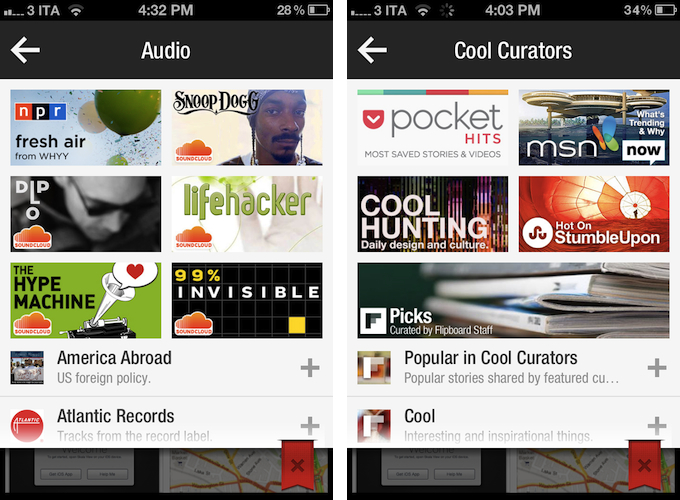
Our Content Guide is now chock-full of some of the best sounds we could find. We’ve launched new partnerships with NPR and PRI and scoured SoundCloud’s massive community of sound creators to bring you some of our favorites—artists like Snoop Dogg and Diplo; music labels like Atlantic Records and Ninja Tune; podcasts from The New Yorker and Slate; and segments from shows like Radiolab and Science Friday.

Right now, support for audio content is mainly implemented through SoundCloud, which received a new login option in the app’s settings, and NPR and PRI, which have agreed on a partnership with Flipboard to make content available in the app’s content guide, properly reformatted to fit Flipboard’s unique style and interactions. In Flipboard 1.9, support for audio means you can start playing a podcast featured in the content guide (such as TWiT or TNW Daily Dose) or any content available in your SoundCloud account, and go back to browsing links and photos as Flipboard can keep playing audio while you’re reading something else. The app will show up as an audio source in the iOS multitasking tray, and you can control audio playback from within the app itself too with a “note” icon in the upper toolbar (on iPhone) that will display a folder-like animation for viewing and pausing audio.

Looking back at Flipboard’s evolution over the past months, I think support for audio in version 1.9 is yet another example of how the company has been gradually and relentlessly drifting away from a system that simply aggregates “your social links” to embrace a broader vision that’s turning Flipboard into “an Internet magazine”, whether it’s social or not.

Flipboard started off as a neat app to give a magazine-like layout to links shared on Twitter and Facebook. Then came Google Reader, Flickr, and Instagram with more content types and visual previews. The company started announcing partnerships with publishers to display their content beautifully inside Flipboard, and with more content came an explosive growth that led to a re-imagined version 1.5, focused on showcasing “popular stories” and making more great content available to users through a content guide that wasn’t necessarily social – rather, it was aimed at letting users know that more content was available on Flipboard beyond their existing social accounts. After that, Flipboard released the long-awaited iPhone app, unifying accounts with over-the-air sync and bringing Cover Stories – a dedicated view for interesting and popular stories – over to the iPad app.

While still prominently “social” in the way it puts the focus on accounts and supported services, Flipboard has become perfectly usable and enjoyable even without necessarily configuring a Twitter or Facebook account. The company has put great effort on building a content guide that spans different countries, themes, content types, and publishers. Flipboard aggregates top content shared by Pocket, it collects the best things found on the Internet under the “Cool Curators” section, and, alongside the usual Tech and Business news, displays popular videos from YouTube, Vimeo, and even Colbert Report in a Video category. With version 1.9, audio has been brought into the mix.

The social component of Flipboard is still strong (version 1.9 also brings “related sections” for social networks, such as “tweets mentioning you”), but it hasn’t been the only way to enjoy Flipboard for quite some time, and this is more visible than ever in the latest update. Flipboard doesn’t simply create a personalized magazine out of content “being shared with me” anymore – it still does that, but at the same time, it allows me to find other great content that I wouldn’t have discovered otherwise.

More than a “social magazine”, the “Internet magazine” aggregates and reformats content that is also social, but not strictly so. Curation and APIs are keys here. Flipboard was already rumored to be considering support for movies and TV shows last year. Would it be too absurd to think the app will someday gain compatibility with Rdio and Spotify to let you find the best music from your favorite streaming service? How about YouTube and Vimeo, to let users also find videos that are bring shared in those social accounts? According to TechCrunch, ”Flipboard will look into other ways it can do more with video”.

With social accounts, APIs, search, and curation, Flipboard has become more than a social magazine: it is restructuring Internet content for the screens of mobile devices with the help of a strong social counterpart.

Access Extra Content and Perks

Founded in 2015, Club MacStories has delivered exclusive content every week for nearly a decade.

What started with weekly and monthly email newsletters has blossomed into a family of memberships designed for every MacStories fan.

Learn more here and from our Club FAQs.

Club MacStories: Weekly and monthly newsletters via email and the web that are brimming with apps, tips, automation workflows, longform writing, early access to the MacStories Unwind podcast, periodic giveaways, and more;

Club MacStories+: Everything that Club MacStories offers, plus an active Discord community, advanced search and custom RSS features for exploring the Club’s entire back catalog, bonus columns, and dozens of app discounts;

Club Premier: All of the above and AppStories+, an extended version of our flagship podcast that’s delivered early, ad-free, and in high-bitrate audio.

Learn more here and from our Club FAQs.


The iPad Is The Future Of Education

For the past years, Apple has been showcasing the educational advantages of devices like Macs, iPhones and iPods on its Apple in Education website. Since the introduction of the iPad in 2010, however, the company has been making an effort to position the device as the best tool now available to teachers and students to improve the quality of education and level of engagement. The dedicated iPad in Education webpage showcases recent moves by Apple such as iBooks Textbooks and the iTunes U iOS app.

While we have covered schools and educational institutions adopting iPads in the past, the latest profile posted by Apple today on their UK website is quite possibly the best example of iPad in education to date. Those of you who have been following the progress of iPad deployment in schools may remember Fraser Speirs’ iPad Project, which made headlines throughout 2011 as it was the first one-to-one iPad deployment to every people in a school. Speirs documented the process of giving an iPad to every teacher and student at Cedars School of Excellence (Scotland) on his personal website, and today Apple has posted a video profile showing how “Cedars students boost learning with iPad”.

The full video is available here, and it shows teachers and kids using the iPad as a modern, regular tool in their daily lives that has improved the way they create and share content of any kind. One particular segment towards the end of the video struck a chord with me:

I don’t think we could ever go back from where we are right now with the iPad. The only way’s really forward – to more access to knowledge, more empowerment, more creativity…all these things in the classroom”.

As I wrote before, Apple’s education strategy will be interesting to follow. Actually seeing kids and teachers who have been using the iPad as a real substitute for and enhancement over old learning tools for over a year now, however, reminds me that, no matter Apple’s strategy as a company, software is the future of education, and the iPad is giving our kids a bit of that future today.

Detractors of the iPad as a learning tool point at the management required by connected devices to ensure that, in the classroom, the possibilities offered by the Internet don’t get in the way of teachers’ requirements and students’ attention. Fortunately, this is something Apple has been addressing since day one, and that has recently improved with more tools.

Every major change in our society and culture will be awarded an equal amount of optimism and skepticism. As someone who’s been lucky enough to find his dream job in the possibilities offered by the Internet and software, I tend to see skepticism as a challenge, rather than a roadblock. People like Fraser Speirs are proving that, beyond analysts and blog posts, a better education for our kids is possible, today, every day, with a device that’s making kids eager to learn.

Free of the constraints of paper and old, disconnected learning material, the iPad brings new challenges and practical issues to overcome. With time, patience, and willingness to look past rules established in societies different than ours, we must make sure these devices we have built and ecosystems we have nurtured won’t be remembered for Angry Birds, because among other things, our kids deserve a better, modern education. And we have to start building it today.

Access Extra Content and Perks

Founded in 2015, Club MacStories has delivered exclusive content every week for nearly a decade.

What started with weekly and monthly email newsletters has blossomed into a family of memberships designed for every MacStories fan.

Learn more here and from our Club FAQs.

Club MacStories: Weekly and monthly newsletters via email and the web that are brimming with apps, tips, automation workflows, longform writing, early access to the MacStories Unwind podcast, periodic giveaways, and more;

Club MacStories+: Everything that Club MacStories offers, plus an active Discord community, advanced search and custom RSS features for exploring the Club’s entire back catalog, bonus columns, and dozens of app discounts;

Club Premier: All of the above and AppStories+, an extended version of our flagship podcast that’s delivered early, ad-free, and in high-bitrate audio.

Learn more here and from our Club FAQs.


Compare Timezones On The Go With Timelanes

When I ask myself what timezone a friend (or more recently, colleague) lives in, I fire up the Clocks app on my iPhone or Every Time Zone when I’m on my Mac. In many cases, this needs quite some time and disrupts my workflow; I need to go back to my mail or calendar or any other situation which required this knowledge (meetings, mails or projects) and apply the time differences to them. Yesterday, I stumbled upon Timelanes by B-ReelProducts, immediately bought it, and from time to time while trying it out, I remembered some awkward situations in which I could have needed exactly this app to enhance my workflow.

Timelanes basically is Every Time Zone on the go — with some handy extras and a different, but in no way worse UI. When launching it for the first time, the app automatically locates your current timezone and displays it styled as a horizontal lane. This way, it centralizes your chosen hour of the day, plus indicating the exact current time with a small clock indicator. At the same time, you can easily switch between the days or come back to the current time using the arrows and the clock button at the center of the navigation bar at the bottom of the screen, or you can scroll horizontally until you reach the exact point in time you need (Timelanes works both in portrait and landscape mode).

From here, comparing timezones and times is just two taps away. Using the plus button, you can search for any city in the world — not just those standard “indicating” cities like NYC or Mumbai — and add them to your lanes. Those behind your current timezone are displayed above, those ahead are arranged below it. Tap the weekday information and it will change to the actual date, so you can see when the new day begins in every timezone; swipe one, and you can delete them again. Here lays a small and more or less the only design flaw of the app: the edges of the delete button are scruffy and look pretty ugly in my opinion. Read more

Access Extra Content and Perks

Founded in 2015, Club MacStories has delivered exclusive content every week for nearly a decade.

What started with weekly and monthly email newsletters has blossomed into a family of memberships designed for every MacStories fan.

Learn more here and from our Club FAQs.

Club MacStories: Weekly and monthly newsletters via email and the web that are brimming with apps, tips, automation workflows, longform writing, early access to the MacStories Unwind podcast, periodic giveaways, and more;

Club MacStories+: Everything that Club MacStories offers, plus an active Discord community, advanced search and custom RSS features for exploring the Club’s entire back catalog, bonus columns, and dozens of app discounts;

Club Premier: All of the above and AppStories+, an extended version of our flagship podcast that’s delivered early, ad-free, and in high-bitrate audio.

Learn more here and from our Club FAQs.


Sparrow 1.2 for iPhone Brings Landscape Support, Labels Management

Sparrow 1.1 brought minor enhancements to the best alternative email client for iPhone, including a built-in browser and a Send & Archive option. Sparrow 1.2, released today, adds much-requested support for landscape mode to an email app that, in this new version, also lets you manage email labels and folders.

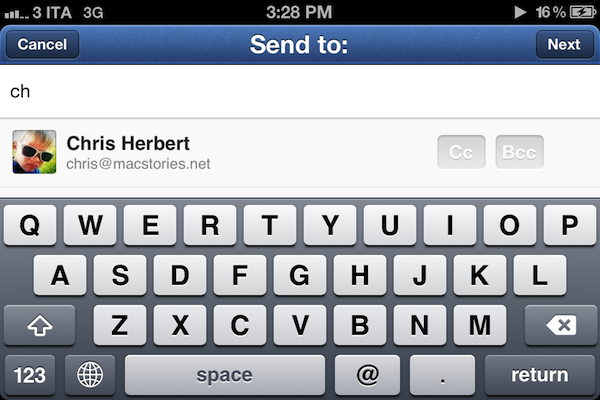
I have been testing Sparrow 1.2, and while I am no fan of landscape mode on iOS (I never use such functionality on the iPhone), I recognize how some users are going to perform some serious typing for their email replies thanks to Sparrow 1.2. The whole compose interface has been updated to take advantage of the different orientation.

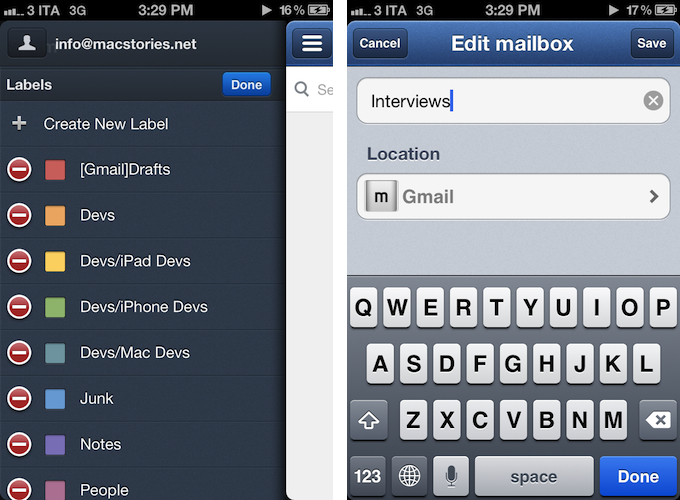
Two features that I have been enjoying in Sparrow 1.2 are proper label/folder management, and improved navigation between messages. The latter brings a nicer, cleaner design to the message “preview” you get when pulling a message up to reveal the next one. Folder/label management, on the other hand, now lets Sparrow directly create, edit, and delete labels or folders without leaving the app to use a web interface or desktop client.

I have tested the feature with Gmail (both regular and Google Apps accounts) and iCloud, and I was pleased to see Sparrow differentiated visually between labels (for Gmail) and folders (for iCloud mail). Because label management has been implemented in the mid panel – the one Sparrow uses to list an account’s mailboxes – you won’t be able to swipe-to-delete; instead, management has been assigned to a new “Edit” button that shows up in the Folders or Labels sections of a single account.

Meanwhile, the Sparrow team has also confirmed that Apple won’t allow them to implement push notifications through the VoIP framework, as they did in early betas of the app. Sparrow will have to build notification support on the server’s side, and the developers confirm this will require a yearly subscription for Sparrow users willing to use push notifications. Previously, the Sparrow developers said push support would be coming “with or without Apple”.

With proper label management, landscape mode, localization in 9 additional languages, and bug fixes, Sparrow for iPhone continues its march towards becoming the best email client for iPhone. You can find Sparrow 1.2 on the App Store today.

Access Extra Content and Perks

Founded in 2015, Club MacStories has delivered exclusive content every week for nearly a decade.

What started with weekly and monthly email newsletters has blossomed into a family of memberships designed for every MacStories fan.

Learn more here and from our Club FAQs.

Club MacStories: Weekly and monthly newsletters via email and the web that are brimming with apps, tips, automation workflows, longform writing, early access to the MacStories Unwind podcast, periodic giveaways, and more;

Club MacStories+: Everything that Club MacStories offers, plus an active Discord community, advanced search and custom RSS features for exploring the Club’s entire back catalog, bonus columns, and dozens of app discounts;

Club Premier: All of the above and AppStories+, an extended version of our flagship podcast that’s delivered early, ad-free, and in high-bitrate audio.

Learn more here and from our Club FAQs.