Posts in Featured

Apple Q3 2012 Results: $35 Billion Revenue, 26 Million iPhones, 17 Million iPads, 4 Million Macs Sold

Apple has just posted their Q3 2012 financial results for the quarter ending on July 24, 2012. The company posted revenue of $35 billion, with 17 million iPads, 26 million iPhones and 4 million Macs sold. iPhone represented a 28 percent unit growth over the year-ago quarter, while iPad reported a 84 percent unit increase over the year-ago quarter. Apple sold 6.8 million iPods, a 10 percent unit decline from the year-ago quarter. The company posted quarterly net profit of $8.8 billion, or $9.32 per diluted share.  International sales accounted for 62 percent of the quarter’s revenue.

For Q2 2012, Apple posted revenue of $39.2 billion, with 11.8 million iPads, 35.1 million iPhones and 4 million Macs sold. Apple’s iPad represented a 151 percent unit growth over the year-ago quarter, while iPhone reported a 88 percent unit increase over the year-ago quarter. 7.7 million iPods sold, a 15 percent unit decline from the year-ago quarter. The company posted quarterly net profit of $11.6 billion, or $12.30 per diluted share. In the year-ago-quarter, Q3 2011, Apple posted revenue of $28.57 billion, with 9.25 million iPads, 20.34 million iPhones and 3.95 million Macs sold.

Expectations

On July 24th, Philip Elmer-Dewitt published a forecast chart tracking predictions from 63 analysts, half working for banks or brokerage firms, and half independent whom follow Apple for fun or personal profit. Professional analysts expected $10.33 per share and revenue of $37 billion, while independent analysts expected $12.31 per share and revenue of $41.5 billion.

Apple CFO Peter Oppenheimer, quoted from Apple’s Financial Results for Q3 2012:

 Looking ahead to the fourth fiscal quarter, we expect revenue of about $34 billion and diluted earnings per share of about $7.65.

Apple will provide a live audio feed of its Q3 2012 conference call at 2:00 PM PST, and we’ll update this story with conference highlights. The full press release is embedded after the break.

Read more

Access Extra Content and Perks

Founded in 2015, Club MacStories has delivered exclusive content every week for nearly a decade.

What started with weekly and monthly email newsletters has blossomed into a family of memberships designed for every MacStories fan.

Learn more here and from our Club FAQs.

Club MacStories: Weekly and monthly newsletters via email and the web that are brimming with apps, tips, automation workflows, longform writing, early access to the MacStories Unwind podcast, periodic giveaways, and more;

Club MacStories+: Everything that Club MacStories offers, plus an active Discord community, advanced search and custom RSS features for exploring the Club’s entire back catalog, bonus columns, and dozens of app discounts;

Club Premier: All of the above and AppStories+, an extended version of our flagship podcast that’s delivered early, ad-free, and in high-bitrate audio.

Learn more here and from our Club FAQs.


Google Acquires Sparrow

Sparrow, the email client for OS X, just announced they have been acquired by Google. The Sparrow team will join the Gmail team to “accomplish a bigger vision”. Since its release, Sparrow has quickly become one of the most popular mail clients on OS X and, more recently, on the iPhone as well.

From the Sparrow website:

We’re excited to announce that Sparrow has been acquired by Google!

We care a lot about how people communicate, and we did our best to provide you with the most intuitive and pleasurable mailing experience.

Now we’re joining the Gmail team to accomplish a bigger vision — one that we think we can better achieve with Google.

According to the developers, while the product has been acquired by Google, it will continue to be available, and the team will still provide support for its users, at least for the time being.

After the release of the iPhone client, the Sparrow team publicly asked Apple to figure out a solution to let them implement push notifications, which Sparrow wanted to use through a different method than the one enforced by Apple. The Sparrow team stated push was coming with or without Apple, but then suggested push would be coming with a yearly subscription after Apple’s decision not to allow their implementation of push notifications.

Recently, Sparrow also announced they were working on an iPad application. However, in an email the team just sent to existing customers, they wrote:

as we’ll be busy with new projects at Google, we do not plan to release new features for the Sparrow apps.

On the other hand, Google’s own Gmail app has always been heavily criticized (in spite of its improvements) for its performances and reliance on web views instead of “native” code in several interactions with navigation, message search, and more. In theory, the acquisition of Sparrow should hint at a major update to the official Gmail offerings for iOS coming in the future, although, obviously, the details are not clear at this point.

Interestingly enough, while Sparrow does have clients for both iPhone and OS X, Google has never offered an official Gmail application for the Mac. Similarly, one of the most prominent features of Sparrow is its ability to pull contacts’ profile pictures from Facebook, a kind of integration we assume would be going away in an hypothetical Google-owned version of Sparrow, replaced by Google+ support for avatars. Again, the same would apply for Dropbox and CloudApp, both of which are file sharing services supported by Sparrow; theoretically, Google would want to replace those features with Google Drive, their service for sharing and collaborating on documents online.

For a background on Sparrow, check out our latest coverage of the Mac client, our review of Sparrow for iPhone, and initial impressions with the Google Gmail app.

Update: A Google spokesperson has provided MacStories with a statement on Sparrow’s acquisition.

The Sparrow team has always put their users first by focusing on building a seamlessly simple and intuitive interface for their email client. We look forward to bringing them aboard the Gmail team, where they’ll be working on new projects.

Access Extra Content and Perks

Founded in 2015, Club MacStories has delivered exclusive content every week for nearly a decade.

What started with weekly and monthly email newsletters has blossomed into a family of memberships designed for every MacStories fan.

Learn more here and from our Club FAQs.

Club MacStories: Weekly and monthly newsletters via email and the web that are brimming with apps, tips, automation workflows, longform writing, early access to the MacStories Unwind podcast, periodic giveaways, and more;

Club MacStories+: Everything that Club MacStories offers, plus an active Discord community, advanced search and custom RSS features for exploring the Club’s entire back catalog, bonus columns, and dozens of app discounts;

Club Premier: All of the above and AppStories+, an extended version of our flagship podcast that’s delivered early, ad-free, and in high-bitrate audio.

Learn more here and from our Club FAQs.


An Apple I In My Town

I live in Viterbo, a small town in Lazio, Italy, not too far away from Rome. My town is a beautiful place to visit with a rich history behind its Etruscan origins; unfortunately, it is often vastly undervalued by its citizens and municipal administration. My town lives and breathes in history, but very few people seem to appreciate its roots.

I took a walk in the center of my town today, and I ended up gazing upon an original Apple I. And an Apple II. And a Lisa. And a Macintosh. Today, the medieval buildings that make Viterbo an evocative architectural tapestry of art and history became, for a moment, a gallery for the modern history of technology.

Thanks to the efforts of Medioera, a festival of “digital culture” at its third annual edition here in Viterbo, Marco Boglione’s original Apple I gained a prominent spot in the gorgeous Piazza del Gesù (take a look at the location) alongside other Apple computers from the 70’s and 80’s, as well as Atari, Commodore, and IBM machines. Read more

Access Extra Content and Perks

Founded in 2015, Club MacStories has delivered exclusive content every week for nearly a decade.

What started with weekly and monthly email newsletters has blossomed into a family of memberships designed for every MacStories fan.

Learn more here and from our Club FAQs.

Club MacStories: Weekly and monthly newsletters via email and the web that are brimming with apps, tips, automation workflows, longform writing, early access to the MacStories Unwind podcast, periodic giveaways, and more;

Club MacStories+: Everything that Club MacStories offers, plus an active Discord community, advanced search and custom RSS features for exploring the Club’s entire back catalog, bonus columns, and dozens of app discounts;

Club Premier: All of the above and AppStories+, an extended version of our flagship podcast that’s delivered early, ad-free, and in high-bitrate audio.

Learn more here and from our Club FAQs.


New Apps & Tools For More Efficient Writing

For the past week, the entire MacStories team and I have been focusing on finalizing our coverage of Mountain Lion, which, according to recent speculation, may be coming out next Wednesday, July 25th. As you may have noticed, we have been posting less frequently on the site, but we wanted to get our coverage just right, and I think we’ve managed to come up with a good plan. More details soon.

In the meantime, I’d like to share some links of apps and tools I have been using to research, write, and edit my review of Mountain Lion. As a general tip, make sure to check out our Reviews section, as several of the apps we have reviewed recently have a spot on my iPhone or iPad Springboard. But I’ve also discovered some new gems that, while working on the review, have helped me organize all my material more efficiently.

Scrivener. Per Dave Caolo’s recommendation, I decided to give Scrivener a try as a desktop app for writing and researching articles, and I’m glad I did. I’m still a novice – Scrivener is very complex and feature-rich – but here’s a few things that immediately enhanced my workflow: possibility to organize ideas and drafts as outlines, text, or visual notes; support for file attachments and OPML; document references for webpages; split-mode for comparing “snapshots” of document copies without creating duplicates of a file. I have been using Scrivener to compare various edits of my review, and I love it. An iPad app is coming, and I also got this book to learn my ropes around the app. Even better: Scrivener can sync to Dropbox, so I can make additions using the app I prefer. For iOS integration, I’ve been testing an app called Index Card, though I’m still not entirely sold on its implementation of the cork board.

Marked. To preview Scrivener’s contents (written in Markdown), I use Marked. Its exporting features are fantastic, and I have been using the outline navigator to get a better sense of my review’s structure. If you write on a Mac, you need Marked.

Keyboard Maestro Markdown Library. I only found out about this collection of macros this week, when I was looking for ways to automate link insertion in my article with Markdown. It turns out, the Keyboard Maestro Markdown Library contains macros for links, formatting, lists, and even images. I have tweaked them to better suit our site’s requirements (for instance, I have added captions to my image macro, and article titles to the link one using this tip), and, in total, I’m pretty sure they have already helped me save minutes I would have spent copying & pasting HTML instead. Amazingly useful. More on why I love Keyboard Maestro here.

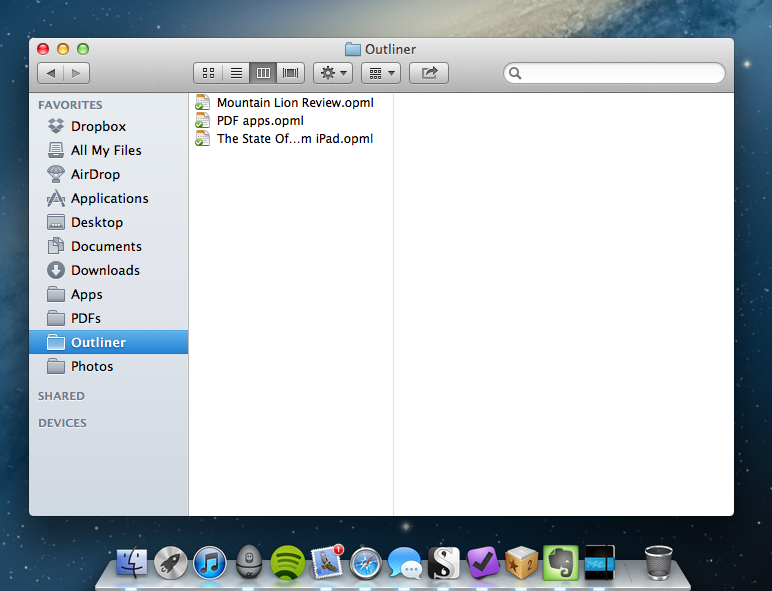
OmniOutliner and CarbonFin Outliner. I have recommended these two apps in the past, but they’re worth a second mention. For my review, I created an outline on my iPhone months ago and started adding new ideas and notes from there. On iOS, I like Outliner because it supports Dropbox and has a simpler interface than OmniOutliner for adding notes and indenting elements. But on the Mac, I rely on The Omni Group’s app because it’s got the best support for keyboard shortcuts and notes – which are both essential to my workflow.

NoMoreiTunes. I had to look up several iTunes applications in the past week, and this Safari extension did the trick (read: it doesn’t launch iTunes when Safari opens an iTunes link).

Markdown Service Tools. Because sometimes I want to use my Mac’s contextual menu to quickly generate HTML off some Markdown.

Macdrifter’s Dictionary Macro. Mountain Lion features a new three-finger single-tap action for Dictionary lookups and file previews, but some apps don’t recognize this gesture. If you use Keyboard Maestro, this is a nice way to forward any selected word to Dictionary.

Evernote. While my writing happened in Scrivener, all other research material that didn’t strictly belong to the article went into Evernote. With it, I use a combination of other apps and hacks that make it easy to save URLs, images, and just about anything. I use EverWebClipper to quickly beam URLs into Evernote from Mobile Safari; lately, I’ve also been playing with EverClip, which doesn’t feature a bookmarklet but can run in the background (“listening” for every new copied file) for 10 minutes. It’s sort of like Pastebot, but for Evernote, which is nice. To automate the process of saving links while on my Mac, I use a couple of AppleScripts put together by our Don Southard, which are obviously configured to work with Keyboard Maestro.

Captio. Indispensable utility to quickly save new tasks into my OmniFocus database.

iFiles. Following GoodReader’s somewhat unexpected removal of its iCloud-based file storage, iFiles came out with a similar functionality, and it works pretty well. iFiles hasn’t received a major update in months – apparently, the developer is working on a 2.0 version – but this iCloud integration is interesting, and works as you’d expect from an iOS file manager.

Last, IFTTT. If I’m not writing, I’m typically distracted by Internet while I browse around looking for interesting stuff. To make sure I can focus on writing without missing out on cool links, I have set up IFTTT to backup favorite tweets and starred Google Reader items to my Evernote and as a text file in my Dropbox. This way, if these services go down or will someday cease to support these functionalities, I’ll still have a complete archive of everything I had saved.

Access Extra Content and Perks

Founded in 2015, Club MacStories has delivered exclusive content every week for nearly a decade.

What started with weekly and monthly email newsletters has blossomed into a family of memberships designed for every MacStories fan.

Learn more here and from our Club FAQs.

Club MacStories: Weekly and monthly newsletters via email and the web that are brimming with apps, tips, automation workflows, longform writing, early access to the MacStories Unwind podcast, periodic giveaways, and more;

Club MacStories+: Everything that Club MacStories offers, plus an active Discord community, advanced search and custom RSS features for exploring the Club’s entire back catalog, bonus columns, and dozens of app discounts;

Club Premier: All of the above and AppStories+, an extended version of our flagship podcast that’s delivered early, ad-free, and in high-bitrate audio.

Learn more here and from our Club FAQs.


#MacStoriesDeals - Monday

Here are today’s @MacStoriesDeals on hardware, iOS, and Mac apps that are on sale for a limited time, so get them before they end!
Read more

Access Extra Content and Perks

Founded in 2015, Club MacStories has delivered exclusive content every week for nearly a decade.

What started with weekly and monthly email newsletters has blossomed into a family of memberships designed for every MacStories fan.

Learn more here and from our Club FAQs.

Club MacStories: Weekly and monthly newsletters via email and the web that are brimming with apps, tips, automation workflows, longform writing, early access to the MacStories Unwind podcast, periodic giveaways, and more;

Club MacStories+: Everything that Club MacStories offers, plus an active Discord community, advanced search and custom RSS features for exploring the Club’s entire back catalog, bonus columns, and dozens of app discounts;

Club Premier: All of the above and AppStories+, an extended version of our flagship podcast that’s delivered early, ad-free, and in high-bitrate audio.

Learn more here and from our Club FAQs.


Tweetbot for Mac: Public Alpha Review

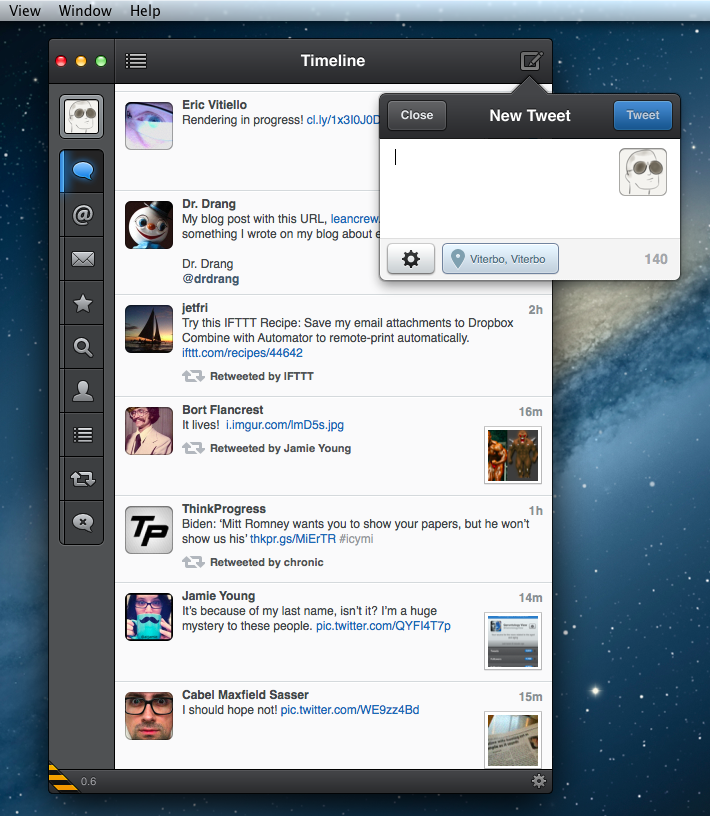
Today, Tapbots released the first public alpha of Tweetbot for Mac. This is not a final review of the app: being in the development stage – albeit ready to be tested by the public – Tweetbot for Mac is still lacking several features that will be available in the final Mac App Store version (such as iCloud sync and Notification Center support), and for this reason I’ll save my full analysis of the app for the future.

However, I have been testing Tweetbot for the past week, and I can say that it already is the best Twitter client available on the Mac. Read more

Access Extra Content and Perks

Founded in 2015, Club MacStories has delivered exclusive content every week for nearly a decade.

What started with weekly and monthly email newsletters has blossomed into a family of memberships designed for every MacStories fan.

Learn more here and from our Club FAQs.

Club MacStories: Weekly and monthly newsletters via email and the web that are brimming with apps, tips, automation workflows, longform writing, early access to the MacStories Unwind podcast, periodic giveaways, and more;

Club MacStories+: Everything that Club MacStories offers, plus an active Discord community, advanced search and custom RSS features for exploring the Club’s entire back catalog, bonus columns, and dozens of app discounts;

Club Premier: All of the above and AppStories+, an extended version of our flagship podcast that’s delivered early, ad-free, and in high-bitrate audio.

Learn more here and from our Club FAQs.


Twitter, Twitter 4.3, and The Mixed Message

The new Twitter recap

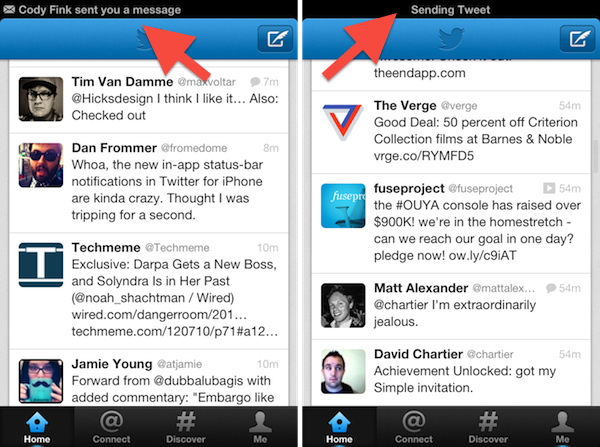
As I was telling a fellow compatriot on Twitter, the Twitter apps exist as the gateway drug. Twitter’s app isn’t for the Tweetbot socialites who are connected to their timelines 24/7, nor is it for the Twitterrific users who treat Twitter as the break room water cooler. While many writers were waxing poetic on a disappointing update following the leave of Loren Brichter from Twitter, I tried to look at how Twitter was making their experience friendlier for everyone, and not just for the power users (who have, admittedly, established Twitter as what it is today).

Twitter’s focus shifted to answer two questions, “How do we retain users who leave because they don’t get Twitter, and how do we make money?“ The Twitter app exists not to serve people who want to mange their timelines, but for people just joining the service. It exists to show new users what Twitter is all about: this was made obvious with the Connect tab ousting Direct Messages. Its sole admission is to help newcomers get accustomed to finding and following people, things, or companies they are interested in. Then there’s Promoted Tweets which insert themselves into your timeline — it’s as intrusive as an advertisement but so far minimally impacts the experience. Twitter’s app is designed to show what you can do in (what I think) is an aesthetically pleasant package. It’s not for you, Tweetbot users.

Trying to defend Twitter gets people upset. Most everyone who read MacStories and are interested in tech want features — they want the Twitter emblematic of Tweetie and Tweetbot, not of the new Twitter. And I certainly understand that Twitter took away what was once an optimal experience for lots of people. In my approach, I understand that while Twitter shunned power users (which Tweetie users happened to be), they’re trying to make something everyone can use. It’s not an app fraught with finicky settings, but rather an app that provides a simple, core experience. I initially reviewed Twitter from a perspective of a newcomer — I think the app looks nice and for what functionality it does provide, that functionality works as intended. Unfortunately for Twitter, this message isn’t getting across. The audience Twitter wants (the audience I tried to put myself in) isn’t as vocal as the established user base is.

Let’s be honest: even I, despite trying to account for what new Twitter really is, use Tweetbot — heck, I still go back to my old favorite Twitterrific from time to time. And I don’t think anyone should mind that Twitter’s app exists as-is if Twitter is presenting their app as the gateway, and not as the path. I’m in agreement with what Twitter is trying to do as long as their app coexists peacefully with 3rd party Twitter clients. However, I’m not going to continue making my claim for why Twitter’s experience is okay if they’re shunning 3rd party developers and sending mixed messages in the process. I’m not okay with Twitter’s experience being the only experience.

Read more

Access Extra Content and Perks

Founded in 2015, Club MacStories has delivered exclusive content every week for nearly a decade.

What started with weekly and monthly email newsletters has blossomed into a family of memberships designed for every MacStories fan.

Learn more here and from our Club FAQs.

Club MacStories: Weekly and monthly newsletters via email and the web that are brimming with apps, tips, automation workflows, longform writing, early access to the MacStories Unwind podcast, periodic giveaways, and more;

Club MacStories+: Everything that Club MacStories offers, plus an active Discord community, advanced search and custom RSS features for exploring the Club’s entire back catalog, bonus columns, and dozens of app discounts;

Club Premier: All of the above and AppStories+, an extended version of our flagship podcast that’s delivered early, ad-free, and in high-bitrate audio.

Learn more here and from our Club FAQs.


Apple Cracking Down On Sites Selling Access To iOS Betas

Last month, Andy Baio wrote a story for Wired detailing the world of selling access to Apple beta software to non-developers. Specifically, Baio’s piece focused on sites that, for a price, allowed regular people to have their UDID (unique device identifier) activated for installation of iOS betas, which Apple makes available for developers only. To install an iOS beta, a developer has to register his/her account with Apple, which costs $99 per year and allows for the configuration of 100 devices in the so-called “Provisioning Portal” through the aforementioned UDID.

While becoming a registered developer costs $99, sites selling UDID activation did so for a low price, usually within the range of $10. Baio wrote:

For a small developer, unauthorized activations are a lucrative business that’s likely worth the risks. UDID Activation publishes their order queue on their official site, which shows more than 2,300 devices activated in the last week alone. At $8.99 for each activation, that’s more than $20,600 in revenue, with $2,277 paid to Apple for the 23 developer accounts. Their homepage claims that more than 19,000 devices were activated so far, and that’s only one of several services. And since device activations only last for a year, each service can reuse their expired slots with no additional cost.

After noticing several of the sites mentioned in Baio’s article had become unavailable in recent weeks (activatemyios.com, iosudidregistrations.com, activatemyudid.com, udidregistration.com, instantudidactivation.com), we reached out to some of them asking whether Apple was behind the takedown of their “services”, which infringed on Apple’s developer agreement. While most of our emails bounced, we heard back from one of the site owners (who asked to remain anonymous), who confirmed his hosting provider took down the site after a complaint for copyright infringement by Apple. Similarly, the CEO of Fused tweeted in a reply to Andy Baio that Apple had been “fairly heavy-handed” with DMCA requests to UDID-selling sites hosted on their network.

In the email, the site owner said that their website made $75,000 since last June, when Apple released the first beta of iOS 6 to developers. “We do not believe our service was infringing and our services did not violate their guidelines for iOS 6”, the site owner commented, adding that they will soon launch another similar site, “with better and more secure data lines to handle Apple”.

The owner of another site replied to our emails with a “no comment”. According to him, “the Wired article has caused all these sites to go down”.

Indeed, it appears Apple has started taking action against these sites recently, and more precisely after Wired ran the story on UDID activation. Last year, Apple reportedly closed developer accounts of people who sold their available UDID slots to other users; this year, it appears Apple has chosen the more direct path of shutting down websites and their services by filing DMCA requests to their hosting providers.

When Wired published its story, Apple added that “unauthorized distribution is prohibited, and may be subject to both civil and criminal liability”. It is unclear whether Apple terminated memberships to the Developer Program this year as well.

Surprisingly, one of the most popular sites selling access to iOS betas, udidactivation.com, is still online. However, their “UDID order queue” – a webpage displaying the amount of total sales – fails to load, and the same page on their “backup site”, udidactivation.us, displays the latest sales as being from June 28.

Apple seems to have taken action against sites selling access to OS X beta downloads, as well. A popular one, iMZDL.com, put a notice on their website saying “we will no longer be putting up downloads on iMZDL.com for Apple Betas”. Their website is still up, and rather than hosting the download links themselves, they have now switched to torrents for sharing links to iOS and OS X betas.

As we previously wrote, access to Apple beta software should be restricted to developers, as they know how to provide meaningful feedback and report bugs to Apple.

Access Extra Content and Perks

Founded in 2015, Club MacStories has delivered exclusive content every week for nearly a decade.

What started with weekly and monthly email newsletters has blossomed into a family of memberships designed for every MacStories fan.

Learn more here and from our Club FAQs.

Club MacStories: Weekly and monthly newsletters via email and the web that are brimming with apps, tips, automation workflows, longform writing, early access to the MacStories Unwind podcast, periodic giveaways, and more;

Club MacStories+: Everything that Club MacStories offers, plus an active Discord community, advanced search and custom RSS features for exploring the Club’s entire back catalog, bonus columns, and dozens of app discounts;

Club Premier: All of the above and AppStories+, an extended version of our flagship podcast that’s delivered early, ad-free, and in high-bitrate audio.

Learn more here and from our Club FAQs.


Get A Sense Of What A 7.85” iPad mini Would Be Like

Rumors of a smaller iPad were back again this week with a report from Bloomberg and since then the rumor mill has been in full swing. Not much detail was in the rumor, other than it’s a smaller iPad and that it’ll launch later this year. Earlier in the year, the display was rumored to be around 7.85” and A.T. Faust of AppAdvice gave compelling reasons as to why it makes sense. That number seems to have stuck around with this latest round of iPad mini rumors.

“The reason we [won’t] make a 7-inch tablet isn’t because we don’t want to hit [a lower] price point,” Jobs said. “It’s because we think the screen is too small to express the software. As a software driven company, we think about the software strategies first.” - AllThingsD

When I read the rumors this week I sighed, not again. I wasn’t the only one either, an iPad mini seems like a compromise, with little advantage. Plus the old Steve Jobs quote about 7 inch iPads just kept circling around. But others weren’t so closed minded and were considering whether it might actually have a place in Apple’s product line.

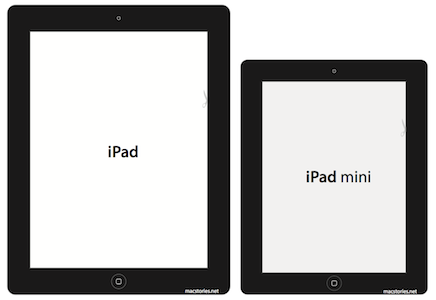
The biggest issue I have is with the screen, and whether the screen can still be sufficiently useful at the smaller size. To find out, I decided to do the old hack of making a little paper template of the iPad mini and see how it looked. I decided to stick with the 7.85” diagonal display size suggested and use a bezel only slightly smaller than those on the current iPad. For comparison I also made a paper template for the current iPad and versions of both with the bevel colored in. You can download, print and cut them out for yourself.

Note: make sure when printing that it isn’t being scaled up or down, as that will adjust the size of the “screen”. Check the little measurement guides to ensure it printed out correctly.

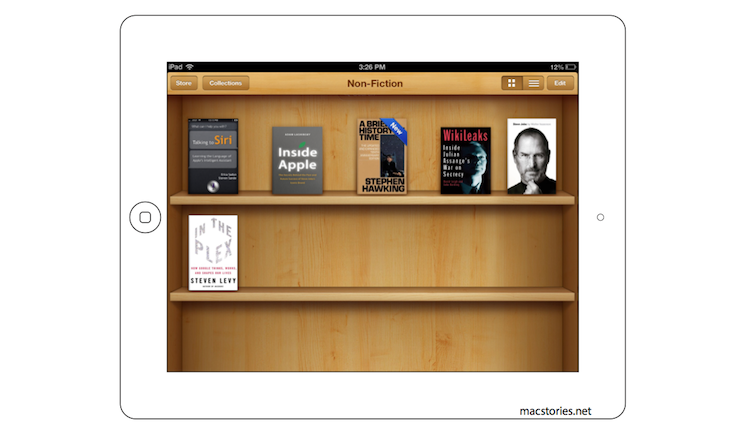
That was all good and well, but it didn’t really give me a sense of what the UI might look like on an iPad mini. So I decided to take some screenshots and shrink them down to the appropriate size. But I also made a duplicate copy of the screenshot and using Photoshop, reconfigured the UI to fit on a 7.85” display without adjusting the size of the buttons. To my mind that’s the only way that Apple would do this - Apple does frequently remind iOS designers to keep buttons at a tappable size (mentioned prominently in iOS Human Interface Guide), just shrinking the current iPad display would make buttons more difficult to tap.

Finally I put it all together into a Keynote presentation so that I could view it on my iPad and visibly see and compare how it would look. I’ve uploaded it, so you can do the same yourself. You just need Keynote for iOS and go into presentation mode to look at it yourself. If you want to go the extra step, cut your iPad mini template out and place it on top of your iPad whilst viewing the screenshots.

Read more

Access Extra Content and Perks

Founded in 2015, Club MacStories has delivered exclusive content every week for nearly a decade.

What started with weekly and monthly email newsletters has blossomed into a family of memberships designed for every MacStories fan.

Learn more here and from our Club FAQs.

Club MacStories: Weekly and monthly newsletters via email and the web that are brimming with apps, tips, automation workflows, longform writing, early access to the MacStories Unwind podcast, periodic giveaways, and more;

Club MacStories+: Everything that Club MacStories offers, plus an active Discord community, advanced search and custom RSS features for exploring the Club’s entire back catalog, bonus columns, and dozens of app discounts;

Club Premier: All of the above and AppStories+, an extended version of our flagship podcast that’s delivered early, ad-free, and in high-bitrate audio.

Learn more here and from our Club FAQs.