Posts in Featured

The Numbers From Apple’s October 23 Event

As usual with every Apple product announcement, keynotes start with “state of the business” introduction that, through various numbers and facts, reveals how the company is doing in several areas such as retail, the App Store, and hardware sales. At today’s media event in San Jose, Apple CEO Tim Cook shared some interesting details on a variety of subjects.

  • iPhone 5 is off to a “tremendous start”. It’s been the fastest-selling opening weekend in the history of mobile phones.
  • Apple has already sold 3 million units of the new iPods (combined with the rest of the line-up).
  • 200 million devices have been updated to iOS 6.
  • 125 million documents have been stored in iCloud.
  • 300 billion iMessages have been sent to date.
  • 28,000 iMessages are sent every second.
  • 160 million Game Center accounts have been created.
  • 70 million photos have been shared with Photo Stream.
  • 700,000 iOS apps are available, 275,000 iPad apps.
  • Customers have now downloaded 35 billion apps from the App Store.
  • $6.5 billion have been paid to developers.
  • 1.5 million books are available on iTunes.
  • 400 million books have been downloaded since the launch of the Store.

For more coverage, check out our October 23 news hub and follow @macstoriesnet on Twitter.

Access Extra Content and Perks

Founded in 2015, Club MacStories has delivered exclusive content every week for nearly a decade.

What started with weekly and monthly email newsletters has blossomed into a family of memberships designed for every MacStories fan.

Learn more here and from our Club FAQs.

Club MacStories: Weekly and monthly newsletters via email and the web that are brimming with apps, tips, automation workflows, longform writing, early access to the MacStories Unwind podcast, periodic giveaways, and more;

Club MacStories+: Everything that Club MacStories offers, plus an active Discord community, advanced search and custom RSS features for exploring the Club’s entire back catalog, bonus columns, and dozens of app discounts;

Club Premier: All of the above and AppStories+, an extended version of our flagship podcast that’s delivered early, ad-free, and in high-bitrate audio.

Learn more here and from our Club FAQs.


#MacStoriesDeals - Monday

Here are today’s @MacStoriesDeals on hardware, iOS, and Mac apps that are on sale for a limited time, so get them before they end!
Read more

Access Extra Content and Perks

Founded in 2015, Club MacStories has delivered exclusive content every week for nearly a decade.

What started with weekly and monthly email newsletters has blossomed into a family of memberships designed for every MacStories fan.

Learn more here and from our Club FAQs.

Club MacStories: Weekly and monthly newsletters via email and the web that are brimming with apps, tips, automation workflows, longform writing, early access to the MacStories Unwind podcast, periodic giveaways, and more;

Club MacStories+: Everything that Club MacStories offers, plus an active Discord community, advanced search and custom RSS features for exploring the Club’s entire back catalog, bonus columns, and dozens of app discounts;

Club Premier: All of the above and AppStories+, an extended version of our flagship podcast that’s delivered early, ad-free, and in high-bitrate audio.

Learn more here and from our Club FAQs.


Tweetbot for Mac Review

When the first alpha of Tweetbot for Mac came out in July, I said I would take a look at the app again. Here we are, three months later, with the final version of Tweetbot for Mac available on the App Store.

I concluded my review of the public alpha version with:

Right now, Tweetbot for Mac is, in my opinion, already superior to any other client for OS X — and it still can be improved. More importantly, Tweetbot makes better use of Twitter features than Twitter’s own Mac app, and that says a lot about the importance of third-party clients in this ecosystem.

In calling the alpha version of Tweetbot a “superior” product, I took quite a stance. I had been using the alpha for weeks before the public release, and I had the perspective and context to make a conscious and reasonable decision about my statement. I knew I was going to like Tweetbot and use it on a daily basis. Three months later, that’s still the case.

I’ll get to the point right away. Tweetbot is, in my opinion, the best Twitter client for Mac. From my perspective, no other app gets closer to the amount of polish and functionality that Tapbots poured into their latest creation, making it the most powerful, fast, and elegant Twitter app I’ve seen on OS X to date. In hindsight, it’s also a superior product than Twitter for Mac, which, as you may recall, used to be my go-to client. Three months ago I reviewed an app that I knew was going to be great.

In thinking about how I should approach this new review, I came to the conclusion that you don’t need me to go through the backstory of Twitter clients on the Mac. Here’s what I wrote, again, for context:

Ever since Loren Brichter (creator of the original Tweetie, who sold his app to Twitter and went on to work there) left the company, Twitter for Mac — what I had deemed as the best Twitter client for OS X — fell into an unexplainable state of abandon and lack of updates. You would think it’s in Twitter’s best interest to keep a native client up to date with the latest features of the service; and yet, after a solid first version — which came after years of speculation on Tweetie 2 — Twitter started ignoring the app, failing to bring several of Twitter’s new features (such as inline media and updated search) to the desktop. It only got worse recently: after many updates to Lion, Twitter for Mac has started showing new bugs and glitches that haven’t been fixed by Twitter, alongside the ones that have always been there and were never corrected. And then with the release of the Retina MacBook Pro, Twitter’s lack of support for high-res text and graphics became the proverbial final nail in the coffin of what used to be a great app.

Twitter for Mac still hasn’t received an update since last year. Some say it’s no longer in development.

In my review of Tweetbot Alpha, I briefly touched upon features that were missing from the app:

For instance, there is limited support for keyboard shortcuts, there are some rough edges around the interface, and one of my favorite features of Twitter for Mac — being able to navigate and switch sections with gestures — isn’t yet available. Indeed, Tapbots say that features like better management of multiple windows will be coming in the future, and they confirmed in a blog post that they are planning “ on making everything as beautiful and pixel perfect” as they can. Don’t be surprised if, in this version, some pixels will look misaligned or out of place. Eventually, it will all be fixed.

It is with this standpoint that I want to look at Tweetbot again: you don’t need me to know what Tweetbot is or what it looks like. Between the Mac and iOS, we’ve covered Tweetbot extensively here at MacStories.

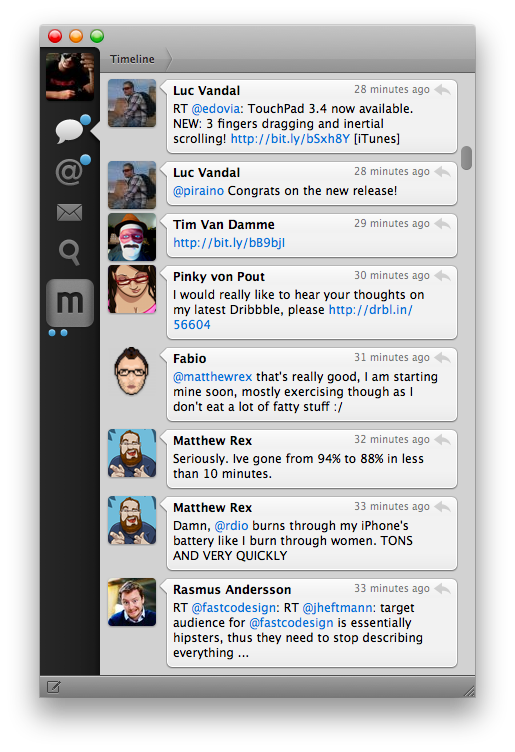
What follows is my review of Tweetbot 1.0 based on how I use the final version of the app. The little features and the details I’ve come to rely upon, and the overall functionality that makes Tweetbot the best Twitter client for Mac. Read more

Access Extra Content and Perks

Founded in 2015, Club MacStories has delivered exclusive content every week for nearly a decade.

What started with weekly and monthly email newsletters has blossomed into a family of memberships designed for every MacStories fan.

Learn more here and from our Club FAQs.

Club MacStories: Weekly and monthly newsletters via email and the web that are brimming with apps, tips, automation workflows, longform writing, early access to the MacStories Unwind podcast, periodic giveaways, and more;

Club MacStories+: Everything that Club MacStories offers, plus an active Discord community, advanced search and custom RSS features for exploring the Club’s entire back catalog, bonus columns, and dozens of app discounts;

Club Premier: All of the above and AppStories+, an extended version of our flagship podcast that’s delivered early, ad-free, and in high-bitrate audio.

Learn more here and from our Club FAQs.


Apple Confirms: Media Event on October 23

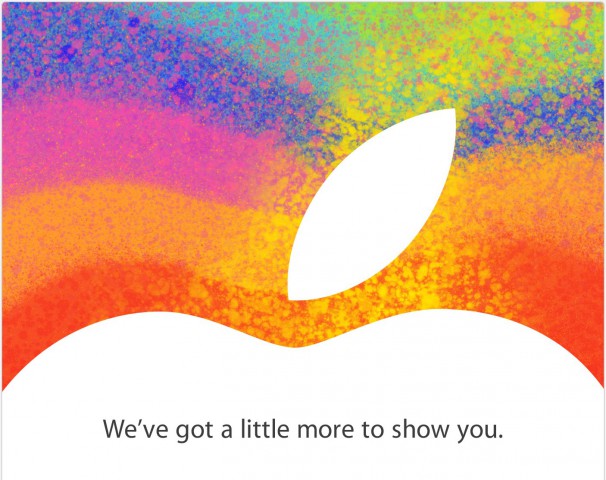
As first reported by The Loop’s Jim Dalrymple, Apple just sent out invitations to the press for a media event taking place on October 23 in San Jose. The invitations show an Apple logo with the tag line “We’ve got a little more to show you”.

Unlike other recent events that have been held at the Yerba Buena Center for the Arts in San Francisco, Apple will hold this event at the California Theatre in San Jose .

According to recent speculation, Apple will unveil a new, smaller 7.85-inch iPad at the event dubbed “iPad Mini”. The device has been long rumored to be a smaller version of the last-gen iPad 2, carrying the same 1024x768 non-Retina display in a thinner and lighter body with a smaller display. The core feature of the iPad Mini should be portability, as well as a reduced price for consumers.

Curiously enough, the invitation is somewhat reminiscent of the one sent for the original iPad event in January 2010.

As noted by Jason Snell, the last time Apple held an event in San Jose at California Theater was for the iPod photo announcement with a Bono/Edge live performance.

Based on more recent rumors, next week may also see the introduction of refreshed iMac, MacBook Pro, and Mac mini lines. Specifically, Apple is rumored to be planning a 13-inch version of the MacBook Pro with Retina display, a thinner iMac, and a new Mac mini model.

To get a sense of what a 7.85” (as opposed to 9.7”) iPad Mini would be like, check out our mockups from July.

Access Extra Content and Perks

Founded in 2015, Club MacStories has delivered exclusive content every week for nearly a decade.

What started with weekly and monthly email newsletters has blossomed into a family of memberships designed for every MacStories fan.

Learn more here and from our Club FAQs.

Club MacStories: Weekly and monthly newsletters via email and the web that are brimming with apps, tips, automation workflows, longform writing, early access to the MacStories Unwind podcast, periodic giveaways, and more;

Club MacStories+: Everything that Club MacStories offers, plus an active Discord community, advanced search and custom RSS features for exploring the Club’s entire back catalog, bonus columns, and dozens of app discounts;

Club Premier: All of the above and AppStories+, an extended version of our flagship podcast that’s delivered early, ad-free, and in high-bitrate audio.

Learn more here and from our Club FAQs.


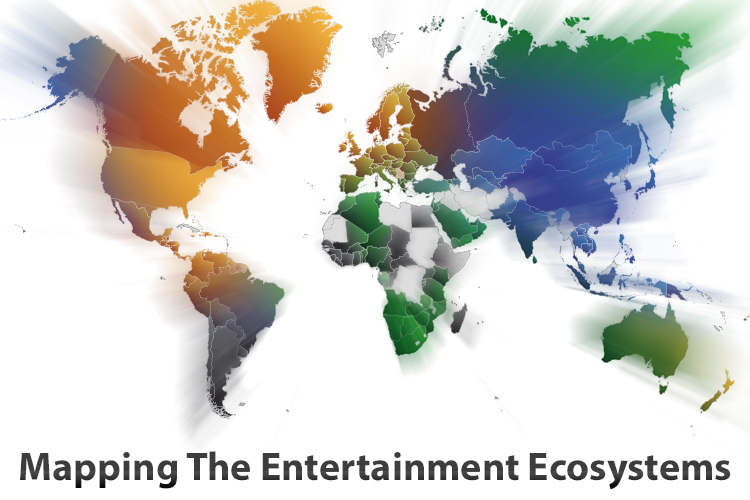
Mapping The Entertainment Ecosystems of Apple, Microsoft, Google & Amazon

Please note: An update to this article is available here, it includes the December 2012 iTunes expansion (Music & Movies) as well as Xbox Music.


The choice of what phone or tablet to buy is one that often involves many considerations, chief amongst those is the physical device and the operating system that it runs. But I think there is a third fundamental consideration that is growing in importance: what services and entertainment ecosystems you’ll be able to access. You need only look back to the recent criticism of iOS 6, in which Apple replaced Google Maps with their own Maps app. Summing it up generally, Apple’s Maps app is sub-par to what it was replacing and that mattered to people - enough that Tim Cook felt the need to apologise for the frustration the switch caused.

Today I want to focus specifically on the entertainment ecosystems of Apple, Google, Microsoft and Amazon. I’m referring to the various digital content stores that are run by Apple, Microsoft, Google and Amazon - specifically their Music, Movies, TV Shows, eBooks and App stores. In my mind, there are four general aspects that make a good entertainment ecosystem:

  • Wide selection of quality content
  • Competitive prices
  • International availability
  • Interoperable on a user’s devices

I want to explore the third aspect in depth today, because it’s something that I feel is all too often downplayed by the technology press (which, coincidentally, is based predominantly in the US). I’ll also briefly discuss the fourth aspect as well at the end. Why are these two aspects so important? Well, smartphones and tablets are devices that have universal appeal, so for Apple or any of the other three to win the smartphone or tablet “race” - an entertainment ecosystem that is available across the world, not just in the US, isn’t just a cool extra feature, it’s a necessity. The US may be one of the biggest markets for such devices today, but is there any doubt that these devices will rival the prevalence of personal computers (which are everywhere) in years to come?

I’ve collected data on which countries each service is available in and then added in population figures to create many of the graphs and diagrams you’ll see below, mixed in with some of my own analysis and thoughts. Please note that the five HTML5 map diagrams are interactive, click on the logos of the four companies to compare their coverage.

Read more

Access Extra Content and Perks

Founded in 2015, Club MacStories has delivered exclusive content every week for nearly a decade.

What started with weekly and monthly email newsletters has blossomed into a family of memberships designed for every MacStories fan.

Learn more here and from our Club FAQs.

Club MacStories: Weekly and monthly newsletters via email and the web that are brimming with apps, tips, automation workflows, longform writing, early access to the MacStories Unwind podcast, periodic giveaways, and more;

Club MacStories+: Everything that Club MacStories offers, plus an active Discord community, advanced search and custom RSS features for exploring the Club’s entire back catalog, bonus columns, and dozens of app discounts;

Club Premier: All of the above and AppStories+, an extended version of our flagship podcast that’s delivered early, ad-free, and in high-bitrate audio.

Learn more here and from our Club FAQs.


Pinbook: A Fast Pinboard Client for iPhone

For all its popularity, there’s always been a shortage of great Pinboard clients for iOS. Pinboard, a bookmarking service I use on a daily basis, has a very clean and fast website that works fine on the iPhone and iPad, but I’ve always been looking forward to having a client with all the perks of native code: clipboard integration, support for URL schemes, and caching are just a few options that come to mind. However, in spite of the service’s growing userbase, I haven’t been able, in four years of App Store, to find a Pinboard app I could rely on.

Pinbook by Collin Donnel finally provides a (partial, for now) solution to this problem. Released a few days ago on the App Store, Pinbook for iPhone is the best Pinboard client to date, in spite of the lack of numerous Pinboard-related functionalities in the app.

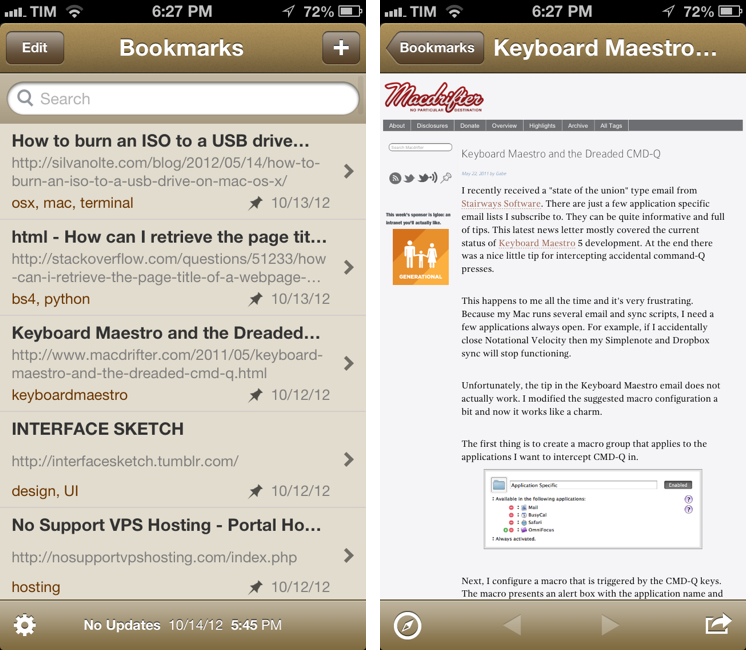
Pinbook is fast. Using Apple’s own pull to refresh mechanism, the app takes a second to refresh your Pinboard account and fetch the latest bookmarks. From my tests, the initial sync (I have 388 bookmarks) took just a few seconds. Pinbook is snappy, and scrolling through hundreds of bookmarks is butter-smooth, as you’d expect from any great iOS app. You can tap on a bookmark to open it in the in-app browser, which features a button to open the link in Safari, and another one to bring up the native iOS 6 share sheet (which includes an Instapaper button). As far as browsing bookmark is concerned, Pinbook’s workflow is extremely simple and effective.

In the main screen, you can swipe on a bookmark to delete it, or tap & hold to open the share sheet. However, as you’ll notice, you won’t be able to tap on the tags underneath a bookmark’s title: one of Pinbook’s current limitations is the inability to explore the various sections offered by Pinboard. In Pinbook 1.0, you can’t browse the global feed of a specific tag, open a user’s profile, or view the Popular page (something I do every day on my Mac); you can only view your bookmarks and search amongst them. For search, you can refine your query by title, tags, or notes; unfortunately, there’s no auto-complete for existing tags.

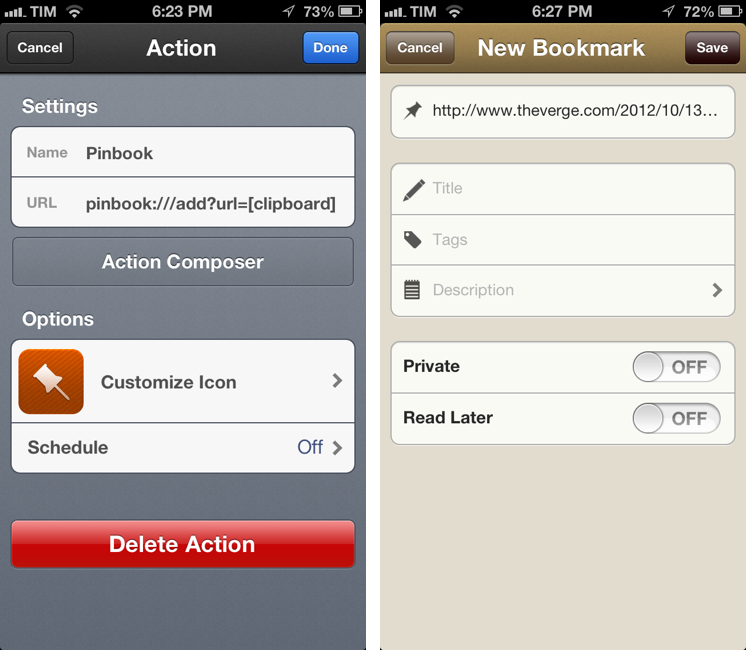
Pinbook lets you add new bookmarks directly from the app. The New Bookmark screen allows you to add a URL, title, tags, a description, and to choose whether you want a bookmark to be “private” or set to “read later”. The app comes with clipboard detection: it recognizes when a URL has been copied, but just like lack of tag auto-complete (which is absent from this screen as well), Pinbook can’t automatically fetch a webpage’s title. So when you add a URL, unless you type a title manually you’ll end up with the URL itself being the bookmark’s title.

Pinbook comes with a URL scheme. Documented here, it has arguments for URL, titles, tags, and description; if you’re thinking about setting up Pinbook with Launch Center Pro, be aware the arguments will have to be properly encoded.

I think there are several additions the developer could make to Pinbook to make it a more complete app with a faster workflow. Firstly, I’d like to have a bookmarklet that sends a page’s URL and title to Pinbook; for as much as Launch Center support is handy, it doesn’t allow me to copy two arguments simultaneously to the iOS clipboard. The great thing about the Pinboard bookmarklet is that it grabs a link’s URL and title automatically, and then offers suggested tags with auto-completion: Pinbook should do the same.

An iPad version and more navigation options would also be welcome. Like I said, I don’t just use Pinboard to add new bookmarks, but also to discover new ones added by someone else. Access to Popular page and user profiles would be a start.

In spite of the features it lacks, Pinbook is still the best Pinboard client for iPhone to date. Not simply because of the shortage of competition – the app really is fast, easy to use, and responsive. Here’s to hoping more functionalities will come relatively soon without hampering the app’s focus on simplicity and speed.

Pinbook is available at $4.99 on the App Store.

Access Extra Content and Perks

Founded in 2015, Club MacStories has delivered exclusive content every week for nearly a decade.

What started with weekly and monthly email newsletters has blossomed into a family of memberships designed for every MacStories fan.

Learn more here and from our Club FAQs.

Club MacStories: Weekly and monthly newsletters via email and the web that are brimming with apps, tips, automation workflows, longform writing, early access to the MacStories Unwind podcast, periodic giveaways, and more;

Club MacStories+: Everything that Club MacStories offers, plus an active Discord community, advanced search and custom RSS features for exploring the Club’s entire back catalog, bonus columns, and dozens of app discounts;

Club Premier: All of the above and AppStories+, an extended version of our flagship podcast that’s delivered early, ad-free, and in high-bitrate audio.

Learn more here and from our Club FAQs.


Shortcat: Spotlight For The User Interface

In my daily workflow, I rely on Alfred for Mac to find files, folders, and apps for me. Since July 2012, I have used Alfred 4,326 times for an average of 46.5 times a day. I use Alfred for a variety of tasks which include (but are not limited to) accessing favorite folders, launching Google search, acting on multiple files through the Buffer, and executing AppleScripts. Alfred is one of my favorite pieces of Mac software, ever.

I like launchers. They simplify my workflow while allowing me to save time and be more efficient. This is why I’ll keep an eye on the development of Shortcat, a new Mac app – currently in public beta – that aims at becoming a launcher for interface elements.

The developers describe Shortcat as “Spotlight for the user interface”, and that’s a fairly accurate description. Essentially, Shortcat relies on support for Assistive Devices (an Accessibility feature of OS X) to be able to “see” the labels of buttons and menus and “click” on them. So, for instance, instead of moving your cursor on the trackpad, you’ll be typing “back” to make Shortcat click the Back button in Safari.

Shortcat works better with apps that leverage Accessibility features and have properly labeled buttons and interface elements. In the app’s Help menu there’s already a list of apps that don’t work properly with Shortcat as it’s unable to “read” (and thus let you find) their interface elements. I am no Accessibility expert, but my guess is that these apps don’t support VoiceOver either.

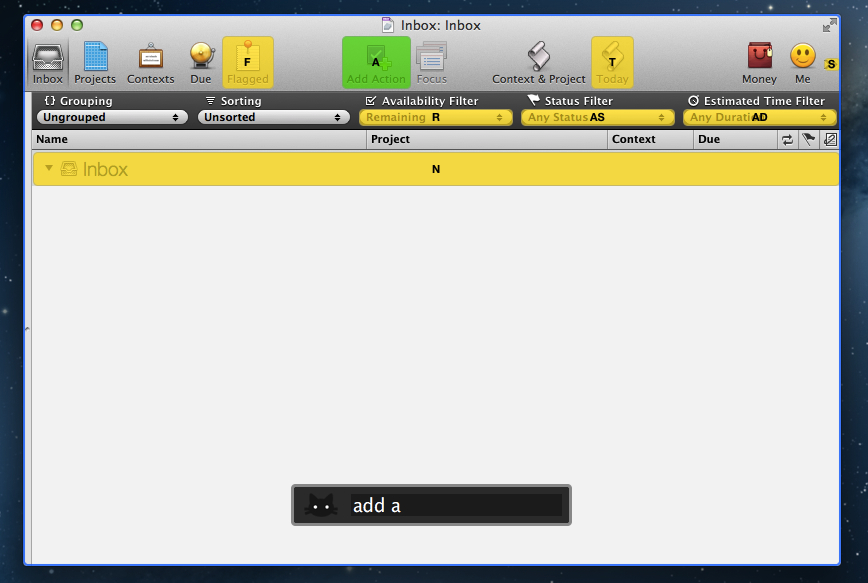
In my tests, Shortcat was a pleasant surprise. If you don’t know about Accessibility, the app will look like a fantastic trick – how can it click for me when I’m just typing? In actual usage, there are some things to be considered. When you invoke the app with a shortcut (it’s customizable from the Terminal in this version) and you start typing, it will highlight areas of an app that match the letters you typed. The best match is highlighted in green, other possible “destinations” for the mouse are yellow. You can click on a button or menu by typing its full name or an abbreviation, such as “Add Action” or “AD” for the toolbar button in OmniFocus.

You can also tell Shortcat to show “hidden” results. By preceding your query with a dot, you’ll be able to reach interface elements that, at first glance, don’t have a label. I tested this with several apps, and, for instance, I was able to type “.1p” to click on the unlabeled 1Password extension in Safari, or “.n” to open the compose box in Tweetbot. Speaking of Safari, you can also use Shortcat to click on website navigation elements such as buttons or text. “Clicking” on hyperlinks with Shortcat will, just like a regular click, open them in a new tab.

Shortcat is an interesting experiment, but it needs more work before being ready for primetime. Its text matching algorithm is good, but still not perfect: sometimes, it associates things like “SYNZ” to “sync”, which isn’t particularly nice to see. I would also like to see a more polished graphical representations of highlights and selected regions of the UI, as right now the highlighting process seems more a “hack” than a consumer product. Also, I’m still not completely sure how, in every day usage, Shortcat could come in handy. Is it a utility to navigate large documents without typing? Or is it an app navigator? In a world of buttons associated with keyboard shortcuts, are virtual clicks really that necessary? Shortcat makes for a cool demo, but it needs to find a stronger message to make people “get” what it’s all about.

You can check out the Shortcat beta for free here.

Access Extra Content and Perks

Founded in 2015, Club MacStories has delivered exclusive content every week for nearly a decade.

What started with weekly and monthly email newsletters has blossomed into a family of memberships designed for every MacStories fan.

Learn more here and from our Club FAQs.

Club MacStories: Weekly and monthly newsletters via email and the web that are brimming with apps, tips, automation workflows, longform writing, early access to the MacStories Unwind podcast, periodic giveaways, and more;

Club MacStories+: Everything that Club MacStories offers, plus an active Discord community, advanced search and custom RSS features for exploring the Club’s entire back catalog, bonus columns, and dozens of app discounts;

Club Premier: All of the above and AppStories+, an extended version of our flagship podcast that’s delivered early, ad-free, and in high-bitrate audio.

Learn more here and from our Club FAQs.


Goodbye Tweetie

The original Tweetie for Mac – the app that went on to become Tweetie 2 or “Twitter for Mac – stopped working today. Twitter cut access to the API endpoint that allowed for it to work, thus effectively “killing” the app for those who were still using it.

Matthew Panzarino writes:

Tweetie for Mac came about on April 20, 2009, and it brought along its own set of UI paradigms that propagated throughout Mac app design culture. The sidebar navigation, for instance, is probably in use on whatever Twitter client you’ve got installed. The ‘nipple’ that indicates the current position on the navigation bar is also a Brichter invention, and now exists in hundreds of apps like Google+, Instapaper and dozens more. It eventually found its way to Tweetie 2 for iPhone as well.

To me, Tweetie was more than an .app bundle available from /Applications in the Finder. It represents a period of my life that I cherish every day.

I joined Twitter in February 2009. As I said, I was jobless at the time. I thought I could try my hand at writing about Apple and Macs, and my girlfriend said “go for it”.

On April 20, 2009, MacStories and Tweetie were born.

Today, we kiss Tweetie goodbye. MacStories and my girlfriend are still around, and my relationship with them is better than ever. I didn’t realize this back when we celebrated the site’s third birthday – that MacStories and Tweetie for Mac launched on the same day.

Tweetie and I had our ups and downs. I loved the app, but I became frustrated with the multiple delays version 2.0 was seeing. I wrote some things about Loren that I’m not proud of. Years later, I apologized to him, but I’m keeping those posts online to remember that sometimes I can be wrong, and ridiculously so. In late 2010, Loren was so gracious to let me beta-test “Tweetie 2.0”, which was launched as Twitter for Mac on the App Store. I used that app until Tweetbot for Mac came out. Loren moved on with his life and left Twitter; I, behind my keyboard, picked a different Twitter client.

I guess, in a way, this site owes much of its success to Tweetie for Mac. I woudn’t have been able to get to know developers, friends, colleagues, and readers if it weren’t for Twitter. If it weren’t for Tweetie, which to me, was Twitter.

I remember using Tweetie all the time. Sometimes I would go days without closing it, keeping it open because I was “looking for news” or trying to get into some new beta of an upcoming iPhone app. Other times I would close Twitter during the night, because, back in the “old days”, Twitter clients – not even Tweetie – had good timeline gap detection.

Tweetie set standards and inspired other developers to create new apps. It won awards, and it marked the starting point of a new era of third-party OS X development.

For me and many others, Tweetie defined Twitter.

Goodbye, Tweetie. Our community is better because of you.

Access Extra Content and Perks

Founded in 2015, Club MacStories has delivered exclusive content every week for nearly a decade.

What started with weekly and monthly email newsletters has blossomed into a family of memberships designed for every MacStories fan.

Learn more here and from our Club FAQs.

Club MacStories: Weekly and monthly newsletters via email and the web that are brimming with apps, tips, automation workflows, longform writing, early access to the MacStories Unwind podcast, periodic giveaways, and more;

Club MacStories+: Everything that Club MacStories offers, plus an active Discord community, advanced search and custom RSS features for exploring the Club’s entire back catalog, bonus columns, and dozens of app discounts;

Club Premier: All of the above and AppStories+, an extended version of our flagship podcast that’s delivered early, ad-free, and in high-bitrate audio.

Learn more here and from our Club FAQs.


Marco Arment’s The Magazine: At The Intersection of Technology and Writing

When people ask me about my job, I usually reply: “I write about technology”.

Just a little over three years ago, I found myself unemployed, so I started MacStories. It wasn’t easy. Not because of WordPress, FTP, or getting black pixels to appear on a white background. I’ve never had a problem with putting words on a screen.

It wasn’t easy because where I live, a small town in Italy, writing about technology sounds a lot like “I spend my days at home looking at a computer while I drink coffee” . Which, to be fair, is a pretty accurate representation of my daily agenda. But how I do it, and why I do it, and understanding the whole idea of seeing technology as more than a bunch of cables – well, that was the not-so-easy part.

It still is. I know it will be for a long time. And yet I keep typing on this keyboard because I think it’s worth it. I do what I can by writing about my experiences.

Because, hopefully, thanks to technology, our kids will have a better future.

Because twenty years from now, people won’t “find out” they have cancer. They will know in advance, thanks to technology.

That’s quite a goal I, and others like me, are priding ourselves upon, you’d argue, when, effectively, what we do is reviewing apps and reflecting on the latest news. In practical terms, that’s what I do. But I see it as more than that.

Writing is about making connections.

In the past three years, I’ve seen how the great technology writers I look up to are able to make connections between topics and streams of thoughts: they look at the big picture.

On the flip side, technology writing, a scene that’s built on its very distinct and yet cohesive communities, has created connections between people. I wouldn’t have met the MacStories team if it weren’t for writing and following the same writers. I wouldn’t have gotten to know friends like Shawn, Stephen, Gabe, David, Matt, Matthew, Justin, Brett, and many more.

In fact, if it weren’t for this little writing thing of ours, I wouldn’t have met any of you.

Great writing creates connections inside and outside of text.

The Magazine

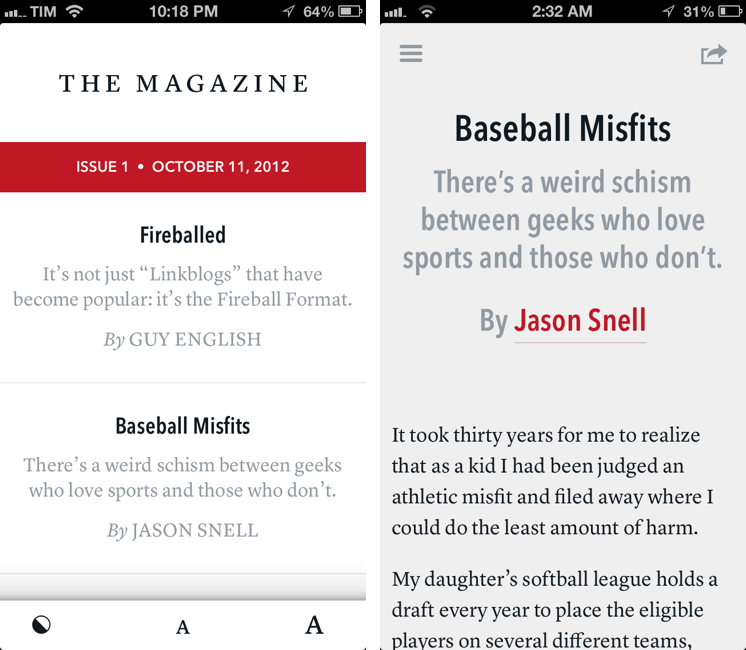
Marco Arment’s The Magazine falls exactly under this aspect of writing. It’s about people who love technology, delivered as a curated collection of articles from great writers. In a way, it’s the opposite of Instapaper: while Marco’s more popular app is what you make of it, The Magazine is Marco’s own vision. So, yes – you’ll have to trust him on this one.

I’ve never met Marco in real life. We’ve exchanged emails a couple of times and perhaps replied to each other on Twitter. The other day we talked about pears on App.net. But see, the great thing about the Internet is that I genuinely like this guy only because of his work and passion for technology.

I think The Magazine is a promising and notable initiative for a variety of reasons. Firstly, for as much as I praise the tech community, there are aspects of it that I’m not particularly fond of. I don’t like rumors and linkbaity headlines. Sometimes I think that it’s too much when a site tries to tell me everything about a topic with 20 articles. In the words of Marco, The Magazine will take a “a measured approach to the big picture” with “meaningful editorial and big-picture articles”. Or, as Guy English writes in “Fireballed” for the first issue, The Magazine is both old and new. It’s old in that it won’t share the same publication schedule of most blogs; it’s new, because it should encourage writers to create more, new “timeless pieces” based on a business model that their “Fireball Format” website wouldn’t probably allow. I suggest you read Guy’s article in the first issue (there is a free 7-day trial).

I’ve heard from several people who received copies of The Magazine in advance that, in hindsight, the idea is obvious. Get articles from great writers and make an app out of it with new content available periodically. To me, The Magazine seemed “obvious” more because of the technology it’s built with.

Earlier this week I wrote a post on how to hide Newsstand from iOS 6. The Magazine is entirely based on Newsstand, and, a year after the launch of iOS 5, it’s the first app that gives it a purpose, at least for me. Read more

Access Extra Content and Perks

Founded in 2015, Club MacStories has delivered exclusive content every week for nearly a decade.

What started with weekly and monthly email newsletters has blossomed into a family of memberships designed for every MacStories fan.

Learn more here and from our Club FAQs.

Club MacStories: Weekly and monthly newsletters via email and the web that are brimming with apps, tips, automation workflows, longform writing, early access to the MacStories Unwind podcast, periodic giveaways, and more;

Club MacStories+: Everything that Club MacStories offers, plus an active Discord community, advanced search and custom RSS features for exploring the Club’s entire back catalog, bonus columns, and dozens of app discounts;

Club Premier: All of the above and AppStories+, an extended version of our flagship podcast that’s delivered early, ad-free, and in high-bitrate audio.

Learn more here and from our Club FAQs.