Posts in Featured

Automating iOS: How Pythonista Changed My Workflow

A couple of months ago, I decided to start learning Python.

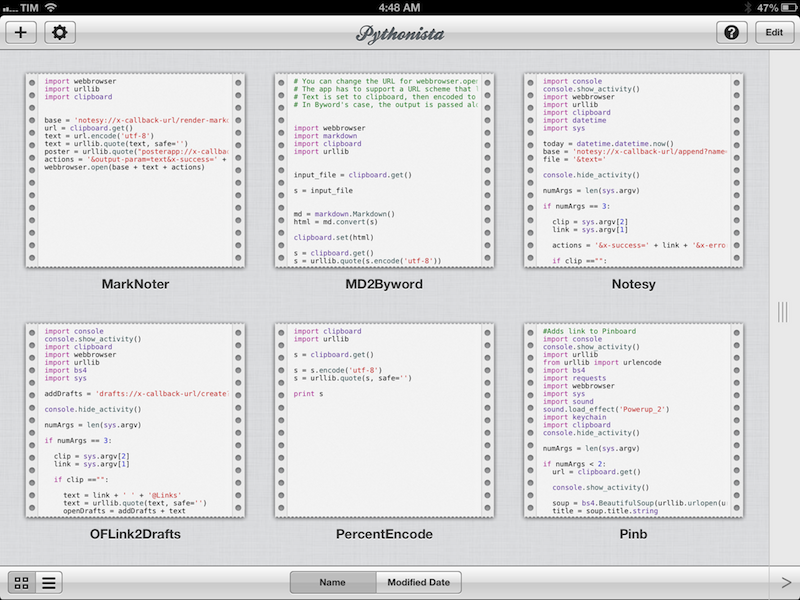
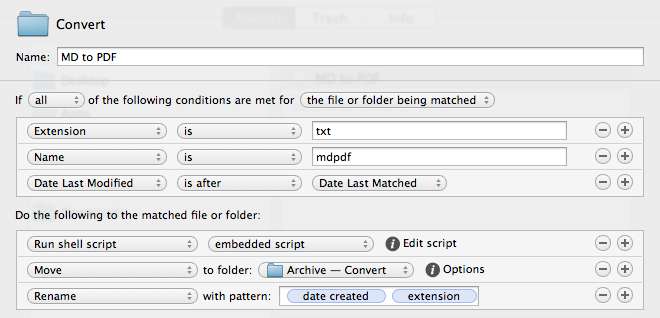
I say “start” because, as a hobby to fit in between my personal schedule and work for the site, learning the language is still very much a work in progress. I hope I’ll get to an acceptable level of knowledge someday. Coming from AppleScript, another language I started researching and playing with earlier this year, the great thing about Python is that it’s surprisingly easy to pick up and understand. As someone whose job primarily consists of writing, I set out to find how Python could improve my workflow based on text and Markdown; I found out – and I’m still finding out – that Python allows for more flexible and intelligent string manipulation[1] and that some very smart folks have created excellent formatting tools for Markdown writers.

But this article isn’t strictly about Python. Soon after I took my decision to (slowly) learn my way around it, I asked my friend Gabe Weatherhead about possible options to write and execute Python scripts on iOS. Thanks to Gabe’s recommendation I installed Pythonista, and this app has completely changed my iOS workflow. Read more

Access Extra Content and Perks

Founded in 2015, Club MacStories has delivered exclusive content every week for nearly a decade.

What started with weekly and monthly email newsletters has blossomed into a family of memberships designed for every MacStories fan.

Learn more here and from our Club FAQs.

Club MacStories: Weekly and monthly newsletters via email and the web that are brimming with apps, tips, automation workflows, longform writing, early access to the MacStories Unwind podcast, periodic giveaways, and more;

Club MacStories+: Everything that Club MacStories offers, plus an active Discord community, advanced search and custom RSS features for exploring the Club’s entire back catalog, bonus columns, and dozens of app discounts;

Club Premier: All of the above and AppStories+, an extended version of our flagship podcast that’s delivered early, ad-free, and in high-bitrate audio.

Learn more here and from our Club FAQs.


Kickstarter: Shaun Inman’s Retro Game Crunch - Six Games in Six Months

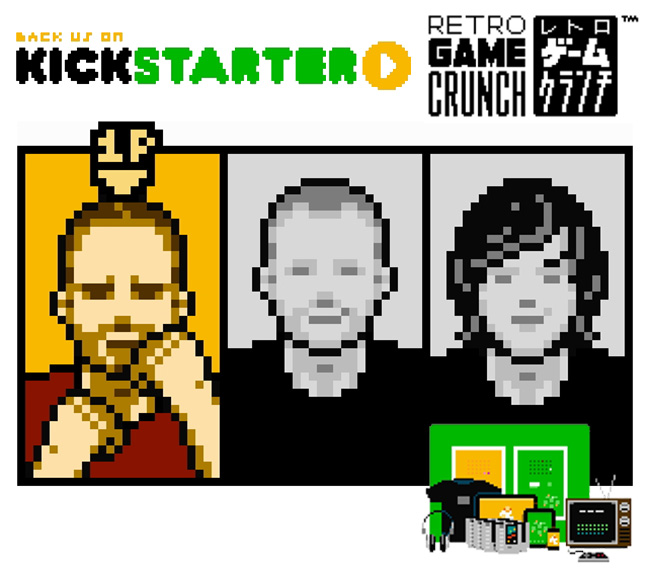
I haven’t covered many Kickstarter projects as of late: it seems many are getting funded but not delivering on time or backers are still waiting for the product to ship. Today, Shaun Inman has launched his own Kickstarter project along with his friends Rusty Moyher, of Bloop fame, and Matt Grimm, a great composer and sound designer of such games as Flip’s Escape. Together they are launching Retro Game Crunch, a Kickstarter series that will try to produce six original games in six months. Sound too good to be true? Normally yes, but with the awesome team I believe it will happen. Read more

Access Extra Content and Perks

Founded in 2015, Club MacStories has delivered exclusive content every week for nearly a decade.

What started with weekly and monthly email newsletters has blossomed into a family of memberships designed for every MacStories fan.

Learn more here and from our Club FAQs.

Club MacStories: Weekly and monthly newsletters via email and the web that are brimming with apps, tips, automation workflows, longform writing, early access to the MacStories Unwind podcast, periodic giveaways, and more;

Club MacStories+: Everything that Club MacStories offers, plus an active Discord community, advanced search and custom RSS features for exploring the Club’s entire back catalog, bonus columns, and dozens of app discounts;

Club Premier: All of the above and AppStories+, an extended version of our flagship podcast that’s delivered early, ad-free, and in high-bitrate audio.

Learn more here and from our Club FAQs.


Angry Birds Star Wars Now Available

Angry Birds Star Wars is now available for download on iOS, Android, Windows Phone, Mac & Windows 8. The game is the fifth installment in the Angry Birds series from Rovio (following Seasons, Rio and Space) and is a collaboration with Star Wars creator Lucasfilm.

“It’s a banner day for us,” said Peter Vesterbacka, CMO of Rovio Entertainment. “This is our best Angry Birds game yet, and we’re excited for our fans to finally meet Luke, Leia, and the rest of the gang! But it’s more than just a game launch: we think fans are going to just love the new animated trailer and the Angry Birds Star Wars products, sure to be a big hit this holiday season.”

The game features more than 80 levels at launch including bonus levels that let you play as R2D2 and C-3PO birds. According to Polygon, which has a great review of the game, Angry Birds Star Wars currently “track the events of A New Hope, while a soon-to-be-released free Hoth level pack will dig into the beginning of Empire Strikes Back”. There’s also an in-app purchase for an additional level pack that is set in Dagobah that is available at launch for $1.99.

The makers of Angry Birds Star Wars have imagined how the the original Star Wars trilogy might have looked if performed by their coterie of birds and pigs — truly, a bizarre undertaking. Angry Birds Star Wars succeeds, though, because it is more than just a Star Wars tie-in. Polygon

Rovio and Lucasfilm also held a Google+ Hangout a few hours ago where they counted down to the launch whilst discussing the game and chatting with fans - that video is available to watch now.

Angry Birds Star Wars is available on:

“We can’t wait for fans around the world to experience the fun of launching the Angry Birds characters into the Star Wars universe,” said Colum Slevin, Vice President, Head of Studio Operations for Lucasfilm Ltd. “This is the kind of creative partnership that has helped Star Wars remain vibrant and beloved for over 35 years.”

Access Extra Content and Perks

Founded in 2015, Club MacStories has delivered exclusive content every week for nearly a decade.

What started with weekly and monthly email newsletters has blossomed into a family of memberships designed for every MacStories fan.

Learn more here and from our Club FAQs.

Club MacStories: Weekly and monthly newsletters via email and the web that are brimming with apps, tips, automation workflows, longform writing, early access to the MacStories Unwind podcast, periodic giveaways, and more;

Club MacStories+: Everything that Club MacStories offers, plus an active Discord community, advanced search and custom RSS features for exploring the Club’s entire back catalog, bonus columns, and dozens of app discounts;

Club Premier: All of the above and AppStories+, an extended version of our flagship podcast that’s delivered early, ad-free, and in high-bitrate audio.

Learn more here and from our Club FAQs.


Facebook 5.1 Released with Improved Messaging, Photo Sharing

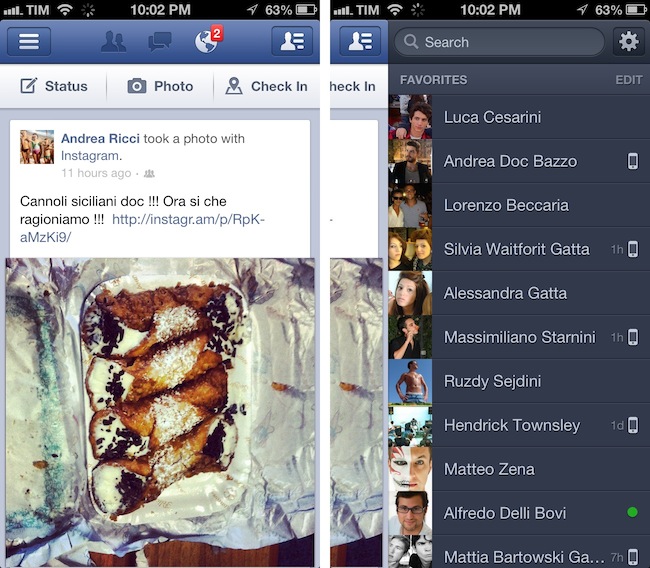
Facebook today released version 5.1 of its iOS app, which adds a new way of messaging friends and sharing multiple photos at once. The updated Facebook app now comes with a friend list on the right that you can use to easily start a private conversation. You can swipe left to access the chat panel, and add friends you contact the most to the top of the list. To customize the Favorites list, you can hit an Edit button to start “pinning” your friends in the Favorites section. Read more

Access Extra Content and Perks

Founded in 2015, Club MacStories has delivered exclusive content every week for nearly a decade.

What started with weekly and monthly email newsletters has blossomed into a family of memberships designed for every MacStories fan.

Learn more here and from our Club FAQs.

Club MacStories: Weekly and monthly newsletters via email and the web that are brimming with apps, tips, automation workflows, longform writing, early access to the MacStories Unwind podcast, periodic giveaways, and more;

Club MacStories+: Everything that Club MacStories offers, plus an active Discord community, advanced search and custom RSS features for exploring the Club’s entire back catalog, bonus columns, and dozens of app discounts;

Club Premier: All of the above and AppStories+, an extended version of our flagship podcast that’s delivered early, ad-free, and in high-bitrate audio.

Learn more here and from our Club FAQs.


Apple: 3 Million iPads Sold In 3 Days

With a press release, Apple just confirmed it has sold over 3 million iPads (iPad mini + iPad 4th gen) in three days. Interestingly, Apple is not separating sales figures of the iPad mini from the regular iPad; in the press release, Apple simply says it is a new record doubling the previous milestone of 1.5 million weekend sales of the iPad 3 in March.

Apple today announced it has sold three million iPads in just three days since the launch of its new iPad mini and fourth generation iPad—double the previous first weekend milestone of 1.5 million Wi-Fi only models sold for the third generation iPad in March. The Wi-Fi + Cellular versions of both iPad mini and fourth generation iPad will ship in a few weeks in the US and in many more countries later this year.

Apple notes how “demand for iPad mini exceeded the initial supply”, confirming that some pre-orders (which began on October 26) will be shipped “later this month”. Tim Cook was quoted in the press release:

Customers around the world love the new iPad mini and fourth generation iPad,” said Tim Cook, Apple’s CEO. “We set a new launch weekend record and practically sold out of iPad minis. We’re working hard to build more quickly to meet the incredible demand.

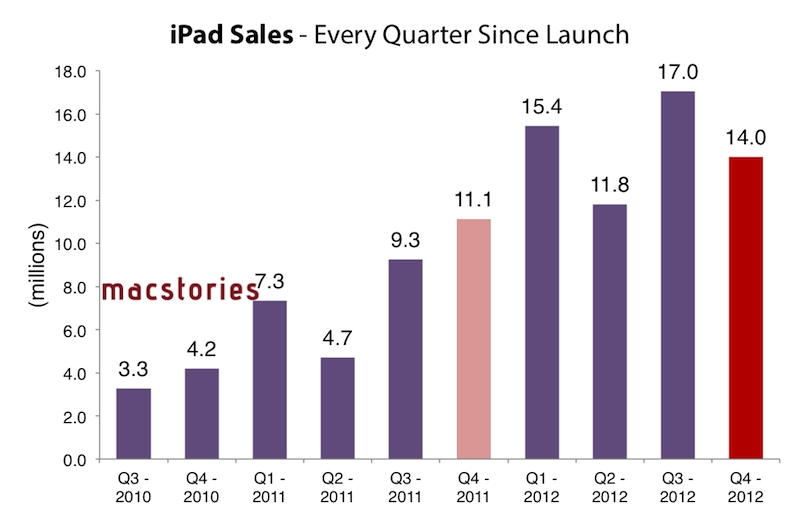
To put these numbers in a better context, here’s how iPad sales evolved over time since the release of the original model in 2010:

And here’s a visualization of the iPad’s growth every quarter since launch, based on Apple’s Q4 numbers (which don’t include sales for the new models).

In today’s case, however, the comparison is different as Apple is accounting for two models (iPad mini and iPad 4th gen) in a somewhat clear intention to report iPad sales as a single category without specifying models – similarly to how they do for iPod sales or iPhone sales without differentiating between device models. It’s also worth remembering how the new iPads’ rollout has been one of the largest ones for Apple to date: the iPad mini went on sale on November 2 in 34 countries, whereas the 3rd generation iPad launched in 10 initial countries, and then rolled out to 25 more a week later; both WiFi and WiFi + Cellular versions of the 3rd generation iPad were available at launch.

The iPad mini launched to positive reviews, but saw fewer and shorter lines around the world with online pre-orders quickly sold out for every model.

Access Extra Content and Perks

Founded in 2015, Club MacStories has delivered exclusive content every week for nearly a decade.

What started with weekly and monthly email newsletters has blossomed into a family of memberships designed for every MacStories fan.

Learn more here and from our Club FAQs.

Club MacStories: Weekly and monthly newsletters via email and the web that are brimming with apps, tips, automation workflows, longform writing, early access to the MacStories Unwind podcast, periodic giveaways, and more;

Club MacStories+: Everything that Club MacStories offers, plus an active Discord community, advanced search and custom RSS features for exploring the Club’s entire back catalog, bonus columns, and dozens of app discounts;

Club Premier: All of the above and AppStories+, an extended version of our flagship podcast that’s delivered early, ad-free, and in high-bitrate audio.

Learn more here and from our Club FAQs.


My Must-Have Mac Apps, 2012 Edition

I concluded last year’s edition of My Must-Have Mac Apps suggesting that, with iCloud approaching its public debut and developers starting to integrate native sync in their iOS and OS X apps, “a new class of Mac software” would take us in new directions. While that has been (partially) the case, 409 days later the results are more nuanced.

Read more

Access Extra Content and Perks

Founded in 2015, Club MacStories has delivered exclusive content every week for nearly a decade.

What started with weekly and monthly email newsletters has blossomed into a family of memberships designed for every MacStories fan.

Learn more here and from our Club FAQs.

Club MacStories: Weekly and monthly newsletters via email and the web that are brimming with apps, tips, automation workflows, longform writing, early access to the MacStories Unwind podcast, periodic giveaways, and more;

Club MacStories+: Everything that Club MacStories offers, plus an active Discord community, advanced search and custom RSS features for exploring the Club’s entire back catalog, bonus columns, and dozens of app discounts;

Club Premier: All of the above and AppStories+, an extended version of our flagship podcast that’s delivered early, ad-free, and in high-bitrate audio.

Learn more here and from our Club FAQs.


#MacStoriesDeals: 20% Off Hazel Screencast & Superstorm Sandy Donations

#MacStoriesDeals: 20% Off Hazel Screencast & Superstorm Sandy Donations

Last week, I linked to Mac OS X Screencasts’ Hazel tutorial, a 1-hour screencast detailing several Hazel features:

I have watched the entire video, and, indeed, I think it’s one of the best resources you can buy to get started with Hazel and understand all of the its potential. Screencast quality is good, with on-screen guides and labels, zoomed views on specific sections and menus, and clean transitions. The voiceover is concise and to-the-point. The video lasts an hour, but it passes quickly thanks to the provided examples and explanations – it’s definitely not boring, as most video tutorials can be nowadays.

Should you get it? Yes. If you’re new to Hazel, this will get you up to speed very quickly. And, even as a long-time Hazel user, the screencast refreshed my memory on several aspects of Noodlesoft’s app.

Thanks to Mac OS X Screencasts, we can offer a 20% discount off the Hazel screencast (regular price €10) with the coupon code MACSTORIES-IS-AWESOME. The coupon code is valid from November 1st - 18th. Simply head over to Mac OS X Screencasts’ website and paste our coupon code to receive a 20% discount.

But there’s more. For every screencast sold with our coupon code, Mac OS X Screencasts will donate €1.50 to American Red Cross to help people impacted by Hurricane Sandy in the United States. If you purchase the Hazel screencast without our coupon code, Mac OS X Screencasts will donate €3 to American Red Cross for every screencast sold.

The Hazel screencast offer is available here. If you’d like to donate to American Red Cross without having to buy the Hazel screencast, we recommend Apple’s own donation page available on iTunes.

UPDATE: Together with Mac OS X Screencasts we’re giving away 5 free screencasts for this Hazel tutorial. To enter, tweet to @macstoriesdeals with the hashtag #macstorieshazeltutorial and we’ll pick 5 winners later today! GOOD LUCK!

Permalink

Evernote 5 Public Beta Now Available

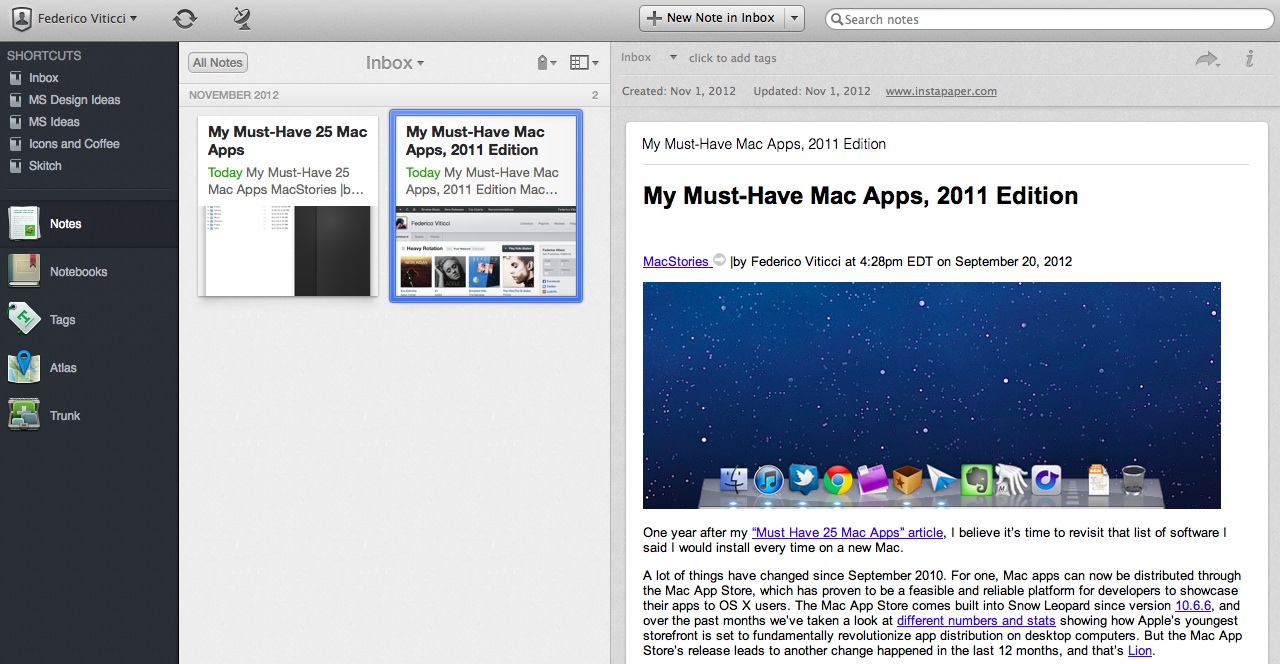
Announced last week, Evernote has today released version 5.0 of its Mac client as a public beta. Sporting a redesigned interface and over 100 new features, Evernote 5.0 is a complete rethinking of the desktop experience, built with easier access to most used notebooks and notes in mind. As I wrote last week:

Evernote 5 will primarily focus on improving the way users manage and access their notes, tags, and notebooks. With a new sidebar, users can drag items into the Shortcuts area; user shortcuts are accessible using CMD+1/9 keyboard shortcuts – just like bookmarks in Safari. Advanced users will still be able to “show lists” in the sidebar, but, overall, according to Evernote, the redesign will be focused on making the sidebar more visual, compact, and easier to use. In fact, the new sidebar will also list the five most recent notes for quick access. Evernote says there are over 100 new features in v5.0. These include a new iPad-like Cards view for notes, improved sharing, a new look for the notes editor, more keyboard shortcuts, new views for tags and notebooks, and more.

The new interface is primarily based on the new sidebar, which lists all the “shortcuts” created by the user. A shortcut can be a notebook, a tag, a note – anything that can be selected and dragged in the app can be manually placed in the Shortcuts area. Read more

Access Extra Content and Perks

Founded in 2015, Club MacStories has delivered exclusive content every week for nearly a decade.

What started with weekly and monthly email newsletters has blossomed into a family of memberships designed for every MacStories fan.

Learn more here and from our Club FAQs.

Club MacStories: Weekly and monthly newsletters via email and the web that are brimming with apps, tips, automation workflows, longform writing, early access to the MacStories Unwind podcast, periodic giveaways, and more;

Club MacStories+: Everything that Club MacStories offers, plus an active Discord community, advanced search and custom RSS features for exploring the Club’s entire back catalog, bonus columns, and dozens of app discounts;

Club Premier: All of the above and AppStories+, an extended version of our flagship podcast that’s delivered early, ad-free, and in high-bitrate audio.

Learn more here and from our Club FAQs.


iStat 2 Review

I like Bjango. They make the kind of simple, polished, and useful software that defines OS X as a platform with equal attention to beautiful pixels and powerful features. I was already a big fan of Consume and Skala. Bjango’s latest release, iStat 2, falls exactly under this category of apps: great-looking and efficient at the same time.

Mac Servers

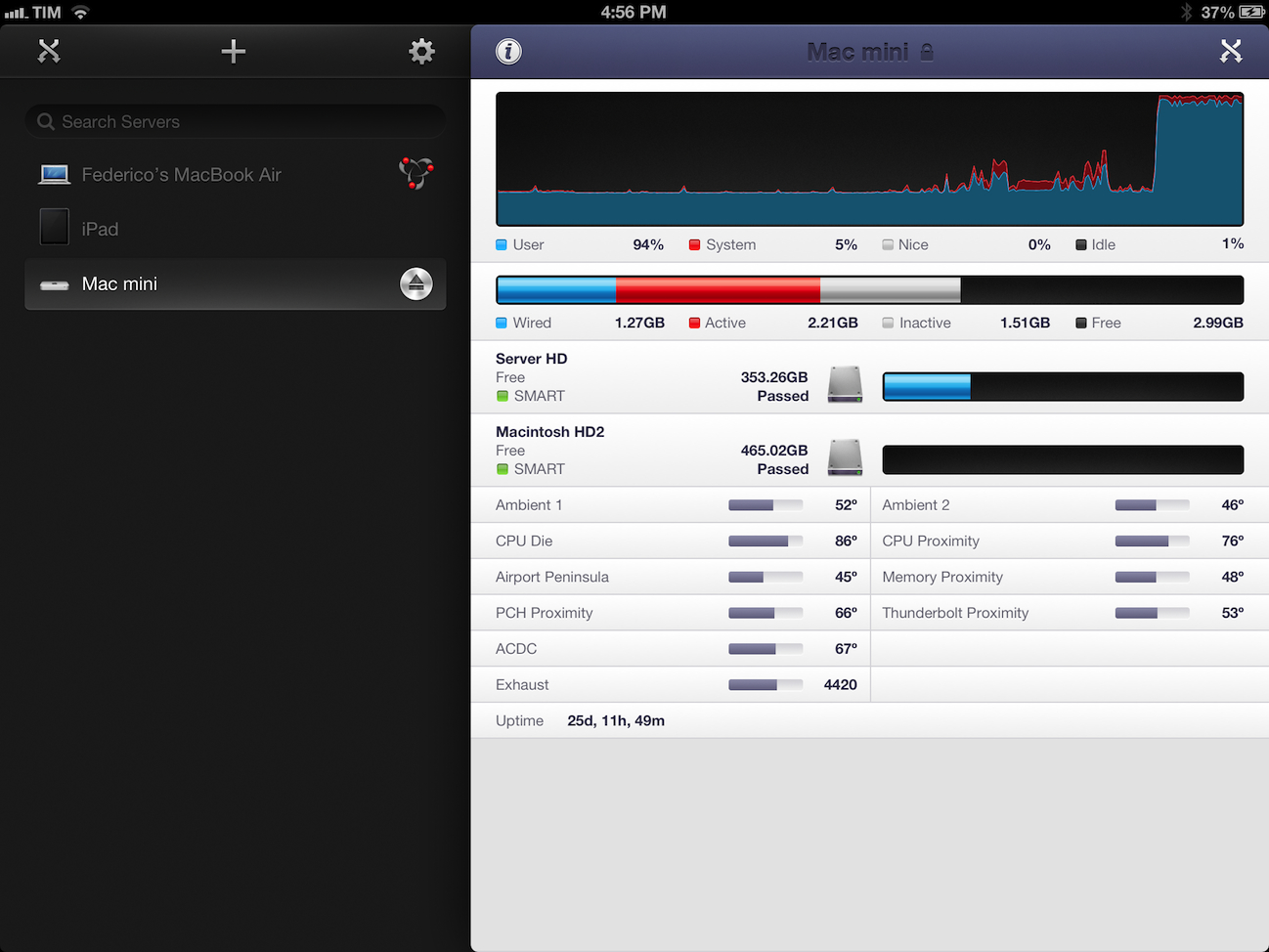
I own a 13-inch MacBook Air and a 21.5-inch iMac. My MBA is the “work machine”, whereas the iMac has always been the media center of the house, as it’s connected to a couple of external drives with my iTunes library on it. For the past few months, however, I’ve been increasingly switching every part of my “entertainment workflow” from local to cloud-based. It started with Rdio a year ago (now, I have a Family account and I’m not switching any time soon). For iTunes, it means I’ve slowly uploaded my library to a Mac mini hosted on Macminicolo. As documented elsewhere, I’m very happy with Macminicolo, their reliability, and the overall message of a Mac mini server always available in the cloud.

But I’m not a “server guy”. I don’t understand the teminology behind server management, and my limited skills go as far as restarting WebDAV and Apache. I use my Mac mini primarily for media streaming through Plex and as a server for Mail, OmniFocus, Dropbox, and other services or apps that allow me to automate my workflow in the cloud. All my Dropbox-based scripts for plain text and OmniFocus are created with the Mac mini in mind, because it’s always-on and lets me receive results in real time. Hazel is another invaluable utility when it comes to automating a remote Mac.

I do put my Mac mini through some more processor-intensive tasks every once in a while. Usually, it’s movie conversion through Handbrake or movie streaming through Plex Media Server. I recoginize this doesn’t compare to using a mini as an Xcode build server, but it’s still something that I want to keep an eye on. Read more

Access Extra Content and Perks

Founded in 2015, Club MacStories has delivered exclusive content every week for nearly a decade.

What started with weekly and monthly email newsletters has blossomed into a family of memberships designed for every MacStories fan.

Learn more here and from our Club FAQs.

Club MacStories: Weekly and monthly newsletters via email and the web that are brimming with apps, tips, automation workflows, longform writing, early access to the MacStories Unwind podcast, periodic giveaways, and more;

Club MacStories+: Everything that Club MacStories offers, plus an active Discord community, advanced search and custom RSS features for exploring the Club’s entire back catalog, bonus columns, and dozens of app discounts;

Club Premier: All of the above and AppStories+, an extended version of our flagship podcast that’s delivered early, ad-free, and in high-bitrate audio.

Learn more here and from our Club FAQs.