Posts in Featured

Dropbox Releases Completely Redesigned iOS App

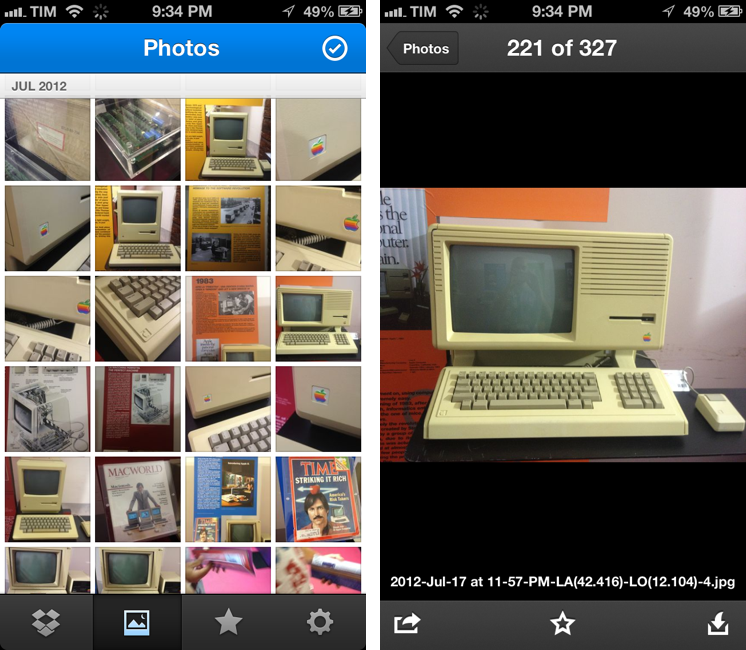
Dropbox has today launched a major new version of its iOS app, featuring a new UI design, new upload features, and an updated photo experience.

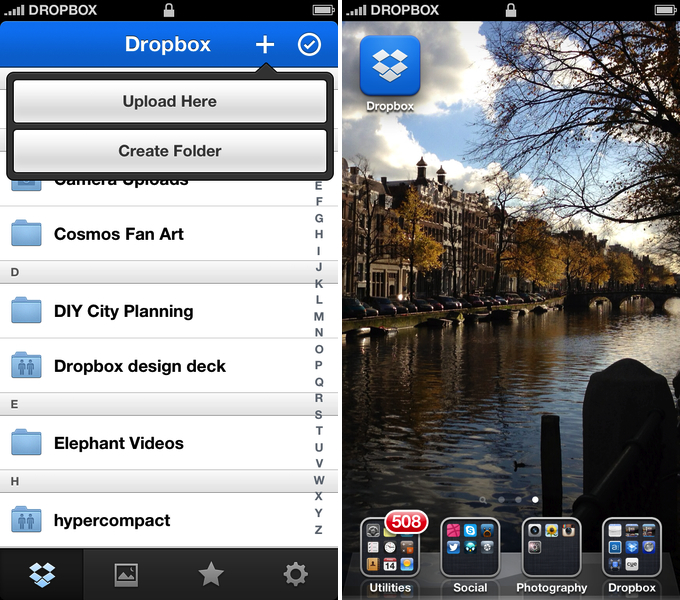
As detailed in a blog post by the company, the new Dropbox aims at simplifying the user interface with “flattened out” colors, simpler lines, and less visual complexity. For instance, the new tab bar of the app doesn’t come with text labels, using only icons to indicate folders, Photos, Favorites, and Settings. In a way, the Dropbox redesign is somewhat reminiscent of the latest Rdio update for iOS, also focused on flat colors and an overall simplification of graphical elements.

The new Dropbox changes the upload system as well. In the previous version, there was an Uploads section to upload items from the iOS Camera Roll to a specific folder; users needed to specify the folder before starting the upload process. In Dropbox 2.0, every folder – including the main Dropbox one – has got a “+” button in the upper toolbar with two options: “Upload Here” and “Create New Folder”. I look forward to trying this feature in particular as I use the Dropbox app to upload photos on a daily basis to different folders; I don’t know whether an upload button dependent on the folder you’re currently viewing will eventually make me save taps, or require more navigation around folders.
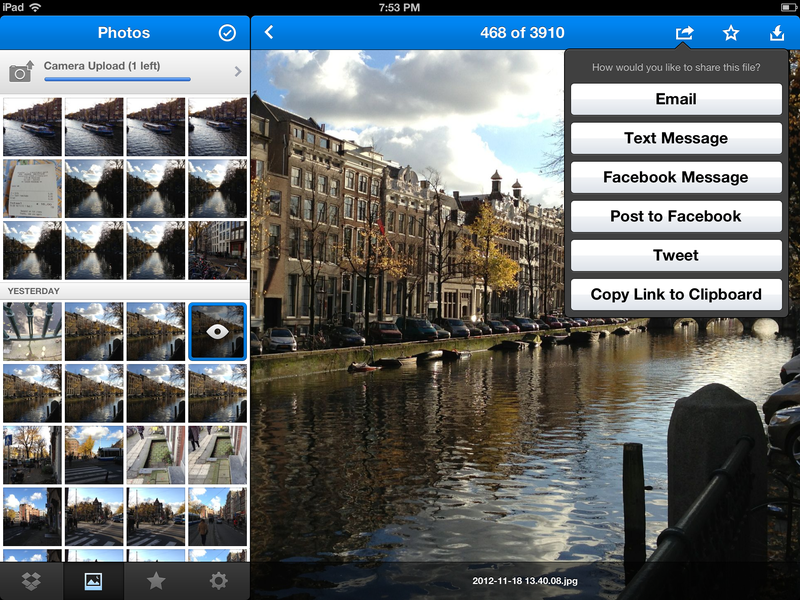
Photos are also part of my Dropbox workflow, and the new app introduces a new browsing experience for them. According to Dropbox “all of your photos” including those you have “uploaded from other devices” will be available in the new Photos tab. This view comes with a grid interface to browse photos from newest to oldest. Interestingly, sharing options for photos now include separate entries for “Post on Facebook” and “Facebook Message”. The Photos view retains the Camera Uploads functionality of the previous version (though personally I use CameraSync for this, a third-party app that offers more settings for Dropbox photo uploads).

The new Dropbox app is available on the App Store.

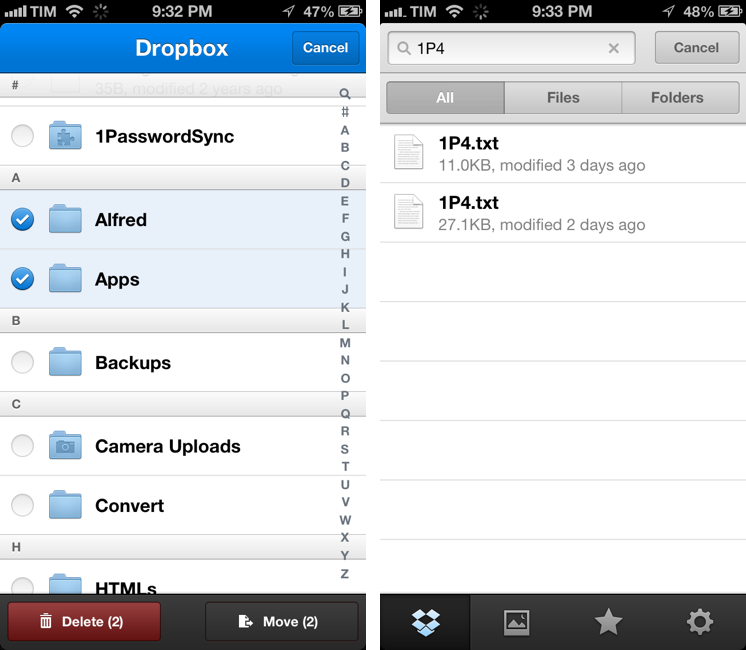
Update: Based on my first tests, it appears only photos uploaded with the app’s Camera Uploads feature are recognized in the Photos tab; it doesn’t seem like the app is recognizing photos I uploaded with third-party apps like CameraSync. Too, like in the previous version of the app, you can’t star folders.

More screenshots below.
Access Extra Content and Perks

Founded in 2015, Club MacStories has delivered exclusive content every week for nearly a decade.

What started with weekly and monthly email newsletters has blossomed into a family of memberships designed for every MacStories fan.

Learn more here and from our Club FAQs.

Club MacStories: Weekly and monthly newsletters via email and the web that are brimming with apps, tips, automation workflows, longform writing, early access to the MacStories Unwind podcast, periodic giveaways, and more;

Club MacStories+: Everything that Club MacStories offers, plus an active Discord community, advanced search and custom RSS features for exploring the Club’s entire back catalog, bonus columns, and dozens of app discounts;

Club Premier: All of the above and AppStories+, an extended version of our flagship podcast that’s delivered early, ad-free, and in high-bitrate audio.

Learn more here and from our Club FAQs.


Google Releases Maps App For iPhone

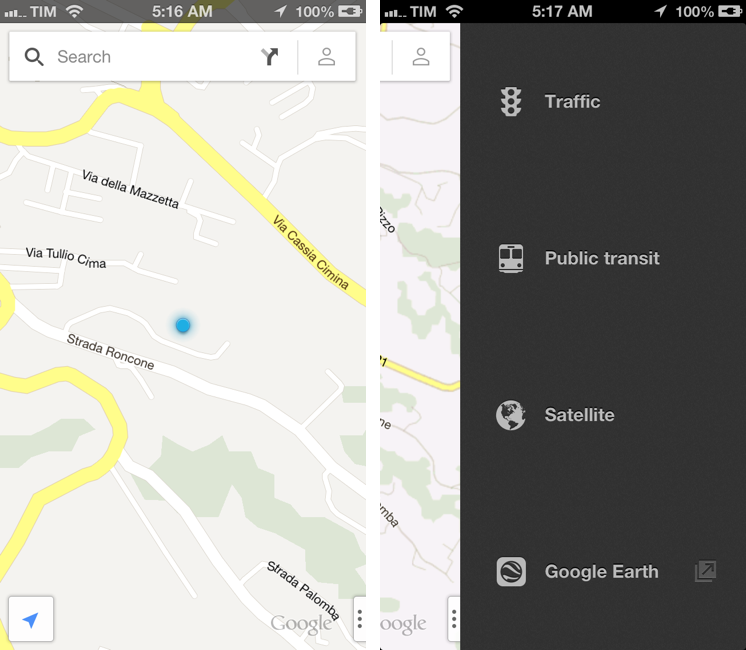
In spite of “sources at Google” claiming that Apple wouldn’t accept a Google Maps app in the App Store, Google has today released its official Maps application for iPhone. The app just went live on the App Store, and it’s available as a free download here.

Following Apple’s debacle with their Maps software for iOS 6, Google was rumored to be preparing a third-party version of Google Maps for iOS devices. We haven’t been able to test this yet, and we’ll post our impressions of the software on MacStories once we’re able to properly use the app. Read more

Access Extra Content and Perks

Founded in 2015, Club MacStories has delivered exclusive content every week for nearly a decade.

What started with weekly and monthly email newsletters has blossomed into a family of memberships designed for every MacStories fan.

Learn more here and from our Club FAQs.

Club MacStories: Weekly and monthly newsletters via email and the web that are brimming with apps, tips, automation workflows, longform writing, early access to the MacStories Unwind podcast, periodic giveaways, and more;

Club MacStories+: Everything that Club MacStories offers, plus an active Discord community, advanced search and custom RSS features for exploring the Club’s entire back catalog, bonus columns, and dozens of app discounts;

Club Premier: All of the above and AppStories+, an extended version of our flagship podcast that’s delivered early, ad-free, and in high-bitrate audio.

Learn more here and from our Club FAQs.


1Password 4 Review

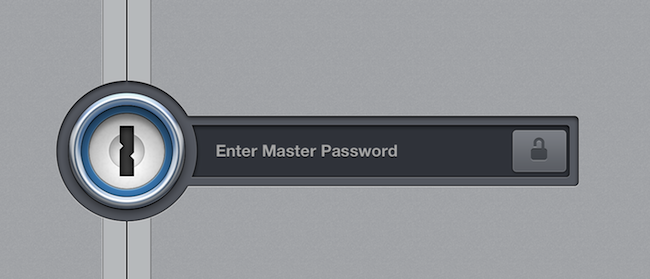
I got my first iPhone in the Fall of 2008. Going back through my iTunes Purchased history, I see 1Password was the ninth app I downloaded from the App Store. I’ve been using 1Password for as long as I remember having a Mac and iOS device, and I’ve come to rely on it – to trust it – as the only piece of software holding my private information securely. 1Password 4, released today on iOS, is a major update that improves on every area of the app, starting from the interface.

I’d argue that, aside from bug fixes, smaller improvements, and support for new displays and the latest iOS versions, 1Password Pro got its last major new feature with version 3.5, released in July 2010, which added Dropbox sync and support for auto-lock on multitasking. Another fundamental change of the mobile 1Password experience could be traced back to iPassword 3.0, which added a new interface for the iPad in April 2010; however, iPad apps have evolved and matured in the past two years, and 1Password – especially on the larger screen – has started to feel like an app that was designed at the beginning of the iPad era. It wasn’t inherently bad, but, combined with the iPhone app (which goes back to the early App Store days: it was released in the summmer of 2008), it was obvious that 1Password for iOS could be better.

1Password 4, in terms of design and features, is both a clean slate and an iterative improvement. It’s a fresh start, but existing 1Password users will also recognize the things that have been adjusted and added on top of 1Password 3.7. More importantly, 1Password is now a consistent experience across the iPhone and iPad that supports a platform users expect from modern iOS apps: iCloud. Read more

Access Extra Content and Perks

Founded in 2015, Club MacStories has delivered exclusive content every week for nearly a decade.

What started with weekly and monthly email newsletters has blossomed into a family of memberships designed for every MacStories fan.

Learn more here and from our Club FAQs.

Club MacStories: Weekly and monthly newsletters via email and the web that are brimming with apps, tips, automation workflows, longform writing, early access to the MacStories Unwind podcast, periodic giveaways, and more;

Club MacStories+: Everything that Club MacStories offers, plus an active Discord community, advanced search and custom RSS features for exploring the Club’s entire back catalog, bonus columns, and dozens of app discounts;

Club Premier: All of the above and AppStories+, an extended version of our flagship podcast that’s delivered early, ad-free, and in high-bitrate audio.

Learn more here and from our Club FAQs.


Mapping Apple’s Retail Expansion

Apple opened its first retail stores on May 19, 2001 - one in Virginia and the other in California. In the Steve Jobs biography, author Walter Isaacson wrote how Jobs had wanted Apple to have its own stores so that their iMacs didn’t have to “sit on a shelf between a Dell and a Compaq while an uninformed clerk recited the specs of each”. Despite initial criticisms and comparisons to Gateway’s failed retail stores, Apple Stores not only continue to exist today, but are regarded as one of Apple’s greatest innovations - one that now contributes to more than 10% of Apple’s revenue.

“Unless we could find ways to get our message to customers at the store, we were screwed.” - Steve Jobs

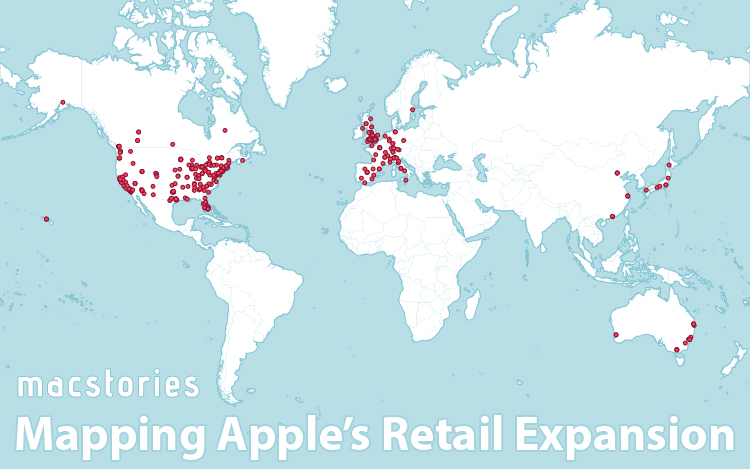
I’ve previously written about the coverage of Apple’s entertainment services in international markets (including how they compare to Google, Microsoft and Amazon), so I was similarly intrigued by how Apple’s stores have expanded into countries outside the US. Whilst researching all this, I came across other questions such as whether Apple had a particular preference for when they opened new stores and how the expansion of their retail network would affect visitors and profits. What I have found isn’t particularly groundbreaking, but there are certainly some trends and fascinating tidbits that I’ve come across, all of which is detailed below the break.

A note to RSS readers: This article includes an HTML5 diagram that likely won’t display in your reader, view this post in your browser (it works on iOS devices) to view that diagram. Apologies for the inconvenience.

Read more

Access Extra Content and Perks

Founded in 2015, Club MacStories has delivered exclusive content every week for nearly a decade.

What started with weekly and monthly email newsletters has blossomed into a family of memberships designed for every MacStories fan.

Learn more here and from our Club FAQs.

Club MacStories: Weekly and monthly newsletters via email and the web that are brimming with apps, tips, automation workflows, longform writing, early access to the MacStories Unwind podcast, periodic giveaways, and more;

Club MacStories+: Everything that Club MacStories offers, plus an active Discord community, advanced search and custom RSS features for exploring the Club’s entire back catalog, bonus columns, and dozens of app discounts;

Club Premier: All of the above and AppStories+, an extended version of our flagship podcast that’s delivered early, ad-free, and in high-bitrate audio.

Learn more here and from our Club FAQs.


Instacast 3 Review

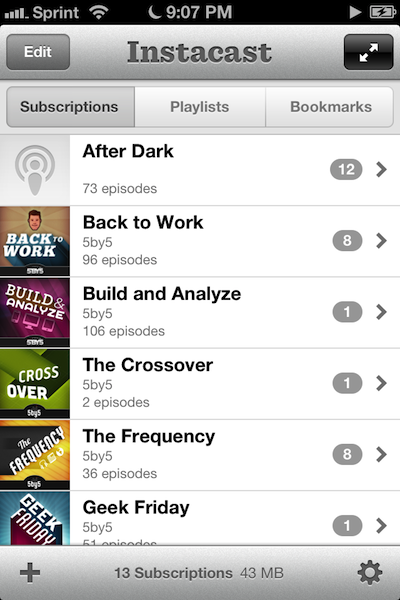
Instacast 3 is both iterative and something different. No longer divided into separate iPhone and iPad apps, Instacast 3 is universal, also eschewing the in-app purchase model introduced with Instacast 2. And at its core, iCloud sync has been gutted and replaced with Vemedio’s own syncing solution that’s faster and less error prone (an in-house solution that works with WebDAV.). On the iPad, Vemedio has completely redesigned their Twitter-for-iPad inspired interface in favor of a more parallel experience with the iPhone. Just as Apple makes small iterations to their hardware, Vemedio has made small iterations to their software.

Read more

Access Extra Content and Perks

Founded in 2015, Club MacStories has delivered exclusive content every week for nearly a decade.

What started with weekly and monthly email newsletters has blossomed into a family of memberships designed for every MacStories fan.

Learn more here and from our Club FAQs.

Club MacStories: Weekly and monthly newsletters via email and the web that are brimming with apps, tips, automation workflows, longform writing, early access to the MacStories Unwind podcast, periodic giveaways, and more;

Club MacStories+: Everything that Club MacStories offers, plus an active Discord community, advanced search and custom RSS features for exploring the Club’s entire back catalog, bonus columns, and dozens of app discounts;

Club Premier: All of the above and AppStories+, an extended version of our flagship podcast that’s delivered early, ad-free, and in high-bitrate audio.

Learn more here and from our Club FAQs.


Twitterrific 5 Review

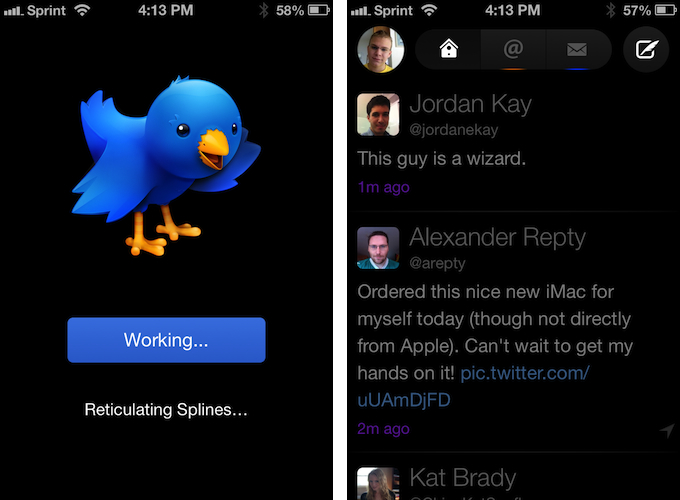
Twitterrific 5. It’s been fun to watch Twitter’s reaction to an app that I, and other writers, wanted to surprise the world with. Alas, it was bound to leak, unsurprisingly by Apple’s Japanese App Store. The Iconfactory’s latest iteration of their famed Twitter client is shockingly different isn’t it? The same gut reactions I watched unfold on Twitter could not better describe the same gut reactions I had when I first saw just how striking the new interface is.

Sharing the first pic of Twitterrific 5 with my coworkers resulted in an immediate, “Wow.” After a few more screenshots, “That looks like a Windows 8 app. Like Track 8.” It’s an absolutely fair assessment. And it’s one I’ve seen echoed on Twitter as I watched the tweets scroll by. Thankfully, Twitterrific 5 is as much of an iOS app as it ever was. No text hangs off the screen — no “CTURES” as Federico and I will joke.

Twitterrific 5 presents itself dressed in black with Helvetica accents and familiar shades of orange and blue for mentions and messages. It’s both instantly recognizable and obviously different. In contrast to colored entries and standard rectangular iOS elements, it is typography, floating buttons, and rounded corners that are pervasive in the new Twitterrific.

Read more

Access Extra Content and Perks

Founded in 2015, Club MacStories has delivered exclusive content every week for nearly a decade.

What started with weekly and monthly email newsletters has blossomed into a family of memberships designed for every MacStories fan.

Learn more here and from our Club FAQs.

Club MacStories: Weekly and monthly newsletters via email and the web that are brimming with apps, tips, automation workflows, longform writing, early access to the MacStories Unwind podcast, periodic giveaways, and more;

Club MacStories+: Everything that Club MacStories offers, plus an active Discord community, advanced search and custom RSS features for exploring the Club’s entire back catalog, bonus columns, and dozens of app discounts;

Club Premier: All of the above and AppStories+, an extended version of our flagship podcast that’s delivered early, ad-free, and in high-bitrate audio.

Learn more here and from our Club FAQs.


YouTube for iOS Gets iPhone 5 and AirPlay Support, iPad Version

Following a major update to Gmail for iOS, Google has today also released a new version of its YouTube app, which includes AirPlay and iPhone 5 support, as well as an iPad version that makes the app Universal.

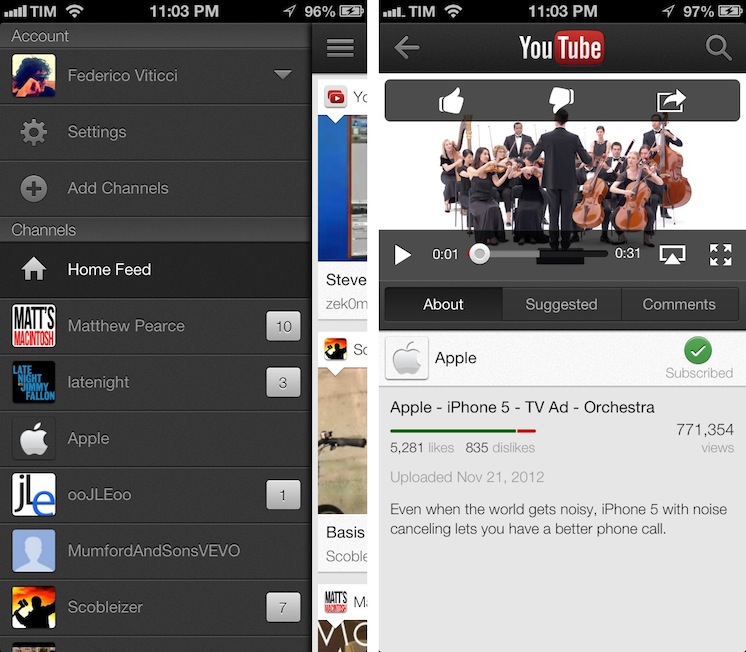
One of the new features is the Guide of channels that you can access by tapping on the YouTube logo in the title bar; tap it, and you’ll go back to the app’s main sidebar, listing your account’s options and Channels. On the iPhone 5, YouTube is now optimized for the taller screen – a glaring omission that has annoyed several iPhone 5 users since the device’s release. Among other improvements – including clickable links in video descriptions and ability to add or remove a video from your playlists – a notable addition is AirPlay support: you can now natively stream videos to any AirPlay-compatible device such as the Apple TV or a Mac running Reflection (which is what I tested).

The iPad version of the app is rather obvious, but still welcome: it packs a sidebar on the left side, and main content on the right side of the screen. When you tap on a video, the right portion becomes the main view hiding the sidebar and displaying suggested videos on the right. Interestingly, you can’t browse and watch videos at the same time, as the sidebar will always be hidden after you click a video’s thumbnail.

For everything else, both the updated iPhone app and iPad version share the same features that I covered in my original review of the app, and today’s changes are definitely improvements worth checking out – it’s especially good to see Google supporting AirPlay right after the 1.0 release. Both on the iPhone and iPad, Google offers a feature in the Settings to open links in Chrome, also available for both platforms on the App Store.

The updated YouTube app is available on the App Store. More screenshots of the iPad app are available below. Read more

Access Extra Content and Perks

Founded in 2015, Club MacStories has delivered exclusive content every week for nearly a decade.

What started with weekly and monthly email newsletters has blossomed into a family of memberships designed for every MacStories fan.

Learn more here and from our Club FAQs.

Club MacStories: Weekly and monthly newsletters via email and the web that are brimming with apps, tips, automation workflows, longform writing, early access to the MacStories Unwind podcast, periodic giveaways, and more;

Club MacStories+: Everything that Club MacStories offers, plus an active Discord community, advanced search and custom RSS features for exploring the Club’s entire back catalog, bonus columns, and dozens of app discounts;

Club Premier: All of the above and AppStories+, an extended version of our flagship podcast that’s delivered early, ad-free, and in high-bitrate audio.

Learn more here and from our Club FAQs.


Gmail 2.0: A Year Later

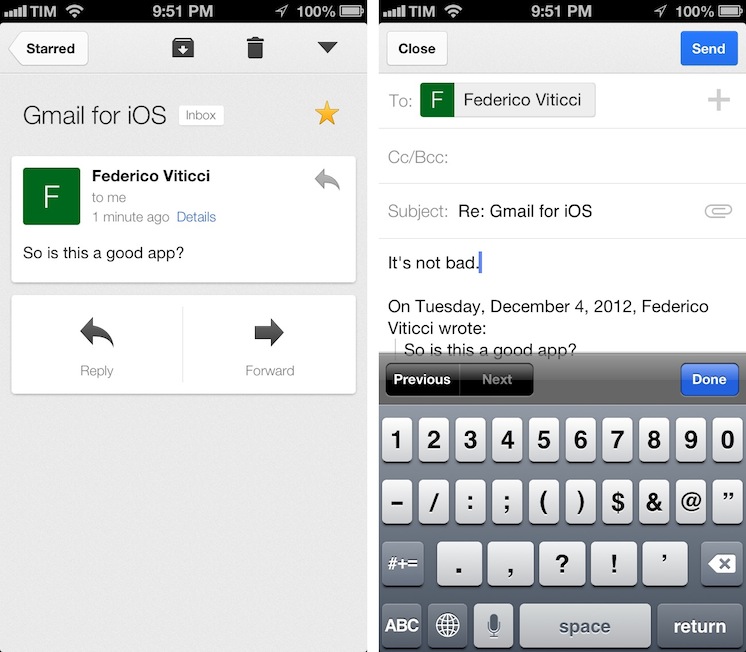
Despite Google’s persistence on adopting web views in an iOS frame, Gmail’s iOS app has been consistently improved since its inception. For the amount of ridicule Gmail for iOS has received, whether it be for its mobile web disguise or a lack of support for multiple accounts, it’d be a shame not to recognize some of the substantial improvements that have been made to the app. While I didn’t think Gmail was a great app, I didn’t think of it as a bad app, offering a native Gmail experience for account holders who want to take advantage of Google’s quick search capabilities, labels, and importance markers. On iOS, the main benefit is near instant notifications, something that Apple’s native Mail app can’t take advantage of unless Gmail is set up as an Exchange account. (And that notification sound? One of the best.)

Read more

Access Extra Content and Perks

Founded in 2015, Club MacStories has delivered exclusive content every week for nearly a decade.

What started with weekly and monthly email newsletters has blossomed into a family of memberships designed for every MacStories fan.

Learn more here and from our Club FAQs.

Club MacStories: Weekly and monthly newsletters via email and the web that are brimming with apps, tips, automation workflows, longform writing, early access to the MacStories Unwind podcast, periodic giveaways, and more;

Club MacStories+: Everything that Club MacStories offers, plus an active Discord community, advanced search and custom RSS features for exploring the Club’s entire back catalog, bonus columns, and dozens of app discounts;

Club Premier: All of the above and AppStories+, an extended version of our flagship podcast that’s delivered early, ad-free, and in high-bitrate audio.

Learn more here and from our Club FAQs.


#MacStoriesDeals - Friday

We have many great deals for #MacStoriesDeals’s Cyber Week 2012. Be sure to check our Cyber Monday 2012 page for more ongoing deals!

You can find us as @MacStoriesDeals on Twitter. Happy Holidays from the MacStories Team!

Read more

Access Extra Content and Perks

Founded in 2015, Club MacStories has delivered exclusive content every week for nearly a decade.

What started with weekly and monthly email newsletters has blossomed into a family of memberships designed for every MacStories fan.

Learn more here and from our Club FAQs.

Club MacStories: Weekly and monthly newsletters via email and the web that are brimming with apps, tips, automation workflows, longform writing, early access to the MacStories Unwind podcast, periodic giveaways, and more;

Club MacStories+: Everything that Club MacStories offers, plus an active Discord community, advanced search and custom RSS features for exploring the Club’s entire back catalog, bonus columns, and dozens of app discounts;

Club Premier: All of the above and AppStories+, an extended version of our flagship podcast that’s delivered early, ad-free, and in high-bitrate audio.

Learn more here and from our Club FAQs.