
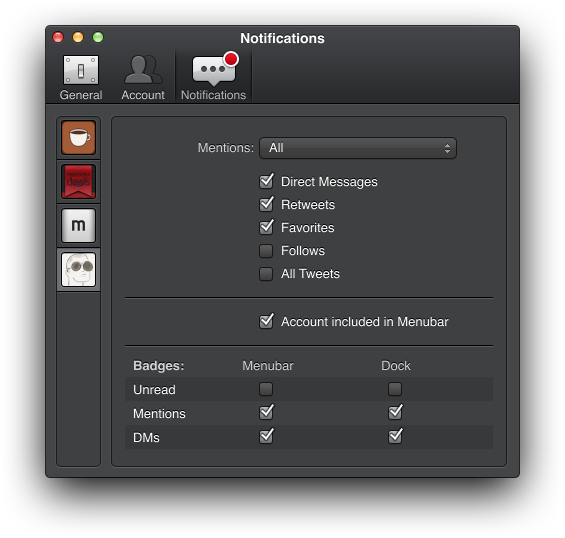
Tweetbot for Mac, Tapbots’ Twitter client that I first reviewed in October 2012, has been updated today to version 1.2, which is available on the Mac App Store. Among the notable features of this new version, Tapbots is introducing notifications for specific users, support for inline Flickr and Vine previews, and compliance with the Twitter 1.1 API. Read more
Posts in Featured
Tweetbot for Mac 1.2 Brings Notifications For Specific Users, Vine Previews, UI Tweaks

Access Extra Content and Perks
Founded in 2015, Club MacStories has delivered exclusive content every week for nearly a decade.
What started with weekly and monthly email newsletters has blossomed into a family of memberships designed for every MacStories fan.
Club MacStories: Weekly and monthly newsletters via email and the web that are brimming with apps, tips, automation workflows, longform writing, early access to the MacStories Unwind podcast, periodic giveaways, and more;
Club MacStories+: Everything that Club MacStories offers, plus an active Discord community, advanced search and custom RSS features for exploring the Club’s entire back catalog, bonus columns, and dozens of app discounts;
Club Premier: All of the above and AppStories+, an extended version of our flagship podcast that’s delivered early, ad-free, and in high-bitrate audio.
CriticMarkup: Plain Text Syntax for Editorial Reviews

Gabe Weatherhead is a good friend who writes and makes great stuff. Together with Erik Hess (MacStories readers may remember his particular iPad workflow), he launched CriticMarkup, a new project I’ve helped testing for the past few weeks.
Essentially, CriticMarkup is a plain text syntax for marking up text in editorial reviews. For someone who writes in Markdown and works with a team on a daily basis, CriticMarkup is the missing piece of a puzzle that required using clunky software like Word for Mac to do any sort of change tracking or markup. CriticMarkup feels like an extension of Markdown in that it allows you, through a simple and easily understandable syntax, to insert additions, deletions, substitutions, comments, and highlights into plain text.
Access Extra Content and Perks
Founded in 2015, Club MacStories has delivered exclusive content every week for nearly a decade.
What started with weekly and monthly email newsletters has blossomed into a family of memberships designed for every MacStories fan.
Club MacStories: Weekly and monthly newsletters via email and the web that are brimming with apps, tips, automation workflows, longform writing, early access to the MacStories Unwind podcast, periodic giveaways, and more;
Club MacStories+: Everything that Club MacStories offers, plus an active Discord community, advanced search and custom RSS features for exploring the Club’s entire back catalog, bonus columns, and dozens of app discounts;
Club Premier: All of the above and AppStories+, an extended version of our flagship podcast that’s delivered early, ad-free, and in high-bitrate audio.
Chaining Multiple Apps Together with Drafts
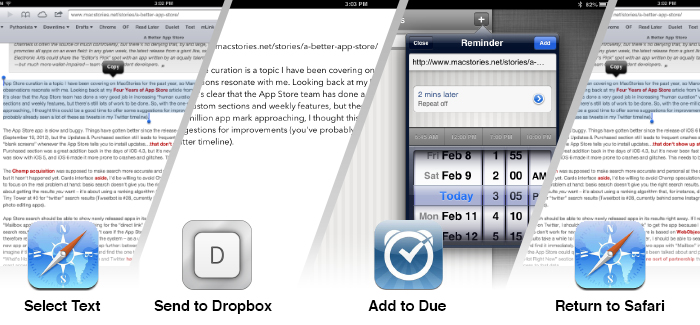
A few weeks ago, I took a look at the automation possibilities opened by Drafts, Agile Tortoise’s multi-purpose text app. In the article, I mentioned how a bug prevented Drafts from “linking to itself” more than once:
Therefore, my idea for cross-posting was: I can link to Drafts itself, and if the first action is successful, I can link to Drafts itself again. Essentially, I wanted to leverage the built-in App.net and Twitter actions to avoid the use of any third-party app. Unfortunately, there’s a bug in the current version of Drafts that doesn’t make that kind of action work.
With an update to Drafts released yesterday, Greg Pierce has brought various improvements to the app, including support for more customizable timestamps and dates using strftime, date and time tags for file names and URL actions, and a new way to encode strings with curly brackets.
Seemingly minor, the option to more easily URL encode strings is actually a very welcome addition: like in the latest Mr. Reader, instead of forcing the user to encode a URL into a longer string, you can simply put a URL inside {{ }} and let Drafts take care of encoding it. It means I can now experiment with building more complex workflows that contain actions for more external apps and, more importantly, for “sequential” tasks in Drafts itself. Easier encoding means we construct URLs that will tell Drafts “do this, and then do that” in a single workflow.
Those who follow me on Twitter know that I’ve been trying since yesterday to see how many apps I could chain together in a workflow, mainly out of curiosity and as a “proof” of concept. First, I tweeted about a Mr. Reader -> Drafts -> Poster workflow that would take selected text from an article, convert its Markdown to HTML, and then send it to Poster; the workflow consisted of three apps chained together, but I knew I could try to accomplish something a bit more ambitious. I kept on experimenting with Drafts URLs, and eventually I managed to build a single workflow with 3 apps and 4 different tasks involved. I’m posting it here for two reasons: a) I believe it’s a quite useful workflow; and b) it can serve as an example of what Drafts can do when you understand how to properly link multiple apps together. Read more
Access Extra Content and Perks
Founded in 2015, Club MacStories has delivered exclusive content every week for nearly a decade.
What started with weekly and monthly email newsletters has blossomed into a family of memberships designed for every MacStories fan.
Club MacStories: Weekly and monthly newsletters via email and the web that are brimming with apps, tips, automation workflows, longform writing, early access to the MacStories Unwind podcast, periodic giveaways, and more;
Club MacStories+: Everything that Club MacStories offers, plus an active Discord community, advanced search and custom RSS features for exploring the Club’s entire back catalog, bonus columns, and dozens of app discounts;
Club Premier: All of the above and AppStories+, an extended version of our flagship podcast that’s delivered early, ad-free, and in high-bitrate audio.
A Better App Store
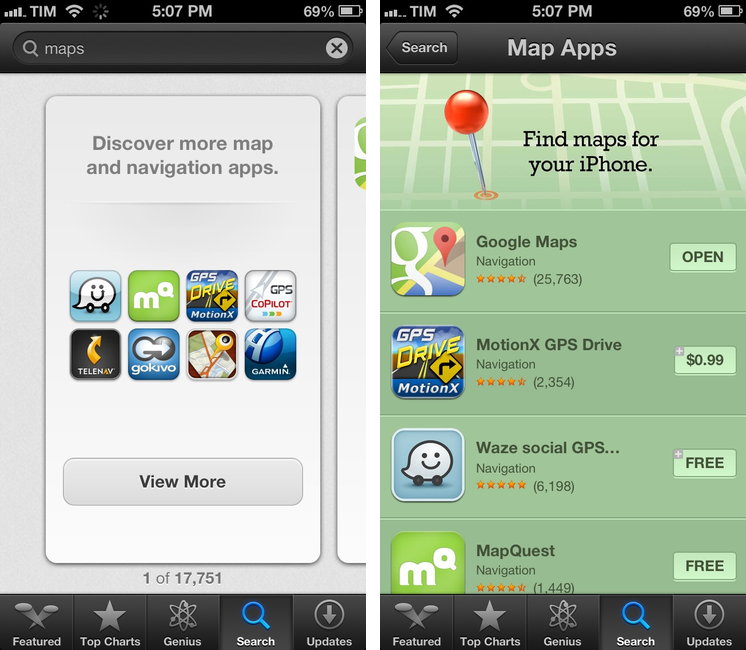
Marco Tabini has a good overview of how the App Store (both for iOS and OS X) could use some improvements now that the 1 million app milestone is in sight. I particularly agree with his points on curation:
Given the sheer volume of apps on the App Stores, Apple’s role in curating them is becoming more and more important. The company’s notoriously tight grip on its distribution channels is often the source of much controversy, but there’s no denying that, by and large, it promotes all apps on an even field: In any given week, the latest release from a giant like, say, Electronic Arts could share the “Editor’s Pick” spot with an app written by an equally talented—but much more wallet-impaired—team of independent developers.
App Store curation is a topic I have been covering on MacStories for the past year, so Marco’s observations resonate with me. Looking back at my Four Years of App Store article from May 2012, it’s clear that the App Store team has done a very good job in increasing “human curation” with custom sections and weekly features, but there’s still lots of work to be done. So, with the one-million app mark approaching, I thought this could be a good time to offer some suggestions for improvements (you’ve probably already seen a lot of these as tweets in my Twitter timeline).
Access Extra Content and Perks
Founded in 2015, Club MacStories has delivered exclusive content every week for nearly a decade.
What started with weekly and monthly email newsletters has blossomed into a family of memberships designed for every MacStories fan.
Club MacStories: Weekly and monthly newsletters via email and the web that are brimming with apps, tips, automation workflows, longform writing, early access to the MacStories Unwind podcast, periodic giveaways, and more;
Club MacStories+: Everything that Club MacStories offers, plus an active Discord community, advanced search and custom RSS features for exploring the Club’s entire back catalog, bonus columns, and dozens of app discounts;
Club Premier: All of the above and AppStories+, an extended version of our flagship podcast that’s delivered early, ad-free, and in high-bitrate audio.
Tweetbot Adds Support For Chrome and 1Password Browsers, Vine and Flick Inline Previews
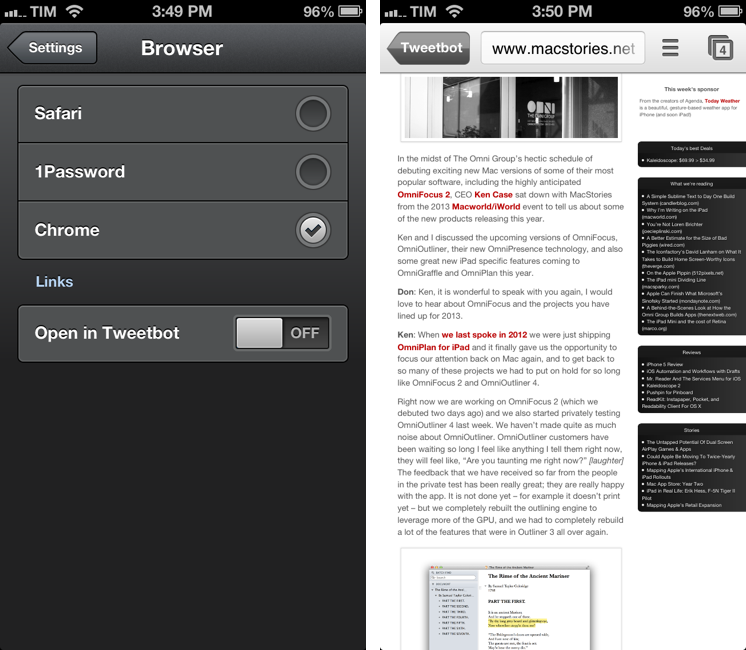
Tweetbot 2.7, released today for the iPhone and iPad, comes with a new Browser setting to specify an external app for opening links. I have been testing the feature and I’m a big fan of this update.
In the Settings, you can now choose to open links directly in Safari, Google Chrome, or 1Password. There are two ways to do this: you can choose to keep opening links in Tweetbot’s own web view and then forward them to your browser of choice; or you can skip Tweetbot’s web view altogether and go directly to a different browser upon tapping a link.
Opening links in Safari and 1Password doesn’t have anything special to it aside from the fact that you’ll be taken out of Tweetbot and into another browser. The 1Password integration is particularly useful as it is, essentially, the same idea behind my bookmarklet, only available inside Tweetbot: if you see a link for a website that you also want to log into, you can use 1Password’s built-in browser to access it.
Using Chrome alongside Tweetbot is my new favorite option, as it leverages Chrome’s support for x-callback-url to enable a completely automated workflow to open Chrome and go back to Tweetbot. If you open a link in Google Chrome, a new tab will open showing a back button labeled “Tweetbot”; once you’re done reading, you can hit that button to automatically close the tab and be taken back to your position in the Tweetbot timeline. Chrome is smart in hiding the back button if you navigate to other pages from the Tweetbot-created tab; the browser also remembers the “special” tab if you switch to other tabs and then go back to the one created by Tweetbot. There’s a minor bug in this version that will redirect to the Tweetbot’s Timeline when you open a link from Mentions, but Tapbots is aware of it. For me, this is a very welcome addition to Tweetbot as it allows my two most-used iOS apps to better communicate with each other without requiring me to manually move between apps. I can get all the benefits of using an external browser (Facebook sharing, using bookmarklets) while still being able to go back to Tweetbot seamlessly.
For Flickr and Vine users, Tweetbot 2.7 also adds inline previews. Vine’s short videos are shown with a standard iOS video player that has a play/pause button.
Tweetbot 2.7 is a minor, yet useful update for Chrome and 1Password users who have been wishing the app could open links in other browsers. You can find the update on the App Store (iPhone, iPad).
Access Extra Content and Perks
Founded in 2015, Club MacStories has delivered exclusive content every week for nearly a decade.
What started with weekly and monthly email newsletters has blossomed into a family of memberships designed for every MacStories fan.
Club MacStories: Weekly and monthly newsletters via email and the web that are brimming with apps, tips, automation workflows, longform writing, early access to the MacStories Unwind podcast, periodic giveaways, and more;
Club MacStories+: Everything that Club MacStories offers, plus an active Discord community, advanced search and custom RSS features for exploring the Club’s entire back catalog, bonus columns, and dozens of app discounts;
Club Premier: All of the above and AppStories+, an extended version of our flagship podcast that’s delivered early, ad-free, and in high-bitrate audio.
Evernote Relaunches Penultimate: Free, Evernote Sync, Search
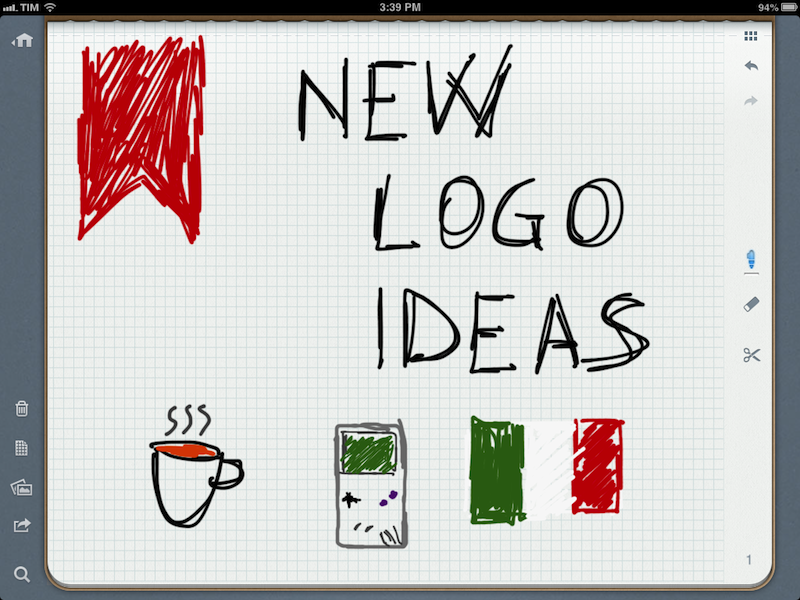
In May 2012, Evernote acquired Penultimate, one of the most popular handwriting apps for the iPad. Today, Evernote is relaunching Penultimate as a free app with built-in Evernote sync and search for handwritten notes.
I have been beta testing the new Penultimate, and, overall, I like the update. I have to admit that my usage of the application is limited to importing images into the app’s notebooks and drawing a few callouts and simple illustrations on them. I usually prefer Evernote’s other app, Skitch, for quick image annotations, but I don’t mind using Penultimate every once in a while when I need something more complex than a straight line or callout. Still, keep in mind that I don’t store hundreds of notes in Penultimate. Read more
Access Extra Content and Perks
Founded in 2015, Club MacStories has delivered exclusive content every week for nearly a decade.
What started with weekly and monthly email newsletters has blossomed into a family of memberships designed for every MacStories fan.
Club MacStories: Weekly and monthly newsletters via email and the web that are brimming with apps, tips, automation workflows, longform writing, early access to the MacStories Unwind podcast, periodic giveaways, and more;
Club MacStories+: Everything that Club MacStories offers, plus an active Discord community, advanced search and custom RSS features for exploring the Club’s entire back catalog, bonus columns, and dozens of app discounts;
Club Premier: All of the above and AppStories+, an extended version of our flagship podcast that’s delivered early, ad-free, and in high-bitrate audio.
iPhone 5 Review

I bought my iPhone 5 on September 28, 2012, after waiting in line almost 20 hours at the Apple Store in Roma Est. Four months into using the device every day, I think I can safely go ahead and share my thoughts.
This is not a complete review of the iPhone 5. There were dozens of iPhone 5 reviews back in September, and hundreds after a few weeks of availability. This is my review of four months of usage in real life. Read more
Access Extra Content and Perks
Founded in 2015, Club MacStories has delivered exclusive content every week for nearly a decade.
What started with weekly and monthly email newsletters has blossomed into a family of memberships designed for every MacStories fan.
Club MacStories: Weekly and monthly newsletters via email and the web that are brimming with apps, tips, automation workflows, longform writing, early access to the MacStories Unwind podcast, periodic giveaways, and more;
Club MacStories+: Everything that Club MacStories offers, plus an active Discord community, advanced search and custom RSS features for exploring the Club’s entire back catalog, bonus columns, and dozens of app discounts;
Club Premier: All of the above and AppStories+, an extended version of our flagship podcast that’s delivered early, ad-free, and in high-bitrate audio.
Apple Releases iOS 6.1 [Direct Links]
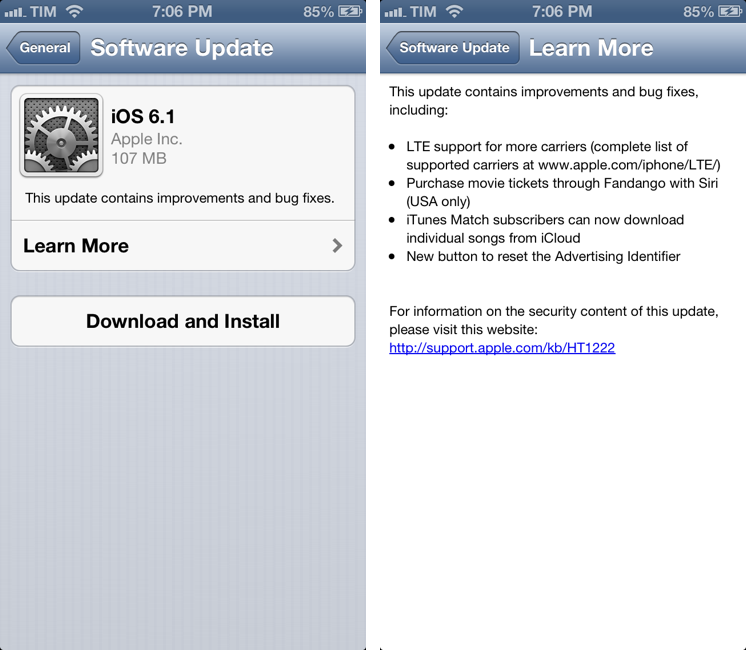
Apple has just released iOS 6.1. The software update, available in beta for the past few months, is available at the moment as over-the-air download. It should be available in iTunes soon.
iOS 6.1 brings LTE support for more carriers (as announced by Apple at the latest earnings call), possibility to purchase movie tickets in the US with Siri and Fandango, and a feature to download songs from iTunes Match individually using iCloud.
Apple details the updated list of LTE-compatible carriers here. According to a press release also posted by Apple, iOS 6.1 adds LTE capabilities to 36 iPhone carriers and 23 iPad carriers worldwide. Apple also shared more numbers:
To date, iOS users have uploaded over nine billion photos to Photo Stream, sent over 450 billion iMessages and received over four trillion notifications.
In the same press release, Apple has updated the statistics on the number of available App Store apps:
The revolutionary App Store offers more than 800,000 apps to iPhone, iPad and iPod touch users, with more than 300,000 native iPad apps. App Store customers have downloaded over 40 billion apps, and Apple has paid over seven billion dollars to its incredible developer community. Customers can choose from apps in 23 categories, including newspapers and magazines offered in Newsstand, games, business, news, sports, health & fitness and travel.
Earlier this month, Apple had announced that the App Store featured 775,000 apps with “more than 300,000 iPad apps”.
We will update this article with direct links to iOS 6.1 as soon as they’re available. Apple also released an update for the Apple TV, adding Bluetooth keyboard support, Up Next, and improvements to iTunes in the Cloud. Read more
Access Extra Content and Perks
Founded in 2015, Club MacStories has delivered exclusive content every week for nearly a decade.
What started with weekly and monthly email newsletters has blossomed into a family of memberships designed for every MacStories fan.
Club MacStories: Weekly and monthly newsletters via email and the web that are brimming with apps, tips, automation workflows, longform writing, early access to the MacStories Unwind podcast, periodic giveaways, and more;
Club MacStories+: Everything that Club MacStories offers, plus an active Discord community, advanced search and custom RSS features for exploring the Club’s entire back catalog, bonus columns, and dozens of app discounts;
Club Premier: All of the above and AppStories+, an extended version of our flagship podcast that’s delivered early, ad-free, and in high-bitrate audio.
iOS Automation and Workflows with Drafts
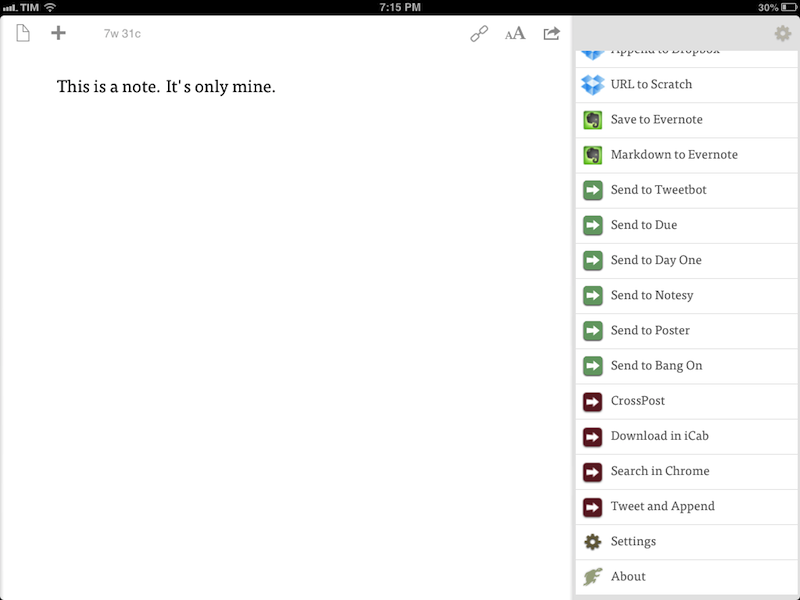
The latest update to Drafts – a “quick note capturing” app that I’ve covered several times on MacStories – adds a series of features aimed at increasing the possibilities of workflows automation on iOS devices. Obviously, this is something I’m interested in.
It seems like enabling users to save time while using apps has been a common thread in the past few months. The success of Launch Center Pro probably “raised awareness” in regards to the whole concept of URL schemes, but it’s been the increased adoption of x-callback-url and interest in automated workflows that proves better inter-app communication is something that (at least) third-party developers are thinking about. Google included a powerful URL scheme in Google Maps and Google Chrome; more recently, Mr. Reader showed how to enable a “services menu” by requiring users to mix URL schemes from other apps with parameters for an article’s title or selected text. These aren’t ideal solutions, but it’s all we have for now.
Greg Pierce, creator of the x-callback-url specification, has improved Drafts in ways that not only make the app more useful to get text onto other services, but also broaden the possibilities for automation through the use of URL schemes.
There are three main new features in the new Drafts: Dropbox actions, URL actions, and an improved URL scheme with support for callbacks and action triggers. I am going to explain how they work and include various actions and bookmarklets to demonstrate different use cases. Read more
Access Extra Content and Perks
Founded in 2015, Club MacStories has delivered exclusive content every week for nearly a decade.
What started with weekly and monthly email newsletters has blossomed into a family of memberships designed for every MacStories fan.
Club MacStories: Weekly and monthly newsletters via email and the web that are brimming with apps, tips, automation workflows, longform writing, early access to the MacStories Unwind podcast, periodic giveaways, and more;
Club MacStories+: Everything that Club MacStories offers, plus an active Discord community, advanced search and custom RSS features for exploring the Club’s entire back catalog, bonus columns, and dozens of app discounts;
Club Premier: All of the above and AppStories+, an extended version of our flagship podcast that’s delivered early, ad-free, and in high-bitrate audio.