
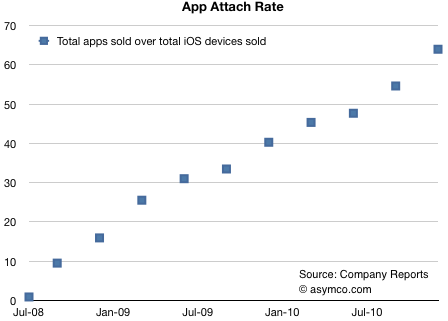
Research firm Asymco by industry analyst Horace Dediu has published a new report that details the average number of apps that have been downloaded on every iOS device. The devices included in Asymco’s report are the iPhone, iPod touch and iPad – but not the Apple TV, which even if it’s an iOS device it hasn’t got access to the App Store yet. Read more
Posts in Featured
On Average, Each iOS Device Has Downloaded 60 Apps

Access Extra Content and Perks
Founded in 2015, Club MacStories has delivered exclusive content every week for nearly a decade.
What started with weekly and monthly email newsletters has blossomed into a family of memberships designed for every MacStories fan.
Club MacStories: Weekly and monthly newsletters via email and the web that are brimming with apps, tips, automation workflows, longform writing, early access to the MacStories Unwind podcast, periodic giveaways, and more;
Club MacStories+: Everything that Club MacStories offers, plus an active Discord community, advanced search and custom RSS features for exploring the Club’s entire back catalog, bonus columns, and dozens of app discounts;
Club Premier: All of the above and AppStories+, an extended version of our flagship podcast that’s delivered early, ad-free, and in high-bitrate audio.
The AppSumo Supercharge OS X Bundle Giveaway

It might be a brand new year, but that doesn’t mean your brand new Mac has to be left app empty. So we want to supercharge your OS X experience with four applications for a powerful Finder experience, smarter windows, and only the fastest downloader on your side of the MacStories Internet. We’re going to supercharge your Snow Leopard, and all you have to do is enter our giveaway for a chance at one of five bundles.
Access Extra Content and Perks
Founded in 2015, Club MacStories has delivered exclusive content every week for nearly a decade.
What started with weekly and monthly email newsletters has blossomed into a family of memberships designed for every MacStories fan.
Club MacStories: Weekly and monthly newsletters via email and the web that are brimming with apps, tips, automation workflows, longform writing, early access to the MacStories Unwind podcast, periodic giveaways, and more;
Club MacStories+: Everything that Club MacStories offers, plus an active Discord community, advanced search and custom RSS features for exploring the Club’s entire back catalog, bonus columns, and dozens of app discounts;
Club Premier: All of the above and AppStories+, an extended version of our flagship podcast that’s delivered early, ad-free, and in high-bitrate audio.
iPad 2 with SD Slot, Higher Res Screen? iPhone 5 To Feature Apple A5 CPU?

A report posted tonight by Engadget reveals several details of future Apple products scheduled for a 2011 launch, such as the iPad 2, the iPhone 5 and the successor to the second-generation Apple TV. Engadget’s track record with Apple scoops has been very solid, and the details are very interesting.
According to sources close to the website, the iPad 2 will feature a higher resolution screen similar to the iPhone 4’s Retina Display, but won’t be have the same DPI. In the past, we’ve heard rumors about the next-generation iPad featuring a display with higher pixel density, and we actually spotted higher resolution images in the iBooks app for iPad months ago. Those images suggested a 2x increase in resolution. Engadget also claims the device will have a SD card slot – that bigger hole we’ve seen in cases and mockups recently wasn’t a speaker, apparently. The iPad 2 is set to come out in April, won’t feature a USB port and will be “lighter”. Read more
Access Extra Content and Perks
Founded in 2015, Club MacStories has delivered exclusive content every week for nearly a decade.
What started with weekly and monthly email newsletters has blossomed into a family of memberships designed for every MacStories fan.
Club MacStories: Weekly and monthly newsletters via email and the web that are brimming with apps, tips, automation workflows, longform writing, early access to the MacStories Unwind podcast, periodic giveaways, and more;
Club MacStories+: Everything that Club MacStories offers, plus an active Discord community, advanced search and custom RSS features for exploring the Club’s entire back catalog, bonus columns, and dozens of app discounts;
Club Premier: All of the above and AppStories+, an extended version of our flagship podcast that’s delivered early, ad-free, and in high-bitrate audio.
Discovr for iPad: An Interactive Map of Music
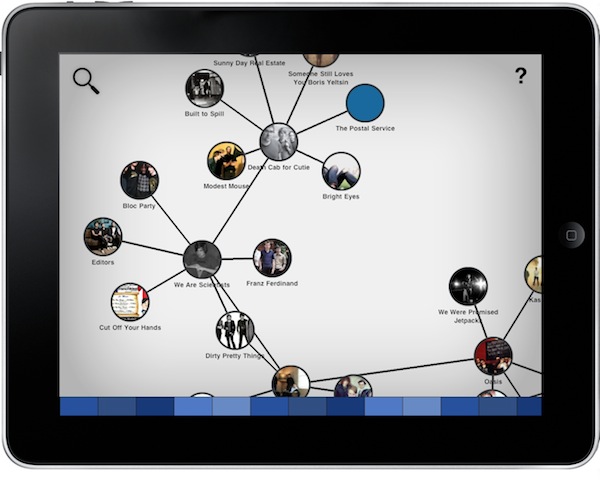
Months after its original release, I’m still using Aweditorium as my primary “music discovery tool” on the iPad. The app is nothing but a grid containing interesting independent artists and bands the Aweditorium developers think you should check out. You can listen to songs directly from the app, send them to an external speaker with AirPlay, run the app in the background or stay in there and check out bios, interviews and lyrics while you’re listening. It makes for a great way to discover new music when you have some free time to dedicate to music. But in Aweditorium, you won’t see your favorite artists coming up every once in a while, as the app is entirely based on music you’ve likely never heard of before. That’s where (I think) Australian music start-up Jammbox got inspired to develop Discovr for iPad. Read more
Access Extra Content and Perks
Founded in 2015, Club MacStories has delivered exclusive content every week for nearly a decade.
What started with weekly and monthly email newsletters has blossomed into a family of memberships designed for every MacStories fan.
Club MacStories: Weekly and monthly newsletters via email and the web that are brimming with apps, tips, automation workflows, longform writing, early access to the MacStories Unwind podcast, periodic giveaways, and more;
Club MacStories+: Everything that Club MacStories offers, plus an active Discord community, advanced search and custom RSS features for exploring the Club’s entire back catalog, bonus columns, and dozens of app discounts;
Club Premier: All of the above and AppStories+, an extended version of our flagship podcast that’s delivered early, ad-free, and in high-bitrate audio.
Handoff Pushes Web Pages From Your Computer to Any iOS Device
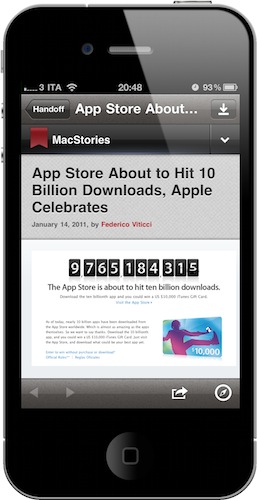
One of the features many users wish Apple implemented by default on OS X is the possibility to easily and quickly send any kind of content to iOS over the air. Through the Internet, in seconds, from a computer to the iPhone or iPad. We’re not talking “sync” here: I’m talking about web links, images, maps, phone numbers, Youtube videos “pushed” instantly to an iOS device. The other way around, from iOS to the Mac, would be welcome as well: instead of relying on third-party apps, one could save content and information to consume later on a Mac. Like a video you don’t want to watch while you’re out because, honestly, Instapaper wasn’t meant for video.
Luckily for us, a number of apps that enable OS X to iOS communication over the air have surfaced in the past years, and today we’re taking a look at a new one. The app / service is called Handoff, and it’s probably the simplest I’ve stumbled upon so far. It allows you send web links from your browser to the iPhone or iPad (the iOS app is universal) through a bookmarklet or extension. Read more
Access Extra Content and Perks
Founded in 2015, Club MacStories has delivered exclusive content every week for nearly a decade.
What started with weekly and monthly email newsletters has blossomed into a family of memberships designed for every MacStories fan.
Club MacStories: Weekly and monthly newsletters via email and the web that are brimming with apps, tips, automation workflows, longform writing, early access to the MacStories Unwind podcast, periodic giveaways, and more;
Club MacStories+: Everything that Club MacStories offers, plus an active Discord community, advanced search and custom RSS features for exploring the Club’s entire back catalog, bonus columns, and dozens of app discounts;
Club Premier: All of the above and AppStories+, an extended version of our flagship podcast that’s delivered early, ad-free, and in high-bitrate audio.
Twitter for Mac: ‘Tweet’ from Anywhere in OS X
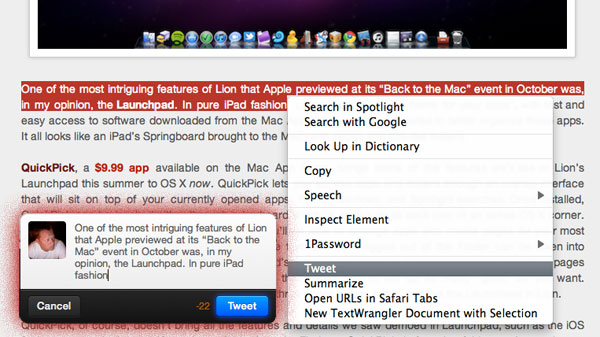
Just a few days ago everyone (including us) was talking about a simple bookmarklet for Safari that sends the site title and link to Twitter for Mac (Tweetie 2). Last night, I even found a Safari extension that did the same thing but also adds a tweet option in the contextual menu (right click) within Safari. Right after I tweeted the link, @SebastienPeek told me “who needs that when you can highlight anything, right click and it’ll show Tweet?” I had no idea what he was talking about, do you? I asked him if it was Safari only and he went one step more and said that it’s system wide, you can do it with a right click and highlight of any text. @BoltClock is credited with pointing me to this discovery. It’s system-wide for all apps that support Mac OS X’s contextual menu item additions. Here’s some visual goodness:
Access Extra Content and Perks
Founded in 2015, Club MacStories has delivered exclusive content every week for nearly a decade.
What started with weekly and monthly email newsletters has blossomed into a family of memberships designed for every MacStories fan.
Club MacStories: Weekly and monthly newsletters via email and the web that are brimming with apps, tips, automation workflows, longform writing, early access to the MacStories Unwind podcast, periodic giveaways, and more;
Club MacStories+: Everything that Club MacStories offers, plus an active Discord community, advanced search and custom RSS features for exploring the Club’s entire back catalog, bonus columns, and dozens of app discounts;
Club Premier: All of the above and AppStories+, an extended version of our flagship podcast that’s delivered early, ad-free, and in high-bitrate audio.
The Daily Won’t Be Announced Next Week

Looks like we called it: citing “sources familiar with the companies’ plans” All Things Digital reports that The Daily, the joint venture between Apple and News Corp. for an iPad-exclusive newspaper, won’t be announced next week:
Apple and News Corp. have made a joint decision to push back next week’s planned launch, according to sources familiar with the companies’ plans. The delay is supposed to give Apple time to tweak its new subscription service for publications sold through its iTunes platform.
Plans to hold debut the iPad newspaper at the San Francisco Museum of Modern Art next Wednesday have been tabled “for weeks, not months,” I’m told.
As we expected, the issue seems to be lying in app subscriptions for iTunes, which aren’t ready at the moment. And with such a feature supposedly being scheduled to ship with a software update to iOS, it appears that we’ll have to wait for weeks before actually reading The Daily. iOS 4.3, in fact, was released as “beta 1” only yesterday.
News Corp. PR confirmed the delay, and Apple declined to comment. Apple is reportedly tweaking the iTunes subscription feature that will allow publishers to push new content to users automatically, with recurring billing in iTunes.
Access Extra Content and Perks
Founded in 2015, Club MacStories has delivered exclusive content every week for nearly a decade.
What started with weekly and monthly email newsletters has blossomed into a family of memberships designed for every MacStories fan.
Club MacStories: Weekly and monthly newsletters via email and the web that are brimming with apps, tips, automation workflows, longform writing, early access to the MacStories Unwind podcast, periodic giveaways, and more;
Club MacStories+: Everything that Club MacStories offers, plus an active Discord community, advanced search and custom RSS features for exploring the Club’s entire back catalog, bonus columns, and dozens of app discounts;
Club Premier: All of the above and AppStories+, an extended version of our flagship podcast that’s delivered early, ad-free, and in high-bitrate audio.
Get Lion’s Launchpad On Your Mac Now with QuickPick
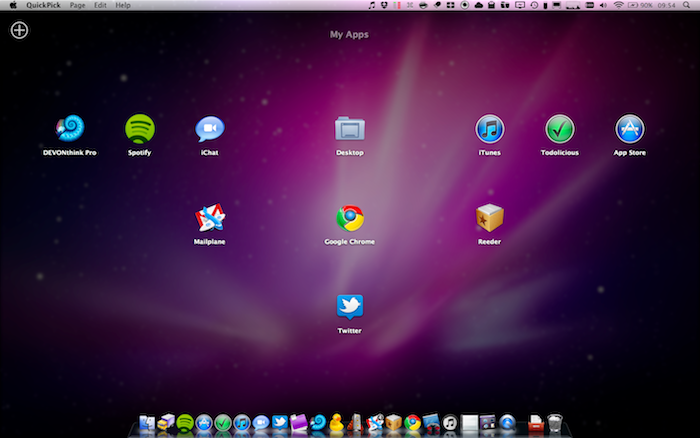
One of the most intriguing features of Lion that Apple previewed at its “Back to the Mac” event in October was, in my opinion, the Launchpad. In pure iPad fashion, Launchpad will be “a home for your apps”, with fast and easy access to software downloaded from the Mac App Store, or folders created to better organize these apps. It all looks like an iPad’s Springboard brought to the Mac, with pages and iOS-like folders.
QuickPick, a $9.99 app available on the Mac App Store, brings some of the features we’ll see on Lion’s Launchpad this summer to OS X now. QuickPick lets you access apps and folders through an overlay interface that will sit on top of your currently opened apps, Finder windows and Spotlight searches. Once installed, QuickPick can be invoked either through a keyboard shortcut, a click on its dock icon or an active OS X corner. As QuickPick’s grid comes in the foreground, you’ll be able to arrange apps and create pages for your most used apps, folders or documents. Almost any file that can be dragged out of the Finder can be taken into QuickPick’s grid. In the app, you can adjust the grid’s spacing and text size. You can even create multiple pages of apps / documents thanks to a “Page Dock” that allows you to set up as many “grids” as you want. Alternatively, you can move between pages with a three-finger swipe. Again, just like the Launchpad in Lion.
QuickPick, of course, doesn’t bring all the features and details we saw demoed in Launchpad, such as the iOS folders or page indicators. If you drag a folder from the Finder to QuickPick, in fact, that folder won’t open in-app but will launch a new Finder window instead. I guess it’s a fair trade-off, considering that this app is running on Snow Leopard and we haven’t seen enough of Launchpad anyway. Still, everything’s smooth and works just as advertised.
QuickPick is available at $9.99 in the Mac App Store, and it gives us a taste of things to come in Lion by providing an alternative solution for OS X 10.6. Will Launchpad be different and more refined come Lion’s public release? For sure. But until then, you should give QuickPick a try. Check out our brief demo video of the app below.
Read more
Access Extra Content and Perks
Founded in 2015, Club MacStories has delivered exclusive content every week for nearly a decade.
What started with weekly and monthly email newsletters has blossomed into a family of memberships designed for every MacStories fan.
Club MacStories: Weekly and monthly newsletters via email and the web that are brimming with apps, tips, automation workflows, longform writing, early access to the MacStories Unwind podcast, periodic giveaways, and more;
Club MacStories+: Everything that Club MacStories offers, plus an active Discord community, advanced search and custom RSS features for exploring the Club’s entire back catalog, bonus columns, and dozens of app discounts;
Club Premier: All of the above and AppStories+, an extended version of our flagship podcast that’s delivered early, ad-free, and in high-bitrate audio.
Gameloft Brings Interactive World War II Archive To The iPad

With their latest release for the iPad, Gameloft has temporarily decided to put games on the shelves and focus on a more historic subject like World War II. And instead of re-creating the conflict through another first-person shooter videogame, Gameloft created a completely interactive and immersive 56-page book filled with photographs, maps and fac-simile documents.
The app, War in the Pacific, features a foreword by Senior Military Advisor Dale Dye and was curated by Richard Overy, Professor of History at the University of Exeter. As you can see in the promo video below, the app (which also happens to be a 463 MB download, not exactly “lightweight”) comes with original video footage from 1945 detailing the battles against the Japanese Empire and sports some neat multi-touch gestures to navigate between pages, move documents on screen and re-arrange content. There are also animated maps showing the most important events in the Pacific and, overall, the photo archive really looks impressive.
War in the Pacific is available exclusively for the iPad and will cost you $9.99. I wonder if in the future we’ll see, for example, schools adopt this kind of single-subject interactive publications as a way for kids to learn faster, in a new way. Read more
Access Extra Content and Perks
Founded in 2015, Club MacStories has delivered exclusive content every week for nearly a decade.
What started with weekly and monthly email newsletters has blossomed into a family of memberships designed for every MacStories fan.
Club MacStories: Weekly and monthly newsletters via email and the web that are brimming with apps, tips, automation workflows, longform writing, early access to the MacStories Unwind podcast, periodic giveaways, and more;
Club MacStories+: Everything that Club MacStories offers, plus an active Discord community, advanced search and custom RSS features for exploring the Club’s entire back catalog, bonus columns, and dozens of app discounts;
Club Premier: All of the above and AppStories+, an extended version of our flagship podcast that’s delivered early, ad-free, and in high-bitrate audio.