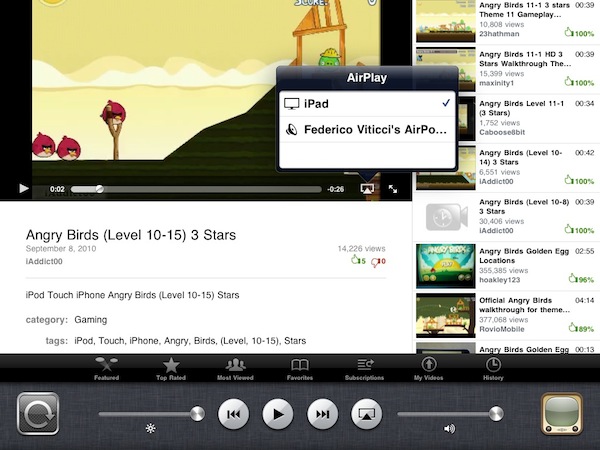
A few minutes ago Apple posted a new GM seed in the iOS Developer Center. The build shows that it’s a GM seed for iOS 4.2.1, with build number 8C148. Read more
Holiday Deals for Office for Mac 2011
Office for Mac 2011 was released at the end of last month and it seems like it’s a pretty solid release users who purchased it are really enjoying. With the holiday season around the corner (I wish we had something like Black Friday here in Italy), the Office for Mac team decided it would be appropriate to offer from sweet discounts on its brand new suite.
So this year Apple, Best Buy, and Mac Mall shoppers can save $20 on purchases of Office for Mac 2011 Home & Student. Amazon customers will receive $40 off, which is a great deal. These offers are available Thursday, November 25 – Monday, November 29.
We’ll update this post once the links to purchase the suite on Amazon will go live.
• Apple Stores (US & Canada): $20 off Home & Student Family Pack for $129 (regularly $149 ERP).
• Best Buy and MacMall (US): $20 off Home & Student 1-pack for $99 (regularly $119 ERP) and $20 off Home & Student Family Pack for $129 (regularly $149 ERP).
• Amazon (US): $40 off the Home & Student 1-pack for $79 (regularly $119 ERP) and Home & Student Family Pack for $109 (regularly $149 ERP).
• OfficeforMac.com (US): $20 off Home & Student Family Pack for $129 (regularly $149 ERP).
Get 40% Off App Tamer for Mac→
Get 40% Off App Tamer for Mac
App Tamer tames applications that are chewing up excessive CPU time and battery life on your Mac. Its unique “AutoStop” feature will stop an application when you switch away from it, and then automatically restart it when you click back to it.
This is a neat app to free up CPU and save battery life I highly recommend. I use it on a daily basis on my iMac, and at $8.97 it’s a great deal. Promo ends in 10 hours.
The Feed, Immersive RSS App for iPad
At this point, I guess you know I’m a huge Reeder fan. I use the app on my iPad on a daily basis, I fire up the iPhone version when I’m on the go and I was lucky enough to be accepted into the private Reeder for Mac alpha. Reeder has become my RSS app of choice, and I haven’t been able to switch to any other alternative since I tried the iPhone client last year. Yes, it’s that good. But that doesn’t mean I haven’t tried companion apps to Reeder.
Reeder is meant for RSS power consumption. Being based on folders and feeds navigation, Reeder isn’t meant for those people who want to sit down, pull out the iPad and start reading immediately. You have to do something to find your way through the feeds waiting for you in Google Reader. And that’s ok for me: Reeder is great Google Reader client. But what if we had the chance to have an Instapaper for Google Reader? An app that allows you to lean back, and just read? No folders, no menus, no navigation - just a flow of articles and text. Read more
Apple Releases Safari 5.0.3
A few minutes ago Apple released an update to Safari, which reaches version 5.0.3. It’s available now in Software Update, or via direct download on Apple’s website.
Apple also released Safari 4.1.3 for Tiger users. Safari 5.0.3 comes with a variety of fixes and overall performance improvements. Specifically, the update addresses issues with search and text input fields on Netflix and Facebook, improves stability of Javascript-intensive extensions and introduces more reliable pop-up blocking.
Check out the full changelog below. Read more
Sleeve360: iPad Case With Hand Strap Mode
The guys at ThinkFast have been working on a very cool case for iPad that, among other functionalities, will enable you to use the tablet in “hand strap mode”. Thanks to a 360° spinning pivot attached to the back of the device through a case, the Sleeve360 will allow you to have the screen always at your fingertips and rotate it in any direction you want. Read more
Control Your iPhone’s Brightness From The Multitasking Tray | Cydia Store
App Switcher Brightness is a simple tweak available in the Cydia Store which lets you control your iPhone’s brightness from the multitasking tray. Once you download the tweak, available at $0.99, you’ll be able to adjust brightness through a slider placed right below the iPhone’s widget controls.
Neat.
World Without Photoshop: Neat PS Book for iPad
Created by photographer Dan Marcolina, “World Without Photoshop” is an app for iPad designed using Adobe’ InDesign publishing tools, and it focuses on showcasing the techniques and processes used by Photoshop “artists and masters”.
From the app’s description:
Now 20 years old, Adobe® Photoshop® software has changed image editing forever. Can you imagine a world without Photoshop? Over the next twelve chapters you can see for yourself what some of the best digital artists work looks like without the software. Then with the touch of your finger The World Without Photoshop is transformed and you can see and hear the imaginations of these artists come to life in their work. Pinch and zoom into over 48 works by artists, illustrators, designers, and photographers and get their insights into how twenty years of Photoshop innovation have changed their world.
Honestly, we can’t imagine a Photoshop-free world. And since I can’t imagine a world without iPad either, you’ll get the best of both worlds with this cool app / book / book app.
World Without Photoshop is available for free here. [via John Nack]
Yahoo’s iPad-optimized Homepage Doesn’t Look Bad
Oh, Yahoo. What are you, exactly? What have you become? No one really knows for sure. Are you “the guys behind Flickr”? Are you a news website? A mail platform? Many say Yahoo! lacks an identity. Maybe they do.
But anyway, the iPad-optimized homepage they recently launched isn’t that bad. Available at yahoo.com/tablet, it displays Yahoo’s sites in a sidebar and featured articles to flick through with your fingers on top.
Not bad at all.