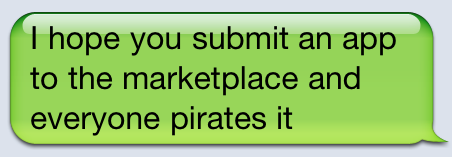
Notable mentions:
“I hope you submit an app to the App Store and it gets rejected”
“I hope you lose your SD card”
Full image below, via @jtaby. Happy Thanksgiving, iOS and Android users.


Smart Autocomplete for Your Whole Mac
Notable mentions:
“I hope you submit an app to the App Store and it gets rejected”
“I hope you lose your SD card”
Full image below, via @jtaby. Happy Thanksgiving, iOS and Android users.
I wish we could write an article about this every single day: we’re thankful we get to wake up every morning, check on our emails (ok, maybe a full inbox isn’t something to be thankful for) and do what we love. We’re thankful we can talk about the things we love every day and share them with you. It’s been an amazing 2010 so far for MacStories, and we have only you to thank.
That said, happy Thanksgiving folks. Personally, I never had the chance to be invited to a Thanksgiving lunch (we don’t have such a thing here in Italy) but I’m pretty sure Cody and Chris are lost somewhere in their houses right now trying to figure out how they managed to eat so much while talking about apps with their non-geek friends.
Seriously though, we wish you the happiest of holidays. Oh, and in case you missed it: we’ve taken care of Black Friday Apple-related sales for you.
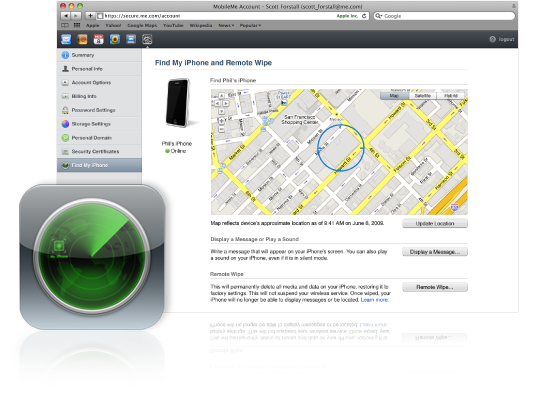
Rumors of some features of MobileMe going free started surfacing online days before the public release of iOS 4.2. On November 22nd, a few hours before Apple flipped the switch on the new OS, Find My iPhone – a MobileMe functionality that allows users to remotely locate and wipe the iPhone and iPad – went free for all iOS users running the latest firmware on last generation devices. It turned out, though, that enabling the feature for free on older devices wasn’t that difficult.
Apple’s refreshed MobileMe offering, however, comes with some limitations, namely the impossibility to activate Find My iPhone for free more than 3 times on a device. Read more
Remember the App Store Review Guidelines Apple published a few months ago? They’re available for you to read here, although an Apple Developer account is needed. Basically, Apple opened up to many more kinds of apps and frameworks with the publicly available Review Guidelines, but took a clear position on some kinds of apps as well. Namely, fart apps:
We have over 250,000 apps in the App Store. We don’t need any more Fart apps. If your app doesn’t do something useful or provide some form of lasting entertainment, it may not be accepted.
The San Jose Mercury News is reporting that Apple has made a 98-acre land purchase in Cupertino to double the capacity of its original campus. The new location is the historic Hewlett-Packard campus, the same where Steve Wozniak was working when he and Steve Jobs were working on the first Apple computer in the 70s.
HP is in the middle of an operation to consolidate its headquarters in Palo Alto, and Apple apparently secured the old HP campus in an effort to expand Cupertino’s Infinite Loop. Put simply, Apple needs more room. Read more
Home & Student single license pack, save 30 bucks. If you need the most recent version of Office for Mac, this is a good time to buy it.
You can also save $40 on the Family Pack.
Looks like those ahead of us timezone-wise can already enjoy the discounts offered by Apple in its Black Friday sale. A few minutes ago the sale went online in the Australia and New Zealand Apple online stores, and it applies to MacBooks, iPads, iPod touches and a variety of accessories. Read more
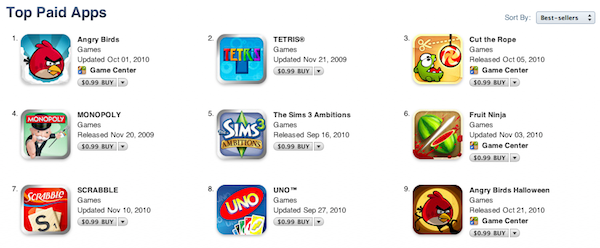
Frankly, I saw this coming: with all the offers and deals that have started to pop up in the App Store since last week, the rapid arise of games in the App Store charts doesn’t come as a surprise at all. Still, the results and numbers are noteworthy: while counting all the games in the App Store is nearly impossible (at least basing on official data, which Apple doesn’t provide), we can simply take a look at the “Top Paid Apps” and “Top Grossing Apps” charts to see what happened.
Games are dominating the Thanksgiving week in the App Store. Especially on the iPhone App Store, where at the moment of writing this only 26 apps out of the top 100 are non-games apps. The fact that we refer to them as “non-games apps” also tells a lot about the environment Apple created. The situation is slightly different on the iPad App Store (“only” 40,000 apps, newer platform) but the trend is just about the same on both the stores. Games are selling like hotcakes, huge discounts or not. Read more
Web designers rejoice.