


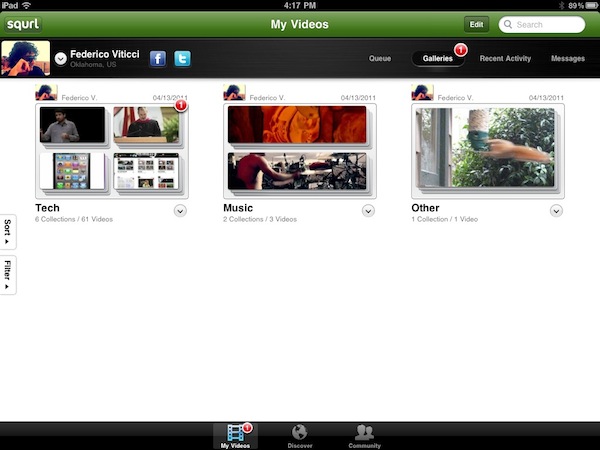
Released yesterday on the App Store and the web, Squrl is a new service powered by an HTML5 interface that allows you to save videos from several supported services, collect them on the iOS and web apps, and watch them later at any time. The concept behind the service is very simple and attractive: much like an Instapaper for video, Squrl enables you to save videos from Youtube, Vimeo, Hulu, Netflix and many other providers with the click of a bookmarklet (which you have to install from the website). Unlike Watchlater, though, Squrl doesn’t stop at collecting videos in a single place, it also packs social functionalities and organization features to let you create galleries and collections of videos, share them, or even subscribe to collections shared by other users in your social graph. Read more
Suppliers: iPhone 4 Demand Still High, No iPhone 5 Roadmap Yet

Speaking to suppliers “related” to the iPhone’s production in Asia, Digitimes reports today Apple still hasn’t released a roadmap for the next-generation iPhone – unofficially dubbed iPhone 5 until today – leading many to believe Apple might want to focus the upcoming WWDC in June (the usual stage for new iPhone announcements) on software and release a new model this Fall, or in early 2012. Digitimes, however, also reports another “theory” that has been formulated by component suppliers: unlike previous rumors that suggested the iPhone 5 would be a completely new device, the iPhone 5 could be a slight redesign of the current iPhone 4 and still launch this summer “to fend off the rising popularity of Android.”
Apple has not yet released a production roadmap for iPhone 5 as shipment volumes of iPhone 4 have continued to mount and related suppliers are not yet ready to shift their production lines for new products, according to sources at Taiwan-based touch panel makers.
While acknowledging there should be a roadmap for each generation of products, the sources insisted that touch panel shipments for iPhone 4 have remained steady, and that they have not seen a timetable to stop current production in preparation for the next-generation of iPhone.
A report surfaced yesterday indicated the iPhone 5’s production is set to start in September for a Fall release, with a cheaper iPhone model still in the works to grant Apple a larger share in different market segments. According to previous speculation, the iPhone 5 should be an updated version of the iPhone 4 (featuring the same design scheme), but with a metal back and redesigned antenna, 8 MP camera, NFC capabilities and Apple A5 processor.
New Final Cut Pro X Screenshots, Apple Says “Stay Tuned” For Other Apps
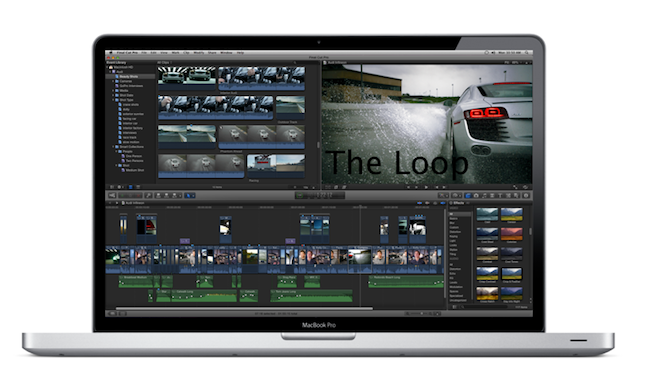
Last night, Apple officially announced a new version of Final Cut Pro during the Supermeet in Las Vegas, Nevada. As you might have read in our liveblog and announcement post, Final Cut Pro X has been completely rebuilt from the ground up to be as revolutionary as the first version of FCP released in 1999: full Cocoa, Core Animation, Grand Central Dispatch and 64-bit support, iMovie-inspired menus for easier navigation and media management, a whole new underlying engine that – according to people who saw the demo yesterday – makes the timeline incredibly fast and responsive. With keyboard-based nesting, magnetic timeline, background processing and automatic people and media detection on import, Apple aims at revolutionizing Final Cut Pro.
As announced yesterday by Chief Architect of Video Applications Randy Ubillos on stage, Final Cut Pro X will be released at $299 in June. Final Cut Pro went under a major price cut (it used to be sold at $999), and it will also be available on the Mac App Store – like every new Apple desktop app nowadays. But last night, many immediately wondered whether the lower price and Mac App Store distribution would lead to the demise of Final Cut Express (widely regarded as an “iMovie for Pros”, lacking many of the functionalities of Final Cut Pro) and boxed copies of FCP. Furthermore, Apple made no mention of all the other Final Cut Studio apps last night such as Motion, Soundtrack Pro, Compressor, Color and DVD Studio Pro. On Twitter, I speculated Apple could release them as standalone apps in the Mac App Store or – when they don’t make sense as apps because they’re basically “extensions” to Final Cut – as in-app purchases within Final Cut Pro X itself.
An Apple representative, speaking to The Loop, seems to confirm the theory that other apps will be released alongside FCP X:
Apple on Wednesday introduced Final Cut Pro X, but there was no mention of the other applications in the suite of video apps.
“Today was just a sneak peak of Final Cut Pro, stay tuned,” an Apple representative told The Loop.
The Loop has also received a series of high-res screenshots, one of them you can see above. We should know more about Final Cut Pro X in the coming weeks (Apple hasn’t posted a press release, or updated its website with a sneak peek) as Apple gets ready for a June launch, presumably during or soon after the WWDC.
Apple Announces Final Cut Pro X, Coming In June

Update #1: Final Cut Pro X will be released in June and it’ll be available through the Mac App Store. No mention of Final Cut Studio or Final Cut Express today. [via]
As widely expected, Apple just introduced a new version of Final Cut at the Final Cut Pro Supermeet during NAB 2011 in Las Vegas, Nevada. Touted as “revolutionary as the first version” from 1999, Apple introduced the new Final Cut Pro X saying that every major broadcaster and film maker nowadays relies on FCP for their video editing needs.
Basing on live updates coming from attendees at NAB 2011, Final Cut Pro X has been built from scratch, and it’s entirely 64-bit. It’s based on technologies like Cocoa, Core Animation, Open CL, Grand Central Dispatch and it focuses on image quality. It features a resolution independent timeline up to 4K for scalable rendering – in fact, it appears the old render dialog is gone entirely as the app uses the available CPU to keep files always rendered. FCP X allows you to edit while you’re importing thanks to its new engine, and it’s also got automatic media and people detection on import, as well as image stabilization.
Apple is promoting the new FCP X as a complete and total rebuild. Smart collections look very similar to iMovie, and overall there is a feeling Apple has borrowed some UI elements from the iLife application to make the general design more accessible, even for professionals. For instance, Apple has brought “single keystroke nesting” to Final Cut Pro – a new functionality that allows you to group chunks of media into a single clip in the timeline. The “inline precision editor” allows you to make edits by revealing media with an iOS-like menu.
More details from liveblogs:
- “You can view the media in the browser in a film strip type view. You can completely customize how you view media prior to the timeline.” - robimbs
-
“4 window setup is now kind of truncated in 3 windows. The browser has the viewer built into it.” - robimbs
-
“Auditioning: collect options during edit, choose later (simplifies versioning). This is loosely similar to Logic’s feature for grouping” - fcpsupermeet
Some notes of interested from Photography Bay:
10:33: Randy Ubillos, Chief Architect, Video Applications on stage. Demo FCP X live now. Beta version. “We hope it behaves.”
10:35: Audi R8 commercial spot cut on FCP X…
10:36: Demo’ing it live now. Showing off the keywording ability of the sections of the clip instead of the whole clip.
10:37: Offers filmstrip view for content. Looks just like iMovie’s functionality.
10:38: You can highlight sections of content in the filmstrip view and add keywords that way. The keywords show up as items in event library. Selecting those keyword items brings up just those sections of content. Looks like subclips, but it’s not.
If the new FCP X is still in beta, there’s shouldn’t be a product launch (or press release) coming today. Several attendees are reporting on Twitter the new timeline is very, very fast and are also mentioning an iPad app being demoed on screen. With background processing and the possibility to use all cores on powerful machines like a Mac Pro, Apple has focused on improving the reliability of Final Cut’s timeline by making sure to clips can be accidentally “destroyed”. The redesigned UI with a touch of iOS here and there and “magnetic timeline” should – basing on what we’re hearing from people at NAB – dramatically improved navigation and organization of large chunks of media.
FCP X features instant render in the background that doesn’t affect editing, also with 1-click instant color matching. Color correction, for example, has been built right into the timeline, enabling users to, say, distribute a “Ken Burns Effect” with a single swipe. Apparently there’s a lot of animation going on with windows, and attendees are reporting that – judging from the demo – Final Cut Pro X is incredibly fast in every task and processing that’s been done on stage.
Read more
iPhone Tab Bar Lessons→
iPhone Tab Bar Lessons
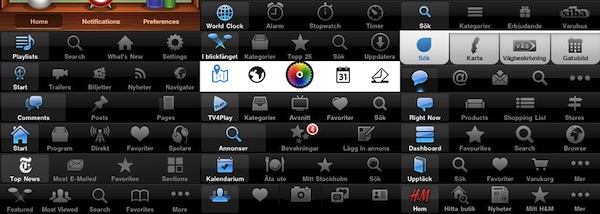
Over the last couple of years, the iPhone has greatly popularized the tab bar navigational model for mobile handsets. Apple has put together a design rationale for the tab bar in their Human Interface Guidelines (HIG) along with lots and lots of other information — they do however leave some question unanswered. Having worked with interaction and graphical design for iPhone applications during the last couple of years I’ve managed to pick up some lessons the hard way, and in this post I would like to share my thoughts on a couple of do’s and don’ts.
Petter Silfver compares different tab bar designs from popular iPhone apps and gives some insight into Apple’s subtle design decisions that most of us won’t even notice, but are important to build a consistent and natural experience on iOS. Such as colors and hues in the tab bar, the ideal number of tabs, or the problems with a “More” tab that distracts users and hides important functionalities of an app that should be discovered naturally.
If you’re an iOS geek like me, a designer, or simply interested in knowing more about this particular aspect of Apple’s Human Interface Guidelines, check out the post here. It’s full of details, and it’ll make you re-consider the implementation of Instagram’s Camera button.
Acorn 3.0 Released With 50 New Features
Popular “image editor for humans” Acorn for Mac was updated to version 3.0 a few hours ago, and after trying the app with some images I had on my desktop I can say it’s one the best updates I’ve seen on the Mac platform recently. Acorn 3.0 not only brings a series of refinements and optimizations that make the app faster, more reliable and overall more stable – it also introduces a whopping 50 new features that aim at enhancing your experience with Acorn without overwhelming you with functionalities unlike some other pricey image editor for OS X and Windows we know very well. Plus, if you’ve been an Acorn user for a while you know you can expect elegance and minimalism from the app’s interface that’s always readable and accessible. I am a big fan of Acorn so maybe I’m a little biased in judging the app, but I think we can all agree version 3.0 brings a terrific new feature set that turns Acorn into an easy to use & powerful image editor.
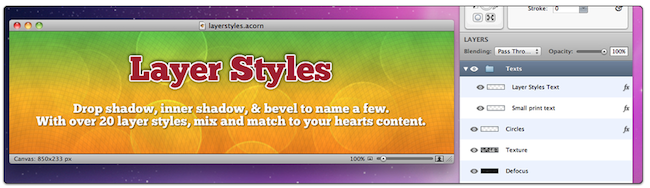
Among the new features, layer styles: with drop shadow, inner shadow, bevel and more Acorn allows you to apply effects to layers and revert back at any time with a simple CMD+Z. PSD import and export have been improved, there are new filters to play with, and a cool ”Multistop Live Gradients” technology that enables you to apply more than 2 color gradients to your text or images. Text support, indeed, was improved in version 3.0: you can apply gradients on text and shapes, rotate text upside down to get to the layout you want, and you can convert text into Bezier shapes, too. Other new features in this 3.0 update include “Instant Alpha” to automatically remove unwanted pixels from an image, and a Quickmask functionality to select and move layers around by just hovering over them with your cursor. The Quickmask works really well, and combined with the layered screenshot capabilities of Acorn it makes for a great tool for Mac bloggers (see screenshot after the break). Last, Acorn 3.0 can export layered documents to PSD and PDF.
You can check out the full release notes here. Acorn 3.0 is a huge update that’s temporarily available at the discounted price of $29.99, but users who bought the app from the Mac App Store when it was released a few months ago will get the update to 3.0 for free. Once again, Acorn is the image editor for humans, and an excellent alternative to Photoshop or Pixelmator for OS X users. Read more
Postagram: Print Postcards From Your Instagram Photos

A few days after Instagram launched its official API, web services and third-party applications promising integration with the popular photo sharing platform started popping up on the Internet and, as it usually happens, most of them were just cool experimentations not meant for massive usage on a large scale. That’s why we called Instaprint, a device that plugged into Instagram to print Polaroid-like photos, the coolest use of Instagram’s API we had seen. In the past weeks, you might have noticed we covered other interesting apps that rely on the API to deliver photos from Instagram on otherwise unsupported platforms like, for example, the Mac.
Clearly inspired by what Instaprint did with the mini-printer, Postagram is an actually working service and app available in the App Store that allows you to turn your Instagram photos into physical glossy postcards at 300 dpi. The concept is simple: you download the free app, log in with your Instagram account and grant authorization to Postagram. Once logged in, all you have to do is pick a photo from your Instagram stream, and choose to make it a postcard that will be sent to you in 2-5 business days (if you live in the United States). Printing a postcard costs $0.99 right now – the price will likely go up in the next weeks once this initial promotion is over – but users who sign up now can print a photo for free. I did, and I should receive it next week. The process is really super-easy, and you can also enter a personal message if you want – by default, the app picks the description from an Instagram photo (see screenshot above).
Postagram lets you send an Instagram postcard to any recipient, and if you’re planning on sending multiple ones the app will be able to remember previous choices so you don’t have to re-enter an address every time. You can enter credit card information in-app, but there’s no interface to track the status of a shipment – likely because it happens through regular postage. Furthermore, if you don’t like having your photo inside a postcard you can pop it out and end up with a single square in your hands, perfect for – say – your desk.
You can download Postagram from the App Store now and start ordering prints right away. We think this is a great idea – it’ll be huge for vacations this summer, if only the service will start offering discounts on large sets of photos – and I look forward to getting my postcard next week. Check out more screenshots below. Read more
Rovio Posts Easter Update Screenshots, “Angry Birds Sync” Coming This Summer

Following last week’s report about Angry Birds Seasons getting an “amazing update” before Easter, the Rovio developers have posted the first screenshots of the update – which unsurprisingly will feature lots of eggs, bunnies and, overall, 15 new levels for iPhone and iPad users. Rovio will also release 3 new levels on the Facebook version of the app – you should have lots to play this Easter if you’re a die-hard Angry Birds fan.
Meanwhile, Rovio keeps giving out interesting details about future developments of the Angry Birds franchise through a series of replies to their customers on Twitter. The latest tidbit comes in the form of a tweet that confirms the company is still working hard on a cross-platform sync solution (Angry Birds Sync, perhaps) that should allow users to easily switch devices without losing their Angry Birds progress and records. This was possible before with a bit of manual hacking on iOS devices, but real iOS - Android - Facebook sync would be perfect for Angry Birds. Rovio says sync should come before summer.
[via TouchArcade]
Office for Mac 2011 Service Pack 1 Now Available
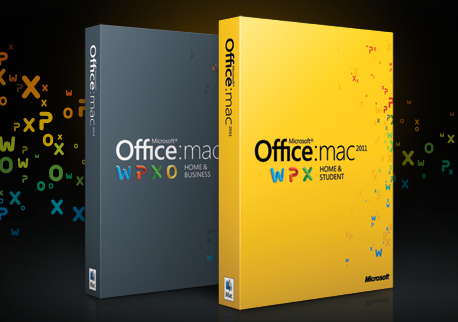
As reported last week, Microsoft today released the first Service Pack update for Office for Mac 2011, which brings improved security and a number of fixes to patch “vulnerabilities that an attacker can use to overwrite the contents of your computer’s memory with malicious code”. The update is available now on Microsoft’s website.
The SP1 also brings integration with Apple’s Sync Services for calendars, contacts, tasks and mail notes through Outlook. These sync features will work with any iPhone or iPad plugged in a computer and synced with iTunes, but unfortunately Microsoft couldn’t implement MobileMe support for Outlook Calendars as MobileMe will stop using Sync Services in May. However, it should be possible to sync a Google Calendar back to iCal, and then from iCal to Outlook to achieve some sort of online synchronization.
You can find the Office for Mac 2011 Service Pack 1 here.