Federico Viticci

10873 posts on MacStories since April 2009

Federico is the founder and Editor-in-Chief of MacStories, where he writes about Apple with a focus on apps, developers, iPad, and iOS productivity. He founded MacStories in April 2009 and has been writing about Apple since. Federico is also the co-host of AppStories, a weekly podcast exploring the world of apps, Unwind, a fun exploration of media and more, and NPC: Next Portable Console, a show about portable gaming and the handheld revolution.

This Week's Sponsor:

HomeSnap

A Private, Read-Only Window Into Your HomeKit Home


Apple: A Step Ahead, and Three To The Side

Here’s a thought: Apple isn’t ahead of its competitors only in terms of hardware design, software, and product marketing. When Apple takes a step ahead, it also takes three more to the side – and that’s what’s helping them shape the industry today.

We often refer to Apple as a company “ahead of the competition” with products like the iPhone, iPad, OS X and iTunes. I believe what’s driving the single “step ahead” isn’t the (successful) combination of products and customer satisfaction – it’s the company itself, its culture, the image they want to show to the world. The “step ahead” is Apple’s DNA.

But consider the three steps to the side that help Apple differentiate itself from the competition, and roll out products and services that people are actually willing to pay for. These three steps are taken in regards of hardware, software, and the overall message the interplay of both has to deliver.

Hardware: iPhone, iPad, iPod, Mac. These products have an attractive design, and they’re the result of Apple’s deals to secure components before anyone else at a lower price, for the long-term. That’s why it took months for competitors to figure out multi-touch after the first iPhone, and why Ultrabooks still can’t match the MacBook Air.

Software: iOS, OS X, iTunes, iCloud. Software is the soul to Apple’s products, it is the reason why Apple hardware “just works”.

Message: Apple wants to make the best products in the world. Products they can sell for a profit, and make people happy with at the same time. Through the right combination of prices, attractive design, and marketing, the “interplay of hardware and software” is what defines Apple’s message.

Apple strives to innovate, but wants to do so by being unique with its own hardware, software, and message. Competitors often try to take their risks with either hardware, software, or the message, but they can’t do all three at the same time.

This is where competitors and Apple stand:

You can also think of “Innovation” as “Liberal Arts” and “Time” as “Technology”. When Apple takes a major leap forward, it does so because it’s in their DNA to innovate and sit at the intersection of Technology and Liberal Arts; alongside the single breakthrough in terms of innovation, they take three equally disruptive steps to the side to stand out from their competitors thanks to the great efforts they’ve gone through to advance in technology.

Technology evolves with time. Apple’s three steps allow them to have a considerable time advantage – this is the reason why many phones today still can’t match the original iPhone from 2007.

Four years ago, Steve Jobs said:

iPhone is a revolutionary and magical product that is literally five years ahead of any other mobile phone.

But is still ahead just because Apple kept iterating on the original idea?

Technology isn’t a 100 meters sprint race. Companies that want to be successful can’t keep running the same race, more of the same following more of the same. Just take a look at RIM. Apple knows that technology alone is not enough. And thus evolving with time alone (upgrading the same product with new hardware) won’t matter much if risks aren’t taken other directions as well.

Apple reinvented itself as it was moving ahead. Steve Jobs, announcing the iPad in January 2010:

Everybody uses a laptop and a smartphone. And a question has arisen lately: is there room for a third category of device in the middle? Something that’s between a laptop and a smartphone. And of course we’ve pondered this question for years as well. The bar’s pretty high. In order to really create a new category of devices, those devices are going to have to be far better at doing some key tasks. Better than a laptop. Better than a smartphone. Now, some people have thought…that’s a netbook. The problem is, netbooks aren’t better at anything. They’re slow, they have low quality displays and they run clunky old PC software. So, they’re not better than a laptop at anything. They’re just cheaper. They’re just cheap laptops. We don’t think they’re a new category of device.

Progress, ultimately, is adaptation. This started with the iPhone in 2007, and ends with iCloud in 2011. When iOS 5 and iCloud come out this Fall, there will be a brand new vision – and therefore, kind of adaptation – moving forward. A company that constantly adapts to an ever-changing market generates desires for the new, whilst simplicity and usability lead to customer satisfaction. At a higher level, it is the interplay of progress and simplicity that keeps Apple growing.

Technology and liberal arts aren’t mutually exclusive.


Western Digital Unveils “WD 2go Pro” iOS App To Stream & Download Media From The Cloud

Earlier today Western Digital launched WD 2go Pro on the App Store, a $2.99 universal app for iPhone and iPad to access and download media and documents stored in a My Book Live account. My Book Live, unveiled by the company last year, allows users to set up a NAS (network attached storage) device, and access documents from a “personal cloud” with different user accounts over the Internet. The first version of My Book Live came with an iOS app to view photos stored in the cloud, while the free WD 2go enabled remote viewing for media, and documents.

WD 2go Pro is different from the free application in that it enables users to download files for offline access, set a passcode, and sync entire folders from My Book Live to a mobile device. Furthermore, the Pro version lets users email files, share them as links, and print/open documents through third-party apps.

The WD 2go mobile app supports most major file types including Microsoft Word documents, Microsoft Excel spreadsheets, PowerPoint presentations, Apple Keynote, and more. So you can pull up that presentation and show it off on your iPad in 1024 x 768 resolution.

WD 2go Pro is available at $2.99, and it requires a My Book Live account with an iPhone, iPod touch, or iPad running OS 4.x or later. Check out the original My Book Live promo video below. Read more


Deus Ex: Human Revolution Coming to the Mac

Feral Interactive has announced that a native Mac version of Deus Ex: Human Revolution, the critically acclaimed prequel to Deus Ex, will be released in the upcoming months. The game is set to come out during Winter 2011/12, with Feral’s dedicated mini-site receiving an update with more information about the title soon.

Deus Ex: Human Revolution is an action-based role-playing game developed by Eidos and published by Square Enix. It tells the story of Adam Jensen, a security chief for one of the world’s most powerful corporations; in 2027 – Human Revolution is set 25 years before the original game – corporations have extended their powers beyond the reach of local governments. Adam is forced to undergo cybernetic augmentation to fuse his body with mechanical parts, and he’s thrown in the middle of a global conspiration.

From Ars Technica’s review of the game:

The game’s uncanny ability to give you multiple ways out of situations is carried right through to the final encounter, and the game even ends with an important decision. Every option you’re given before the credits roll is attractive in its own way, though at the same time, none of the choices truly provide comfort. Human Revolution can be oppressively bleak at times, but it earns its tone.

Although the game world has plenty of room for more stories told by future titles, this story comes to a very definitive end. That’s something rare in big-budget games today, especially when they take place in an established franchise. But a real conclusion just confirms why this game deserves so much praise: by the end of the game’s impressively long run time, you’re left satisfied by the story and the characters within it.

Below is the trailer of Human Revolution from E3 2010. Feral Interactive isn’t new to Mac game ports, having released Borderlands: Game of the Year Edition for OS X last year. [via The Loop]
Read more


Security Update 2011-005 Released, Addresses DigiNotar Certificates

Earlier this afternoon Apple released two security updates for OS X Lion and 10.6.8 Snow Leopard to address an issue with compromised digital certificates issued by DigiNotar weeks ago.

Available for: Mac OS X v10.6.8, Mac OS X Server v10.6.8, OS X Lion v10.7.1, Lion Server v10.7.1

Impact: An attacker with a privileged network position may intercept user credentials or other sensitive information

Description: Fraudulent certificates were issued by multiple certificate authorities operated by DigiNotar. This issue is addressed by removing DigiNotar from the list of trusted root certificates, from the list of Extended Validation (EV) certificate authorities, and by configuring default system trust settings so that DigiNotar’s certificates, including those issued by other authorities, are not trusted.

The updates are available on Software Update, or directly on Apple’s Downloads website. DigiNotar’s servers were hacked last month, and began issuing false certificates, leading to security concerns among several companies. As Apple also notes, it was possible to remove the certificates manually by deleting the root entries in Keychain Access.

Direct links:

Security Update 2011-005 (Lion)

Security Update 2011-005 (Snow Leopard)


Bloomberg: Sprint To Sell iPhone 5 Next Month with Unlimited Data

A new article from Bloomberg corroborates a report from The Wall Street Journal, claiming that”according to people familiar with the matter” Sprint will start selling the next-generation iPhone in mid-October, with an unlimited data plan.

Sprint Nextel Corp. (S) will offer Apple Inc. (AAPL)’s iPhone next month with unlimited data service plans to distinguish itself from rivals AT&T Inc. (T) and Verizon Wireless, according to people familiar with the matter.

Sprint, the third-largest U.S. wireless carrier, plans to begin selling the device in mid-October under a deal with Apple for the next model, the iPhone 5, said the people, who wouldn’t be identified because the plans aren’t public. Becoming the country’s only operator to offer the device with unlimited data service for a flat fee may help Sprint draw customers from AT&T and Verizon Wireless, which already carry the phone, they said.

Both Verizon and AT&T switched their previous unlimited data plans to tiered ones, and Sprint is said to be considering the iPhone as a way to win consumers over the nation’s two largest carriers – Sprint has lost money for 15 consecutive quarters, with several analysts claiming that the lack of Apple’s iPhone in its line-up has certainly contributed to the carrier’s loss. A lawsuit filed by Spring against the AT&T / T-Mobile merger earlier this week stated the company had to compete without the iPhone for nearly five years.

For a timeline of iPhone 5 news and speculation, check out our rumor roundup and retrospective.


Translate Tab Puts Google Translate In Your Mac’s Menubar

I use Google Translate quite a bit. Automatic, “machine-made” translations of entire sentences are usually bad and may lead to some funny nonsense, but the service has gotten better over the years and, admittedly, it’s useful to quickly look up synonyms from one language to another, or get the general sense of a blog post about technology and Apple (which I do on a daily basis for articles from Macotakara or MacMagazine). And whilst heading over Google Translate via the browser is pretty effortless these days thanks to application launchers like Alfred and LaunchBar, I’ve been looking for a way to embed the translate UI of Google’s website on my Mac in a way that’s always there but unobtrusive, ready to be used when I need it.

Translate Tab does this at $2.99. It takes Google Translate, and puts it inside a nicely translucent, white Lion-like popover in your Mac menubar, which you can access with a keyboard shortcut (and if you’re geek enough, customize with automatic clipboard entry through Keyboard Maestro). Tab Translate can be considered a site-specific browser, and I like how it’s been slightly tweaked to fit inside the popover with no horizontal scrollbars, retaining Translate’s functionalities such as alternate translations.

If you use Google Translate a lot and you’re tired of opening a new browser tab every time, you might as well spend $2.99 on Translate Tab on the Mac App Store.


My Two Weeks with Keyboard Maestro

I’ve been intrigued by Keyboard Maestro since I first heard about it on Daring Fireball years ago, but never installed and tried the app because of a somewhat widely shared notion that it’s “too difficult to use”. Recent Keyboard Maestro coverage on Brooks Review, ShawnBlanc.net and MacDrifter took my curiosity to a whole new level, so thanks to the Productive Macs bundle, I pulled the trigger and got a copy of Keyboard Maestro, which was later upgraded to version 5.0 for free with the same license.

There’s no easy way to describe Keyboard Maestro, but I’ll try: Keyboard Maestro is a trusted and powerful assistant for your Mac. When you don’t know how to do something, or how to make an existing menu or functionality faster and easier to use, you can turn to Keyboard Maestro and start building your own way out of options third-party developers or Apple didn’t think about.

Keyboard Maestro empowers you to take existing apps, menus, keyboard shortcuts – anything your Mac can perform – and mix them together to achieve something that fits better your workflow.

Keyboard Maestro isn’t strictly about tweaking. The app’s real power lies in how it puts the focus on discovering and building what’s better for you, and sticking with it. It’s no toy, but it’s fun to use once you get the (easy) hang of it.

Writing a review of Keyboard Maestro it’s like asking someone to “write a review of Apple”. The subject is so broad, the offer so variegate and ever-changing, it makes almost no sense to go into every single feature and over-analyze it with no context. Rather, I’d prefer to provide a more empirical look at this app in that I’ll share some of the tricks and functionalities I’ve come to learn and use in the past weeks.

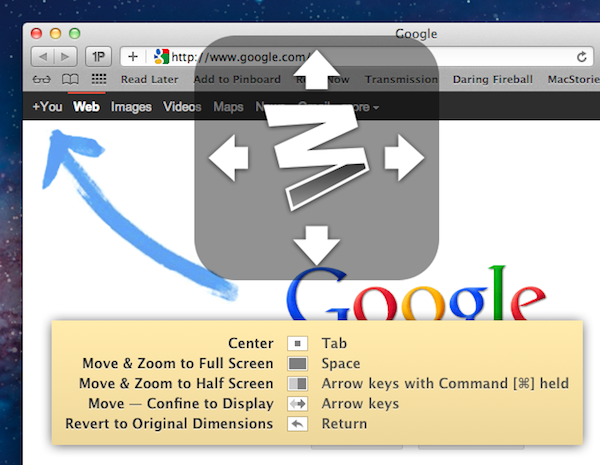
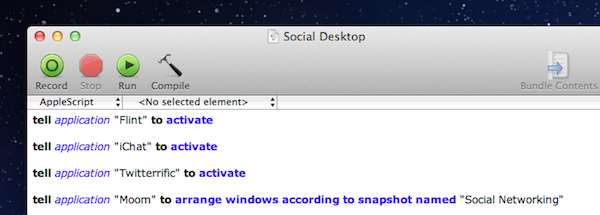
A simple way to understand Keyboard Maestro is this: you tell the app to do something for you automatically, in the background, whenever you want, and all you have to do to start such sequence is a trigger. The trigger can be a keyboard shortcut, something you typed, a system event – you choose the trigger and there’s plenty of options to look at when deciding which action should initiate a process. Read more


Google Launches “Google Music” Web App Optimized for iOS

Announced with a tweet a few minutes ago, Google has rolled out an iOS-optimized (iOS 4 or later is required) web app for Google Music, the company’s invite-only cloud locker that allows users to upload music to Google’s servers. The web app can display music libraries and play songs from an iPhone, iPod touch or iPad running iOS, with a dark interface that’s also been optimized for the iPad’s larger screen with tabs for Artists, Albums, Songs, Playlists and Genres.

The web app has a search function for large libraries, lacks any upload feature on iOS devices, and because it acts as a standard audio source on iOS from Mobile Safari, it can run in the background and be controlled from the multitasking tray. The app supports swipes to switch between album and artists, and overall it looks like a very slick experiment from the Music Beta design team. The Next Web has the first details and screenshots:

The app looks pretty great and feels much snazzier than your average Google app. Hopefully this is a sign of good design to come. Functionally it is a pure ‘player’, with no ability to upload any music or browse any catalogs of music, much like the rest of the Google Music service at the moment.

If you’ve been invited to Google Music, you can check out the new web app from your iOS device at music.google.com. Google Music Beta was first launched in May with no iPhone-optimized interface.


Google Releases Blogger for iPhone

Earlier today Google announced the release of Blogger for iOS, an iPhone app aimed at Blogger users who have been looking for a way to edit or write new blog posts directly from their mobile devices. The app is free, and available on both iOS and Android. Blogger retains the service’s typical orange schemes; Blogger itself recently went under a major redesign for its entire platform. The app allows you to create a new blog post with tags, pictures and plain text, or edit an existing one or draft that you might want to finish on an iPhone.

You can also open a blog post you’ve been working on from your computer and continue editing it while you’re on-the-go. Your blog posts are automatically synced across devices, so you’ll always have access to the latest version. Pictures are worth a thousand words, and the Blogger app makes it easy to add photos either by choosing from the gallery or taking a new photo right within the app. You can also add labels and location to provide more details about the post.

This first version of Blogger runs on the iPhone and iPod touch – there’s no native iPad client yet. You can download Blogger for iPhone here.