Federico Viticci

10758 posts on MacStories since April 2009

Federico is the founder and Editor-in-Chief of MacStories, where he writes about Apple with a focus on apps, developers, iPad, and iOS productivity. He founded MacStories in April 2009 and has been writing about Apple since. Federico is also the co-host of AppStories, a weekly podcast exploring the world of apps, Unwind, a fun exploration of media and more, and NPC: Next Portable Console, a show about portable gaming and the handheld revolution.

OS X Mountain Lion: The iOS-ification Continues This Summer

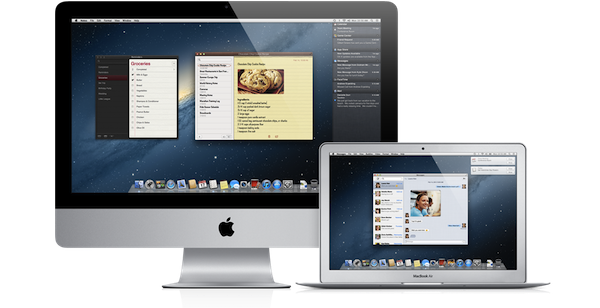
Earlier this morning Apple caught the Internet by surprise with a series of major announcements regarding the future of OS X. To put it simply, Apple officially unveiled OS X Mountain Lion, or version 10.8, the next major iteration of OS X that will become available later this year – the initial targeted release date is a vague “this summer” – through the Mac App Store. A preview of Mountain Lion was given to a few selected tech blogs, including The Verge, Macworld, Daring Fireball, and The Loop, which we are linking back to summarize the new features of Mountain Lion and reflect upon the changes previewed by Apple.

The basic theme of Mountain Lion is iOS-ification.

Apple took the best features of iOS, and in particular iOS 5, and brought them “back to the Mac”, giving them a desktop-class facelift to make applications and services suitable for the Mac environment. Mountain Lion will feature some familiar faces for iOS users: iChat has been renamed Messages and integrated with the iCloud/iMessage ecosystem from iOS; Notes and Reminders are now standalone apps; Notification Center, Game Center, AirPlay Mirroring, Share Sheets, and a new security system called GateKeeper are now part of OS X as well.

In this post we’ll provide a quick description of the new features, a Storify bundle that aggregates the most interesting links and tweets about Mountain Lion (which is available as developer beta today), and some thoughts on what Mountain Lion means for Apple and its users. Read more


Tweet Library 2.0 Review

The last time I wrote about Twitter clients, I noted how I’d rather settle with a single app for power users, and have other developers innovate on top of Twitter and the technologies offered by Apple to provide a unique take on the standard Twitter experience. Unfortunately, until today very few developers seem to have believed in the market potential for innovative Twitter clients that go beyond refreshing your timeline and catching DMs, with Riverfold Software’s Tweet Library being the best example of what’s possible to do by leveraging the Twitter API, focusing on another kind of experience.

I initially reviewed Tweet Library when it hit version 1.0 on iPad. I wrote:

Tweet Library is a searchable local archive of your Twitter activity, with promising online functionalities that show good room for improvement. At $9.99 in the App Store it might not be an app for everyone, but if Twitter curation is your thing, this is the best you can have on the iPad right now.

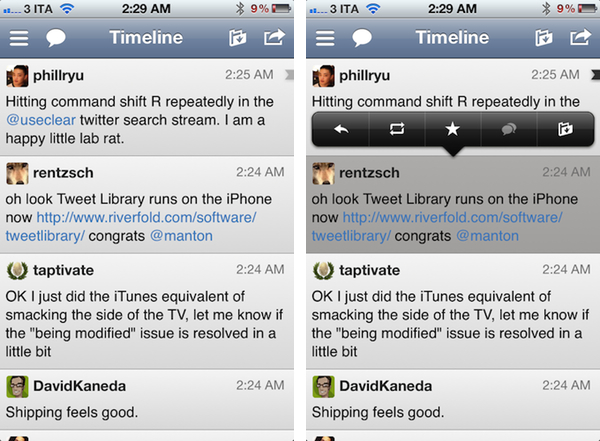
Released earlier today, Tweet Library 2.0 offers some fantastic improvements for those who began using the app on the iPad last year, adding a completely new iPhone interface as part of the free, universal update that will have Twitter curation nerds drooling in new functionalities. Read more


Transcript of Tim Cook’s Q&A at Goldman Sachs Technology Conference

Transcript of Tim Cook’s Q&A at Goldman Sachs Technology Conference

Earlier today, Apple CEO Tim Cook spoke at the Goldman Sachs Technology Conference, providing some interesting details into Apple’s product philosophy and strategy going forward. MacRumors has posted a transcript of the Q&A with Tim Cook, which contains some notable points.

On the iPad:

The reason that it is so large in my view is that the iPad has stood on the shoulders of everything that came before it. The iTunes Store was already in play, the App Store was already in play. People were trained on iPhone. They already knew about multitouch. Lots of things that became intuitive when you used a tablet, came from before. I gave one to my mother and she knew how to use it from watching the commercial.

On Siri and iCloud:

Both of these things go in the profound category. They’re things that you’ll talk to your grandkids about that are profound changes.

On cannibalization of the Mac:

iPad has cannibalized some Mac sales. The way that we view cannibalization is that we prefer to do it to ourselves than let someone else do it.

The whole transcript is interesting and gives some perspective on Tim Cook as CEO and “product guy” who’s in charge of Apple now. Make sure to check out the entire Q&A here.

Permalink

WSJ: iPad 3 To Feature LTE

WSJ: iPad 3 To Feature LTE

Following a report about a possible iPad 3 announcement on March 7 posted earlier today, The Wall Street Journal is claiming the next-generation iPad will feature 4G LTE connectivity for AT&T and Verizon in the United States.

Verizon Communications Inc. and AT&T Inc. will sell a version of the coming iPad that runs on their newest fourth-generation wireless networks, according to people familiar with the matter, as the battle to cash in on big investments in mobile broadband heats up.

According to The WSJ, the iPad 3 will fall back to 3G where LTE isn’t available, and “it couldn’t be learned” whether other carriers would launch LTE plans for the iPad 3 besides AT&T and Verizon, the two largest carriers by number of subscribers in the US. Back in January, Bloomberg reported that the new iPad would come with a higher-res display, a quad-core processor, and 4G LTE connectivity.

For an overview of the current LTE scenario around the globe, check out our previous story ”2012, The Next iPhone, And LTE” – it’s interesting to notice how The Wall Street Journal says the LTE iPad 3 will provide a good testing opportunity for carriers, whereas most carriers worldwide are still far behind in the LTE rollout for consumers.

Permalink

iMore: iPad 3 Keynote On March 7

iMore: iPad 3 Keynote On March 7

Citing ”sources who have been reliable in the past”, Rene Ritchie at iMore claims that Apple will announce its next-generation iPad at a media event on Wednesday, March 7.

According to sources who have been reliable in the past, Apple currently plans to hold their iPad 3 announcement on Wednesday, March 7, 2012. Along with the 2048×1536 Retina display, the iPad 3 will feature a quad-core Apple 6 system-on-a-chip, and possibly 4G LTE networking.

Whilst we have refrained from reporting every single iPad 3 rumor to date, Ritchie’s report seems to make sense for a couple of reasons. First, well-connected John Paczkowski at All Things D is claiming that Apple will be holding an iPad 3 event in the first week of March. The Loop’s Jim Dalrymple has chimed in confirming AllThingsD’s report with a “Yep”. iMore, previously known as TiPB, doesn’t cover rumors much, but when they did last year, they were only off by a week, and correctly pinpointed the nature of the iPhone 4S (which became available for pre-order on October 7th, went on sale a week later).

The iPad 3 was previously rumored to be feature a high-res Retina Display, faster “A6” processor, and LTE connectivity. Back in August, The Wall Street Journal wrote the iPad 3 would launch in “early 2012” with a high-resolution display.

Permalink

Apple To Stream Tim Cook’s Presentation at Goldman Sachs Conference Tomorrow

setteB.IT notes that Apple will provide a live stream of CEO Tim Cook’s presentation at the Goldman Sachs Technology and Internet Conference tomorrow. Apple has indeed refreshed its Investor page to include a link to the QuickTime audio webcast, which will be live at 12:30 PM PT tomorrow, February 14th.

Welcome to the audio webcast of Tim Cook’s presentation at the Goldman Sachs Technology and Internet Conference. The presentation will begin at approximately 12:30pm PT/3:30pm ET on Tuesday, February 14, 2012. Please note that comments made during the presentation may include forward-looking statements that are subject to risks and uncertainties, and actual results may differ materially from those forward-looking statements.

As it happened in the past when Cook was COO, we should expect interesting details and comments from the presentation. This is the first time Cook is speaking as Apple CEO – make sure to check out reports from the 2010 and 2008 conferences.


iCloud File Sharing

It is often said that Apple doesn’t offer a filesystem for iOS devices. Sure enough, it is indeed not possible to manage documents and folders on an iPhone or iPad as you can on OS X. Apple does, however, offer a very basic file management system that works with iOS apps, and you’ve haven’t probably used it too many times:

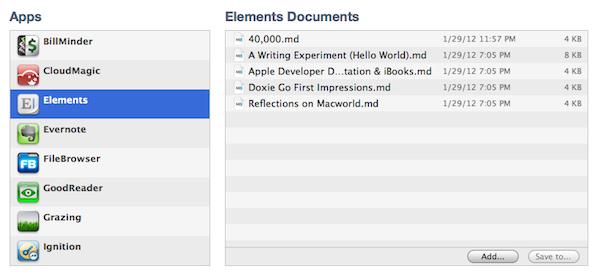
Introduced with iOS 3.2 and iTunes 9.1, iTunes File Sharing allows applications to import files copied from a Mac or PC using iTunes, and export to a computer. In iTunes, all you have to do is connect an iOS device, head over the Apps tab, and choose File Sharing below the Home screen app management interface. You can copy almost any kind of file into an app’s internal directory dedicated to file sharing, and several iOS apps use this method to import or backup files and documents such as bookmarks, videos, or spreadsheets. I’ve often used this feature to import .avi files to watch on my iPad.

iTunes File Sharing doesn’t seem to get the attention other iTunes functionalities do, and I believe there are a couple of reasons behind this. First off, it’s quite cumbersome: the interface for File Sharing is buried within an iOS device’s settings in iTunes, and there are no options to, say, automate the process of importing files or setting up favorite sources for documents. Second, iTunes File Sharing only solves a partial problem, in that the majority of iOS users don’t lament the lack of a proper Mac-to-iOS file management system as much as they’re asking for an iOS-to-iOS centralized file storage solution that would also happen to sync back to a Mac.

So, I had an idea. I think the same iTunes File Sharing feature would work a lot better as a dedicated, native iCloud app for iOS devices (and maybe the Mac too). After all, if Apple is providing an iTunes-based file management utility for Mac users, why couldn’t they build an app that enabled any third-party iOS app to save and import files from iCloud? This app would be built into the system and allow users to simply collect documents, like iTunes File Sharing. Developers could easily add options to their apps to import files from “iCloud File Sharing” and export files to it. Users would have the same feature set of the existing iTunes File Sharing, only with an interface they are already familiar with, because iCloud File Sharing would resemble the existing file management workflow of iWork for iOS or iCloud.com. The only difference is that it would be integrated on a system level, work with any iOS app, and basically be an extension of the “Open In” menu that already allows apps to communicate with each other through supported file types.

I wouldn’t call such an app “Dropbox from Apple”, as Dropbox is mainly developed as a solution to sync files between computers, running in the background all the time, whereas this would be more oriented towards giving apps a better file sharing system. In fact, I imagine Apple could go as far as indicating the apps that can receive an iCloud file as they currently do with iTunes File Sharing for better organization and to maintain the app-driven model. iCloud File Sharing would play well with this strategy, and it would offer a basic way for developers to integrate iCloud in their apps.

Apps like GoodReader have already implemented a similar system of iCloud-based file management, and some third-party developers are experimenting with providing standalone apps for file management purposes over iCloud. A default utility from Apple would have the obvious advantage of not requiring any additional download: it would be integrated as a system action in any app for iPhone, iPad (and even the Mac). Apps would still have their own iCloud libraries and synced data; the file sharing part would ditch iTunes and become iCloud-powered (iTunes File Sharing would be kept around as an option for transferring large files such as videos through USB).

You might argue that Apple is trying to eliminate the concept of the filesystem altogether by embracing the app model with data silos that are self-contained and user-friendly. As iTunes File Sharing seems to be suggest, though, I think that Apple knows the app model and iOS only solve so much when it comes to file management – Apple has to deal with the fact that many people still work with files and folders, export them, move them around, and manage them. I believe the real winning scenario for Apple would be to make the management process as lightweight and intuitive as simple by relying on iCloud. Thus, iCloud File Sharing would serve as a better solution than iTunes File Sharing, ans it would strengthen Apple’s offerings requiring no or little effort from developers, ultimately providing an accessible way to manage files atop of Apple’s existing free 5 GB of storage for every iCloud account.

Unfortunately, it doesn’t look like the upcoming iOS 5.1 will introduce such a feature, and I’m not holding my breath for a surprise announcement during the iPad 3 event. But for the next major version of iOS, if Apple doesn’t think a better way to let apps communicate with each other is needed, I believe an evolution of iTunes File Sharing towards iCloud would be a sweet stopgap solution in the PC-free era.


VLC 2.0 for Mac Final Design Previewed, Coming This Week

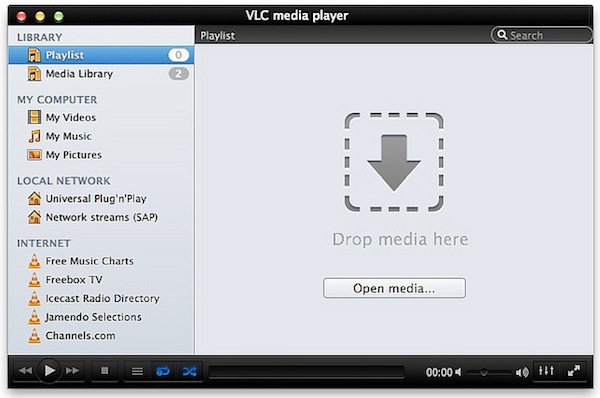
Popular media player VLC is about to reach version 2.0 final and Felix Kühne, current lead developer of VLC’s Mac OS X port, has posted a series of screenshots detailing the final user interface design that we’ll see in the 2.0 update once it goes public “later this week”. The screenshots, available over at Kühne’s blog, show a dramatic change from VLC’s current design on the Mac, with a new sidebar for your playlists, Internet sources, and media on your computer and local network. The new design was created by Damien Erambert, and the first concepts date back to 2008. The interface of VLC 2.0 for Mac will offer a series of advantages over the older version from a functionality standpoint as well:

VLC 2.0’s interface for Mac is dramatically different from its previous revision, both technically and usage-wise. Playlist and video output share the same window, service discovery modules can be easily accessed through a sidebar and various audio + video filters are available through the respective panels. Besides that, the interface is noticeably faster and easily expandable. Speaking of that, we also added support for VLC’s lua-based extensions, which allow you to get info about the current movie from Allociné, post to Twitter, fetch subtitles automatically, etc.

Previously known as VLC 1.2, VLC 2.0 is a major rewrite of the application, which now includes several bug fixes, new features, and a redesigned interface. Alongside improved performances and optimizations for Lion, VLC 2.0 comes with many new features including initial support for Blu-Ray Discs, new subtitle management and blending in video outputs, support for multiple files inside RAR archives, and an all-new 64-bit version for Windows users (VLC 2.0 for Windows won’t feature a new interface as seen on OS X). A complete list of changes from VLC 1.x to VLC 2.0 is available here; the developers didn’t mention anything specific about the “mobile port” for iOS and Android devices.

VLC 2.0 will be available later this week at VideoLAN’s website. More screenshots of the final Mac UI have been posted on Flickr.


MacStories Reading List: February 5 - February 12

The past week has been an interesting one, for a couple of reasons. First, we’ve seen Kickstarter breaking records for its most funded campaign, a record that didn’t last long as a new game by Tim Schafer quickly pulled in $400,000 in 8 hours. Then Path, the cool kids’ alternative to the “evil” Facebook, found itself in the middle of a PR brouhaha as it was caught uploading a user’s Address Book email addresses to its servers. Ouch. Luckily, the company was smart enough to reverse its decision and issue an update in less than a day. There’s more: Apple has started warning developers against manipulating the App Store’s charts, and more people every week are considering using the iPad as their only work machine.

It’s this week’s Reading List, best served with a good cup of coffee. Enjoy. Read more