Federico Viticci

10762 posts on MacStories since April 2009

Federico is the founder and Editor-in-Chief of MacStories, where he writes about Apple with a focus on apps, developers, iPad, and iOS productivity. He founded MacStories in April 2009 and has been writing about Apple since. Federico is also the co-host of AppStories, a weekly podcast exploring the world of apps, Unwind, a fun exploration of media and more, and NPC: Next Portable Console, a show about portable gaming and the handheld revolution.

Quotebook 2.0

Quotebook 2.0

Last year, I reviewed Quotebook, an iPhone app to save your favorite quotes, and organize them by tags, authors, and sources. I wrote:

Quotebook’s greatest strength is that it’s built for quotes, and nothing else. It doesn’t want or need to be a replacement for your notes and daily thoughts. The interface has been designed to make it easy to jot down a quote, and set correct attribution like author and source, or perhaps fiddle with ratings. The app goes one step further and makes it super-simple to import quotes found in your iPhone’s clipboard, and plays nicely with @author names, automatically opening a Twitter profile within a web view. That’s very nice of the developers — this got me started on saving some tweets I find inspiring. Quotes can be searched and filtered, shared on Twitter, Facebook and Tumblr, or browsed by author and tag using the buttons in the bottom toolbar. Pretty standard stuff for an iPhone app.

Months in the making, Quotebook 2.0 has been released today, and it’s a major update that makes the app universal, and fully iCloud-enabled so you’ll be able to keep your Quotebook archive in sync across the iPhone and iPad.

I have tested the new version, and it’s a solid update that you should definitely check out regardless of whether you’re a new user, or haven’t launched Quotebook in a while (in that case, you’ll get version 2.0 for free). iCloud sync has been implemented reliably, with fast sync times across devices and clear, and visible settings to indicate if iCloud is turned on or disabled. The app syncs full quote information, including ratings and tags. An export feature is still available to back up your database on a computer, and of course you can share quotes on a variety of networks including Facebook, Tumblr, and Twitter (with iOS 5 integration). The iPad interface is simple and elegant, with a purposeful focus on content and a subtle leather texture that, I believe, is functional to the app’s core concept – being a notebook for your favorite quotes.

Quotebook is $2.99 on the App Store.
Permalink

Timer

Timer

Designed for function and intuitiveness, Timer is a new app by AppCubby, makers of Launch Center and Tweet Speaker. Timer is simple – dramatically so – and it was born out of a need to focus on one feature: touch. David Barnard writes:

I’ll leave the in-depth discussion to past and future posts, but suffice it to say — HUGE buttons are incredibly well suited to quickly taking action on touchscreen devices. For all the love complex, nebulous gestures have gotten in recent months, tapping a HUGE button is still the ultimate — and often overlooked — gesture.

So that’s Timer in a nutshell. Twelve HUGE buttons designed to scratch my own itch.

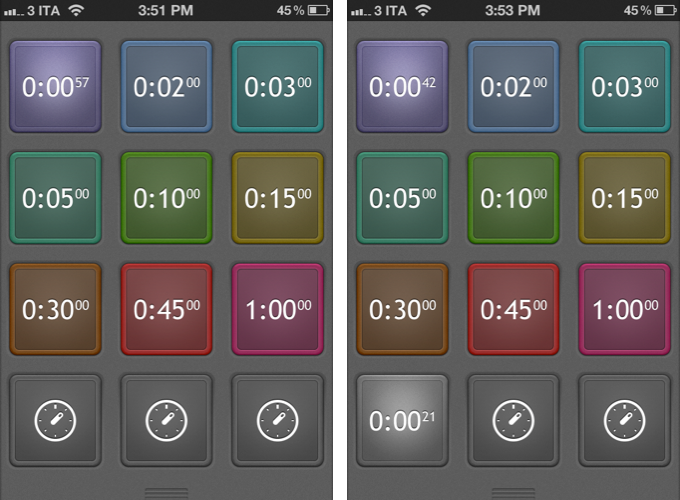
The twelve buttons will start a timer upon tap, and they can be customized (tap & hold) to turn off the preset, change color, and alert tone. By default, twelve buttons are presets, and three at the bottom are  alerts you can set manually with the numeric keyboard. I have been testing Timer, and I am a big fan of the app’s extreme simplicity and focus on doing one thing right. I often need to set up the same quick timers – especially in the kitchen – and Timer is just faster than Siri and Apple’s Clock app thanks to its preset implementation.

Timer is $0.99 on the App Store.

Permalink

Apple To Acquire Italian Digital Music Editing Company Redmatica

As noted by Italian website Fanpage [Google Translation] and reported by TechCrunch, Apple has filed documentations with Italian authorities to acquire Italian company Redmatica. Based in Correggio, Italy, Redmatica specializes in “digital audio workstation” software – notably, the company is well known for Mac audio editing and mixing editors such as KeyMap Pro, AutoSampler, and ProManager. Based on Apple technologies such as CoreAnimation, Redmatica’s software integrates with popular desktop editors and tools such as Logic, Reason, MainStage, and even GarageBand for iPad.

The acquisition of “DAW” (Digital Audio Workstation) assets by Redmatica has been reported by Italian regulator AGCOM in an official document available here. The document notes how Redmatica’s worldwide revenue in 2011 has been under €1 million, with, surprisingly, no revenue (“fatturato”) coming from Italy. Apple, on the other hand, reported, according to the document, approximately €77,6 billion revenue worldwide in the fiscal year 2011 (2010/2011 as noted in the document), €19.9 billion in the European Union, and “over €1 billion” in Italy alone.

As for the DAW software, the AGCOM filing notes how Redmatica holds a share less than 1%, while Apple holds around 10/15% among “several and qualified competitors”. The document explains how DAW software may fall under the category of “business software”, as DAW applications allow for recording, editing, mixing, and playback of digital music, and are typically used by sound professionals, but also “prosumers” (“expert amateur users” in the document), musicians, and DJs.

The AGCOM document doesn’t say Apple has acquired Redmatica. Rather, provided a description of both companies, the nature of the acquisition, and the aforementioned numbers and stats, the filing goes on to note how Apple isn’t a big player in the area of DAW software, and thus the acquisition should be safe for competition. In the document, in fact, Italian law n. 287/90 (art. 16, comma 4) is mentioned as a possible factor that could prevent Apple from acquiring the company. Specifically, law n. 287/90 (art. 16, comma 4) notes how, in case of competitive disadvantages (explained in art. 6), authorities may begin an investigation (detailed in art. 14) for a proposed acquisition or merger (“operazione di concentrazione”).

The AGCOM document ends noting how AGCOM deliberated an investigation won’t be necessary; AGCOM’s conclusions have been forwarded to Apple, Redmatica, and the Italian Minister of Economic Development of Infrastructure and Transport. It is safe to assume that, considering AGCOM’s position, the acquisition will be given the final go-ahead by Italian authorities soon. It is obviously unclear how much Apple is willing to spend to acquire Redmatica’s assets, or how Apple plans to integrate its software in its existing suite of digital audio applications.

We have reached both Apple and Redmatica for comment, and we’ll update this story with more details when available.


Quip: A New iPad Twitter App With A Focus On Conversations

I have often written about the need for developers of third-party Twitter clients to focus on different, fresh experiences aimed at providing a new take on mobile tweeting. On iOS, as I have previously argued, apps like Tweetbot, Twitterrific, and Twitter’s official client have managed to capture a large portion of a devoted userbase split in those seeking a wide array of functionalities, a streamlined interface, or the free price tag. Quip, a new Twitter app by Glasshouse Apps (makers of The Early Edition), takes a unique approach at filtering the typical Twitter timeline by conversations, images, and retweets.

I have been testing Quip since its early beta versions, and the app has been no replacement for Tweetbot on my iPad. But that’s exactly Quip’s greatest strength and, I believe, one of its most valid points alongside a care for beautiful UI design and ease of use. While capable of being an average user’s primary iPad client because of its support for basic Twitter functionalities such as direct messages, search, and favorites, I think Quip works best as an attractive companion for catching up on Twitter and browsing certain sections/tweets that could otherwise get easily lost in a “regular” timeline. Quip doesn’t support Twitter lists, its search features are limited, and you won’t find the same degree of link and tweet manipulation options of Tweetbot.

Rather than contributing to the app’s possible detriment when compared to more advanced clients, however, Quip’s extremely specific feature set catalyzes the convenience of those Twitter-based functionalities that Glasshouse implemented. Read more


Fantastical 1.3 Adds Reminders Integration

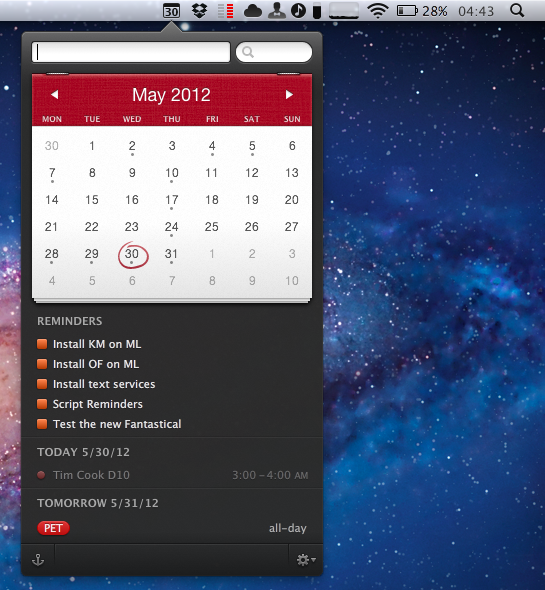
Flexibits’ Fantastical, a menubar-based calendar application to quickly enter new events with natural language recognition, has today been updated to include native integration with Reminders, a feature that Apple rolled out with its own app in iOS 5 last year. I have been testing the new Fantastical (version 1.3) for the past weeks, and its integration with calendars, reminders, and natural language input is as solid as ever.

One of Fantastical’s biggest advantages over similar apps to quickly add items to synced calendars is its built-in CalDAV engine, which ensures the app can directly communicate with online calendars without having to leave iCal open in the background. As with events, Fantastical 1.3 lets you create reminders with a few keystrokes, using reminder lists already configured in your calendar app of choice, such as iCal or Outlook. Because Fantastical is capable of directly communicating with the syncing engine behind Reminders – not just the calendar application that displays them on the desktop – you’ll be able to add reminders in Fantastical and have them synced across devices without leaving iCal open. In my tests, Fantastical 1.3 indeed took reminders I added from the menubar, and synced them to iCloud.com and other iOS devices within seconds. If iCal opens, as Flexibits explains in the FAQ, it’s because of a Lion default setting related to push; switching iCal’s refresh rate to 30 minutes doesn’t compromise Fantastical’s ability to create events and reminders independently of iCal.

Fantastical can create, edit, and delete reminders with natural language recognition. In testing the app, I told Fantastical to “remind me to take out the trash”, and the app intelligently parsed the command as just “take out the trash”, interpreting the initial portion of the sentence as a reminder input. Similarly, commands like “remind” and “todo” will trigger reminder creation in Fantastical 1.3, which, generally speaking, tries to associate every new item without a date to a reminder list. This, however, can be reverted at any time, as the interface to switch between reminders and events includes a handy switch to jump through both options.

Reminders can be given a specific date or priority, assigned a note, but they don’t support location and time-based alerts, as those features are exclusive to iOS’s Reminders and Siri. In the app’s UI, reminders are displayed alongside calendar events, and they use the same floating popover windows for modifications.

In testing Fantastical 1.3 with my iCloud calendar and reminders, I found the app to be remarkably fast and reliable. As you would expect from Fantastical, adding new reminders takes seconds thanks to keyboard navigation and shortcuts, and the syncing engine didn’t miss a beat when communicating with iCloud and iOS. Unsurprisingly considering previous versions of the app, the parser doesn’t disappoint when it comes to automatically switching between event and reminder creation (try to add a date to a reminder, and check out the animation).

Fantastical 1.3 is a great update if you’ve been looking forward to Reminders integration, and another solid release for an app we’ve previously recommended. Fantastical is $19.99 on the App Store.


Apple Confirms WWDC Keynote on June 11

Following the release of the WWDC 12 app and official event schedule, Apple just confirmed that an opening keynote will be held on Monday, June 11, in San Francisco.

Jim Dalrymple at The Loop was first to report about invitations being sent to the press for the keynote, which will be held at 10 am. Speakers haven’t been revealed yet, but it wouldn’t be a surprise to see CEO Tim Cook kick off the keynote, with other executives following up on news and announcements during the event.

Apple’s upcoming conference will see the company unveil ”the latest news about iOS and OS X Mountain Lion with developers”. Apple is widely expected to unveil the next major version of iOS, as well as provide new information on OS X Mountain Lion, set to ship in “late summer”, at the event.


Quickly Share iOS Photos With Your Mac (And iOS Devices)

Quickly Share iOS Photos With Your Mac (And iOS Devices)

Kirk McElhearn at Macworld shares an interesting method to automatically import iOS photos on OS X, originally via The Iconmaster:

I gave up on Image Capture and used Dropbox. But if you’ve used Dropbox for this purpose, you know it involves several steps: launch the app, tap the Uploads tab, tap the add button, tap the photo, etc. etc. It works, but it wasn’t convenient enough.

I wanted something instantaneous. Fortunately, Ryan McCuaig was able to point me in the right direction.

Photo Stream is great, but it’s not 100% reliable. While I can typically wait a couple of minutes for iOS screenshots to show up in iPhoto (or Finder, based on the tip above), sometimes I don’t have that kind of flexibility, as I need access to those images right away. For those times, I use Scotty.

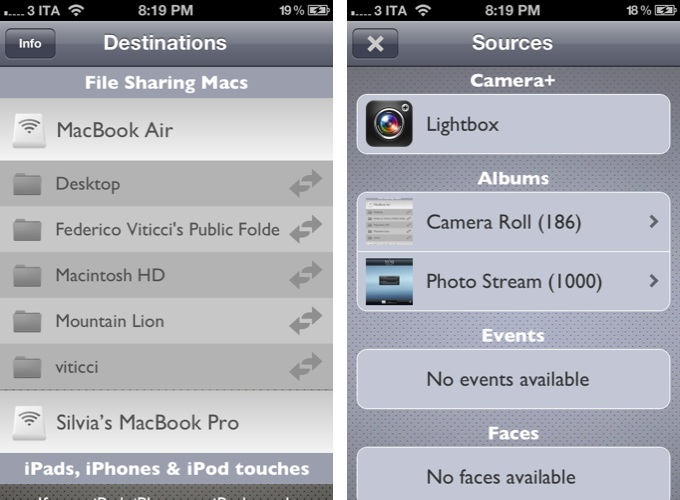
Developed by Galarina, Scotty (my review) is a $1.99 universal app that can send images to computers (on OS X, it uses File Sharing) and other iOS devices. Scotty is fast, well designed, and remarkably intuitive – it is even integrated with the Camera+ lightbox. I also use Scotty as Photo Stream doesn’t work on 3G, and I couldn’t find a better way to send iPhone screenshots to my iPad over Bluetooth.

The screenshots above were imported with Scotty, and processed with Keyboard Maestro.

Permalink

Tweetbot 2.4 Brings New Search View, Keyword Mute Filters, Refinements

Following updates focused on iCloud sync and gestures, Tweetbot 2.4, released today on the App Store (iPhone, iPad), brings an updated search view with additional location features, relocated Trends and People categories, and various improvements that make the client’s search functionality more powerful and intuitive.

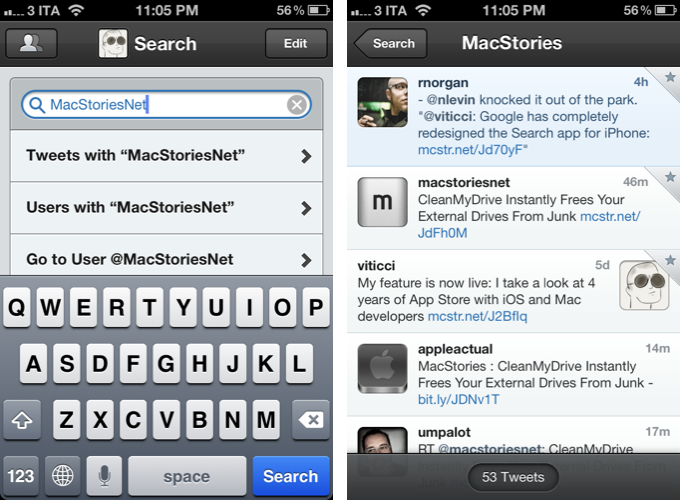
The new Search tab unifies Trends, People, and Top Tweets under a Browse section, with Saved Searches and the classic search box still available at the top of the screen. The dedicated Top Tweets option is quite enjoyable – I have indeed found myself browsing such flow of status updates on a couple of times for the occasional laugh or remarkably snarky tweet. Top tweets now also show up in regular search results, and they are marked by a silver star indicator.

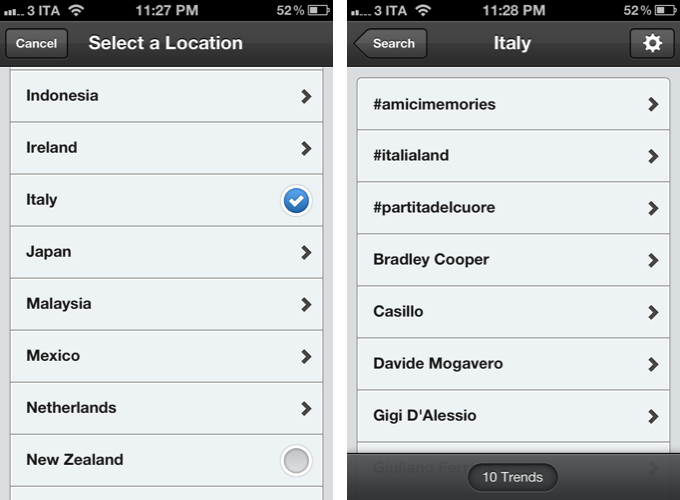
Trends, on the other hand, can be changed to another location directly from the search view of Tweetbot 2.4 – I don’t use Trends, but I assume the option will come in handy for those who, for some reason, like to check the recurring #Buongiorno trend in Italy.

The big addition in Tweetbot’s new search interface is support for nearby tweets. Here, you can view nearby tweets with the ability to change your location (just tap on the embedded Google Map), and you can perform location-based keyword searches for tweets containing specific words that also happen to be located near you. Unfortunately, Viterbo resembles a ghost town when it comes to looking for fellow local MacStories readers. I asked Tapbots, and they confirmed my town’s insistence of loading @viticci as the only local MacStories tweeter isn’t an app’s bug.

There are two more little touches I like in Tweetbot 2.4: you can double-tap the search tab to open search with the keyboard, and the search box has been optimized to let you easily jump to tweets, users, or a specific @user without additional taps.

Keyword Mute Filters

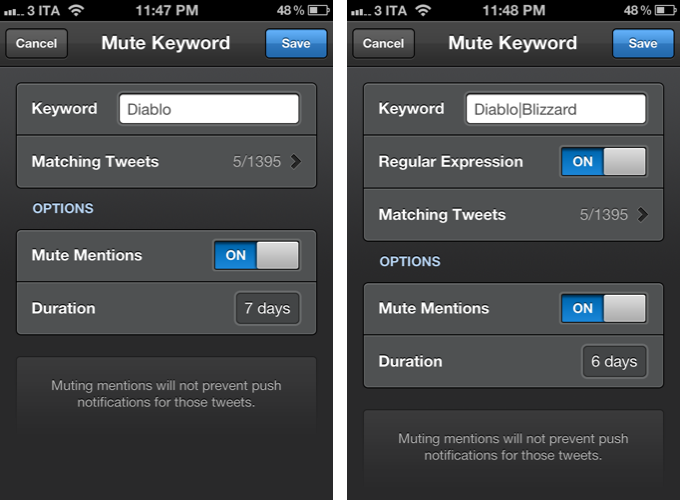
Tweetbot has been offering advanced mute filtering options for quite some time now. Version 2.4 now allows you to block specific keywords – not just users or clients – and there’s even support for regular expression if you really want to make sure you’re not reading about the latest spoilers in Game Of Thrones. Mentions can be muted as well.

Miscellaneous

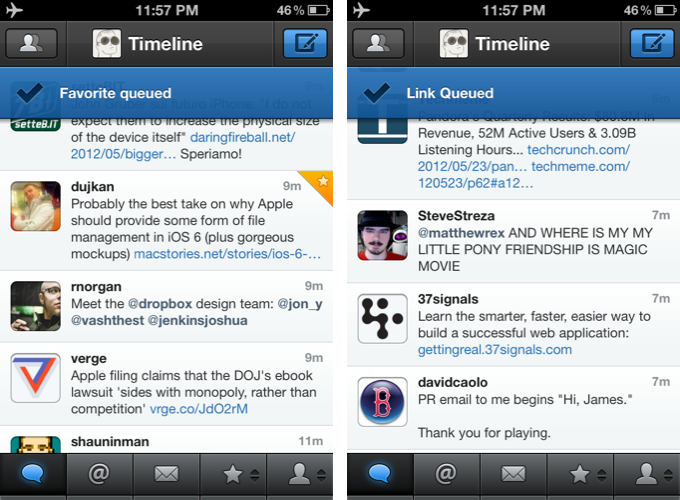
There are plenty of other refinements in Tweetbot 2.4. Offline support, for instance, will ensure tweets marked as favorite or sent to a Read Later service when no Internet connection is available will get “queued”, then sent/favorited as soon as you come back online. Sure enough, while browsing my timeline in Airplane mode, I fave’d a couple of tweets, sent some links to Pocket, and Tweetbot queued them. When I turned WiFi back on, the app refreshed, the tweets were marked as favorites in my account, and they appeared in my Pocket.

On the iPad, web and map views can now be dismissed with a two-finger swipe down gesture, which I found incredibly convenient and faster than reaching out for the Close button in the upper left corner. Also on the iPad, list views show one line of a list or profile description, and when viewing an image in full-screen, you can hold down for options.

Additionally, aside from the usual bug fixes, you can now swipe to the right on profile views to go back; items sent to Pinboard are marked as unread; and last, the compose screen comes with basic smart quote support (for quotes, em dash, and ellipsis).

With powerful new features and UI refinements added to an existing set of great functionalities, Tweetbot 2.4 retains familiarity while striving to remain the best third-party Twitter app for iOS. Get it from the App Store today.


Pulp Gets Retina Graphics, iCloud Sync for Mac & iOS, Trends

Between RSS clients and read later apps, Acrylic’s Pulp has always taken a different approach at presenting news beautifully on the Mac and iPad. Combining the traditional aspects of RSS (Pulp lets you add a website’s feed through search, direct OPML, and Google Reader) with the rich visual presentation of apps like Flipboard, Pulp (nèe Times) offers a magazine-like experience for web articles, which can also be stripped out of unwanted graphics through a feature called Magic Reader. In our previous coverage, we were positively impressed by Pulp for Mac’s push sync and Lion support, as well as the iPad version’s elegant layout.

Today, Acrylic is releasing two major updates to Pulp for Mac and iPad, adding an improved interface and Retina graphics on iOS, iCloud sync across platforms, and a new “smart home page” feature that automatically aggregates trends and relevant news items from your feeds.

Retaining the same page-based layout that allows you to add multiple sources in newspaper-like columns with different display options, the new Pulp adds a “Home” start page that features popular and trending articles from your existing feeds. Using a series of algorithms that determine an article’s relevancy through keywords, date, and other feeds mentioning it, the new Home page provides a grid of fresh and popular stories for the day. In actual testing, this meant that with Pulp set to refresh every 5 minutes, the app would look at my four sections (Apple, Technology, Science, Arts & Entertainment) and bring in popular news like the Google/Oracle trial and Jony Ive’s knighthood, sorted by keyword and grouped by sources.

The concept is interesting; I was told by the developers that Pulp builds this “smart home page” completely on the client side of the app – no data is uploaded to Acrylic’s servers and social networks aren’t contacted to aggregate popular links, either. I haven’t been able to test Pulp’s algorithm during a major news break, but I believe it is safe to assume it would grab popular stories within a couple of minutes. Overall, I think the new Home page is a good idea as it provides a simple and efficient way to “see what’s important” without navigating through feeds manually; in my tests, I noticed refreshing trends took slightly longer on the iPad version of Pulp – but the results were the same afterwards.

The big new feature of Pulp 2.5 is iCloud sync. Moving from the previous Pulp Sync service, iCloud will automatically keep feeds, pages, and shelf items in sync across the iPad and Mac. For testing purposes, I updated to Pulp 2.5 on the Mac, configured my virtual newspaper, and saved a couple of items to the app’s shelf using the new browser extension. Once I updated to the new 1.5 version on the iPad, the first launch of the app made me wait around 30 seconds for an automatic import of my data, and I couldn’t experience any errors of sort. iCloud sync has been fast and reliable in my tests, with Pulp deleting and adding sources between the iPad and Mac app within seconds. The addition of synced shelf items is welcome, too, as it offers a simple way to save articles “for later” – albeit the app also comes with direct integration for Pocket, Instapaper, and Readability.

Pulp 1.5 for iPad and Pulp 2.5 for Mac are two gorgeous, solid, and clever updates. Pulp has always wanted to provide a solution in between the fast-paced nature of RSS and the laid-back reading experience of magazines, and the new version builds on that foundation, enhancing it with iCloud sync and a useful, constantly up-to-date Home page.

Pulp for iPad is available at $2.99 on the App Store; Pulp for Mac is $4.99 on the Mac App Store.