Federico Viticci

10762 posts on MacStories since April 2009

Federico is the founder and Editor-in-Chief of MacStories, where he writes about Apple with a focus on apps, developers, iPad, and iOS productivity. He founded MacStories in April 2009 and has been writing about Apple since. Federico is also the co-host of AppStories, a weekly podcast exploring the world of apps, Unwind, a fun exploration of media and more, and NPC: Next Portable Console, a show about portable gaming and the handheld revolution.

Chuck Skoda’s September 2012 Rumor Roundup

Chuck Skoda’s September 2012 Rumor Roundup

Speaking of Apple’s rumored event for September 12, Chuck Skoda has posted a good roundup of products and updates Apple could be working on.

We’re still months out, but I see Apple’s fall announcements shaping up to be substantial. Tim Cook finished off the new iPad announcement with the words “across the year, you’re going to see a lot more of this kind of innovation, we are just getting started.” Since then, we’ve seen a new Retina MacBook Pro as well as some moderate updates across the MacBook line. But Cook seemed to really be driving home that this year has a lot in store.

The last event that was so heavily rumored to set the stage for several product releases was WWDC. While many predictions before June 2012 didn’t quite turn out to be true, Apple didn’t disappoint either.

Permalink

Ive: “Our Goal Isn’t To Make Money”

Ive: “Our Goal Isn’t To Make Money”

Speaking at the British Embassy’s Creative Summit., Apple’s SVP of Industrial Design Jonathan Ive shared his thoughts on the company’s design process and focus on making better products.

We are really pleased with our revenues but our goal isn’t to make money. It sounds a little flippant, but it’s the truth. Our goal and what makes us excited is to make great products. If we are successful people will like them and if we are operationally competent, we will make money.

Wired UK has put together a full report on Ive’s speech. Speaking with the London Evening Standard back in March, Ive gave a bit more insight into Apple’s philosophy and standards.

What I love about the creative process, and this may sound naive, but it is this idea that one day there is no idea, and no solution, but then the next day there is an idea. I find that incredibly exciting and conceptually actually remarkable.

Permalink

Apple To Hold New iPhone Event On September 12

Apple To Hold New iPhone Event On September 12

According to multiple websites that have posted the rumor today, Apple’s next generation iPhone will be unveiled at a media event on September 12th, 2012. iMore was first to report on the rumored date, claiming that Apple will announce a new iPhone and a smaller iPad at the event.

iMore has learned that Apple is planning to debut the new iPhone at a special event on Wednesday, September 12, 2012, with the release date to follow 9 days later on Friday, September 21. This information comes from sources who have proven accurate in the past.

The iPad mini will be announced at the same September 12 event, as will the new iPod nano.

Following the iMore post, typically well-sourced John Paczkowski at AllThingsD wrote:

IMore was first to report that the company has scheduled a special event for Wednesday, September 12, and now we’ve confirmed it as well. Sources tell AllThingsD that Apple is currently planning an event for that week.

The Verge also confirmed the media event with their own sources:

 The rumor cycle this time around for the next iPhone has been a bit unusual — multiple leaks have all depicted the exact same components — but it looks like we’ll be seeing what Apple has up its sleeves come Wednesday, September 12th. Our own sources familiar with the matter have confirmed that date, and multiple websites have similar reports as well.

And last, always-reliable Jim Dalrymple at The Loop weighed in with his “Yep” on the rumor.

Both Dalrymple and iMore have been accurate with their predictions and “confirmations of rumors” in the past. iMore correctly predicted the new iPad launch date earlier this year, and the iPhone 4S pre-order date last year. AllThingsD also successfully predicted a number of Apple-related rumors in the past, including one about the January 2012 education event.

The new iPhone is rumored to feature LTE, a bigger display, and a design similar to the 4S. According to recent speculation, the smaller iPad will feature a 7.85-inch screen with the same resolution of older-gen iPads.

Permalink

Faster Searches With Bang On and Launch Center Pro

In our review of Bang On for iPhone and iPad, we noted how this nifty utility’s support for “hotkeys” centralized mobile search to avoid extra taps in Safari or switching between multiple apps. Our Lukas Hermann wrote:

To avoid a lot of typing, Bang On is designed around the ability of choosing “!”-hotkeys below the search panel and adding them to your search query. So, as an example: you heard something about that cool band called The Arcade Fire and you want to find out more about them. Fire up Bang On, tap the Wikipedia hotkey, then enter “Arcade Fire” afterwards into the search panel, and Bang On will immediately search Wikipedia and display the respective article using the in-app browser. What I personally found very useful is the ability to change the “!” parameter without changing the actual search query, so you just need to tap the “!youtube” hotkey and Bang On will replace the “!wikipedia” command (those commands are called “!bangs” within Bang On) with it and start searching for Arcade Fire videos instead of Wikipedia articles.

On my iOS devices, I typically run three kinds of searches on a daily basis: Google, Rdio, and email. Using a combination of Bang On and Launch Center Pro (my review here), I have managed to make my workflow faster, more enjoyable, and ultimately better than using dedicated apps.

For regular Google search, instead of using Safari I have created a custom action in Launch Center Pro that, with the input prompt, allows me to write first, then switch to Google with my query already filled in. Unfortunately, as far as Apple apps go, it’s not possible to create actions for Mail.app, which in Launch Center only supports message creation, but not search.

Last week, I found out a recent update to Bang On added some interesting new features including an option to open links in Google Chrome and support for Rdio search. Considering Rdio’s limited integration with their own url scheme and rdio.com URLs (it can auto-play single tracks, not albums or playlists, and it doesn’t always work), I was curious to try out whether Bang On could simplify and speed up the process of looking for music on Rdio – something I do every day.

As it turns out, Bang On’s take on Rdio search is very useful. The developer of Rdio created a custom web app off the Rdio API which, through the !rdio hotkey, displays artists, albums, and songs. Tapping on these items will take you directly to the Rdio app, and you can also tap & hold to see the URLs that Bang On is using for these searches (it’s a rdio://rdio.com scheme).

With Launch Center Pro, I have set up an action to search Rdio through Bang On with an input prompt, so I can type a song or album quickly in Launch Center Pro, like I do for Google. This is extremely simple to create – just make sure you include !rdio in the action composer, so the input prompt will redirect to Rdio search automatically.

Using BangOn and Launch Center Pro, you can speed up your searches using apps and services that only Bang On supports, and making them quicker to use thanks to App Cubby’s fantastic launcher. For instance, I use Launch Center Pro for almost all of my regular searches, but I rely on Bang On for unsupported apps like Articles, the aforementioned Rdio URLs, and many other websites.

You can download Bang On and Launch Center Pro from the App Store.


Mountain Lion Downloaded 3 Million Times In Four Days

Apple hast just announced over 3 million copies of OS X Mountain Lion were downloaded in four days of sale on the Mac App Store, translating to roughly $60 million in revenue on launch day. Apple says it has been the most successful release in the history of OS X.

Just a year after the incredibly successful introduction of Lion, customers have downloaded Mountain Lion over three million times in just four days, making it our most successful release ever,” said Philip Schiller, Apple’s senior vice president of Worldwide Marketing.

On the MAS, Mountain Lion has over 7000 ratings with over 5200 being five-star reviews. Apple has not made Mountain Lion available offline via a $69 USB key as they’ve done with Lion, so far sticking to the Mac App Store (or the purchase of a new Mac) as the only upgrade paths. Apple customers whom have purchased a new Mac between June 11th and July 25th are eligible for a free upgrade through Apple’s Up-to-Date program.

By comparison, OS X Lion exceeded 1 million downloads on its first day of sales (Lion was priced at $29.99); 76 days later, on October 4th, Apple announced 6 million copies of Lion had been downloaded.

Mountain Lion, available for $19.99, includes a wide assortment of new features, including AirPlay Mirroring, the Notification Center, Game Center, Messages, Power Nap for compatible Macs, and apps such as Notes and Reminders. You can read more about Mountain Lion’s new features in our comprehensive review.


Mountain Lion Links

In this post, we have collected some interesting links about Mountain Lion following its release last week. You should also check out our review, or buy our eBook.

Create Reminders using Alfred. Gianni Rondini has put together a nice Alfred extension that, by using AppleScript support in Reminders, adds new items with a very simple syntax. Obviously, the extension will launch Reminders.app if it’s not open, as the app needs to be running to receive AppleScript commands. Download it here.

Customize the dialog that asks for access to a user’s contacts. As pointed out by Daniel Jalkut, there’s an easy way for developers to customize the information displayed in the new dialog that asks for permission to access your contacts. Third-party apps that need to look-up your contacts even for mundane tasks like auto-fill can take advantage of this (otherwise, the dialog will be generic, with no additional details provided to the user).

 Michael Tsai’s Mountain Lion notes. Good collection of miscellaneous links and information here. I agree with Michael’s comments on the Safari address bar, but I still can’t stand how Google Search URLs aren’t copied to the clipboard (as I noted in my review, search terms are).

The story of the new Zebra wallpaper. Directly by photographer Steve Bloom.

Enable backspace navigation in Safari. Use this Terminal command to be able to navigate in history using the backspace key. I have my MacBook Air set to navigate using three-finger swipes, as well as backspace.

On Mountain Lion’s iCloud filesystem. iA’s Oliver Reichenstein takes a look at the structure of iCloud files and folders under Mountain Lion. Their text editing app, iA Writer, has recently implemented support for folders in the iCloud Document Library across Mac and iOS.

Ars Technica’s review of Mountain Lion Server. Good overview by Matt Cunningham.

Mountain Lion and the Simplification of OS X. Shawn Blanc explains why the interplay of iOS and OS X goes beyond mere graphical resemblances.

Virtual Hosts and Web Sharing in Mountain Lion. A guide on how to bring back a local hosting environment by Brett Terpstra.

Get Back “Save As…” menu. Yet another trick to get back “Save As..” in Mountain Lion.

Mountain Lion and AppleScript. Shane Stanley writes about some important changes of AppleScript in OS X 10.8 over at TidBITS.

For more Mountain Lion coverage, visit our hub.


WriteUp 3.2 Adds Swipe Selection On iPad

WriteUp

WriteUp

WriteUp is one of my favorite text editors. Since I published my comparison of text editors for iOS – with a focus on the iPad –the app has been vastly improved thanks to a major 3.0 update that added iCloud sync, a split browser, and possibility to “pin” notes and folders and mark them as favorite. While other text editors like Writing Kit may have better researching tools, or serious automation features like the macros of Nebulous Notes, I still like the streamlined UI of WriteUp to easily navigate across my Dropbox folders (the app can open any folder or sub-folder in your Dropbox) and create notes that require copy & paste from a webpage.

When version 3.0 was released, I wrote:

With strong sharing options, support for Versions (another feature most iOS text editors are lacking), images, custom CSS previews, and all the other features of version 2.0, WriteUp 3.0 has still some rough edges, but shows an incredibly promising, and possibly even more powerful text editing future.

With version 3.2, released earlier this week, WriteUp aims at making its text editing more “powerful” by addressing a popular concern of users of iPad text editing apps: text selection. Inspired by the Hooper Selection concept video that made the rounds back in May, WriteUp 3.2 allows you to move the cursor on screen by swiping with two fingers on the virtual keyboard. You can also swipe with three fingers to select text.

While slightly different from the concept video (apparently, several developers have struggled to find ways to activate the text cursor or iOS text selection with gestures performed directly on the content area), WriteUp’s implementation is still solid and, in my opinion, one of the best so far (a number of iPad apps followed up in recent weeks with similar takes on cursor navigation and text selection, all of them implementing two-finger swipes in different ways).

The fact that WriteUp’s swipe selection happens on the keyboard doesn’t, however, trigger keystrokes, and it can be used both vertically and horizontally. In my workflow, this is particularly useful to navigate Markdown list-based documents I create in Nebulous Notes (thanks to macros) and make changes without having to manually (and slowly) select everything. Most of all, I like how WriteUp’s swipe selection doesn’t get in the way with a custom UI and additional virtual trackpads (like other apps do).

WriteUp 3.2 also adds new features like research bookmarks and history suggestions, and new fonts. It’s a good update, and I recommend it. Get the app here.


A History of Skeuomorphism In Apple Interfaces

A History of Skeuomorphism In Apple Interfaces

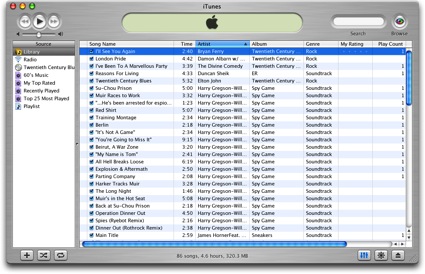
Thomas Brand has published a detailed overview of Apple’s past skeuomorphic designs in applications for classic Mac OS and OS X. As he notes, the trend towards designing apps that resemble real-life objects didn’t start with iOS at all.

As time progressed, the Aqua interface has evolved to reflect the changes in Apple hardware. Gone are the over the top transparencies, deep drop shadows, and distracting pinstripes. Subtle grays, mute reflections, and soft gradients now fill the retina displays of Apple’s latest portables. Some might say that Aqua is not a skeuomorphic interface because it does not resemble a specific real world object. To them I say Aqua is a mirror reflecting back the design decisions that have made Apple’s hardware so appealing over the last 10 years.

In his article, Thomas mentions old software such as Sherlock, the Appearance Manager of Mac OS 8, Apple CD Audio Player, and the Classic Calculator that Steve Jobs famously designed himself with a “build your own” kit created by a former Apple engineer. iOS may not have reinvented skeuomorphism in software per sè, but it surely gave this way of designing apps a whole new meaning and set of interactions thanks to screen constraints and multi-touch.

Check out Egg Freckles’ article for the full list of apps that influenced Apple’s skeuomorphic interfaces.

Image via TUAW

Permalink

Mountain Lion: The MacStories Review

Given how important Mountain Lion — the latest version of OS X, available today — is to Apple’s ecosystem and unification strategy, its announcement was rather unusual. For the past decade, Apple has been relying on media events and developer conferences to serve as the stage for official introductions to major new versions of its desktop operating system. At WWDC 2002, Steve Jobs famously kicked off the event by giving a eulogy for Mac OS 9 as part of the transition to OS X; in 2009, Snow Leopard — the last version of OS X before Apple’s rebranding of “iPhone OS” to “iOS” — was officially unveiled at WWDC in front of over 5,200 developers; and in October 2010, Lion, the eighth major release of OS X, was formally announced and demoed at Apple’s self-hosted “Back to the Mac” media event.

But as Phil Schiller told Daring Fireball’s John Gruber, with Mountain Lion Apple has started “to do some things differently”. On February 16th, 2012, Apple fans and industry watchers checking their Thursday morning news witnessed Apple’s most surprising OS X announcement to date: instead of being unveiled to the press at a media event, Mountain Lion roared into existence as dozens of blog posts were published simultaneously by selected journalists, who had been given “product briefings” and demo copies a week in advance. With Mountain Lion, Apple decided to let the OS speak for itself, saving a proper introduction for WWDC 2012 where a near-final version of the OS was demoed (alongside some new features) and released to developers.

The way Apple handled Mountain Lion’s announcement may have felt unusual at the time, but in hindsight, it made perfect sense given the nature of the upgrade and the way Apple has encouraged letting its mobile and desktop operating systems coexist and benefit from each other.

Mountain Lion Review: PDF Version

Support MacStories and get a beautiful, DRM-free PDF copy of all our Mountain Lion coverage, including this review and exclusive Tips & Tricks.

Buy "MacStories Features: OS X Mountain Lion"

Buy “MacStories Features: OS X Mountain Lion”

More details here.

Cover image by ehtesham/Shutterstock.com

Read more