Federico Viticci

10758 posts on MacStories since April 2009

Federico is the founder and Editor-in-Chief of MacStories, where he writes about Apple with a focus on apps, developers, iPad, and iOS productivity. He founded MacStories in April 2009 and has been writing about Apple since. Federico is also the co-host of AppStories, a weekly podcast exploring the world of apps, Unwind, a fun exploration of media and more, and NPC: Next Portable Console, a show about portable gaming and the handheld revolution.

Velocity

I never got into the idea of catching up on my read later queue through speed reading, but, for those who did, Velocity is a great choice.

I have been testing Velocity for the past month, and it comes with a clean, elegant UI made for iOS 7, Pocket and Instapaper integration, and even a built-in browser to add articles without leaving the app. In the speed reading view, you can tweak words per minute, switch themes (black is my favorite), and see how many minutes you have left in the title bar. It’s an extremely well-considered and functional app, which isn’t a surprise considering that the Quotebook guys made it.

If you like speed reading, Velocity is $2.99 on the App Store.

Permalink

Layer Cake

Justin Williams:

What we see today isn’t what we’ll see six months from now. Everyone is still learning to speak the modern iOS design language: Apple included. The folks in Cupertino built a completely new foundation for their mobile operating system in just a few months and are still working out how to best adapt their applications to speak the new language that foundation affords. It should be no surprise that many of Apple’s apps that are distributed through the App Store aren’t updated to take advantage of iOS 7 to its fullest. They’re trying to find the answers to the same questions designers outside of Cupertino are.

A great response to a shortsighted observation by Topolsky. iOS 7 – as also confirmed by Matthew Panzarino’s interviews with developers such as the NYT team and Evernote – will make conversions to Android extremely difficult and unlikely (unless you want to end up with poor interface decisions on both platforms, which is another problem).

Permalink


iOS 7 For Keyboard Power Users

Rui Carmo (via Michael Tsai) on iOS 7 and the new support for shortcuts with external keyboards:

Furthermore, to add insult to injury, the Spotlight key on my Logitech keyboard also stopped working. It takes me back to the home screen without toggling the search field, so I am now without any truly quick way to launch apps solely from the keyboard.

Finally, something happened to Bluetooth support in general — I’ve had three separate instances where my keyboard did not work at all, all solved by toggling Bluetooth off and on again, in the classic spirit of The IT Crowd.

The new Safari shortcuts that Rui mentions are welcome, and I wish that Google added that kind of keyboard support to Chrome (which is ready for iOS 7, but doesn’t have substantial new features yet). I have experienced the same issues that Rui brings up with my Logitech keyboard, and I wonder if this is a problem of iOS 7.0 that will be fixed soon or a real incompatibility of old Logitech keyboards with the new OS. I hope it’s not the latter, because I really like this keyboard.

In general, I’m not surprised that Apple hasn’t added many keyboard shortcuts to their apps yet. iOS 7 for iPad is rough in some spots, and power user stuff is the one that gets easily cut when you have to meet a deadline. The fact that third-party developers jumped on external keyboard integration gives me hope though, and I’m looking forward to seeing more shortcuts popping up in my favorite apps soon.

For iOS 7.1, it’d be awesome to see new multitasking shortcuts on the iPad.

Permalink

iOS 7 Updates: Twitter, Facebook, Yahoo Weather, and Google Chrome

Yesterday saw the release of thousands of apps optimized, enhanced, or, in some cases, completely redesigned for iOS 7. At MacStories, we highlighted several apps that were ready for the OS’ rollout such as Pocket, OmniFocus 2, or Instacast 4, and then we fired up iTunes – or simply waited for automatic updates to do their magic on iOS 7 – and checked out all the other apps that were also released yesterday. In this post, I thought I could offer a quick overview of iOS 7 updates from four big-name companies: Twitter, Facebook, Yahoo, and Google. Read more


USA Today Interviews Jony Ive and Craig Federighi

I found USA Today’s interview to be a much better read than Businessweek’s. Only Ive and Federighi spoke with USA Today’s Marco della Cava, but the interview is full of interesting tidbits, such as the fact that Apple’s teams “sat down” to work on iOS 7 in November 2012, or how Federighi describes the thinking behind the new OS:

“This is the first post-Retina (Display) UI (user interface), with amazing graphics processing thanks to tremendous GPU (graphics processing unit) power growth, so we had a different set of tools to bring to bear on the problem as compared to seven years ago (when the iPhone first launched),” he says. “Before, the shadowing effect we used was a great way to distract from the limitations of the display. But with a display that’s this precise, there’s nowhere to hide. So we wanted a clear typography.”

Naturally, Federighi omitted that iOS 7 was also released for the iPad 2 and iPad mini, which don’t have Retina displays.

A personal favorite of mine: what Jony Ive drinks during interviews.

Ive rocks excitedly, then leans forward. Could be the espresso he’s just set down.

Permalink

Apple Launches “Kids” App Store Category

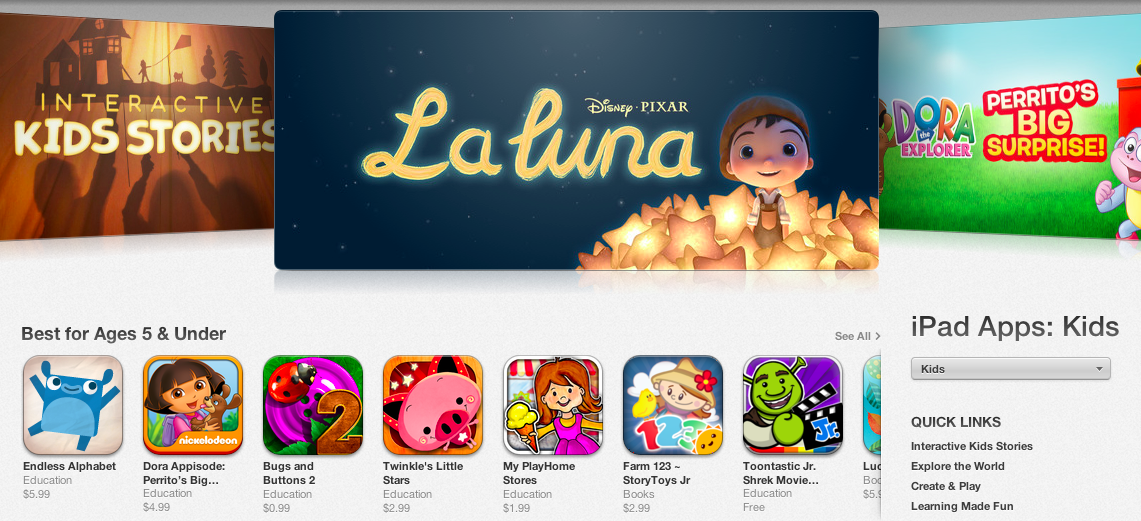
Following iOS 7’s public launch yesterday, Apple today officially opened a new “Kids” App Store category that parents and teachers can use to “quickly find apps that are perfect for children”. The category is available now by browsing the App Store on an iOS device or computer running iTunes.

First announced at WWDC in June alongside iOS 7’s developer debut, the Kids category is aimed at facilitating the process of finding apps and games based on age ratings. The category is curated by Apple editors, who, according to the company, “search the App Store for the best apps in each age group — up to 11 years old”.

The Kids category is, unlike other App Store categories, divided in age ratings: at the top, there’s Apple’s typical carousel of featured apps and sections, with shortcuts to “Best for Ages 5 & Under”, “Best for Ages 6-8”, and “Best for Ages 9-11” areas listed below. According to developers we contacted earlier this month, Apple started requesting additional artwork for promotional materials for the Kids category in the summer, and there is, indeed, a rich selection of games and apps already available in the category today.

Besides featured apps and age ratings, Apple has also created Kids-specific sections to group related apps and games, such as “Create & Play”, “Shapes & Colors”, and “First Words & Numbers”. Each section comes with custom graphics and a selection of apps curated by Apple editors.

Apple’s focus on making iOS devices more accessible for younger generations, teachers, and parents isn’t new, and the Kids category is the culmination of Apple’s efforts to curate App Store software suitable for children.


Businessweek Interviews Cook, Ive, and Federighi

On the launch week of iOS 7, the iPhone 5s, and iPhone 5c, Businessweek scored an interview with Apple’s top executives. The interview doesn’t focus on the new iPhones or thinking behind iOS 7, it’s not very long, and it dwells a bit too much on the implications behind Android’s market share and the old Apple-Microsoft war in the 90s.

But there are some good bits, such as this one:

The line against Apple is that its pace of innovation is off, but Ive and Federighi dismiss that. The two are keen to point out not just new features, but also the deep layers of integration that went into each one. Of the 5S’s fingerprint scanner, Ive says, “there are so many problems that had to be solved to enable one big idea.” Without mentioning competitors (Samsung), it’s clear the two executives think some of what passes for innovation is illusory at best. “We didn’t start opportunistically with 10 bits of technology that we could try to find a use for to add to our features list,” Ive says.

Federighi jumps in: “New? New is easy. Right is hard.”

Permalink

Feedly Opens Up API

From the Feedly blog:

Millions of users depend on their feedly for inspiration, information, and to feed their mind. But one size does not fit all. Individuals have different workflows, different habits, and different devices. In our efforts to evolve feedly from a product to a platform, we have therefore decided to open up the feedly API. Effective immediately, developers are welcome to deliver new applications, experiences, and innovations via the feedly cloud. We feel strongly that this will help to accelerate innovation and better serve our users.

API documentation here. I’m looking forward to playing with this in the next couple of weeks.

Permalink