Federico Viticci

10759 posts on MacStories since April 2009

Federico is the founder and Editor-in-Chief of MacStories, where he writes about Apple with a focus on apps, developers, iPad, and iOS productivity. He founded MacStories in April 2009 and has been writing about Apple since. Federico is also the co-host of AppStories, a weekly podcast exploring the world of apps, Unwind, a fun exploration of media and more, and NPC: Next Portable Console, a show about portable gaming and the handheld revolution.

Google Hangouts For iOS Updated with Support for GIFs

In what can be heralded as the first “major” update to the app since May 2013, Google has today released a new version of Hangouts for iOS that brings support for animated GIFs.

Hangouts 1.3 also lets you make and receive calls using your Google Voice number, it has indicators for contacts that are online and reachable, and it even fixes a pesky bug that caused audio playback to stop when the app was running in the foreground – but the highlight is, clearly, support for inline visualization of GIFs.

Considered a priority over smooth scrolling and proper iOS 7 support (the app sports a lovely iOS 6 keyboard), GIF support works in tandem with the iOS Camera Roll: whenever you’re in need of sending a friend, a co-worker, or a loved one a GIF that can, more than any other static image, prove a point through the use of animated cats, the new Hangouts app can pick a GIF from the Camera Roll, preview it, and insert it in a conversation. The GIF will be played inline across the web and the new iOS app.

In my tests, GIFs that I had archived in Evernote and saved to the Camera Roll weren’t attached as animated GIFs to the Hangouts app; however, it’s possible that this may be an issue of the Evernote app, as GIFs saved from Safari worked well with Google’s client, retaining their beautiful and modern animations.

Support for inline animated GIFs is welcome; based on our first few tests, we can’t pinpoint whether Google also made much-needed improvements to the app’s performance – particularly an issue for long threads and group conversations. On a somewhat related note, Apple released an update to iOS last month, but Google didn’t decide to take advantage on it for version 1.3, deeming inline GIFs the feature worth improving in Hangouts.

Google Hangouts 1.3 is available on the App Store. GIFs are available on the Internet.


Feedly Adds Custom Sharing and “Popular” Section

I’ve been keeping an eye on Feedly since they unveiled their Pro plan earlier this year (I bought a $99 lifetime membership). Their newest additions to the web app are interesting: Popular is an algorithm that detects articles with “engagement” in the Feedly community, and Custom Sharing lets you add your own sharing URL for links.

Here’s how they describe Popular:

Thanks to the engagement and sharing behavior from the community, we are getting a very clear signal of which articles are the most popular within each feed. We added a “Popular” section at the top of each feeds to make sure that you do not miss those articles. If you prefer a chronological view only, this feature can be turned off in the preferences via Preferences > General > Popular.

I just turned on the feature in my account. The first impression is good as it does seem to be recommending articles about popular topics.

Custom Sharing is pretty neat in that it lets you set up a URL to send links to using placeholders for an article’s title and link. I have set up a custom service to bring up the Pinboard add interface, but I’d like to see an option to set up multiple custom sharing services at once (right now, you can only add one, and it doesn’t get a custom icon but a generic envelope one). The feature is reminiscent of Mr. Reader’s custom sharing menu, but for websites, and I think that it is a good addition.

Permalink

Facebook 6.6

Out today on the App Store, you can now edit comments and posts from the new version of Facebook for iOS (for posts that contain photos or locations from Instagram, you can only edit the text part of the status update). When leaving comments, you can also attach photos from your device (a feature that was added to the website a while back); at last, Facebook is providing easier access to privacy settings from mobile devices (tap the More tab on iPhone, then tap the lock icon next to your name).

You can download Facebook 6.6 here.

Permalink

CameraSync Updated for iOS 7

CameraSync

CameraSync

In my Boxie review yesterday, I mentioned the role of the official Dropbox app on my devices:

Boxie is so feature-rich, I want more from it: there’s no iPad app at this point, and I would love for Tapwings to consider an automatic upload feature for photos that would allow me to completely eschew the official Dropbox app. Right now, the only reason I keep Dropbox on my devices is for the iPad client and automatic background uploads, but, for everything else, I’m doing just fine with Boxie and I enjoy the increased efficiency made possible by the app’s feature set.

I should clarify two points: the Dropbox app is also the easiest way to authenticate with your credentials for third-party Dropbox-enabled apps; and, in a sweet coincidence, CameraSync has been updated today with a new design and bug fixes for iOS 7, which means I have turned off Camera Uploads from the Dropbox app again. Read more


First Look at Editorial 1.1

Ole Zorn:

Editorial 1.1 will require iOS 7. I know that some of you won’t like this, but sooner or later, it’s inevitable, and all iPad models that run iOS 6 also support iOS 7, so this doesn’t mean leaving any older devices behind. iOS 7 is so different from its predecessor that it’s a lot more difficult to support older versions than it was with previous upgrades.

I’m especially a fan of the last point in the “New Features” list. Editorial’s looking good on iOS 7.

Permalink

The Prompt: The Federico Special

With Stephen away this week, Federico and Myke spend some time discussing the magic behind iOS automation and URL schemes. They finish the show with a short discussion about Nintendo (of course).

We’re just getting started with iOS automation, and I plan on buying Pokémon Y this weekend. So, expect more soon.

Brought to you by two great sponsors:

  • Squarespace (use code TALLYHO10 for a 10% off)
  • Hostgator (use code SWITCHITUP for a very special 50% off until October 22nd 2013)
Permalink

Glenn Fleishman On Newsstand For Publishers

Glenn Fleishman, writing for TidBITS:

Put bluntly, Newsstand is a ghetto. Readers complain to me regularly about forgetting to read The Magazine, even though we use iOS notifications for each issue. If readers don’t read immediately and don’t remember to tap the Newsstand icon later, they forget about us entirely.

His article comes in response to Marko Karppinen, who writes:

The segregation of Newsstand apps into the Newsstand folder wasn’t ever a positive aspect of Newsstand, but we were optimistic and thought that perhaps readers would form new habits around it. As an industry, we decided to give it a go. Apart from some early successes, attributable to a first-mover advantage, that was a mistake.

As users, many of us complained about the old Newsstand’s folder nature and the inability to hide the app, but publishers aren’t so happy now that it’s possible with iOS 7. I’m curious to see if more publishers will chime in on this.

Permalink

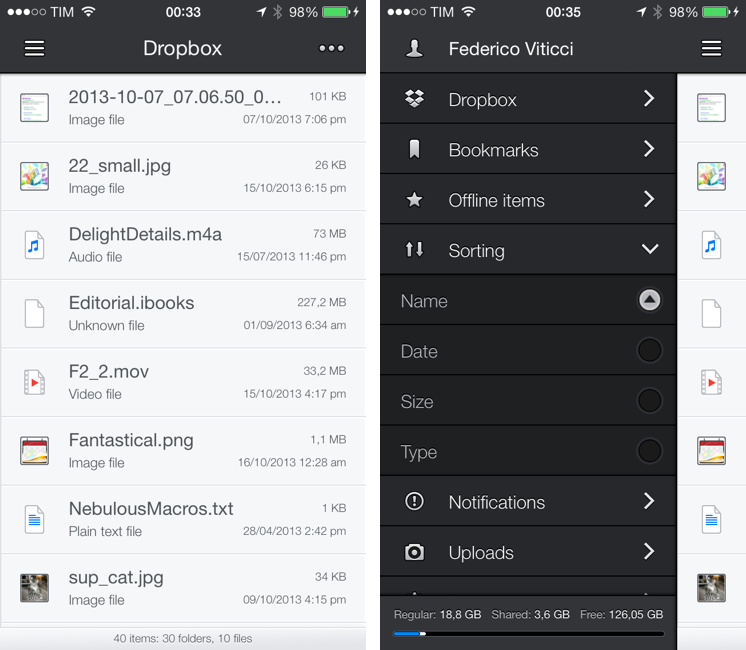
Boxie Review: An Alternative Dropbox Client for Power Users

Boxie for iPhone

Boxie for iPhone

Dropbox is my filesystem. Every file that I need to have available across devices and that doesn’t require the rich text and search capabilities of Evernote goes into my Dropbox account: screenshots that I share with coworkers; PDF copies of my receipts and invoices; articles written in Editorial are stored in Dropbox. Even my photo backup workflow relies on Dropbox as an archival system that’s always in the cloud, readily available and easily shareable. With the Packrat feature, a $39 yearly add-on, I get access to the full history of my deleted files and file revisions, which have saved me on several occasions in the past.

The official Dropbox app for iOS is good, but it’s not great for power users and it hasn’t been substantially enhanced for iOS 7 yet. That’s what Italian developers Matteo Lallone and Gianluca Divisi (together, Tapwings) want to fix with Boxie, a $1.99 third-party Dropbox client for iPhone packed with advanced features and navigation options. I’ve been testing Boxie for the past month, and I think that it’s off to a solid start. Read more