AppStories Episode 354 - Apple Vision Pro and Apps
47:33
This week, Federico and John spend time with the visionOS simulator and consider the design of the Apple Vision Pro system apps and what to expect from third-party developers.
This week, Federico and John are joined by tvOS expert Sigmund Judge, who just finished writing his tvOS 17 review for MacStories, to understand what has changed in tvOS and where it might be heading.
I got my iPhone 15 Pro Max last week, and I’m loving the possibilities opened by the Action button combined with the Shortcuts app. But as I was playing around with different ideas for the Action button, I had a thought:
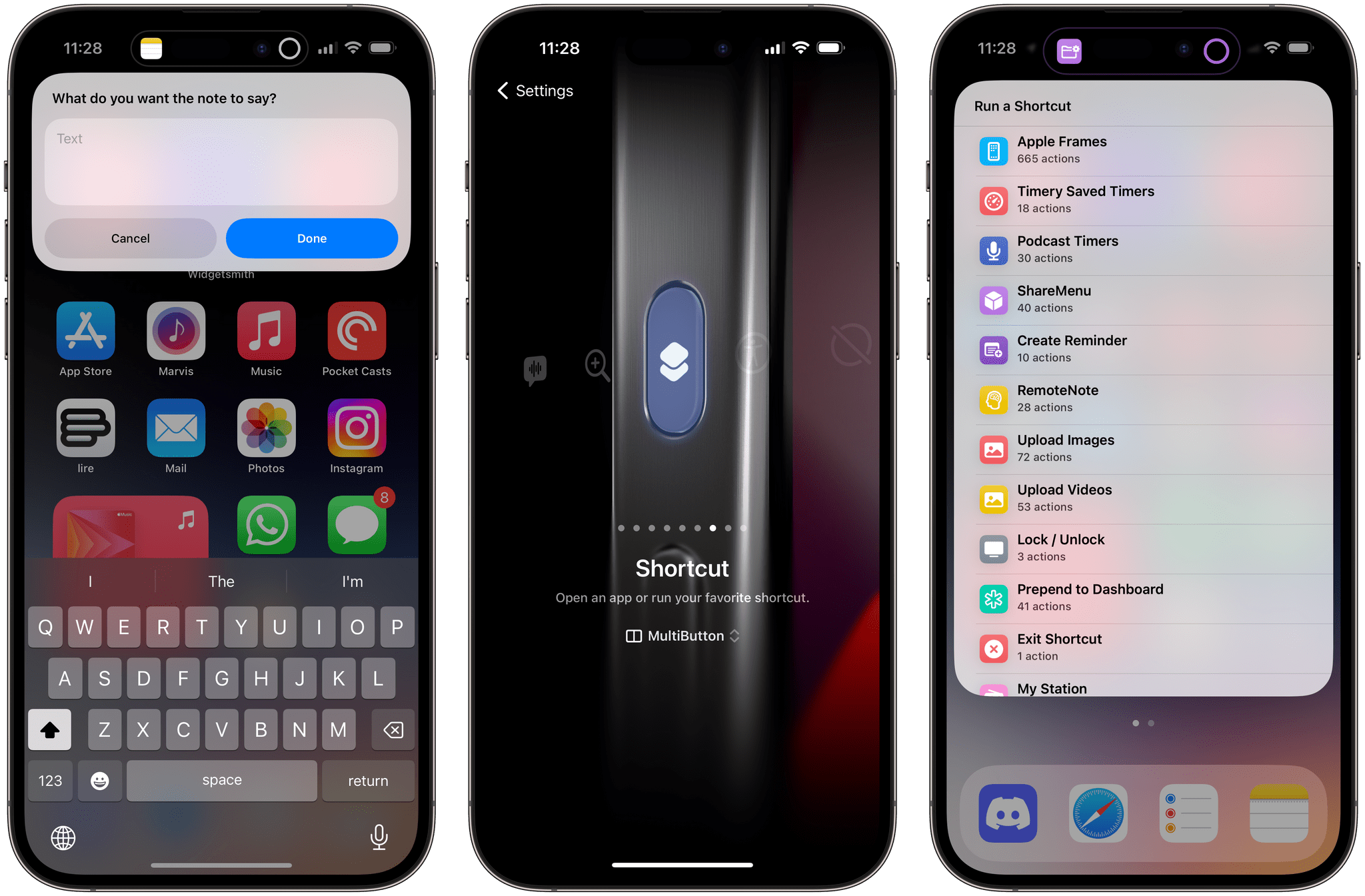
Wouldn’t it be great if instead of just one shortcut, I could toggle between two shortcuts with the same Action button press? That’s exactly what my new MultiButton shortcut does.
With MultiButton, you’ll be able to assign two separate shortcuts to the Action button. Unlike other solutions you may have seen that always make you pick shortcuts from a menu, MultiButton automatically cycles between two shortcuts if you press the Action button multiple times in rapid succession. You don’t need to pick shortcuts from a list; just press the Action button and MultiButton will take care of everything.
Toggling between two shortcuts with MultiButton.Replay
Allow me to explain how MultiButton works and how you can configure it for your Action button. In the process, I’ll also share some new shortcut ideas that you can start using today on your iPhone 15 Pro.
Soon after Apple’s Wonderlust event, it became clear that the company’s revised AirPods Pro with a USB-C case offered more than an updated connector. As detailed in a press release, the upgraded version of the second-generation AirPods Pro “unlocks powerful 20-bit, 48 kHz Lossless Audio with a massive reduction in audio latency”. But how?
Here’s Joe Rossignol, reporting at MacRumors:
In a video interview with Brian Tong, Apple’s VP of Sensing and Connectivity Ron Huang explained why only the updated second-generation AirPods Pro with a USB-C charging case support lossless audio with Apple’s upcoming Vision Pro headset.
Huang revealed that the H2 chip in the USB-C AirPods Pro supports the 5GHz band of wireless frequencies for ultra-low latency and less interference, while the H2 chip in the original second-generation AirPods Pro with a Lightning case is limited to the 2.4GHz band. Apple says it is this 5GHz support that enables the updated AirPods Pro to support lossless audio with the Vision Pro, which is slated for release in the U.S. in early 2024.
You can watch the video below:
The addition of 5GHz wireless makes complete sense in hindsight, and it doesn’t surprise me that Apple prioritized sound quality and latency reduction for a platform where full immersion is key to the experience.
Beyond Vision Pro, however, I wonder whether we’ll ever have any updates on the lossless audio front regarding Apple Music and AirPods Pro.
We know that Apple Music’s lossless catalog supports resolutions “ranging from 16-bit/44.1 kHz (CD Quality) up to 24-bit/192 kHz”. The new AirPods Pro fall short of supporting hi-res lossless playback at 24-bit/192 kHz, but so-called CD Quality lossless playback should now be within the capabilities of the device. Last time Apple gave a statement on the lack of lossless playback in AirPods Pro, they mentioned there are “other elements” to improve sound quality that aren’t necessarily about Bluetooth codecs. Is Apple waiting until they can support full 24-bit/192 kHz playback in future AirPods Pro hardware, or are there more audio-related changes coming with the launch of Vision Pro?
Earlier this week, I published my review of iOS and iPadOS 17, which you can read on MacStories and, if you’re a Club member, download as an EPUB that you can read and annotate offline. Historically, I’ve written a detailed ‘Making Of’ here on MacStories Weekly to describe my setup and workflow for the review....
Apple published an extensive support document about the USB-C connector on the new iPhone 15 lineup (we should be receiving our new iPhones later this week at MacStories, so stay tuned for our coverage), and a few details about compatibility with external displays caught my attention.
For starters, yes – Apple implemented DisplayPort connections over USB-C just like on the iPad Pro. The iPhone, however, is limited to a lower resolution:
iPhone uses the DisplayPort protocol to support connections to USB-C displays at up to 4K resolution and 60Hz.
Note that the latest iPad Pros support connections up to 6K, allowing you to connect an iPad Pro to a Pro Display XDR if you hate your wallet. You can try this with an iPhone 15 too, but display resolution is going to be limited to 4K. The Studio Display will be supported too, obviously.
Another tidbit from Apple’s support document:
You can connect your iPhone to an HDMI display or TV with a USB-C to HDMI adapter or cable. Adapters and cables that support HDMI 2.0 can output video from your iPhone at 4K resolution and 60Hz.
The Apple USB-C Digital AV Multiport Adapter is compatible with iPhone. This adapter can output video from iPhone at up to 4K resolution and 60Hz, including content in HDR10 or Dolby Vision if your display or TV supports HDR.
If my theory is correct, we should soon be able to connect an iPhone to an HDMI capture card (such as the ones I covered in my iPadOS 17 review) via Apple’s adapter and an HDMI cable, connect the capture card to an iPad, and use a compatible app to see the iPhone’s display on your iPad. That could be used for screencasts, playing videos from an iPhone on the iPad’s display, or, better yet, play a videogame from the iPhone in a Stage Manager window on the iPad.
The iPhone itself doesn’t support Stage Manager, so, unlike Samsung phones, it can’t be turned into a desktop workstation when plugged into an external monitor (I hope this happens down the road though). However, I do believe we’re going to start seeing some interesting experiments with iPhones being used as handheld gaming consoles with external monitors. Whether you’ll be using a capture card to turn an iPad into an external monitor for an iPhone using apps like Orion1 or Genki Studio2 or connect it to a portable OLED display, I think this newfound hardware modularity is going to be fascinating to observe.
In the year when the vision is elsewhere, what do you get the OS that has everything?
Well, last year was weird.
For the first time since I started writing annual reviews of Apple’s two mobile operating systems – iOS and iPadOS – I published a review without the iPad part. Or rather: I had to publish it a month later given the mess Apple found itself in with Stage Manager for iPadOS 16 and its half-baked, embarrassing debut.
I don’t want to go over the specifics of that entire saga again and how we got to a shipping version of Stage Manager for iPadOS 16 that didn’t meet my expectations. Spoiler alert: as we’ll see later in this review, Apple listened to feedback and fixed the most glaring issues of Stage Manager in iPadOS 17, striking the balance between “guided multitasking” and freeform window placement that was missing from last year’s debut. Stage Manager for iPadOS 16 will remain another blip in the iPad’s long and storied history of ill-fated multitasking features. There’s no need to talk about it again.
I want to explain, however, why the past 12 months have been different than usual in iOS and iPadOS land beyond the fact that I couldn’t work on my iPad Pro for the first half of 2023.1
Following the launch of iOS 16 with its Lock Screen widgets and after Apple wrapped up work on the last big-ticket item on the iOS 16 roadmap (Live Activities for the Lock Screen and Dynamic Island, which launched in late October), it felt like the entire Apple community only started thinking about one product for the next six months: the headset. What would later be known as the Vision Pro and visionOS platform became the topic of conversation in Apple-related publications, podcasts, and YouTube channels. Leading up to WWDC 2023, anticipation surrounding the upcoming headset eclipsed anything related to other platforms.
And rightfully so. As I explained in the story that I wrote after I was able to try a Vision Pro at Apple Park, the excitement was justified. It’s always a rare occurrence for Apple to introduce a new hardware product with associated software platform; but to do so with a mind-blowing experience unlike anything I ever tried before in my life is truly something special. Apple had been working on visionOS and Vision Pro for years, and we were all thinking about it and waiting for it at WWDC. And the company delivered.
This context is necessary because the visionOS/Vision Pro development timeline explains what’s going on with iOS and iPadOS 17 this year. Both OSes are grab-bag style updates with a collection of welcome enhancements to different areas of experience. I quipped years ago that modern iOS updates need to have a little bit of everything for everyone; that has never been more true than with iOS 17, albeit for a different reason this time: most likely, because Apple didn’t have time to also deliver big, vision-altering upgrades on the iPhone this year.
iOS and iPadOS take a bit of a secondary role in 2023, happily conceding the spotlight to a new software platform that hasn’t launched yet, but which developers around the world are already testing in person.
To be clear, I am not complaining. iOS and iPadOS 17 may not have an industry-defining, obvious tentpole feature, but in their approach to offering miscellaneous improvements, they’re fun and interesting to cover. Of the two, iPadOS is the one that suffered from lack of development resources the most and whose strategy could be easily summed up as “it’s iPadOS 16, but we fixed Stage Manager”. Which, again, given the circumstances, is absolutely fine with me.
While Apple was busy with visionOS this summer, I was having fun exploring iOS 17’s collection of app updates and, as we’ll see in this review, extensive upgrades to one system feature: widgets.
As always every year: let’s dive in.