
Question: I’ve been searching for a way to use my Apple Pencil for text input system-wide on my iPad, but as far as I can tell, there aren’t any high-quality options for a handwriting-recognition keyboard on iOS. Google Translate has an excellent handwriting mode that does what I want, but it’s limited to that particular...
 Filtering Reminders Containing URLs
Among Shortcuts’ several system integrations, its native support for Reminders means we can programmatically create new tasks without opening the app as well as retrieve data for items already stored in the Reminders database. This is one of the unique advantages of using Reminders over other todo apps on iOS: it allows us to...
 What Makes an App a Pro App?
 John
John
Mail Merge with Multiple Variables
After sending the newsletter last Friday, I realized that the direct import URLs for shortcuts I had embedded in my column weren’t working due to how MailChimp formats links in their campaigns. I apologize for the inconvenience. To make this easier for everyone going forward, I’ve put together a private webpage for Club members...
Connected, Episode 202: It Could Just Be Ghosts→
Federico and Stephen are joined by John Voorhees to talk about MacBook Pro throttling, HomePod rumors and answer some listener questions.
A fun episode of Connected this week with a discussion about how we use our HomePods and what’s going on with the 2018 MacBook Pros. You can listen here.
Sponsored by:
- TextExpander, from Smile: Multiply your team’s productivity.
- Simple Contacts: Contact lens prescriptions from home: Use offer code CONNECTED20 for $20 off your contact lenses
- Anchor: The easiest way to make a podcast. Ever.
GoodTask’s Smart Lists for Reminders
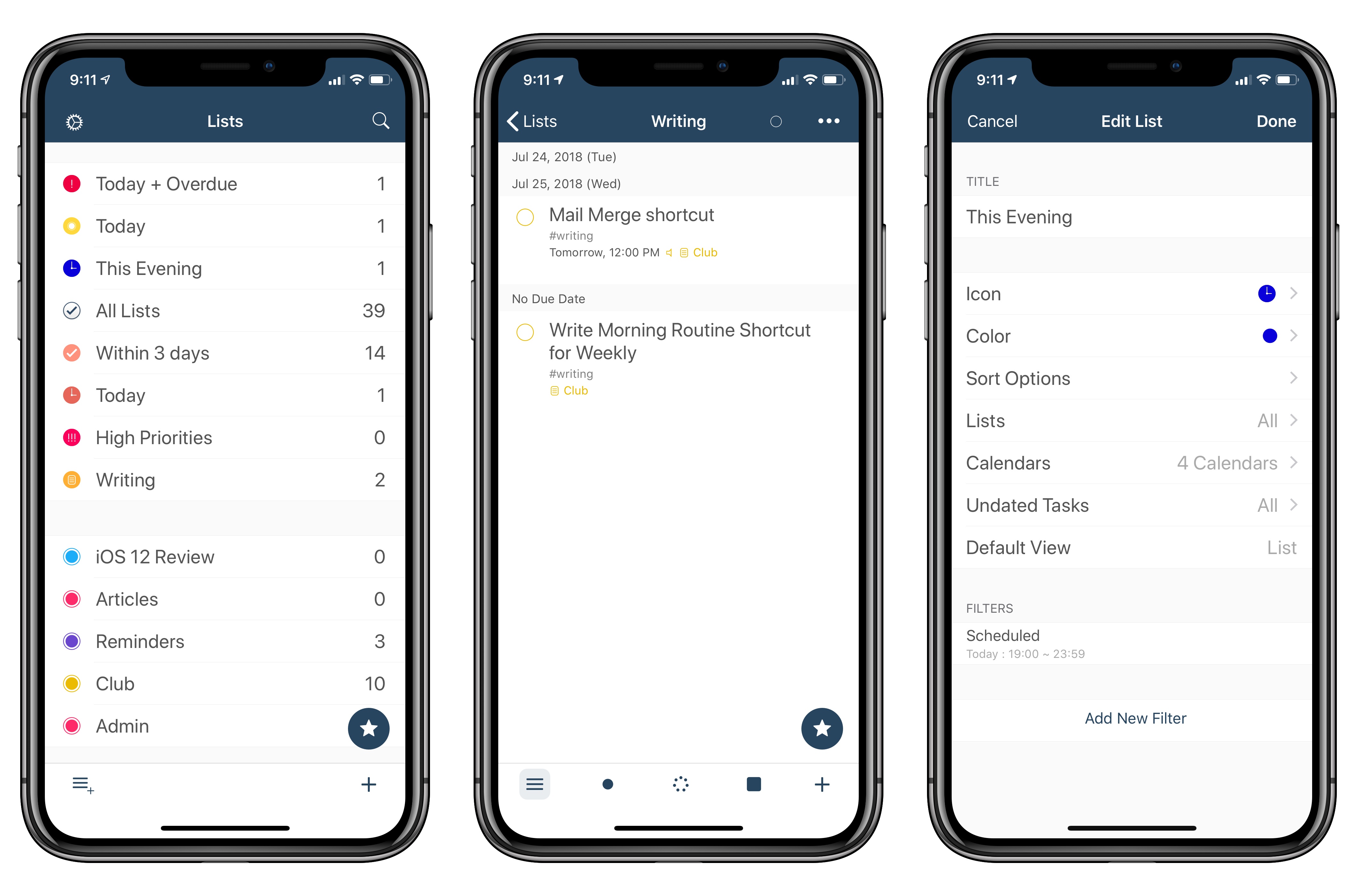
I’ve been playing around with GoodTask, a Reminders client for iOS, as part of my experiments with Shortcuts and Reminders for this year’s iOS review. GoodTask is a powerful utility that extends Reminders in ways that I’d love for Apple to consider whenever they decide to update their own Reminders app. GoodTask has grown a lot since its debut four years ago; I recommend reading Tim’s review of version 3.0 to get an idea of its capabilities. The app has got a bit of a learning curve, but it’s much more powerful than Reminders while retaining its key advantages (such as Siri integration and immediate background sync between every Apple device).
Today’s update to GoodTask brings a couple of features that I suggested to its developer a while back. The first one is a quick action to reopen a web link (or URL scheme) contained in a reminder, if any. This makes it easier to use GoodTask as a repository for links saved from Safari (perhaps through the Shortcuts extension). I like the way GoodTask automatically extracts URLs from the Notes field of a reminder, and this quick action speeds up the process of reopening links a lot.
The second feature is a change to the ‘Scheduled’ filter for smart lists, one of the best ideas in GoodTask. Smart Lists are liked saved searches for reminders: they let you create custom lists (which you can only view in GoodTask) to manage a subset of reminders based on specific filtering criteria. For example, you can create smart lists for reminders with a specific tag (another GoodTask-only option), items that are overdue, or reminders that are due within 3 days and have a high priority. In the latest version of the app, you can create smart lists for reminders that are due between specific start and end times of the day. Essentially, I wanted to replicate Things’ fantastic Today/This Evening feature in GoodTask. With smart lists in version 3.9.1 of the app, I can now use the ‘Scheduled’ filter to show me reminders due today (between 6 AM and 7 PM) and in the evening (between 7 PM and 11:59 PM). It’s not quite as elegant as Things’ native feature, but it lets me have a similar scheduling setup in GoodTask as well.
I’ll have more to share about GoodTask over the summer as I continue to experiment with Reminders and Shortcuts in iOS 12. In the meantime, if you’re looking for a great alternative to the Reminders app on iOS, you should take GoodTask for a spin.
PDF Apps
Enable Slack’s Do Not Disturb via Siri
Now that Apple’s Shortcuts app is available for registered iOS developers in beta, it’s time for the Workflow Corner section of MacStories Weekly to move on from the old Workflow app. Starting with this week’s issue, I will be detailing and sharing custom shortcuts I’m building in the Shortcuts app, along with techniques to...
Connected, Episode 201: An Internal Fortnite→
Federico bought an iPod touch, Nest and Instapaper both have new bosses and the world is finally getting the leg emoji it deserves.
On this week’s Connected, I also shared a status update on my iOS 12 review and the apps I’m using to put it together. You can listen here.
Sponsored by:
- Pingdom: Start monitoring your websites and servers today. Use offer code CONNECTED to get 30% off.
- Simple Contacts: Contact lens prescriptions from home: Use offer code CONNECTED20 for $20 off your contact lenses
- Timing: The automatic time tracking app for macOS. Use this link to save 10% on your purchase.