
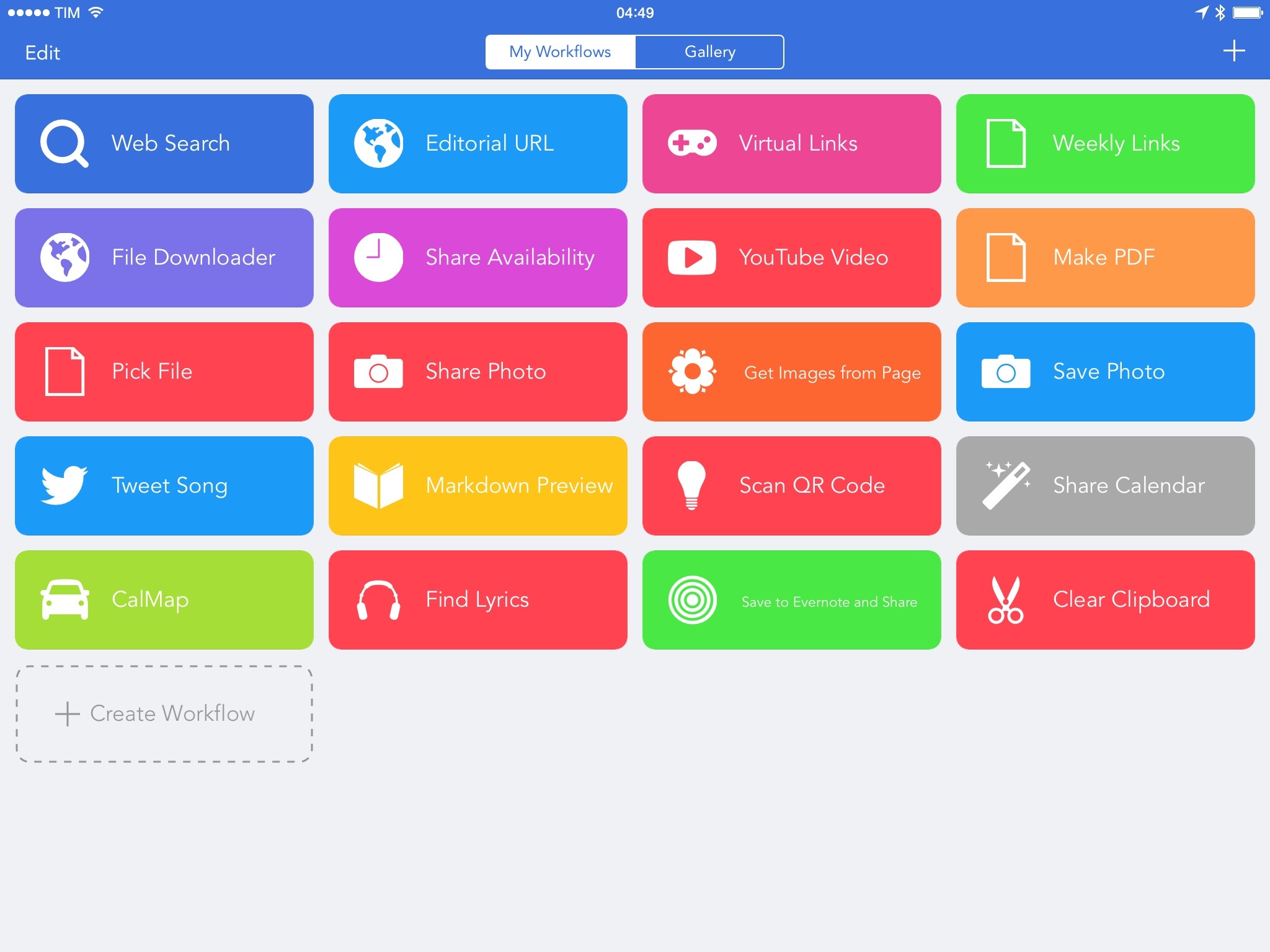
In the years I’ve spent covering iOS automation, I’ve often asked for a mobile version of Automator. Workflow, released today, tries to bring the deep system integration of Apple’s OS X utility to the iPhone and iPad, taking advantage of extensions in iOS 8 to make its automation features ubiquitous and compatible with any app.
Posts tagged with "iOS 8"
Workflow Review: Integrated Automation for iOS 8

Access Extra Content and Perks
Founded in 2015, Club MacStories has delivered exclusive content every week for nearly a decade.
What started with weekly and monthly email newsletters has blossomed into a family of memberships designed for every MacStories fan.
Club MacStories: Weekly and monthly newsletters via email and the web that are brimming with apps, tips, automation workflows, longform writing, early access to the MacStories Unwind podcast, periodic giveaways, and more;
Club MacStories+: Everything that Club MacStories offers, plus an active Discord community, advanced search and custom RSS features for exploring the Club’s entire back catalog, bonus columns, and dozens of app discounts;
Club Premier: All of the above and AppStories+, an extended version of our flagship podcast that’s delivered early, ad-free, and in high-bitrate audio.
Apple Asks Panic to Remove iCloud Drive Export Feature from Transmit for iOS
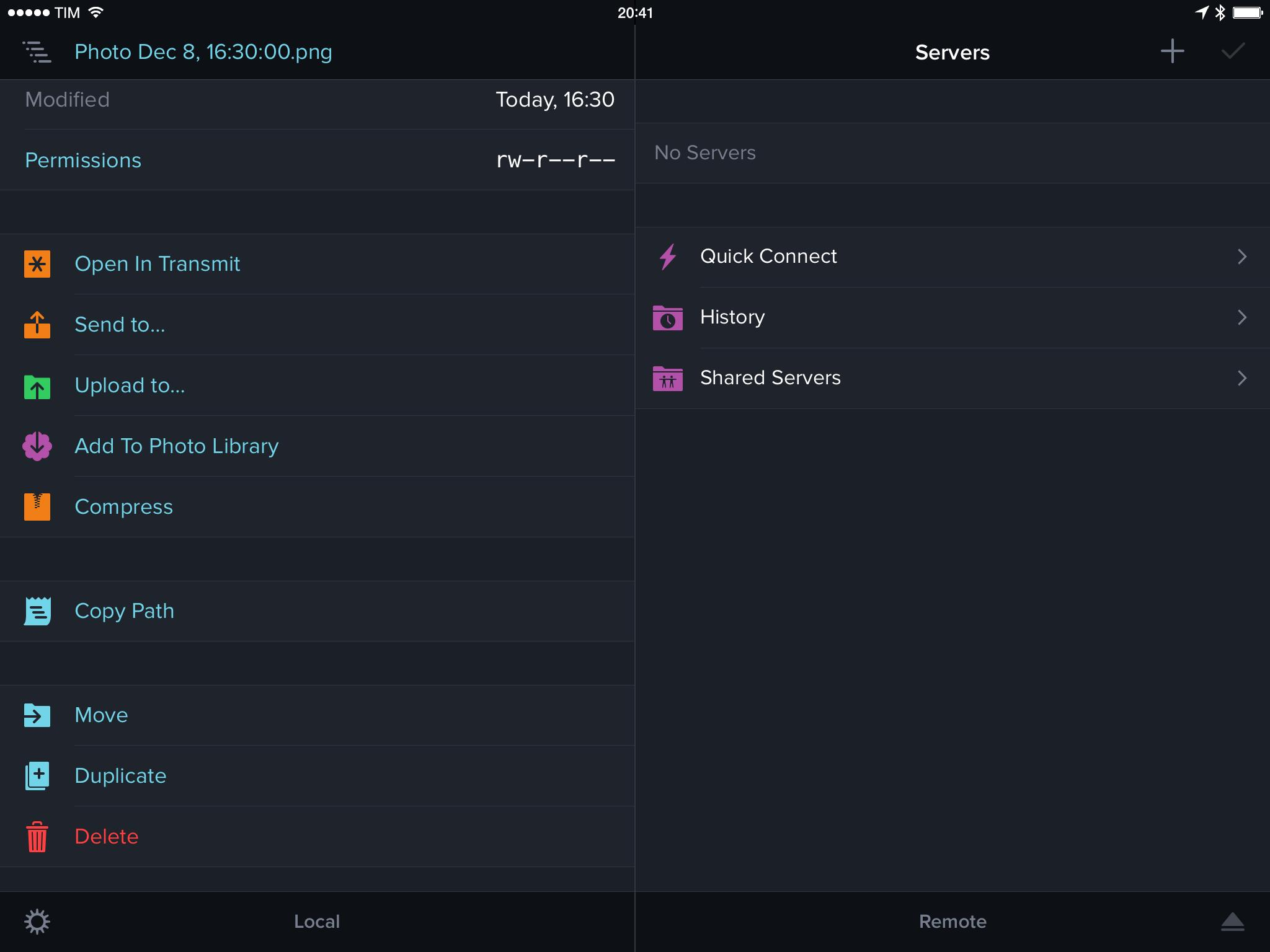
According to a notice added last week in the release notes of Panic’s Transmit, a popular file manager and FTP client released alongside iOS 8 in September, Apple has asked the company to remove the iCloud Drive “Send to” feature from the app. The removal of the feature was confirmed by Panic in a blog post today.
Access Extra Content and Perks
Founded in 2015, Club MacStories has delivered exclusive content every week for nearly a decade.
What started with weekly and monthly email newsletters has blossomed into a family of memberships designed for every MacStories fan.
Club MacStories: Weekly and monthly newsletters via email and the web that are brimming with apps, tips, automation workflows, longform writing, early access to the MacStories Unwind podcast, periodic giveaways, and more;
Club MacStories+: Everything that Club MacStories offers, plus an active Discord community, advanced search and custom RSS features for exploring the Club’s entire back catalog, bonus columns, and dozens of app discounts;
Club Premier: All of the above and AppStories+, an extended version of our flagship podcast that’s delivered early, ad-free, and in high-bitrate audio.
Instapaper 6.1 Brings Redesigned Share Extension
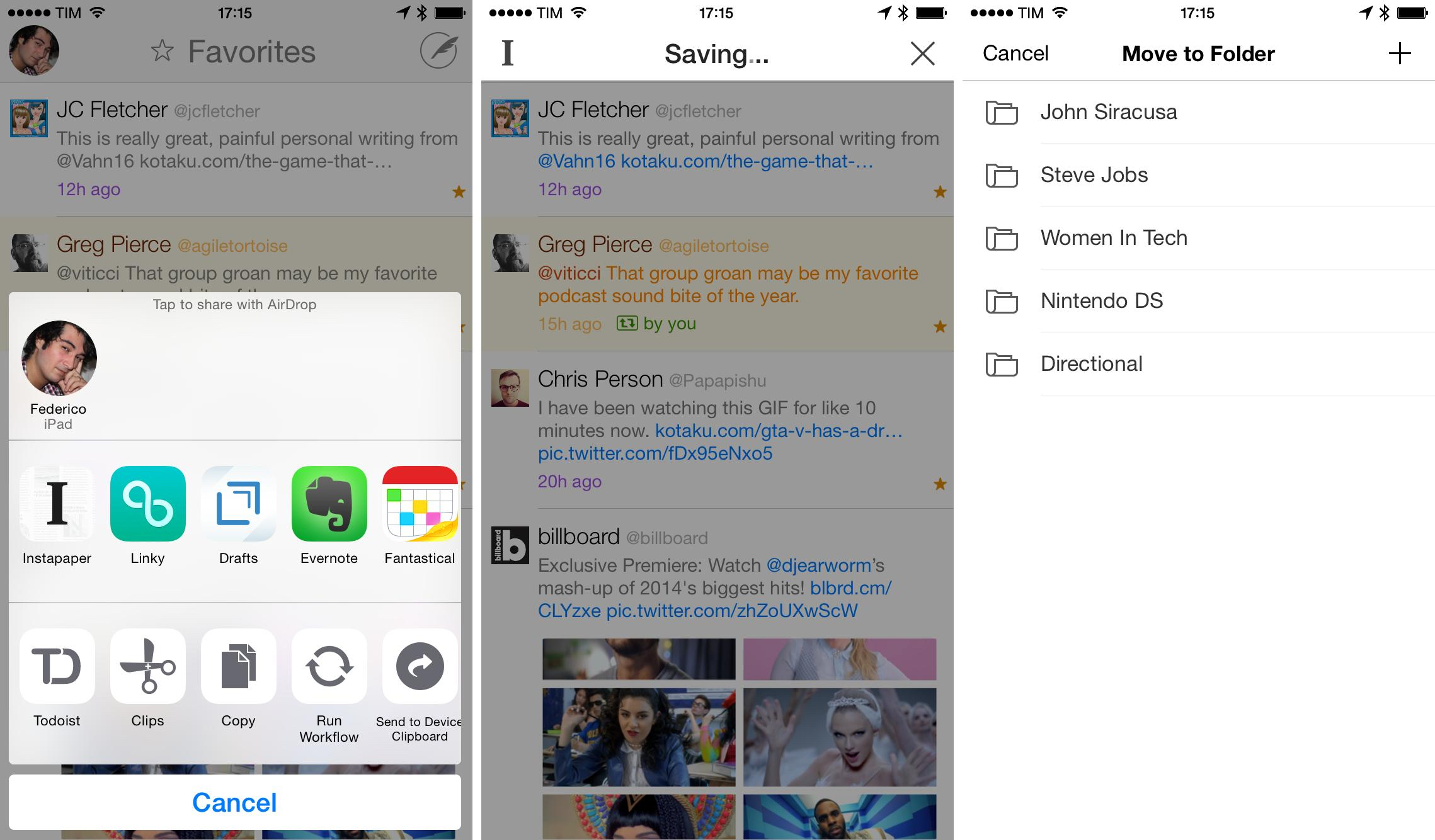
Launched in September alongside iOS 8, Instapaper 6.0 added a share extension to natively save links for later from any iOS app that supported the system share sheet. Today, betaworks has released Instapaper 6.1, which makes the extension less obtrusive by dropping the modal approach that was adopted from the popular Instapaper Bookmarklet and that also brings support for Handoff and a new unread count badge.
Access Extra Content and Perks
Founded in 2015, Club MacStories has delivered exclusive content every week for nearly a decade.
What started with weekly and monthly email newsletters has blossomed into a family of memberships designed for every MacStories fan.
Club MacStories: Weekly and monthly newsletters via email and the web that are brimming with apps, tips, automation workflows, longform writing, early access to the MacStories Unwind podcast, periodic giveaways, and more;
Club MacStories+: Everything that Club MacStories offers, plus an active Discord community, advanced search and custom RSS features for exploring the Club’s entire back catalog, bonus columns, and dozens of app discounts;
Club Premier: All of the above and AppStories+, an extended version of our flagship podcast that’s delivered early, ad-free, and in high-bitrate audio.
WhatFont iOS 8 Extension Identifies Fonts in Safari
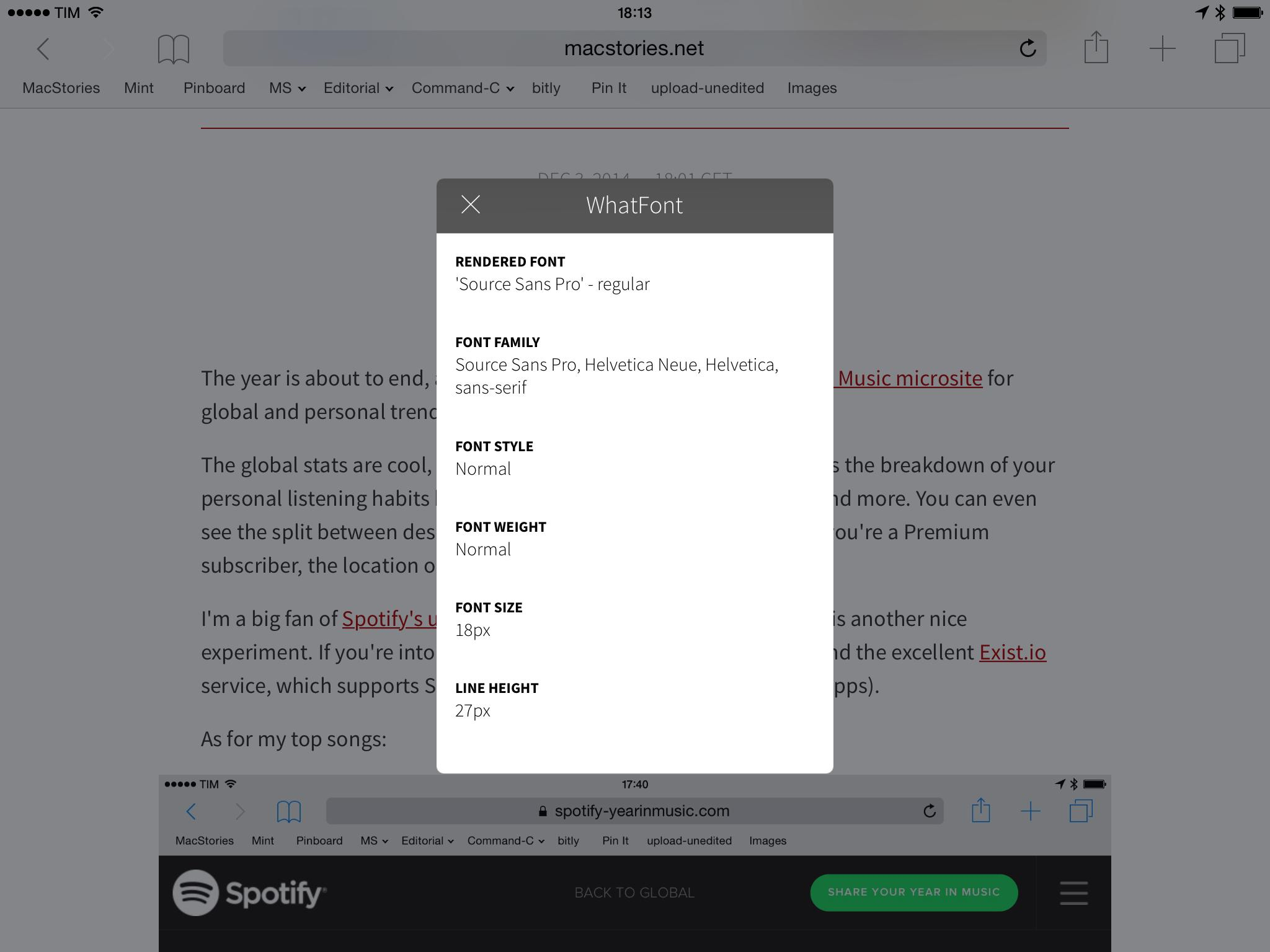
Continuing my exploration of iOS 8 technologies with a focus on extensions, a few days ago I came across WhatFont, the new iOS version of a popular desktop tool. As the name suggests, WhatFont lets you identify fonts in Safari easily and without having to go look at source code or style sheets.
Access Extra Content and Perks
Founded in 2015, Club MacStories has delivered exclusive content every week for nearly a decade.
What started with weekly and monthly email newsletters has blossomed into a family of memberships designed for every MacStories fan.
Club MacStories: Weekly and monthly newsletters via email and the web that are brimming with apps, tips, automation workflows, longform writing, early access to the MacStories Unwind podcast, periodic giveaways, and more;
Club MacStories+: Everything that Club MacStories offers, plus an active Discord community, advanced search and custom RSS features for exploring the Club’s entire back catalog, bonus columns, and dozens of app discounts;
Club Premier: All of the above and AppStories+, an extended version of our flagship podcast that’s delivered early, ad-free, and in high-bitrate audio.
Goodbye, Drafts Widget (For Now?)
Drafts 4, which we reviewed in October, offered a handy Notification Center widget to open the app in draft creation mode. The widget could launch Draft to a new empty draft or, even better, create a new draft based on the contents of the clipboard.
Access Extra Content and Perks
Founded in 2015, Club MacStories has delivered exclusive content every week for nearly a decade.
What started with weekly and monthly email newsletters has blossomed into a family of memberships designed for every MacStories fan.
Club MacStories: Weekly and monthly newsletters via email and the web that are brimming with apps, tips, automation workflows, longform writing, early access to the MacStories Unwind podcast, periodic giveaways, and more;
Club MacStories+: Everything that Club MacStories offers, plus an active Discord community, advanced search and custom RSS features for exploring the Club’s entire back catalog, bonus columns, and dozens of app discounts;
Club Premier: All of the above and AppStories+, an extended version of our flagship podcast that’s delivered early, ad-free, and in high-bitrate audio.
Powered By Extensions, Stacks Converts Currencies Inside iOS 8’s Safari
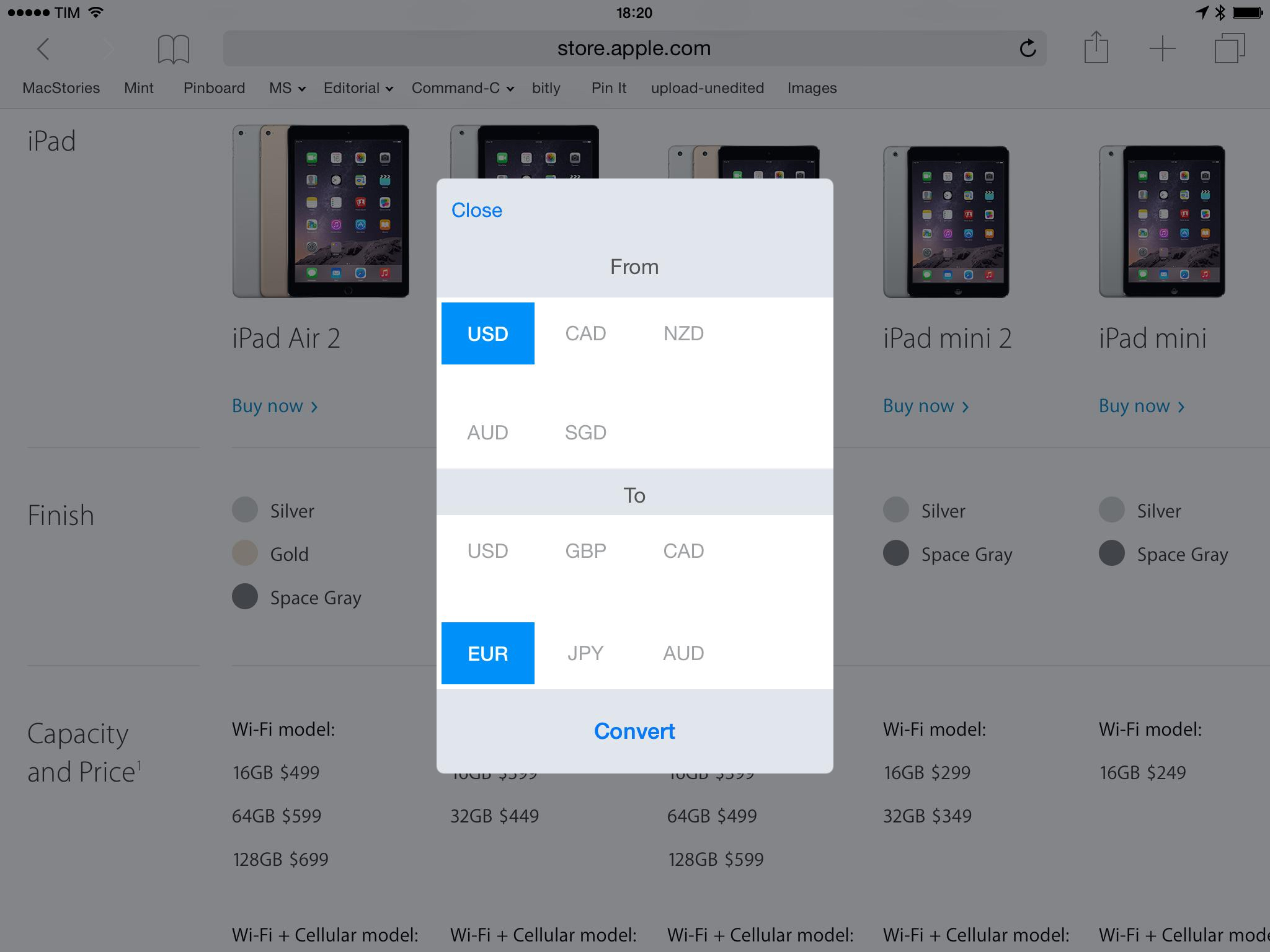
I live in Italy, but MacStories’ audience is primarily US-based, which has posed a few interesting problems over the years. One of them1 has been the constant conversion between currencies: I get paid in US Dollars, but I need to convert to Euros for my bank account; or, I often need to purchase products sold in USD, and I have to find the equivalent in my currency. I’ve now learned how to calculate currency conversions quickly by myself, and, obviously, I’ve tried a number of currency converters on the App Store. Lately, I switched to PCalc as my go-to calculator and currency/unit converter thanks to its custom keys.
Stacks 2.0, developed by WapleStuff (the same creators of Calzy), takes advantage of iOS 8’s new Extensibility features to provide one of the most unique and convenient ways to convert currencies I’ve ever tried. Stacks 2.0 integrates with Safari, using an action extension to convert currencies directly in a webpage you’re looking at.
Access Extra Content and Perks
Founded in 2015, Club MacStories has delivered exclusive content every week for nearly a decade.
What started with weekly and monthly email newsletters has blossomed into a family of memberships designed for every MacStories fan.
Club MacStories: Weekly and monthly newsletters via email and the web that are brimming with apps, tips, automation workflows, longform writing, early access to the MacStories Unwind podcast, periodic giveaways, and more;
Club MacStories+: Everything that Club MacStories offers, plus an active Discord community, advanced search and custom RSS features for exploring the Club’s entire back catalog, bonus columns, and dozens of app discounts;
Club Premier: All of the above and AppStories+, an extended version of our flagship podcast that’s delivered early, ad-free, and in high-bitrate audio.
Dropshare for iOS Uploads Images to Amazon S3 and Rackspace Cloud Files
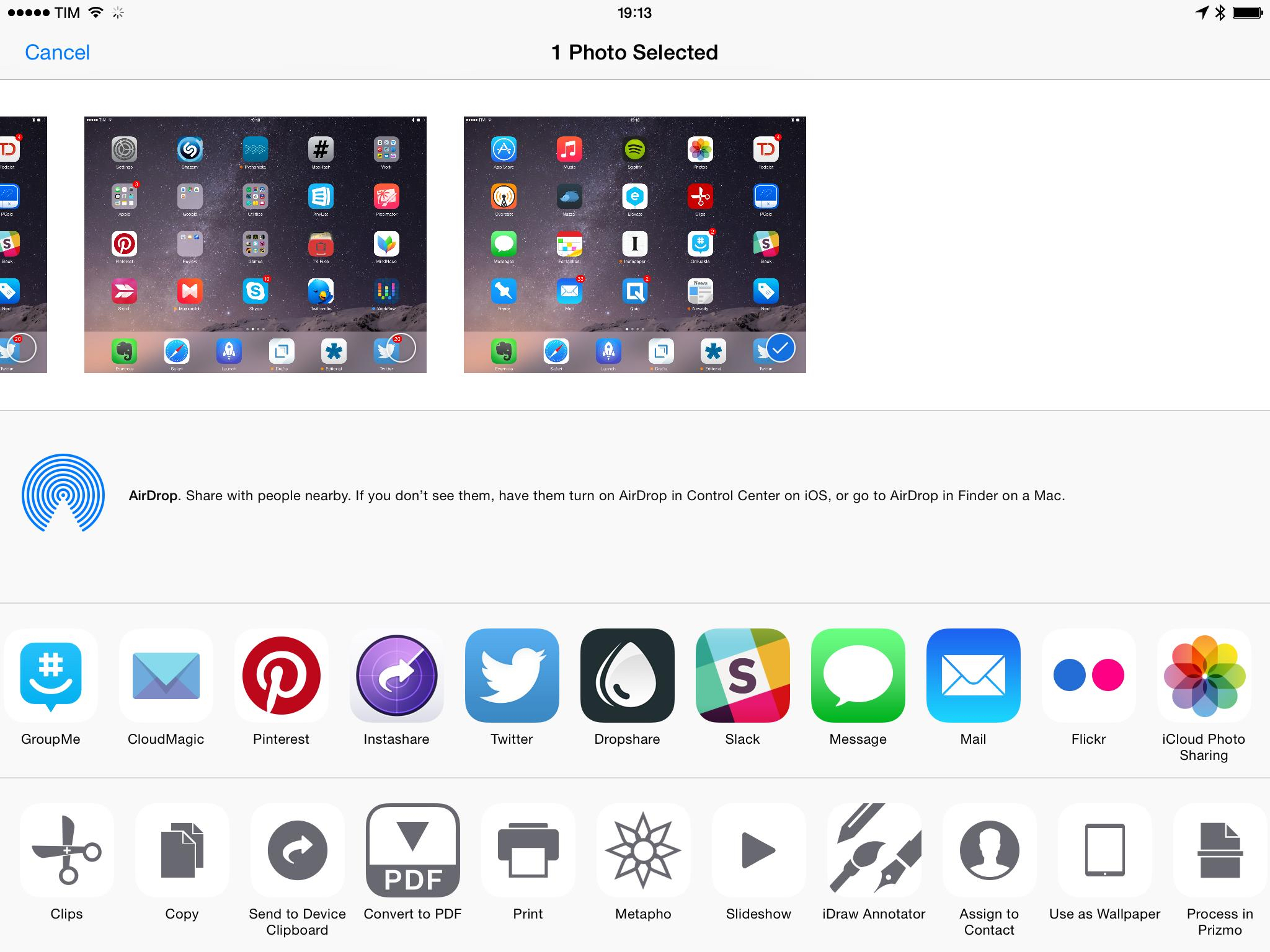
For over two years, I’ve been trying to turn my iPad into a work machine capable of handling every MacStories-related task – from writing and assembling blog posts to research, email, and expense management. One particular requirement, however, has always been problematic for my use case: native image uploads to Cloud Files on iOS. Dropshare, developed by Timo Josten, brings integration with the iOS Photos app and any other image file through a share extension that can upload directly to Amazon S3, SCP over SSH, and Cloud Files, solving a major issue in my iPad workflow for screenshot generation and uploads.
Access Extra Content and Perks
Founded in 2015, Club MacStories has delivered exclusive content every week for nearly a decade.
What started with weekly and monthly email newsletters has blossomed into a family of memberships designed for every MacStories fan.
Club MacStories: Weekly and monthly newsletters via email and the web that are brimming with apps, tips, automation workflows, longform writing, early access to the MacStories Unwind podcast, periodic giveaways, and more;
Club MacStories+: Everything that Club MacStories offers, plus an active Discord community, advanced search and custom RSS features for exploring the Club’s entire back catalog, bonus columns, and dozens of app discounts;
Club Premier: All of the above and AppStories+, an extended version of our flagship podcast that’s delivered early, ad-free, and in high-bitrate audio.
Metapho’s iOS 8 Extension Lets You Quickly Share Photos Without Metadata
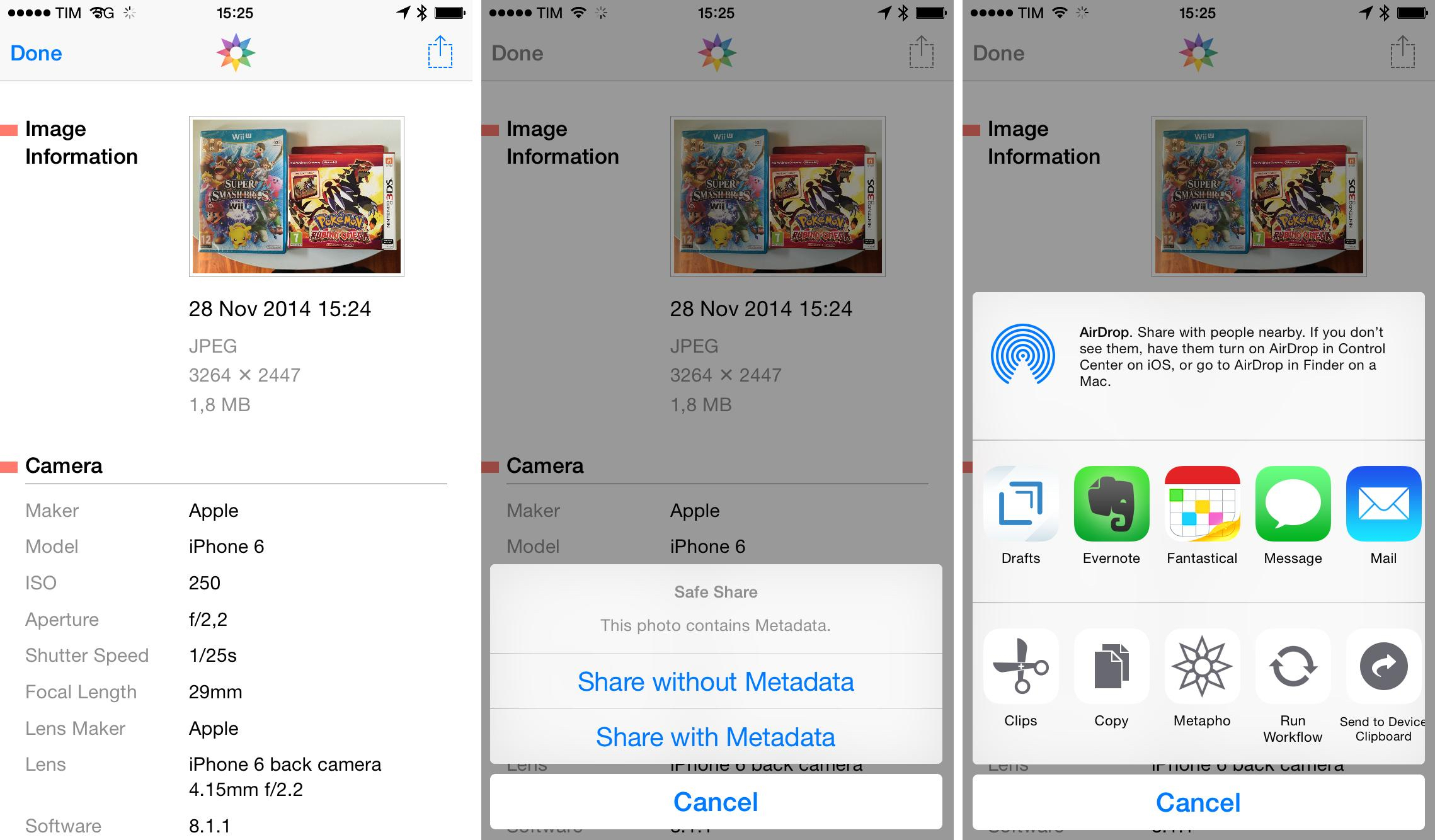
I often want to share photos without revealing the extra bits of information contained inside them – generally, I just don’t want people to know the location where a picture was taken. I’ve talked about how to remove metadata from iPhone photos before, but Metapho (an app that I briefly mentioned in September) now lets you easily share photos without metadata thanks to iOS 8’s extensions.
Access Extra Content and Perks
Founded in 2015, Club MacStories has delivered exclusive content every week for nearly a decade.
What started with weekly and monthly email newsletters has blossomed into a family of memberships designed for every MacStories fan.
Club MacStories: Weekly and monthly newsletters via email and the web that are brimming with apps, tips, automation workflows, longform writing, early access to the MacStories Unwind podcast, periodic giveaways, and more;
Club MacStories+: Everything that Club MacStories offers, plus an active Discord community, advanced search and custom RSS features for exploring the Club’s entire back catalog, bonus columns, and dozens of app discounts;
Club Premier: All of the above and AppStories+, an extended version of our flagship podcast that’s delivered early, ad-free, and in high-bitrate audio.
Screeny Lets You Easily Delete All Your Screenshots on iOS 8
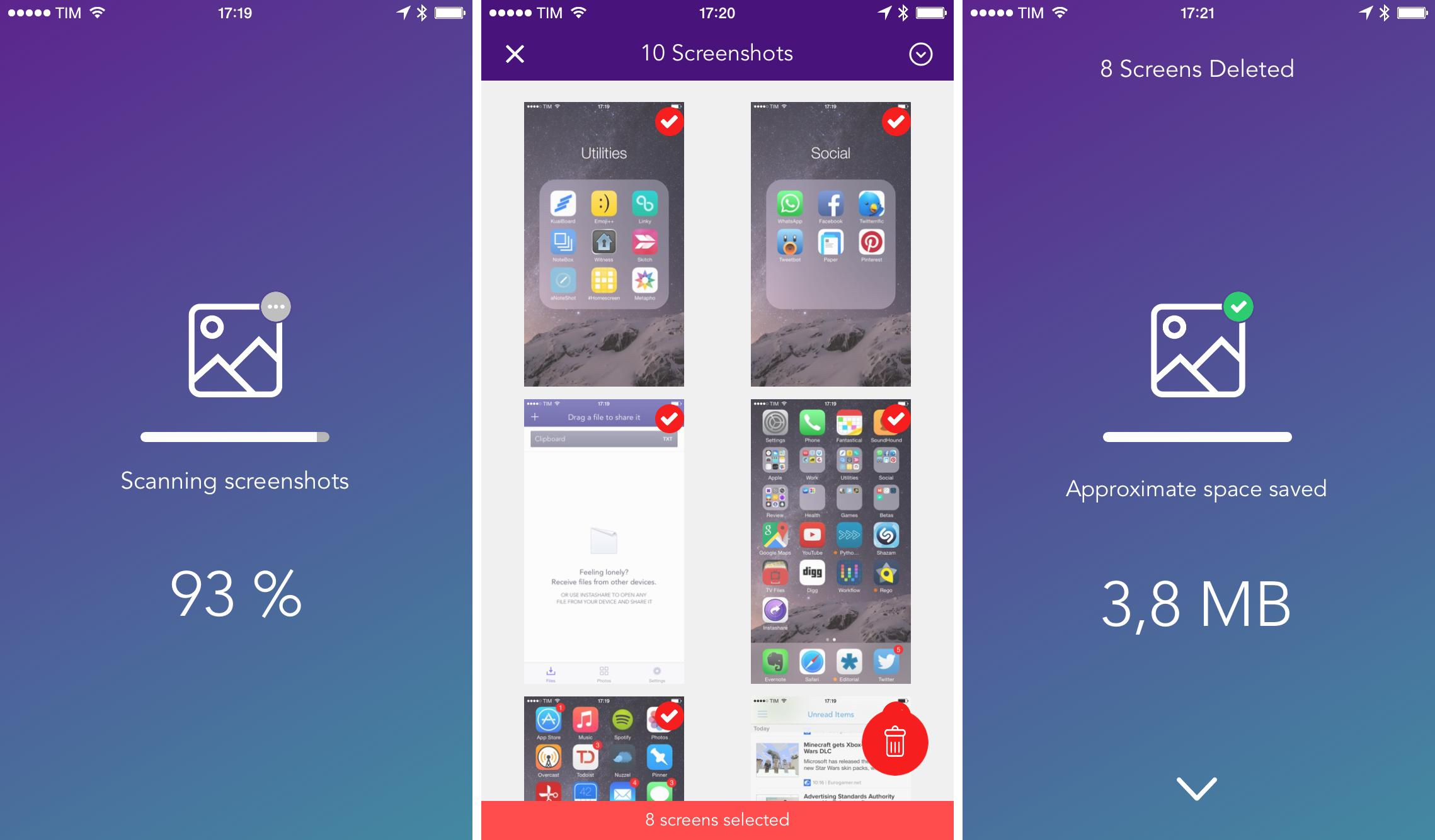
I take a lot of screenshots on my iPhone and iPad on a daily basis. Before I upgraded to a 64 GB iPhone 6, that was a problem: screenshots would accumulate over time alongside my photos, which would easily consume the 16 GB of storage I had on my iPhone 5s. Unlike photos, I never want to keep screenshots around for future consumption, which made the process of going through all of them a lot more tedious and time-consuming (unlike photos, screenshots are harder to recognize through thumbnails in the Photos app).
Access Extra Content and Perks
Founded in 2015, Club MacStories has delivered exclusive content every week for nearly a decade.
What started with weekly and monthly email newsletters has blossomed into a family of memberships designed for every MacStories fan.
Club MacStories: Weekly and monthly newsletters via email and the web that are brimming with apps, tips, automation workflows, longform writing, early access to the MacStories Unwind podcast, periodic giveaways, and more;
Club MacStories+: Everything that Club MacStories offers, plus an active Discord community, advanced search and custom RSS features for exploring the Club’s entire back catalog, bonus columns, and dozens of app discounts;
Club Premier: All of the above and AppStories+, an extended version of our flagship podcast that’s delivered early, ad-free, and in high-bitrate audio.