Posts tagged with "developers"

Our Favorite Indie Apps for iOS 27, Vol. 1

With our annual OS reviews out of the way, Federico and I will be covering our favorite indie apps that take advantage of Apple’s latest OS features. We have hundreds to draw from and instead of one big sweeping roundup, we’re going to do a bunch of smaller ones as we work our way through our lists.

To start with, we have six excellent apps that make use of Siri AI, Apple Intelligence, extra-large widgets, and more. There’s a lot of innovation packed into this group, so let’s dive into the details, and check back soon for more roundups.

Things

Cultured Code’s beautiful task manager is no stranger to supporting major Apple OS releases: while the company is keeping quiet on their plans for a possible Things 4 (Things 3 was released in May 2017), for the past nine years Things has regularly received support for new versions of iOS, iPadOS, and macOS on day one. The app’s iOS 27 update is no exception, and it makes for a great demo of some of the new features of Siri AI as well as XL widgets for iPhone. It also serves as an example of the limitations of Siri AI – and not because of Cultured Code.

The updated Things app integrates with Siri AI and Spotlight, allowing you to retrieve and open tasks from anywhere on iOS and iPadOS, as well as manage tasks with the assistant using its several input methods. In my tests, Cultured Code’s integration worked well, but Apple’s slow on-device indexing was the problem. Soon after installing the app, I was able to ask Siri to create a reminder, and it prompted me to pick a destination app again because I’d installed a few more task managers since I last confirmed my previous choice. After picking Things, I was able to create a task, which landed in the inbox, and then follow-up with Siri AI by saying “make it due at 3 PM”, and it worked.
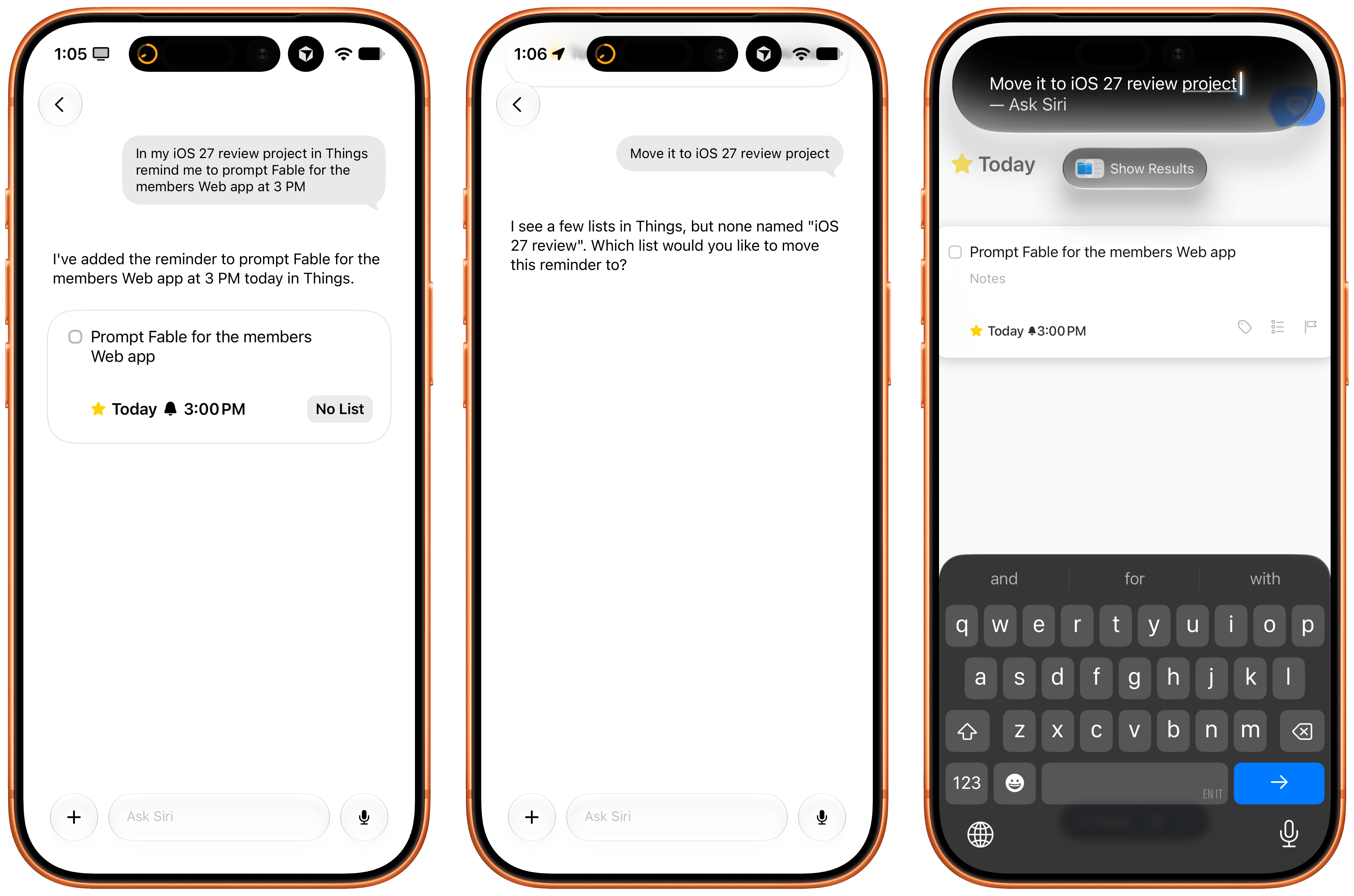
The issues I ran into, which are outside of Cultured Code’s control, are due to how long it takes iOS 27 and Siri AI to build an index of the app’s capabilities and data structure. For instance, I created an ‘iOS 27 Review’ list in Things, but, after three hours, Siri AI still can’t find it. As I noted in my review, I believe this is going to be a major challenge for most third-party apps in the short term as users download them, expect them to work with Siri, but the indexing isn’t going quickly enough.

Regardless of Apple’s technical problems, Things’ integration with Siri AI shows the path forward for third-party task managers on iOS. I also recommend reading the developers’ guide on how to prompt Siri AI for the app.
Locally AI

I covered the differences between Apple’s two flavors of local Foundation models (AFM 3 Core and 3 Core Advanced) in yesterday’s review, but there’s no better way to actually take the model for a spin than Locally AI.

The app, which is now part of the LM Studio family of products and can connect to a remote Mac using LM Link, now offers an ‘Apple Foundation Advanced’ model that, assuming you have a compatible device, lets you prompt Apple’s new on-device model.
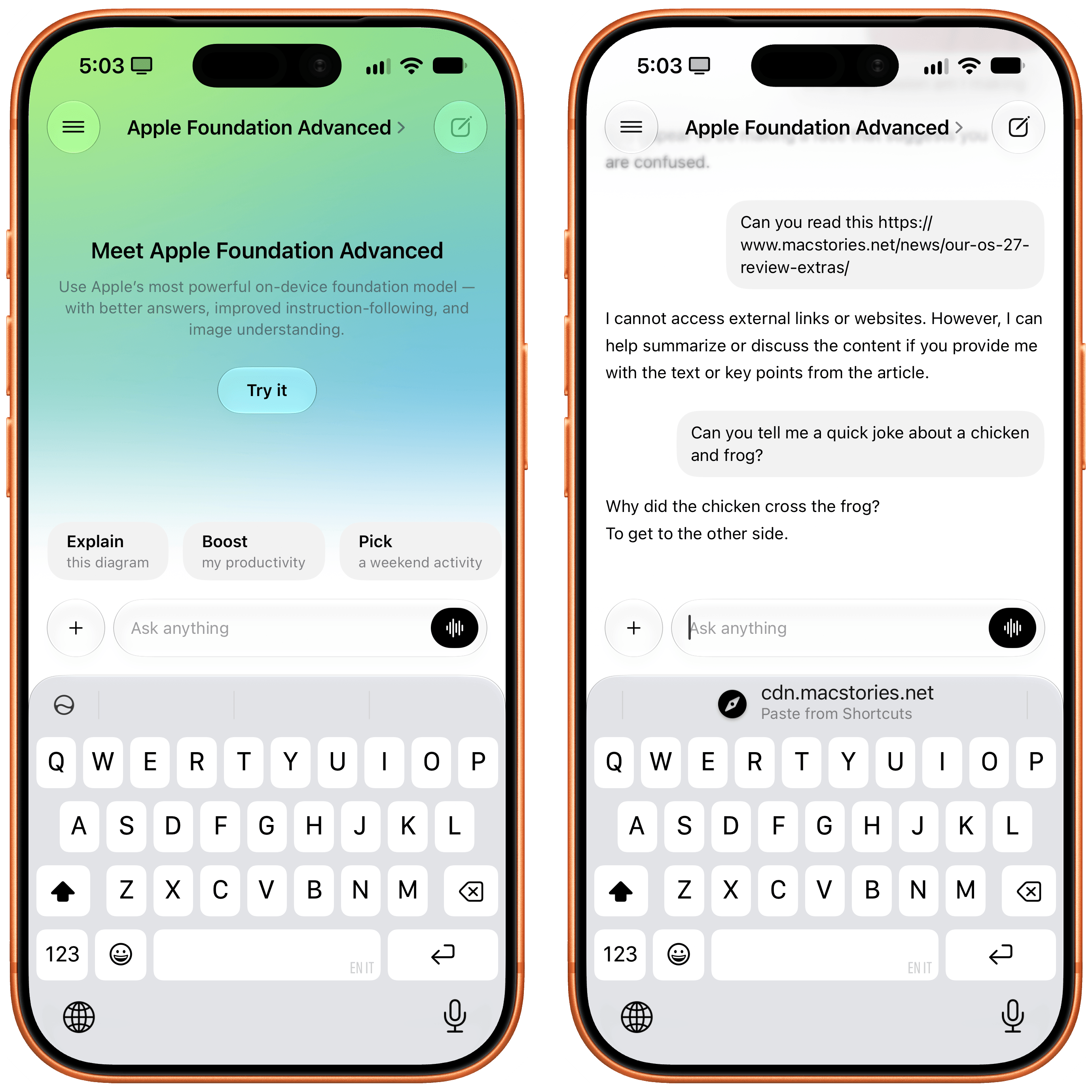
A good way to prompt this model is to give it an image: for the first time, a local Foundation model comes with vision capabilities, and I’ve found Core Advanced to be surprisingly strong at describing things like iPhone screenshots, selfies with different facial expressions, and more. Obviously, it comes with limits: Locally AI’s harness doesn’t expose tools to the model, which means it can’t fetch web content and, say, summarize articles for you in the app. Its knowledge and creativity are also quite limited, as you can see from the non-joke it created in the screenshot above.

Still, despite the limitations of the model itself, Locally AI is an excellent utility for running local models on iPhone and iPad, and if you’re curious to see what Apple’s bigger models feels like outside of Siri AI with your own prompts, I recommend checking it out.
Dark Noise

Charlie Chapman’s Dark Noise has long been my favorite utility to play white noise and other sound effects to relax or focus, and the app has received a substantial update for iOS 27 worth checking out.

First, there’s a good-looking new Liquid Glass player that fluidly morphs on-screen from a mini-player docked at the bottom of the app into a full-screen view that lets you control playback, volume, and set a sleep timer. On the Home Screen, there’s a (customizable) XL portrait widget for iPhone that lets you configure any combination of up to 24 distinct sounds and mixes that you can play with a single tap without opening the app.
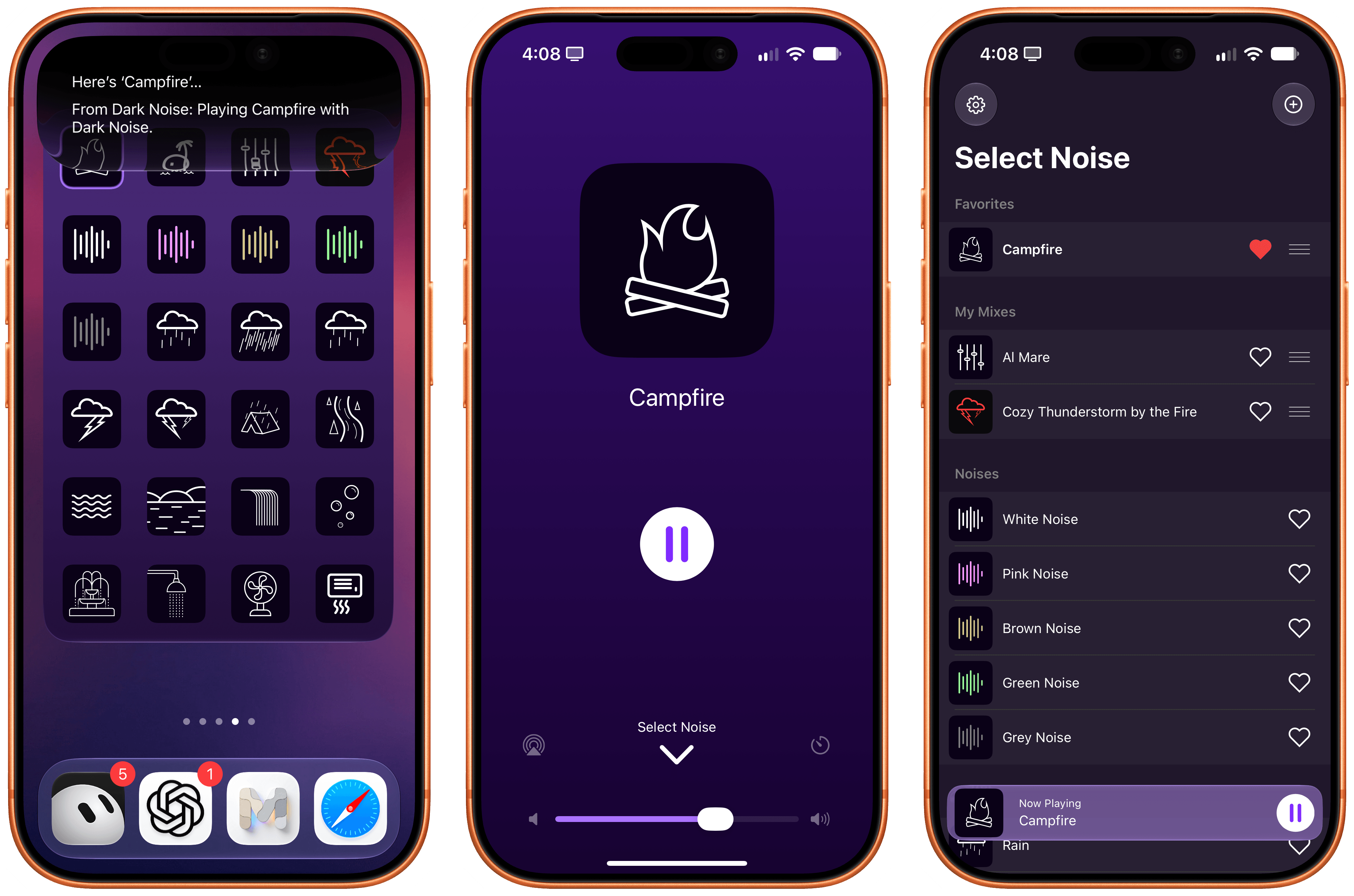
As you can imagine, the app also integrates with Siri AI now. Using Apple’s assistant, you can ask to play specific sounds from the app (make sure to add “…from Dark Noise” to your request) and you can also leverage on-screen awareness inside the app itself. While looking at your list of favorites and mixes, for instance, you can say something like “play the second mix”, and since Chapman has properly annotated the app’s views, Siri AI and Dark Noise will know what you mean.

If you, like me, struggle to get work done with music in the background but also do not appreciate complete silence, I recommend installing Dark Noise and creating a few mixes of your own.
AskPlay

I first covered Francisco Cantu’s AskPlay when it debuted on the Mac earlier this year in the App Radar for Club members, where I wrote:

Created by indie developer Francisco Cantu (a name that should be familiar to longtime MacStories readers!), AskPlay is one of the best new Mac apps I’ve tried in a long time, and we will properly review it on MacStories in the near future. The idea is simple: AskPlay gives you natural language control over Apple Music to play or queue songs. The app, which lives in the menu bar but can also be invoked with a system-wide hotkey, brings up a Spotlight-like floating search box where you can type or say things like, “Queue some ‘90s hip-hop,” or, “Play something like Oasis,” and have an AI carry out the request.

The app can build mixes for a mood or era, start stations, manage the queue (you can ask to move songs up or down), control playback, and add songs to your library or playlists, and it also answers questions such as, “Who sings this?” You can either type your requests or set a voice hotkey that summons the app already listening, pausing your music while you speak. AskPlay is a bring-your-own-key app, so you’ll need an API key from OpenAI, Anthropic, or OpenRouter in addition to an Apple Music subscription (and a subscription to the app itself).

AskPlay is now on iPhone too, and thanks to iOS 27, it’s become one of my favorite showcases of Apple’s Cloud Pro Foundation model running in Private Cloud Compute. Unlike the original version, AskPlay now lets you hand off prompt processing to a reasoning model in the cloud at no cost thanks to Apple’s PCC framework for third-party developers. And not only that, but AskPlay is also the first app I’ve seen that lets you choose between the three reasoning modes supported on PCC: light, moderate, and deep.
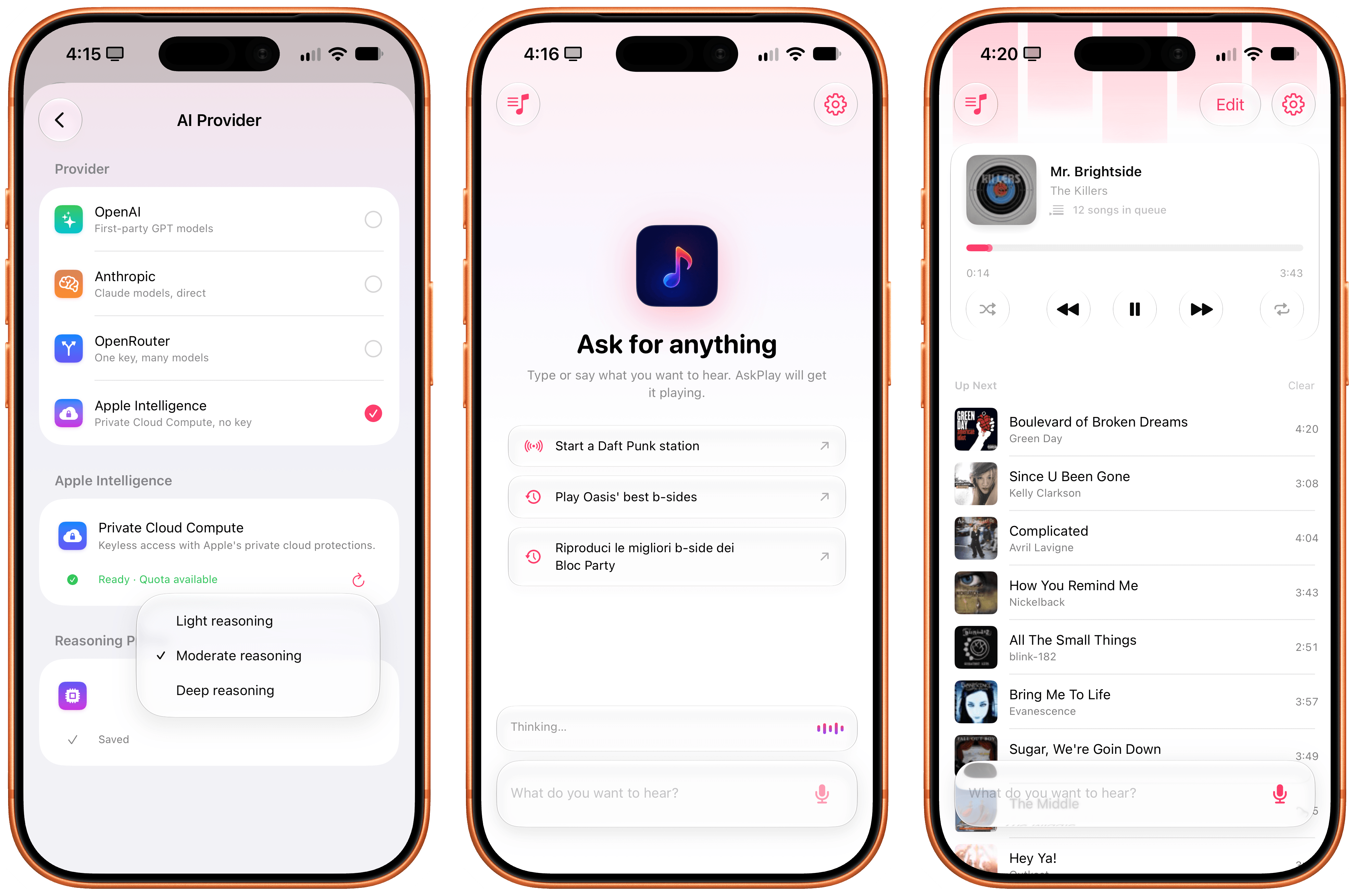
In my experience, I’ve had the best results with the PCC model set to “moderate” reasoning. What this means in practice is that with AskPlay for iOS 27, we now have a way to generate Apple Music-based mixes using natural language with a quality that I find superior to Apple Music’s own playlist generation feature.

AskPlay remains one of the best app debuts of the year, and if you want to demo the capabilities of Private Cloud Compute for third-party apps, you should start here.

LookUp 13

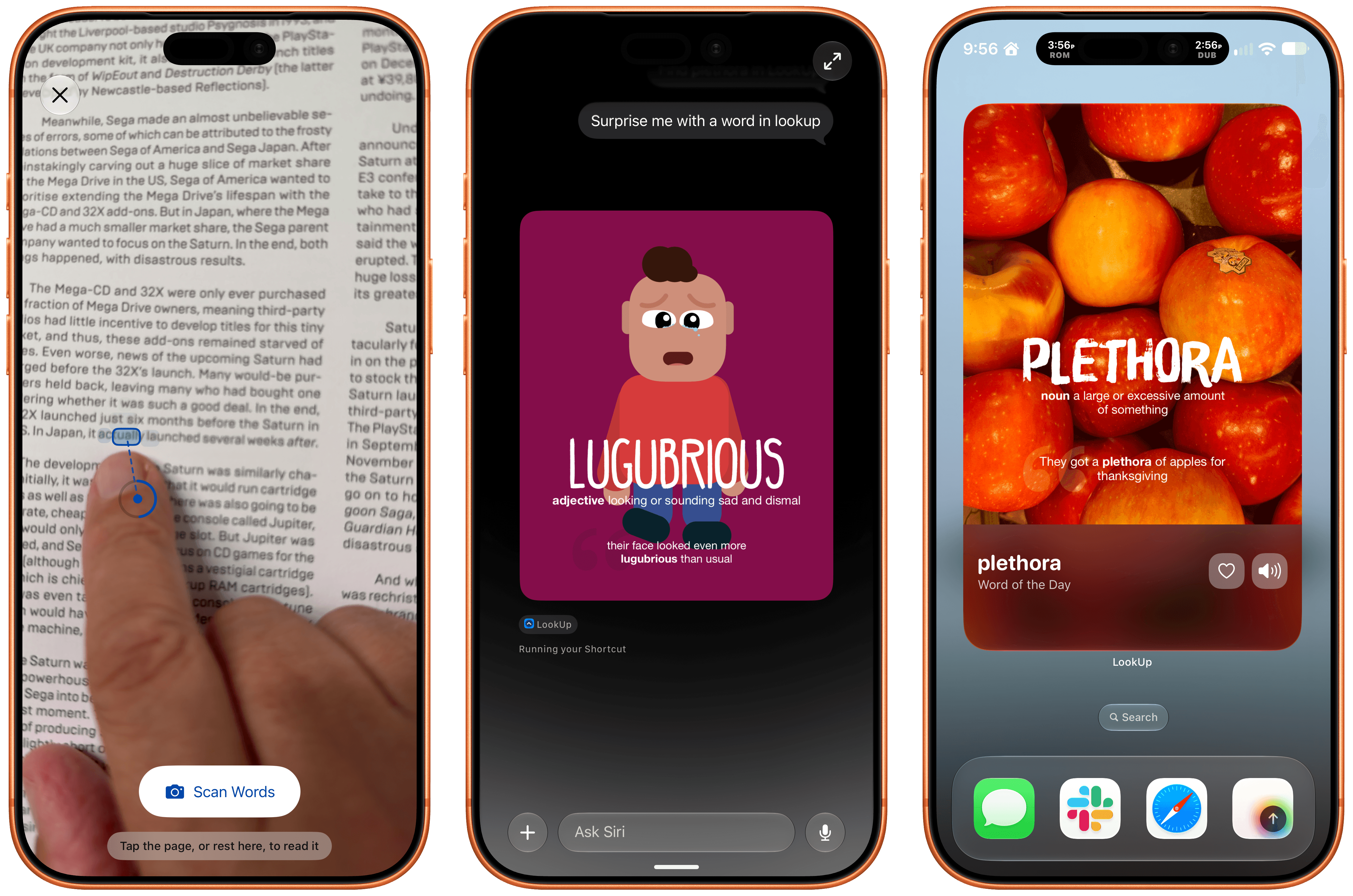
LookUp 13 from Vidit Bhargava has been released with a wide variety of features that make use of iOS and iPadOS 27. The app, which is available on the iPhone, iPad, Mac, Apple Watch, and Vision Pro, makes great use of Siri AI, allowing you to quickly ask Siri things like “Search the word plethora in LookUp,” which opens the app right to that word. Siri can also be used to find LookUp’s word of the day or a random word.
LookUp 13.

LookUp 13.

Beyond Siri, Vidit has added support for Apple Intelligence in the notes that can be tied to a word and combined Apple’s Foundation Models with the Vision framework and hand-pose tracking to let you scan a printed page for a word. Point at a word and the app’s scan mode uses your device’s camera to see which word you’re pointing at. It took a little practice to figure out the right distance from the camera to the page, but once I got that down, it felt like magic. The same feature can pick out other nearby words that might be difficult for the reader, too.

LookUp 13 also offers a Reading Mode that looks up words you speak as you read. The feature uses a Live Activity that listens to you speak, and returns a definition. Initially I ran into some trouble with Reading Mode, but when I tried again later, it worked every time. Also included in the latest release are interactive flash cards that ask for word definitions that are graded by Private Cloud Compute and new extra-large widgets for the word of the day and a shuffled word of the day.

LookUp is an excellent app. I love how Vidit continues to push the boundaries of Apple’s technologies every year, and while I hit a few rough spots in testing, which struck me as issues with Siri AI, not LookUp, I’m impressed by how much depth LookUp’s new Apple Intelligence features add to the app.
Play

The latest update to Play, the watch-it-later app from Marcos Tanaka that works on the iPhone, iPad, Mac, Vision Pro, and Apple TV, includes a bunch of great touches. There’s a new Channels Inbox for navigating saved videos by source. Play has also added Siri AI support allowing you to search for and open videos. Onscreen content is made available to Siri, so you can do things like ask it to remind you to finish a video later, and it knows what you mean. In my testing, all three features work well.
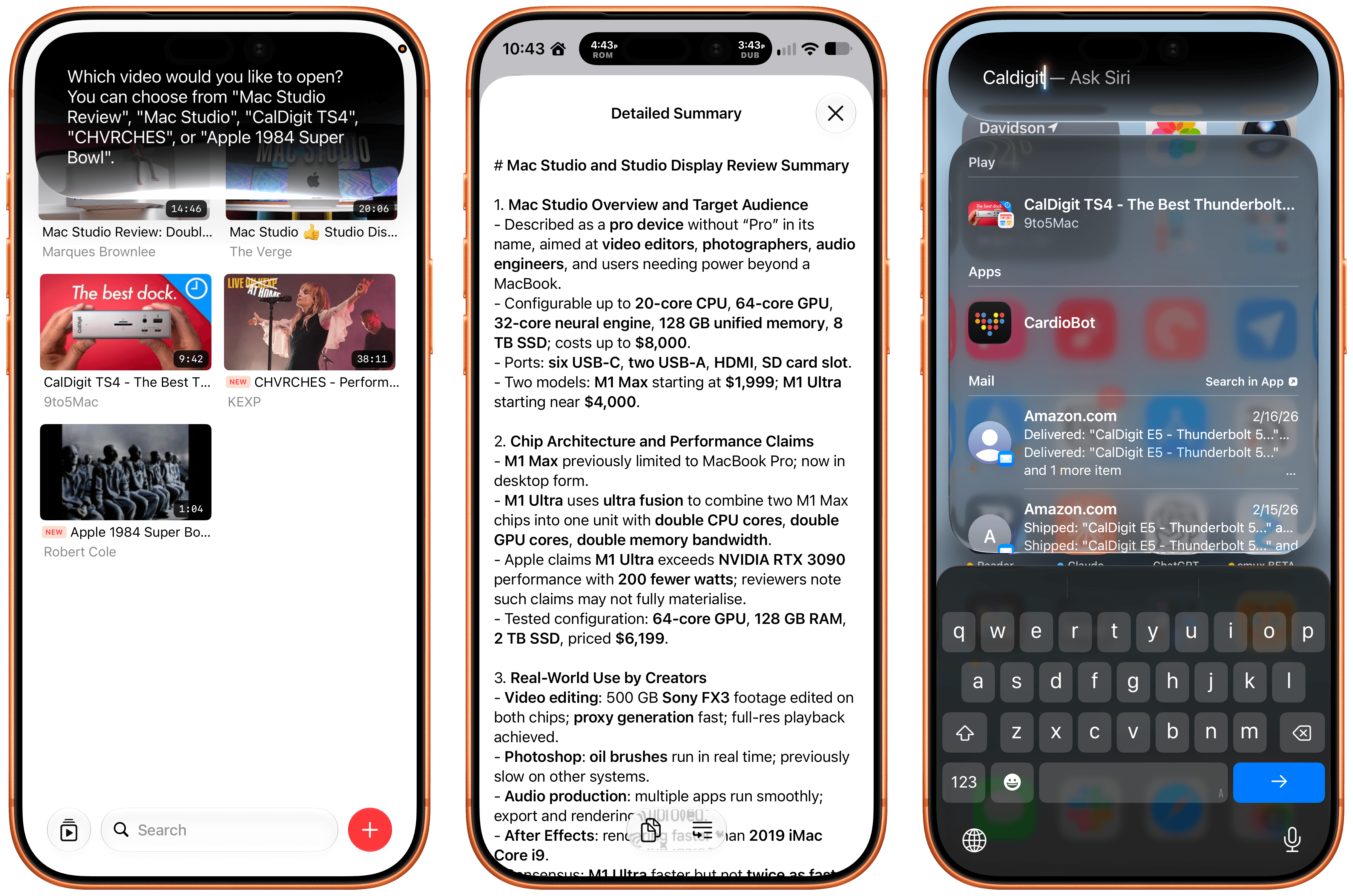
Also, on an individual video’s detail view, you can use Apple Intelligence to create a summary of a video. There are options ranging from a concise summary to a simple explanation. I ran into a roadblock when I tried to create a summary of a fifteen-year-old YouTube video, but more recent videos all worked well. Apple Intelligence can also suggest tags and icons for videos and lets you ask questions, with the answers drawn from the video’s transcript.

Beyond Siri AI and Apple Intelligence, Play adds an extra large widget, a refreshed Liquid Glass design that I love, and Spotlight search. It’s a fantastic update to my favorite way to save videos for later.
Raising the Gates Is Not the Way to Improve the App Store→

Jeff Johnson has a knack for finding spam on the App Store. Yesterday it was review spam, and today it’s app submission spam. In a post where he called out an individual for releasing 41 apps, and presumably contributing to slow app review times, Johnson proposed a solution:

…bring back Apple Developer Program tiers and review app updates post-release for proven developers. Why should Marco Arment go into the same App Store review queue as AI slop? Does that make any sense for developers, for Apple users, or for Apple? Is there no way for developers to earn Apple’s trust, no matter how long they’ve been in the App Store, no matter how famous or beloved? Should professional software developers whose livelihood depends on the App Store go into the same review queue as hobbyists? Speaking for myself, I would be willing to pay a much higher developer program fee for improved service, including a separate review queue. I suspect that a much higher developer program fee might also deter scams and AI slop, typically looking for a fast, easy buck.

I’ve heard versions of this argument since before the App Store first opened its doors, and it’s never sat well with me. Maybe that’s because when I first heard someone argue that established developers or the ones who could afford it should get preferential treatment, I was an unknown hobbyist learning Objective-C and trying to build an app myself. It struck me as gatekeeping then, and it still does today.

There’s no doubt that there is spam on the App Store, but the way to remove it is to target the spammers, not new developers, students, and hobbyists looking to build their ideas. I know that being an indie developer isn’t an easy way to make a living, but erecting barriers to submitting apps is the surest way to starve Apple platforms of fresh, innovative ideas. That hurts everyone from users who would have fewer choices to the established developers who would find themselves writing apps for a stagnant platform.

Permalink

The Utility App Flood Won’t Last

The App Store is evolving at a breakneck pace not seen since its earliest days. We saw the first glimmers of what was to come early in 2025, but it wasn’t until late last year that the tsunami of apps developed with the help of AI agents really took hold.

Since then, veteran developers are releasing new apps and updating existing ones faster than ever, and new developers are releasing their first apps in droves. Today, supply is dramatically up, demand is flat, and quality is seemingly simultaneously up and down, depending on where you look.

How these forces play out long-term is anyone’s guess, but it’s worth examining because, just as Federico’s link to Bryan Irace’s post about agentic coding tools foreshadowed the rise of tools like Codex and Claude Code, today’s trends are sparks that have the potential to become tomorrow’s App Store wildfires or simply fizzle out.

Utility apps are on the front lines of this change. The TechCrunch story I linked in April picked up on this trend:

Another interesting tidbit from Appfigures is that the Utilities app category moved up the top five chart.

If anything, the trend has accelerated in the months since.

It’s not surprising at all that utility apps have taken off. They’ve been a staple of new developers since long before agents came along. That’s because many are UI wrappers around command line tools. That isn’t a knock against the developers of those apps; most users don’t want to open Terminal to convert a video or audio file to another format using ffmpeg, for example. By building a great UI around command line tools, developers have made them far easier to use.

However, the relative simplicity and narrow scope of many utility apps have made them a natural fit for AI agents, too. That’s why the App Store (and my inbox) is deluged with Mac menu bar and single-screen iPhone and iPad utility apps.

On the one hand, the abundance of utilities has been great for users. More choice means you’re more likely to find the app that perfectly fits your needs.

On the other hand, though, I don’t think what’s happening in the category is sustainable and expect to see it dramatically shift again in the coming months. As we’ve seen from reporting by The New York Times, app supply is outstripping demand by orders of magnitude, which will drive down prices. That alone is likely to cause the utility app market to shrink. But there’s more to it than that.

Remember, the demand shifts that The New York Times reported, based on Sensor Tower numbers, are for the entire App Store, where download numbers have grown 2-3% this year and last. I expect utility downloads to actually shrink in the coming months – again, because of agents. Utilities, especially simple ones, are exactly the sorts of apps that are becoming trivially easy for power users – the very users these utilities are made for – to create themselves. From frontier labs‘ model improvements to a growing number of app-building tools from those same labs and third parties, it’s never been easier to build a web or native app yourself.

And although I agree with people, like Nilay Patel, who say the notion that everyone will build their own software is overblown, the utility market is different. Your average person is not downloading apps to adjust the frame rate and file format of a video or downloading YouTube videos to watch later. But those are exactly the sort of things that people who are using agents are doing with them, whether they’re having an agent do those things directly via a command line tool in an app like Codex or Claude Code or building an app to do the same thing. That’s going to put even more pressure on the category.

That said, I think there will always be a cohort of users who would rather pay for an app than build it themselves, so I’m not predicting the demise of utilities in general – just the end of today’s frothy market. I also think there remains a place for simple utilities that solve hard problems with clever solutions. Not every utility is a UI wrapper for a terminal command. Plenty of apps feature original solutions or thoughtful and unconventional remixes of disparate tools.

Utilities aren’t going away, but just like other App Store deluges, the trend will recede. It’s just that this time, it’s likely to flip faster than usual.


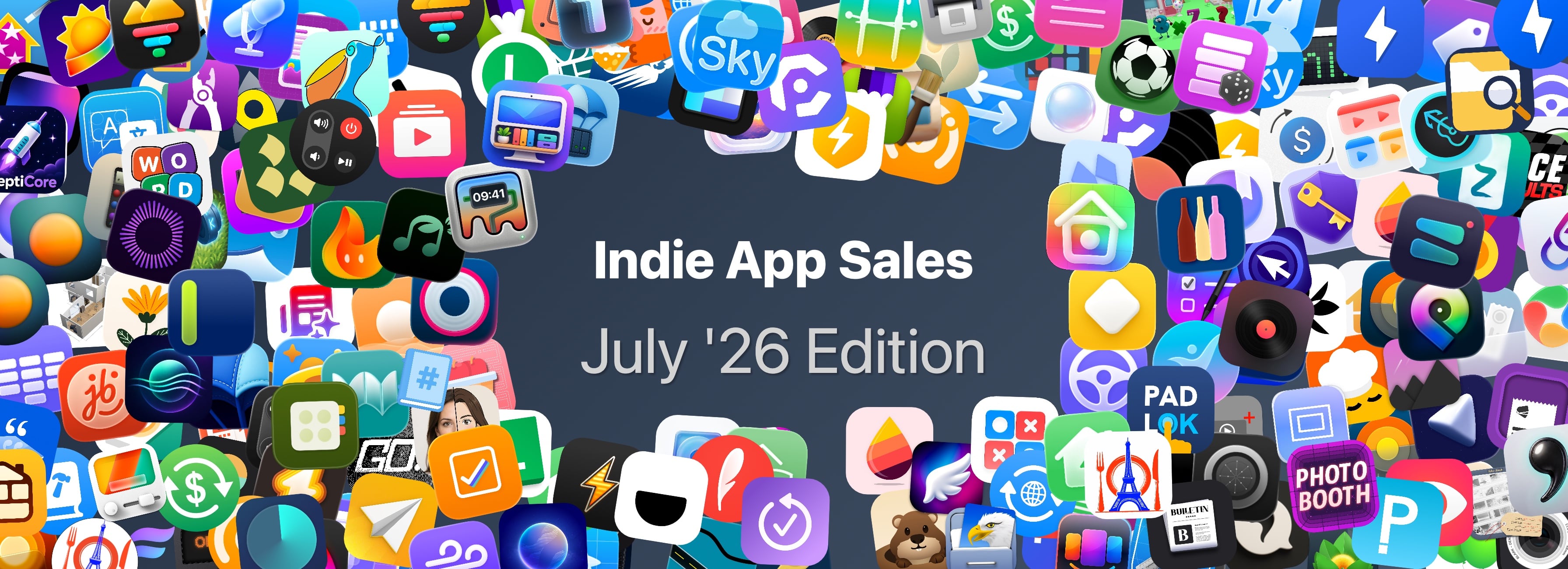
Indie App Sales Event Begins Today with Over 200 Apps

Matt Corey, the maker of Bills to Budget and Signals, has organized indie developers for a big sale that runs from July 28 - 30. The sale includes over 200 apps that will be offered at a discount through Thursday. The list is too long to publish here, but it includes many apps we’ve covered here on MacStories and on Club MacStories in the past, including:

There are a lot of great deals, with many apps discounted 50% or more. What’s listed above is a small fraction of the participating apps, so be sure to visit Indie App Salesand support these great indie apps.


App Store Chaos→

Kalley Huang, writing for The New York Times about apps written with the help of AI agents that are flooding the App Store:

But as with many things A.I., just because something is easy to build doesn’t mean people will use it. It is not clear if vibecoding is breathing new life into the App Store or just cluttering it.

Last year, the number of new apps released in the App Store grew 30 percent to about 600,000, according to estimates by Sensor Tower, an app analytics firm. In the first half of this year, new apps doubled to about 560,000.

Now, Sensor Tower metrics should always be taken with a grain of salt. They don’t have direct access to Apple’s sales data, so they’re extrapolating from incomplete data that they collect themselves. That said, I think it’s fair to take their numbers as broadly representative of sales trends over time, and the story they tell, as reported by Huang, is interesting.

Based on Sensor Tower’s numbers, the total number of App Store releases peaked in 2016 at 890,000, hit a low of 420,000 in 2022, and this year, is on pace to pass 2016’s peak by a healthy margin. But app releases don’t equate to downloads, let alone sales. According to Huang’s reporting, downloads increased 3% in 2025 and 2% in the first half of 2026, far lower than the growth of new releases.

All of this tracks closely with what we’ve seen at MacStories. One subtle trend I’d add is that whereas for years most developers contacted us before they released an app, a lot of new developers are doing so after their apps are on the App Store. I suspect what I’m seeing is a new generation of developers learning the hard discoverability lessons of the App Store for the first time because when I check out these apps, they rarely have any App Store reviews.

The upshot of all these statistics and trends is App Store chaos of a magnitude that we haven’t seen in a long time. It’s a little like the App Store gold rush of the early days, but without the gold. Discoverability has gone from bad to worse, and the supply of apps is off the charts compared to the demand. With download numbers barely creeping up, the flood of new apps is making selling on the App Store harder for everyone.

Yet, it’s exactly this sort of chaotic disruption that leads to exciting new apps. And, it’s tools like Codex and Claude Code that empower and democratize app development, allowing people who would never have built an app to see their ideas become a reality. Those are things I love to see.

There’s no doubt that the App Store is out of whack thanks to agent-assisted coding, but like any market it will find its equilibrium again. In the meantime, it’s never been a better time to be a fan of apps because while a lot of those record numbers are comprised of mediocre apps, there are hidden gems, and we’re on the hunt for them.

Permalink

TestFlight: One Step Forward, Two Steps Back

I test a lot of apps, so I have strong opinions about TestFlight. However I usually keep those opinions to myself because despite the fact that it’s critical to my work, TestFlight wasn’t built for app reviewers. Most people haven’t accumulated hundreds of active and inactive betas in the app like I have, and for them, TestFlight is probably fine. However, for me, TestFlight is a constant source of frustration.

So, you can imagine my excitement when I read a post by Zac Hall at 9to5Mac that a search field had been added to TestFlight. “Finally,” I thought to myself. I stopped what I was doing and updated the app immediately. After all, search was my number one request for TestFlight back in 2024.

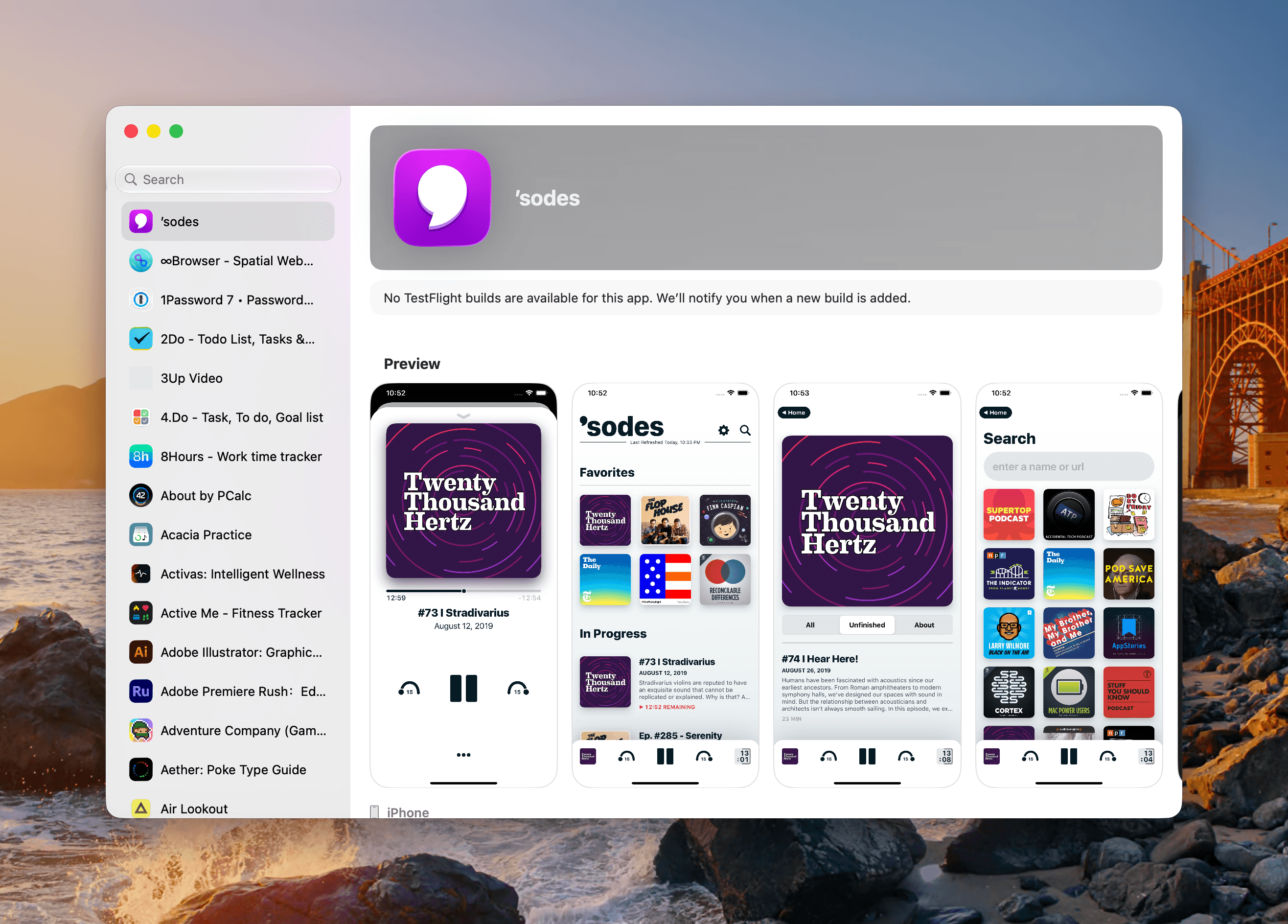
An apostrophe gets you the top spot in Apple's new alphabetical TestFlight list.

An apostrophe gets you the top spot in Apple’s new alphabetical TestFlight list.

That 2024 wishlist was published in the wake of a bad stretch the app had beginning in 2023. At the time, TestFlight was plagued by laggy performance if you were on a lot of betas. To Apple’s credit, they fixed the performance issues, though the issues have begun to creep back into recent releases. Still, the past couple of years as a TestFlight user have been fine despite all the ways the app could be made better for users.

When the TestFlight update finished installing, I eagerly opened it on my Mac and then my iPhone. Sure enough, there was the search field at long last. Lists practically beg for a search field, and finally someone at Apple added one, and to whoever built that feature, a huge thanks from me and the MacStories team.

Unfortunately, this story comes with one very big “but.” Previously, TestFlight betas were listed in reverse chronological order, which I liked. The newer beta releases were at the top of the list and the older ones that were on the verge of being replaced by an App Store release were at the bottom, along with expired betas, a list that I never really understood the purpose of.

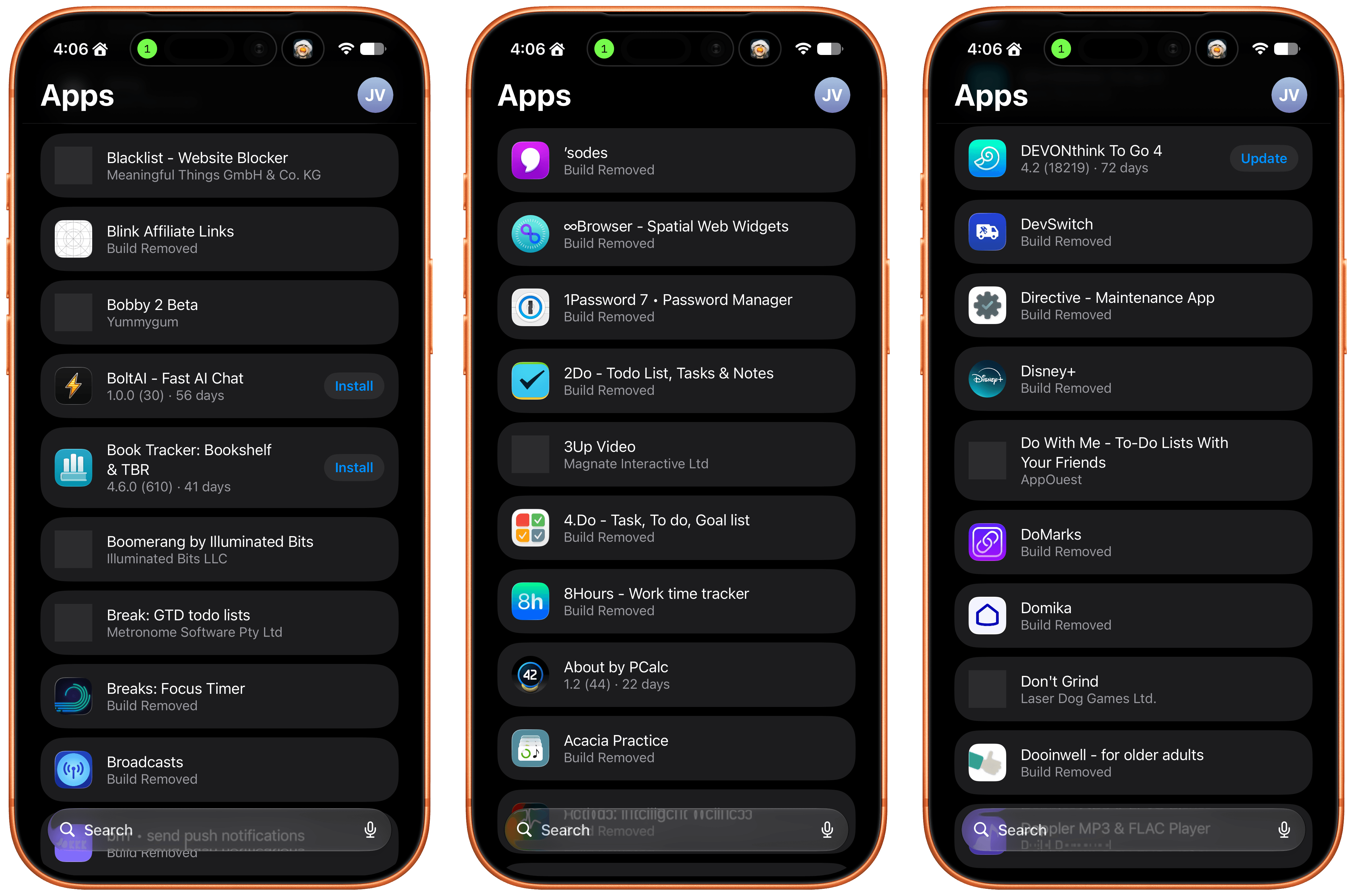
Well, those expired betas are now scattered among the active TestFlight betas in an alphabetical list and it seems that the expired beta list has been expanded to include every single beta I’ve ever been a part of. I did a rough count and for me that’s nearly 800 app listings. As you can imagine, the active betas in that list are few and far between. Search helps, but scrolling is no longer an option.

The live betas are few and far between when mixed with betas gone by.

The live betas are few and far between when mixed with betas gone by.

I get that this is a very “me and a few of my friends” problem, and search does help, but it’s not enough. The active to inactive beta ratio is so bad that few iPhone screens include more than two or three active betas. So here’s my proposal:

  • Add a toggle in TestFlight’s settings that hides inactive betas.

That’s it, that would make all the difference in the world. I’d love to have the reverse chronological ordering back, a performance tune-up, and the other things I wished for back in 2024, but I’ll live with hiding all the noise from my beta list.


WWDC 2026: Between Seasons

It’s my last day at Apple Park for my seventh in-person WWDC, and as I’m waiting for my final briefing just outside the Steve Jobs Theater – ever so magnificent in its polish, and yet always so strangely calm a place – I keep returning to a thought that’s been circling my head, begging for attention. I’ve never felt so “in between” phases of my career. Physically in this very moment, of course, as I’m literally sitting on an also-polished wooden bench overlooking one side of the ring, watching groups of people climb the hill to the theater and others leave. But more so mentally, insofar as I don’t recall another WWDC that’s made me feel so aware of how much things are changing around me.

At my first WWDC in San Francisco in 2016, I didn’t feel like I belonged. I was a 28-year-old blogger from Italy and somehow found my way to the most important event about the software I loved writing about. It was uncomfortable: what was I even doing there, taking notes on an iPad while folks from The New York Times or Wall Street Journal prepared articles that millions of people would read? But I didn’t mind it. I was in the middle of change; the discomfort fueled me.

10 years later, as an almost 38-year-old blogger from Italy who’s wondering just how, exactly, Apple managed to hide speakers playing music in the bushes outside the Steve Jobs Theater, I look at the content creators who are possibly experiencing their first WWDC, and realize: how am I still here, and still taking notes on an iPad, while these younger folks are shooting videos that millions of people will watch? I’m in between changes again, but I don’t mind it. The challenge still feeds me. I’m more comfortable now, but – miraculously – I don’t feel cynical or jaded. Some people are into that sort of attitude; I’ve always preferred to put in the work to be critical and enthusiastic about the things I like. In a world of complaints, optimism is a skill.

The music is still mysteriously coming from somewhere around the bushes. My friend Myke walks out the theater and tells me I’m going to love the session downstairs about AI on the Mac. “Who would have thought I’d be into that someday”, I think to myself.

Read more


Apple Recognizes Developer Community Leaders→

Source: Apple.

Source: Apple.

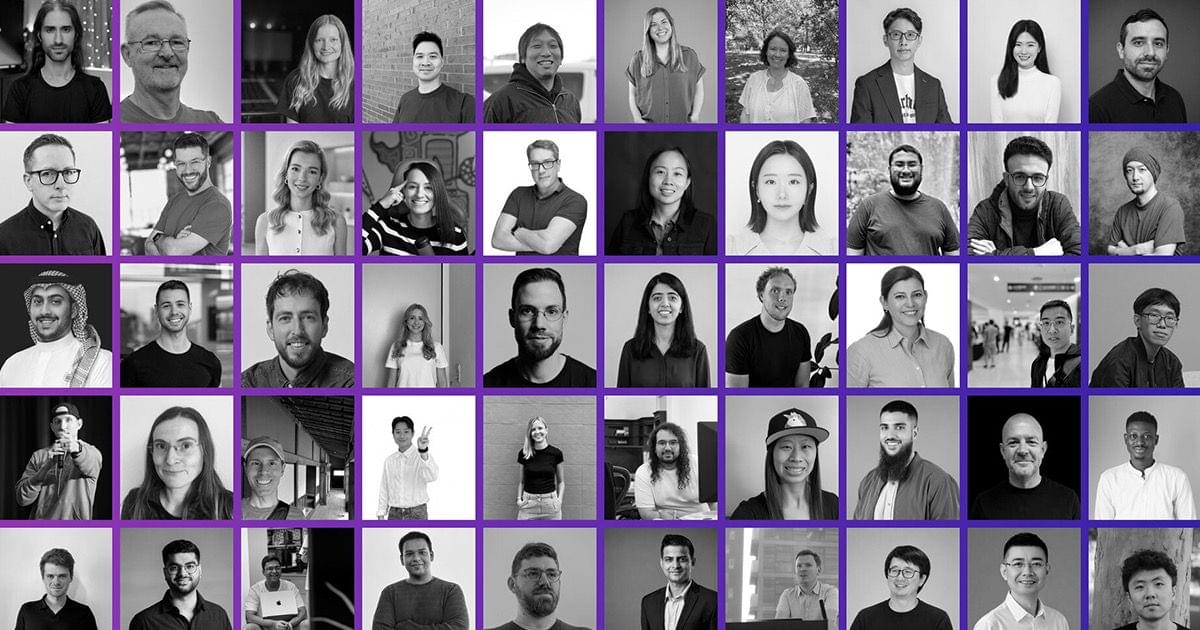
Yesterday, Apple published a new page on its Developer site highlighting the contributions of 50 prominent members in the Apple developer community. The page recognizes individuals from around the world and across a variety of disciplines, from technical writing, content creation, and education to event organizing and accessibility advocacy. Each profile includes a photo, a short biography, and a link to the person’s LinkedIn profile.

It’s great to see Apple give this well-earned special recognition to those who do so much to improve the lives of users everywhere through their apps and other work. The community of developers that has grown around Apple’s platforms is a priceless asset to the company and its customers, and they deserve to be honored. I hope we’ll see even more of this public positive engagement with developers out of Apple going into and following WWDC.

I highly recommend browsing through the page on the Developer site. You’ll likely see some faces you recognize from our coverage and apps you love, including Hacking with Swift’s Paul Hudson, visionOS educator Joseph Simpson, previous First, Last, Everything guest Robin Kanatzar, Mercury Weather’s Malin Sundberg, and many more. If there’s another developer you think should be recognized in the future, the page includes a link to submit their name to Apple for consideration as well.

Permalink

A Look at Apple’s 2026 Swift Student Challenge Winners

Source: Apple.

Source: Apple.

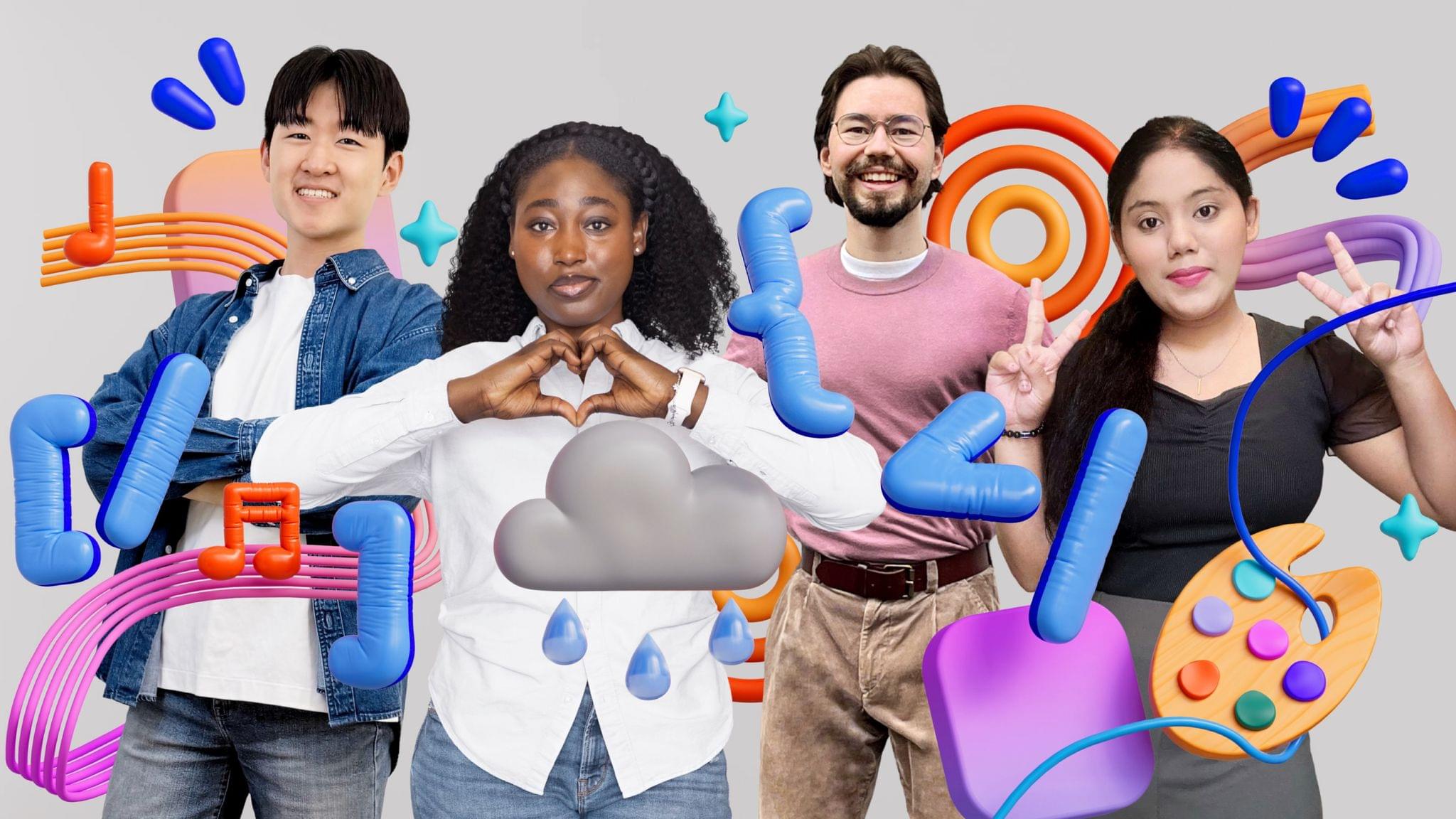
Earlier today, Apple profiled the accomplishments of Swift Student Challenge winners. The 350 students who built the winning app playgrounds come from 37 countries and were chosen from the largest pool of participants ever. Susan Prescott, Apple’s vice president of Worldwide Developer Relations said of the competition’s entries:

The breadth of creativity we see in the Swift Student Challenge never ceases to amaze us. This year’s winners found remarkable ways to harness the power of Apple platforms, Swift, and AI tools to build app playgrounds that are as technically impressive as they are meaningful. We’re incredibly proud to support their journey and can’t wait to see what they create next.

Of the 350 winners, 50 have been invited to attend WWDC, which kicks off next month.

Apple’s press release spotlights four winners who built app playgrounds. Among those profiled is Gayatri Goundadkar, who built an app called Steady Hands that uses the Apple Pencil’s stabilization technology so people with hand tremors can draw more easily. As Goundadkar says:

When a person draws, my app uses Apple’s PencilKit and Accelerate frameworks to analyze stroke data and recognize tremors. It detects what is intentional and what is not, and removes the tremor component. Every drawing is then displayed in a personal 3D museum, because I wanted them to feel like artists, not patients. When users saw the stabilization working, they felt more confident.

Another winner, Karen-Happuch Peprah Henneh, was inspired by floods in her home country of Ghana to build a real-time pathfinding app called Asuo to help people in flood-prone areas to stay out of harm’s way.

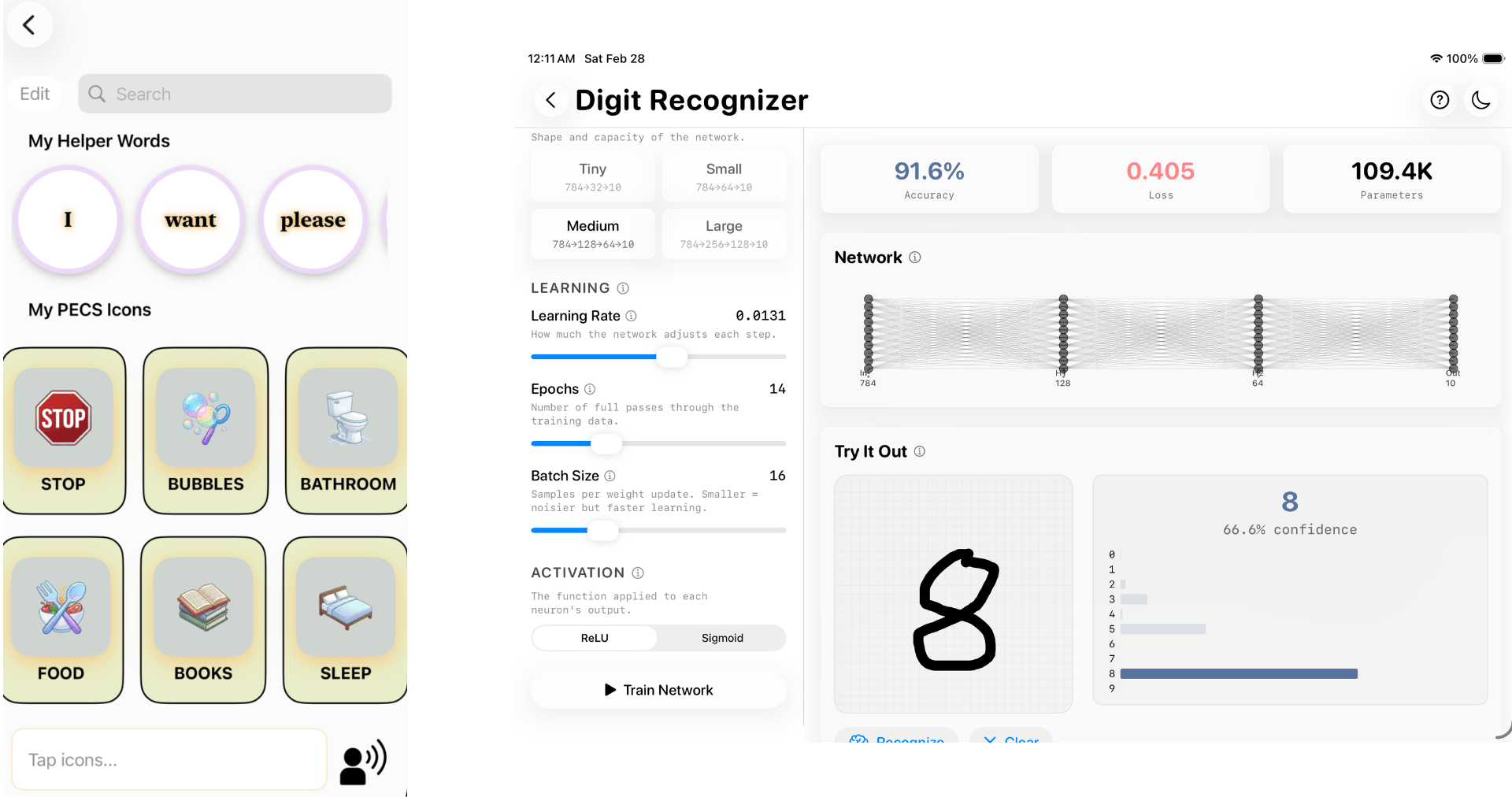
Sign & Say by Courey Jimenez (left) and NodeLab by Aayush Mehrotra (right).

Sign & Say by Courey Jimenez (left) and NodeLab by Aayush Mehrotra (right).

Earlier today, I had a chance to talk to Susan Prescott and two student winners: Courey Jimenez and Aayush Mehrotra. Jimenez drew on her experience working with nonverbal children as a behavioral technician to create an app that combines American Sign Language and Picture Exchange Communication Systems. As Jimenez explained to me:

When you can’t speak your needs, it’s a frustrating thing. So I knew I wanted to build something that was very user friendly and appealing to help mitigate that stress.

Mehrotra, who is just 14, built an app that allows students to explore the complexities of neural networks in a visual and interactive way. He was driven to build something friendly and approachable for students like himself who are interested in machine learning, too.

Every year I’m struck by the creativity of the students who participate in the Swift Student Challenge. Their inspiration is drawn from personal, family, and community experiences and their own passions. And, while their projects vary widely, they all have one thing in common: the excitement of building something and sharing it with others. It’s the same infectious enthusiasm we see over and over in the developers whose apps we cover, which propels the app world forward. Like the students I spoke to today, I can’t wait for WWDC.