This Week's Sponsor:

HomeSnap

A Private, Read-Only Window Into Your HomeKit Home


Posts tagged with "apple"

Apple’s Fifth Avenue Store Re-Opens Today With Its Redesigned Glass Cube

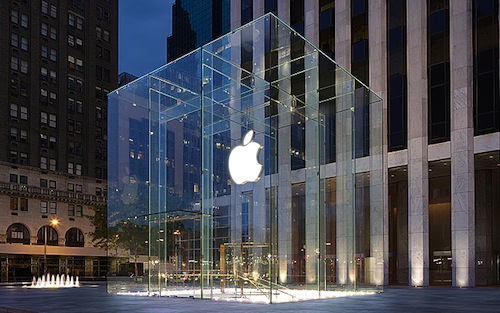
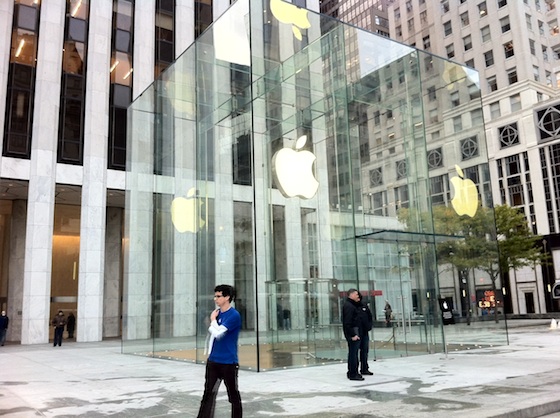
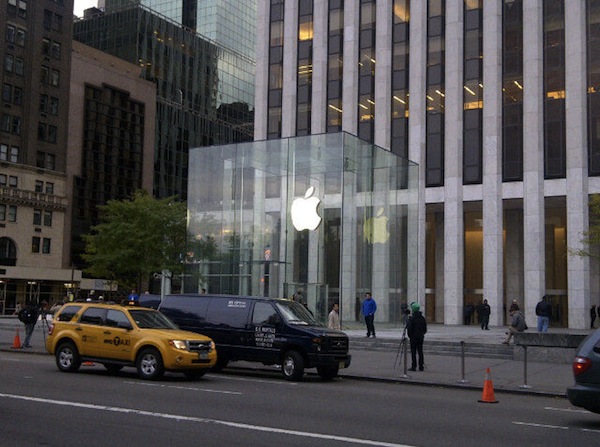
In just a short few hours, at 10 AM local time, Apple’s flagship retail store at 5th Avenue in New York City will have a grand re-opening after its glass cube was renovated and re-created. As you can see above though, Apple has spent the night removing all the barriers and plastic wrapping and the new design is bare for all to see. The new design has just three tall glass panes on all sides of the cube, coming to a total of just 15 panes — compare that number to the old design which had 90 panes.

Jump the break to view a picture before the plastic wrapping came off, to have a look at renderings of what the store was designed to look like and what the old cube (with its 90 panes) looked like.

We will update this post as more pictures come in and the grand re-opening begins.

[Image via 9to5 Mac]

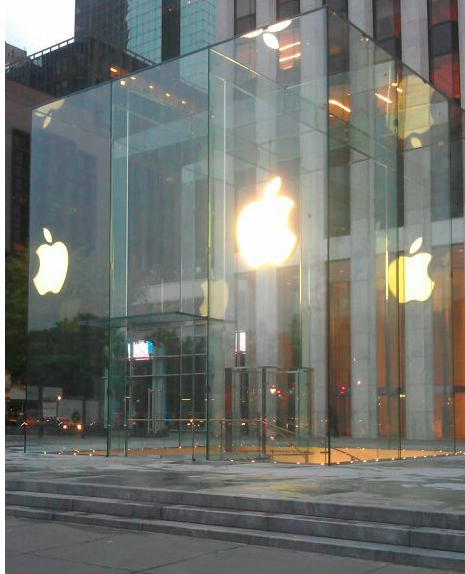
Update: MacRumors shares more pictures of the redesigned cube, showing the new “seamless” design that eliminates most of the hardware that kept the old 90 glass panels together.

Update #2: View of the redesigned cube via @andinieffendi.

Read more


Apple’s Supply Chain Secrets

Apple’s Supply Chain Secrets

A recurring piece of information throughout this year has been how Apple’s supply chain is so integral to their success in recent years. Bloomberg Businessweek’s article from yesterday is just the latest this year and it chronicles a few stories of Apple’s impressive control over their supply chain and gives some interesting insight to how it works.

Apple has built a closed ecosystem where it exerts control over nearly every piece of the supply chain, from design to retail store. Because of its volume—and its occasional ruthlessness—Apple gets big discounts on parts, manufacturing capacity, and air freight. “Operations expertise is as big an asset for Apple as product innovation or marketing,” says Mike Fawkes, the former supply-chain chief at Hewlett-Packard (HPQ) and now a venture capitalist with VantagePoint Capital Partners. “They’ve taken operational excellence to a level never seen before.”

Included in the article are some fascinating stories from the supply chain - whether it be the hoarding of lasers so that that iSight’s green LED indicator light could be ‘invisible’ when off, to Apple buying up all the available air freight over Christmas of 1998 so it could ship their new translucent blue iMacs and to how Apple keeps its new products secret ahead of a launch.

At least once, the company shipped products in tomato boxes to avoid detection, says the consultant who has worked with Apple. When the iPad 2 debuted, the finished devices were packed in plain boxes and Apple employees monitored every handoff point—loading dock, airport, truck depot, and distribution center—to make sure each unit was accounted for.

Permalink

Revolutionary User Interfaces

Revolutionary User Interfaces

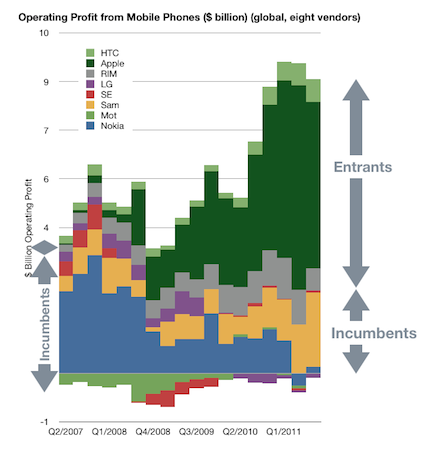
In an article posted this morning on Asymco, Horace Dediu discusses how the revolutionary user interface of the iPhone served to disrupt the mobile market and unseat the incumbents - Nokia, Samsung, LG, Motorola and Sony Ericsson.

In 2007 something happened which changed the industry. It took a few years to even realize it was happening but by the time it was obvious, it had changed to such a degree that huge companies found themselves in financial distress.

Furthermore, Dediu discusses how over time as new input methods have been created, so have new platforms and new business models - as well as hurting the incumbents of the market. A big question that Dediu poses in his article is that with next revolutionary user interface seemingly being created at a faster and more rapid rate (mouse, click wheel and then multi-touch), what will be the next revolutionary user interface? He questions whether in fact it could be Siri.

My disruptive hypothesis for Siri is that it shifts the competition from platforms positioned on a device to a “coupled” super-platform deponent on broadband and infrastructural computing. Just after collecting enough data and observing patterns in it that give us clarity, It looks like things are about to change all over again.

If you’d like to hear more from Horace on this idea of Siri being the next shift in user interfaces, this week’s episode of the Critical Path would also be worth a listen.

Permalink

Customize The Launchpad, Mission Control And Login Screen Backgrounds With Lion Designer

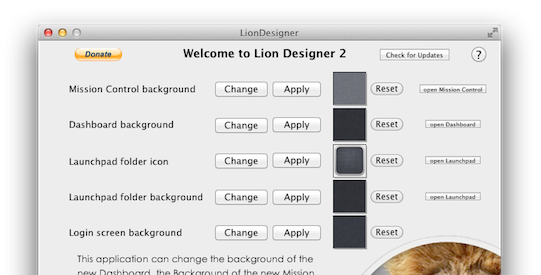
Since Lion launched we’ve covered a few hacks that describe how you can change Mission Control’s and Dashboard’s background, as well as how to change the background of folders in Launchpad - but most of them have required some level of manual file editing and replacement. Fortunately, developer Moritz Wette has made it a whole lot simpler to customize the look of Lion with his app, Lion Designer.

Lion Designer lets you customize the Mission Control, Dashboard, Launchpad folder and the login screen background as well as the Launchpad folder icon. The developer suggests using PNG images that are at the resolution of your screen or are images that can tile - otherwise you’ll end up with something that looks messy. Though if you don’t like how something looks after you’ve changed it, or something has gone wrong, you can easily click the reset button and Lion Designer will return it to the stock look. I gave the app a quick spin and found it worked fine, with my Dashboard now displaying the familiar and soothing linen pattern. Lion Designer is available for free, but be sure to send over a small donation to Wette if you find the app useful to you.

If you’re looking for some other apps to tweak and customise OS X Lion, have a look at these apps that we have covered in the past:

  • Lion Tweaks - Lets you turn various features in Lion on or off, examples include removing the system Window animation, disable spelling correction, enable permanent scrollbars and many more.
  • Launchpad-Control - Hide any app you want from being displayed in Launchpad
  • LaunchpadCleaner 2 - Also allows you to hide apps from Launchpad as well as some more in-depth features.

[Via TUAW]


Apple Pushes Back Mac App Store Sandboxing Requirement To March 2012

In an email to developers today obtained by iClarified, Apple has informed them that all apps submitted to the Mac App Store must implement sandboxing by March 1st, 2012. Originally Apple had told developers that the sandboxing requirement would take place this month. It isn’t entirely clear why Apple has delayed the introduction of this requirement but it does give developers a few more precious months to implement the restriction and resolve all issues that it might cause for their app.

In the email Apple notes; “Sandboxing your app is a great way to protect systems and users by limiting the resources apps can access and making it more difficult for malicious software to compromise users’ systems”. For those who aren’t familiar with the technical ‘feature’, John Siracusa has a great (and in-depth) discussion of the feature in his Mac OS X 10.7 Lion review on Ars Technica. In short, sandboxing restricts the number of actions that an app can do so that if the software is compromised, the amount of damage it can do is greatly minimised.

In Lion, the sandbox security model has been greatly enhanced, and Apple is finally promoting it for use by third-party applications. A sandboxed application must now include a list of “entitlements” describing exactly what resources it needs in order to do its job. Lion supports about 30 different entitlements which range from basic things like the ability to create a network connection or to listen for incoming network connections (two separate entitlements) to sophisticated tasks like capturing video or still images from a built-in camera.

In its email to developers, Apple also notes that if an app requires access to “sandboxed system resources”, the developer must also include justification for why it needs those entitlements when submitting the app to the Mac App Store. Finally, Apple notes that it is willing to offer developers additional, temporary, entitlements if the app is being re-engineered for sandboxing - but only on a short-term basis.

[Via iClarified, Image via Apple]


Angry Birds Reaches Half A Billion Downloads

Rovio today announced a massive milestone for its hit game Angry Birds, revealing that the game has been downloaded more than half a billion times in less than two years. In a short video celebrating the milestone (shown after the break), Rovio also throws out some other interesting statistics including:

  • #1 in 79 countries
  • 266 billion levels played
  • 400 billion birds shot
  • 44 billion stars collected
  • 200,000 years played Angry Birds total
  • 300 million minutes played daily

The app, which originally launched on iOS on December 10th, 2009 has now gone on to be a worldwide hit and has spread to a large swathe of both mobile and desktop operating systems including Android, Symbian, Windows Phone, WebOS, OS X, Windows, Google Plus and more. Last October Rovio also released a special Halloween edition of the game called Angry Birds Hallloween, which was subsequently renamed ‘Angry Birds Seasons’ - it has seen regular updates featuring new levels that are themed by various holidays. This year Angry Birds Rio was released in March, this version tied in with the 20th Century Fox animated film Rio.

Note: Angry Birds Downloads includes downloads from all the platforms it is available on.

Read more


Native Gmail App From Google Coming To The iPhone Soon?

If you’ve been yearning for a good, native, Gmail app for the iPhone, you might not have to wait much longer. MG Siegler claims that Google “is on the verge of launching their native Gmail app” and have likely already submitted it to Apple for review.

Although Google has a good web version of Gmail that is optimised for the iPhone and is also supported by iOS’ inbuilt Mail app, many have long wanted a fully native Gmail app and experience on iOS. Probably the biggest reason for a native Gmail app is push notifications (in the native Mail app, Gmail only supports fetching every 15, 30 or 60 minutes). Yet according to Siegler’s sources, the app is also “pretty fantastic” - something that many users of Android’s Gmail app have also often commented on. His understanding is that this is Google’s first iOS app since they began their recent commitment to design and that “all indications point to it being a good [app]”.

The native Gmail app will likely bring other key functionality as well: like Priority Inbox and one-click starring of messages. Other possibilities include some of the stuff Google is about to roll out for Gmail proper: like contact icons, better threading, and deep searching functionality. Maybe there will even be some Google+ integration, which Google is also hard at work on for Gmail.

The big question is whether Apple will approve the app, because to date they have rejected alternative email apps that would compete against the native Mail app. However, Siegler believes Apple probably will approve it, in which case it could mean that we could also soon see other third party Mail apps on iOS. One such example could be Sparrow for iPhone, after the developers revealed in August they have started development on such an app. In an interview with Business Insider in August, Dominique Leca from Sparrow noted that it would be highly inconsistent for Apple to continue to reject alternative Mail apps when Apple has since allowed replacements for Safari on iOS in recent months.

[Via parislemon]


ReaddleDocs 3 Review: Powerful Document Viewer & File Manager For The iPad

ReaddleDocs 3, the latest version of the popular document viewer and file manager for the iPad was released a few days ago and it packs a bunch of new features and improvements. The app is a little odd in some ways, because at its core it is trying to recreate the file system on an iPad — something that Apple has tried its very best to stay away from with iOS. But in reality, if you’ve wanted to be productive on an iPad you’re inevitably going to need some sort of file system, because whilst iCloud is beginning to help with document and app sync, it isn’t all that helpful for syncing between apps.

As a result, I use a few other ‘cloud’ services to keep all my documents in sync and available everywhere. The primary one I use is SugarSync, but I also use Dropbox (primarily for collaboration) and occasionally Google Docs. This allows me to use any of the computers I have at home, where I will have all my documents ready and available - I can even edit them and see those edits synced across to the other computers where I could access that same file the next morning with all the edits included.

But how do I deal with documents on the iPad? It’s been a bit of a complicated issue since the iPad was first released, and initially I was just emailing any documents I needed on my iPad to myself and then opening that email up on the iPad - but this was messy, complicated and required advanced ‘knowledge’ to send that file before you could see it on the iPad. Eventually I realised I had to find a better way to solve this, and that’s where SugarSync and Dropbox come in. Both these services (and a multitude of others) slowly began to be supported by various apps for the iPad and iPhone, hooking straight into the services. This was a far better way to open files on the iPad - but the apps felt very rough around the edges.

In recent months I’ve been using iFiles on the iPad and iPhone, it’s been pretty great and it was certainly the best app I had used to date for viewing documents from my Dropbox folder and SugarSync services. Then about a month after I started using iFiles, I came across PDF Expert. Primarily I was using it for PDF annotation, but I noticed it was also a pretty great file viewer, particularly because it would also integrate right into Dropbox and SugarSync. So over the past few months I’ve been using PDF Expert for most of my document viewing needs and occasionally opening iFiles.

When looking at it simply, PDF Expert and ReaddleDocs 3 are nearly identical — they share very similar user interfaces and are close in functionality too. Where they differentiate is mainly in price (PDF Expert is nearly twice as much) and in annotation abilities (it is far better in PDF Expert). So before I go into too much detail, if you want to do a lot of PDF annotation on the iPad, PDF Expert is what you should purchase (even if you want to use it as a document viewer, because it is also good at that). In all other cases my recommendation is for ReaddleDocs 3, particularly if you want to do some file management - it is virtually identical and also has some annotation capabilities.

Jump the break to continue reading my review of ReaddleDocs 3.

Read more


Pixelmator 2.0 Now Available On The Mac App Store, Our First Impressions

Pixelmator 2.0, a big new version of the popular image editing application for the Mac, just hit the Mac App Store and is available for just $29.99 (as an introductory price) and is a free upgrade for those who have previously purchased a copy of Pixelmator from the Mac App Store. Pixelmator 2.0 is a significant update, with significant improvements, completely new features, a new look and full support for OS X Lion.

With tons of exciting new features and support for OS X Lion, this new version of Pixelmator is the easiest, most enjoyable way to experience the best of image editing. Pixelmator 2.0 gives everyone the tools they need to unlock their creativity and boost their productivity, all for just $29.99. - Saulius Dailide of the Pixelmator Team

The big new features in Pixelmator 2.0 make it a truly powerful image editor and for most people it should be more than sufficient for all their needs - likely making something like Photoshop overkill for what their requirements are. A big drawcard for many will be Pixelmator’s new drawing tools that make it easy to create, combine and edit vector shapes easily. A new ‘Shape Settings’ palette also makes it simple to adjust the shadow, stroke and fill of a vector shape. A new healing tool in Pixelmator 2.0 features content-aware fill technology so that it is easy to remove ‘objects’ from a photograph and make it appear as though it was never even there.

By choosing either the new Healing Tool or the selection tools, a user can select wrinkles, blemishes, image damage or any other details present in images, and with just one click let Pixelmator seamlessly fill the selected area with similar nearby image content.

Then there are the new retouching tools of smudge, sponge (desaturate), burn (darken), dodge (brighten) and red-eye. These tools are great for retouching and work as one would expect. Finally, there is an improved type tool that not only makes it easier to format your text, but now also features more advanced typography tools for those that want complete control over how their type looks.

Taking advantage of the new features that Apple added to OS X Lion, Pixelmator now supports the native Auto Save and Versioning available in Lion, allowing you to easily save multiple versions of a document you are working on, and compare those versions easily. Lion’s Full Screen feature is also built into Pixelmator so you can easily focus on your work without distraction and also take full advantage of your Mac’s screen real estate. The last thing to note is that Pixelmator 2.0 also follows Lion’s lead and supports a number of gestures, buttons, menus and the new ‘invisible’ scroll bars.

The look of Pixelmator has also been refined in 2.0, with a new ‘Tool Options’ bar and an ‘Info’ bar. Both sit discretely at the top of the window and both bars are contextual, changing depending on what tool you choose, giving you the appropriate information and settings depending on what tool you are using - so you never see useless information. The Tools palette is also more customisable now, allowing you to add, remove and even group any tools you want - letting you create a Tools palette that matches what your workflow requires.

There are a number of other new features, improvements and tweaks that are too numerous to go into. But speaking as an occasional user of Photoshop, Pixelmator 2.0 seems to have almost all the features I require for my image editing and it gives them to me at a fraction of the cost. If you’re like me, you might find Pixelmator a little jarring at first, with various tools and options located in different locations, but this soon disappears when you realise its an incredibly capable piece of software - that from my experience is actually a little more nimble at accomplishing various tasks (particularly when dealing with text).

Pixelmator 2.0 is available on the Mac App Store at an introductory price of $29.99 so be sure to grab a copy of it - at that price it’s an absolute steal. If you have previously purchased Pixelmator from the Mac App Store, its a free upgrade.