This Week's Sponsor:

BetterTouchTool

Now with a Powerful Launcher for Your Mac


Posts tagged with "app store"

Evernote for iOS Adds Business Card Scanning, Presentation Mode for Premium Members

In the first of two updates, Evernote for iPhone and iPad got a nice update yesterday that mainly benefits premium members. Premium members can now scan in an unlimited number of business cards that are converted into editable contact notes, which can be further updated with info from your LinkedIn account or address book contacts. Presentation Mode lets you present your notes as full screen presentations over AirPlay. Non-paying members can add 5 business cards and try Presentation Mode for 14-day days. Lastly, they’ve made a change to the quick note function, letting you choose whether ideas get siphoned into your business notes instead of a personal notebook.

Check out the App Store listing for all the relevant update info, and check out premium plans here.

Permalink

Castro, A New Podcast Player for iOS, Does Two Things Well

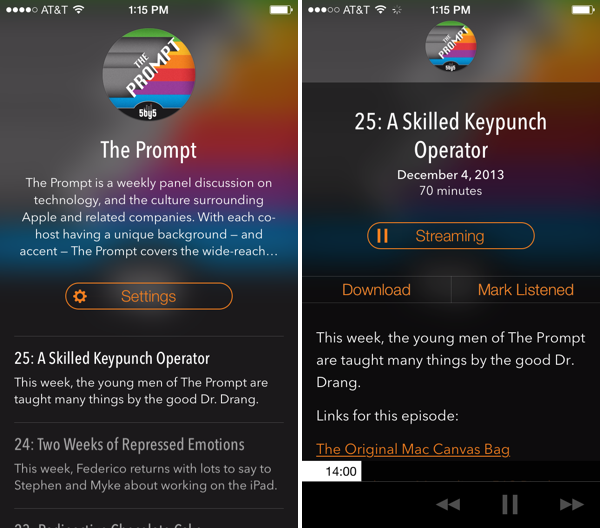
Castro, a new “high fidelity” (come on… I mean really?) podcast player for iOS, looks good and has a few clever ideas for podcast listening. Forget playlists: Castro presents podcasts in a day-to-day timeline that keeps the most recent shows at the forefront. I don’t know if I’m a fan of how text is overlaid on translucent show art since the app’s look is dependent on whether the podcast you listen to has appealing cover art, but I am a fan of the player’s decided simplicity when it comes to podcast controls. There are no timers, no speed settings and no share button. However, underneath the show notes and behind the basic forward, back, and pause/play buttons is a hidden scrubber, which lets you scrub to any position in the currently playing episode with surprising ease. I don’t think it’s discoverable, but it’s unique and surprisingly accurate. It was the thing that John Gruber pointed out and the first thing I showed Federico when discussing the app. Update: Also hidden is a playback speed setting if you tap and hold the play/pause button (thanks Twitter).

The biggest thing Castro has going for it, in my opinion, is its search feature. It’s fast. Like, it’s really fast as podcasts appear as you type. If you’re making a podcast app, I’m pretty sure Castro has set the new high bar here. It made subscribing to a bunch of shows for the first time pretty painless.

Grab it from the App Store for $2.99.


Pinswift: A Powerful Pinboard Client for iOS 7

Pinswift for iPhone

Pinswift for iPhone

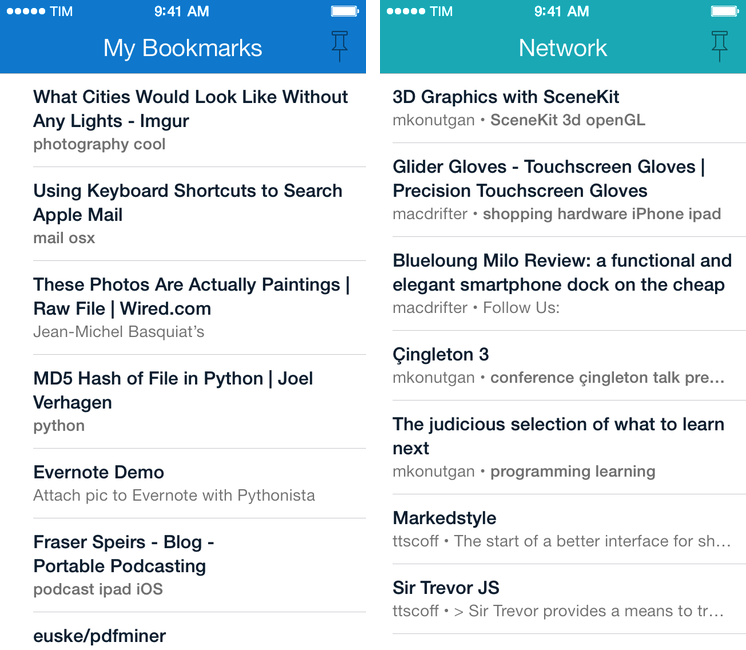
Developed by Joel Carranza, Pinswift is a new $4.99 Pinboard client for iPhone that packs powerful bookmark management, discovery, and search features in an interface specifically designed for iOS 7. Since trying one of the early betas a couple of months ago, I’ve been keeping Pinswift on my iPhone’s Home screen as it offers (almost all) of the Pinboard functionalities I need on a daily basis. Read more


1Password 4.1: Password Fields, A New Classic View, A New Login Prompt, and More

It was October when AgileBits first launched 1Password 4 for the Mac, engineered and redesigned to be just as functional and beautiful as its iOS counterpart. 1Password 4 shipped with a ton of new features, which included iCloud sync, favorites, multiple vaults, Security Audit, and 1Password Mini. Today, our favorite password manager for the Mac is getting even more features in what AgileBits is calling, “The Little Big Update.” While this update is packed with lots of goodies, three stand out to me as the big ones.

New features

First up: one of my own requested features. A great feature on the iOS side lets you add password fields to items, and this feature has finally been brought over to the Mac. If you’ve been adding things like security answers as text fields, you can also convert them into concealed password fields as well. 1Password Mini makes these fields especially easy to get to if you ever need to answer any of your security questions.

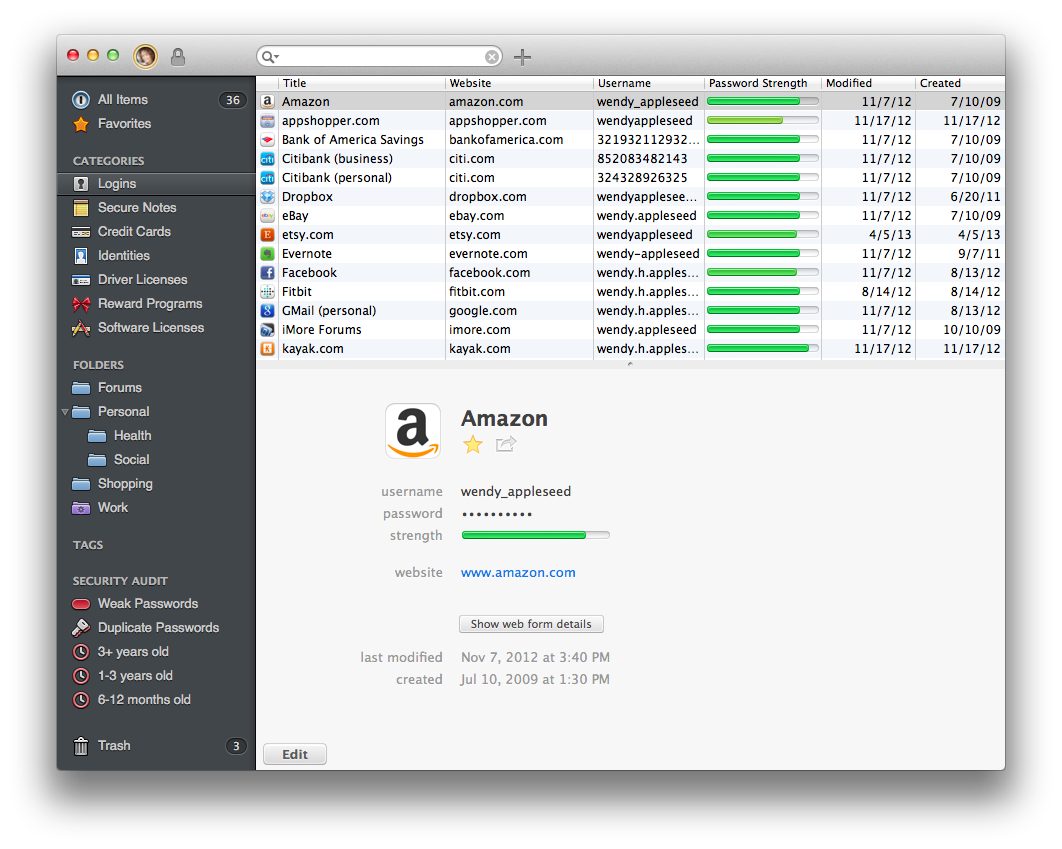
Next up is a new option for viewing items. A new Top Item List Layout view (found under View > Item List Layout > Top) organizes items into multiple columns. It condenses a lot of information into a classic list, making it easy to view logins, dates, and password strength at a glance. Fans of MailMate should will appreciate the formal look.

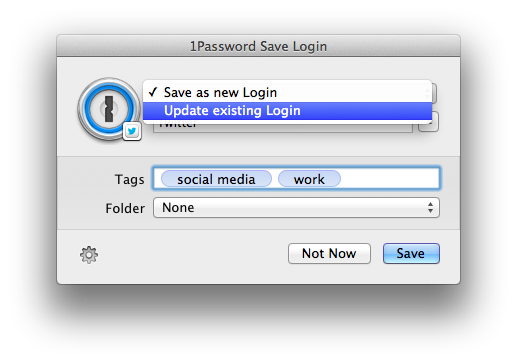
Lastly, 1Password 4.1 has overhauled how Logins are saved and updated. When you change a password on a site, the 1Password extension will let you choose which Login to update if there’s more than one, while additionally letting you set tags and file Logins into folders. The new dialog box is much more like a save prompt for a Mac app, making it easier to save and sort your Logins on the spot.

There’s a few other notable little features that are worth mentioning as well. When you search, you’ll have the option to expand an existing search across all fields in items if what you’re looking for can’t be found by title alone. If you’re printing out items, you’ll be able to do so individually through their share menus. Lastly, lots of bugs have been squashed for WiFi syncing for those who prefer to keep their 1Password databases out of the cloud.

When can you get your hands on it?

You can download 1Password 4.1 from AgileBits’ website at 12pm Pacific Time / 3pm Eastern Time. If you purchased 1Password 4 directly from AgileBits, then you can grab it this afternoon.

Mac App Store customers can download 1Password 4.1 once it’s approved. Basically, “Soon.”

Looking to learn more about 1Password? Check out everything we’ve had to say, including news and reviews on one of our must-have apps.


Skitch for iOS Brings Back PDF Reading and Markup in Latest Update

Skitch is great for marking up images and annotating documents, and it’s brought PDF reading and markup back from the dead. You’ll need to be an Evernote Premium subscriber to take advantage of PDF markup, but regular Skitch users can enjoy general enhancements and bug improvements. From iTunes:

Hey, here’s what’s new in this release
- PDF reading is back. Open a PDF in Skitch.
- Markup a PDF is back. Requires an Evernote Premium account.
- Web capture has been added back
- Improved crop mode
- Lots of bugs were crushed (no actual bugs were harmed)

Previously, Skitch added a crop function to their iOS app, and improved integration with Evernote for choosing a default notebook to save to.

Grab the latest update from the App Store.


Permalink

On Relaxing App Store Rules

Marco Tabini of Macworld uses the recent TextExpander touch debacle to the make the argument on why App Store rules should be relaxed.

On OS X, TextExpander can interact with just about any app. On iOS, Apple’s sandboxing makes this much harder, but in the past Smile’s developers have circumvented the problem by implementing a software development kit that other programmers can easily and quickly integrate into their own software.

Unfortunately, this leaves one problem unsolved: Third-party apps still need to synchronize their text-snippet database against the main TextExpander app, which is difficult to accomplish in an environment where programs are largely prevented from talking to one another—or even being aware of one another’s presence on the device.

Thus, Smile had to find another workaround, which involved relying on iOS’s built-in Reminders as an ersatz synchronization mechanism. After initially permitting that usage, Apple eventually rejected it as an improper application of a technology whose primary goal is, after all, to help you compile grocery lists.

Permalink

Temporarily Capture Moments with Meteor for iPhone

There are lots of pictures we take in the moment that we shoot off to social networks, private chats, and to others in emails, but they don’t necessarily need to stick around. Meteor advertises itself as a photographic memo pad that lets you take photos that only matter right now, deleting your photographs after a period of time unless they’re manually saved to the Camera Roll. For a buck during their launch sale, Meteor tries to unclutter your Camera Roll by separating memories from photographic reminders, in the moment goofiness, and can even perhaps save you from post “why did I take a picture of that” regret. It works with Instagram, Twitter, Facebook, iMessage, your email app, and your favorite photo app.

Permalink