

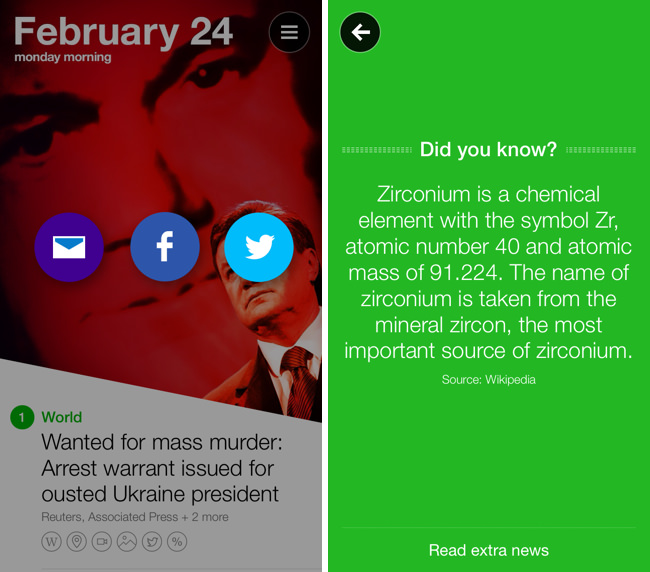
I’m a fan of Yahoo News Digest simply for the fact that it breaks me out of the tech news bubble in short spurts. The latest point update adds atoms for Weather and Statistics, new sharing options such as the ability to tweet Cover Posters, and a new “What You’ve Read” overview has been added that shows you a grid of what digests you’ve browsed through. Shown above, there’s also a little “Did you know?” section that now precedes extra articles in the app. Yahoo News Digest is free to download from the App Store.
Posts tagged with "app store"
Yahoo News Digest 1.1 Adds “What You’ve Read” and Other Improvements→
Units is a Highly Customizable Unit Converter→
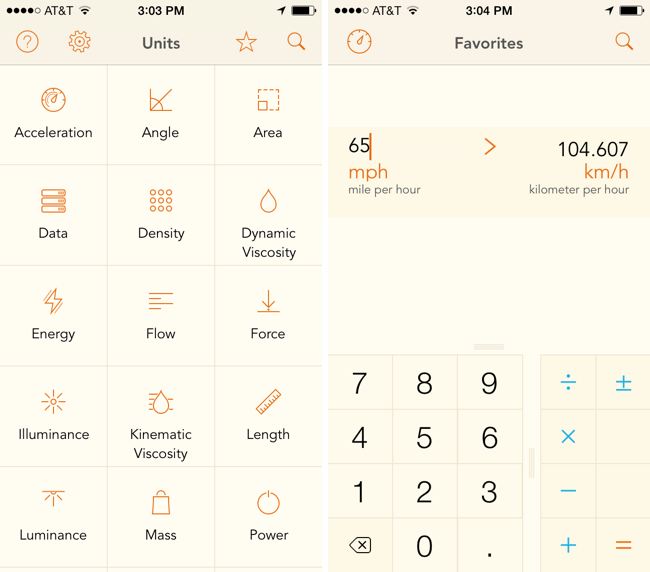
Units avoids needless scrolling through its sizable library of measurements by letting you search and favorite pairs of units, which saves oft-used conversions in a personalized list. The app can make conversions for just about anything you can think of, like units of data, force, luminance, and time. Like similar converters, the design is split between two columns of units, which you simply line up to make a conversion. A basic calculator is built into the app so you can perform basic operations like adding and multiplying. The app is fully customizable, letting you change the font, font color, and background color, so you can mix and match styles to your liking. The app’s $2.99 on the App Store.
Units doesn’t convert currencies, so for that you may want to check out Banca instead.
Ending The App Store Top 200→
Manton Reece thinks that Beats Music’s editorial curation efforts could work well as a template to improve how apps are discovered on Apple’s App Store:
The answer is in Beats Music. They have no overall top 200 list! Instead, they have a bunch of people — musicians and writers who deeply care about music — curating playlists. The top 25 playlists in a genre are so buried in the app that I had to search them out just to write this blog post, because they seem to carry no more weight than any other playlist. Much more common are playlists like “our top 20 of 2013”. That’s not a best-selling list; it’s based on real people’s favorites.
There are literally hundreds or maybe thousands of other playlists. Intro playlists for a band, related artists that were influential to a singer you like, playlists for a mood or activity, and more. This extra manual step makes it much easier for an algorithm to surface great music: just look for playlists that contain songs you already like, and chances are good that you’ll discover something new.
I’ve argued in favor of more editorial curation before, and while I’m a huge fan of what Beats Music is doing, it’s too early to tell whether the company will be successful or not.
I think there is merit to the idea of showcasing human-curated playlists in lieu of an automatic system (charts) that can be exploited with bots, paid installs, and other solutions. Beats Music’s curated playlists are updated every day, they are contextual to current events, and, more importantly, they are visible in search. Apple has been building a good collection of curated sections for featured apps and categories, but they are not regularly updated and they’re completely hidden from search.
Wordsalad Generates Beautiful Word Clouds→
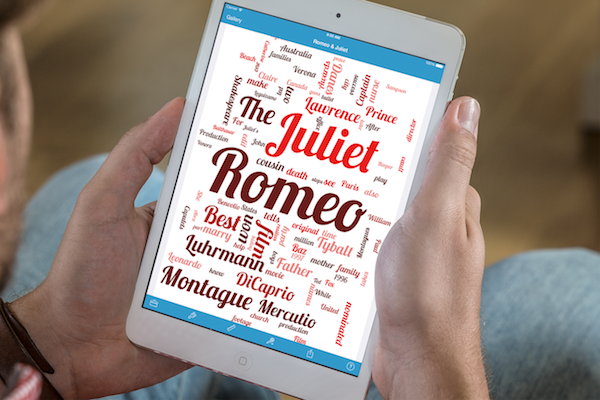
If you want to present an idea or just create a cool word cloud, Wordsalad for iPhone and iPad takes a bunch of words and generates a beautiful image that you can export in full HD in PNG or PDF formats. The app is able to pick out the most important words and bring those forward, filtering out unimportant words like articles, prepositions, and pronouns. You can customize the result by changing fonts, colors, and word layouts. Great for posters, presentations, and brainstorming, Wordsalad is $2.99 in the App Store.
Reporter for iPhone Privately Tracks Your Life Story→
Ellis Hamburger for The Verge on Reporter, a new app that tracks your daily activities:
Reporter works by buzzing you several times per day with a brief quiz based on the questions Felton asks himself. They range from “Where are you?” to “What are you doing?” and “Who are you with?” Some questions can be answered by tapping Yes or No, while others are multiple choice questions, let you type in text, or offer a location picker that polls Foursquare for nearby places. You can also add your own questions (like “Are you happy?”) or program certain questions to occur only when you hit the app’s Awake or Sleep switch (like “How did you sleep?” and “What did you learn today?”). Each time you report, the app also pulls in various pieces of information like the current weather, how many steps you’ve taken today (using the iPhone 5s’ M7 motion coprocessor), and how noisy it is around you using your phone’s mic.
There’s lots of little interesting things that bubble up in Ellis’ review, such as Nicholas Felton’s ideas for printing your records into a book. The best thing about this app is that everything stays on your phone and you can export it in CSV or JSON. The downside is that you have consistently use the app to make it work. The app only costs a few bucks on the App Store, and the website looks great.
Threes: A Game of Multiples
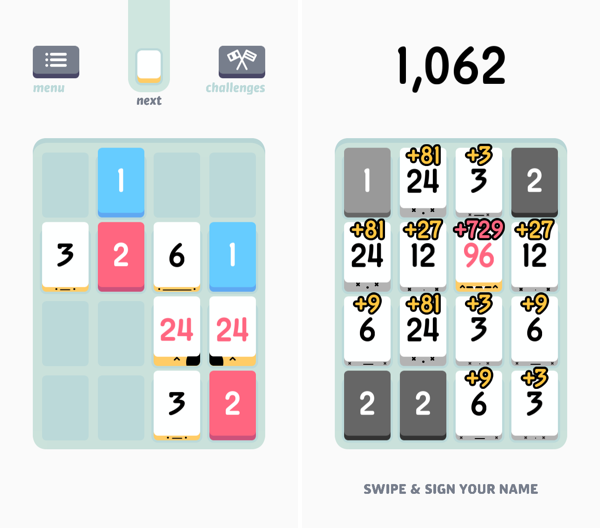
Threes is a game of multiples. It’s a game of combining pairs of numbers to make even bigger numbers. It plays on idea of a sliding puzzle, except the board becomes more populated the longer you play. A new piece falls onto the board after every slide, until the board is completely populated. The end goal is to end up with a board full of large numbers, hopefully in the greater double digits, and maybe even a triple, for a high score.
You play on a 4 x 4 grid, shaped like mahjong pieces, where you slide pieces up, down, left, and right. The game doesn’t really start until you begin combining your blue ones and red twos to create threes. Threes combine to make sixes, which combine to make twelves, etc. Every time you combine two numbers, the result doubles. Only multiples of three count towards your end score, thus the name of the game.
While Threes is largely a game about numbers, there’s lots of little touches in the game, including an unintended achievement system, where creating bigger multiples of three unlocks new personalities. Each multiple of three has a different face, and they’ll smile at each other if they can combine. Threes maintains a history of your previous scores, and includes a toggle to reduce animation frame-rate to save battery life if you’re out and about.
If you love games like Letterpress and Dots, you’ll love Threes. It’s easy to grasp and hard to master. It’s classy.
Threes is $1.99 on the App Store.
Hoplite: A Mini Dungeon Turn-Based Strategy Game for iPhone and iPad
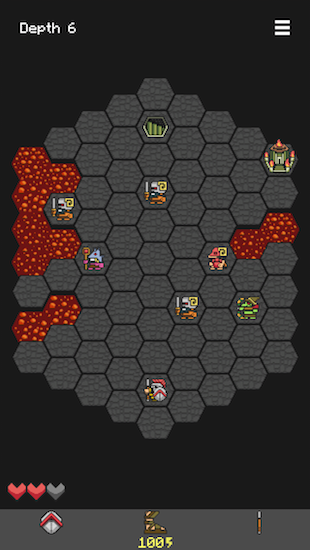
Each step feels more perilous than the last. As you dash over a pool of lava, you lunge to slay a demon archer, cornered and unprepared for the daring attack. Looking ahead it seems all but impossible to make the last jump, as demon footmen move to block the exit. Throwing your spear, you impale the dark beast, only to be greeted by a bomb that lands behind your feet. You bash away the bomb with your shield, taking out another demon as it explodes at a distance. Leaping across the last chasm, a lapse in judgement leaves you directly in the crosshairs of a second archer, who fires an arrow directly into your exposed side as you land.
And thus ends the quest for the Fleece.
This is Hoplite, where a pair of sandals, a trusty spear, sturdy shield, and three hearts are all that protect you from hordes of demons in the Underworld. Your quest is to recover the Fleece and make it out alive, but the journey is treacherous.
A Look at SwiftKey Note
Third party keyboards have been showing up on iOS, not as system replacements, but as individual apps that aim to provide an alternative to Apple’s standard keyboard. Keyboard replacements on Android, and apps on iOS like Fleksy, aim to either provide an alternate method of inputting characters (such as swiping over characters with your finger) or predict what you’re going to say next.
Apple’s keyboard for iOS is good, but not great. Auto-Correct doesn’t provide the right balance of letting me decide what I want to say[1] without disabling it completely, and popovers dismiss corrections rather than select them. Apple’s keyboard feels counterintuitive, and dare I say Apple’s smaller displays don’t lend themselves well to cramped keyboards[2] with buttons for dictation and international keyboards.
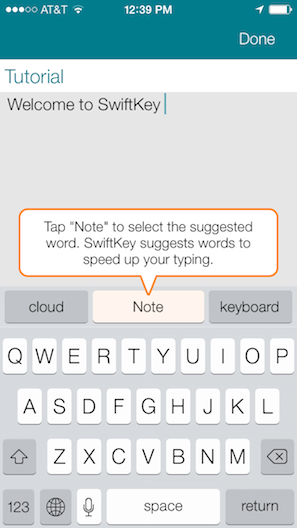
SwiftKey Note doesn’t replace Apple’s keyboard layout, but it does attempt to improve upon automatic corrections while offering easy-to-tap suggestions as you type. Does it hit the ball out of the park? Not completely, but it’s decent and for the most part has better suggestions than Apple.
Write Your Next Song Lyrics with Hum for iPhone→
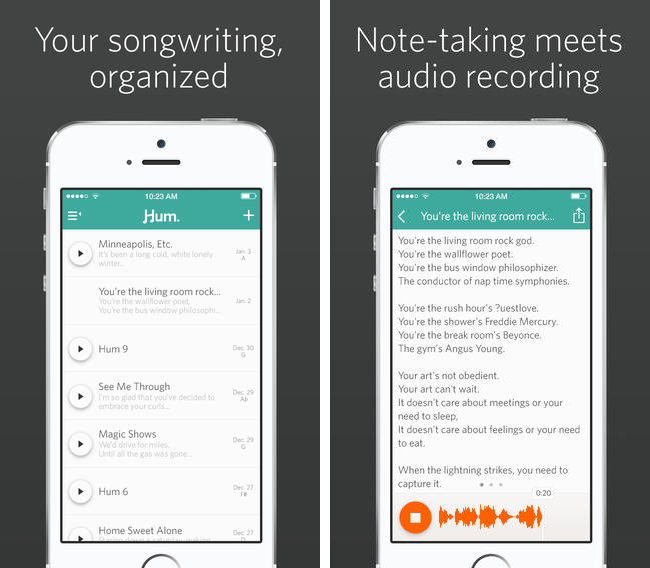
Released on the App Store yesterday, Hum started out as a Kickstarter project before the developers decided to go it on their own. The app gives you a place to write down song lyrics that come to mind, record your song ideas, and set the key, tone, and mood. It’s an interactive songbook that lets you share the end result with friends, available on the App Store for only $1.99.