This Week's Sponsor:

BetterTouchTool

Now with a Powerful Launcher for Your Mac


Posts tagged with "app store"

Cathode Brings the Vintage Terminal to iOS

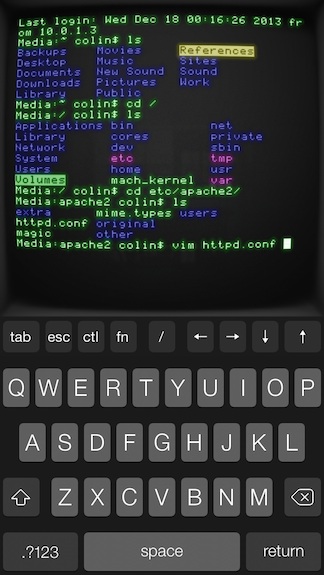
Your favorite customizable terminal app for the Mac is now available for iPhones and iPads, letting you wirelessly connect to any computer offering SSH access. The app gives you lots of control over its vintage look and feel, letting you change color, lighting, “shape,” and your choice of retro bitmap fonts. For iPad owners, the app supports Bluetooth keyboards, and works in both portrait and landscape orientation. Cathode supports multiple sessions and can automatically connect to nearby computers using Bonjour. For the geeks out there, Cathode costs a cool $5.99 from the App Store.


My Finances Lets You View Your Income and Expenses at a Glance

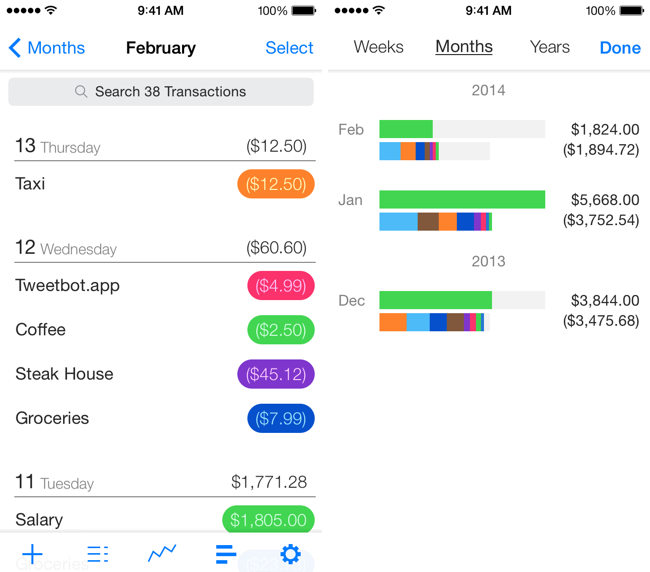
If you just want to keep tabs on your expenditures and income without the overhead of managing a budget, My Finances is a lightweight iPhone app that gives you a glance at how you’re spending your money and what your net worth is at any given time. Put expenditures into categories, track how you’re spending over time, and make quick decisions on whether you’re spending too much. To begin tracking, My Finances lets you enter a starting value in the settings to create a baseline. The app doesn’t connect to your bank to automatically track spending, but it does you mindful since you have to enter each transaction yourself. Setting up basic categories for gas, groceries, public transportation, and eating out can go a long way towards becoming aware of where your money is really going. The app is free to download, but an in-app purchase for $3.99 unlocks all of the features.

Permalink

Audiophone Lets You Stream Music to Your iPhone Without Limitations

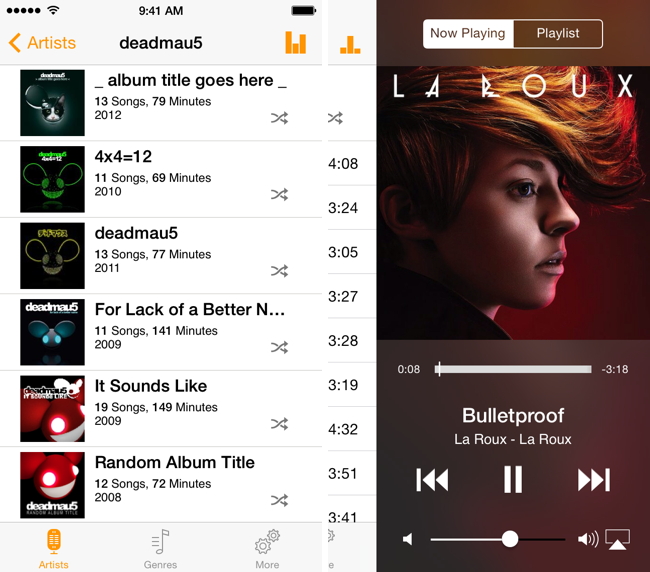
Provided you use Subsonic, Audiophone lets you take your personal music collection with you wherever you go. As an alternative to online storage solutions like Amazon’s Cloud Player, Google’s Play Music, or iTunes Match, Audiophone is about giving you direct access to your library from your personal computer. Want to listen to songs encoded in FLAC and WAV on your iPhone? Because it’s a music player that piggybacks off of Subsonic, the music can be transcoded and pre-buffered so that your streamed tunes can make the most out of your available bandwidth, no matter where you are. Like Genius in iTunes, Audiophone can also generate playlists based on your favorite songs on the fly. Plus, it includes support for AirPlay so you can stream music to a pair of speakers through an AirPort Express or your Apple TV. The app is $4.99 on the App Store, designed for listener who wants to end-to-end control over their music streaming experience.

Permalink

Zippy: A Task Manager With Insights

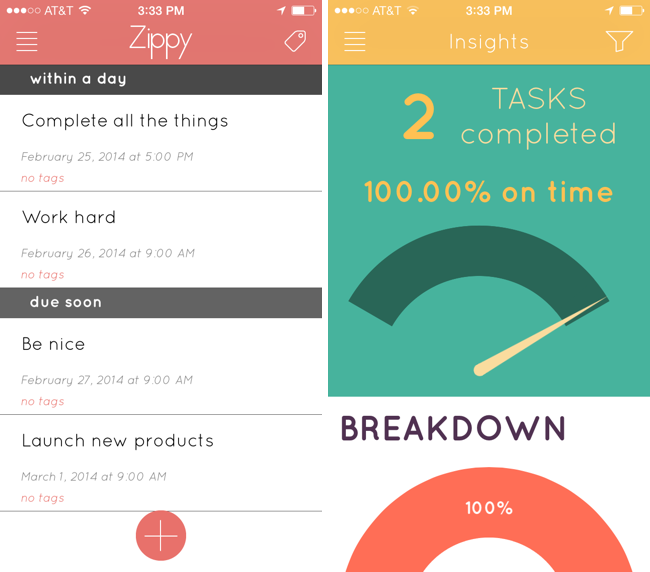
There’s lots of task managers on the iPhone, but how many break down just how good you are at getting things done? Zippy adds some recent features that have found their way into apps like Mailbox, such as a flyover grid of options for snoozing tasks until a later date, and maintains a list of completed tasks and whether you’ve completed them on time. Tags help keep your tasks organized so you can attribute things to home, work, and personal projects, and view tasks per tag. Perhaps the only improvement Zippy could make is the ability to add tags when creating tasks themselves. The insight’s tab is Zippy’s most original feature, and it breaks down things like when you complete tasks, how good you are at planning in advance, and what times of the day you’re most likely to mark things as done. Analyze your daily routine and replace your stack of sticky notes with Zippy, which is only a dollar until March 4th. Grab it from the App Store.

Permalink

Yahoo News Digest 1.1 Adds “What You’ve Read” and Other Improvements

I’m a fan of Yahoo News Digest simply for the fact that it breaks me out of the tech news bubble in short spurts. The latest point update adds atoms for Weather and Statistics, new sharing options such as the ability to tweet Cover Posters, and a new “What You’ve Read” overview has been added that shows you a grid of what digests you’ve browsed through. Shown above, there’s also a little “Did you know?” section that now precedes extra articles in the app. Yahoo News Digest is free to download from the App Store.

Permalink

Units is a Highly Customizable Unit Converter

Units avoids needless scrolling through its sizable library of measurements by letting you search and favorite pairs of units, which saves oft-used conversions in a personalized list. The app can make conversions for just about anything you can think of, like units of data, force, luminance, and time. Like similar converters, the design is split between two columns of units, which you simply line up to make a conversion. A basic calculator is built into the app so you can perform basic operations like adding and multiplying. The app is fully customizable, letting you change the font, font color, and background color, so you can mix and match styles to your liking. The app’s $2.99 on the App Store.

Units doesn’t convert currencies, so for that you may want to check out Banca instead.

Permalink

Ending The App Store Top 200

Manton Reece thinks that Beats Music’s editorial curation efforts could work well as a template to improve how apps are discovered on Apple’s App Store:

The answer is in Beats Music. They have no overall top 200 list! Instead, they have a bunch of people — musicians and writers who deeply care about music — curating playlists. The top 25 playlists in a genre are so buried in the app that I had to search them out just to write this blog post, because they seem to carry no more weight than any other playlist. Much more common are playlists like “our top 20 of 2013”. That’s not a best-selling list; it’s based on real people’s favorites.

There are literally hundreds or maybe thousands of other playlists. Intro playlists for a band, related artists that were influential to a singer you like, playlists for a mood or activity, and more. This extra manual step makes it much easier for an algorithm to surface great music: just look for playlists that contain songs you already like, and chances are good that you’ll discover something new.

I’ve argued in favor of more editorial curation before, and while I’m a huge fan of what Beats Music is doing, it’s too early to tell whether the company will be successful or not.

I think there is merit to the idea of showcasing human-curated playlists in lieu of an automatic system (charts) that can be exploited with bots, paid installs, and other solutions. Beats Music’s curated playlists are updated every day, they are contextual to current events, and, more importantly, they are visible in search. Apple has been building a good collection of curated sections for featured apps and categories, but they are not regularly updated and they’re completely hidden from search.

Permalink

Wordsalad Generates Beautiful Word Clouds

If you want to present an idea or just create a cool word cloud, Wordsalad for iPhone and iPad takes a bunch of words and generates a beautiful image that you can export in full HD in PNG or PDF formats. The app is able to pick out the most important words and bring those forward, filtering out unimportant words like articles, prepositions, and pronouns. You can customize the result by changing fonts, colors, and word layouts. Great for posters, presentations, and brainstorming, Wordsalad is $2.99 in the App Store.

Permalink

Reporter for iPhone Privately Tracks Your Life Story

Ellis Hamburger for The Verge on Reporter, a new app that tracks your daily activities:

Reporter works by buzzing you several times per day with a brief quiz based on the questions Felton asks himself. They range from “Where are you?” to “What are you doing?” and “Who are you with?” Some questions can be answered by tapping Yes or No, while others are multiple choice questions, let you type in text, or offer a location picker that polls Foursquare for nearby places. You can also add your own questions (like “Are you happy?”) or program certain questions to occur only when you hit the app’s Awake or Sleep switch (like “How did you sleep?” and “What did you learn today?”). Each time you report, the app also pulls in various pieces of information like the current weather, how many steps you’ve taken today (using the iPhone 5s’ M7 motion coprocessor), and how noisy it is around you using your phone’s mic.

There’s lots of little interesting things that bubble up in Ellis’ review, such as Nicholas Felton’s ideas for printing your records into a book. The best thing about this app is that everything stays on your phone and you can export it in CSV or JSON. The downside is that you have consistently use the app to make it work. The app only costs a few bucks on the App Store, and the website looks great.

Permalink