This Week's Sponsor:

BetterTouchTool

Now with a Powerful Launcher for Your Mac


Visualizing Apple’s Historical iPhone Lineups, Guessing the Next One

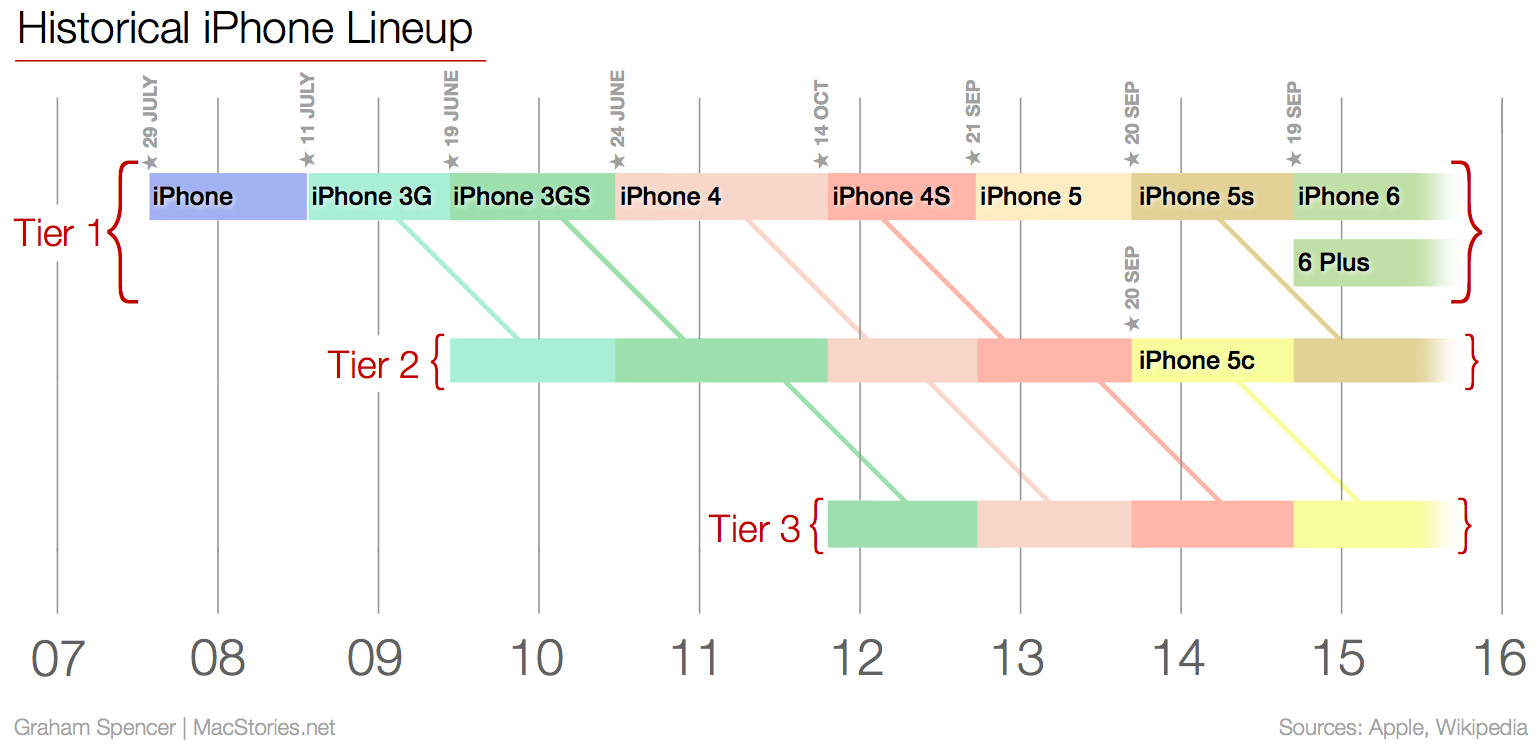
We’re rapidly approaching that time of the year when Apple introduces new iPhones, and BuzzFeed’s John Paczkowski reported last week that the event will be take place on September 9. There will almost certainly be a lot to talk about after the event (Paczkowski says that the event will include a new Apple TV and iPads), but one thing that I’ve been thinking about is what the new iPhone lineup will look like. This was all precipitated by the discussion on last week’s Talk Show with John Gruber and John Moltz.

Because my mind was a bit fuzzy on the historical iPhone lineups (particularly the early years), I decided to go back and make a graph to simply and clearly show what Apple has done in the past. The dates I used were based on when each iPhone was available in the US (not the announcement date). Tier 1 represents the newest and most advanced iPhone available at the time. Although there are slight differences between the iPhone 6 and iPhone 6 Plus, they are largely identical (both have an A8 processor with 1 GB RAM, etc) and as a result I’ve characterised them both as Tier 1. Tier 2 represents the next best iPhone available (often the previous year’s Tier 1 model) and Tier 3 is the next best again.

Read more


Igloo: An Intranet You’ll Actually Like [Sponsor]

Igloo is an intranet you’ll actually like.

It’s a cloud platform that can help you do your best work – share files, blog updates, coordinate calendars, and manage projects. It’s easy-to-use and easy to configure – even for the most non-technical of users. And it’s built using responsive design, which means that everything you can do at your desk, you can now do on the go, on your phone or tablet. The responsive design is meant to look great on all of your devices.

Whether you’re a large enterprise stuck using SharePoint or a fast-growing business overwhelmed by apps, create an intranet that matches your brand’s look and feel, simplifies how you work, and is accessible on your phone.

Sign up now and try it for free at igloosoftware.com/macstories, and invite up to ten of your favorite co-workers to try it with you.

Our thanks to Igloo for sponsoring MacStories this week.


Twitterrific Update Brings Early iOS 9 Features

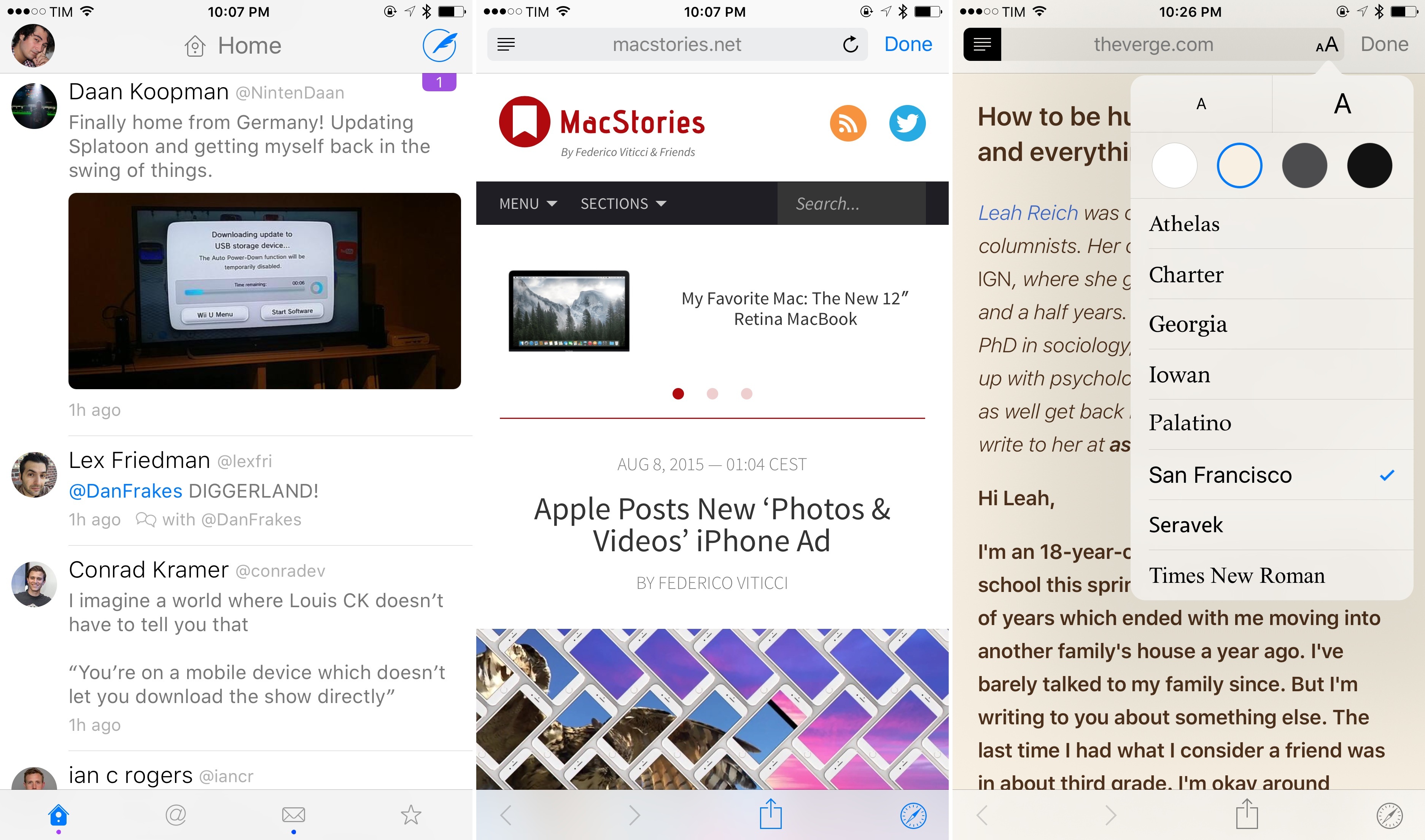
San Francisco, Safari View Controller, and Safari Reader in Twitterrific 5.13.

San Francisco, Safari View Controller, and Safari Reader in Twitterrific 5.13.

The latest version of Twitterrific, released today on the App Store, brings a number of nice improvements such as hashtag autocompletion, better support for Handoff, and some welcome fixes for quoted tweets and the media viewer. What’s even nicer is that, if you’re running the iOS 9 beta, Twitterrific for iOS 8 already supports Safari View Controller and the San Francisco font thanks to some clever coding by The Iconfactory.

Read more


Apple Posts New ‘Photos & Videos’ iPhone Ad

Apple aired a new commercial as part of their “If it’s not an iPhone, it’s not an iPhone” campaign, this time focusing on the device’s camera for photos and videos.

The entire ad showcases full-screen photos and videos taken on the iPhone 6, noting that “every day, millions of amazing photos” are shot with iPhone. Unlike other ads in the campaign, there’s no mention of third-party apps – just the iPhone’s camera and animations generated by photos and videos. Previously, Apple had featured iPhone photography with the “Shot on iPhone 6” initiative, which was later expanded to ads, films, and billboards across the world.

You can watch Apple’s latest iPhone commercial below.

Read more


Apple Redesigns Website, Integrates with Store Pages

Apple launched a redesign of their website today, integrating the product presentation and shopping experiences into one and tweaking the navigation bar with different menu items and icons.

Notably, the separate store.apple.com website is no more, as it now simply leads to apple.com with store pages available at apple.com/shop/ URLs.

As John Gruber writes:

Knowing what I know about the old online store, this was a massive behind-the-scenes undertaking, but the result looks and works like what most people would have expected all along. (Someone should count the instances of “finally” in the headlines about this change.) The old two-site approach was like having separate rooms in a physical retail store — a showroom up front, and a sales room in the back. Now it’s just one room. (And in another subtle parallel to the physical Apple stores, the website now uses a shopping bag instead of a cart.)

Speaking to TechCrunch, an Apple spokesperson explained why the company decided to make this change:

“We redesigned Apple.com knowing that our customers want to explore, research and shop in one place,” said an Apple spokesperson in a statement. “The new Apple.com takes the very best of our existing site and our online store to give customers one simple destination to learn and buy without navigating between two different sites. We’ve also improved several of the site’s features to make shopping easier than ever for our customers.”

The updated website will likely make for an easier shopping flow – especially on smartphones – as there’s less switching contexts between viewing and buying because everything’s integrated. It’ll be interesting to see if updating the store with new products will still require Apple to bring the store down, or if they will appear and propagate for everyone across the world like the new website did today. Probably a good change, but let’s pour one out for Is The Apple Store Down.

Permalink

Replacing QuickCursor with Keyboard Maestro

QuickCursor was a great app which allowed you to use your favorite text editor to edit text anywhere on the Mac. For example, rather than writing a blog post in a form field in your browser, you could press a keyboard shortcut and then whatever text you had written would be sent BBEdit (or any other text editor). You could finish writing your post using all of the features of your preferred text editor (and, most importantly, not have to worry about your browser window crashing or anything else that might cause you to lose your work). When you finished writing, your text would automatically be sent from your text editor back to the web browser. (If the awesomeness of this is not immediately obvious, watch this short YouTube video showing how QuickCursor worked.)

Read more


Microsoft Outlook App Now Available on the Apple Watch

As noted by The Verge, Microsoft Outlook is now available for the Apple Watch after Microsoft updated the Outlook iPhone app today. The Outlook Watch app enables users to reply to emails directly on the Watch through various quick reply options or via dictation.

Besides replying to emails on the Watch, there’s an Outlook glance which enables users to review their inbox or see what’s next on their calendar. Finally, Outlook’s custom notifications on the Apple Watch add support for archiving and scheduling emails as they arrive.

Tom Warren from The Verge tried the new Outlook Apple Watch app wrote:

By default, Outlook notifications on the Apple Watch now show a lot more of the email body instead of cutting it short after a couple of sentences. While you still can’t reply instantly from a notification, you can now tap on the Outlook icon in the notification to launch a dedicated Outlook Apple Watch app that lets you see an overview of email and reply to any messages using quick replies or dictation.

Permalink

11 Million Customers Sign up for Apple Music Trial, App Store Has a Record July

Apple’s Eddy Cue and Jimmy Iovine spoke to USA Today reporter Marco della Cava about Apple Music’s early numbers:

One month after unveiling its new streaming music service, Apple has locked in 11 million trial members, company executives tell USA TODAY.

“We’re thrilled with the numbers so far,” says Eddy Cue, Apple’s senior vice president of Internet software and services, adding that of that sum 2 million have opted for the more lucrative family plan at $14.99 a month for up to six people.

Whilst there are still 2 months of the Apple Music free trial period before user’s credit cards start being charged, there’s little doubt that those numbers represent a solid launch. For those curious about how those numbers compare to other services, Spotify announced in early June this year that they had “more than 20 million subscribers and more than 75 million active users”.

Cue also revealed to USA Today that July was a record breaking month for the App Store:

July also brought a fiscal high-water mark for the company’s App Store, which did a record $1.7 billion in transactions, “with particular momentum in China,” says Cue. That brings the total amount paid to app developers to $33 billion, up from $25 billion at the end of 2014.

Permalink