This Week's Sponsor:

Hello Weather

Half Off for WWDC Week, Just in Time for Summer.


Apple Partners with Aetna to Create Personalized Watch App

Aetna, the health insurance provider, has announced a new Apple Watch app forthcoming for its customers that was developed in partnership with Apple. The app, named Attain, will serve as a way to track fitness data and provide an incentive for healthy living. Joe Rossignol has the details for MacRumors:

Through the use of an Apple Watch, the Attain app will provide Aetna members with personalized goals, track their daily activity levels, and recommend healthy lifestyle choices. For completing these actions, participants will earn points, which can be put towards the cost of an Apple Watch or gift cards.

Attain will motivate participants to complete personalized daily and weekly activity challenges based on their age, gender, and weight. Attain’s definition of activity includes walking, running, swimming, yoga, and other activities that can be tracked in the Workout app on the Apple Watch.

We’ve seen Apple partner with insurance providers in the past to offer the Apple Watch free or subsidized to its members, but this is a different spin on that approach, focusing more on continuous incentives for active lifestyles.

Tim Cook recently stated that health would end up becoming Apple’s greatest contribution to mankind, a bold claim that indicates we’ll continue to see more announcements along these lines moving forward.

Permalink

Memento, the Third-Party Reminders Client, Adds Watch App, Keyboard Shortcuts, and More

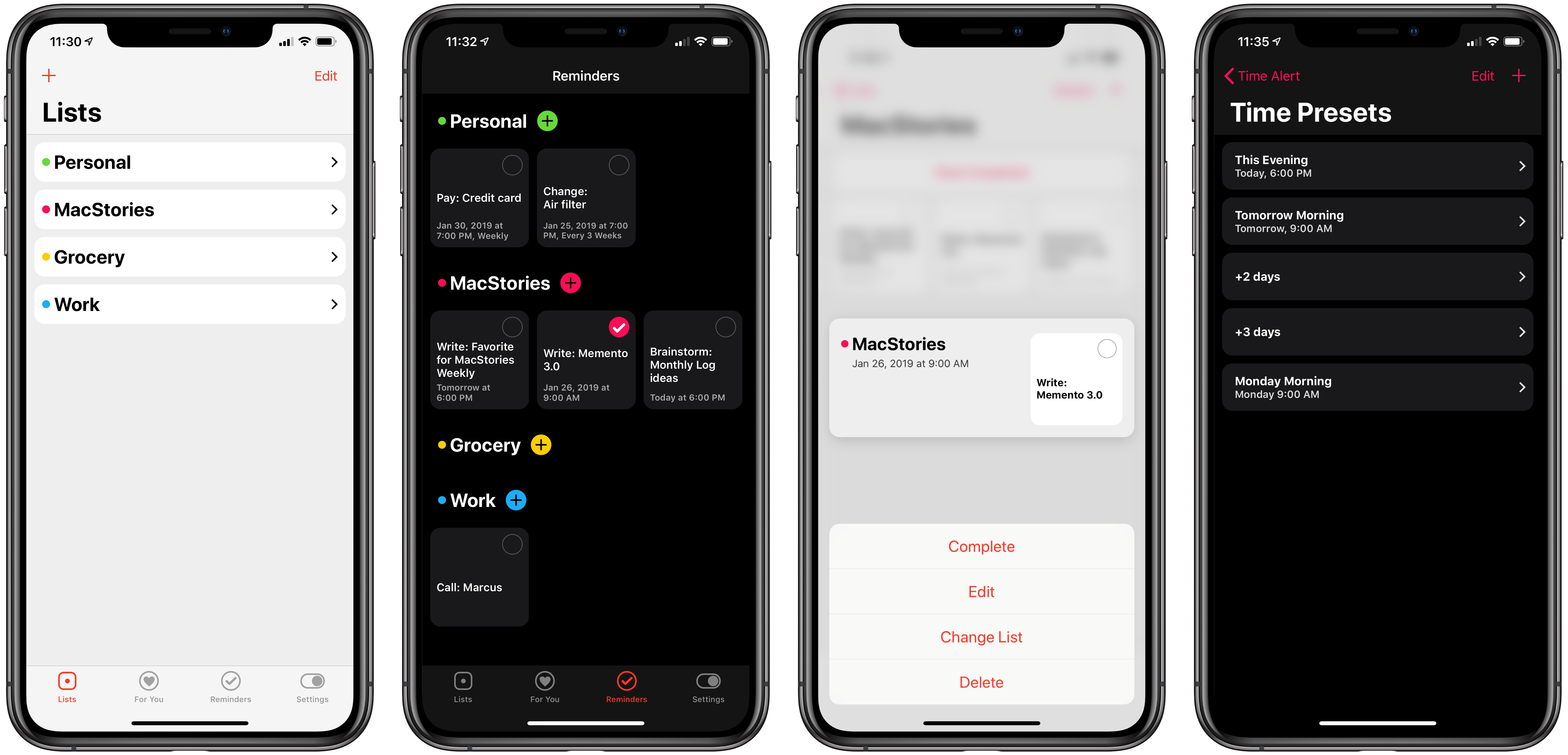
Apple’s Reminders is one of the few native iOS apps with a database that can be directly tapped into by third-party clients. Like the iOS Calendar app, which has no shortage of alternatives on the App Store, developers can create their own task managers that fully integrate with your Reminders database, offering the convenience of a built-in system with the benefit of having multiple options to choose from.

A couple months back I wrote about two of the best third-party Reminders clients on the App Store, one of which was Reminder. Today as part of its big 3.0 update, Reminder is being renamed Memento and bringing a handful of improvements that take better advantage of Apple’s full device ecosystem. There’s an Apple Watch app for the first time, keyboard shortcuts on iPad, 3D Touch shortcuts on compatible iPhones, custom time presets, and more.

Read more


Major FaceTime Bug Allows Any Caller Access to Your iPhone’s Microphone Feed, Potentially Your Camera

Benjamin Mayo of 9to5Mac, reporting on a serious iOS bug just discovered for FaceTime:

A significant bug has been discovered in FaceTime and is currently spreading virally over social media. The bug lets you call anyone with FaceTime, and immediately hear the audio coming from their phone — before the person on the other end has accepted or rejected the incoming call.

Naturally, this poses a pretty privacy problem as you can essentially listen in on any iOS user, although it still rings like normal, so you can’t be 100% covert about it. Nevertheless, there is no indication on the recipient’s side that you could hear any of their audio.

Mayo continues by listing the details of how to reproduce the bug yourself when calling someone else, which involves a few very simple steps that anyone can perform. The simplicity of reproduction makes this bug especially dangerous.

Following up on Mayo’s report, Dieter Bohn of The Verge shared that things get even worse:

https://twitter.com/backlon/status/1090049242809286656

To recap: due to this FaceTime bug, which appears to affect all devices running iOS 12.1 or later, any caller can gain access to another user’s microphone feed while the call is ringing. And if the person receiving the call in that scenario tries to dismiss the call, it may unintentionally be answered, activating the device’s camera as well.

Apple gave the following statement to John Paczkowski of BuzzFeed:

https://twitter.com/JohnPaczkowski/status/1090052150032445440

Hopefully ‘later this week’ ends up translating to the next day or two, as some serious havoc could be wrought by this bug on unsuspecting users. Until that software update is released, we strongly recommend disabling FaceTime from Settings ⇾ FaceTime on your devices, or at the very least be aware that incoming calls you receive could be tapping into your microphone without your consent.

Permalink

Apple in 2018: The Six Colors Report Card

Jason Snell:

It’s time for our annual look back on Apple’s performance during the past year, as seen through the eyes of writers, editors, developers, podcasters, and other people who spend an awful lot of time thinking about Apple.

This is the fourth year that I’ve presented this survey to a hand-selected group. They were prompted with 11 different Apple-related subjects, and asked to rate them on a scale from 1 to 5, as well as optionally provide text commentary on their vote. I received 55 replies, with the average results as shown below:

It was my pleasure to participate (again) in the latest edition of the Six Colors Apple report card, which features average scores and answers on a variety of Apple topics. As usual, it is a solid, balanced overview of where Apple stands today in different areas of its business. Personally, I was positive about iPad Pro hardware, iOS 12, and Apple Watch, but I noted I’d like to see Apple do more on iPad software, iPhone camera, and HomeKit in 2019.

Permalink

For AirPods Early Adopters, Apple’s Hit Wireless Earbuds Are Showing Their Age

I found myself nodding in agreement with this post by Zac Hall about how AirPods purchased in December 2016 are starting to show their age in terms of battery life:

Apple rates AirPods for up to five hours usage at 50% volume, and early testing proved that rating was actually slightly conservative. In practice, brand new AirPods could last almost five and a half hours before their batteries depleted. The carrying case doubles as a charging case, too, providing over 24 hours of battery life without needing to recharge from the wall.

But batteries are consumable, we all know so well now, and that’s proven true for the tiny batteries inside AirPods after two years of daily use. Battery life that once exceeded five hours now struggles to power AirPods through three hours of continuous usage at the same volume. Battery life results can be cut in half if you need to play audio at a louder volume.

In practice, I used to never hear the low battery alert during usage. I rarely listened to audio with AirPods for five straight hours before charging in the carrying case without thought. More recently, I’ve heard the bloop sound much more regularly, frequently followed by AirPods dying before I’m ready to recharge.

I’ve been thinking about this a lot lately (in fact, I proposed it as a topic for this week’s Connected) and I feel like Hall and I have gone through the same process. When my AirPods were new, I could listen to a full episode of Upgrade or Cortex at max volume and still have plenty of battery life left; now I cannot get to the end of an episode (roughly 90 minutes in length) without hearing the low-battery alert. My AirPods can’t hold a charge like they used to and I’m not surprised.

I could buy a fresh pair of AirPods now, but that seems like a waste of money given the (possible?) upcoming release of a new model. I could buy a third-party wireless charging adapter to make charging the case more convenient, but I don’t feel comfortable with an unofficial, bulky add-on case, which wouldn’t fix the battery issue of the AirPods anyway. I love my AirPods – they’re one of my favorite Apple products in recent years alongside the iPad Pro and Apple Watch – but I’m reaching the point where I’m always charging them, and I really want Apple to release whatever they’ve been working on.

Permalink

Apple Shares Behind the Scenes Look at the Creation of iPad Pro ‘A New Way’ Videos

Earlier this month Apple published a series of videos showcasing iPad Pro workflows for things like hosting a podcast, taking notes, and creating a presentation. Each ad’s title began ‘A new way to’ followed by the description of a productivity-themed task.

While these videos were great showcases of the iPad’s potential in their own right, what made them particularly interesting was that each ad ended by stating that it was made using the iPad Pro. Today, Apple has shared a follow-up video that goes behind the scenes into exactly which apps and processes were used to create this video series.

According to the video, Apple’s production team used Procreate and Notability to handle design work for the ads, FiLMiC Pro to shoot each video, LumaFusion for video editing, Keynote and Core Animator for animation, and finally, GarageBand was the composition tool for the ads’ music.

Federico and John discussed Apple’s iPad Pro video series on this week’s episode of AppStories, including some spot-on speculation that Apple used LumaFusion for editing the videos. This peek behind the curtain of iPad Pro video production further demonstrates the power of the iPad, and helps point users toward some of the best apps the App Store has to offer.

One of my favorite touches comes as the video ends, when we learn that, of course, the behind-the-scenes video itself was made on iPad Pro. A video made on iPad Pro, about the making of videos on iPad Pro, which all cover the subject of making things on iPad Pro. Perfect.

Permalink

Banktivity: Achieve Your Financial Goals for 2019 [Sponsor]

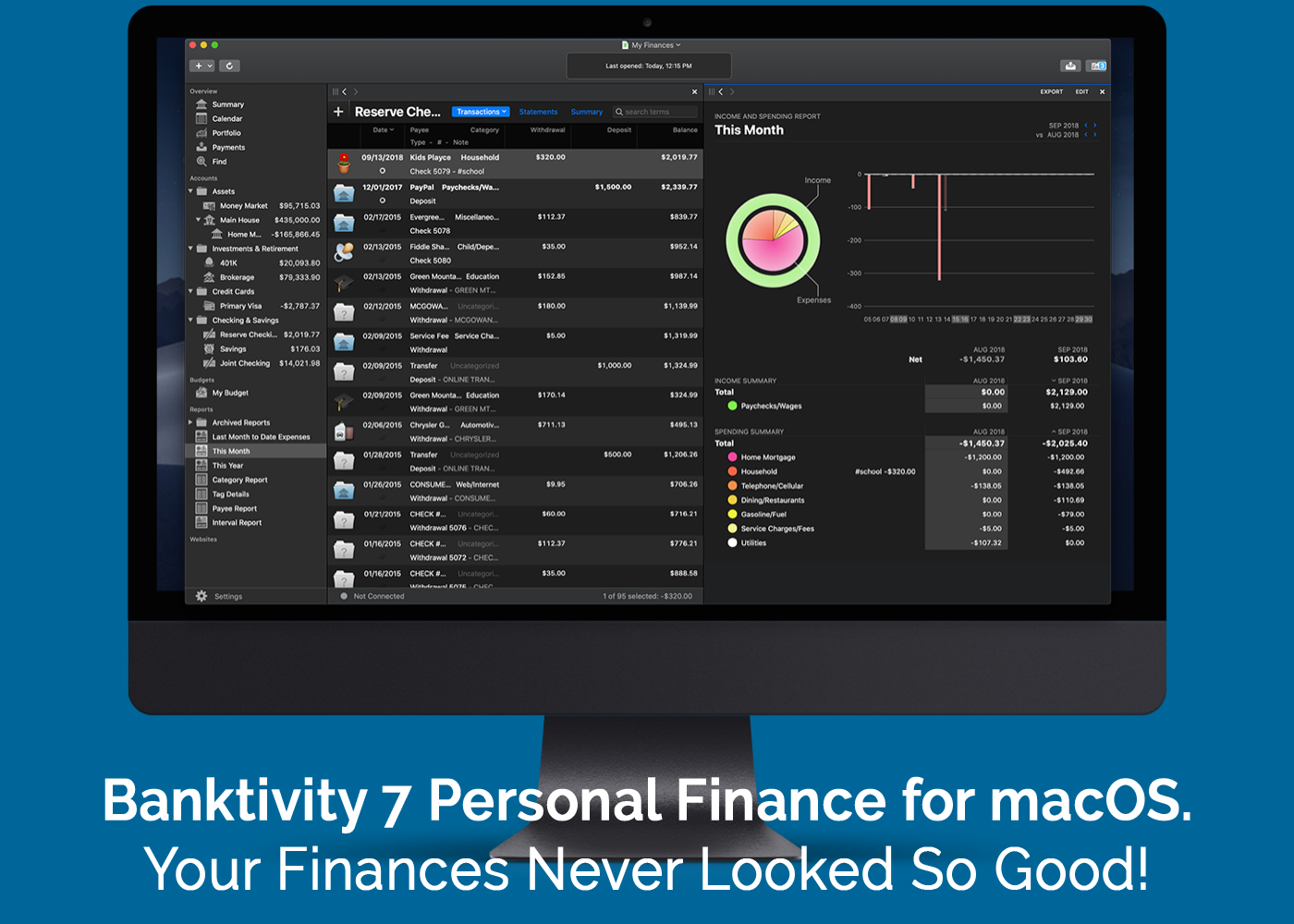
Managing your finances doesn’t have to be difficult. With Banktivity, you can track expenses, know when to pay upcoming bills, gain valuable insights into the performance of your investments, and a whole lot more. Best of all, everything you need for financial peace-of-mind is available on your Mac and iOS devices.

Banktivity empowers its users to manage all of their financial accounts in one place, includes real-time budgeting, and syncs with the free iPhone version of the app, so your finances are always right at your fingertips. With version 7 of the Mac app, Banktivity’s functionality adds all-new ways to track and analyze your finances.

Banktivity for the Mac has added a stunning new dark mode that looks great alongside other macOS Mojave apps. IGG Software, the makers of Banktivity, painstakingly examined and redesigned every corner of the app to take full advantage of dark mode.

The app also has a new ‘Calendar View’ that ensures you’ll never miss a bill again by letting you see past and upcoming bills and transactions. You can even customize which accounts are displayed and track their running balance over time.

Direct Access, which can be purchased separately, is faster than ever. Now, you can connect to over 14,000 banks and import your financial transactions quickly and seamlessly whether you’re on your Mac, iPhone, or iPad.

There’s an all-new real estate account type too, so you can track property you own and link it to related loans and mortgages. If you’re in the US, you can automatically follow your property’s estimated value with Zillow, and there’s a new view with details like your home’s available equity.

Say goodbye to financial stress and hello to Banktivity. Visit IGG Software’s website to learn more about Banktivity today. There’s a free 30-day trial available, so there’s nothing to lose. And when you’re ready to purchase, use the discount code MACSTORIES10 at checkout for 10% off.

Our thanks to Banktivity for sponsoring MacStories this week.


Hands On with iOS 12.2’s HomeKit Support for Smart TVs

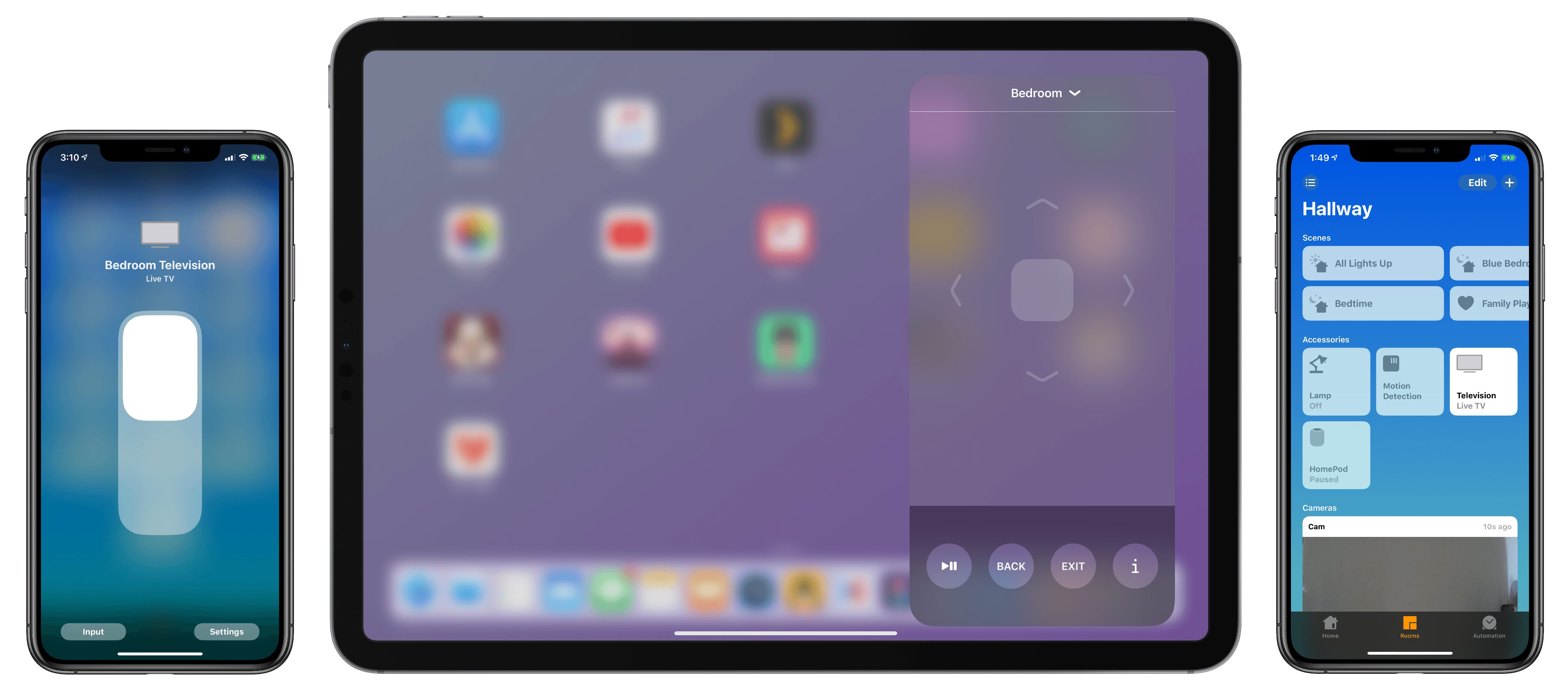
As I noted yesterday, the launch of the developer beta of iOS 12.2 has brought the necessary underlying APIs for manufacturers of smart TVs seeking to integrate their television sets with HomeKit. Originally announced at CES 2019, the initiative encompasses both the HomeKit and AirPlay 2 technologies, which the likes of Samsung, LG, Vizio, and Sony will roll out (albeit to varying degrees) in their upcoming smart TVs over the course of 2019. Thanks to the HomeKit Accessory Protocol and the work of enterprising third-party developers, however, it is already possible to get an idea of what the HomeKit part of these integrations will be like by installing unofficial plugins that add HomeKit compatibility to existing TV sets via software.

Thanks to developer (and homebridge contributor) Khaos Tian, I’ve been able to test native HomeKit integration with my 2017 LG TV running webOS, which does not currently support HomeKit out of the box and which, according to LG, will not receive an official software update for HomeKit support in iOS and tvOS 12.2. In this post, I’m going to share my first impressions of HomeKit’s new TV features in the iOS 12.2 beta, describe how it all works in practice, and share some suggestions for changes I’d like Apple to implement by the final release of iOS 12.2.

Read more