
 MacStories Weekly: Issue 257
MacStories Unwind: Data Privacy Day, Black History Month, Executive Changes, Tweetbot 6, and Record-Breaking Financial Results







Sponsored by: Re:Schedule – Meetings Made Easy
This week on MacStories Unwind:
MacStories
- Apple Publishes ‘A Day in the Life of Your Data’ Case Study and Reveals That App Tracking Transparency is Coming in the Spring
- Apple Releases OS Updates with Better Music Hand Off for HomePod mini, Improvements to QR Code Scanning and Bluetooth Settings, the Unity Watch Face, and More
- Tweetbot 6 Moves to Subscription Pricing
- Apple Unveils ‘Time to Walk’ for Fitness+
- Apple Celebrates Black History Month with Features Across Its Products
- How Matt Birchler Is Using Hey Email, Almost One Year Later
- Apple Breaks Records with $111.4 Billion in Revenue for Q1 2021
- Apple Announces That Dan Riccio Is Moving to a New Role at the Company, and John Ternus Is Stepping in as Senior VP of Hardware Engineering
Club MacStories
- Club MacStories
- MacStories Weekly
- SnapMotion
- Spotify shortcuts
- Alex’s Apple Watch setup
- An interview with Jim Metzendorf
- MacStories Weekly
AppStories
Unwind
- Federico’s Pick:
- Dynasty on Netflix
- John’s Pick:
- Song Exploder on Netflix
CARROT Weather 5 Introduces New Design Elements, Custom Interface Builder, and More
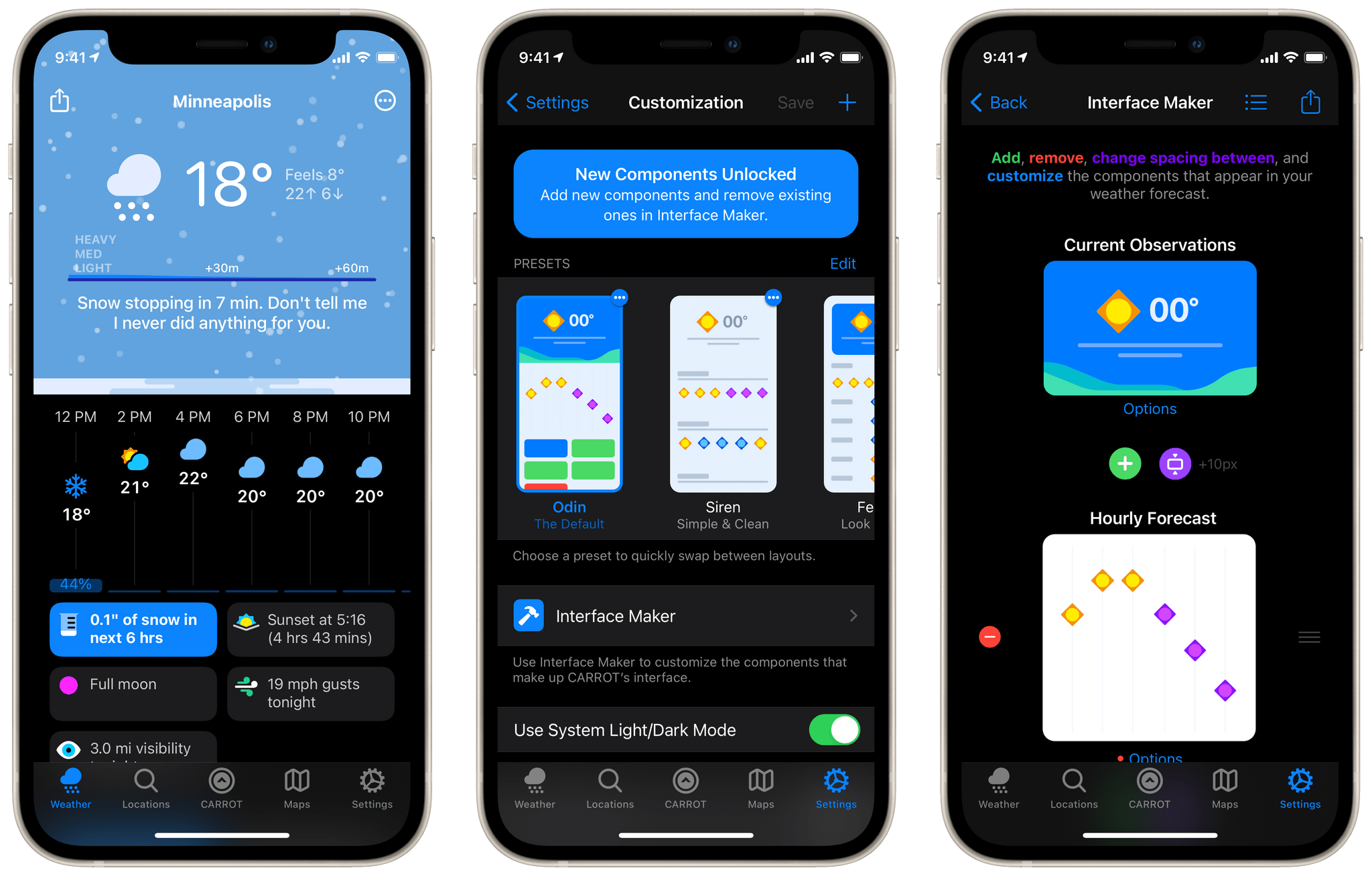
CARROT Weather has been a MacStories favorite for years now. Just last month we named it the Best Watch App of 2020 in our annual MacStories Selects awards. One of the impressive features in CARROT’s Apple Watch app is the ability to customize the interface to display exactly the weather data that you’re interested in. With today’s release of CARROT Weather 5, developer Brian Mueller has brought that same concept to the iOS and iPadOS versions of the app. The major update also includes a host of new icon designs, snarky weather responses, achievements, and fun Easter eggs.
Apple Publishes ‘A Day in the Life of Your Data’ Case Study and Reveals That App Tracking Transparency is Coming in the Spring
Today is Data Privacy Day, and to mark the occasion, Apple has published a case study titled ‘A Day in the Life of Your Data.’ In the accompanying press release, Craig Federighi, Apple’s senior vice president of Software Engineering explains the company’s approach to privacy:
Privacy means peace of mind, it means security, and it means you are in the driver’s seat when it comes to your own data. Our goal is to create technology that keeps people’s information safe and protected. We believe privacy is a fundamental human right, and our teams work every day to embed it in everything we make.
Apple’s efforts to put its customers in control of their data are not new, but as they evolve and expand, so have tensions with other tech industry titans like Facebook. Part of the lastest tensions stems from the fact that as part of the next iOS and iPadOS beta, Apple will begin testing a system that alerts users when an app wants to share data it collects with other apps, websites, and companies. The most common way apps do this is with the Identifier for Advertisers or IDFA, a unique code that identifies your device.
Users can already go into the Privacy section of the Settings app to turn off IDFA-based tracking under ‘Tracking,’ but that requires people to know about the setting and find it. Apple’s new system is similar to other privacy flows throughout iOS in that it displays an alert when an app that wants to use tracking is launched, asking the user to grant it permission.
Facebook and others, whose advertising relies on aggregating data about users from multiple apps and websites and then tying it back to a specific individual, see this as a threat to their business models. Attempting to reframe the issue as one of economics, Facebook argues that the change will hurt small businesses who purchase targeted ads because those ads will no longer be as effective.
The new privacy feature, which Apple calls App Tracking Transparency, comes on the heels of the standardized privacy disclosures the company began requiring from developers with its Fall 2020 OS updates. For apps like Facebook, the disclosures are extensive, but to its credit, Facebook published its disclosures late last year, while Google still hasn’t.
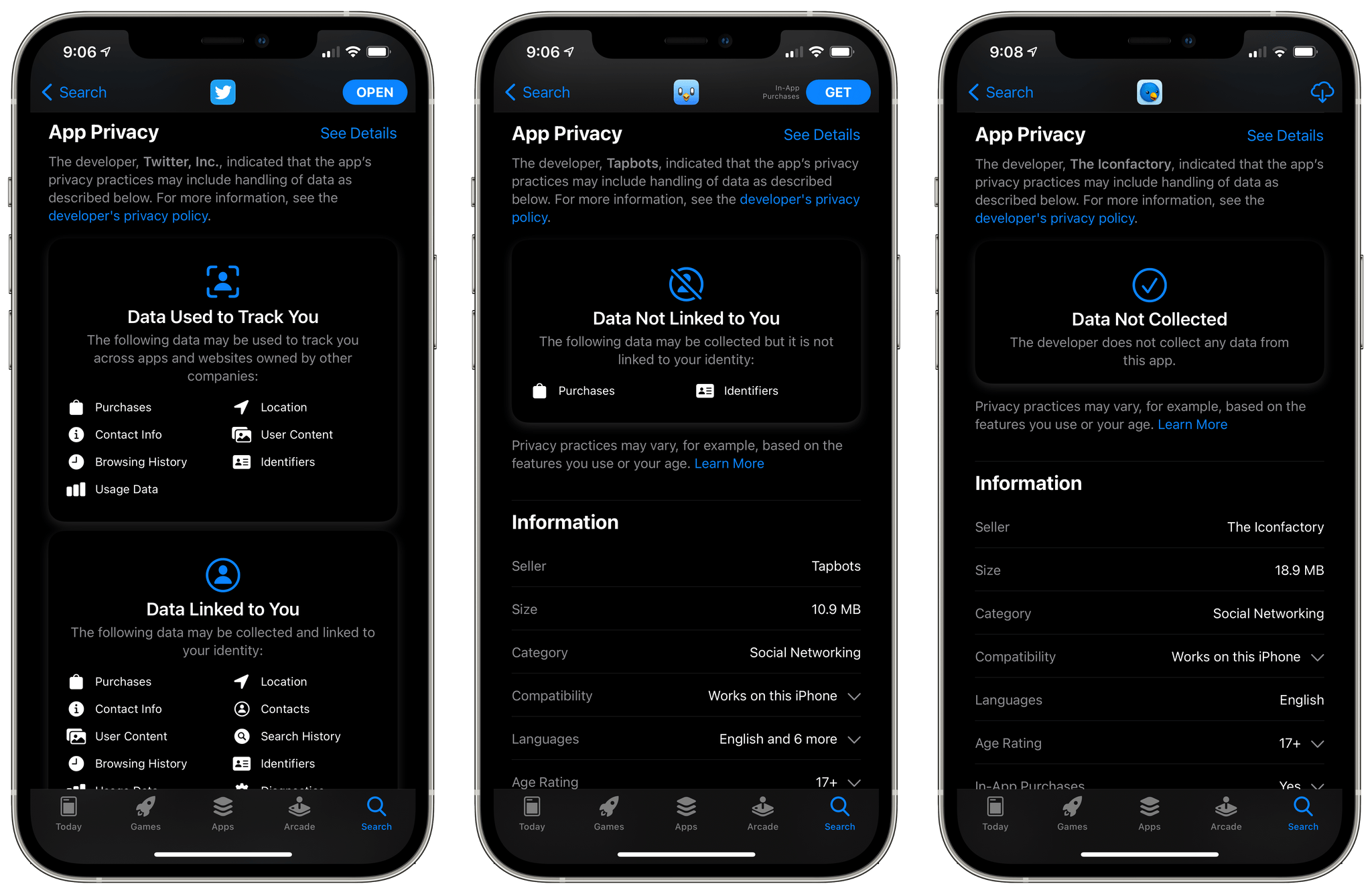
Apple’s App Store privacy labels make it clear to users that third-party Twitter clients collect far less data than the official app, for example.
Apple’s case study is a day-in-the-life hypothetical that follows a father and daughter throughout their day together. The document is peppered with facts about tracking and data brokers, including a citation to a study that says the average app includes six trackers. Most useful, though, is the case study’s plain-English, practical examples of the kind of tracking that can occur as you go about a typical day’s activities using apps.
It’s impossible to create a case study that users who aren’t security experts will understand without glossing over details and nuances inherent to privacy and tracking. However, the study is extensively footnoted with citations to back up the statements it makes for those who want to learn more, which I think strikes the right balance. I’ve had tracking turned off on my devices since it was possible, and personally, I’m glad to see the feature is going to be surfaced for others who may not be aware of its existence.
How Matt Birchler Is Using Hey Email, Almost One Year Later→
Great overview by Matt Birchler on how he’s using Hey for email, almost one year into switching to the service exclusively.
When I was using Gmail and Outlook as the back end for all of my email, I had my pick of the litter when it came to email apps. Apple Mail, Spark, Outlook, Gmail, Airmail, Edison, Blue, Newton, Spike, Polymail…the world was my oyster, and I took part in that game of switching email apps every few months. Spark would release an update and I’d go to it. Then Outlook would do something new and I’d be back there. Then Outlook would have a bug and I’d run to Apple Mail, which would inevitably grow bland and then I’d move back to Spark and the whole cycle would start again.
Was that choice? Absolutely, but was it good for my email? No way.
I switched to Hey for my personal and work email a few months ago (we talked about it in this episode of AppStories), and I haven’t looked back since. The system provided by Hey for managing and organizing incoming email is what sets it apart from the competition, and it’s so good I don’t mind being locked into a proprietary service. Unlike Birchler, I use The Paper Trail a lot and open The Feed less frequently, but I plan on following his suggestion regarding Hey’s widgets by adding a large one to the second page of my Home Screen.
Apple Breaks Records with $111.4 Billion in Revenue for Q1 2021

Apple has just published its financial results for Q1 2021, with the company posting revenue of $111.4 billion. Apple CEO Tim Cook had this to say about the company’s record-setting quarter:
This quarter for Apple wouldn’t have been possible without the tireless and innovative work of every Apple team member worldwide. We’re gratified by the enthusiastic customer response to the unmatched line of cutting-edge products that we delivered across a historic holiday season. We are also focused on how we can help the communities we’re a part of build back strongly and equitably, through efforts like our Racial Equity and Justice Initiative as well as our multi-year commitment to invest $350 billion throughout the United States.
Estimates and Expectations for Q1 2021
As was the case with Q4 2020, Apple did not provide financial guidance for Q1 2021 during its last earnings call due to the ongoing global pandemic. Nonetheless, reportedly strong iPhone sales and a flurry of new products late last year set high expectations among analysts.
Going into today’s call, Yahoo Finance said that:
The Zacks Consensus Estimate for revenues is currently pegged at $102.61 billion, indicating growth of 11.8% from the year-ago quarter’s reported figure.
Moreover, the consensus mark for earnings is currently pegged at $1.39 per share, unchanged over the past 30 days and indicating 11.2% growth from the figure reported in the year-ago quarter.
Graphical Visualization
After the break, we’ve compiled a graphical visualization of Apple’s Q1 2021 financial results.
AppStories, Episode 202 – App Modularity→
Apple Releases OS Updates with Better Music Hand Off for HomePod mini, Improvements to QR Code Scanning and Bluetooth Settings, the Unity Watch Face, and More
Today, Apple released iOS and iPadOS 14.4, HomePod 14.4, watchOS 7.3, which introduce a limited collection of new features along with the usual bug fixes.
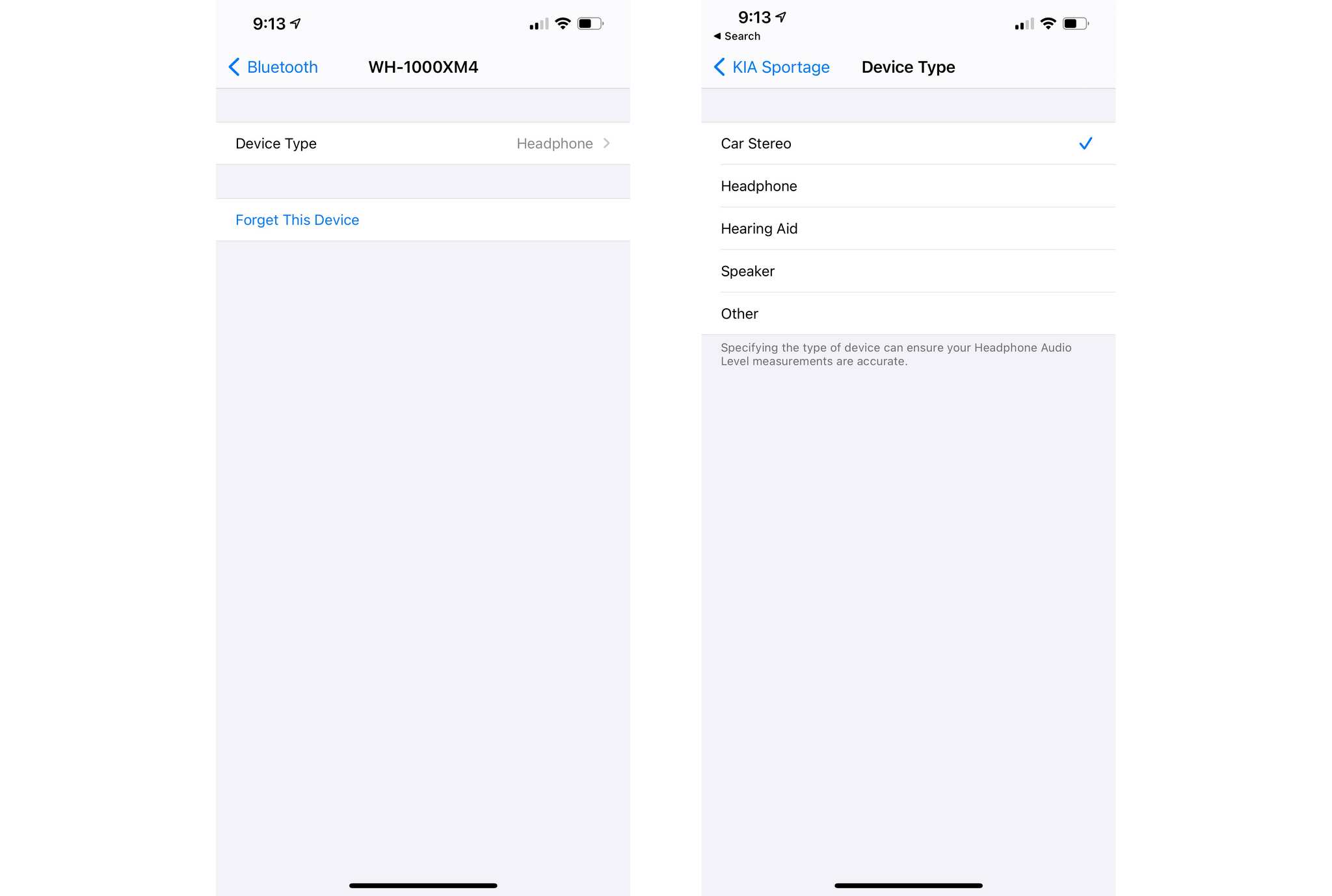
On the iPhone and iPad, the Camera app can now scan smaller QR codes, which is handy for those tiny codes that are often used on product labels. The Bluetooth section of Settings has been updated with an option to identify the type of device connected to your iPhone, so it knows when headphones are connected for the purpose of sending audio notifications.
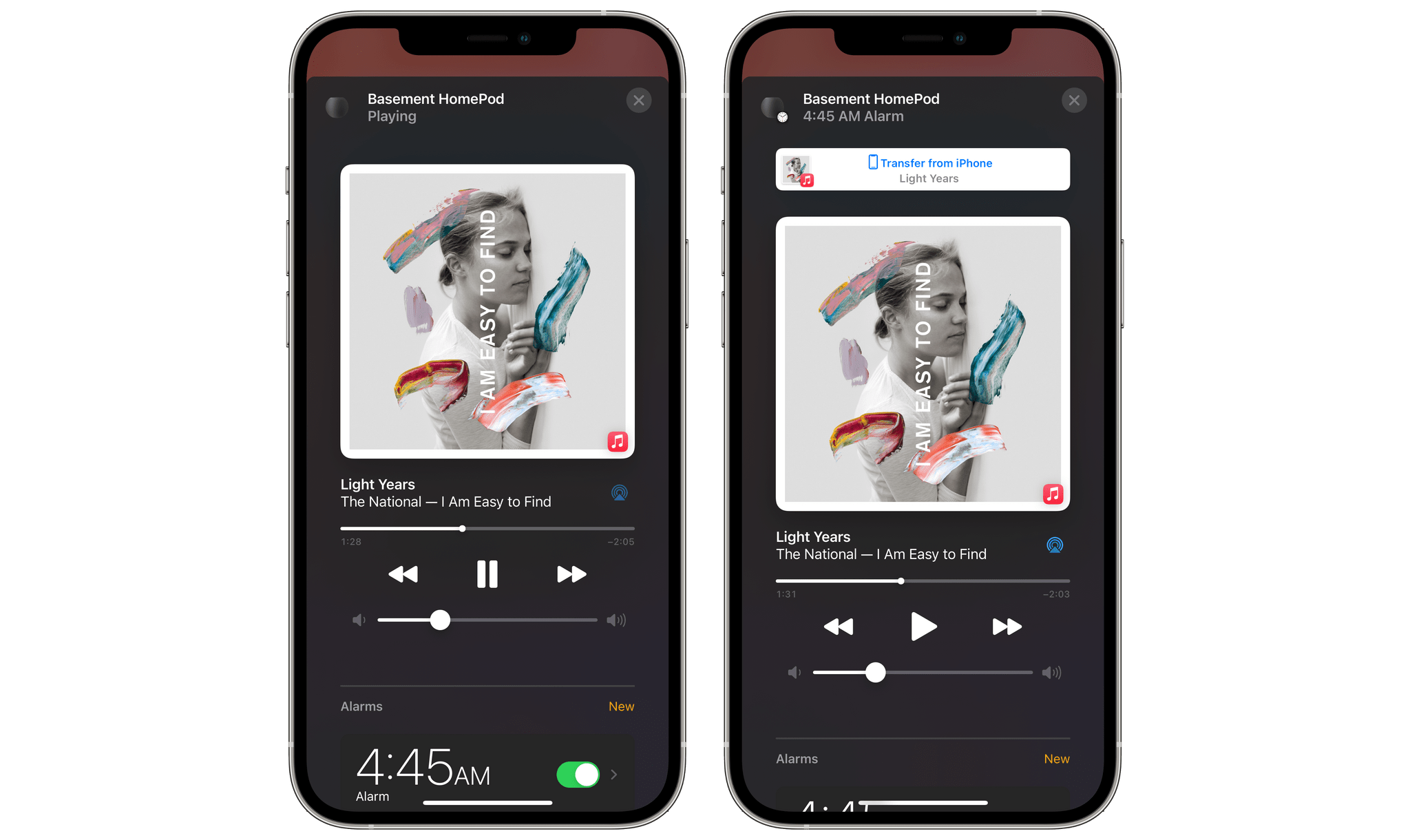
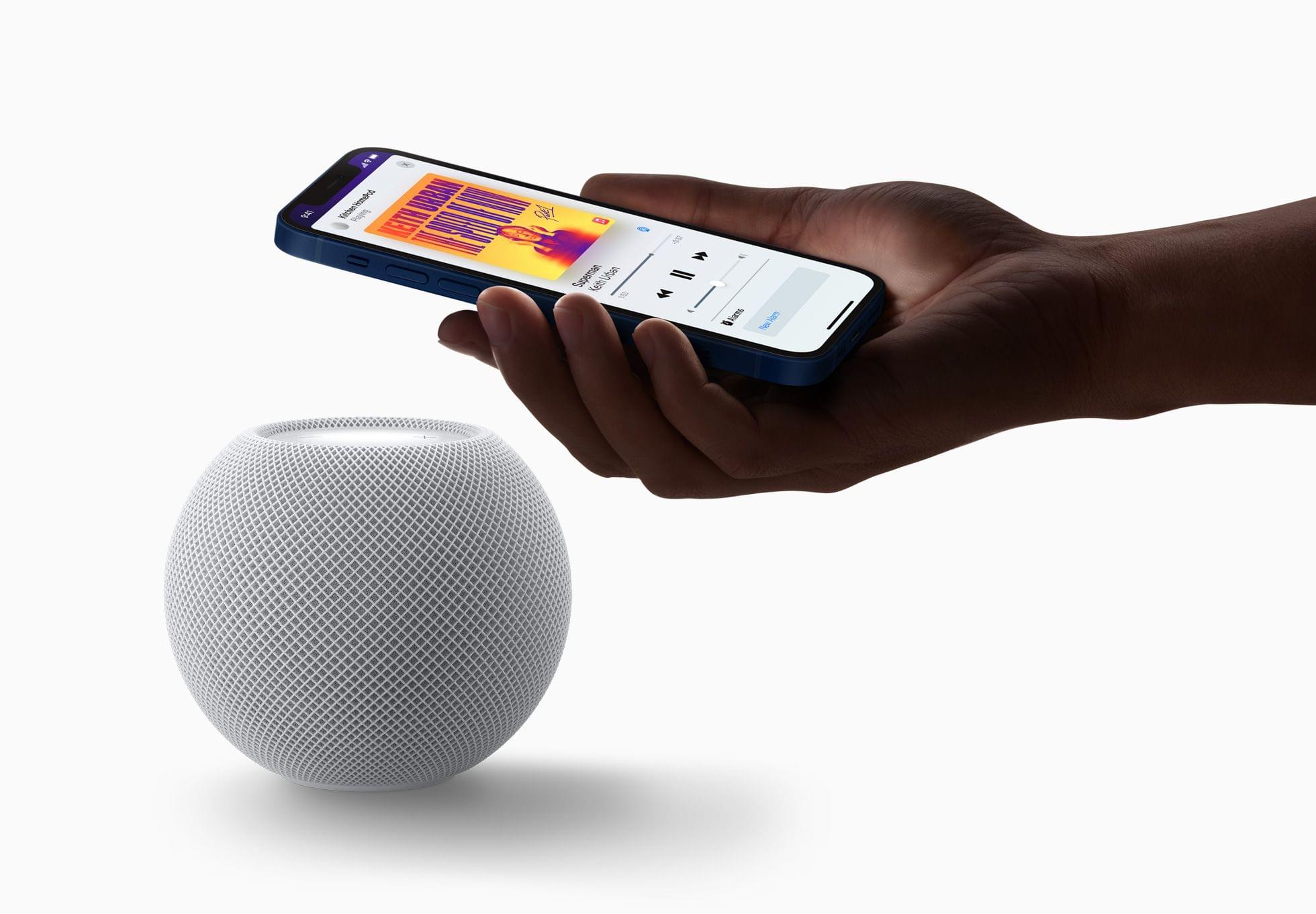
HomePod 14.4 adds a few new features that work in concert with the iPhone’s U1 chip. There is new visual, audible, and haptic feedback when music is handed off from an iPhone to a HomePod mini. The update also provides personalized listening suggestions when an iPhone is placed near a HomePod mini that isn’t currently playing audio. Media playback controls also appear automatically when an iPhone is nearby without having to unlock it first.
I have done some very preliminary testing of the new HomePod mini features and like them a lot. The haptic feedback is a quick slightly sustained vibration that lets you know that the music is being transferred. The animation that slides into view from the top of the screen includes a terrific little animation too. Bring your iPhone close to your HomePod mini again, and a button appears offering to transfer playback back to the iPhone. It’s a good example of how small changes together can make a big difference in the quality of the user experience.
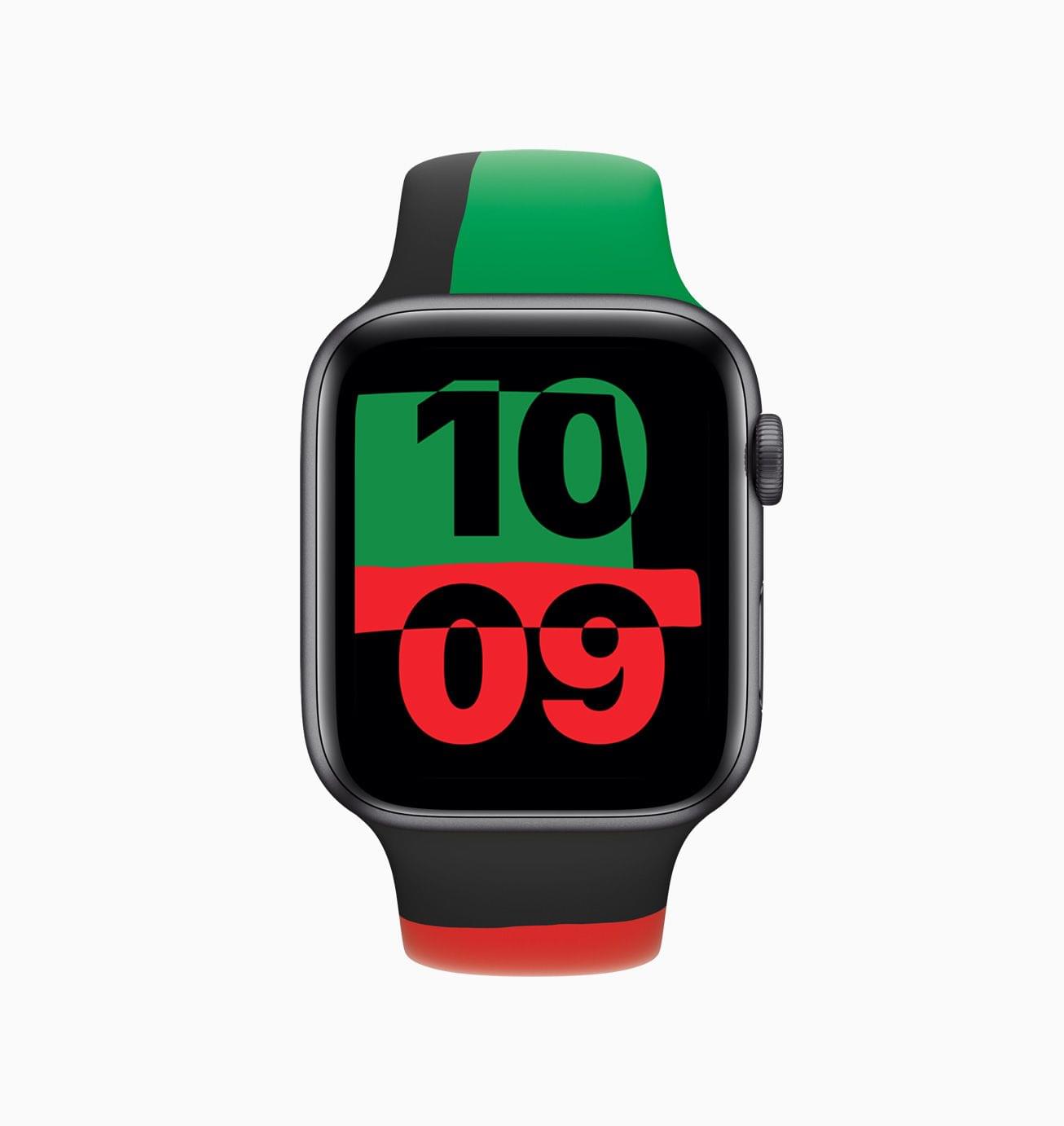
As we reported earlier today, watchOS 7.3 includes the new Unity watch face. The colors of the face are inspired by the Pan-African flag and its shapes change throughout the day as you move. The ECG app has been added in Japan, Mayotte, the Philippines, and Thailand for Apple Watch Series 4 and later. Irregular heart rhythm notifications are now available in those same countries, plus Taiwan too. Apple’s release notes also mention the new Time to Walk feature in the Workout app, but that actually shipped yesterday with a server-side update.
Tweetbot 6 Moves to Subscription Pricing
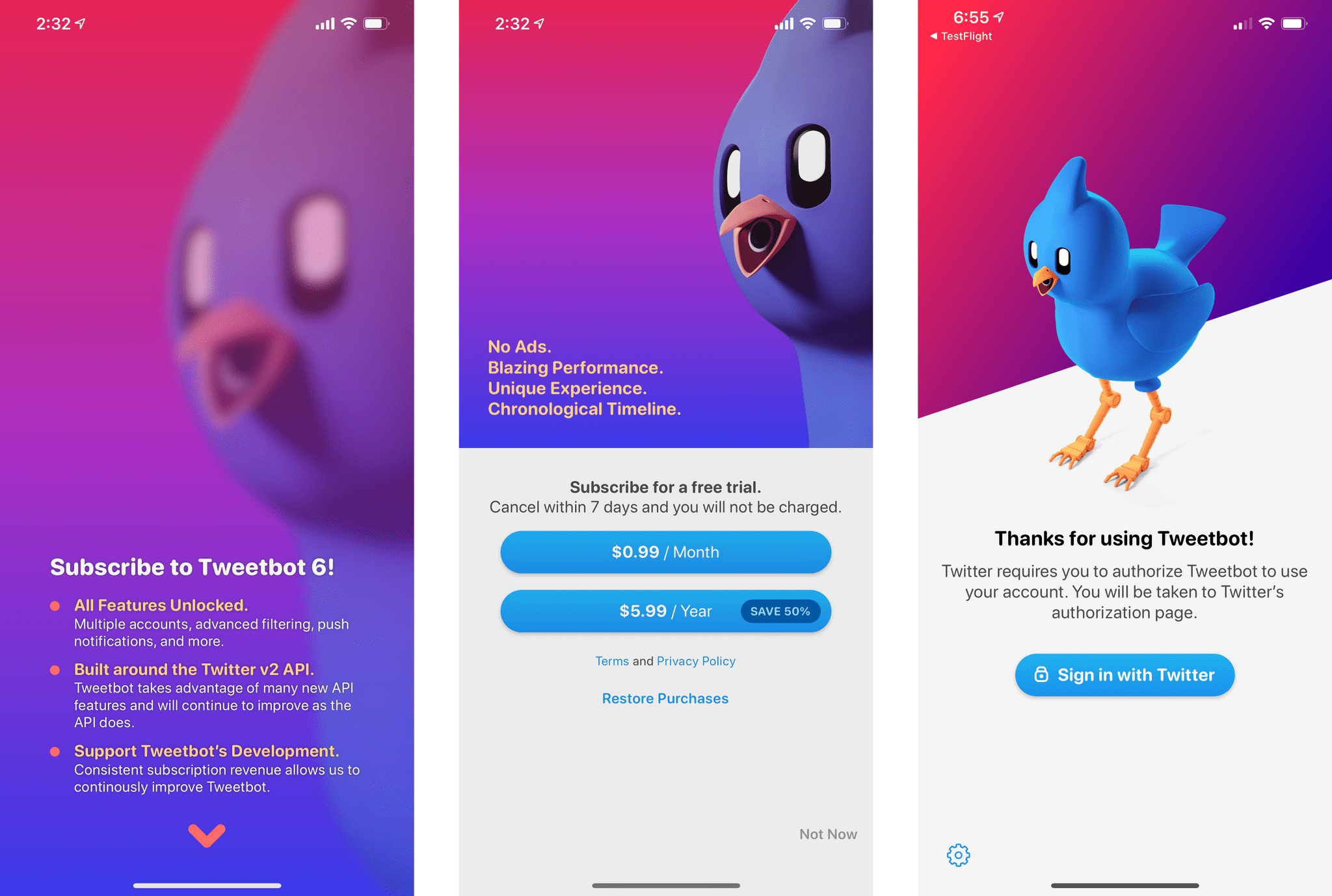
Tapbots, the maker of Tweetbot, has released version 6 of the app, introducing a new subscription pricing model along with a handful of timeline and design updates.
The subscription costs $0.99 per month or $5.99 annually. Many of the features previously available as part of the paid app, including multiple account support, advanced filtering, and push notifications, are now subscription-only features. Tapbots says that subscribers will also benefit from future updates as Twitter expands its third-party APIs and ensure Tweetbot’s continued development. You can still download the app to view your timeline if you’re not willing to subscribe, but the free version is read-only, so it isn’t possible to tweet from it.
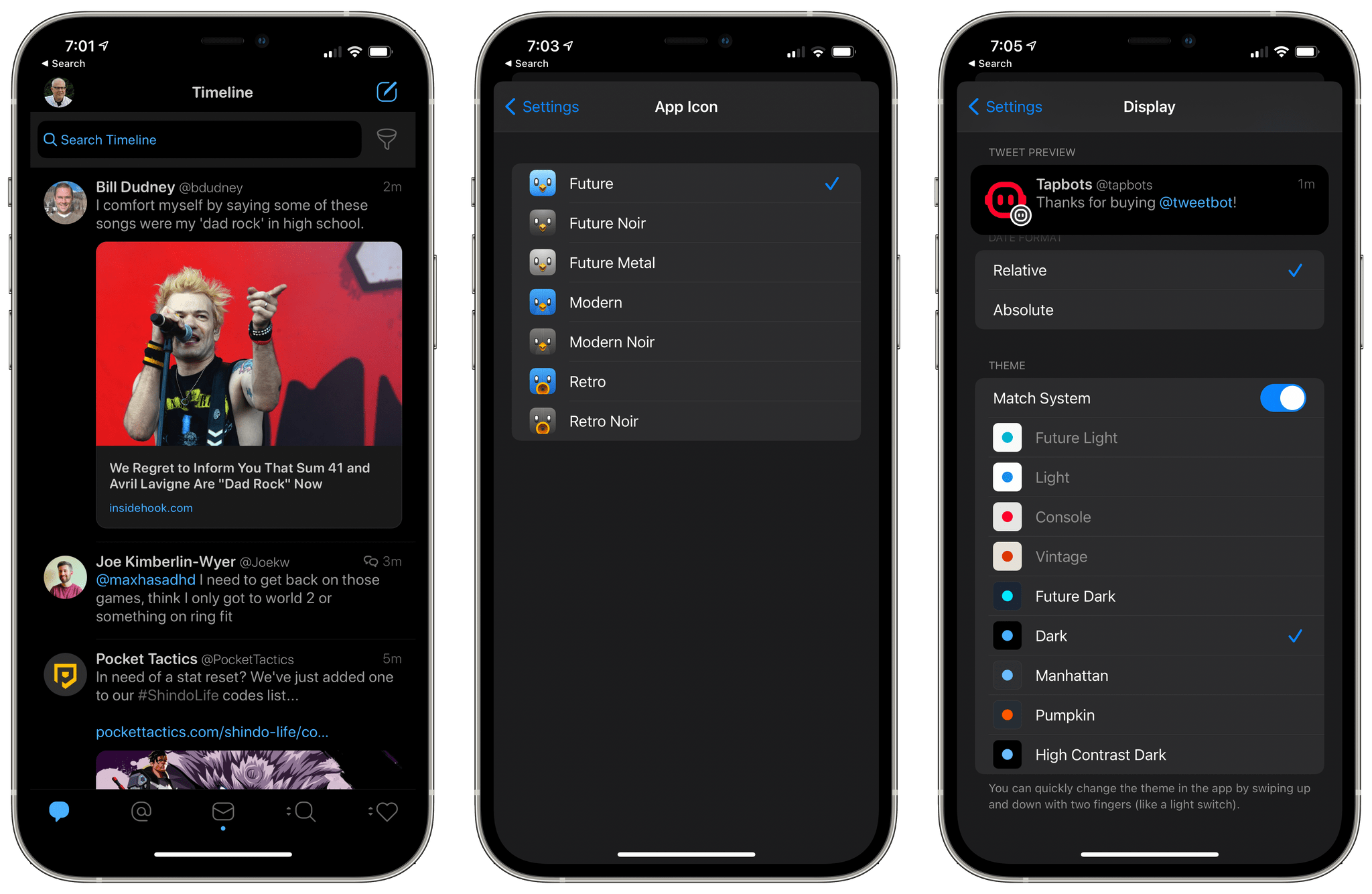
Aside from the new pricing model, Tweetbot 6 has only implemented a handful of new features, including a few changes to the timeline view and some design changes. In the main timeline, you’ll notice more image thumbnails than before. Polls and cards are also visible thanks to the implementation of Twitter’s latest third-party APIs, and there are new dedicated ‘@’ and ‘#’ buttons in the app’s tweet composition sheet.
Tweetbot 6 has implemented changes to the app’s settings too:
- There are three new alternative app icons: Future, Future Noir, and Future Metal, which bear a close resemblance to the Modern versions of the icon
- There are more and different UI themes, including four light versions and five dark versions where previously there were five total
- Dark mode has been extended to the app’s Settings screens
- Chrome and Firefox have been added as browser options for opening links
- Service options for URL shortening, image uploads, and video uploads have been eliminated
The move to subscriptions isn’t easy. No matter how well it is handled, the change upsets a segment of users who aren’t willing to sign up. However, in the long run, a successful transition to subscriptions makes up for lost users with recurring revenue, which I’m sure an experienced development team like Tapbots has considered.
I have no issue with subscriptions conceptually, but they rightly carry the expectation that in return for regular payments, users will receive meaningful, periodic updates. Recognizing this, many developers time the move to a subscription with a substantial app update to start off on the right foot, which Tapbots hasn’t done. Tweetbot’s subscription is primarily based on the promise of future updates. Even though the Tweetbot subscription isn’t expensive, I think Tapbots owes its users more than it has delivered. It’s a shame because Tweetbot remains one of the premier third-party Twitter clients for iOS. Hopefully, the lack of new features in this update will be addressed in subsequent releases.
Tweetbot is available as a free download on the App Store, but a subscription is necessary to send tweets and access other features.