This Week's Sponsor:

Cotypist

Smart Autocomplete for Your Whole Mac


Kindle iOS App Updated, Lets You Add Your Own Files

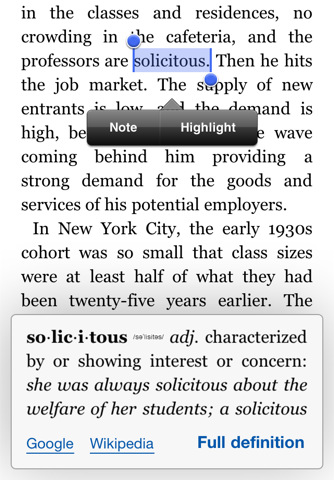
An important update to the official Kindle app for iOS (free and universal for iPhone and iPad) was released earlier today. Version 2.5 of the app adds much requested features that should satisfy all the Kindle users on the iOS platform that have been asking for functionalities such as proper multitasking support and access to the free Internet archive of Project Gutenberg books.

Kindle 2.5 for iOS, in fact, can now download books in the background leveraging iOS 4 APIs and supports thousands of ebooks downloaded through Project Gutenberg. Most of all, the app can now load files from any other iOS app thanks to the “Open in” feature seen in Safari, Mail and any other iPhone or iPad app that can forward files to other applications that can open a specific file type. This means you can now add your own files to the Kindle app, or even better drag & drop files into it using iTunes’ File Sharing. To add books in this way, simply connect your device to iTunes, head over the Apps tab in the device’s info screen, and drag files onto the Kindle section right below the iOS Springboard preview window. The bad news is that, like the actual Kindle, epub books don’t seem to be supported at this time.

Other new features and improvements in this update include bug fixes, a new book indicator and better image zooming. You can get Kindle for iOS for free here.



Zune HD Can Sync To Mac While Windows Phone 7 Controls iTunes

While Microsoft isn’t officially advocating the Zune HD march onto OS X, a simple tweak to your Windows Phone 7 Connector software for OS X can add syncing capability in no time. With a little tweak of the .plist file, nate8nate over at Zuneboards discovered this terminal trick:

defaults write com.microsoft.Windows-Phone-7-Connector ZuneEnabled -bool YES

Nate was able to sync pictures and movies to his Zune HD – you might want to give it a try if you’re tired of syncing to that unused Windows box.

If you’ve upgraded to a Windows Phone 7 device, you might be happy knowing your iTunes playlists are now controllable over wifi. This isn’t an official Microsoft implementation, bur rather something you can add for $1.99 on the Marketplace. The WP7 Remote app not only has a pretty nice icon, but also turns your iTunes library into something terrible unique (or dare I say, Zune like?).

[via Engadget 1, 2]


Who Wouldn’t Want To Perch This Wireless Speaker?

Interested in a two-piece wireless speaker and charger that looks like half a zen-birdhouse? Check out the Perch Mobile Wireless Speaker from Quirky. A two piece design elegantly flips around so you can stand it up, lay ‘er down, and stream your music through bluetooth through the little guy. It includes an AC Charger and allows you to dock, erm, Perch your iPhone for a makeshift bed stand, perfect for something like Rise if you’re not into the default alarm clock. It’s also compatible with Androids, Windows phones, and Blackberries, but face it – it doesn’t look as cool without an iPhone nested in its maw. It’s kind of pricey at $179.99 during pre-order (it’ll be $199.99 once it launches), and we think for the commitments needed it’d have been better left to Kickstarter.


MacStories Product Review: Powermat Wireless Charger for iPhone

To inaugurate our new series of hardware and gadget reviews, I’d like to cover a product that, in the past months, has completely changed the way I carry my iPhone around and charge it. The Powermat, a combination of case and charging mat for the iPhone we first covered in October, allows you to charge your iPhone wirelessly, without any cable, through a case you’ll have to put your iPhone 4 into.

Courtesy of the great folks at Powermat, I was sent a single mat, a receiver case for the iPhone 4 and another mat that can charge up to two devices on a single surface. So far, my experience with the charging system has been very good; then only issues I ran into involved some kind of difficulty trying to find the “right spot” on the 2x mat. But overall, I do believe the Powermat is one of the most innovative, powerful and, why not, cool gadgets you can buy for your iPhone right now. Read more


The Verizon iPhone Is For App Lovers

Let’s state the obvious, Fink. Geez. I’ll be blunt: this is an, “Should I keep my Android phone or get the new iPhone on my Verizon contract?” post. Specifically, I’m talking to my fellow Android owners who’re on the fence about switching to the Verizon iPhone.

I’ve been sitting on this article all day between five thousand or so words of rant material, iPhone gawking, Android squawking, and just about every title under the sun that would attract more iPhone and Android fanboy rage than my little heart could handle. Good grief! I told Federico that this piece could do me in for a few days – this one was hard to write. “Ticci!” I said. “This is too controversial for the Internetz! They’ll explode!” After much deliberation I decided to focus on one specific aspect of Android and the iPhone, instead of comparing the platforms as a whole (there’s simply too much to talk about). After dramatically toning down the content, today’s topic is all about apps and the phones that have them, but which one is better for you?

As someone on Verizon who’s had a year long matrimony with an Android… do you dare click the read more link? I think you should.

Read more


Apple Seeds Xcode 4 Preview 6 to Developers

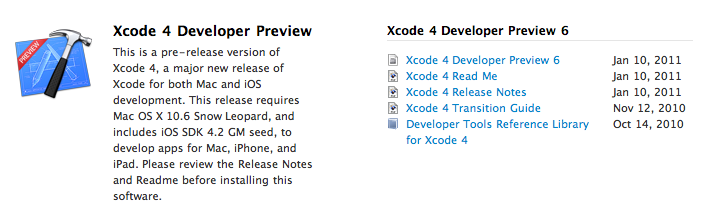
A few minutes ago Apple seeded a new Xcode 4 preview build to developers, which is available in the Mac  and iOS Dev Centers. The new version , labelled Developer Preview 6, adds a number of features and enhancements over the previous preview build, which was released in November. Xcode 4 is a major new version of Apple’s development suite which sports lots of new features and a new single-windowed UI. The first version of Xcode 4 preview was released during the WWDC in June, the second build was seeded in late July, Preview 3 was made available on September 2, Preview 4 was released in October.

Check out the release notes below. Read more


Steve Jobs and Rupert Murdoch To Unveil “The Daily” Next Week?

According to Yahoo’s The Cutline, Steve Jobs will join Rupert Murdoch to unveil the highly anticipated iPad-only digital newspaper, The Daily, at a media event in San Francisco later this month:

Rupert Murdoch will unveil News Corp.’s much-anticipated iPad newspaper onstage this month with Apple chief executive Steve Jobs, The Cutline has learned.

The two media moguls will appear together at the San Francisco Museum of Modern Art, according to a source familiar with preparations for the event. The launch date is expected to be Jan. 19, but that may change.

In December, rumors surfaced that The Daily was set to debut, or at least announced, in the “week of January 17”. The same report by All Things D suggested that Apple may release a new build of iOS to include the rumored app subscription service, the same feature we heard was once set to be made available in December.

Details on News Corp.’s “The Daily” leaked in the past months pointed to the iPad-exclusive nature of the publication, and the fact that Murdoch had assembled a “super-team” of 100 journalists to work on the newspaper. The Daily, according to the rumors, should come with a new iOS functionality that will allow iPad users to get new content every day automatically, in the background, directly from The Daily’s servers.


Camera Genius 3.0: New Design, More Social, Lots of DSLR Love

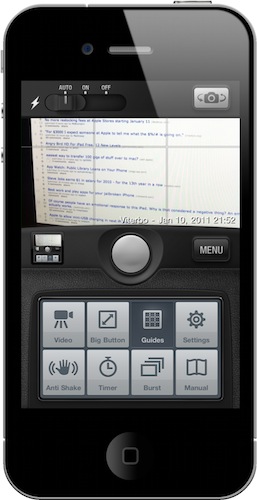
Camera Genius is a photo app for the iPhone that has been around for months, years now I believe. Featured on the New York Times, CNET and just about any other major publication back when photo-taking apps where the novelty on iOS, the app slowly fell back in the garage of App Store apps as more lightweight, beautiful and social applications like Camera+, Hipstamatic or Instagram were released. But the developers of Camera Genius, strong on the sales figures the app had generated, went back to work and crafted Camera Genius 3.0, which is a complete revamp of the original app and it’s available at $0.99 in the App Store.

On first sight, Camera Genius 3.0 looks like another take on the old Camera+ DSLR interface, just when Camera+ itself has ditched the faux canera design with the much-acclaimed 2.0 version. Still: Camera Genius has a DSLR-like design and allows you to choose between two display themes, although I left the default one untouched. Just like in the past, Camera Genius is an app to take photos with more functionalities to play around with, such as shake control, timer, guides and burst mode. Read more


QuickBins: Call and Email Your Contacts via Drag & Drop

In these past months on MacStories, we have covered two apps that aim at becoming replacements for the standard Apple Phone app: Favorites and Dialvetica. By leveraging the APIs of iOS that allow for 3rd party apps to access your contact’s list, these apps are focused on letting you quickly access your favorite contacts and either call them, text them or email them with a few taps. Favorites and Dialvetica are not really focused on the number dialing part of the phone experience (although the latest Dialvetica update introduced a dialpad), they’re rather simple interfaces to get to your most contacted friends and do stuff. Shortcuts, that is.

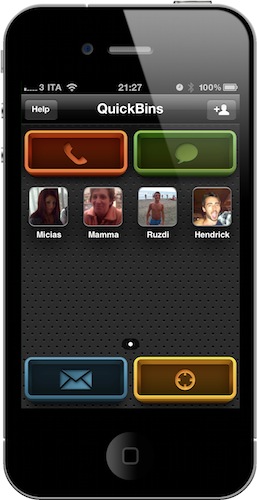
QuickBins, a free iPhone app by Chalk, is very similar to Favorites, but it’s based on drag & drop. The app displays your favorite contacts (which you’ll have to add manually) as profile pictures on a grid, and you can even create multiple pages of contacts. As you fire up the app, you’ll notice 4 big buttons at each corner: those are shortcuts to initiate a call, send a text message, an email and check on a contact’s address. How do you activate these commands? Simple: you take a contact, and you drop it on a button. QuickBins will then forward you to an external app (third-party software can’t send calls or text without loading Apple’s stock apps) to perform the action.

That’s it. QuickBins will soon introduce support for Skype, Twitter and Google Voice, it’s free and ad-supported, but you can remove the ads with a $2.99 in-app purchase. QuickBins also happens to have a beautiful UI design that makes it a real pleasure to tap on its icon and look at the dashboard.

QuickBins is available for free here.