Apple Seeds Xcode 4 Preview 6 to Developers

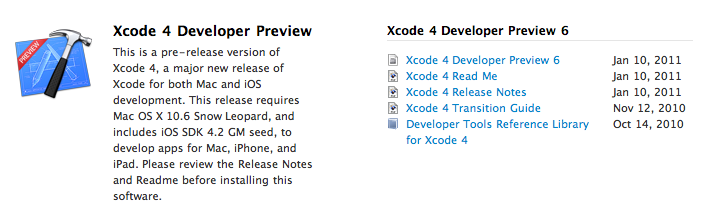
A few minutes ago Apple seeded a new Xcode 4 preview build to developers, which is available in the Mac  and iOS Dev Centers. The new version , labelled Developer Preview 6, adds a number of features and enhancements over the previous preview build, which was released in November. Xcode 4 is a major new version of Apple’s development suite which sports lots of new features and a new single-windowed UI. The first version of Xcode 4 preview was released during the WWDC in June, the second build was seeded in late July, Preview 3 was made available on September 2, Preview 4 was released in October.

Check out the release notes below. Read more


Steve Jobs and Rupert Murdoch To Unveil “The Daily” Next Week?

According to Yahoo’s The Cutline, Steve Jobs will join Rupert Murdoch to unveil the highly anticipated iPad-only digital newspaper, The Daily, at a media event in San Francisco later this month:

Rupert Murdoch will unveil News Corp.’s much-anticipated iPad newspaper onstage this month with Apple chief executive Steve Jobs, The Cutline has learned.

The two media moguls will appear together at the San Francisco Museum of Modern Art, according to a source familiar with preparations for the event. The launch date is expected to be Jan. 19, but that may change.

In December, rumors surfaced that The Daily was set to debut, or at least announced, in the “week of January 17”. The same report by All Things D suggested that Apple may release a new build of iOS to include the rumored app subscription service, the same feature we heard was once set to be made available in December.

Details on News Corp.’s “The Daily” leaked in the past months pointed to the iPad-exclusive nature of the publication, and the fact that Murdoch had assembled a “super-team” of 100 journalists to work on the newspaper. The Daily, according to the rumors, should come with a new iOS functionality that will allow iPad users to get new content every day automatically, in the background, directly from The Daily’s servers.


Camera Genius 3.0: New Design, More Social, Lots of DSLR Love

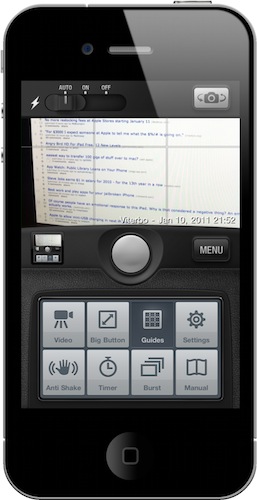
Camera Genius is a photo app for the iPhone that has been around for months, years now I believe. Featured on the New York Times, CNET and just about any other major publication back when photo-taking apps where the novelty on iOS, the app slowly fell back in the garage of App Store apps as more lightweight, beautiful and social applications like Camera+, Hipstamatic or Instagram were released. But the developers of Camera Genius, strong on the sales figures the app had generated, went back to work and crafted Camera Genius 3.0, which is a complete revamp of the original app and it’s available at $0.99 in the App Store.

On first sight, Camera Genius 3.0 looks like another take on the old Camera+ DSLR interface, just when Camera+ itself has ditched the faux canera design with the much-acclaimed 2.0 version. Still: Camera Genius has a DSLR-like design and allows you to choose between two display themes, although I left the default one untouched. Just like in the past, Camera Genius is an app to take photos with more functionalities to play around with, such as shake control, timer, guides and burst mode. Read more


QuickBins: Call and Email Your Contacts via Drag & Drop

In these past months on MacStories, we have covered two apps that aim at becoming replacements for the standard Apple Phone app: Favorites and Dialvetica. By leveraging the APIs of iOS that allow for 3rd party apps to access your contact’s list, these apps are focused on letting you quickly access your favorite contacts and either call them, text them or email them with a few taps. Favorites and Dialvetica are not really focused on the number dialing part of the phone experience (although the latest Dialvetica update introduced a dialpad), they’re rather simple interfaces to get to your most contacted friends and do stuff. Shortcuts, that is.

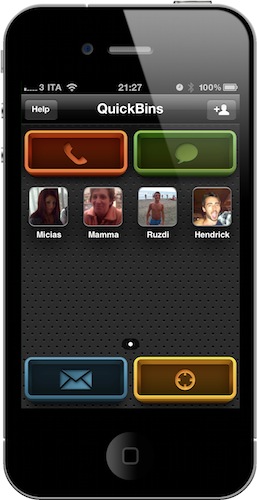
QuickBins, a free iPhone app by Chalk, is very similar to Favorites, but it’s based on drag & drop. The app displays your favorite contacts (which you’ll have to add manually) as profile pictures on a grid, and you can even create multiple pages of contacts. As you fire up the app, you’ll notice 4 big buttons at each corner: those are shortcuts to initiate a call, send a text message, an email and check on a contact’s address. How do you activate these commands? Simple: you take a contact, and you drop it on a button. QuickBins will then forward you to an external app (third-party software can’t send calls or text without loading Apple’s stock apps) to perform the action.

That’s it. QuickBins will soon introduce support for Skype, Twitter and Google Voice, it’s free and ad-supported, but you can remove the ads with a $2.99 in-app purchase. QuickBins also happens to have a beautiful UI design that makes it a real pleasure to tap on its icon and look at the dashboard.

QuickBins is available for free here.


This Lego iPhone Case Won’t Brick Your Phone

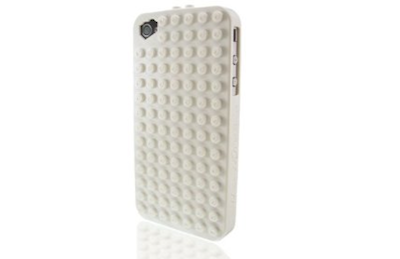
Of all the iPhone 4 cases I’ve seen in these past months, the SmallWorks BrickCase has to be the most original, if not craziest, one. In true old-style fashion, the BrickCase is a Lego-compatible iPhone case that, according to Daring Fireball’s John Gruber, feels good in your hands and also provides good entertainment for the most loyal Lego fan.

The cases are available on Amazon in White, Black and Clear versions at $19.99. If you’re a Lego guy, I guess you know what you have to do.


Notificant Delivers Notifications To All Your Macs, Through The Cloud

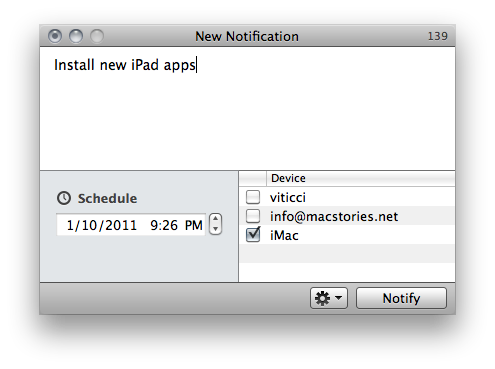
Notificant by Caramel Cloud is a new app available exclusively on the Mac App Store that provides an easy, fast and reliable solution to create and send notifications to all your personal Macs and a selected email address. The app is deeply tied to a cloud infrastructure – as the developers’ name suggests – and it allows you to forward as many notifications you want, at any given time. It’s one of those apps that doesn’t reinvent anything (notification apps have been around for a while, and we recently reviewed Alarms for Mac) but takes a simple approach and throws the advantages and speed of the cloud in the mix.

Basically, Notificant is a simple tool to sync reminders in the cloud. The app takes care of all the sync stuff and forwarding to your personal devices, you just need to write down entries, hit save and forget about it.

Read more


Google Goggles for iPhone Gains Ad Recognition and…Sudoku

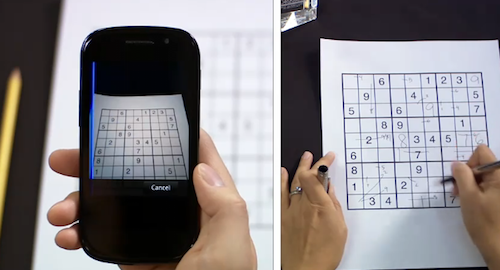
Earlier today, the Google mobile team announced an update to their official Goggles application for Android and the Goggles component in the Google Mobile App for iPhone. While Android users get advanced barcode scanning in version 1.3 of the app, printed ad recognition and Sudoku puzzle solving have been enabled both on iOS and Android. Yes, that’s right: as part of the Google Goggles labs experiments, the app can now solve Sudokuy puzzles. Just take a clear picture and let Goggles provide some help.

As for ad scanning, Goggles for iPhone can now take a look at any printed ad and return web search results for that brand or product.

Goggles will recognize print ad and return web search results about the product or brand. This new feature of Goggles is enabled for print ads appearing in major U.S. magazines and newspapers from August 2010 onwards. This feature is different from the marketing experiment that we announced in November. We’re now recognizing a much broader range of ads than we initially included in our marketing experiment.

The official Google iPhone app doesn’t seem to be updated yet, the new version should be propagating in iTunes in the next hours. In the meantime, check out the promo video for Sudoku support in Google Goggles below. Google Goggles for iPhone was launched in October as part of the Google mobile app. Read more


Little List Is The Simplest GTD App Ever Made

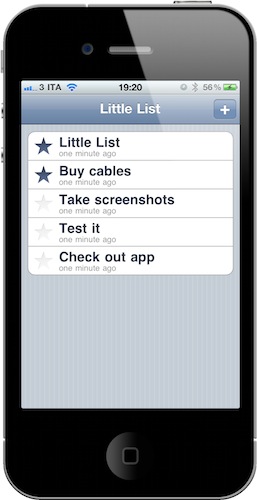
…Or maybe it’s not really a GTD app at all. Little List is an iPhone app developed by Caleb Thorson, the same guy behind the Trickle Twitter client we reviewed here. And just like Trickle, Little List is a minimal, elegant and focused app that takes a simple approach at a complex system: getting things done. Instead of providing tags, folders, projects and contexts, Little List is, well, a simple and clean list of things you have to do.

Many apps in the App Store have tried to go extremely simple against the most fundamental GTD principles. Little List, however, has a cool trick up its sleeve: it’s got yet another implementation of Loren Brichter’s “Pull to refresh”, but instead of refreshing, the gesture sorts items. The command is, in fact, called “Pull to sort”. So what do you sort? Normal items and starred ones. You can create a new entry by tapping on the + button and start typing; if you have important tasks you’d like to highlight, you can star them with an additional tap. “Pull to sort” will put the starred items on top.

Little List is as simple as it gets. It’s available at $0.99, it doesn’t have any kind of OTA sync – it doesn’t have any kind of anything, actually. It’s just a list, with starred items. And with a nice icon. Give it a try if you’re looking for a different take on aggregating your to dos.