This Week's Sponsor:

Cotypist

Smart Autocomplete for Your Whole Mac


Hipstamatic Update: Faster Photo Organization, Camera Bag

It is no secret that Instagram, the popular image sharing service, has been collecting an incredible user base lately. With more than 2 million active users and commercial brands jumping on board to promote their products through photos, Instagram has become many people’s choice when it comes to applying quick and neat effects to photos snapped with an iPhone, ready to be shared online.

But Hipstamatic, another popular iPhone app that’s been around for years and was featured on publications such as The New York Times, is not standing still. Hipstamatic allows you to apply effects to photos and share them on your favorite social networks, but it’s more geared towards “pro” users with a quite complex interface that’s based on the concept of changing films, lenses and flashes. Unlike Instagram, Hipstamatic really wants to put a vintage camera in your hands, with all the options that come with a real camera. The latest update to the app, which went live in the App Store last night, aims at fixing many of the issues with “complicated UI” by providing faster photo snapping and organization, a camera bag menu to easily sort your virtual camera accessories.

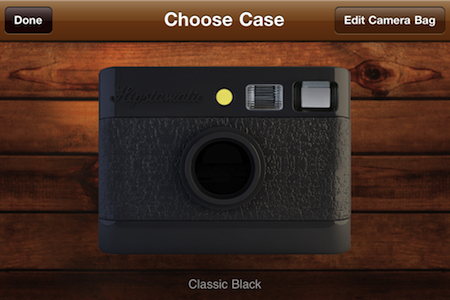
Hipstamatic 2 (the iTunes page says version “200”) adds a Camera Bag system that lets you organize the films, flashes and lenses you want to take with you all the time. It’s a simple list that helps along with getting exactly the items you want in your Hipstamatic. This may come in handy if you’ve always hated the fact that the app presents a long list of accessories that can’t be disabled / rearranged. Now it feels much better and it’s easy to use.

Simplicity was also the main reason why the developers added a “Quicksta Snap film queue system” that processes images in the background as you shoot, allowing you to take 9 images in a row without waiting for each one to finish. iOS 4 is required for this feature. Last, major improvements went into the Hipstamatic market – HipstaMart – which is the store embedded into the app that you can use to acquire new lenses, films and flashes as in-app purchases. New packs are offered, the interface is much cleaner now.

Overall, we’re very satisfied with this Hipstamatic update. The app is faster, easier to use and has more options than ever – yet it doesn’t overwhelm you like before. Check it out here.



fring Update Brings fringOut, Allows Cheap Calls to Landlines and Mobiles

In its latest update, the iPhone app fring which allows instant messaging and VoIP calls between users has added the ability to call people on regular landline or mobile numbers. The new feature, fringOut isn’t free but the rates are fairly competitive starting at 1c a minute for users in the US and UK and users can still call other Fring users at no cost.

Rates vary from country to country so be sure to check out the full list of rates, but the service should work from any country, but be careful to note that calls are charged in one-minute increments. The service also currently does not send SMS messages and calls cannot be made to premium, toll-free or emergency numbers.

For more information visit the fringOut website.


iPhone Exploit Puts Passwords At Risk Within Minutes

German researchers have demonstrated the ability to reveal passwords stored in a locked iPhone in six minutes and without needing to crack the passcode. The attack targets Apple’s password management system known as keychain and is based on existing jailbreak exploits that gives the attacker wide access to the iPhone’s internal data.

Once jailbroken, the researchers installed an SSH server on the iPhone and install a keychain access script. This keychain access script utilizes functions that are built within the phone to access passwords and other data stored in keychain which is then outputted to the attacker. For a demo of the exploit,  jump the break.

Read more


More Evidence of iOS Gaming on the Apple TV Unearthed, Online Multiplayer too?

Since the Apple TV was revised last year with an iOS backend there has been ample speculation that Apple would eventually allow users to run apps and games and Engadget has today reported that some code in iOS 4.3 beta 3 further backs up that speculation. More specifically, the uncovered code references “ATVGames” and “ATVThunder” which also point to leaderboards, a controller, a way to schedule games and a storefront.

Two other strings were particularly noteworthy; “com.apple.appletv.play.live.thunder” and “.play.archive.thunder”. No one is really sure what they fully mean but as Engadget points out, the AppleTV is limited to 8GB’s of storage which is admittedly fairly minimal possibly suggesting that “archive” or “live” could mean streaming games or multiplayer. Engadget’s source also comments that  “OpenGL is mature and thoroughly implemented enough that streaming low bandwidth data and computing locally could happen”.

Read more


Journler Now Open Source, “Per Se” To Be Successor

Philip Dow, unhappy with the current offerings of journaling applications (including his own Journler) for OS X, has opened up the popular diary app over at Sprouted as a complete Xcode project. Journler was closed over a year ago, leaving many dissatisfied customers in its wake. Looking to finally put Journler to a good end, Philip has reluctantly opened up the source code to the public in an effort to rekindle development company Sprouted.

With this rekindling comes a new and improved journaling application dubbed Per Se, which looks stunning if not bold from this first sneak peek. The end goal is to create a realistic journaling experience on the desktop, literally recreating the page metaphor as you write in an open book. Shown in the screen grab above, Per Se includes super fast calendaring, bookmarking, searching, and a tags feature so your records are never lost. We like the developer’s approach in creating an untraditional experience for desktop users, but we have to ask our readers: would you trade a text editor or alternative journaling application for Per Se’s beautiful paper interface?

[via Journler Blog]


OmniOutliner for iPad Sneak Peek

We’ve already covered the plans of the Omni Group for 2011: a huge update to OmniFocus and OmniPlan, deeper cloud integration with the deployment of the Omni Sync Server in multiple applications and the arrival of outlining and text editing app OmniOutliner on the iPad. A few minutes ago, the Omni Group updated its official Vimeo channel to give a sneak peek of the work-in-progress build of OmniOutliner for iOS, which was demoed at Macworld a few weeks ago.

OmniOutliner for iPad, just like the Mac version, will make it easy to capture ideas and structure them hierarchically with drag & drop, multitouch integration and the possibility to nest as many levels as you need with gestures. Users will be able to apply custom styles to text through a popover menu, or styles to entire rows and multiple rows at the once. It sounds very intriguing. OmniOutliner for iPad, according to the Omni Group, will bridge the gap between a word processor and a spreadsheet app.

Frankly, we can’t wait to try out the app and see if the Omni Group manages to pull out a complete reinvention of OmniOutliner like they did with OmniFocus on the iPad. Check out the video below in its HD glory. Read more


BBC iPlayer For iPad Now Available In UK Store

As previously reported, the official BBC iPlayer app for the iPad has launched today in the App Store. Sadly, iPlayer is only out in the UK for now, and it looks like it will stay there for a while until BBC figures out a subscription method for users outside the United Kingdom.

iPlayer for iPad puts BBC’s TV and Radio programs directly on your iPad for easy access and consumption. The app has been entirely written with Apple’s API and Cocoa Touch technology – it’s a native port of the iPlayer experience for the iPad. You can watch TV and listen to radio, manage your favorite shows and episodes through a Favorite list, browse upcoming programs from BBC. The design is really clean and elegant.

BBC iPlayer is available here, for free. [iTunes via 9to5mac]


Twitterrific 4 For Mac Review

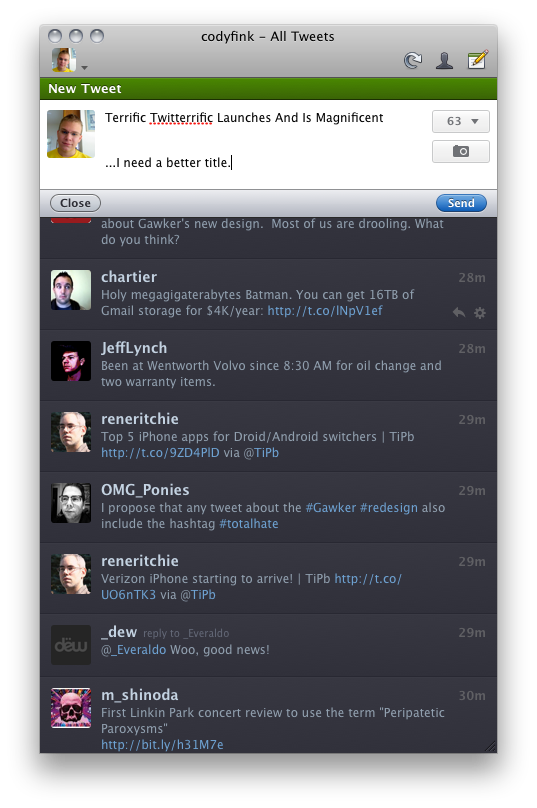
My first exposure to Twitterrific was when MacHeist casually offered Ollie as part of their first nanoBundle, alongside great applications such as WriteRoom and TinyGrab. While the third version quickly grew outdated in part because of Twitter’s continual feature growth and the IconFactory’s focus on providing parity between iPhone and iPad iterations, Ollie remained perched in my menubar for quite a while thanks to its minimal HUD interface. It was this Aqua-less client that faded into the background as I went about my other tasks that was supposed to be a permanent mainstay on my MacBook. I loved everything about it despite criticisms of it being ugly or lacking features, and if I wasn’t as vigorous on Twitter as I am today it would still be perfect for simply reading the latest incoming tweets. Though times changed, and I shelved my favorite mascot for Echofon while Tweetie garnered droves of followers in its presence.

While the OS X version of Twitterrific remained seemingly stagnant, the IconFactory made a rather large push into the Twitter realm with the iOS versions we’re familiar with today. Starting with the iPhone, the IconFactory practiced bringing a familiar experience across mobile devices by simplifying how we interact with Twitter. There is no excess interface or useless presentation of information: the IconFactory replaces Twitter’s originally dull and now confusing web interface with an inline, color-coded approach whose design is recognizable across the Apple community. Macworld named Twitterrific the ‘Twitter Client of the Year’ in 2010’s App Gem Awards, and you can bet the IconFactory would take their award winning design to the desktop. Steve Jobs wasn’t kidding when he said everything was coming, “Back to the Mac.”

Today, I’m glad to say that with the launch of Twitterrific 4 for OS X, it has once again reclaimed dominance on my Coca-Cola bottled desktop.

Read more