


If you didn’t already know, we’ve set up a new twitter account for Deals, it’s @MacStoriesDeals. We’ll tweet the daily deals there as well as exclusive weekend deals too. Help spread the word! Here are today’s deals on iOS, Mac, and Mac App Store apps that are on sale for a limited time, so get ‘em while they’re hot!
#MacStoriesDeals - Tuesday
Apple Asks Toyota To Take Cydia Theme Down
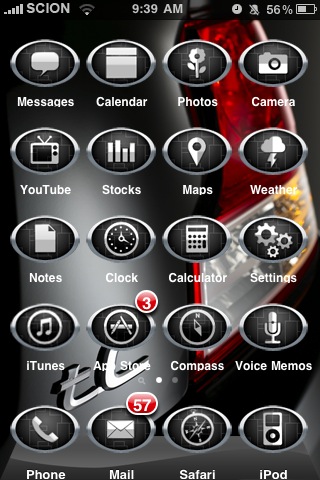
Two days ago we reported Toyota launched a new advertising campaign in the Cydia through ModMyi’s repository based on a custom theme iPhone users could install on their jailbroken devices. The theme promoted Toyota’s affiliate Scion 2011 tC vehicle, with graphics on screen depicting the car in various elements of the standard iOS interface. Toyota didn’t directly get in touch with Cydia’s creator Jay Freeman to launch the ad campaign, which was organized and hosted through ModMyi’s repository. Many saw the advertising campaign as the first step for large companies like Toyota to avoid the App Store altogether to promote their brands and products on the iPhone. With 10-15 million jailbroken devices out there, launching an ad campaign in Cydia through a third-party repo must have sounded like the perfect opportunity to Toyota.
Too bad Apple didn’t think that was a really good idea. In fact, Toyota was apparently asked by Apple to take the theme down, and Toyota accepted to ”maintain their good relationship with Apple.” The campaign had been in the works since April 2010 with Toyota and advertising agency Velti.
Kyle Matthews of ModMyi reports:
Apple also heard about the theme and ad campaign. I received a call from our contact at Velti this evening as well as an email asking me to please take the theme out of Cydia. On the phone, he explained Apple had contacted Toyota and requested they remove the theme and stop the advertising campaign. They (Velti) in turn contacted me relaying the message.
Apple doesn’t obviously like jailbreak (they called it “illegal” before the Digital Copyright Millennium Act updated its rules and observed jailbreaking a phone is in a consumer’s rights), and they’re taking another hard stance against those who promote or support (or make business with) Cydia in any way. Sorry Toyota, but you’ll have to take that theme down.
MailTabs Brings Safari-like Tabs to Mail.app
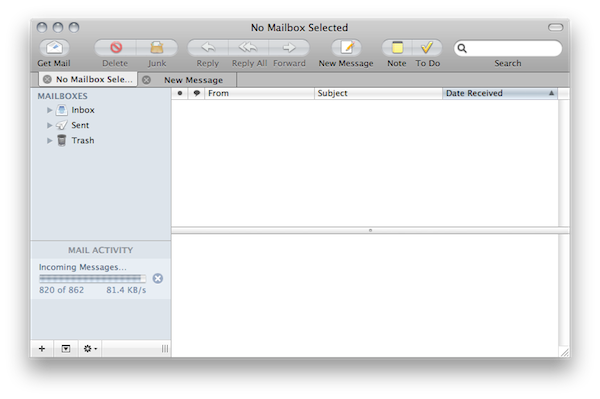
If you use Mail.app on your Mac desktop to stay on top of your inboxes and messages and you’re that kind of user who opens a lot of Mail windows to navigate between accounts, folders and new messages, perhaps you’ve thought about getting a new email client with support for tabs. In web browsers, tabs are the best way to open multiple links at once without being forced to clutter your screen with dozens of standalone windows (although some people still prefer to keep separate sets of tabs organized in different windows); furthermore, new solutions like Mozilla’s Panorama for Firefox enable us to literally open hundreds of tabs and visually switch between them retaining some free space in the toolbar. Tabs have basically changed the way we browse. How about enabling them in Mail.app now?
That’s what a new plugin called MailTabs does. Available for free and supporting auto-updates (that means you won’t have to download a new version every time), once installed MailTabs will put Safari-like tabs in Mail for OS X. New messages, conversations and inboxes will open in a new tab sitting below the top toolbar instead of a new Mail window. The UI is far from perfect in this first release, but tabs really work and sessions are even restored when you close Mail.app and open it again. When you send a new message from within a tab, the tab is automatically closed as soon as you hit Send. The plugin has no other configuration options available in the Settings, and I’m hoping the developers will add further customization possibilities in the future updates. MailTabs also seems to have a small footprint on CPU resources and RAM.
If you’re a fan of plugins like TotalFinder and, overall, tabs for web browsers, you should try MailTabs. It’s a free download here.
Zen Viewer Adds AirPlay Support, Can Open Files In Other Apps
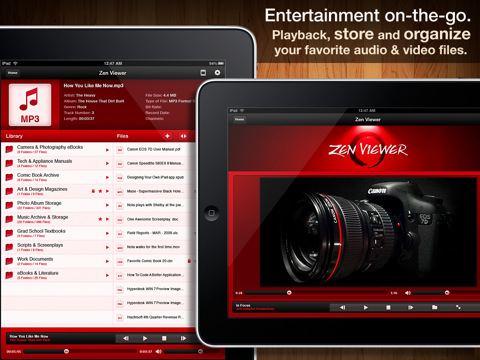
Zen Viewer is a beautiful file manager for iPad with a unique interface design we reviewed a few weeks ago. The app impressed us with its original approach to file management on the tablet: Zen Viewer makes great use of the iPad’s large screen by providing a split view that allows you to easily browse files, and preview media like songs in the upper panel. From our review:
The first thing to understand about Zen Viewer is the column interface with “Library” on the left and “Files” in the other panel. Files is where all your imported documents will end up in, and you can choose to organize them at a later time in the Library. Files is your “everything bucket”, whilst the Library is meant for organization purposes and management. You can move, copy and paste files by just hitting the gear icon in the Files toolbar and selecting the items you want to move or copy in a different location (like a folder in the Library).
The app went under two updates in the past weeks, and whilst the second one is aimed at fixing bugs discovered in the previous releases, the first update introduced the possibility to stream audio and video files through AirPlay to an Apple TV or compatible AirPlay speakers; Zen Viewer can now also receive files from other apps (like iFiles or GoodReader) thanks to the addition of the “Open In” menu. Similarly, Zen Viewer can send files to other apps installed on your iPad.
You can find Zen Viewer at $2.99 in the App Store. If you’re looking for an innovative and great-looking iPad file manager, Zen Viewer is one of the new apps of 2011 to try out.
Radio Reporter Uses iPhone 4 As A Replacement For Bulky Equipment

A decade ago Neal Augenstein packed and took with him a suitcase full of heavy equipment so that he could cover news events in the field for the WTOP radio station. Today? It’s an iPhone 4, iPad and a few accessories.
As a radio reporter, the fundamental aspect for Augenstein is audio capture, currently that role is fulfilled by the iPhone 4’s inbuilt microphone (the third-party one he used to use with his 3GS doesn’t yet support the iPhone 4) and whilst it isn’t quite up to the quality he previously experienced, he says it is 92% as good as before. For audio editing he uses the VC Audio Pro app that lets him quickly and easily pull cuts, edit, assemble and adjust the volumes on a three-track screen. This is Augenstein’s favorite improvement on his previous workflow, because he is now able to push out a report in something like 10 minutes rather than 30 minutes.
For live reports Augenstein experimented with two expensive options but left unsatisfied went with the tried and tested Skype which gives him (and his station) a free VoIP service that he says “often sounds as good as the pricy apps”. Twitter has also become a complementary avenue of reporting and he writes that he will often “break stories on Twitter, and follow-up with audio and website reports.”
Augenstein also carries an iPad primarily for taking down notes during press conferences and a “jury-rigged” stand for the iPhone for when there is no podium to place the iPhone on. In essence Augenstein highlights the very benefit of ditching his old equipment for the iPhone 4 when he says: “I can produce intricate audio and video reports, broadcast live, take and edit photos, write web content and distribute it through social media from a single device.”
[MediaShift via TUAW]
Stephen Colbert Already Wants An iPad 3 [Video]

The iPad 2 came out a few weeks ago and it’s still the hot new gadget among Apple aficionados and average consumers, right? I mean, some people didn’t even get the chance to buy one, as they’re still waiting in line at the local Apple Store hoping for new stock to become available. Stephen Colbert got one though, he loved it as a device to send emails and tweets or check out his photos…and then he got tired of it. “Anyone know when the iPad 3 is coming out?”, he asks. “I just want something new, you know?”
Hilarious. Check out the video below.[MediaMemo via Colbert Nation]
Read more
Madrid Now Renting iPads for Your Stay with PadInTheCity

If you’re on a vacation in Madrid, Spain and don’t have your 3G iPad, why not rent one? This sounds like a great idea and PadInTheCity has developed a new service that lets you rent a 3G iPad pre-installed with tourism and business apps. For $55 (€39 in Madrid) per day, a tourist (or anyone that doesn’t have an iPad) can rent a 3G iPad with unlimited data.
PadInTheCity arranges the rentals through their site. Enter the dates that you will be in Madrid to check for availability, enter your credentials then you’re ready. The payment system is through PayPal, so people will already feel comfortable making a transaction this way as opposed to using a credit card in a foreign country. PadInTheCity does put a $708 (€500) hold in case the iPad is not returned though.
They will deliver the iPad to your hotel, the airport or train station - wherever you like - and also bring a case and charger for use. You now have a fully equipped 3G iPad with apps to help you get around the city like news, maps, radio, tourism apps, wikipedia and even Angry Birds. Once you return the device, they unblock the €500 credit card hold.
PadInTheCity is a great idea, it’s like a tourist guide that fits in your travel bag and without the difficult accent! More cities around the world should encompass this idea, what a great idea.
[via Cult of Mac]
Google Books for iOS Update: Landscape Reading, Faster

Released in December for iPhone and iPad users, the official Google Books app was very promising as it gave everyone access to Google’s 2 million book catalogue, with the possibility to download books locally and read them on-device. The app, however, sported some pretty bad UI inconsistencies and user experience issues, such as the impossibility to read in landscape mode on the iPad or several bugs that turned many users into frustrated readers that had to deal with an unstable and slow app.
Google wants to change this today with a major update to Google Books for iOS that introduces landscape reading on the iPad, a “find” feature that shows matches for a specific keyword as you scroll down the book and a useful “Get eBooks” button that will automatically sign you into the Google eBookstore with the same username you used to log into the app. The app is now faster, bugs have been fixed and the iPad on iOS 4.3 also gets a nice 3D page curling effect. Google claims they have improved the book downloading experience, too, as well as the whole responsiveness of the app.
If you’re a Google Books user, you can find the app here. The update is propagating in the iTunes Store now.
iPad 2 Tops Consumer Reports Rankings In Spite of “Competitors”

In the past year, product review and rating magazine Consumer Reports had a troubled relationship with Apple products and its users: since the release of the iPhone 4 on AT&T in June 2010 and the whole “Antennagate” debacle that saw Apple issue a press conference to clarify that the issue was common to every smartphone and announce the free Bumper program, Consumer Reports couldn’t recommend the phone even when a) it was topping the publication’s rankings and b) Apple released the Verizon iPhone which, according to many, doesn’t come with any signal attenuation issues. They, however, recommended bumpers. It was pretty clear that Consumer Reports suddenly had a “thing” for not recommending Apple’s iPhones anymore, but we’re not here to speculate on the reasons or the testing methods they use.
The good news for Apple is, Consumer Reports today announced that the new iPad 2 tops the magazine’s tablet rankings, beating other devices in test labs. Competitors are approaching quickly, though, and Consumer Reports thinks that other tablets will soon give people more choice between different models:
So far, Apple is leading the tablet market in both quality and price, which is unusual for a company whose products are usually premium priced,” said Paul Reynolds, Electronics Editor at Consumer Reports. “However, it’s likely we’ll see more competitive pricing in tablets as other models begin to hit the market.
In their tests, the iPad 2 sported longer battery life than any other tablet: (from Archos, Dell, Motorola, Samsung, and ViewSonic)
The largest gap in performance among the 10 tested tablets was evident in Consumer Reports’ battery-life test, measured by playing the same video clip continually on each tablet and timing how long it played until the battery ran down. The top-scoring iPad 2 lasted 12.2 hours, but the lowest-rated tablet, the Archos 70 Internet Tablet, $270, lasted just 3.8 hours.
Tech specs, of course, aren’t everything when it comes to a personal device like a tablet, and Apple knows this very well. Still, if you’re really interested in Consumer Reports’ take on the whole subject, check out the full press release after the break. [via BGR]