Mailplane Adds Evernote Integration

Users of Mailplane, a desktop interface for Gmail’s online web application, will find a new feature in the latest 2.4 update, released yesterday, that adds complete integration with capturing tool Evernote, a staff favorite here at MacStories. As you may know, Evernote allows you to easily capture your ideas in the form of notes, images, PDF documents and all sorts of document archives; with a wide range of apps that go from a native Mac client to a recently revamped iPhone app and a new version coming out soon for Android Honeycomb tablets, Evernote is a ubiquitous system that helps you save, organize and archive all the important things in your life.

The new Mailplane 2.4 adds an Evernote-specific button in the top toolbar that enables you capture a conversation, archive it in Evernote and have the app automatically include a link to the email message you previously selected in Mailplane. As the new feature saves a full copy of the message as a new note, you’ll have the possibility to enter a title, tags, as well as edit text from the message. Furthermore, a new option in Mailplane’s download manager lets you quickly send attachments to Evernote without saving them in the OS X Finder first.

Mailplane 2.4 can be downloaded here.


Fantastical: Your Personal iCal Assistant


In my preview of Fantastical, a new Mac application by Flexibits, I noted how developing a new calendar utility for OS X wasn’t an easy task at all: not only does the competition offer some great alternatives, Apple itself bundles the free iCal into the main installation of Mac OS X Snow Leopard, giving users a relatively powerful tool to manage appointments, invites, to-dos and all sorts of calendar needs. Whilst iCal – and on iOS, the Calendar app for iPhones and iPads – makes it super-simple to see all events at a glance with the supported Google Calendar, MobileMe, CalDAV and other protocols, it appears Apple didn’t really focus on letting users quickly and easily add new items with a few keystrokes and commands. To enter a new event in Apple’s default iCal, you have to open the app, head over the day you’ve chosen (or hit a keyboard shortcut) and type in every single field for the new event. That includes things like name, location, all-day checkbox, date and time, repeat, invitees and status.

Being forced to manually type all info and move the cursor around every single time is boring, and annoying; that’s exactly what Flexibits wants to fix and improve with Fantastical.

As I highlighted in my initial preview, Fantastical’s biggest feature lies in the way it allows you to enter events with natural language. Plain English, that’s it. Once the app is configured with your calendars and up and running in the menubar, you’ll be able to invoke its main window with a shortcut (or by clicking on the menubar icon), be automatically focused in the text entry field, and start typing. Before I delve deeper into this, a quick note about Fantastical’s calendar support: being the app an external tool that can be integrated with iCal, the app perfectly supports all the protocols already supported by Apple out of the box. That means MobileMe, Google Calendar, CalDAV, shared calendars – anything, really. In my tests, the app (and iCal, set as my default calendar app, more on this in a minute) worked just fine with a personal Me calendar, two Google Calendars, as well as a shared cal configured through Exchange both on Mac and iOS. As far as calendar support goes, there’s nothing to worry about if your calendars are already working in iCal. In fact, the app looks directly into it to fetch local and online calendars you might want to use, and iCal doesn’t even need to be running for Fantastical to add new events. Furthermore, the app also supports Outlook and Entourage, Yahoo! Calendar accounts as well as delegates both on Google and Yahoo.

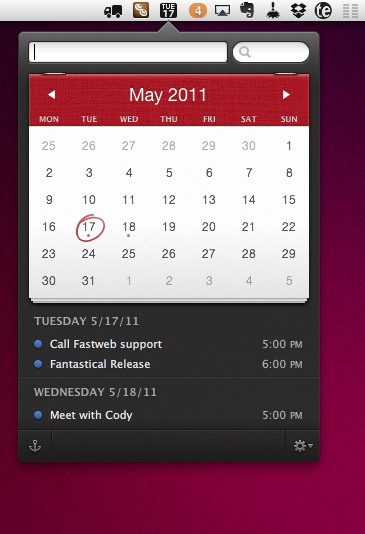
Fantastical’s natural language system is without a doubt the most important feature that sets it apart from other calendar utilities for Mac and Apple’s own iCal. As I noted in my preview, writing “Meet with Cody tomorrow at Apple Store, Viterbo 5 PM to 6 PM” in iCal does nothing, in spite of the sentence being correct and relatively simple to understand for a computer. Writing the same sentence in plain English in Fantastical adds a new event with all the fields already filled in. I’m talking about the event’s name (Meet with Cody), location (Apple Store, Viterbo), relative date (tomorrow) and time (from 5 PM to 6 PM). Fantastical understand what you’ve written, and leaves room for typos such as “Thrsday” or “tomorow.” The system implemented by Flexibits is very powerful and, as the company’s name reflects, flexible, allowing you to enter an event’s name in almost any way you want with the app still recognizing it correctly. Why is it a big deal? Because it’s smart and it helps me save time. Instead of having to move my cursor to select checkboxes and repeat the same actions over and over again, I just write a quick sentence like I’m used to and the app does the job for me. Indeed, Fantastical is the closest thing to a “calendar assistant” the Mac has ever seen. More importantly, the system is smart in the way it knows when I’m referring to people already in my Address Book. In the screenshot below, you can see how I wrote “Meet with Cody” and the app knew “Cody” was an entry in the Mac’s Address Book. From there, it fetched the two email addresses saved with Cody’s contact information and enabled me to send an invitation without leaving the app or having to open a browser. Overall, Fantastical’s natural input technology is the best thing that ever happened to a calendar application, for all the reasons listed above.

Fantastical, however, is also a great utility because of its intelligent and clever design. Let alone the fact that the app looks beautiful (just take a look at the screenshot or download the trial and play with it for 5 minutes), the design is functional to what a user has to accomplish: entering events quickly, in seconds, without opening a full-featured calendar app. Fantastical is unobtrusive, sits in the menubar and can be launched with a keyboard shortcut. If you feel like you want to look at it all the time, you can pin the app to stay above other windows. I don’t do that, but the feature might come in handy when adding events from other applications. The calendar design is minimal, tasteful, and allows you to navigate between months with ease. Marked days and events are done the right way with subtle indicators and graphics overlaying the main calendar. Nothing about Fantastical is “too much” or redundant: events can be previewed in a small popup if you head over them with your mouse, and if you double-click them iCal will launch. Events can’t be deleted from within Fantastical, but the app allows you to enter a new one from any app or browser – as you can see in the screenshot below. The system-wide service is incredibly useful when dealing with receipts and expenses in PDF documents, or just about any date displayed on screen. It’d be nice to be able to delete events in Fantastical, but I think the focus for the developers now is to let users add events in any way they want, as fast as possible.

There are other functionalities worth mentioning, too. From Fantastical’s window, you can decide how many “next events” or “next days” to show, so you’ll always be focused on the right amount of time and events. From the same menu, you can jump to today’s view. There are some things to tweak in the Preferences as well: you can choose a default calendar and calendar app, which will be the one that handles event management in the background as you add new stuff in Fantastical. The keyboard shortcut for quick entry can be customized, alongside the menubar icon that can show date, date and weekday, or date and month. Calendars can be managed in the preferences’ second tab, and you can set default alarms for timed and all-day events so you’ll always end up with a standard alarm for every new event – very useful.

Fantastical is the calendar assistant to install on every Mac that has to deal with calendars. Not because Fantastical is more powerful than other solutions like iCal and Outlook, but because is smarter and different. Fantastical wants to be the best, fastest and most intuitive way to add new events, whereas other desktop applications focus on letting you manage your calendar, sometimes packing features that slow down the whole process of adding new events. Fantastical is available on the Mac App Store at an introductory price of $14.99, with a free trial available here. Read more



Apple Proposes Standard To Make SIM Cards Smaller

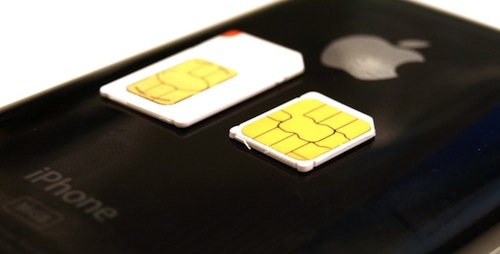
According to Reuters, an executive of Orange has confirmed the French carrier is backing Apple’s plans for a new standard to make SIM cards smaller in order to use them in future thinner mobile devices. The proposed standard aims at reducing the size of SIM cards, which are currently implemented as “micro” models in the iPhone 4 and iPad.

We were quite happy to see last week that Apple has submitted a new requirement to (European telecoms standards body) ETSI for a smaller SIM form factor – smaller than the one that goes in iPhone 4 and iPad,” said Anne Bouverot, Orange’s head of mobile services.

“They have done that through the standardization route, through ETSI, with the sponsorship of some major mobile operators, Orange being one of them,” she told the Paris leg of the Reuters Global Technology Summit.

Reuters claims the approval process for such a new standard would take time, with new devices carrying the new SIM models not coming out at least until next year. A rumor surfaced last year indicated Apple was working closely with Gemalto to develop an integrated SIM card that would be embedded in every iPhone to enable users to quickly switch between carriers without restrictions and obligations, but this new report seems to suggest Apple is simply aiming for a smaller chip, perhaps following the opposition from carriers to an embedded SIM that would cut mobile operators out of the retail game.


360 Panorama Gets Major Update with New UI, Social Features and More

Occipital’s 360 Panorama is an iPhone app we first reviewed in December that, through an intuitive interface, allowed you to snap a panoramic shot using your iPhone by simply panning it around to capture things around you. The concept was simple: instead of merging multiple shots into a single panoramic one like most apps do, 360 let you “paint” the panorama on screen by waving the iPhone and making sure light conditions were optimal. A few weeks later, Occipital also showcased the gyroscope support for 360 shots uploaded online and visible in Mobile Safari, thanks to the new API introduced in iOS.

360 Panorama is receiving a major update today, bringing the app to version 4.0 and introducing a new icon, a redesign interface and brand new social features to share photos online and browse panoramas shared by other users. As in the previous version, you can see a panorama being built in real-time as you move your iPhone’s camera around; panorama quality has been improved in the new version, thanks to a new algorithm used by Occipital that will also increase quality over time by processing the image synthesizing server-side. After a few tests, it really looks like Occipital has managed to find a way to create even better panoramas, which were good-looking in 360 version 3.0 but far from perfect. The interface has been redesigned and streamlined to be more intuitive, elegant and accessible; the sharing functionalities on Twitter and Facebook have been completely overhauled to make it easier to send a panorama off to your favorite social network, and Occipital also took care of implementing private uploads and deeper sharing options. On top of that, the app now supports multiple Facebook and Twitter accounts and the image saving process has been made faster to allow users to build a panorama and share it in seconds. 360 Panorama now works on the iPad 2 as well, with the engine being optimized to take advantage of the device’s dual-core CPU.

Last, Occipital is also launching an all-new online interface for panoramas called 360verse that allows users to browser for pano shots using a search functionality based on location and time of upload. Furthermore, the app now packs a new 360.io shortening system, as well as the possibility to create Occipital user accounts to check out all the photos you’ve uploaded over time.

360 Panorama 4.0 has been released a few minutes ago in the App Store and it’s available as a limited time offer at $0.99. Get it here.


djay Now Optimized For iPad 2 Dual-Core A5

djay, the excellent app for iPhone and iPad we reviewed back in December when it first came out on the tablet, received a major update today to include exclusive functionalities for the iPad 2 and its A5 dual-core processor. After the release of a “mini” iPhone version that yet managed to include most of the features found in the iPad counterpart, algoriddim pushed an update earlier today to fully optimize performances for the iPad 2, enable higher precision audio analysis and implement a number of new features as well.

  • Key Lock / Time-Stretching: change the tempo of a song without affecting its pitch (requires iPad 2)
  • High-Precision audio analysis: improves syncing, BPM detection, beat-grid, and waveform precision (requires iPad 2, enable in Settings > Advanced)
  • Loop / Cue snapping: auto-aligned to closest snare, base drum etc. (requires iPad 2)
  • Improved playback of recordings
  • Various minor improvements for all iPad models

djay 1.2 for iPad is now available in the App Store at $19.99.


Apple “Investigating” Lodsys Claims, Official Response Later This Week

Following Lodsys’ response to the debate surrounding the patent infringement claims they sent to a number of iOS developers last week, The Guardian reports Apple is “actively investigating” these claims, with an official response expected to come from the company later this week.

Apple’s legal department is understood to be “actively investigating” claims by Lodsys, a patent holding company based in Texas, to have a claim against iPhone and iPad developers who use in-app purchase systems. So far Lodsys has served papers on about a dozen iOS developers who it says are infringing its patent 10/732,102, which it bought in 2004 from the inventor, who filed it in the 1990s, covering user interaction over a network.

Apple is not expected to respond to the claims, which have been passed to it by affected developers, until later this week.

Last week, Lodsys sent legal notices to some iOS developers who were using in-app purchases and upgrade buttons in their iPhone and iPad applications, claiming the implementation of this kind of upgrade process was patented and subject to licensing fees. The debate the followed the blog posts and tweets from developers who didn’t understand how it was possible to infringe a patent while using Apple’s own SDK quickly made Lodsys write a series of blog posts detailing how the company was already licensing the patent to Apple and Google, but not to indie developers. Lodsys is asking for a 0.575% fee of US revenue over the period the technology was implemented, giving developers 21 days to decide whether or not they want to license the patent. Lodsys also explained that Apple can’t extend the rights of the patent to third-party developers, in spite of its intention to build a eco-system revolving around a single SDK to write software for iPhones and iPads. This left many developers wondering whether in-app purchases were still a feasible option, considering Apple’s 30% cut off every transaction and the newly discovered legal implications.

In the meantime, Lodsys is sending more legal notices to other developers, with The Iconfactory apparently receiving one this morning as tweeted by co-founder Talos Tsui and James Thomson, the first developer who got hit with Lodsys’ patent claims. Notably, The Iconfactory has the popular Twitter client Twitterrific for iPhone and iPad available in the App Store, featuring an upgrade button to remove advertising with in-app purchase.


Apple Stores Installing NFC Payment Systems?

According to BGR, several sources have suggested Apple may be gearing up to install new payment systems in its retail stores, quite possibly implementing the NFC technology that’s also been rumored to be one of the key features of the iPhone 5, in spite of recent reports claiming the opposite. The website reports Apple’s POS system (based on iPod touches) recently went offline for an entire day causing employees to not be able to process payments, and new tables (different from the standard ones) with cash wraps have also been installed in some retail locations, leading to speculation as to whether Apple is looking to renew its payment system.

Additionally, we have been told that there were recently multiple “overnights” in Apple retail locations, which required store employees to “assist in installing TBD devices” throughout the stores “as the retail segment of Apple grows.

We have a feeling Apple’s 10th anniversary plans might put a few pieces of the puzzle in place, but one of our sources also believes that NFC payment processing capabilities are among the enhancements that will be brought about by the new gear.

It’s unclear from the report whether Apple is planning on updating their POS technology with NFC to enable compatibility with future devices that will feature the technology on a consumer level, or if retail stores are simply installing new hardware for internal usage, not necessarily implying new iPhones with NFC are on their way. Multiple reports in the past months had pegged Apple was considering NFC for future iPhones and iPads, but recent speculation from different sources has suggested NFC simply isn’t ready for mass adoption, with Apple saving the implementation of Near Field Communication for another generation of devices.


Analyst Claims Production Issues Still Affecting iPad

According to a new research note by FBR analyst Craig Berger relayed by Business Insider, Apple will be unable to meet the internal goal of 40-45 million iPads produced this year. The analyst called the number “out of reach”, and said low touchscreen supplies, component shortages and production issues at Hon Hai’s Foxconn will limit Apple and affect iPad shipments throughout the second and third calendar quarters of 2011.

For the third quarter, he sees production dropping off to 5.2 million units thanks to component shortages and production problems. He also says the effects of the Japanese earthquake could be felt in Q3. But, Berger says that could change if touchscreen supplies improve.

Ahead of the iPad 2 announcement and release in March, reports suggested the device could be delayed until June due to production issues in Foxconn’s facilities. The alleged delay didn’t happen of course, but it’s no secret Apple struggled to meet demand for the new device as also confirmed by COO Tim Cook at the company’s Q2 2011 earnings call, where he said consumer demand had been “staggering” with the iPad 2 heavily back logged at the end of the quarter. He later went on to call the iPad 2 “the mother of backlogs”, with Apple working as fast as they can to get the device in the hands of consumers. Tim Cook also said the Japan earthquake and tsunami would reduce revenue in Q3 by around $200 million, but assured Apple was on track to avoid production issues and shortages for the next quarters.

Separate reports in the past weeks noted display and speaker production issues affected iPad production in the last quarter. The iPad 2 is available on Apple’s online store, with waiting times of 1-2 weeks in most international stores.


Samsung and Toshiba Awaiting Apple’s Approval on sub-30nm NAND Chips

As reported by Digitimes today, several NAND chip manufacturers including Samsung and Toshiba are still waiting for Apple’s approval on their new production processes below 30nm. As Apple is the biggest buyer of NAND flash memory with popular products like the iPhone, iPad and MacBook Air (the first line of Mac desktop computers to come with flash memory by default), manufacturers want to make sure mass production is “feasible” while waiting for the company’s consent to move forward with the new process that involves sub-30nm chips, with Samsung operating at 27nm and Toshiba at 24nm.

Both Samsung Electronics’ and Toshiba’s 2Xnm-made products have not yet been certified by their biggest customer Apple, the sources claimed.

Micron Technology and Intel were ahead of peers in volume producing chips using their jointly-developed 25nm technology in the first half of 2011, followed by Samsung’s ramp-up of 27nm, Toshiba’s 24nm and Hynix Semiconductor’s 26nm. This marked the beginning of a race among major NAND chip suppliers to transition to 20nm-class processes, the sources said.

The website notes certification times for new manufacturing process have extended to up to 9 months from 6 to ensure greater “product performance, quality and reliability.” In terms of consumer products, manufacturing process below 30nm result in higher memory density in NAND chips, thus leading to faster devices with more capacity. Smaller processes are also linked to lower costs. Put simply, adopting new production standards for Flash memory will bring devices and computers with more storage on board and lower production costs for Apple in the next years, though Samsung and Toshiba have to wait for now. [via AppleInsider]