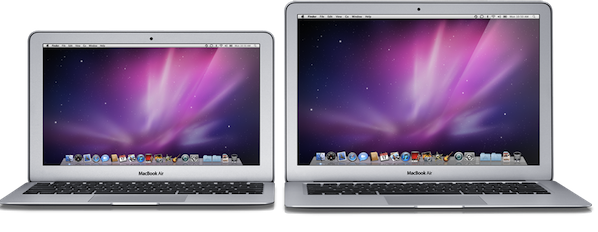
New MacBook Airs Coming In June / July

A new report from Digitimes seems to corroborate rumors we’ve heard in the past weeks about a MacBook Air refresh this summer, featuring Intel’s Sandy Bridge processors and Thunderbolt technology:

The Taiwan-based supply chain for Apple products will begin shipments of new 11.6-inch and 13.3-inch MacBook Air models featuring Sandy Bridge platform and Thunderbolt interface in late May for launch in June or July, according to makers in the supply chain. While Apple’s PR representatives in Taiwan have neither confirmed nor responded to the report, it has long been understood that Apple always keeps silent about its new products not yet launched, the sources emphasized.

Earlier reports about the new MacBook Airs (last updated in October at the Back to the Mac event) suggested production would start later this month for a June release. Cnet was first to report in February the MacBook Airs would receive an upgrade; there’s a lot of anticipation when it comes to the MacBook Airs thanks to their super-thin design, native SSD and screen resolution, with analysts claiming the line could become a $2.2 billion annual business for Apple.


Survey Reveals How Consumers Use Their iPad

When the iPad went on sale just over a year ago, many were unsure of what people would use it for and the uncertainty has largely continued to today, where it is still a little vague as to how a tablet fits into people’s lives. Yesterday however, Business Insider published some fascinating data on a whole range of questions that surround the iPad and how it is used. The data was collated after Business Insider issued an extensive survey, on a wide variety of issues and questions, to more than 850 people.

Their survey revealed that for about 70% of respondents, there was only 1 iPad in their household and only about 23% has 2 in the one household – less than 7% had 3 or more iPads in their household. Nearly 40% had downloaded between 20 and 50 apps, whilst 30% had downloaded more than 50 apps – with few paying for more than 20 of those apps and only 6% paying for none. Below are some of the other more interesting results but jump over to The Atlantic for all the results.

  • 87.4% did not even consider an Android tablet before buying an iPad and 90% would not consider a BlackBerry PlayBook or HP TouchPad
  • The number of people with WiFi-only or the 3G iPad is fairly evenly split (52% to 48%)
  • Only 49% subscribe to a monthly 3G data plan (of those who have a 3G iPad)
  • 40% use the iPad as their primary computer
  • The most cited reasons for use of the iPad are; web browsing (35%), using social or communication apps (22%), watching video (12%), playing games (12%) and using all other apps (20%)
  • For consuming news, 38% would use the iPad’s web browser, 34% would use a news site’s app and 28% would use an aggregator like Reeder or Flipboard.
  • 72% read e-books on the iPad, mostly on iBooks but Kindle is a close second

Going to WWDC? Find The Perfect Party With This App

In about 20 days from now, the city of San Francisco will see thousands of knowledge-hungry Mac and iOS developers arriving from all parts of the globe to attend the WWDC, Apple’s annual developer event that this year officially kicks off on June 6. With Apple showcasing the next version of iOS and Mac OS X Lion on stage, plus other cloud-related services we’ve heard about in the past weeks, there’s the chance this year’s WWDC is going to be one of those to be remembered for years to come. Not to mention the Apple Design Awards, for the first time counting both Mac and iOS applications that provided an example of excellence and developer craftsmanship throughout the past months of App Store availability.

I’ve never been to WWDC, but I have a pretty solid feeling it’s not just about Steve Jobs, Forstall’s perennial surprised face, Cocoa and sessions. From what I hear, there are some wild parties and dinners going down in San Francisco during the WWDC. After all, those tired developers deserve some fun after a day of CoreAnimation training and ADAs tension, right? Meet Party List, a free iPhone app that everyone who’s going to WWDC this year should download. The app? It basically gives you a list of ”all the hippest, kewlest, craziest, and down right awesomest parties” happening during WWDC. Then, you save a party to your favorites and you go there – simple. To promote and event you’re organizing, just get in touch with the developers and ask them to include it in the app. That’s it.

Party List is free – attending the WWDC, of course, is not. I won’t be in San Francisco to record my experiences with developers, parties and drinks with Scott Forstall, but if I could come, I’d certainly put Party List on my homescreen. The app even supports push notifications – now, here’s something I wish Apple will fix come June 6.


OmniFocus for iPad Gets Calendar Integration

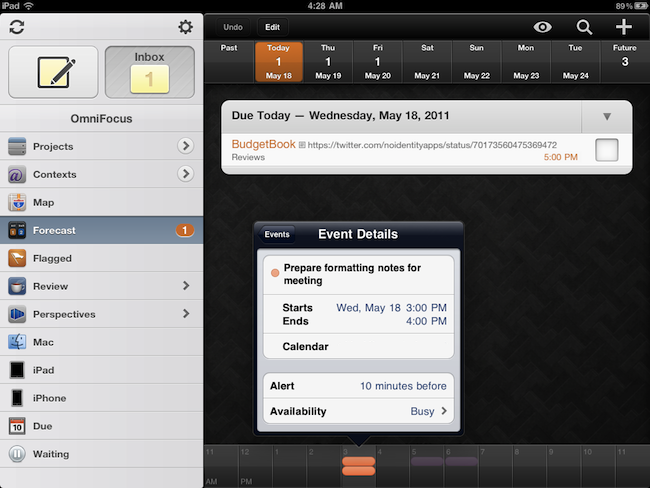
The Omni Group’s flagship GTD application, OmniFocus, received an update earlier today in its iPad version to include a number of new functionalities, bug fixes, and miscellaneous improvements to the interface. Widely regarded as the best version of OmniFocus currently available on all platforms, OmniFocus for iPad managed to win the hearts of The Omni Group’s loyal user base thanks to a clean and elegant design, a powerful sync engine that keeps tasks, projects and contexts always available across the Mac and iOS, but most of all the Forecast view, a slimmed down version of the popular Due perspective, which on the iPad has been completely reimagined as a timeline of sorts with the upcoming week’s days sitting in a top toolbar, listing all your next actions for quick reviewing and rescheduling. Coming soon on the iPhone as well and rumored to be part of OmniFocus for Mac 2.0 big upgrade (expected later this year), the Forecast view in OmniFocus 1.3 for iPad now allows you see items with a start date and, more importantly, calendar events.

Calendar integration in OmniFocus for iPad will display all events for one day through a bar along the bottom that, among other things, allows you see events in popover menus, and change your availability status. You can’t edit events within OmniFocus, as I guess the developers wanted to offer a way to see what’s going on. The addition is very welcome for users like me, who keep an organized set of tasks and projects in OmniFocus, but save other things like reminders and meetings in iCal. At first, however, I was a little disoriented by the changelog of version 1.3 that illustrated the new feature:

OmniFocus for iPad 1.3 updates Forecast Mode: Never spread yourself too thin. Enable Calendar integration to see your hard landscape events alongside your overdue and due soon OmniFocus actions. Use the View options menu to show your items with a start date. Reschedule your projects and actions—with just a tap or two—to keep your days balanced.

Forecast mode now integrates calendar events into a convenient timeline. Use the View options menu to configure which calendars appear on the timeline, and the range of hours for which events are displayed.

Because I keep my OmniFocus for iPad in sync with the Mac version through the Omni Sync Server beta, I initially thought enabling calendar integration would require me to open the desktop app and fiddle with the iCal tab in the Preferences. I clearly read the changelog wrong (and didn’t really remember iCal’s send-to functionalities on OS X), because OmniFocus for Mac doesn’t let you import events, it lets you publish tasks and contexts to a calendar. Instead, what The Omni Group is doing here is different: they’re letting you see calendar events in OmniFocus for iPad alongside tasks in the Forecast view. How does it work? Simple: by relying on the iOS calendar API, any calendar that’s already been configured on an iPad can be displayed out of the box in OmniFocus. Just tap the view icon in the upper right corner, select Calendar Events, and choose a calendar from the Calendars tab. Select a day’s start and end times and you’ll be able to view events at the bottom. Events are color-coded depending on your calendar’s settings, and like I said above you can’t edit them. I wish the developers implemented a way to see events for the next weeks as well (as I treat events differently than most of my tasks and I need to know with weeks in advance about that meeting in Rome), but I guess that breaks the whole purpose of the Forecast view. Anyway, well done.

OmniFocus for iPad 1.3 also packs other interesting features. For one, I love the new fullscreen mode for editing notes in a task’s panel. Or the fact that the app’s badge counts due, overdue and flagged items, but items that are both overdue and flagged aren’t counted twice anymore. Another new neat functionality is video mirroring: by taking advantage of the iPad 2 hardware, The Omni Group now allows you to mirror OmniFocus on a second display, with viewers being able to see gestures, taps and swipes on screen. This will be huge for OmniFocus users like Merlin Mann having a presentation about OF in the future – and it’s something more developers should support.

OmniFocus 1.3 is a huge update with lots of additional fixes and enhancements you can check out in detail here. The app is available at $39.99 in the App Store – it was worth it before, and with calendar integration in the latest version it’s simply become a must-have.


Apple’s 2011 “Back to School” Program To Launch Next Week?

Following speculation on what Apple employees and store managers will discuss at the all-hands meetings set for Sunday, May 22, AppleInsider reports one of the subjects of discussion may be Apple’s new Back to School program.

People familiar with the Apple’s retail operations have told AppleInsider that the company is currently gearing up for its yearly educational promotion. The news comes as numerous reports have revealed that Apple has scheduled early 7 a.m. store meetings with employees this coming Sunday, May 22.

But with the annual back-to-school sale set to kick off as soon as next week, the educational promotion is potentially a more likely subject for Sunday’s meetings. Additionally, other people familiar with next week’s plans say some of the materials and shipments rumored to be making their way to stores around the same time will be part of ‘procedural changes’ to the way the shops run or operate, rather than new products customers could buy.

The Back to School program usually runs until the first week of September – before Apple’s music event – and in the past allowed students to get a free 8 GB iPod touch with the purchase of a new Mac. The timing of this report sounds appropriate, with rumors running wild about an Apple 10th anniversary of retail event and new product launches, but with Back to School seemingly ready to be launched considering the company followed a late May / early June timeframe in the past years. The current iPod touch family – assuming Apple is following its tradition of giving away free iPod touches to new Mac owners – starts at $229 with the 8 GB model, featuring Retina Display and FaceTime HD camera.


Foodish: Delightfully Mindful of What You’re Eating. Review & Giveaway!

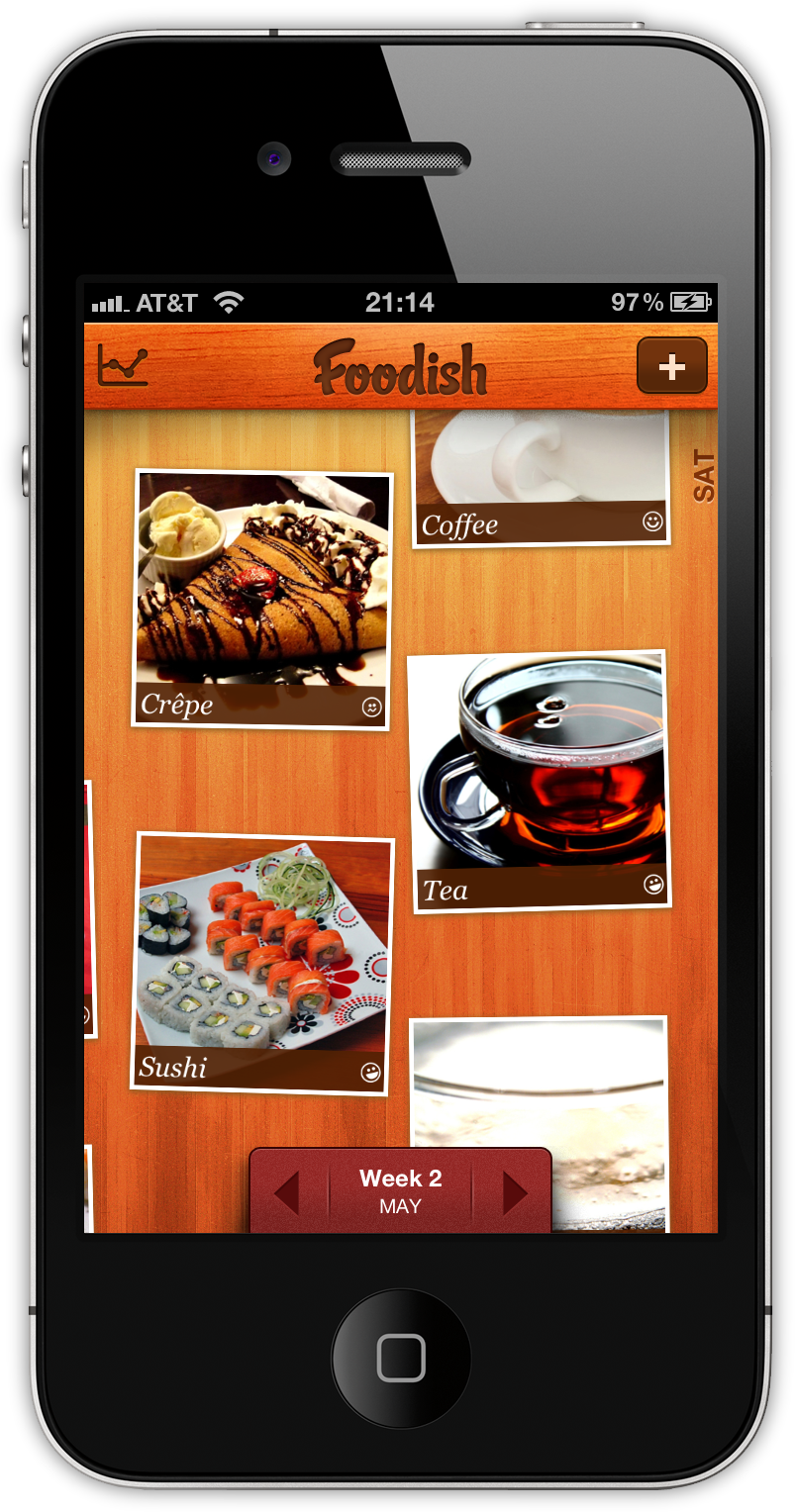
Calories aren’t fun. No matter what kind of appreciation you have for food, watching what you eat while being a food-a-holic can be difficult when everyone else focuses on just the numbers. Eating should be about discovery. It should enjoyable, shared, and fun without making everything else out to be a dangerous game of cat and calories. In my opinion, it’s much better to be mindful of what you’re eating, and Foodish is exactly the kind of app that fulfills this desire very well.

Not only is Foodish wrapped in a beautiful user interface, it’s fun and simple to use. Based on good conscience alone, you simply snap a picture of your meals and rate them on a general “bad to good” scale that tracks your overall eating habits over time. The concept is great: not only can the foodie in you keep a record of all those great meals and memories, but it also keeps you aware of just what exactly you’re shoving into that pie hole. Plus, you get to totally brag about the incredible meal you’re having at that five start restaurant from within the app. It’s a win-win!

Read more


Screenstagram: An Instagram Screensaver On Your Mac

After the release of an official API months ago, Instagram has become a ubiquitous service that already has a plethora of third-party tools for Mac, Windows and iOS devices in spite of the lack of a website to browse photos and the fact that it still is ”just an iPhone app.” The ecosystem built by Instagram is amazing, especially considering the kind of growth the developers had to face and the number of devs that suddenly signed up for the API to start creating external tools and toys like Postagram, an iPhone app that sends you real postcards based off Instagram photos. Like I said multiple times in the past, Instagram’s success on the iPhone has no equal. And we have seen there are some pretty good clients on the Mac, too.

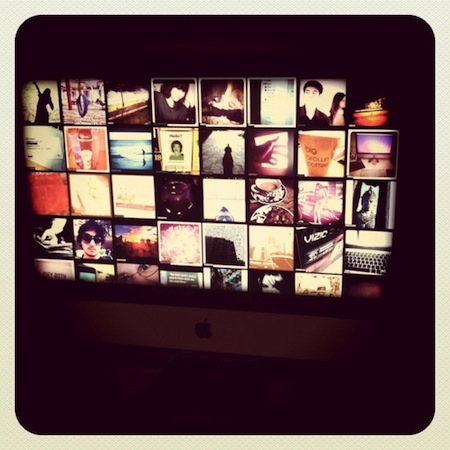
If you feel like there’s never enough Instagram around, perhaps you should check out this new utility called screenstagram, a Mac screensaver based on, you guessed it, Instagram pictures. That’s it: just photos rotating on a grid once your Mac is in screensaver mode. The cool thing the developers added? You can log in with your account and have the screensaver serve photos found in your feed. Otherwise, screenstagram will simply use Instagram’s popular feed to deliver its magic to a sleeping OS X. The developers write on their blog:

It took us a while to figure out what to build with the new web service. We’re no strangers to leveraging that kind of resource, but it’s generally for data-driven services, like Twitter or Foursquare. It’s not too often that a visually rich system like Instagram comes along and releases an API. We wanted to do something that took advantage of the eye candy, something beyond a web-based photo browser – something to really showcase our friends’ grainy, bar room photography. A way we could sit with the photos and soak them in longer than usually allowed by the ephemeral, wham-bam-thank-you-ma’am approach taken by the feed in the Instagram iPhone app. Once those photos are out of your friends’ feed, they’re sort of gone, never to be seen again without some digging on your part. So we decided on an old fashioned screen saver, a medium that doesn’t get much love these days.

The idea is very neat and well-implemented. We recommend you check it out here, as it’s a free and lightweight download. Read more


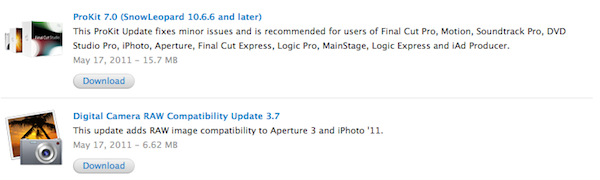
Digital Camera RAW Compatibility Update 3.7 and ProKit 7.0 Released

As part of their usual weekly software update cycles, Apple today released ProKit 7.0, improving performances and enhancing stability in Pro applications like Final Cut Pro, Motion, Soundtrack Pro, DVD Studio Pro, iPhoto and Aperture, and Digital Camera RAW Compatibility Update 3.7, adding support for more cameras in Aperture and iPhoto. Changelogs below.

ProKit 7.0

  • Improved support for PopOver style tooltips.
  • Improved support for Font Smoothing.
  • Addresses an issue with an unwanted gap between a menu and submenu.
  • Fixes leaks and improves stability for the color picker and timecode interface in Final Cut Pro and Motion.
  • Improved compatibility when importing assets from older versions of Soundtrack Pro.
  • Fixes an issue with the scrubber appearance in Logic Express and Logic Pro.
  • Addresses AppKit related crashes in Motion.

Digital Camera RAW Compatibility Update 3.7

  • Fujifilm FinePix X100
  • Nikon D5100
  • Olympus E-PL2
  • Olympus XZ-1
  • Samsung GX-1S

As usual, software updates can be viewed and directly downloaded on Apple’s website, or from the Software Update control panel.


Lodsys Vs. iOS Developers Patent Claim FAQ

Lodsys Vs. iOS Developers Patent Claim FAQ

FOSS Patents has posted a lengthy and interesting FAQ-style blog post detailing many of the implications behind Lodsys’ patent infringement claims against iOS developers:

8. How can an app dev be liable for just implementing Apple’s in-app purchase API?

Some developers have pointed out that basically they just implement Apple’s in-app purchase API. So they wonder whether this can expose them to liability for patent infringement or is actually something Apple needs to take care of.

The whole thing is a must read if you’re interested in knowing more about Lodsys, iOS developers, the implementation of in-app purchases, and Apple. Just to recap: Lodsys first sent a number of legal notices to some independent iOS developers claiming they were infringing a patent for in-app purchase buttons and upgrade links. After all the debates that quickly spread online, Lodsys explained why they are doing what they’re doing and how much they’re asking for licensing fees. This morning, more developers – including The Iconfactory – received Lodsys’ notices and The Guardian reported Apple’s legal department was looking into Lodsys’ claims.

Update: Nilay Patel at This Is My Next offers one of his usual breakdowns, this time outlining the history of Lodsys and original patent inventor Dan Abelow, detailing a possible outcome for Apple in this whole story:

So now you know almost everything you need to know about Lodsys, Dan Abelow, and ’078 — he’s a serial inventor with a number of patents, and he sets up shell companies to collect royalties on them. It’s legit on paper, but it’s definitely shady and disheartening to see Lodsys go after small developers for such tiny amounts of money. But it makes a certain kind of evil sense: Lodsys can’t engage Apple directly because of Cupertino’s existing ’078 license, so it’s going after app developers as a way to pressure Apple into re-working the agreement to cover apps. I would imagine that such an expansion will cost Apple a pretty penny, wouldn’t you?

In that context, the single most critical factor in this situation is the exact scope of Apple’s license to ’078. It’s entirely possible Apple’s license already covers app developers and Lodsys is just trying to double-dip, but we simply can’t know that without seeing the license and fully evaluating Lodsys’s patent claims against Apple’s code. I can only assume Apple’s lawyers are busily investigating that right now — and I’d imagine the various iOS developers that received letters from Lodsys are impatiently waiting to hear from them.

Permalink