Stay on Top of Retweets, Faves, and Follows from your Menubar with Bird Bell: Review and Giveaway!

If you’ve wanted to stay on top of your Twitter status in real time, many Twitter clients won’t show you whether that last tweet caused a few unfollows or if it was fave’d by a few of your fans. For those obsessed with getting realtime feedback, Bird Bell is an excellent companion app to any Twitter client you have on the Mac, integrating with Growl and displaying real time feedback on retweets, follows, unfollows, favorites, and lists you’re added to. Bird Bell integrates with both Twitter and Favstar, and can be customized to a wide extent in revealing growl or menubar notifications per account. With the official Twitter app for the Mac (which offers live streaming), Bird Bell can give you a bird’s eye view on just how responsive your audience is to what you’ve tweeted as soon as you’ve hit the return key. Bird Bell works in the background, and only notifies you based on your interests: I personally don’t care about follows and unfollows, and choose to see favorites and retweets instead.

Twitter junkies who want to revel in their tweets can purchase Bird Bell on the Mac App Store for $1.99 — it’s a great utility that works alongside your favorite Twitter clients. We’re also giving away five copies of Bird Bell, and you can click past the break for your chance to win.


Read more


AirServer 2.2: AirPlay On OS X Already Working with Lion and iOS 5

AirServer is an OS X utility I first reviewed in May that allows you send music, photos and videos from iOS devices to a Mac’s display using AirPlay. Unlike similar apps that enabled such functionality before, AirServer stood out because the first release was stable, fast, and cheap at $3. Since then the price increased to $4.99, but the developers released a plethora of updates (seriously, I’m pretty sure I updated the app more than 10 times) to bring several other functionalities like dual display support, a different icon, a settings panel, audio controls, service rebroadcasting, and more.

With the latest 2.2 update, however, the developers have gone all out to implement early support for iOS 5 and OS X Lion. Both OSes aren’t out yet, but if you’re rocking the betas on your device or computer you’ll be able to use AirServer to beam music and videos – you’ll just have to disable dual-mode AirPlay on iOS 5 for now. The devs also said that they’re looking into implementing iOS 5’s AirPlay Mirroring on AirServer (iOS apps mirrored on a Mac, that would be nice), but that could be difficult as it uses Apple’s FairPlay encryption.

Alongside OS compatibility, recent AirServer updates also brought audio controls in video apps, support for Boxee, XBMC, FrontRow, Wake on Demand, as well as 24-bit audio support. I’ve tested AirServer with iOS 5 and Snow Leopard and it works very well, with songs and YouTube videos playing just fine on my MacBook Pro.

Go download Air Server here.


“iCloud Is The Operating System”

The conversation my friend Francesca and I were having in front of a good cup of coffee ended when she concluded that iCloud was the operating system.

At first, that silly statement didn’t make any sense to me. I laughed, and tried to explain her that it’s not the operating system – the one you have to download and install on your computer or device – rather, I told her iCloud was a new way to keep all her content stored somewhere else she could access at any time. But the more I went on to illustrate the advantages of pushing media from the Internet (“the cloud”) to devices without a USB cable, the more she kept asking why would that be any different from having the operating system on the Internet, “doing stuff for you automatically.” Read more


iOS 5 To Allow 1080p Video Export

Following the increasing speculation about the next-generation iPhone getting an 8-megapixel camera, the iOS 5 beta seeded to developers earlier this week keeps providing interesting details on features that Apple is baking into the OS, but aren’t ready or usable yet as they’re being built for future devices. In addition to iOS 5 enabling playback of 1080p video files scaled down to 720p as Apple hasn’t built a screen with enough resolution to support 1080p, 9to5mac points to more code strings from the developer beta that seem to confirm developers will soon be able to activate video export options at 1080p in their applications. This means Apple’s apps like Camera and iMovie, or other third-party solutions, will be capable of saving 1080p files with the public release of iOS 5. Previously, developers could only export videos to 720p.

Programmers use the AVAsset class to work on a detailed level with timed media assets such as videos and sounds. It lets them examine, create, edit or reencode media files, get input streams from devices, manipulate video clips during realtime capture and playback and more. It is now clear that iOS 5 enables devices such as iPhone 4, iPad 1 and 2 and fourth-generation iPod touch to both decode 1080p videos and encode content in 1080p.

An improved camera/processor in the iPhone 5 could allow the device to go past the iPhone 4’s 720p limitation and also start shooting flicks at 1080p with dedicated export options, though Apple would need to bump up the screen resolution to offer native, true 1080p playback. As far as the camera speculation goes, a new report by Digitimes today also indicates camera lens maker Largan Precision (caught in the Apple rumor mill before) has hinted at increasing orders for 8-megapixel modules from smartphone vendors like Apple and HTC. Reports in the past months suggested Apple’s regular supplier OmniVision would provide the 8 MP camera lens for the iPhone 5, although separate claims pointed out that Largan Precision was selected by Apple.


redsn0w Tethered Jailbreak Now Available For iOS 5 Beta 1

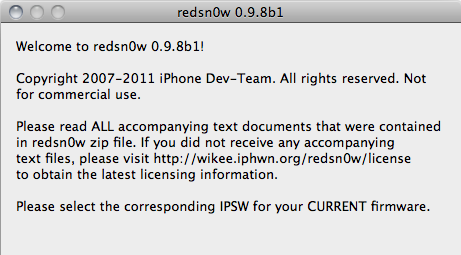
This week’s developer release of iOS 5 has brought hundreds of new features for iPhone and iPad owners, but jailbreakers haven’t wasted any time trying to figure out a way to get the old tweaks and hacks from Cydia working on the devices running the new OS. As tweeted by Musclenerd two hours ago, a new beta of popular jailbreaking tool redsn0w is available, bringing compatibility with devices on iOS 5 beta but exclusively meant for developers willing to beta test the software. As iOS 5 beta is developer-only and consumers shouldn’t get their hands on it, the Dev Team is asking developers of jailbroken apps to test their tweaks against the OS Apple will release this Fall.

Compatible devices:

  • iPod touch 3G
  • iPod touch 4G
  • iPad 1
  • iPhone3GS
  • iPhone4 (GSM)
  • iPhone4 (CDMA)

Furthermore, iSpazio reports a first list of compatible and not working tweaks on iOS 5 beta 1:

Working

  • iFile
  • CyDelete
  • OpenSSH
  • iSHSHit

Not Working

  • MobileSubstrate
  • Springtomize
  • PhotoMail
  • ActionMenu
  • Celeste
  • BiteSMS
  • WinterBoard

The new beta is Mac-only, and if you’re a developer interested in checking out whether your Cydia app is working on iOS 5 beta, you can download it here.


Apple Files Motion To Intervene In Lodsys Suit

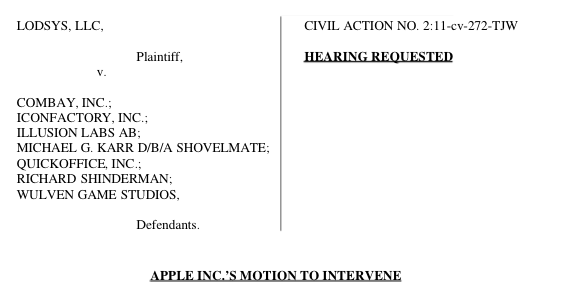
According to FOSS Patents, Apple has filed a motion to intervene in the proceedings between Lodsys and several app developers. Lodsys nine days ago filed a civil suit against several app developers including Iconfactory, Illusion Labs and Quickoffice in East Texas over patents it owns.

Whilst Lodsys can oppose Apple’s attempt to intervene in the case, FOSS Patents says that “Apple is fairly likely to be admitted as an intervenor”. In Apple’s proposed defence, it is argued that Apple’s existing license agreement with Lodsys covers the third party developers being sued – an argument Apple made with Lodsys in its letter to them. Contrary to what some might have presumed would happen, Apple does not claim any other defences such as disputing the validity of the patents – but the third party developers could still do so.

I’m reasonably optimistic that Apple will get to intervene. There appears to be precedent for that. Apple cites three interventions admitted in more or less comparable cases (Intel against Negotiated Data Solutions, Intel against U.S. Ethernet Innovations, and Microsoft against TiVo).

It isn’t clear what Apple’s relationship with the developers is (likely under a non-disclosure agreement) but more than likely is that Apple will help them with financial costs and perhaps even the potential risks. In its motion, Apple states that those developers being sued by Lodsys are “are individuals or small entities with far fewer resources than Apple and […] lack the technical information, ability, and incentive to adequately protect Apple’s rights under its license agreement”.

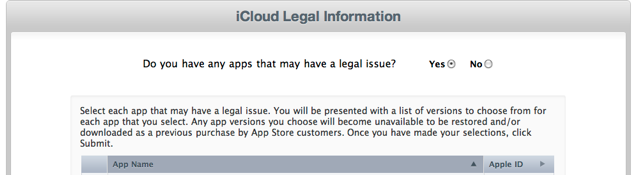
In its post, FOSS Patents also shares some screenshots of the developers iTunesConnect app management service which asks developers about potential legal issues with their apps. If a developer says “yes” to legal issues, that app will become “unavailable to be restored and/or downloaded as a previous purchase by App Store customers” through the new iCloud service.

If you want a full rundown of Apple’s motion to intervene, FOSS Patents has an excellent run down, along with questions that the motion does not answer. If you feel brave enough you can also read the official motion here.

[Via FOSS Patents]


Mac mini, Mac Pro Server Refresh Coming Soon?

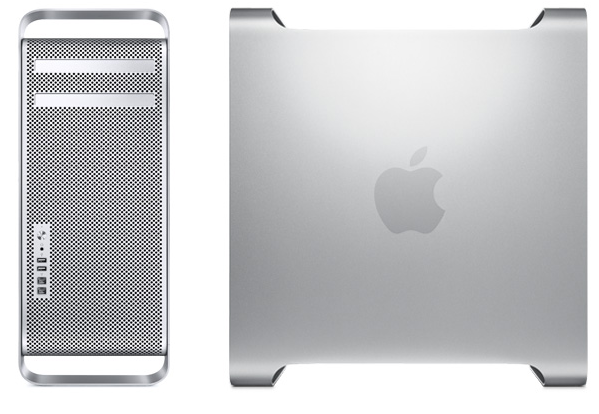
According to 9to5mac, “sources” are pointing to an upcoming refresh for the Mac mini and Mac Pro server lineup which could come in “the next month or so”. Apple will launch OS X Lion in July and, following the implementation of Sandy Bridge processors and Thunderbolt I/O technology in the latest MacBook Pro and iMac refreshes, it’s very likely the company will begin shipping new Mac minis and Mac Pros featuring the new aforementioned hardware. 9to5mac mentions, however, that the server lineup will go under a refresh, so we’re not sure how that would play out with the consumer version of the products. Still, it seems fairly obvious that all forthcoming Mac updates will carry Sandy Bridge and Thunderbolt. Apple quietly introduced its Mac Pro Server product after the Xserve’s discontinuation was announced in November.

The interesting part about both the Mac Pro and Mac mini server models become constrained simultaneously is that Apple might be looking to completely revamp their server offerings, not just update each respective product.

In past few weeks, rumors claimed Apple would soon refresh the MacBook Air family (perhaps in June or July) and the AirPort Extreme/Time Capsule lineup to bring better integration with its recently announced iCloud service. Whilst the Time Capsule announcement didn’t come true at the WWDC keynote, several sources have indicated the MacBook Air would soon receive an update to increase performances with new processors, as well as better connectivity with Thunderbolt.


More than Twitter: iOS 5 Built With Social Contact Integration

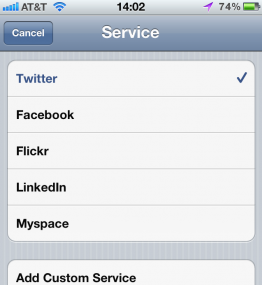
While Twitter integration is engrained in iOS 5 (heck, Apple even lets you know whether you have Twitter’s official app installed or not), All Things D reports that Contacts has received a small update which includes support for adding friend’s handles on Facebook, Myspace, LinkedIn, and Flickr. When you add a contact to your iPhone, you can link that person to all of their social accounts. If you tap the handle in your contacts list, you’ll be take to that person’s user profile page.

The inclusion of the feature shows Apple’s acknowledgement of the importance of Web presences and contact information. But it could be much more useful if users don’t have to enter each of their friends’ handles manually, as appears to be the case at least in this release.

There’s also an inactive “add custom service” button that may allow you to add someone’s Instagram or MLKSHK account in the future - currently I found this particular feature wasn’t working. To access these additional profiles, edit a contact, and add a Profile field. If tap on the word Profile, you can select between the various social networks.

[via All Things D]