Rdio Launches Complete Redesign

Rdio, a music streaming service that works on the web, Mac, and iOS, is holding a press event today to announce a major redesign that, however, is already available to subscribers in the web browser. Once enabled, “New Rdio”, as the company is calling the new experience, shows a complete rethink of the music browsing and listening workflow behind Rdio.com.

New Rdio is a visually beautiful and dynamic way to play Rdio’s massive catalogue of 15 million songs. New features include the oft requested drag and drop playlist creation, a more personalized Heavy Rotation, and private playlists.

From a first test, it appears the new user interface is heavily based on sidebars and panels to manage your music collection, playlists, queue, and network of friends or people you should follow. Playlists have been updated, and it’s now possible to create them and manage them through drag & drop, as well as make new “private playlists” that you can choose to share with just a few people. A new sidebar on the left organizes people and music influencers by “Your network” and “Who to follow”. The Network tab is similar to Facebook’s own ticker system, in that it shows people you’re currently friends with and the music they’re listening to. Click on an item, and a popover will open allowing you check out a song right away. The suggestions tab is equally interesting, presenting people that Rdio thinks you should invite or follow on the service. The aforementioned drag & drop system has also been enabled for sharing – you can now grab an item from the main panel, head over a friend’s avatar, and share it. Twitter, Facebook, and email sharing are supported.

Search seems a lot faster than before, presenting results for artists, songs, or albums in a few seconds. The overall design feels cleaner, less crowded, and easier to use. As the company stated at its press event “We basically took Rdio apart and put it back together”. The app is more social, puts music and people front and center, and, more importantly, keeps more items and sections within a single page thanks to popups, sidebars, and panels. Furthermore, the new design also allows you to click through items – for instance, an album – and navigate back while maintaining page position, without having to scroll again. What I think is interesting, and will likely take some time getting used to, is that while the Heavy Rotation for your account is harder to access and has been seemingly also incorporated with your network’s rotation, people that are listening to same music as you are now always shown in the UI, your collection included. Top Charts, Recent Activity, Queue, and New Releases keep more or less the same functionalities as before, only with a new design.

The new Rdio experience has also been brought to the official Mac app, which was updated earlier today to version 2.0 and is capable of automatically switching to the new UI once enabled in your account. The app is now smarter at recognizing when music is playing on another location (such as the browser), and offers you a way to quickly switch playback to the desktop.

We will update this story with more screenshots and details from Rdio as the company details the new features at its media event. For now, New Rdio is available only to Web and Unlimited subscribers, with everyone else gaining access sometime in the future. A promo video of the new Rdio is embedded after the break. Read more


Tweetbot Gets Streaming

Tweetbot, Tapbots’ excellent Twitter client for iOS that we recently reviewed for the launch of its long-awaited iPad version and 2.0 update on the iPhone, received today support for one of the most requested functionalities by its users: streaming.

Available today in version 2.1 of the iPad app, live streaming allows users to stay on top of the latest tweets thanks to Twitter’s real-time push technology that can be seen in the new Tweetbot timeline, which, when on WiFi, will constantly check for new tweets and automatically load them above your timeline position. An option is available to disable streaming in the app’s Settings, as well as a switch to enable “Pin to Top”. In my tests, Tweetbot’s new streaming feature has been extremely reliable – that is, unless Twitter itself was experiencing issues – and has enabled me to forego completely the need of manually refreshing or waiting for Tweetbot to update my timeline every few minutes. Like on Twitter for Mac, I think streaming is an invaluable tool if you’re planning on getting the most out of Twitter’s real time nature, and Tweetbot’s implementation doesn’t disappoint.

With streaming come a few other changes to make the experience of fetching and syncing tweets more pleasant. The new tweets sound, for instance, is now limited to mentions, direct messages, and tweets fetched with pull-to-refresh. The Tweet Marker service, which allows you to keep your Tweetbots (and other supporting clients) in sync, has been vastly improved. Generally, this means the process of getting your latest-seen tweet and timeline position should sync faster to the cloud and back to the app – in testing the latest Tweetbot, I can confirm Tweet Marker sync seems a little faster and more “accurate” than before.

Tweetbot is my favorite Twitter client on any platform, and streaming makes it a lot better from a user experience standpoint. You can get iPad update from the App Store now (the app’s graphics are also ready for the new iPad coming out later this week); version 2.1 of the iPhone app, sporting the same new features and Camera+ 3.0 integration, is still waiting for approval in the App Store’s queue.


Camera+ 3.0 Review

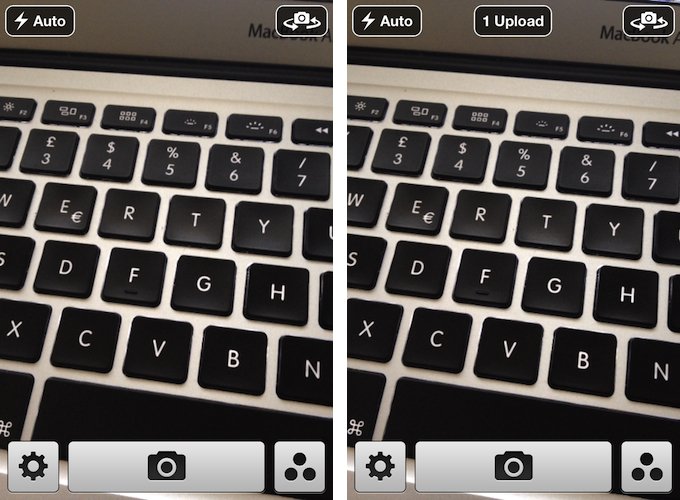
Few iPhone apps have managed to substantially improve on the functionalities offered by Apple in its core system apps. Tap tap tap’s Camera+, a popular alternative to Apple’s Camera app, is one of them, and the 3.0 version released today takes a major leap in turning Camera+ into a more powerful solution to shoot, edit, and share photos online, as well as providing a solid foundation other developers can integrate their apps with.

The thing about Camera+ is that its lead developer and creator, John Casasanta, knows what people want from an iPhone app, and understands the rules behind viral marketing for software sold on the App Store. In spite of a 4-month ban that forced Camera+ out of the App Store due to a functionality the developers shouldn’t have hidden without telling Apple, the app has been an example of modern success in the App Store, granting its developers a renowned position in the top charts with millions of copies sold worldwide. But it’s not just about clever marketing (Casasanta also runs MacHeist, a website dedicated to promoting deals on Mac software that has amassed an incredible amount of followers in the past years). Camera+ is a very well-done app – from the polished user interface to the features it adds on top of Apple’s standard camera-related functionalities, Camera+ has become many users’ go-to camera app thanks to its enhanced view options, filters and effects, and elegant sharing capabilities.

With Camera+ 3.0, a free update for existing users, tap tap tap wants to refine every aspect of the app, whilst opening the door to third-party devs with APIs to offer Camera+’s features into other apps. Read more


Getting Your iPad App Ready for the new iPad

Editor’s Note: This is a guest post by Ken Yarmosh, the creator of the popular iOS apps Agenda Calendar and Buzz Contacts. Read more about him at his blog and follow him on Twitter.

With the announcement of “the new iPad,” developers are quickly readying their apps for the latest and greatest iOS device from Apple. Preparing an iOS app for a more powerful, Retina display device is a familiar task for those developers who got apps ready for the iPhone 4. Whether you do or don’t have that experience, it’s still helpful to have a checklist of sorts for preparing your app for the new iPad.

Here’s that list.

Download the Latest Version of Xcode

Before you get too excited, open up the Mac App Store to download Xcode 4.3.1. This will provide you with the “iPad (Retina)” simulator and the ability to build against the iOS 5.1 SDK. Even though an iOS 5.0.x iPad app will run on the new iPad (or any iPad running iOS 5.1), remember that the new iPad will ship with iOS 5.1. So, building against the proper SDK is always a smart choice.

Update Designs Assets for Retina display

Getting your UI assets updated for the new iPad’s Retina display should be relatively straightforward. Hopefully, you’ve built your application in a way that will mostly make it a design-related task of scaling up your images and applying the “@2x” designation to them. This can be slightly more involved than what was required for the iPhone 4 Retina display update because of the importance of both portrait and landscape on the iPad. Don’t forget to update your “Launch Images” for both orientations, as well as your “App Icons.” If you want more specifics on this topic, see the Apple-related documentation or read Marc Edwards’ post on designing for Retina display on the Bjango site.

Test in iPad (Retina) iOS Simulator

If you want your iPad app looking shiny the day the new iPad arrives, you’ll be stuck trying to use the ginormous iPad (Retina) simulator since the new iPad isn’t available now. Even on Apple’s 27-inch Thunderbolt or Apple Cinema Display, you’ll be struggling to view your app in portrait and barely be able to see it in landscape. Use the window scale and adjust it to 75% or 50% accordingly.

Check Wi-Fi Download Limit

Paul Haddad of Tapbots reported Tweetbot for iPad going from 8.8MB to 24.6MB post-Retina display upsizing. Since many iPad apps are content-intensive, definitely keep tabs on the total size of your app. Even with the new 50MB Wi-Fi download limit, Retina display assets will add up quickly.

Consider New Features

Should you be readying your app for the new iPad on launch day, you’re probably not going to add many new features to your app. But the new iPad does come with more than just Retina display, including the much faster A5X processor, a new camera, dictation (which is available to third-party apps), LTE, and Bluetooth 4.0. Think about how these new features can impact your app and consider how your app might be made better by specifically using them.

Submit to Apple

Apple is now asking developers to submit apps updated for iOS 5.1, including apps optimized for the new iPad. So, once you’ve gone through the steps above, submit to Apple and hurry up and wait. Make sure you mention in your “What’s New” release notes, as well as your version-specific App Store description that your app is now iOS 5.1 tested and Retina display ready. You’re not done yet though!

On-Device Testing

When you get that new iPad in your hands, the first thing you should do is open up your app. Do some pixel nitpicking and ensure everything is working as expected. Faster devices may cause certain parts of the user interface to load faster than others, can handle content pulled in from APIs to process differently, and more generally, may require some small tweaking.

iPad hero

iPad hero

Re-Submit to Apple

If you found issues during the on-device testing, prepare another update and once again, submit your iPad app to Apple. If any crashing or critical bugs were identified during on-device testing, consider (very carefully) requesting an expedited review.

Congratulations, you’re ready for the new iPad. Here’s to 25 billion more app downloads and many five star App Store reviews.


Apple Releases Safari 5.1.4

Apple just released an update to Safari on its Downloads website and Software Update, adding a number of improvements for stability, compatibility, and security.

  • Improve JavaScript performance
  • Improve responsiveness when typing into the search field after changing network configurations or with an intermittent network connection
  • Address an issue that could cause webpages to flash white when switching between Safari windows
  • Address issues that prevented printing U.S. Postal Service shipping labels and embedded PDFs
  • Preserve links in PDFs saved from webpages
  • Fix an issue that could make Flash content appear incomplete after using gesture zooming
  • Fix an issue that could cause the screen to dim while watching HTML5 video
  • Improve stability, compatibility and startup time when using extensions
  • Allow cookies set during regular browsing to be available after using Private Browsing
  • Fix an issue that could cause some data to be left behind after pressing the “Remove All Website Data” button

You can find Safari 5.1.4 here. The previous version of Safari, 5.1.3, was released alongside 10.7.3, adding, again, bug fixes and improvements.


OnCue 5.0 Brings Powerful Music Queue Features To iOS

These days, most of my music consumption happens on Rdio. The term “consumption” isn’t there because that’s how providers like to present content: I consume albums and artists that I discover online. However, for as much as I’m completely hooked to paying a monthly fee to get access to a (virtually) unlimited amount of music, there are albums that I still have to keep synced locally through iTunes. Either because Rdio applies some curious restrictions on several artists from Europe or because these artists choose not to make their music available for streaming (ask Coldplay), I have resorted to keeping a portion of my music synced on the devices I own (32 GB iPhone 4S and iPad 2, soon to be new iPad). And when I want to play songs from this “mini library” I sync, I stumble upon the same problem I initially wrote about last year: Apple’s Music app doesn’t let me create queues, and I loathe creating playlists for all possible scenarios my music listening habits may fall into. Just like last year, Dan Pouradi’s OnCue comes to the rescue, this time with a completely re-engineered version that works with iOS 5, and sports a new UI. Read more


MacStories Reading List: New iPad Special Edition

What a week for Apple news. Last Wednesday, after much speculation and last-minute predictions, Apple officially took the wraps off its new iPad, simply called, well, the new iPad. Debates on the name aside, the new device sounds like a great achievement for the company: in the same design of the iPad with only minimum weight and thickness added (to allow for a battery with more capacity), the new iPad adds a Retina display, 4G LTE networking, Bluetooth 4.0, a quad-core CPU, A5X processor – all while keeping the same price. Make sure to read all the details in our new iPad overview and keynote roundup.

It has been a crazy week filled with news, hands-on impressions, and editorials, and it deserved a proper Special Edition of our Reading List. Grab your favorite read later app or browser of choice, and follow us along after the break as we collect the best links and articles about the new iPad. Read more