My New Dropbox List-Making App: TaskAgent 2.2

In the past few months, I have been refining my Dropbox-powered writing workflow, adding new tools and checking out updates to existing ones in order to achieve a reliable, yet seamless environment for quick notes, longer articles, and lists. In particular, I mentioned TaskAgent, an iOS app to manage lists through easily formatted text files inside Dropbox.

In TaskAgent, I keep lists of apps I want to buy or update, and lists of stories I want to work on. These lists can be archived and retrieved later, and they exist as standalone .txt files in my Dropbox. If I want, I can add items to my lists using TextDrop, GoodReader, or TextEdit on my Mac; I guess it’d be nice to have a dedicated TaskAgent Mac app with the possibility of entering items with keyboard shortcuts.

See, on my computer and iOS devices, I keep lists. I have the aforementioned work-oriented lists of apps and posts I’d like to work on. I have lists of apps I want to recommend for our Inspiring UI series, and I have lists of developers I want to interview. But I also keep lists of podcasts I want to check out, movies I want to buy, groceries I need to pick up, and ideas I want to submit to a developer as feedback for his beta app.

In my mind and in my workflow, lists and tasks are separate entities. A list may contain items that will become tasks; my OmniFocus keeps the things I know I have to do – neatly organized and synced to the cloud. Over time, I have found the separation of lists and tasks to be necessary to properly divide my organization skills in two distinct areas: remembering Vs. doing. And I have found TaskAgent 2.2, released today, to be the best app at enhancing this text-based setup on the iPhone and iPad.

From a core functionality standpoint, TaskAgent 2.2 isn’t too dissimilar from the versions we have previously covered here at MacStories. However, alongside a much simpler formatting syntax and a slew of new features, TaskAgent 2.2 impressed me thanks to its completely redesigned interface and Dropbox sync engine.

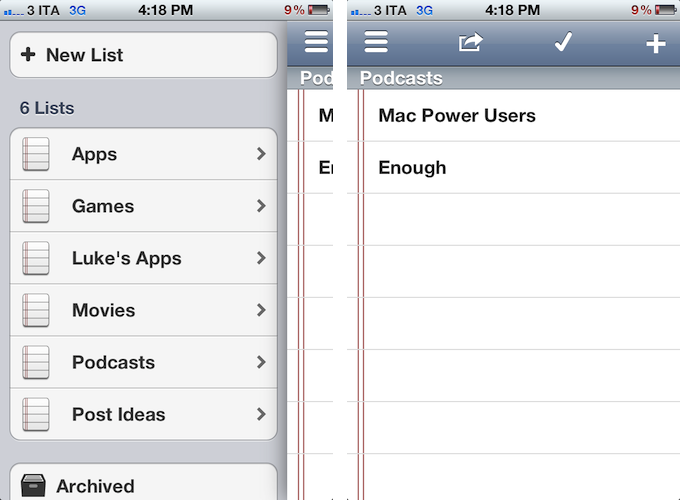
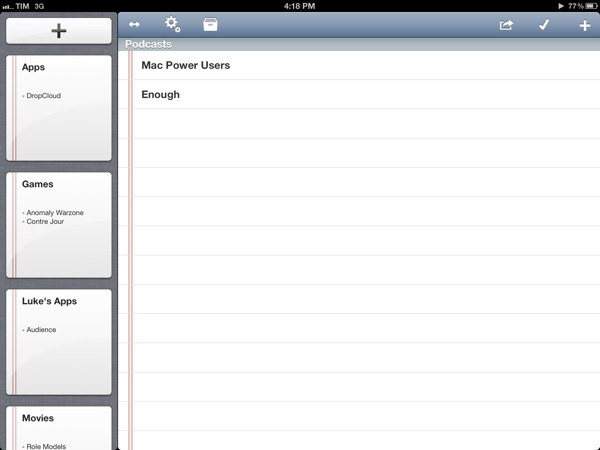
On the iPad, large “notebook thumbnail previews” adorn a sidebar that can be dismissed with a button in the upper toolbar. On the iPhone, lists are shown through a Facebook-like panel that also contains shortcuts to create a new lists, enter the Settings, or open Archived lists (which aren’t permanently deleted). TaskAgent 2.2 cleverly uses these new list previews to bring up functionalities that would have otherwise been buried in sub-menus within the main interface. A tap & hold on a list will reveal options to quickly delete, rename, duplicate, or archive a list. To avoid the guilty remorse of having too many items in a list, TaskAgent now lets you hide the “0 out of x completed” description, so you’ll focus exclusively on managing your lists without feeling bad about having too many items inside them.

One of TaskAgent’s previously often criticized feature was its New Item dialog. Version 2.2 does away with uninspired blue alert boxes and introduces a new quick way of entering items one after the another: on the iPad, that’s a popover, while on the iPhone the menu has been rendered as another panel on the right. Depending on your settings, new items will be added at the top or bottom of a list, and you can enter multiple ones in a row without having to tap Done every time. The overall workflow is incredibly faster.

TaskAgent 2.2 is unarguably a better version of the app, and, to me, the best solution to manage lists on iOS while retaining the capability of editing them anywhere as long as I can open a .txt file. I can access my lists from my browser with TextDrop or from iOS using GoodReader and ReaddleDocs. I can associate TaskAgent’s folder (which can be moved anywhere inside Dropbox) with a text editor and start editing right away. I can quickly append new items to a specific list file using Alfred, and if I want, I can share a list to Evernote as well, as TaskAgent supports that service, too.

TaskAgent makes lists “open” and available anywhere. Only $1.99 for a limited time.

Alien Blue 2.1

Alien Blue 2.1

My favorite Reddit client for iPad, Alien Blue by Jason Morrisey, was recently updated to version 2.1, adding a number of functionalities (including iCloud sync, which will work alongside an upcoming update to the iPhone version) aimed at increasing the app’s Reddit-based discoverability features.

From Alien Blue’s subreddit:

Inside Alien Blue, you’ll now find a well curated and up-to-date list of active subreddits ranging across a wide variety of topics. This list is maintained and updated nightly. If you see something missing, you can make a recommendation in any of the categories and they’ll be live soon after.

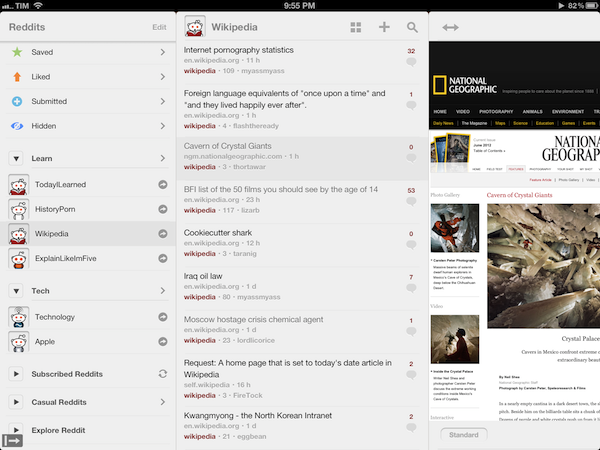
To better leverage Reddit’s wide-ranging amount of information available every day, Alien Blue now lets you easily organize similar subreddits (sections of the site) into groups that are synced to iCloud, and will automatically carry over to the iPhone once the new version comes out. At first I didn’t get the usefulness of groups – I was used to accessing my most-visited subreddits through Alien Blue’s sidebar, which, by the way, in version 2.1 seems to be more reliable at switching between “compact navigation” and extended panels depending on whether you’re holding the iPad in landscape or portrait mode.

Subreddit grouping, however, has changed the way I use Alien Blue. Aside from the convenience of neatly categorizing similar subreddits in the app’s sidebar, each group can be turned into a “front page” collecting all the most upvoted links of each subreddit. This means that, for instance, I was able to create a “Learn” group within Alien Blue, throw TodayILearned, HistoryPorn, Wikipedia, and ExplainLikeImFive in there, so that when I’m in the mood of learning new things and cool facts, I can enjoy my own “Learn” Reddit front page made of the subreddits I grouped. It’s incredibly smart.

Check out all the improvements in Alien Blue 2.1 in the official announcement post, and download the app at $3.99 on the App Store.

Permalink

Bang On Centralizes Mobile Search

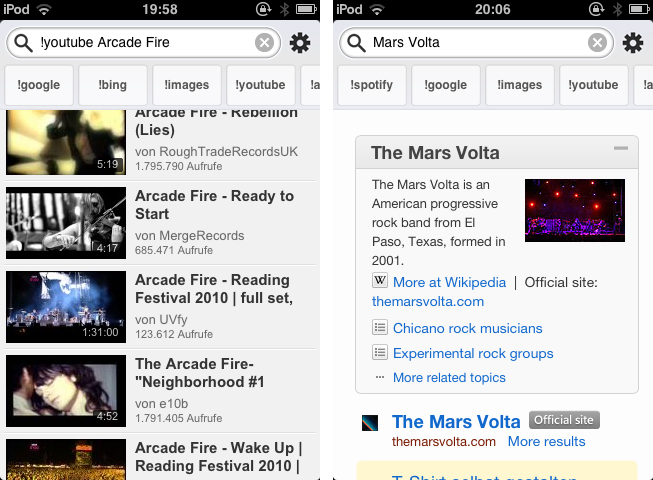
Mobile search is and has ever been a very problematic area. After nearly five years of iPhone, developers are still discussing iOS browser search functionality, speed, and the right way of implementing it into the devices workflow. When it comes to services other than Google or Bing, Apple took the easy way by dividing its mobile OS into multiple apps with each one having its own searching capability (Safari for websites, YouTube for videos, etc.). This trend did not stop after the launch of the App Store: third-party apps like Articles and more recent examples like Spotify rely on their own search engine implementation. Bang On by Derek Kepner might be able to change that. Read more


Apple Confirms Sandboxing Deadline For Mac App Store Apps on June 1

In an email sent to registered Mac developers earlier today, Apple has confirmed it will begin enforcing a deadline on Sandboxing for Mac App Store apps on June 1, 2012.

As a reminder, the deadline for sandboxing your apps on the Mac App Store is June 1. We’ve made the process easier with new sandboxing entitlements and APIs now available in OS X 10.7.3 or later and Xcode 4.3.2.

If you have an existing app on the Mac App Store that is not sandboxed, you may still submit bug fix updates after June 1. If you have technical issues that prevent you from sandboxing your app by June 1, let us know.

Previously pushed back from November 2011 to March 2012, and then again from March to June 1, 2012, sandboxing is a new technology aimed at limiting an application’s access to certain areas of OS X through a system based on entitlements. As we wrote in February:

Sandboxing is a new technology in OS X Lion that limits the functionalities of Mac App Store applications to a list of “entitlements” that cover various areas of the operating system an app can access, such as networking, printing, or a user’s files. A sandboxed application would be unable to harm the system outside of its operational scope (managed by the entitlements), and this has caused some concerns as apps would lose access to the Mac’s entire filesystem, which is required by some functionalities of certain applications that aren’t necessary malicious or “compromised”. Similarly, inter-app communication would be a technical issue with sandboxing, as apps like TextExpander, Keyboard Maestro and CoverSutra — utilities that perform actions in the background without asking for user’s interaction in some cases (user-initiated actions can override the sandbox) — couldn’t get past the sandboxing requirement for the Mac App Store.

With today’s reminder, Apple has confirmed that new apps submitted to the Mac App Store after June 1 must adopt sandboxing, whilst existing apps that are not sandboxed will still be available to receive bug fix updates. Earlier this week, a report suggested that, in relation to the upcoming sandboxing deadline, Apple was also looking into “banning” new apps with “hotkey” functionality, though it appears that such policy won’t take effect, according to several sources. Recently, several OS X developers expressed their wish for Apple to further delay the sandboxing deadline to the end of June in order to better explain the ramifications of the technology at the upcoming WWDC. Unfortunately for those developers who were hoping for a revised deadline for apps that have proven to be incompatible with sandboxing, WWDC kicks off on June 11 – 10 days after the sandboxing deadline.

A number of Mac applications using Sandboxing are already available on the Mac App Store. Most notably, 1Password by AgileBits implemented the technology back in September 2011, and others like Edovia’s Screens for Mac and, recently, Pixelmator were updated with support for sandboxing as well.


Jack White, Norah Jones, and Usher to Perform at Apple’s iTunes Festival 2012 in September

Last July, Apple’s annual iTunes Festival for 2011 rocked London with top-notch performances by bands like Linkin Park, Coldplay, and Foo Fighters — this year’s follow-up slated for September will bring Jack White, Norah Jones, Usher and more to the Roundhouse in London. The festival schedule for this year’s iTunes Festival isn’t complete, but you’ll find this year’s must-see headliners already scheduled for the following dates:

  • Usher, September 1st
  • Emeli Sandé, September 5th
  • Jack White, September 8th
  • Norah Jones, September 10th
  • One Direction, September 20th

Live concerts will be streamed to viewers worldwide through iTunes or the iTunes Festival app for iOS devices. Last year, the iTunes Festival app made available the schedule, live concert streams, photo galleries, concert replays, and performance highlights (availability depending on the band and when you saw them). From your iPhone or iPad, you’ll also have the option to stream the concert to your television through the Apple TV. Shortly after a performance, you can typically find live highlights through EPs released through the iTunes Store.

If you live in the United Kingdom, Ireland, the Netherlands, France, or Germany, you have a chance to win a pair of tickets to see your favorite artist. The rest of the world can tune in to watch the live streams online or through Apple’s application. Throughout September, Apple will be streaming live, must see performances of your favorites artists. You can sign up for updates through the iTunes Festival page on iTunes or follow @itunesfestival on Twitter.

[via MacRumors]


Four Years of App Store: Developers Weigh In On Search, Discovery, and Curation

“The App Store is a grand slam, with a staggering 10 million applications downloaded in just three days”. That’s how Apple co-founder and late CEO Steve Jobs saluted the launch of the company’s new storefront for iOS (née iPhone OS) applications on July 14, 2008. Almost four years and over 25 billion downloads later, the App Store has evolved into a brand that spans two platforms (iOS and OS X), three different iOS devices (iPhone, iPod touch, iPad), a variety of Macs, and that hosts over 600,000 apps from more than 200,000 registered developers. Albeit minimal in terms of revenue for a company that makes billions off iPhones and iPads, the App Store created a new economy that nurtures an ecosystem ultimately aimed at selling more devices, as well as showing consumers that, nowadays, software is revolutionizing the way they approach work, entertainment, and other personal tasks. In spite of its tremendous growth, however, little has been done to improve a basic premise of the App Store: finding new apps.

“Discovery and search has been a huge concern of mine for a long time”, said Craig Hockenberry, Principal at design and development studio The Iconfactory. Hockenberry and his team were among the first developers to support the App Store in 2008 with Twitterrific, a Twitter client for iPhone that has expanded to the iPad and Mac, with different versions available on the App Store and Mac App Store. In 2009, a year after the App Store launched, Hockenberry offered a series of suggestions to Apple in order to improve certain aspects of the App Store – namely, following early discussions with developers that decided to sell software on the “iTunes App Store”, he noted how there was “still much room for improvement” to turn the App Store into a viable and reliable business platform for developers who weren’t simply interested in experimenting with it.

Hockenberry’s “Year two” post still rings true today, in spite of the functionalities that Apple fixed, improved, or brought to the App Store in the past four years. For instance, Apple created a “New and Noteworthy” section on the homepage of the App Store that is refreshed on a weekly basis to showcase apps Apple deems worthy of attention; promotional codes, which Hockenberry listed as one of the tools that had helped them sell more products, were made available internationally in late 2010; either on print, its website, or YouTube, Apple has kept pushing ad campaigns to educate iOS and Mac users on the importance and convenience of the App Store.

The very motto that started the app revolution, however, didn’t meet an equal amount of attention by Apple in terms of improvements for the infrastructure behind it. As Hockenberry wrote in 2009, “it’s incredibly hard to find the “that” in “there’s an app for that.” Between keyword spamming and the sheer volume of choices in each category, customers can’t find what they want”.

Read more


Everyme Launches Web App for Group Messaging, Improves iPhone App

Released in April exclusively on the iPhone, Everyme offered a new take on private messaging with groups by combining a clean design with a featured called “Magic Stories”, which allowed the app to automatically fetch important updates from other social networks, and bring them into Everyme. From my review:

Everyme is a private “network” of people, organized in circles, connected to other services. The distinction between “communication” and “sharing” will also define Everyme as a private network, or a messaging service going forward. Unlike most messaging solutions, Everyme could improve its “magic” aggregation and cross-service data collection to simplify organization for its users; unlike most social networks, Everyme could, say, think of something like Xobni’s contact history to provide better, more informative stats about the people you care about. It is an interesting scenario, and I look forward to Everyme’s next steps; today, I don’t think Everyme can be compared to Path — as some are already doing — as the focus is clearly on group messaging, whereas Path has taken a more elegant, Facebook-like approach with its digital journal.

Today, Everyme begins its expansion onto other platforms and connected services by releasing an Android app, web access, and an improved iPhone app with support for Instagram, better communication within groups, and more. I have been able to test the new Everyme for iPhone, and while I am still looking forward to a native iPad version (most of my iMessages these days are sent from the iPad), I have enjoyed the changes brought to version 1.5.

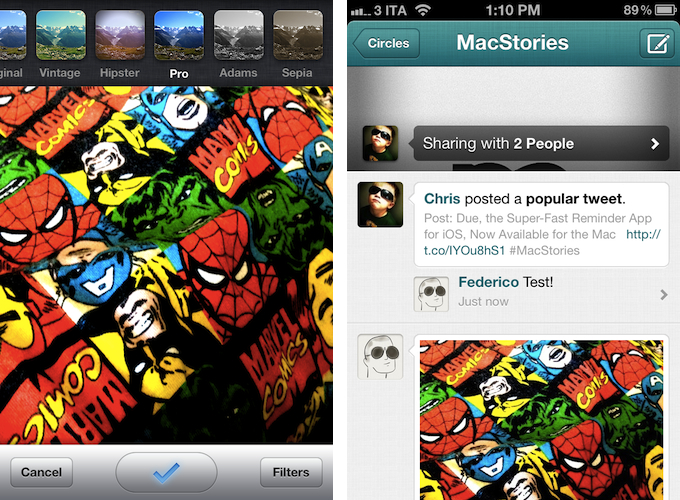
The most visible change in Everyme 1.5 is support for photo uploads with Instagram-like filters. Similarly to how Path for iPhone lets you preview filtered photos as you take them, Everyme 1.5 puts a filter bar at the top of the screen, enabling you to see how a picture will look like with Vintage, Hipster, Pro, Adams, or Sepia effects applied. I didn’t find Everyme’s filters to be as attractive and fun to use as Instagram’s, but I do think they are better than Path’s somewhat curious choices. Photo uploads are generally faster in Everyme 1.5, and because not everyone will want to add yet another filter-based photo sharing tool to their workflows, the team added support for Instagram into the app. With an additional login option in the Settings, Everyme can now look for activity in your Instagram account, and populate your Circles with Magic Stories coming from Instagram as well.

Other minor, yet welcome improvements have found their way into Everyme 1.5. When you share links, for instance, the app now embeds summaries inline to give others an idea of what they are about to click on (Everyme features a built-in browser for webpages); users can now create and edit their own bios, and comments are displayed inline within the news feed. Comments can be deleted with a swipe, and, speaking of gestures, Everyme 1.5 also comes with pull-to-refresh to update circles and stories. Overall, Everyme 1.5 appeared to be faster than version 1.0 in my tests, and I was happy to see a new “export data” option to request an export of all your data you shared on Everyme, and get it delivered via email.

Today, Everyme is also launching a web app to communicate with your Circles. Sporting a clean design similar to the iPhone app, the web app features a sidebar on the left listing all your circles, with unobtrusive notification badges for unread stories and messages; you can manage your profile and your Circles, share stories and upload pictures from your computer, and, overall, enjoy the basic Everyme experience from any modern web browser, which should come in handy for those times when an iPhone isn’t available, or to sift through multiple conversations at once with the convenience of a larger display. I haven’t been able to test the web app on the iPad’s Mobile Safari yet, but I assume it makes for a decent temporary solution until the Everyme team comes out with a native tablet client.

Everyme 1.5 is available for free on the App Store.


Justnotes is Simplenote’s Desktop Companion and a Little More

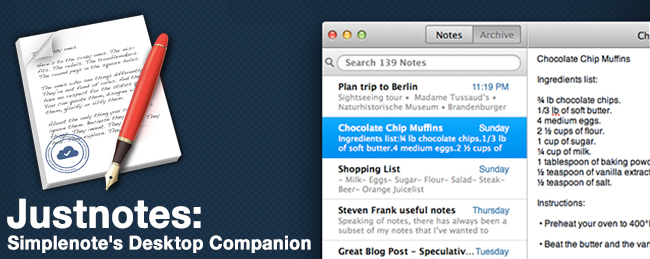
I already know what you’re thinking: “Justnotes looks a lot like nvALT.” You wouldn’t be wrong in thinking that Justnotes is visually reminiscient of Notational Velocity and its poweruser fork, nvALT, but it wouldn’t be fair to judge without getting hands on. I’d posit Justnotes as an alternative to TextEdit on OS X — it’s a container for creating, sorting, and archiving text files. Otherwise, Justnotes is simply the desktop counterpart to Simplenote… With a twist.

Read more


Apple To Reject Mac Apps With “Hotkey Functionality” Starting June 1? [Updated]

According to TUAW, Apple will start rejecting Mac apps with “hotkey functionality” starting June 1, when the deadline for Sandboxing will become active for Mac App Store developers.

Apparently, Apple will allow hotkey apps that are already in the Mac App Store before June to offer only bug fixes. New apps and any apps that add features (i.e. non-bugfix releases) will not be allowed to support hotkeys.

TUAW has been told that Apple will be rejecting all apps with hotkey functionality starting June 1, regardless of whether the new features are hotkey related or not. Basically, if you’re developing one of those apps, an app that assumes you can still add hotkeys, don’t bother submitting it to the Mac App Store.

While TUAW doesn’t specifically mention any Mac app that would be subject to this new restriction, it is safe to assume that by “hotkey functionality” they mean desktop applications that allow users to set up keyboard shortcuts to activate other apps or system locations (such as Apptivate), or an app’s specific functionality (such as Alfred’s hotkey to show a search box, or OmniFocus’ hotkey-based Quick Entry panel).

I spoke to various developers of Mac apps with system-wide hotkey functionality, and they were unaware of the changes that Apple may begin to enforce on June 1. Currently, there is no mention of such specific change in the Mac App Store Review Guidelines (or Sandboxing FAQs), and the APIs used by the developers I contacted aren’t deprecated in the latest Mountain Lion Developer Preview, updated yesterday. Some developers told me Apple may have rejected some apps that registered hotkeys without a user’s explicit consent, but according to TUAW the issue is different, and related to the kind of control and experience that Apple wants on the Mac App Store, rather than technical limitations or APIs.

Initially pushed back from November 2011 to March 2012, and then again to June 1, 2012, Sandboxing for Mac apps has found a considerable amount of skepticism in the Apple developer community, as it would pose a threat to existing Mac apps that would have to rework their functionalities around the limitations of sandboxing.

As I wrote in February:

Sandboxing is a new technology in OS X Lion that limits the functionalities of Mac App Store applications to a list of “entitlements” that cover various areas of the operating system an app can access, such as networking, printing, or a user’s files. A sandboxed application would be unable to harm the system outside of its operational scope (managed by the entitlements), and this has caused some concerns as apps would lose access to the Mac’s entire filesystem, which is required by some functionalities of certain applications that aren’t necessary malicious or “compromised”. Similarly, inter-app communication would be a technical issue with sandboxing, as apps like TextExpander, Keyboard Maestro and CoverSutra — utilities that perform actions in the background without asking for user’s interaction in some cases (user-initiated actions can override the sandbox) — couldn’t get past the sandboxing requirement for the Mac App Store.

In the past months, a number of notable Mac developers have voiced their concerns in regards to sandboxing: Daniel Jalkut of Red Sweater Software wrote that “to increase adoption, Apple should expand the current list of entitlements until it covers every reasonable behavior that users expect from Mac apps”; following his decision to stop selling Clipstart on the Mac App Store, Riverfold’s Manton Reece noted how, rather than playing “catch-up” with Apple to work around the list of entitlements for sandboxed apps, he’d prefer to keep selling his apps on his own website – something that the upcoming Mountain Lion will keep supporting thanks to GateKeeper.

Over at TUAW, Erica Sadun says we should say goodbye to “hotkeys, macro programs, end-user customization”. While I can’t confirm the kind of apps and “hotkey functionalities” that Apple has apparently already rejected or will start rejecting in two weeks (I’ve only seen some discussions about clipboard managers and keyboard shortcuts on the Mac Dev Forums), it would surely be unfortunate to lose software like Alfred, Apptivate, or Keyboard Maestro (just to name a few) to an updated Mac App Store policy. Erica Sadun refers to these hotkey-enabled apps as ”all those great little hotkey shortcuts that used to let us bring an app to the forefront and do something”.

That sandboxing would be a technical issue for apps based on AppleScript technologies is nothing new; however, Apple also specifically asked developers to get in touch with the company if technical issues were preventing them from sandboxing an app, suggesting that the company was actively working on getting developers of existing great Mac software on board with sandboxing, without limitations. This week, the Pixelmator team updated their application with support for sandboxing; other developers of “power-user” applications like Keyboard Maestro, however, still haven’t found a proper way to work around sandboxing entitlements, going as far as writing “Keyboard Maestro requires access to other applications to perform your macros and so is not, and cannot, be sandboxed” on the app’s Mac App Store page.

According to Apple’s notice from February, developers of existing apps on the Mac App Store that are not sandboxed may still submit bug fix updates without sandboxing their apps. In theory, this should mean that apps like Alfred or Shortcuts (with hotkey functionality) or Keyboard Maestro (for general incompatibility) should stay on the Mac App Store as long as their developers don’t include new features, but only bug fixes for existing customers. But what’s going to happen when developers of hotkey-enabled apps or already-approved macro programs like KM will decide to update their apps with new features?

Just like in February, the future of sandboxing and Mac App Store apps is uncertain, but it’s looking worse if Apple really has decided to ban hotkey functionality – a common trait of keyboard-based software, such as Mac apps – from the Mac App Store. With the WWDC ‘12 scheduled to kick off 10 days after the proposed sandboxing deadline, here’s to hoping Apple will, once again, be more flexible, and offer third-party developers new ways to work around sandboxing – the Mac App Store deserves all kinds of OS X software, from simple single-purpose utilities, to more complex, power user-oriented applications.

Update: Throughout the day, several developers I spoke to confirmed my earlier reports that the APIs to implement global hotkeys and keyboard shortcuts haven’t been deprecated (not even in Mountain Lion), and aren’t going away any time soon. Two developers I spoke to, in particular, confirmed that recent updates to their Mac apps with “hotkey functionality” were approved without issues by Apple.

Furthermore, developers confirmed they couldn’t find any new mention of hotkey-related entitlements in today’s updated documentation for Gatekeeper and Sandboxing. So while more “complex” utilities like Keyboard Maestro and TextExpander may still have to find a way to work around Sandboxing, other apps that incorporate hotkey functionality – like OmniFocus, Alfred, or just about any app that offers a systemwide shortcut – should still be fine for the Mac App Store.

Lex Friedman at Macworld confirmed with his own sources that a ban for general “hotkey functionality” isn’t coming to the Mac App Store, writing that “so long as developers use Apple’s officially supported APIs to register systemwide global hotkeys, their apps will remain eligible for inclusion in the Mac App Store”.