Announcing Our First eBook

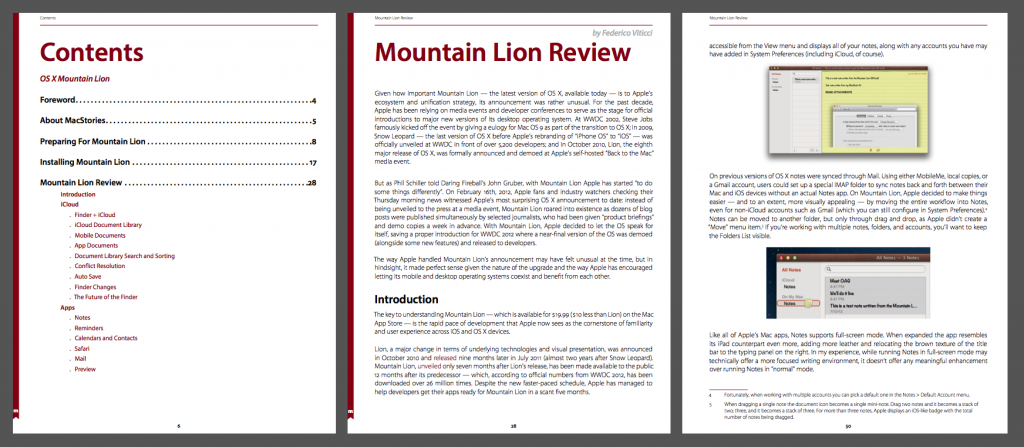
MacStories is pleased to announce their first eBook, MacStories Features: OS X Mountain Lion, for $6.99. With a detailed review of Mountain Lion, numerous sections covering its new apps and features in depth, and 30% of its proceeds going to the American Cancer Society, MacStories Features: OS X Mountain Lion is a great way to learn about Mountain Lion, support MacStories, and fight cancer all at once.

Contents

We’ve put a lot of effort into this book: it contains exclusive guides for preparing your Mac for Mountain Lion, walks you through every aspect of the install process, and contains great tips and tricks you won’t find anywhere else. Every inch of its over 120 pages is custom-designed and optimized for Retina displays, presenting its content in a beautiful, easy-to-read format.

You can download MacStories Features: OS X Mountain Lion here.

Buy Now

Buy Now

Cover image by ehtesham/Shutterstock.com


Apple Confirms OS X Mountain Lion Coming Tomorrow

In the Q3 2012 press release, Apple has confirmed that OS X Mountain Lion is launching tomorrow, July 25th. The OS will be available on the Mac App Store at $19.99.

OS X Mountain Lion is a major upgrade to Apple’s desktop operating system which includes over 200 new features that further ties OS X into iCloud and brings many important iOS applications to the Mac. Major new OS X features include apps such as Notes and Reminders, Messages, Game Center, the Notification Center that works similarly to iOS, Gatekeeper — ensuring that users stay safe when they download and install applications, Dictation, and Power Nap for compatible Macs.


Apple Q3 2012 Results: $35 Billion Revenue, 26 Million iPhones, 17 Million iPads, 4 Million Macs Sold

Apple has just posted their Q3 2012 financial results for the quarter ending on July 24, 2012. The company posted revenue of $35 billion, with 17 million iPads, 26 million iPhones and 4 million Macs sold. iPhone represented a 28 percent unit growth over the year-ago quarter, while iPad reported a 84 percent unit increase over the year-ago quarter. Apple sold 6.8 million iPods, a 10 percent unit decline from the year-ago quarter. The company posted quarterly net profit of $8.8 billion, or $9.32 per diluted share.  International sales accounted for 62 percent of the quarter’s revenue.

For Q2 2012, Apple posted revenue of $39.2 billion, with 11.8 million iPads, 35.1 million iPhones and 4 million Macs sold. Apple’s iPad represented a 151 percent unit growth over the year-ago quarter, while iPhone reported a 88 percent unit increase over the year-ago quarter. 7.7 million iPods sold, a 15 percent unit decline from the year-ago quarter. The company posted quarterly net profit of $11.6 billion, or $12.30 per diluted share. In the year-ago-quarter, Q3 2011, Apple posted revenue of $28.57 billion, with 9.25 million iPads, 20.34 million iPhones and 3.95 million Macs sold.

Expectations

On July 24th, Philip Elmer-Dewitt published a forecast chart tracking predictions from 63 analysts, half working for banks or brokerage firms, and half independent whom follow Apple for fun or personal profit. Professional analysts expected $10.33 per share and revenue of $37 billion, while independent analysts expected $12.31 per share and revenue of $41.5 billion.

Apple CFO Peter Oppenheimer, quoted from Apple’s Financial Results for Q3 2012:

 Looking ahead to the fourth fiscal quarter, we expect revenue of about $34 billion and diluted earnings per share of about $7.65.

Apple will provide a live audio feed of its Q3 2012 conference call at 2:00 PM PST, and we’ll update this story with conference highlights. The full press release is embedded after the break.

Read more


Mac and iOS Developer Acrylic Joins Facebook

Mac and iOS Developer Acrylic Joins Facebook

In other acquisition news, renowned Mac and iOS developer Acrylic has announced they will be joining the design team at Facebook:

I’m happy to announce today that we’ve packed up our small Vancouver studio and will be making the move to San Francisco in the coming weeks to join the design team at Facebook.

Our products and services have not been acquired by Facebook, and while there are no plans for further development on them, Wallet and Pulp will continue to remain available for download and purchase in their current form. We’ll certainly be the first to let you know of any updates or changes here in the future.

Well-known among the Apple community for their Pulp and Wallet apps for iOS and OS X, it’s unclear whether the apps will also keep receiving updates for bug fixes or not. This isn’t the first acquisition of a former Mac developer by Facebook: notably, the company acquired Sofa last year, which then went on to create the Facebook Camera app.

You can check out our review of the latest version of Pulp here.

Permalink

Google Acquires Sparrow

Sparrow, the email client for OS X, just announced they have been acquired by Google. The Sparrow team will join the Gmail team to “accomplish a bigger vision”. Since its release, Sparrow has quickly become one of the most popular mail clients on OS X and, more recently, on the iPhone as well.

From the Sparrow website:

We’re excited to announce that Sparrow has been acquired by Google!

We care a lot about how people communicate, and we did our best to provide you with the most intuitive and pleasurable mailing experience.

Now we’re joining the Gmail team to accomplish a bigger vision — one that we think we can better achieve with Google.

According to the developers, while the product has been acquired by Google, it will continue to be available, and the team will still provide support for its users, at least for the time being.

After the release of the iPhone client, the Sparrow team publicly asked Apple to figure out a solution to let them implement push notifications, which Sparrow wanted to use through a different method than the one enforced by Apple. The Sparrow team stated push was coming with or without Apple, but then suggested push would be coming with a yearly subscription after Apple’s decision not to allow their implementation of push notifications.

Recently, Sparrow also announced they were working on an iPad application. However, in an email the team just sent to existing customers, they wrote:

as we’ll be busy with new projects at Google, we do not plan to release new features for the Sparrow apps.

On the other hand, Google’s own Gmail app has always been heavily criticized (in spite of its improvements) for its performances and reliance on web views instead of “native” code in several interactions with navigation, message search, and more. In theory, the acquisition of Sparrow should hint at a major update to the official Gmail offerings for iOS coming in the future, although, obviously, the details are not clear at this point.

Interestingly enough, while Sparrow does have clients for both iPhone and OS X, Google has never offered an official Gmail application for the Mac. Similarly, one of the most prominent features of Sparrow is its ability to pull contacts’ profile pictures from Facebook, a kind of integration we assume would be going away in an hypothetical Google-owned version of Sparrow, replaced by Google+ support for avatars. Again, the same would apply for Dropbox and CloudApp, both of which are file sharing services supported by Sparrow; theoretically, Google would want to replace those features with Google Drive, their service for sharing and collaborating on documents online.

For a background on Sparrow, check out our latest coverage of the Mac client, our review of Sparrow for iPhone, and initial impressions with the Google Gmail app.

Update: A Google spokesperson has provided MacStories with a statement on Sparrow’s acquisition.

The Sparrow team has always put their users first by focusing on building a seamlessly simple and intuitive interface for their email client. We look forward to bringing them aboard the Gmail team, where they’ll be working on new projects.


Terpstra Day

Terpstra Day

When I started MacStories three years ago, I had no idea whether or not the site would be successful. But I was told that, no matter the page views and the retweets, the people from the Apple community would make it worth the effort anyway. Brett Terpstra represents everything that’s great about this corner of the Internet.

Brett is the developer of Marked, a writing tool we use every day at MacStories and that, personally, I couldn’t work without anymore. But that’s not the main story. Brett gives away dozens of productivity enhancers for your Mac and iOS devices such as nvALT, Marked Watcher Scripts, Markdown Service Tools, TextExpander snippets for OS X and iOS, and a Clip to Day One service, just to name a few. Gabe at Macdrifter put together a list of all the awesome things that Brett builds, keeps up to date, and gives away for free without asking anything in return. Brett is also the guy behind the ultimate iTextEditors comparison list.

Not only that, Brett somehow manages to combine his love for nerdery, writing, and coding with elegance and kindness. I once mistakenly wiped an entire MacStories post I was editing in a Marked beta, and Brett recovered every part of it, no problem – it wasn’t something he had to do, because when you beta test software, you should know the risks (still, you should look forward to the next Marked).

From my interview with him earlier this month:

My workflow is constantly in flux. I’m what people refer to as a “fiddler.” I’m ok with that, mostly because I get a lot of enjoyment out of sharing the things I figure out on the way. If I just dumped all of that time into a hole and never made anything useful for myself or others, then I’d definitely feel like I was wasting it.

People like Brett make this little community of ours worth writing for every day, and the stuff he makes allows me to work better and more efficiently. Thanks Brett.

Permalink

Alfred 1.3 Improves System Navigation with “File Buffer”

Alfred 1.3

Alfred 1.3

Released yesterday, Alfred 1.3 is a major update to the popular desktop application aimed at “increasing your productivity” on OS X. Started as a simpler app launcher, Alfred has, in fact, evolved into a much more powerful – yet always accessible – solution that goes beyond the simple definition of a “launcher”, like Spotlight would be. I use Alfred on a daily basis to browse my file system, compose email messages,  search the web and even look for my favorite songs on Rdio. Alfred was once a launcher, now it’s much more. In my workflow, it’s an app that makes the core features of OS X work better for me.

I particularly appreciate the improvements brought in version 1.3 as they address a usage scenario I often find myself dabbling into: selecting multiple files in the Finder to move them to another location. For instance, in writing my Mountain Lion review, I took a lot of screenshots; those images had to be cropped, resized, and re-composed to fit the layout of my article. Once edited, I had to move them from the Desktop – where OS X creates my screenshots – to a sub-folder in Dropbox, which, through a custom script, they are uploaded to our CDN, returning a URL. With Alfred’s new File Buffer functionality I saved precious minutes I would have otherwise spent opening the Finder and navigating with the trackpad.

The File Buffer is basically a virtual “shelf” that can temporarily host files you want to act on. Configurable in Alfred’s Preferences, you can set the Buffer to be cleared after actioning items, or after five minutes if items you selected haven’t been used.

Alfred File Buffer

Alfred File Buffer

File selection is integrated with Alfred’s existing navigation capabilities. In Alfred, you can browse your Mac’s file system with the keyboard, finding documents and folders you need and choosing from a set of actions to do stuff with them. These actions include, by default, an Open command, Reveal in Finder, Copy Path, Move, Copy, and more; they are entirely actionable with the keyboard, so you’ll be able to, say, unzip a folder and forward its contents via email to a contact without lifting a finger from the keyboard. Furthermore, you can assign favorite locations – in my case, Desktop and Dropbox – to a hotkey, and tell Alfred to open them in its own navigation, rather than the Finder’s.

With the Buffer, you can now select multiple files and act on them at once. So while writing, I was able to bring up the Desktop in Alfred, select multiple screenshots, move them to Dropbox, then launch the .txt file where image URLs get appended to. The Buffer was a huge timesaver, and, for the future, I hope Alfred will make it easier to create custom actions (right now, here’s how you can do it) and specify custom locations for the Copy and Move commands (you can type a folder’s name to instantly bring it up).

When working with the File Buffer, I often select images that I want to move or delete. Alfred’s navigation window features a thumbnail preview for files, but sometimes that’s too small to really see whether or not I’ve selected the right file. Thankfully, version 1.3 introduces support for Quick Look through the Shift key or by hitting Command-Y on a selected file. Quick Look works both in default results and the File System navigation.

Alfred Quick Look

Alfred Quick Look

Version 1.3 brings many other features, improvements, and fixes as well. There is now better integration with 1Password, a new way to show more results, a compact mode, and a “quit all” command to quit all running apps. Make sure to check out the full change log for a complete list of changes.

Alfred has become an essential piece of software in my daily workflow, and I’m glad I decided to give it a chance two years ago. You can download version 1.3 from Alfred’s website, and unlock all the app’s functionalities by purchasing the Powerpack.



Brief History of the iPad

Brief History of the iPad

iPad

iPad

Over at 52 Tiger, Dave Caolo has started an interesting new series on the history of the iPad. With a retrospective on devices and patent filings that preceded the iPad’s announcement in 2010 and a look at old rumors and speculation, Dave’s “Brief History of the iPad” provides an excellent look at Apple’s fastest growing product.

In part I of the series, Dave’s research focuses on the tablet-like products that were patented or released in the past century. I found this bit particularly interesting:

The first commercial tablet product from Apple appeared in 1979. The Apple Graphics Tablet was meant to compliment the Apple II and use the “Utopia Graphics System” developed by musician Todd Rundgren. 2 That’s right, Todd Rundgren. The FCC soon found that it caused radio frequency interference, unfortunately, and forced Apple to discontinue production.

In part II, published today, Dave collects the most notable rumors that were floating around ahead of the iPad’s introduction in January 2010.

Frog and Apple worked on the Apple IIc, among others, including this prototype design for a tablet PC. This little lovely, called the “Bashful,” features a full-sized keyboard and a stylus. It went through several design iterations, three of which you can see at WIRED. As Engadget points out, this suggests that Apple had been playing with the idea of a tablet device for 26 years.

Make sure to check out 52 Tiger’s “Brief History of the iPad” here.

Permalink

An Apple I In My Town

I live in Viterbo, a small town in Lazio, Italy, not too far away from Rome. My town is a beautiful place to visit with a rich history behind its Etruscan origins; unfortunately, it is often vastly undervalued by its citizens and municipal administration. My town lives and breathes in history, but very few people seem to appreciate its roots.

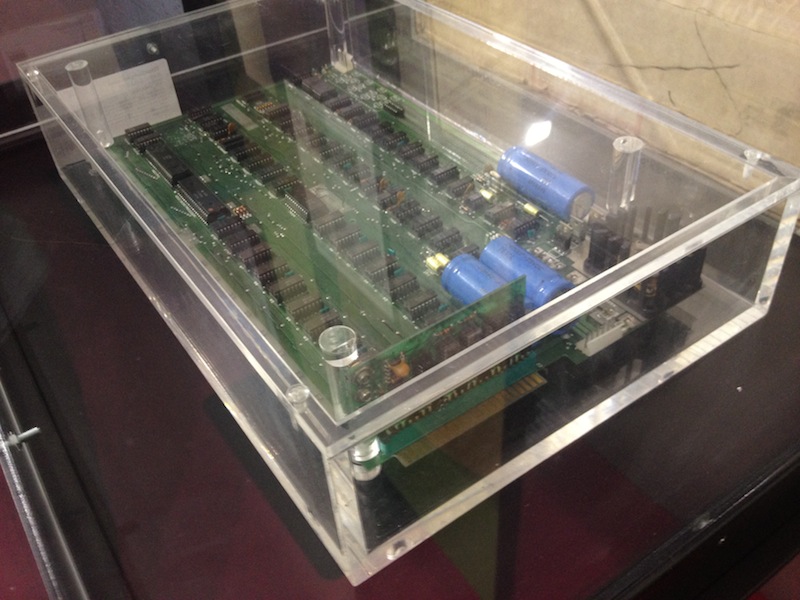
I took a walk in the center of my town today, and I ended up gazing upon an original Apple I. And an Apple II. And a Lisa. And a Macintosh. Today, the medieval buildings that make Viterbo an evocative architectural tapestry of art and history became, for a moment, a gallery for the modern history of technology.

Thanks to the efforts of Medioera, a festival of “digital culture” at its third annual edition here in Viterbo, Marco Boglione’s original Apple I gained a prominent spot in the gorgeous Piazza del Gesù (take a look at the location) alongside other Apple computers from the 70’s and 80’s, as well as Atari, Commodore, and IBM machines. Read more