


We have many great deals for #MacStoriesDeals today. You can find us as @MacStoriesDeals on Twitter.
#MacStoriesDeals - Tuesday
Siri Date Calculations and WolframAlpha→
Siri Date Calculations and WolframAlpha
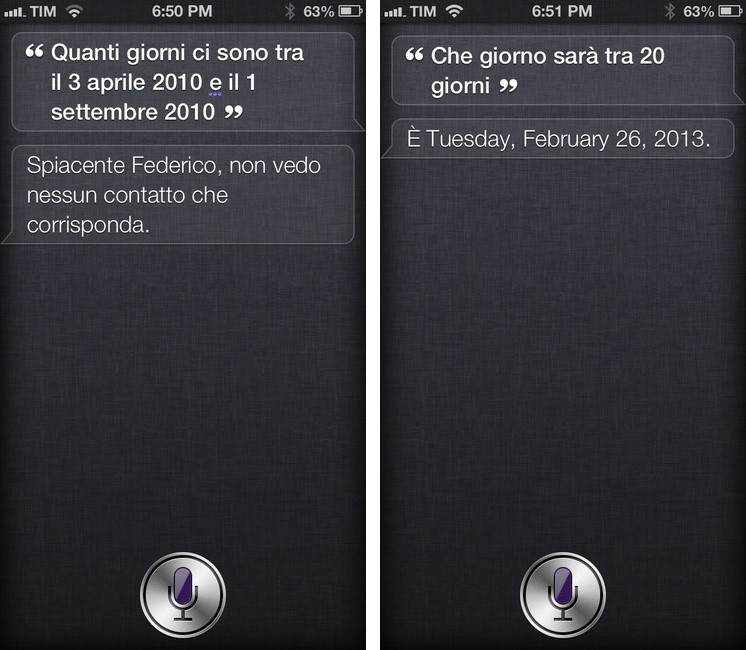
Speaking of Siri, David Sparks posted a great overview of how you can perform date calculations with Siri. I didn’t know any of those tips, and I was surprised to find out they are based on WolframAlpha. I have been doing date calculations in WolframAlpha for years, and I didn’t even think about using Siri for that purpose.
David’s post convinced me to do the same with Siri’s Italian sister. Unfortunately, but unsurprisingly, the results were disappointing. First, I asked Siri to calculate the days between April 3, 2010 and September 1, 2010. The query was parsed correctly, but Siri said she couldn’t find a contact in my Address Book.
For the second test, I asked which day it’ll be in 20 days from now, and Siri replied with the following mix of Italian and English:
E’ Tuesday, February 26, 2013
It basically told me that today is (“E’” in Italian) February 26th, completely ignoring my date query. Last, I asked which day it was 17 days ago, and this time Siri didn’t combine languages, but it replied with 17 days from now – March 15th, 2013.
I believe part of the culprit is that iOS 6 can still get confused if you use Siri in Italian but keep your device’s settings to English. Another example is how, with a device set to English and Siri in Italian, Maps navigation in iOS 6 still speaks Italian directions…in English. You can imagine how that sounds. But generally, it’s Siri’s own parsing engine that’s inferior to the “real” English Siri.
Like I said many times in the past, Siri has still a long way to go with the Italian language, and the software hasn’t improved much since I last checked in November 2012.
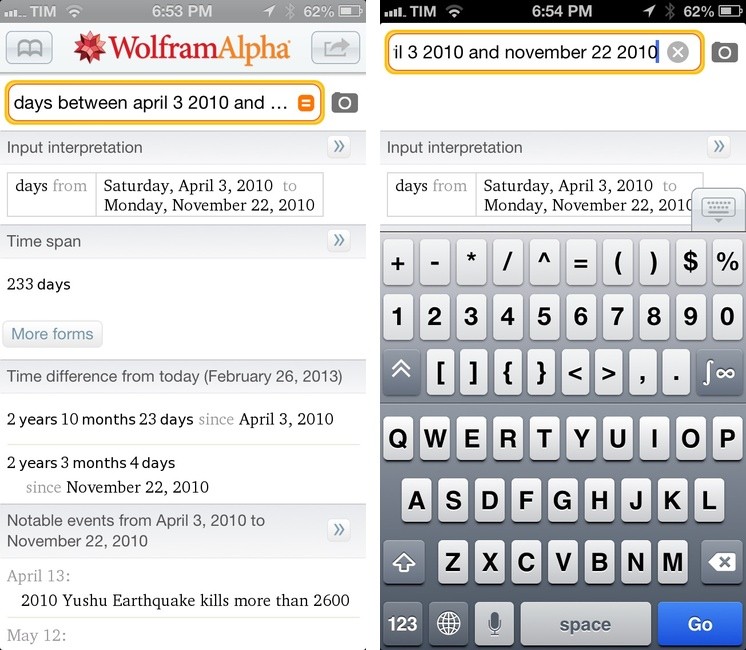
What I have been using for quick and reliable date calculations is WolframAlpha. On iOS, the company has a native Universal app that understands my queries just fine 99% of the time and that allows me to type characters faster with series of extra keyboard rows. It’s not pretty, but it is efficient and it also displays additional information related to your date query – such as date formats, events on a specific day, and time difference from today. I may not have the same date calculation skills of Dr. Drang, but WolframAlpha never disappointed me.
The WolframAlpha app is $2.99 on the App Store.
Siri Vs. Google Voice Search, Four Months Later→
Siri Vs. Google Voice Search, Four Months Later
Rob Griffiths, comparing Siri to Google Voice Search at Macworld:
Because of the speed, accuracy, and usefulness of Google’s search results, I’ve pretty much stopped using Siri. Sure, it takes a bit of extra effort to get started, but for me, that effort is worth it. Google has taken a key feature of the iOS ecosystem and made it seem more than a little antiquated. When your main competitor is shipping something that works better, faster, and more intuitively than your built-in solution, I’d hope that’d drive you to improve your built-in solution.
When the Google Search app was updated with Voice Search in October 2012, I concluded saying:
Right now, the new Voice Search won’t give smarter results to international users, and it would be unfair to compare it to Siri, because they are two different products. Perhaps Google’s intention is to make Voice Search a more Siri-like product with Google Now, but that’s another platform, another product, and, ultimately, pure speculation.
When Clark Goble posted his comparison of Siri Vs. Google Voice Search in November, I summed up my thoughts on the “usefulness” of both voice input solutions:
I’m always around a computer or iOS device, and the only times when I can’t directly manipulate a UI with my hands is when I’m driving or cooking. I want to know how Siri compares to Google in letting me complete tasks such as converting pounds to grams and texting my girlfriend, not showing me pictures of the Eiffel Tower.
From my interview with John Siracusa:
And yet the one part of Google voice search that Google can control without Apple’s interference — the part where it listens to your speech and converts it to words — has much better perceptual performance than Siri. Is that just a UI choice, where Apple went with a black box that you speak into and wait to see what Siri thinks you said? Or is it because Google’s speech-to-text service is so much more responsive than Apple’s that Google could afford to provide much more granular feedback? I suspect it’s the latter, and that’s bad for Apple. (And, honestly, if it’s the former, then Apple made a bad call there too.)
Now, four months after Google Voice Search launched, I still think Google’s implementation is, from a user experience standpoint, superior. While it’s nice that Siri says things like “Ok, here you go”, I just want to get results faster. I don’t care if my virtual assistant has manners: I want it to be neutral and efficient. Is Siri’s distinct personality a key element to its success? Does the way Siri is built justify the fact that Google Voice Search is almost twice as fast as Siri? Or are Siri’s manners just a way to give some feedback while the software is working on a process that, in practice, takes more seconds than Google’s?
I still believe that Siri’s biggest advantage remains its deep connection with the operating system. Siri is faster to invoke and it can directly plug into apps like Reminders, Calendar, Mail, or Clock. Google can’t parse your upcoming schedule or create new calendar events for you. It’s safe to assume Apple’s policy will always preclude Google from having that kind of automatic, invisible, seamless integration with iOS.
But I have been wondering whether Google could ever take the midway approach and offer a voice-based “assistant” that also plays by Apple’s rules.
Example: users can’t set a default browser on iOS but Google shipped Chrome as an app; the Gmail app has push notifications; Google Maps was pulled from iOS 6 and Google released it as a standalone app. What’s stopping Google from applying the same concept to a Google Now app? Of course, such app would be a “watered down” version of Google Now for Android, but it could still request access to your local Calendar and Reminders like other apps can; it would be able to look into your Contacts and location; it would obviously push Google+ as an additional sharing service (alongside the built-in Twitter and Facebook). It would use the Google Maps SDK and offer users to open web links in Google Chrome. Search commands would be based on Voice Search technology, but results wouldn’t appear in a web view under a search box – it would be a native app. The app would be able to create new events with or without showing Apple’s UI; for Mail.app and Messages integration, it would work just like Google Chrome’s Mail sharing: it’d bring up a Mail panel with the transcribed version of your voice command.
Technically, I believe this is possible – not because I am assuming it, but because other apps are doing the exact same thing, only with regular text input. See: Drafts. What I don’t know is whether this would be in Google’s interest, or if Apple would ever approve it (although, if based on publicly-available APIs and considering Voice Search was approved, I don’t see why not).
If such an app ever comes out, how many people would, like Rob, “pretty much stop using Siri”? How many would accept the trade-off of a less integrated solution in return of speed and more reliability?
An earlier version of this post stated that calendar events can’t be created programmatically on iOS. That is possible without having to show Apple’s UI, like apps such as Agenda and Fantastical have shown .
Sponsor: CrashPlan
My thanks to CrashPlan for sponsoring MacStories this week.
–
CrashPlan lets you backup your data to your own computers and hard drives or friends & family with no storage limits. CrashPlan gives you the peace-of-mind that only comes with continuous, minute-to-minute backup. CrashPlan has been a favorite of the Mac community for years because of its “set it and forget it” ease of use and ability to provide continuous, minute-by-minute backup without interfering with normal Mac operations. Using sophisticated byte pattern analysis and data de-duplication to detect file changes, CrashPlan preserves multiple versions of files; if you don’t want to always use your Mac, the files you were just working on minutes ago can be accessed from our phone or tablet using CrashPlan’s free mobile apps.
This week only, MacStories readers can get 33% off CrashPlan by using this special link.
Find out more about CrashPlan here.
Sun: iPhone Weather Web App→
Sun: iPhone Weather Web App
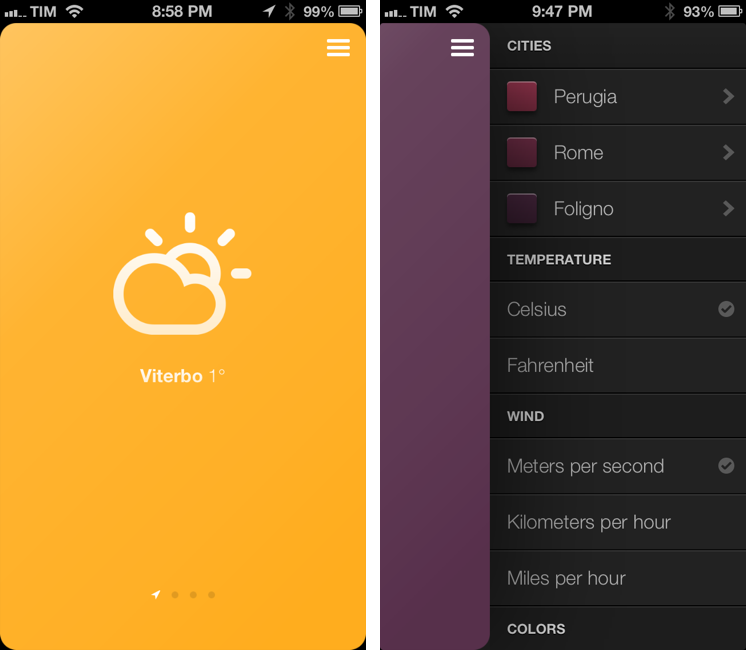
Sun is an impressive weather web app for the iPhone created by Jakob Henner. I don’t normally cover web apps on MacStories, but Sun almost feels like a native app and sports a clean and elegant interface reminiscent of the latest trends in UI design. I discovered it thanks to a tweet by Beautiful Pixels’ Preshit.
Sun has a 3D interface that lets you swipe between locations that you can add in a sidebar on the right. There are sound effects for when you open the sidebar or succesfully add a new location. You can even switch between Fahrenheit/Celsius and 9 different color schemes. Like a native app, Sun will request access to your location to display local weather without having to enter that one manually.
Another nice thing about Sun is how it dynamically changes its webclip icon depending on the latest weather information it fetched. As explained by the developer (and others on Twitter), this is possible by “drawing” the icon every time shortly after the app is launched.
There are some aspects of Sun that reveal its web origins. Animations are slower than what you’d expect from a native app; there are some random refreshes of the entire page; text selection can get funny in the sidebar.
Still, Sun is a great experiment and you should check it out here.
Pythonista 1.3 Brings Camera Roll and Notification Center Support, New Library View, And More
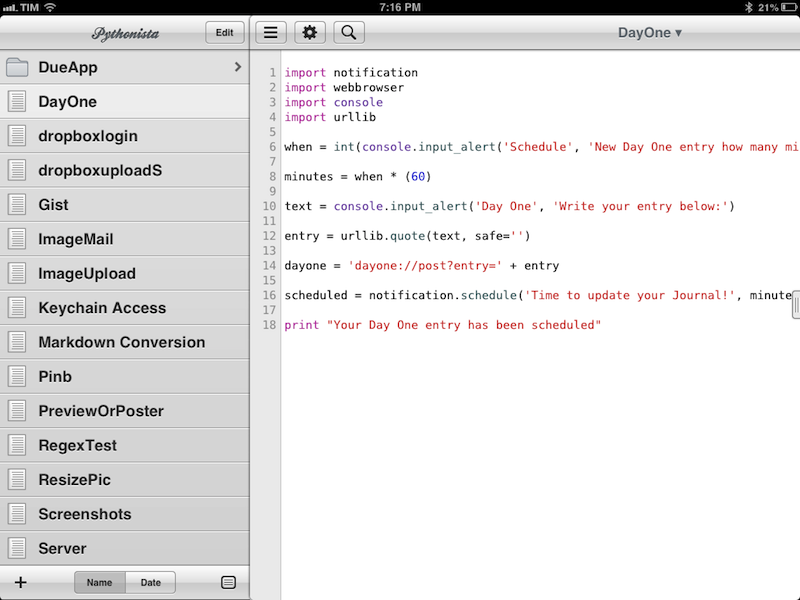
Ole Zorn’s Pythonista is one of my favorite, most-used iOS apps to date. Combining a Python interpreter with scripting capabilities that take advantage of iOS through native interface elements and features like URL schemes, Pythonista has completely reinvented my iOS workflow. With Pythonista, I can work from the iPad without wishing I had a Mac.
Back in November, I wrote an extensive review of Pythonista 1.2, providing some sample scripts and an in-depth look at the app and its functionalities. I concluded my review saying:
I believe that, going forward, Pythonista and other similar apps will show a new kind of “scripting” and task automation built around the core strenghts of iOS.
Pythonista 1.3, released today, adds a number of features aimed at making the app more “connected” with the underpinnings of iOS, enabling users to create more complex workflows that go beyond running scripts inside Pythonista. I was able to use Pythonista 1.3 for the past weeks, and I believe it’s a very solid update. Read more
RegexMatch for iPad
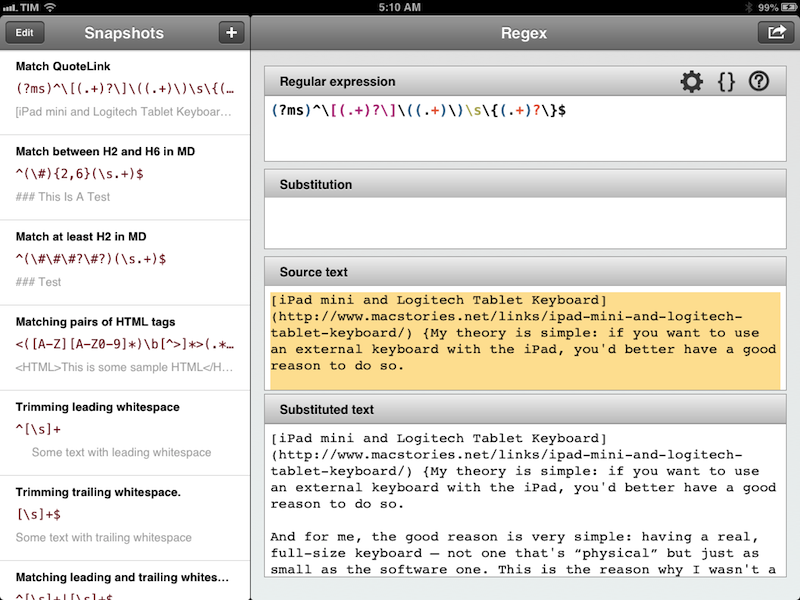
There seems to be a scarcity of easy-to-use, well designed iOS apps for testing and previewing regular expressions. I’ve only seen a few on the App Store, and they tend to look ugly or lack the feature set that I need. Fortunately, RegexMatch is a good start if you’ve been looking for a way to test and save regexes on the iPad.
RegexMatch has a clean interface that’s easy to navigate and good-looking. On the left side, there’s a sidebar listing all your Snapshots – regular expressions you’ve created and saved manually. You can create as many snapshots as you want, but I wish there was some kind of folder organization for people who, like me, will test several versions of the same regex. Read more
Apple Airs New iPad Commercial During Oscars
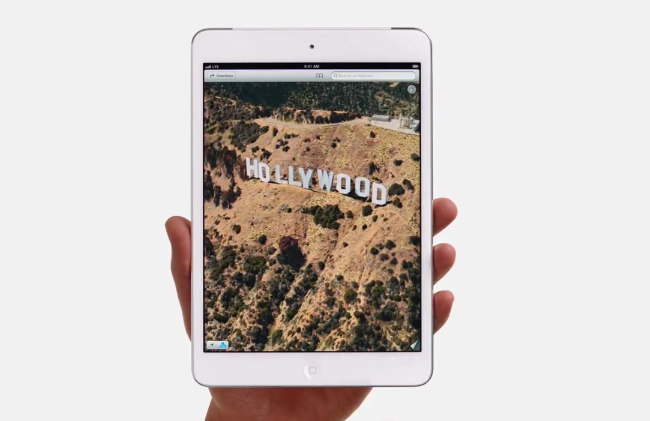
Apple aired a new iPad commercial during the 85th Academy Awards. The ad, focused on apps for photographers and video editors and iTunes Store content, also included a brief demonstration of Apple’s Maps showing a 3D animation of the historical Hollywood sign.
The new commercial uses the same style of the ones Apple aired a week ago. There is no narration, just a series of words quickly shown on screen alongside apps available on the App Store. The words that are spoken out loud are “lights”, “camera”, and “action”. The apps shown in the video include: iMovie, Pinterest, Apple’s iTunes Movie Store, MovieSlate, 8mm for iPad, Action Movie FX, and Instant. Movie Clips from Indiana Jones and Back to the Future are also shown in the ad.
You can watch the video below. Read more
iPad mini and Logitech Tablet Keyboard→
iPad mini and Logitech Tablet Keyboard
David Chartier has been taking a look at various external keyboard solutions for his iPad mini in the past weeks. I have enjoyed the series and I was looking forward to reading his thoughts on the Logitech Ultrathin Keyboard mini, Logitech’s latest entry in the market of iPad keyboard/case accessories. As I feared, the Ultrathin Keyboard mini is just too cramped to be an acceptable trade-off:
The keys are cramped, even moreso than the 9.7 inch iPad’s on-screen keys in landscape, which I consider “Normal Netbook” and quite typeable if you give yourself time to warm up to them. Logitech made some questionable tradeoffs when combining and shrinking keys; take a close look at my gallery photo to see what I mean.
My theory is simple: if you want to use an external keyboard with the iPad, you’d better have a good reason to do so. And for me, the good reason is very simple: having a real, full-size keyboard – not one that’s “physical” but just as small as the software one. This is the reason why I wasn’t a fan of the Ultrathin Keyboard Cover for the bigger iPad either.
Like David, I have been getting better at touch-typing, but I still think the best solution for the iPad mini is the one I chose for the iPad last year: the Logitech Tablet Keyboard. It’s the same size of Apple’s Bluetooth keyboard, and it’s got iOS-specific keys such as a Home button and a Spotlight shortcut, which I use all the time. Here’s my review from last year, still 100% true for me.
If you use a Logitech keyboard, here’s a handy list of shortcuts (list may vary depending on the keyboard layout you have). Also, iOS supports more “advanced” keyboard shortcuts, but very few people know about them – because they require VoiceOver to be activated. Here’s how you can get more shortcuts to work; I don’t use this method, but I hope Apple will allow third-party developers to have configurable keyboard shortcuts in a future version of iOS.