
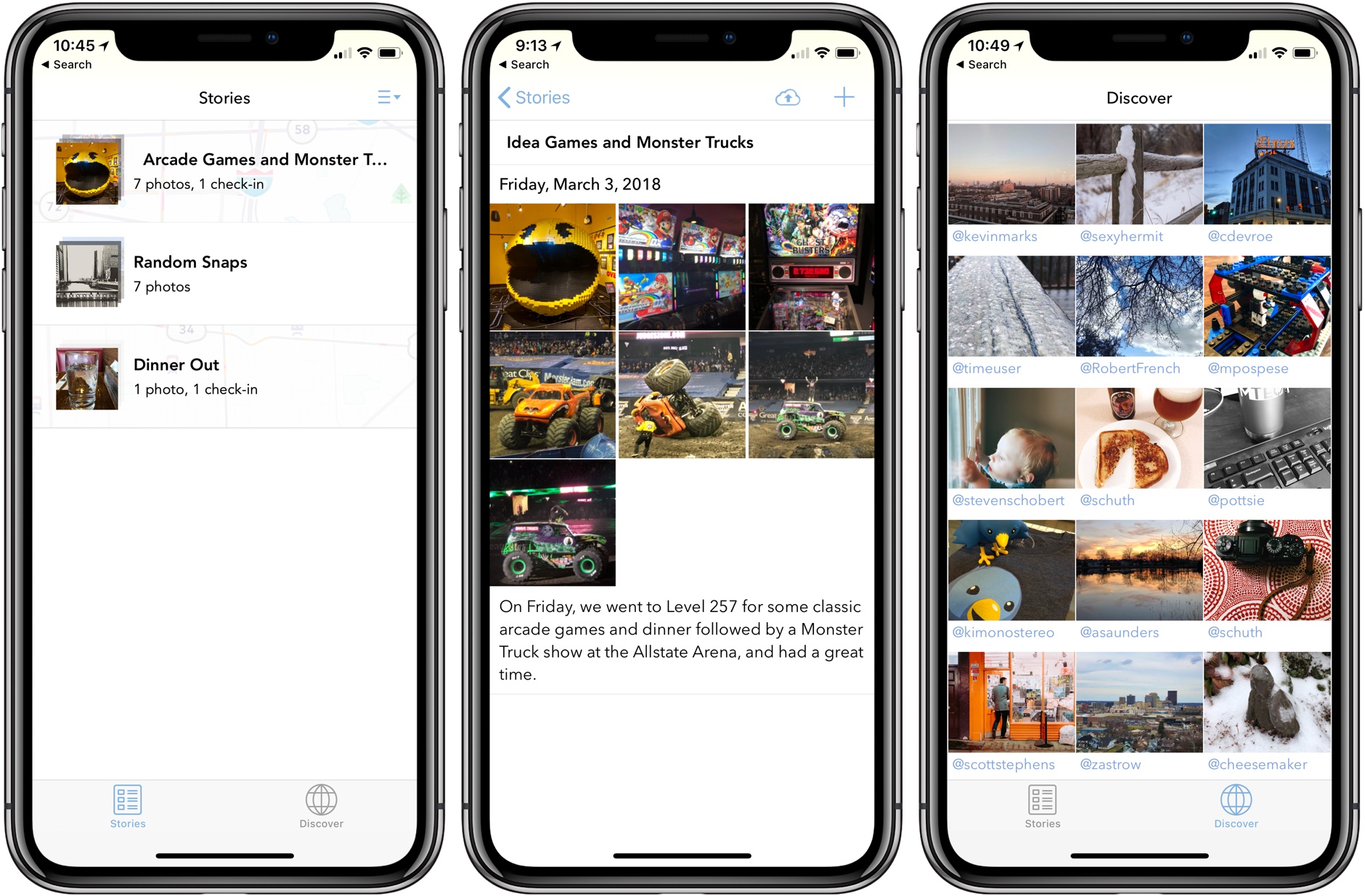
It’s hard to believe that it’s been over 4 years since Sunlit debuted as an iOS photo-sharing app built on top of App.net, the social network that has since been shut down. App.net didn’t make it, but Sunlit is back and has been reimagined as a photo blogging app for Micro.blog and WordPress sites.
Posts in reviews
Sunlit 2.0 Released as a Micro.blog and WordPress Photo Blogging App

Access Extra Content and Perks
Founded in 2015, Club MacStories has delivered exclusive content every week for nearly a decade.
What started with weekly and monthly email newsletters has blossomed into a family of memberships designed for every MacStories fan.
Club MacStories: Weekly and monthly newsletters via email and the web that are brimming with apps, tips, automation workflows, longform writing, early access to the MacStories Unwind podcast, periodic giveaways, and more;
Club MacStories+: Everything that Club MacStories offers, plus an active Discord community, advanced search and custom RSS features for exploring the Club’s entire back catalog, bonus columns, and dozens of app discounts;
Club Premier: All of the above and AppStories+, an extended version of our flagship podcast that’s delivered early, ad-free, and in high-bitrate audio.
Game Day: Bring You Home
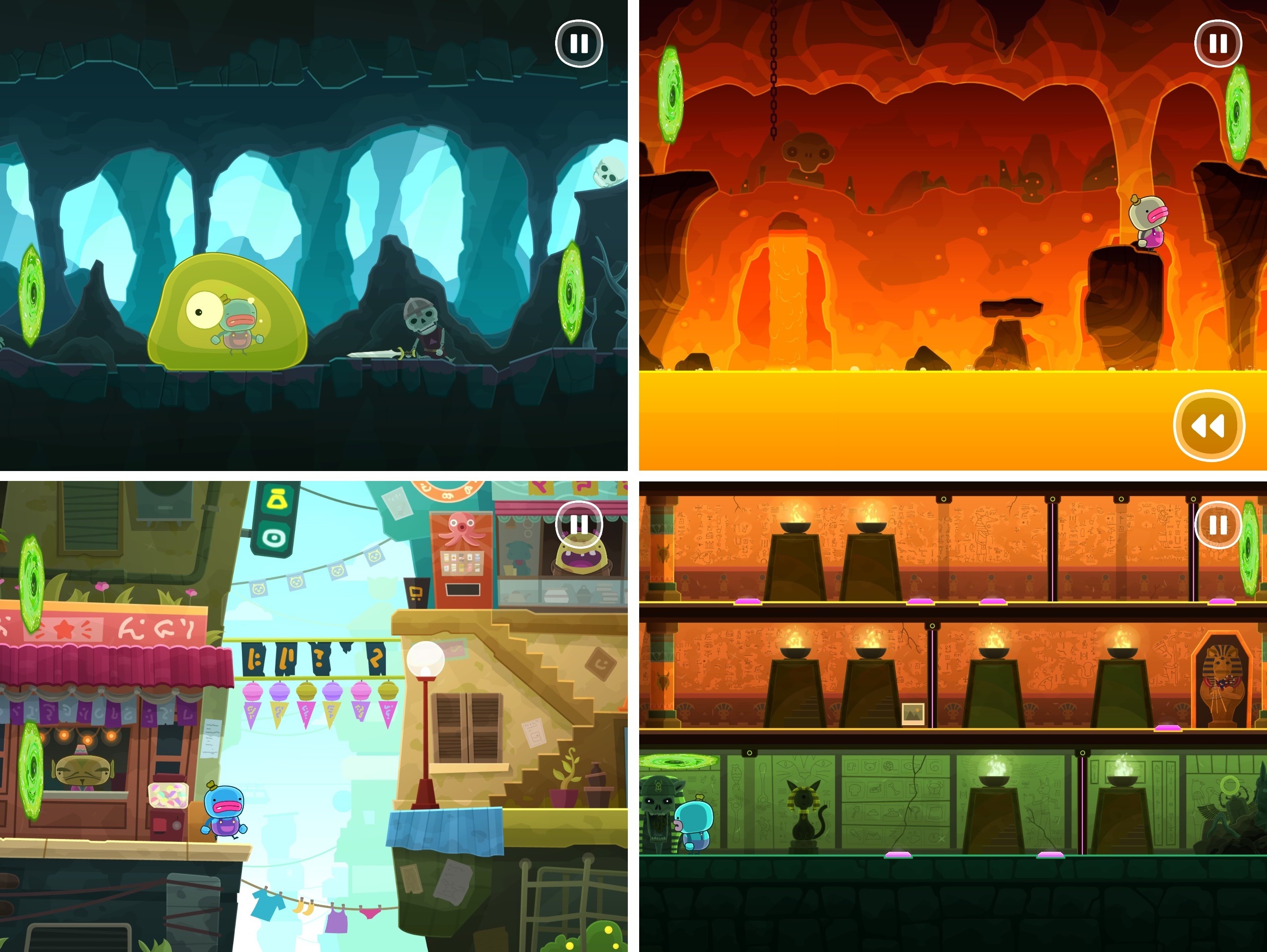
Earlier this month Alike Studio released Bring You Home, a charming puzzle game about a blue alien on a quest to save its pet from thieves. It’s a delightful game that showed up one day with little fanfare. The game, from the creators of Love You to Bits, was teased almost a year ago, but its sudden appearance on the App Store means it hasn’t gotten the coverage it deserves. That’s a shame because this is a low-key but captivating game that should appeal to a wide audience.
Exploration is at the core of Bring You Home. As soon as the alien’s pet is whisked away, it leaps out the window after the thieves landing face-first on the ground. Time rewinds, and you’re shown how to swipe panels up and down until there’s a cart of hay under the window to break the alien’s fall. It’s a simple mechanic similar to the hit game Framed but executed with a style and personality that fits Bring You Home.
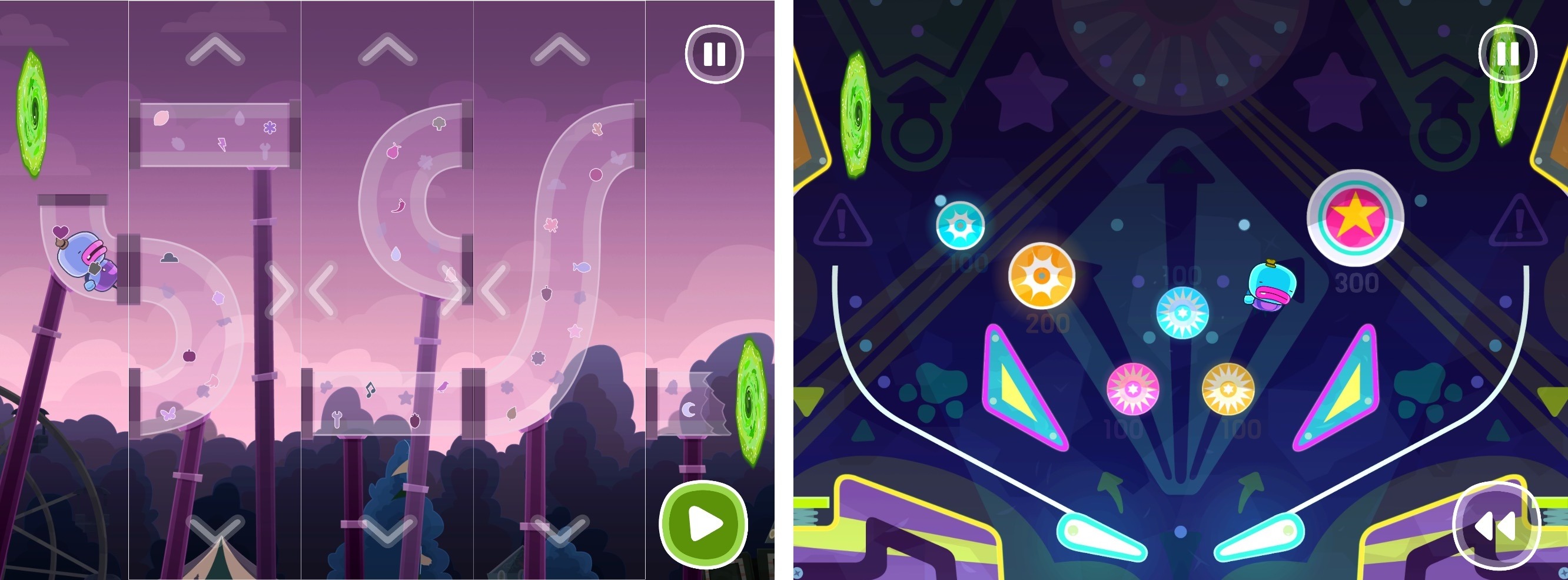
The goal is just as simple. By manipulating the environment around the alien, you help steer it from scene to scene in pursuit of the thieves. As you move through Bring You Home, new layers are added to the gameplay. Instead of just cycling through panels vertically, you can swap their position horizontally too. Next, the game adds multi-step puzzles, which require you to rearrange the scene, pause, and make further adjustments. Along the way, there are also collectible photos featuring your alien and his pet, which is a nice touch suggesting that it’s ok to explore, fail, and explore some more.
There is an absurd logic to each of the nearly 50 levels of Bring You Home, which rewards thoughtful examination. There are no time limits or penalties for failure, which encourages a leisurely, calm approach. Sure, you can power through Bring You Home quickly, but that’s not the point. Trial and error is part of the fun. This is a game best-enjoyed at a pace at which you can absorb each scene’s brightly-colored, playful animations.
Bring You Home is a Universal app that’s also available on the Apple TV. The game looks great on a big screen TV, but the controls work better on an iOS device, so on balance, I prefer to play on my iPad. Also, achievements are tracked in Game Center, and your progress is synced between devices via iCloud, which I always appreciate.
Bring You Home is a relaxing game with a playful, sweet personality that will appeal to kids and adults alike. The puzzles range from easy to challenging without ever becoming frustrating, which makes it an excellent choice for relaxing on a quiet afternoon.
Bring You Home is available on the App Store.
Access Extra Content and Perks
Founded in 2015, Club MacStories has delivered exclusive content every week for nearly a decade.
What started with weekly and monthly email newsletters has blossomed into a family of memberships designed for every MacStories fan.
Club MacStories: Weekly and monthly newsletters via email and the web that are brimming with apps, tips, automation workflows, longform writing, early access to the MacStories Unwind podcast, periodic giveaways, and more;
Club MacStories+: Everything that Club MacStories offers, plus an active Discord community, advanced search and custom RSS features for exploring the Club’s entire back catalog, bonus columns, and dozens of app discounts;
Club Premier: All of the above and AppStories+, an extended version of our flagship podcast that’s delivered early, ad-free, and in high-bitrate audio.
Alto’s Odyssey Review: Desert Tranquility

The sky above the desert has chosen a peculiar, almost plum-like shade of purple tonight as I’m nimbly moving past tall silhouettes of cacti and palm trees, when I see the black contours of a rock. My experience tells me that, in most cases, rocks have to be avoided, so I jump. While airborne, I glance at the dune ahead of me, and decide to attempt a backflip. The sky in the distance is a sight to behold – a full moon, barely visible among the clouds, faintly illuminates a panorama of ancient ruins left to age and crumble. In fact, the horizon is so beautiful, I don’t see another rock waiting just ahead of me as soon as I stick the landing. I hit the rock and fall face down in the sand. It’s game over.
I try again.
An angry lemur is chasing me, probably because I, once a mountain shepherd and now a tourist with a sandboard and little knowledge of lemur manners, woke the creature who was resting in his hut. His only goal, apparently, is to attack me and stop my speedy exploration. But I just need to make it to the next chasm and leave him behind, shaking his tiny lemur fist at me as I backflip over the void. That shouldn’t be too hard.
He’s fast though. Suddenly, I see a potential way out: a rushing water stream connects to a narrow wall, which I can vertically ride to hop onto a vine where I can grind, jump, and backflip to build up speed and escape the lemur. Seems easy enough. My jumps are precise and I elegantly make it onto the vine. But the lemur isn’t giving up – he’s right behind me. 10, 9, 7, 5 meters behind – he’s going to catch me. But we’re at the end of the vine now, and if I jump, I’m going to land and sprint. I take the leap and start my backflip. I think I made it. Except the lemur also jumps, grabs me, and I’m face down in the sand again. It’s game over.
I keep trying.
Access Extra Content and Perks
Founded in 2015, Club MacStories has delivered exclusive content every week for nearly a decade.
What started with weekly and monthly email newsletters has blossomed into a family of memberships designed for every MacStories fan.
Club MacStories: Weekly and monthly newsletters via email and the web that are brimming with apps, tips, automation workflows, longform writing, early access to the MacStories Unwind podcast, periodic giveaways, and more;
Club MacStories+: Everything that Club MacStories offers, plus an active Discord community, advanced search and custom RSS features for exploring the Club’s entire back catalog, bonus columns, and dozens of app discounts;
Club Premier: All of the above and AppStories+, an extended version of our flagship podcast that’s delivered early, ad-free, and in high-bitrate audio.
OmniOutliner 3 for iOS Review
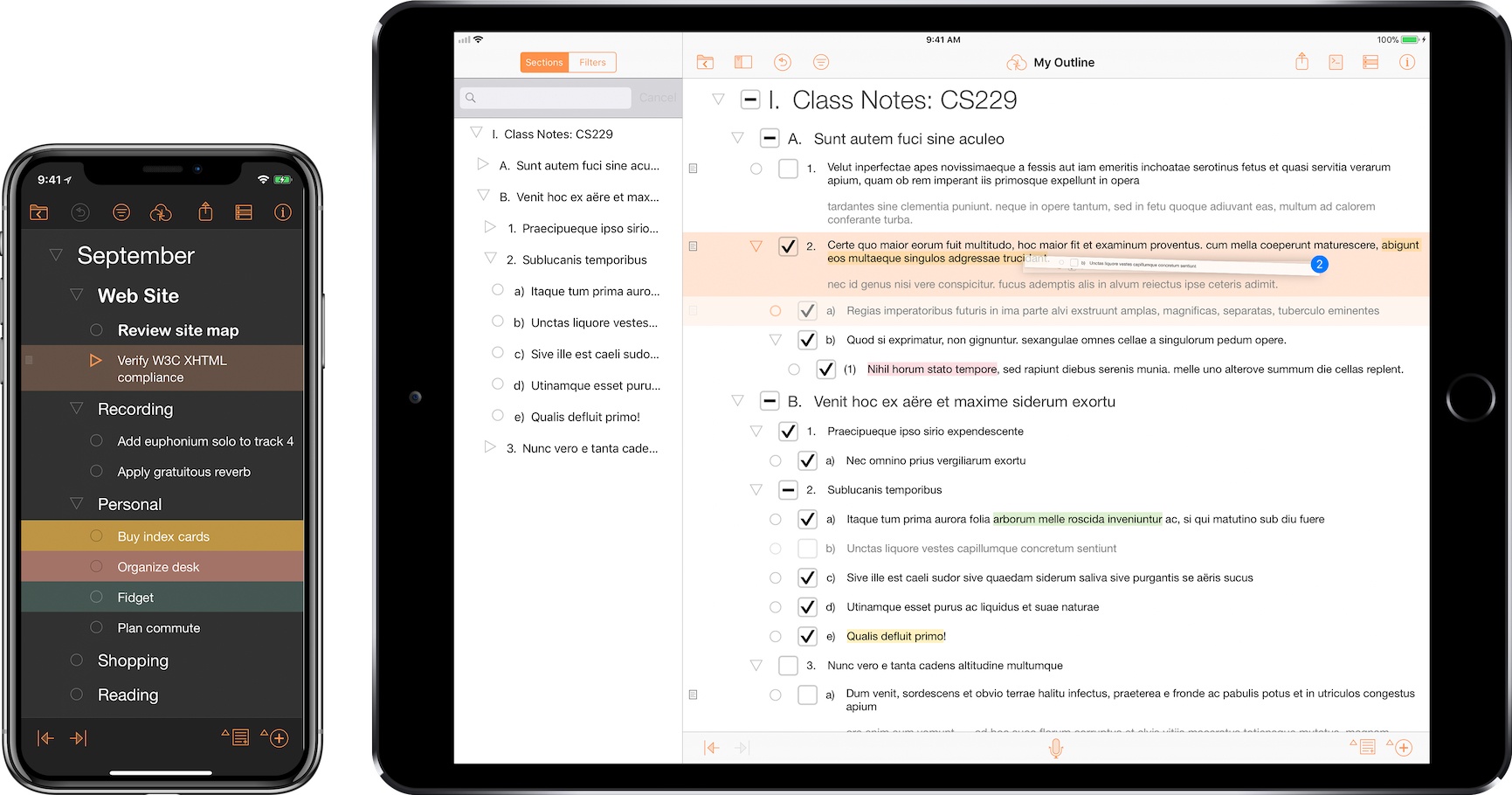
I think in outlines. When I was in law school, that’s how I was taught to break down legal issues and structure the enormous amount of information I needed to know to pass exams. Outlines became second nature – something I still use today to organize research, write longer articles, and organize projects.
I wish I had OmniOutliner when I was in law school. Those outlines grew as the semester wore on, adding complexity that made them harder to edit. Although the word processor I used could handle outlining, it wasn’t optimized for huge outlines the way OmniOutliner is.
Today, my outlining needs are much simpler. I’m not creating 100-page outlines. If an outline is more than a few pages long, it’s only because it’s full of detailed notes. More often than not, all I need is a quick indented list, with simple formatting, and the ability to reorder sections easily.
Perhaps the greatest strength of OmniOutliner 3 for iOS is that it can handle both scenarios. That’s because OmniOutliner 3 isn’t one app, it’s two: OmniOutliner Essentials and OmniOutliner Pro. Essentials includes all the tools you need for basic outlining, and Pro adds extensive customization options, section navigation, automation, and other features.
Access Extra Content and Perks
Founded in 2015, Club MacStories has delivered exclusive content every week for nearly a decade.
What started with weekly and monthly email newsletters has blossomed into a family of memberships designed for every MacStories fan.
Club MacStories: Weekly and monthly newsletters via email and the web that are brimming with apps, tips, automation workflows, longform writing, early access to the MacStories Unwind podcast, periodic giveaways, and more;
Club MacStories+: Everything that Club MacStories offers, plus an active Discord community, advanced search and custom RSS features for exploring the Club’s entire back catalog, bonus columns, and dozens of app discounts;
Club Premier: All of the above and AppStories+, an extended version of our flagship podcast that’s delivered early, ad-free, and in high-bitrate audio.
CARROT Weather 4.5 Brings Achievements, Alternate Icons, and More
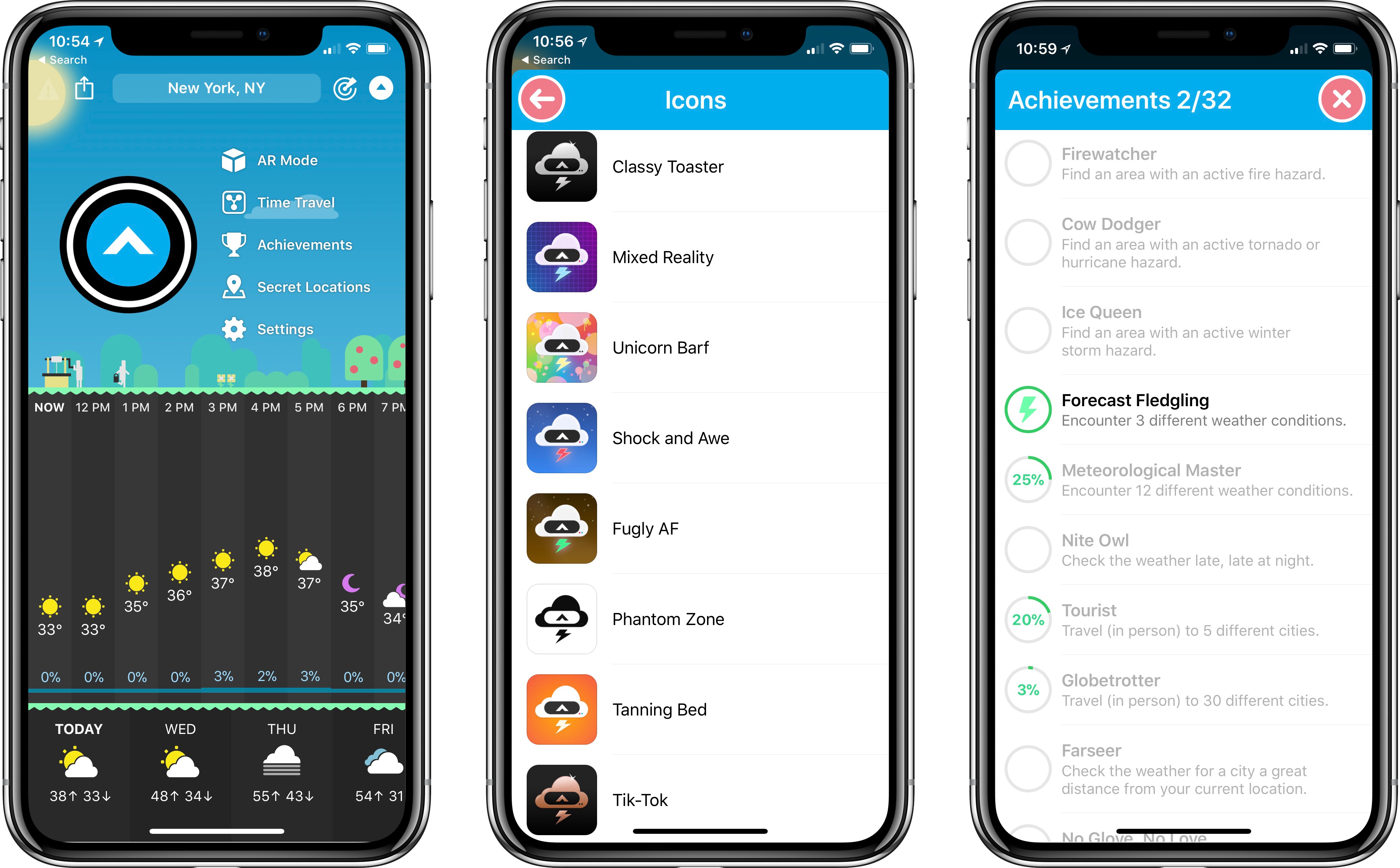
The latest update to CARROT Weather, a MacStories favorite among iOS weather apps, brings a variety of improvements big and small, with the most noteworthy designed to add extra fun to the app: achievements and alternate icons.
Achievements are an attempt to gamify your weather app experience. While with most apps that sentence would sound ridiculous, achievements fit well with the personality and character of CARROT Weather. Currently there are 32 achievements you can unlock, many of which have to do with weather events you experience, while some involve travel and other activities. All available achievements can be viewed from CARROT’s dropdown menu.
Alternate icons, like achievements, aren’t a necessary addition to a weather app, but they do add joy to the user experience. Developer Brian Mueller has put together a diverse, high-quality set of icons to choose from, ensuring you can make CARROT fit in well with your existing Home screen layout vibes.
Other changes worth noting in version 4.5 are that the Secret Locations feature has been removed from its previous home in the search box, instead getting its own dedicated place in the dropdown menu. This move is accompanied by a revamp of the map view for carrying out assigned missions. Also, the app’s main search box has had its autocomplete upgraded to work much faster and comprehensively, and you can reorder saved locations easily using drag and drop.
Today’s update isn’t a major one, but it does make a great weather app even better. Features like custom icons and achievements help boost CARROT Weather’s already extensive amount of character, endearing the app to users in a way few apps can. If you haven’t tried the app yet, I highly recommend it.
CARROT Weather is available on the App Store.
Access Extra Content and Perks
Founded in 2015, Club MacStories has delivered exclusive content every week for nearly a decade.
What started with weekly and monthly email newsletters has blossomed into a family of memberships designed for every MacStories fan.
Club MacStories: Weekly and monthly newsletters via email and the web that are brimming with apps, tips, automation workflows, longform writing, early access to the MacStories Unwind podcast, periodic giveaways, and more;
Club MacStories+: Everything that Club MacStories offers, plus an active Discord community, advanced search and custom RSS features for exploring the Club’s entire back catalog, bonus columns, and dozens of app discounts;
Club Premier: All of the above and AppStories+, an extended version of our flagship podcast that’s delivered early, ad-free, and in high-bitrate audio.
Fiery Feeds 2 Review
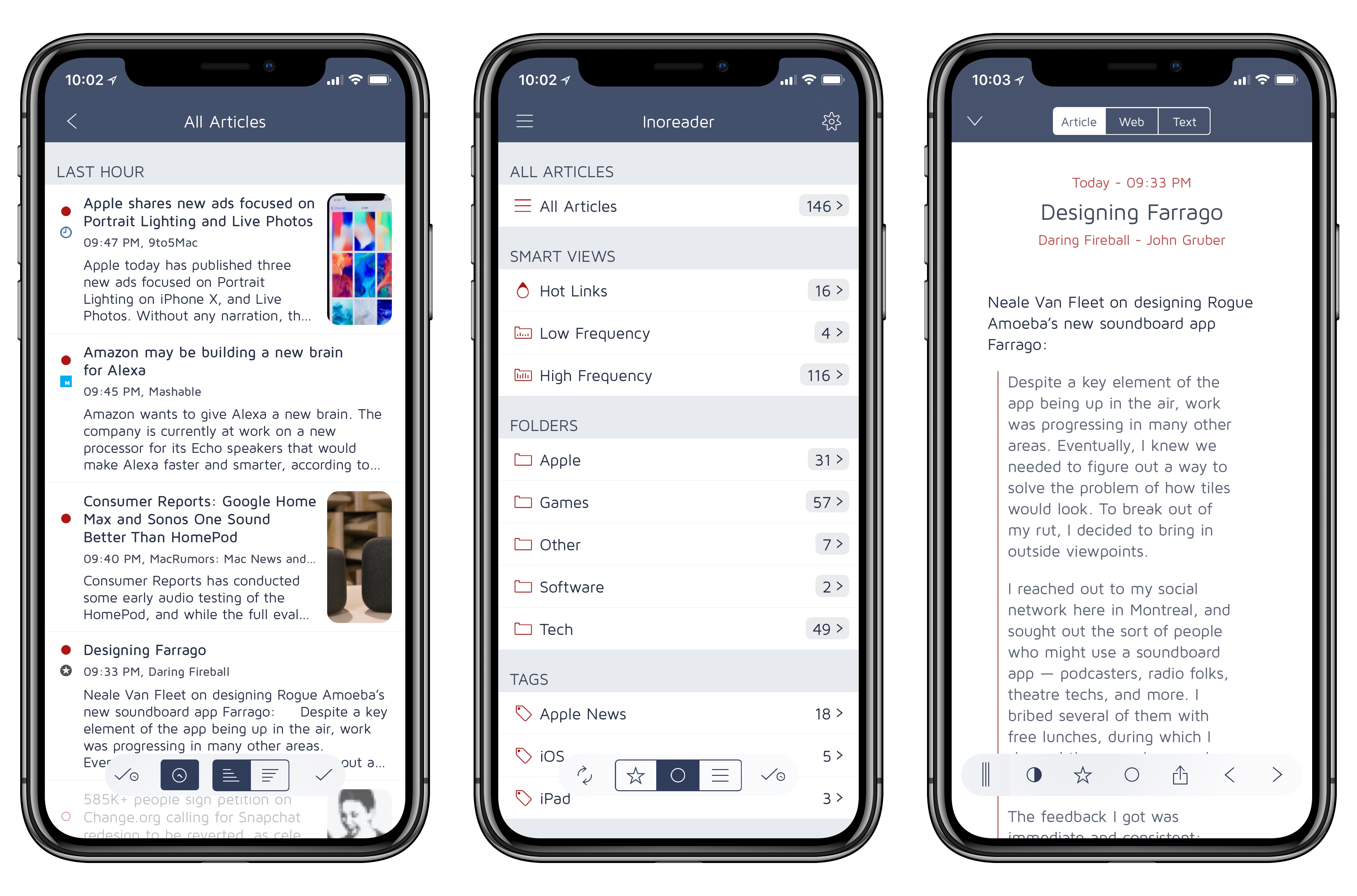
Fiery Feeds, an RSS client developed by Lukas Burgstaller, has long been among the top choices of iOS power users given its integration with multiple RSS services and ability to create custom actions for sharing articles with other apps. In the aftermath of Google Reader’s demise, Fiery Feeds found its niche as a client that supported a variety of modern RSS services and that also catered to users who had been looking for an alternative to Mr. Reader – which pioneered the idea of a highly customizable and extensible RSS app for iOS long before iOS 9 and the iPad Pro.
With Fiery Feeds 2, released on the App Store today, Burgstaller has largely focused on two fronts: modernizing every aspect of the app, and adopting a subscription-based business model that clearly separates features available for free from those exclusively available to paying customers. In the process, Fiery Feeds has grown into a cleaner, more elegant client that looks nicer on iOS 11 and the iPhone X; at the same time, Burgstaller has been able to extend Fiery Feeds’ appeal with a powerful premium-only feature dubbed Smart Views.
The result, while not perfect or as deeply integrated with iOS 11 as lire, is among the best options for RSS clients on the platform.
Access Extra Content and Perks
Founded in 2015, Club MacStories has delivered exclusive content every week for nearly a decade.
What started with weekly and monthly email newsletters has blossomed into a family of memberships designed for every MacStories fan.
Club MacStories: Weekly and monthly newsletters via email and the web that are brimming with apps, tips, automation workflows, longform writing, early access to the MacStories Unwind podcast, periodic giveaways, and more;
Club MacStories+: Everything that Club MacStories offers, plus an active Discord community, advanced search and custom RSS features for exploring the Club’s entire back catalog, bonus columns, and dozens of app discounts;
Club Premier: All of the above and AppStories+, an extended version of our flagship podcast that’s delivered early, ad-free, and in high-bitrate audio.
A Promising Work in Progress: Initial Thoughts on HomePod
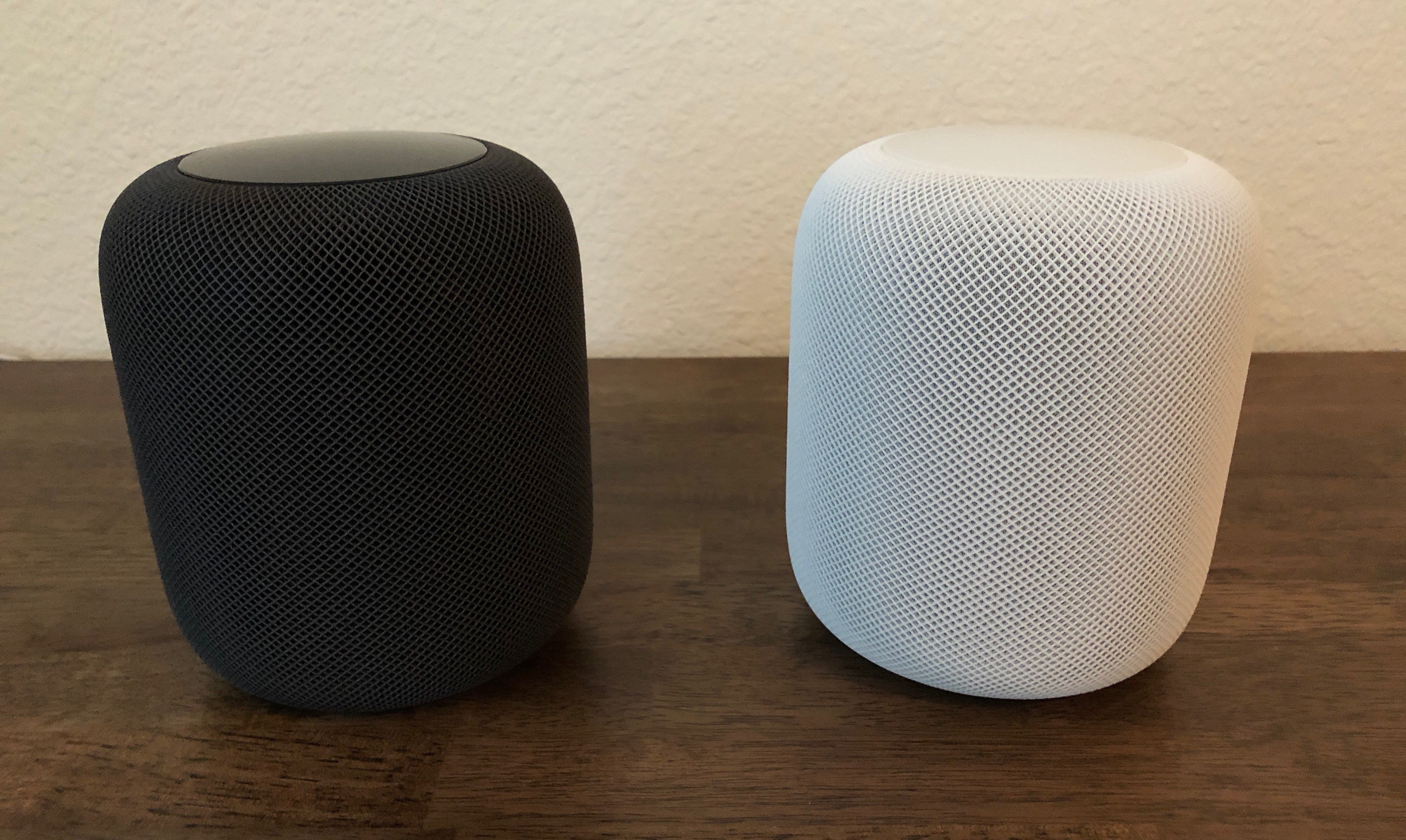
At the start, you should know two things about me: HomePod is the first smart speaker I’ve ever owned, and I’m all-in on the Apple ecosystem.
These facts make me the HomePod’s perfect customer, and they will surely color my comments. I’m guessing if I had more experience with other smart speakers, or I didn’t own nearly every modern Apple product, my thoughts on HomePod would be different. That said, here are my early impressions.
Access Extra Content and Perks
Founded in 2015, Club MacStories has delivered exclusive content every week for nearly a decade.
What started with weekly and monthly email newsletters has blossomed into a family of memberships designed for every MacStories fan.
Club MacStories: Weekly and monthly newsletters via email and the web that are brimming with apps, tips, automation workflows, longform writing, early access to the MacStories Unwind podcast, periodic giveaways, and more;
Club MacStories+: Everything that Club MacStories offers, plus an active Discord community, advanced search and custom RSS features for exploring the Club’s entire back catalog, bonus columns, and dozens of app discounts;
Club Premier: All of the above and AppStories+, an extended version of our flagship podcast that’s delivered early, ad-free, and in high-bitrate audio.
Snapthread Combines Live Photos and Videos into Special Shareable Moments
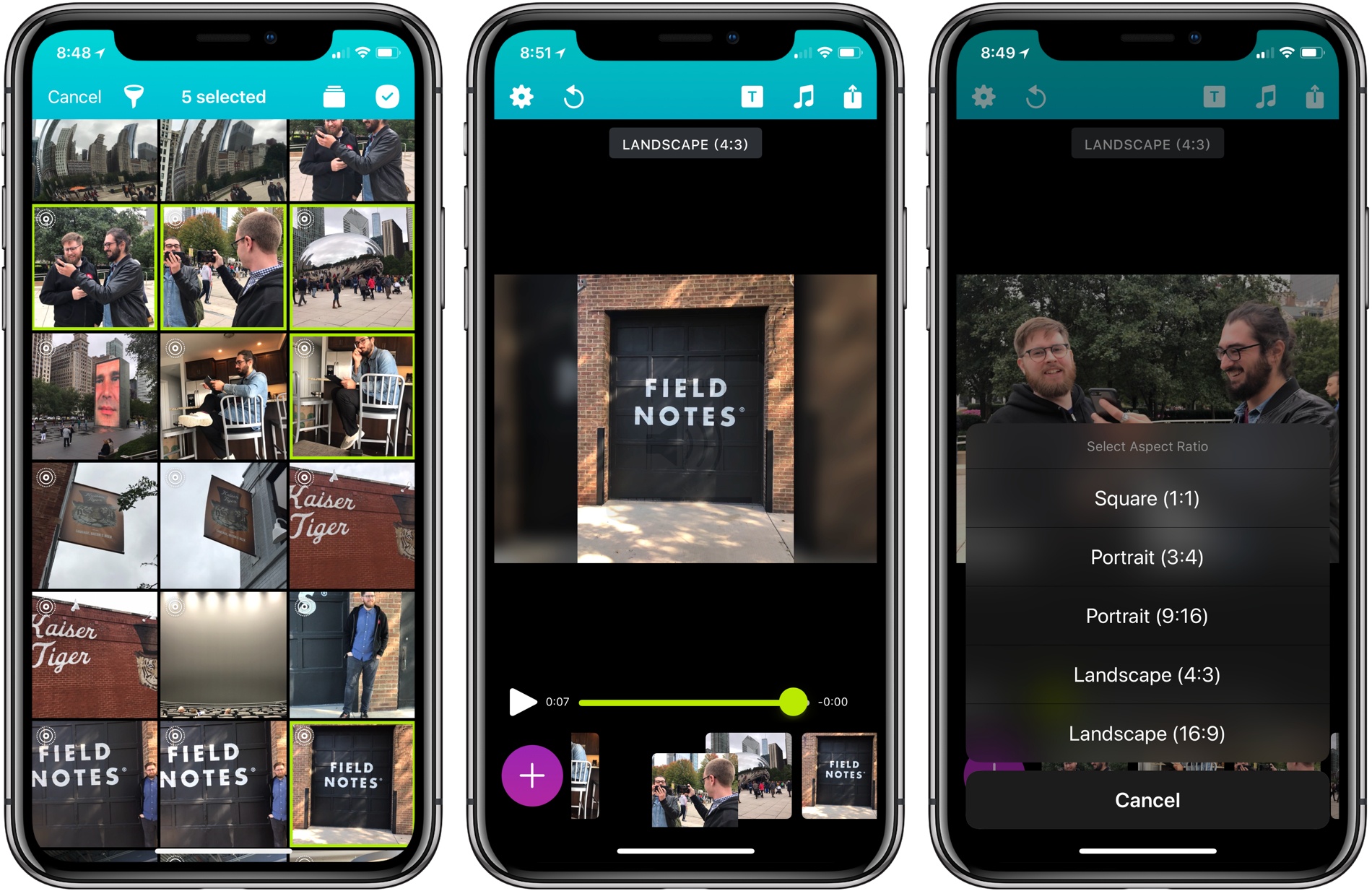
Becky Hansmeyer started building Snapthread to combine Snapchat videos. What she ended up creating is an elegant way to combine Live Photos and videos into short movies that are greater than the sum of their parts and perfect for sharing with friends and family.
What I love about the origin story of Snapthread is how much the app changed from its inception to launch, yet how close the resulting app remains to Hansmeyer’s original vision. That’s because at its core is a great idea: creating a better way to share life’s fleeting moments.
With version 1.5, Snapthread has grown into a mini iPhone video studio with a focus on making it as quick and simple as possible to assemble a video from several Live Photos or standard videos. The approach is smart. It’s easy to get caught up in filters, effects, and transitions when you’re editing video. There’s a place for that sort of app, and Snapthread lets you add things like a title card and overlay music, but what I like most about it is that the app’s focus on the basics prevents me from obsessing about my creation. It’s a design choice that makes me far more likely to create and share a clip.
Access Extra Content and Perks
Founded in 2015, Club MacStories has delivered exclusive content every week for nearly a decade.
What started with weekly and monthly email newsletters has blossomed into a family of memberships designed for every MacStories fan.
Club MacStories: Weekly and monthly newsletters via email and the web that are brimming with apps, tips, automation workflows, longform writing, early access to the MacStories Unwind podcast, periodic giveaways, and more;
Club MacStories+: Everything that Club MacStories offers, plus an active Discord community, advanced search and custom RSS features for exploring the Club’s entire back catalog, bonus columns, and dozens of app discounts;
Club Premier: All of the above and AppStories+, an extended version of our flagship podcast that’s delivered early, ad-free, and in high-bitrate audio.
Game Day: WayOut
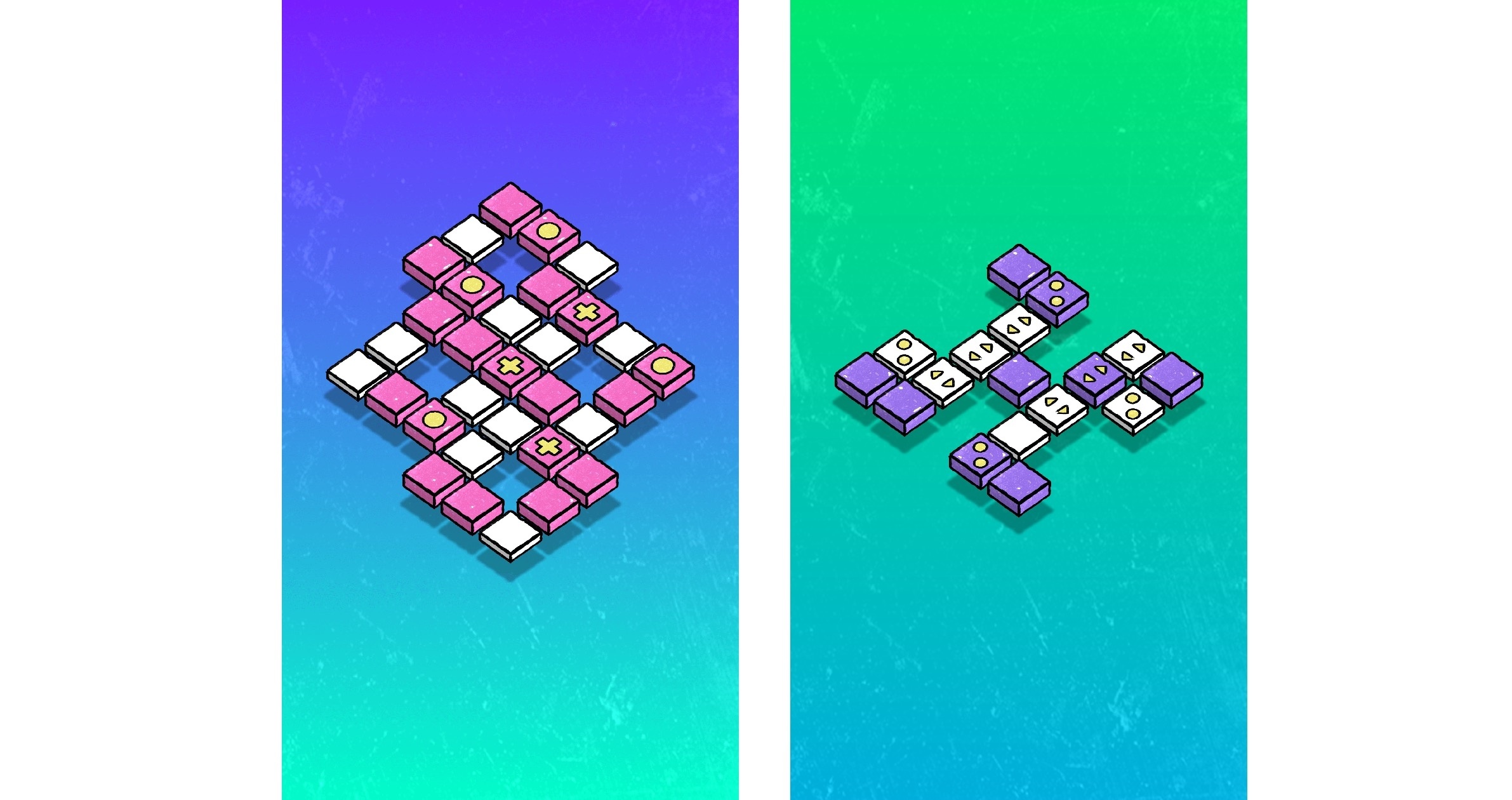
Dropout Games is known for publishing relaxing, stylish puzzle games like Blyss, which we previously covered on MacStories. They are back with WayOut, an elegant Lights Out-style iOS game developed with Ukraine-based developer Konstructors that is easy to learn to play but devilishly difficult to master.
Access Extra Content and Perks
Founded in 2015, Club MacStories has delivered exclusive content every week for nearly a decade.
What started with weekly and monthly email newsletters has blossomed into a family of memberships designed for every MacStories fan.
Club MacStories: Weekly and monthly newsletters via email and the web that are brimming with apps, tips, automation workflows, longform writing, early access to the MacStories Unwind podcast, periodic giveaways, and more;
Club MacStories+: Everything that Club MacStories offers, plus an active Discord community, advanced search and custom RSS features for exploring the Club’s entire back catalog, bonus columns, and dozens of app discounts;
Club Premier: All of the above and AppStories+, an extended version of our flagship podcast that’s delivered early, ad-free, and in high-bitrate audio.