Posts in reviews

Knotwords: A New Word Game From Zach Gage and Jack Schlesinger

Knotwords is a deceptively simple new game from Zach Gage and Jack Schlessinger that combines elements of multiple word and logic puzzles into a unique, fun experience.

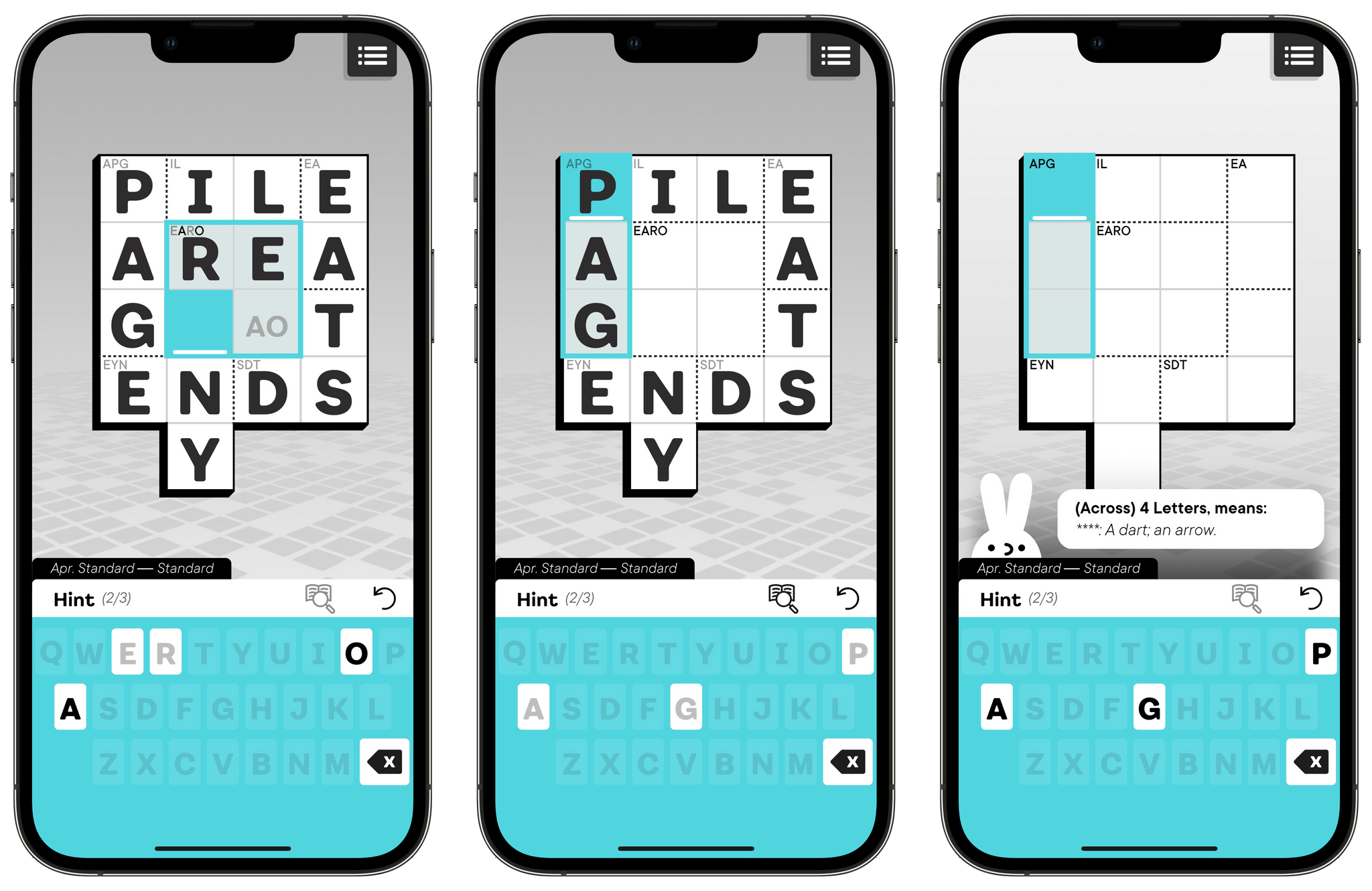
Each puzzle is composed of a set of squares that are divided into sections. Letters in the corner of a section establish which letters can be placed in that section of the puzzle. The goal is to arrange the letters, so they spell words vertically and horizontally throughout the puzzle. If that sounds simple, it is, but like any good game, just because the rules are easy to grasp doesn’t mean the game itself is easy.

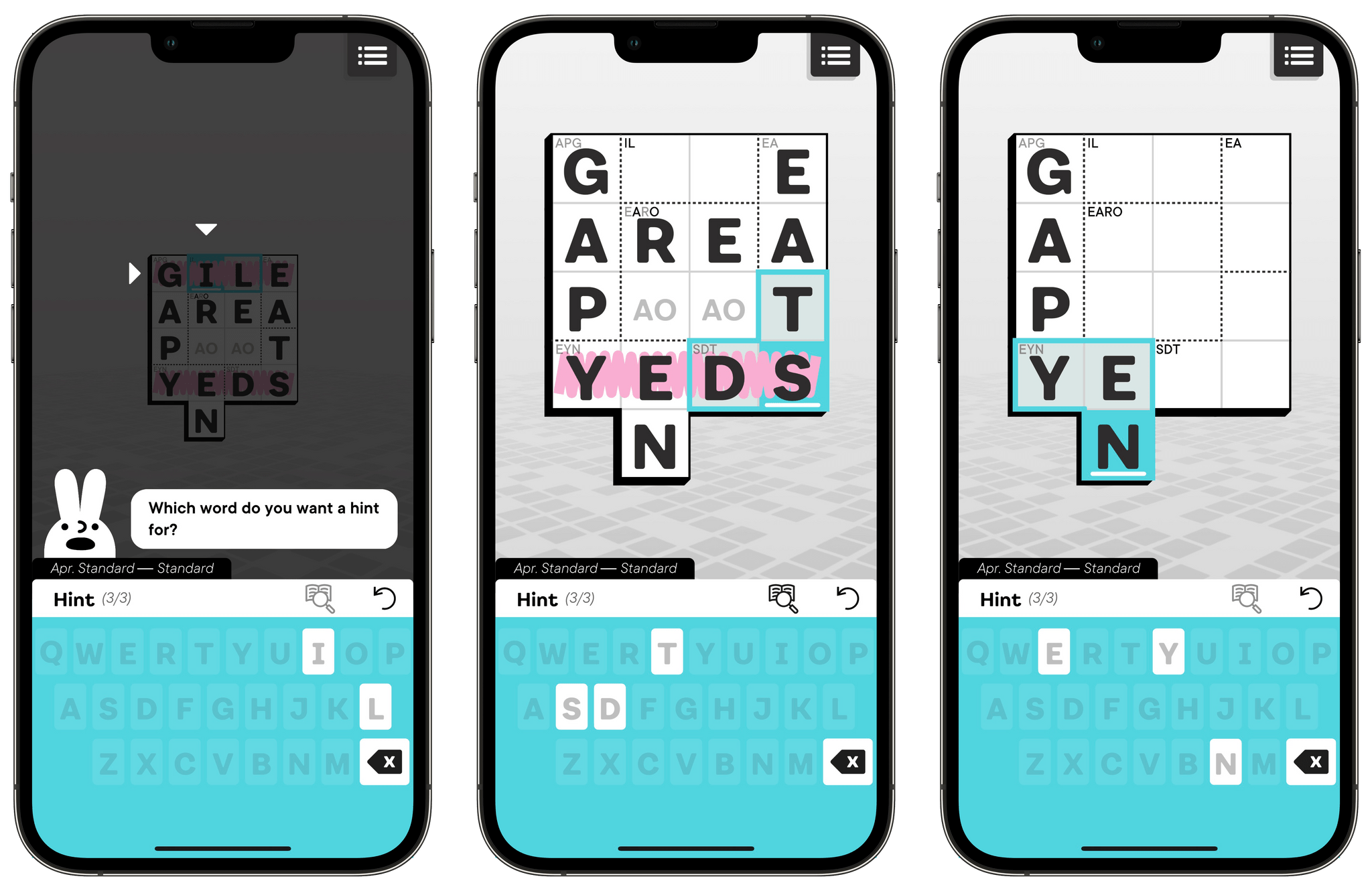
As you explore and test solutions in Knotwords, the available letters are highlighted on a keyboard at the bottom of the screen, making it easy to tell which letters remain available to play. Once a row has been filled with letters horizontally or vertically, Knotwords will let you know if your letters are out of place by scratching out the letters in pink.

Like Sudoku, solving words makes each puzzle progressively easier by eliminating the number of possible letters that can be placed in open squares. It’s a dynamic that helps ease the frustration of getting stuck on one part of a puzzle because focusing your efforts elsewhere often leads to a breakthrough in an area where you were having trouble. There’s also a built-in hint system featuring the game’s rabbit mascot, who dispenses hints in the form of definitions of words instead of the answers themselves. Also, on iOS, the game includes an upbeat soundtrack with a jazzy lounge music vibe and generous use of haptic feedback, both of which add to the overall experience.

I’m a big fan of logic puzzles like Knotwords. They’re an excellent way to unwind by concentrating on something that isn’t your work or something else that might be on your mind. Knotwords fits that role perfectly by being easy to learn and play but challenging to solve and unique. The experience is a little like doing a crossword puzzle without the clues. It’s a combination that I love, so I plan to make Knotwords a regular part of my downtime this summer.

In addition to iOS and iPadOS, Knotwords is available on Android, the Mac, and PC. The game is free to download on the App Store and includes a core set of puzzles, but for $4.99/year or a one-time payment of $11.99, you can unlock more puzzlebook puzzles each month, a daily Twist puzzle, additional hints, statistics, and color themes.


Sofa 3.3 Adds Extensive Customization Options

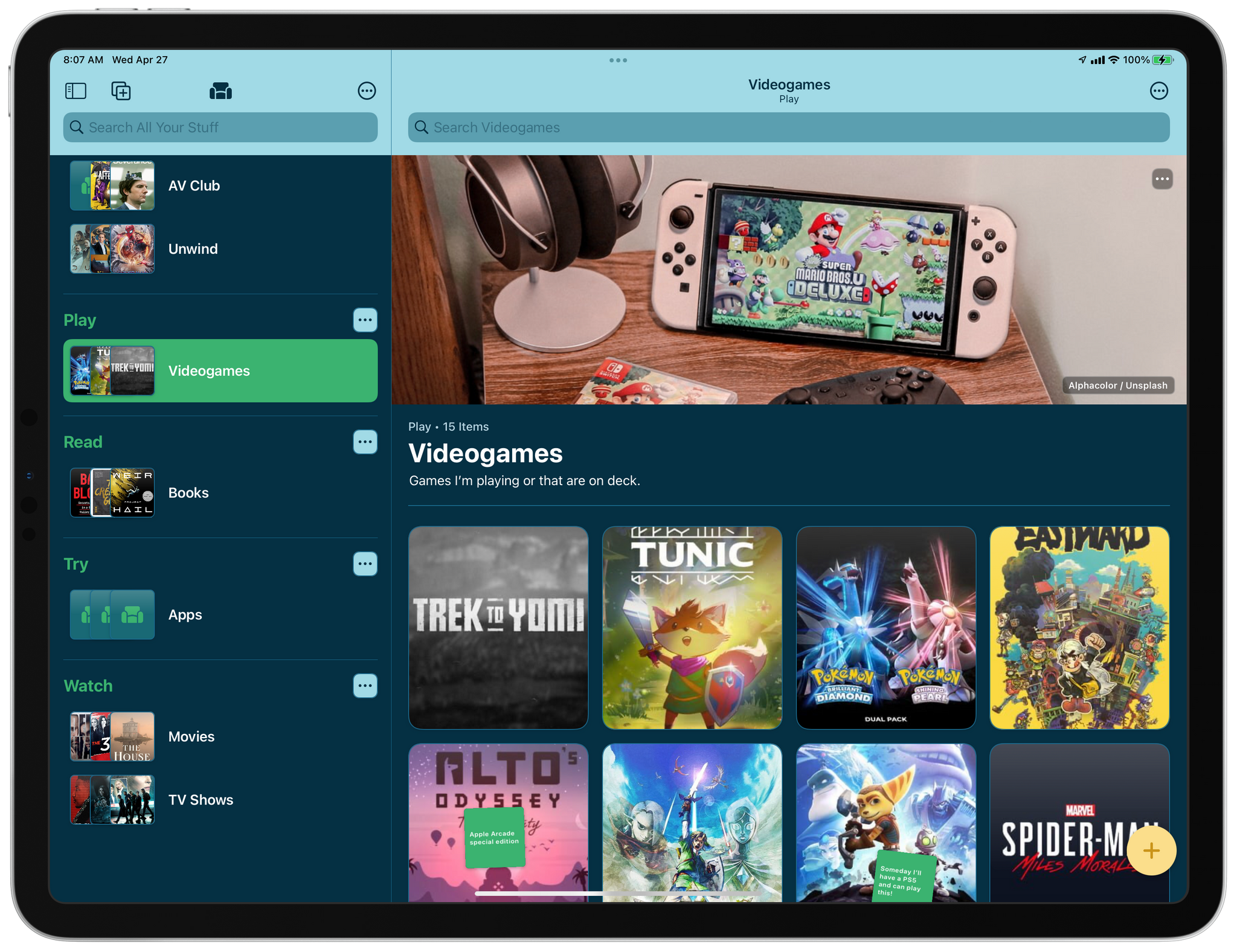
Sofa 3.3, the media organizer app for the iPhone, iPad, and Mac, is out, and the update is all about customization. If you haven’t tried Sofa before, check out our recent coverage of the app, which was a runner-up for the MacStories Selects awards in the Best App Update category last year. The update includes a long list of ways to personalize Sofa, which are best shown off by showing you what’s possible, so let’s update the list of books I’ve got in Sofa.

Read more


CARROT Weather 5.6 Adds Locations Lists, New Layout Sections, and More

CARROT Weather 5.6 is out today with a handful of excellent new features that pick up where previous updates have left off, with more ways to customize the app and make it your own.

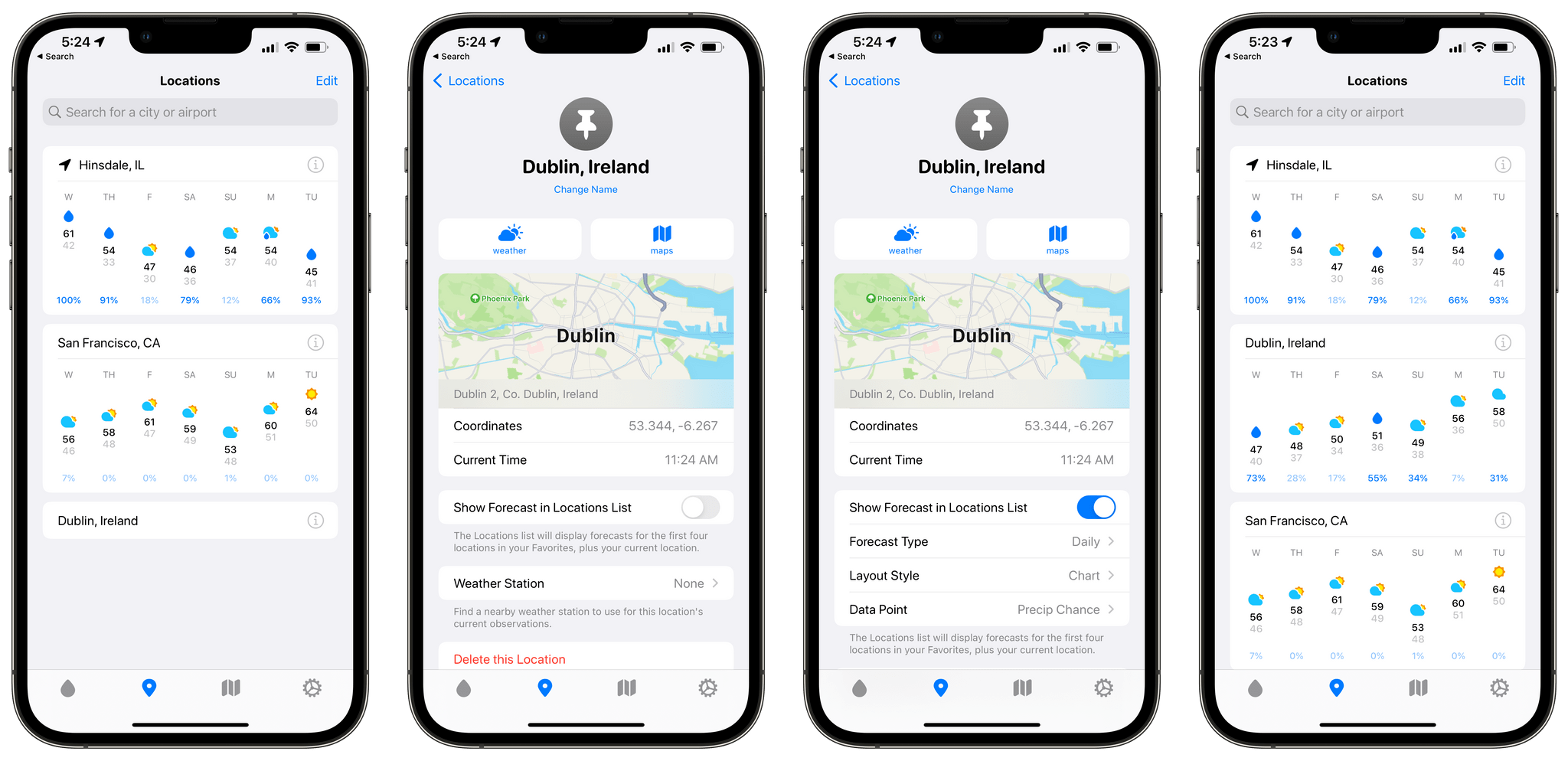
My favorite new feature is Locations Lists. From CARROT Weather’s Locations tab, you can search for the weather in any city you like. That works well for one-off checks of conditions somewhere else, and CARROT saves your most recent searches at the bottom of the Locations tab making it easy to rerun a search. Locations can also be saved as favorites.

Setting up forecasts for multiple locations.

Setting up forecasts for multiple locations.

Location Lists extend CARROT Weather’s location-based functionality further by letting you go beyond a simple list of favorite locations. Tap the Info button next to a place you’ve marked as a favorite, and you can choose to ‘Show Forecast in Locations List.’ Doing so opens up additional options, including an hourly or daily forecast, a chart or stack layout, and a choice from among many data points to highlight alongside the forecast. Once a location has been set up the way you want, you’ll see a card-like UI for each city you’ve added with the data you’ve chosen. Whether you’re keeping tabs on a destination for an upcoming trip or just want to know if the weather is nice where a friend or family member lives, the new Locations List provides an excellent overview without requiring you to tap into the details of each city. In the future, I’d love to see Location List forecasts added to CARROT Weather’s set of Home Screen widgets.

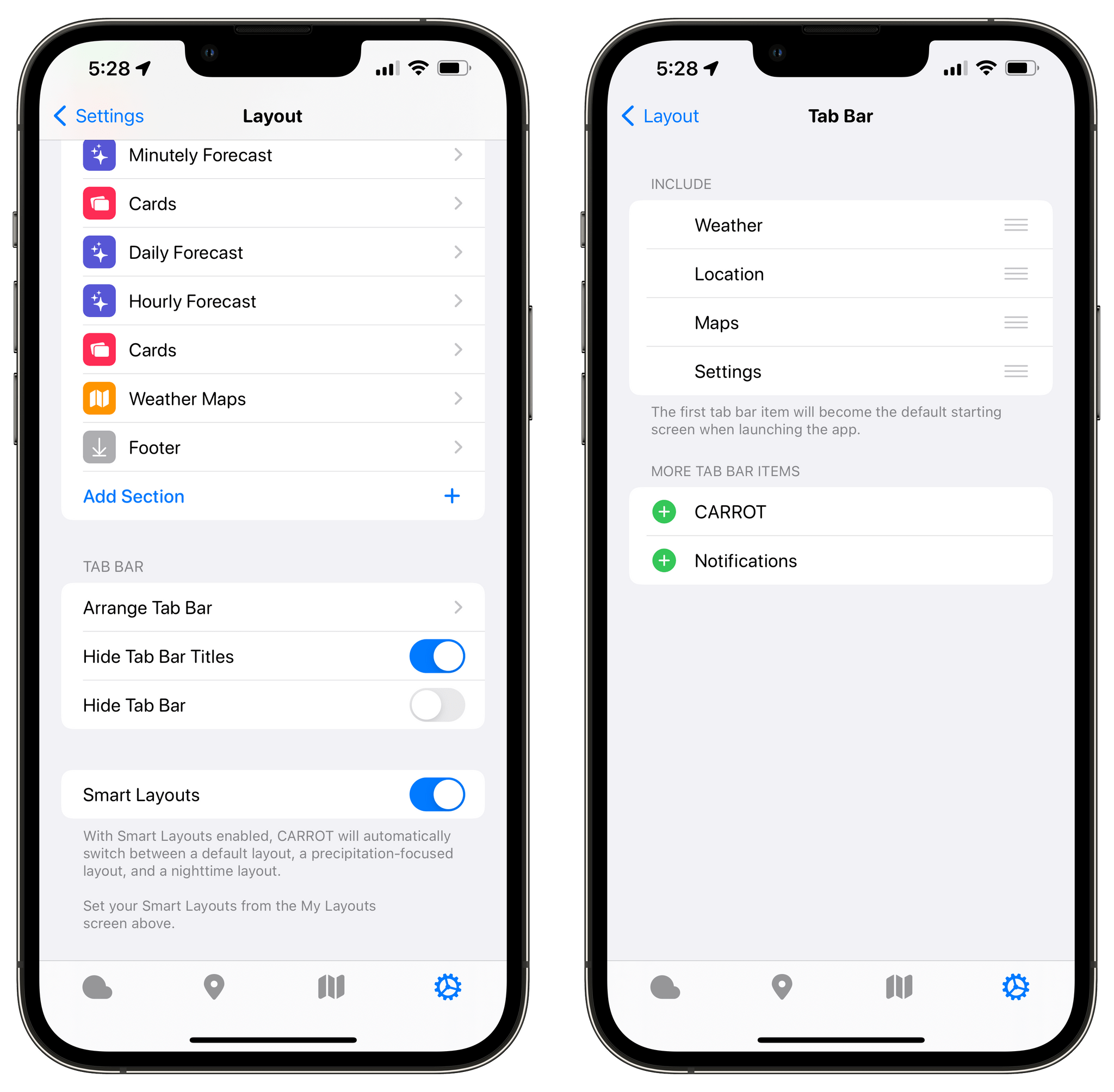
CARROT's tab bar is fully-customizable.

CARROT’s tab bar is fully-customizable.

I used to hide CARROT Weather’s tab bar, but the new Locations List has given me a reason to keep it visible, making it easier to access my favorite locations and features like the app’s weather maps. The tab bar is now customizable, so you only need to display the tabs you use in the order you prefer. Just visit the Layout settings and choose Arrange Tab Bar to customize it.

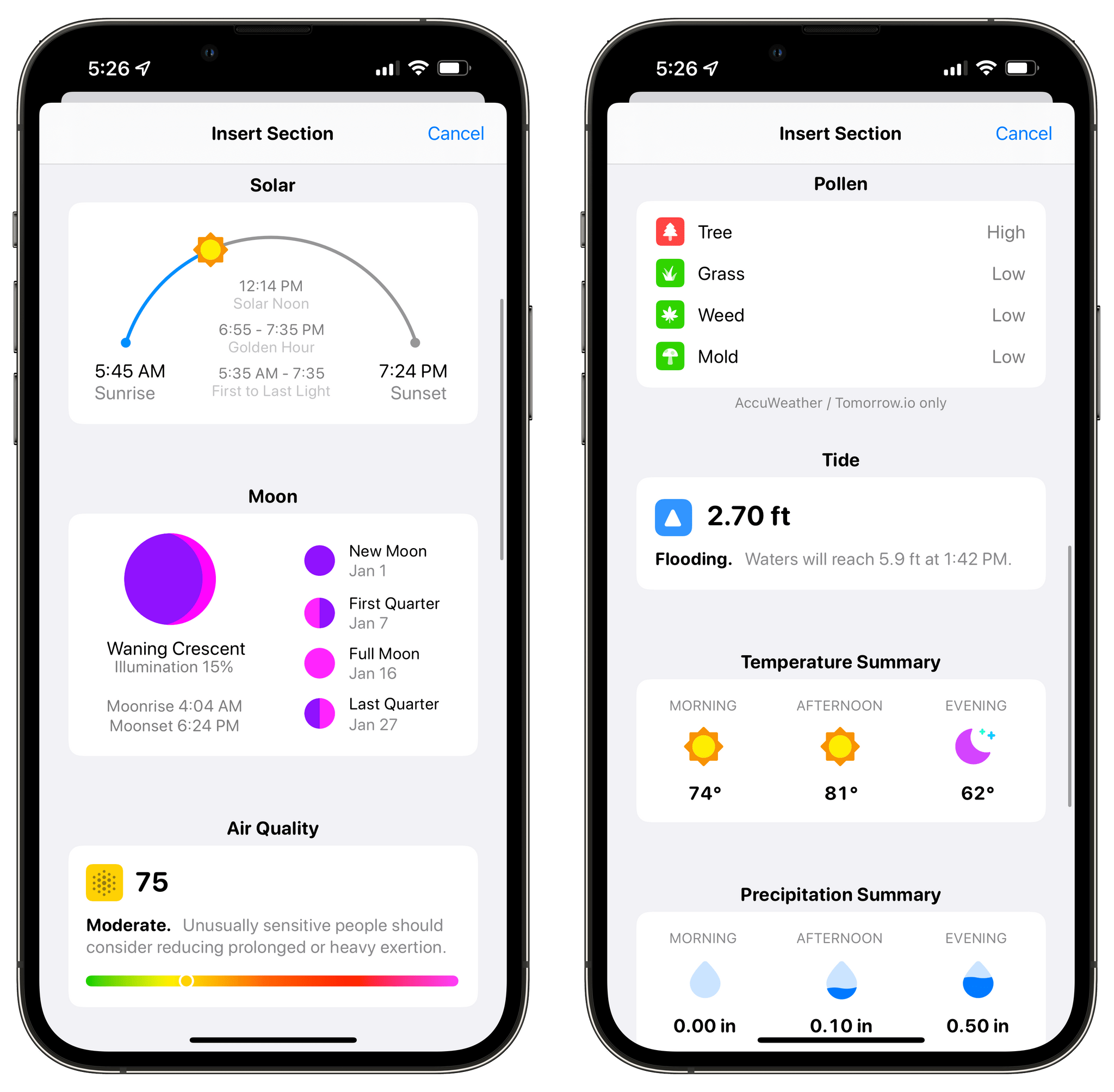
CARROT Weather 5.6 introduces new Solar, Moon, Air Quality, Pollen, and Tide sections.

CARROT Weather 5.6 introduces new Solar, Moon, Air Quality, Pollen, and Tide sections.

CARROT Weather’s Layout sections continue to expand with version 5.6 too. The latest update includes Solar, Moon, Air Quality, Pollen, and Tide sections. CARROT Weather already offered ways to surface the information in these new sections as data points. However, with the new Layout sections, you get more detailed and glanceable information than before.

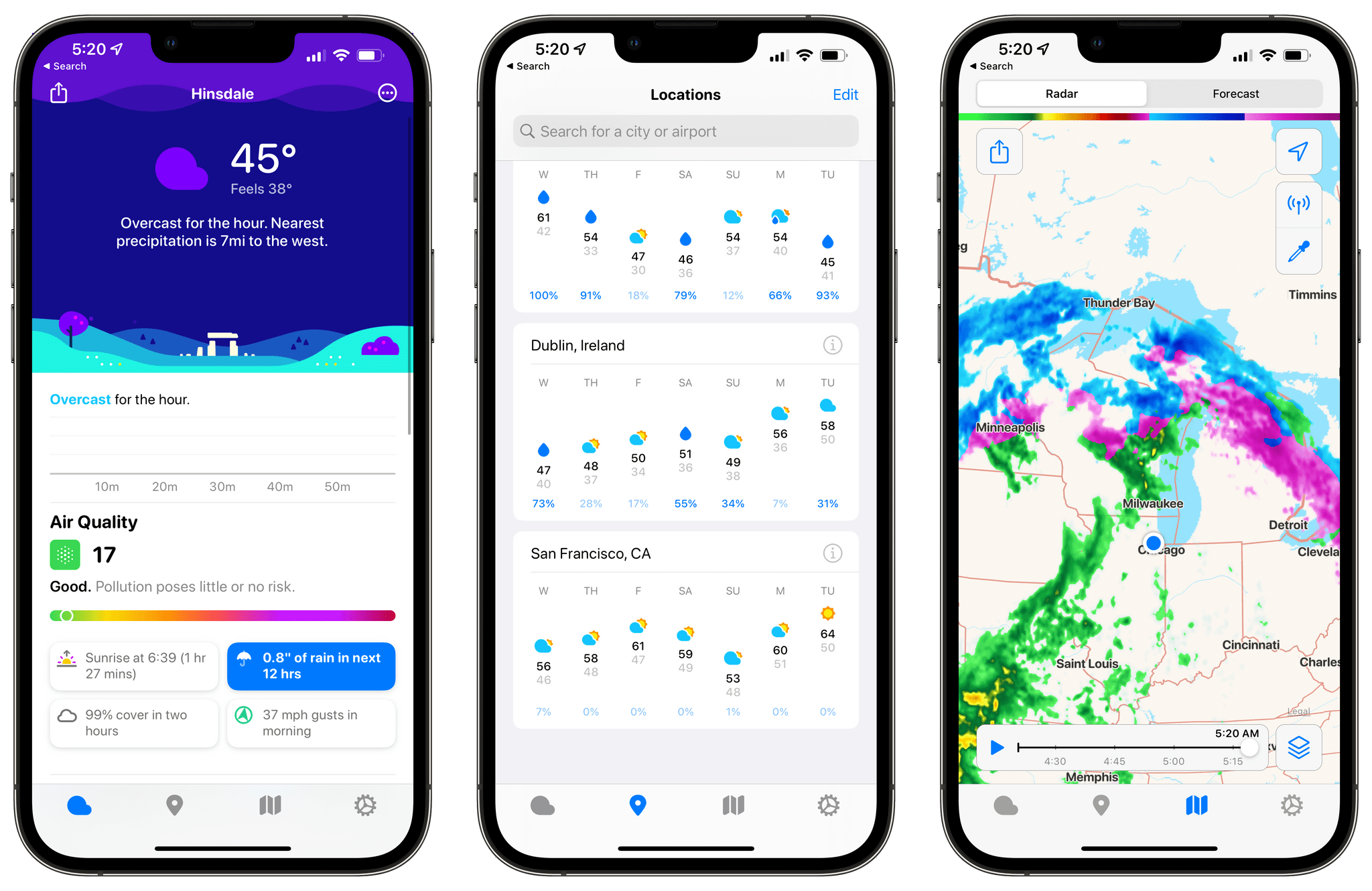
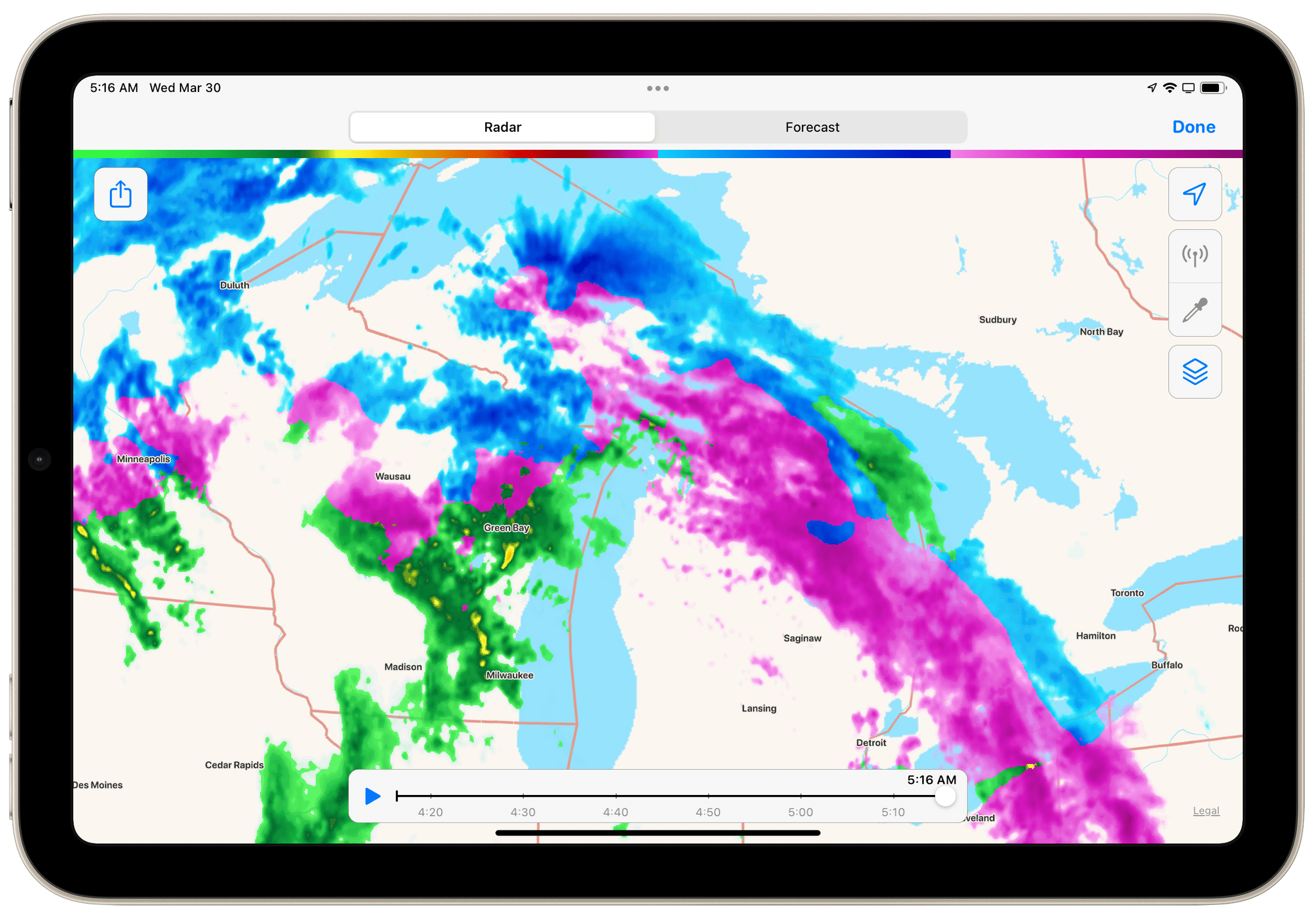
When the weather is bad in Chicago, I look north to feel better.

When the weather is bad in Chicago, I look north to feel better.

The maps and radar functionality have also been expanded. Maps now show when a wintery mix of precipitation is falling. Fortunately, we’re nearing the end of that kind of weather in the Chicago area, so I haven’t seen a wintery mix in CARROT’s weather map here. However, the good people of Wisconsin and Michigan are enjoying a bright pink wintery mix this morning, so you can see what that looks like in the screenshot above. The radar feature also reports hail and debris from tornados that are detected, which I’d prefer not to see any time soon, but I’m also glad it’s available.

With the latest update, I’ve added daily forecasts to my Locations List for the cities where my kids live. I’ve also added Pollen and Air Quality sections to my weather layout, which will be handy as the weather warms up and I head outside more. I’ve also simplified my tab bar to mirror how I use the app, which makes one-handed use easier.

It’s remarkable how much customization is now available in CARROT Weather. Version 5.0 was a big leap forward, but Brian Mueller has continued to refine the app and add new and interesting options that have taken the app’s personalization to a new level that I love.

CARROT Weather is available as a free update on the App Store. The app offers multiple subscription tiers, with different features at each level, which you can read more about in the app’s Settings.


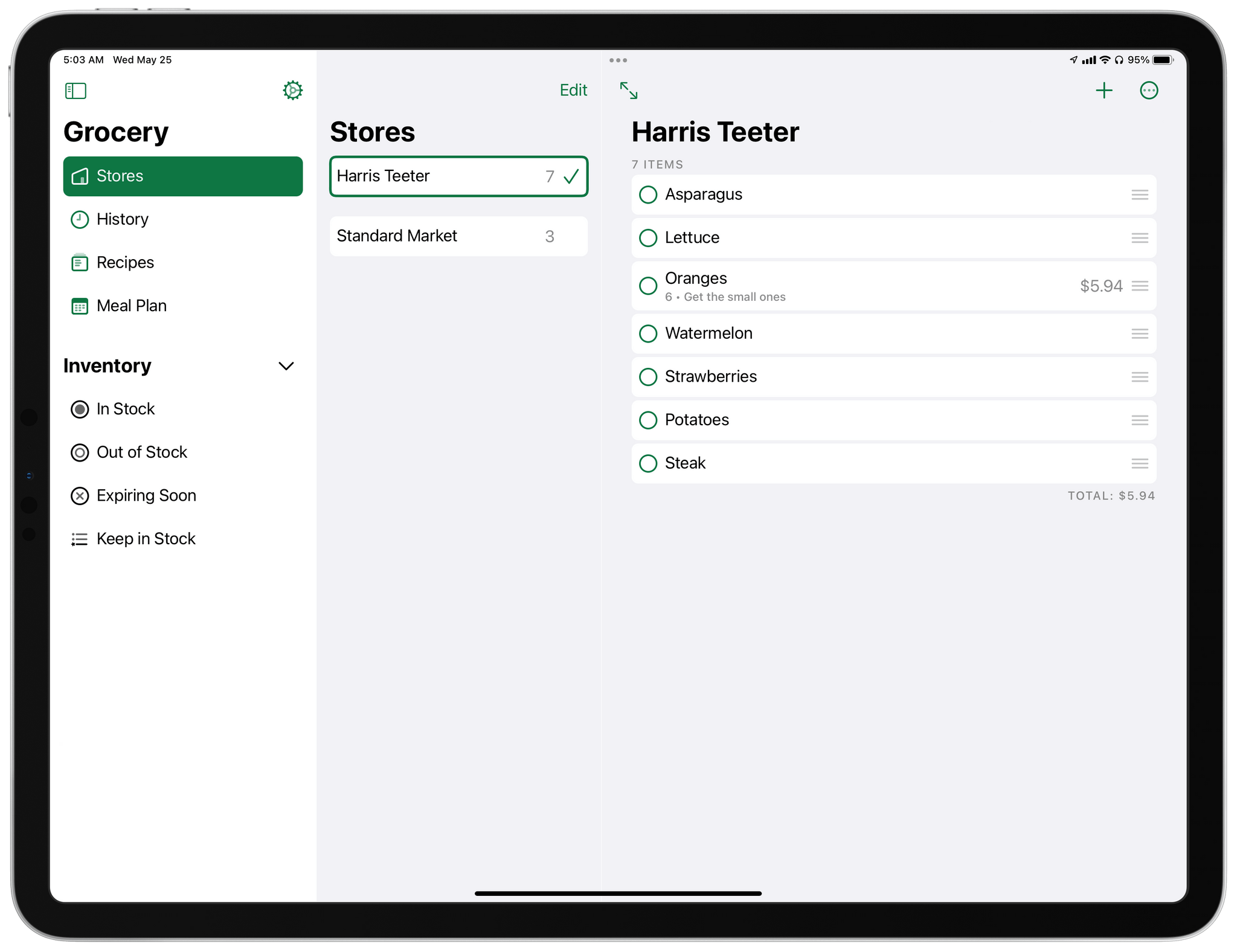
Overcast Redesign Enhances Podcast Navigation with an Emphasis on Playlists and Recent Episodes

I’ve used a lot of different podcast apps over the years, but the one I return to most often and have used the most is Overcast by Marco Arment. The app’s customizability, Smart Speed and Voice Boost audio enhancement technologies, and Shortcuts support are unrivaled among podcast players. I also appreciate that when episodes of the shows I love are published, they usually appear in Overcast first.

Read more


ComicTrack: A Beautifully-Designed, Flexible Way to Organize Your Comic Book Reading

ComicTrack is a new app from Joe Kimberlin for tracking and organizing the comic books you’ve read, are currently reading, and want to read. The idea is similar to his excellent videogame tracking app, GameTrack, but applied to comics. I’ve been using ComicTrack for a couple of weeks now, and it’s excellent. Of course, you’ll also need a separate app to read your comics, but having a dedicated app to organize what I’m reading and plan to read has single-handedly gotten me back into reading comics more regularly.

ComicTrack on the iPhone.

ComicTrack on the iPhone.

For context, I’ve always been a very casual comic book fan. I have Comixology and Shonen Jump installed on my iPad mini, but I often go weeks or months without touching either. It’s not a lack of interest, so much as a combination of not knowing where to start and having limited free time. ComicTrack hasn’t magically granted me more free time, but it has made getting started much easier by reducing the friction of picking something to read.

ComicTrack on the 12.9" iPad Pro in dark mode

ComicTrack on the 12.9” iPad Pro in dark mode

I’m going to focus on the iPad version of ComicTrack because that’s where I read most of my comics, but the app also works and looks great on the iPhone and Mac, as you’ll see in the screenshots below. Everything syncs over iCloud too. Also, although I spend most of my time using the iPad version of ComicTrack, I find the iPhone and Mac apps indispensable for collecting new ideas of things to read. I run across comic books all the time via RSS, Twitter, podcasts, and friends’ recommendations. That doesn’t just happen when I’m using my iPad, but with ComicTrack on all the platforms I use, it’s easy to add something that catches my eye.

Read more


WaterMinder 5.1 Delivers a Ground-Up Redesign of Its Apple Watch App and More

Today, there are a lot of apps that track hydration, but for me, the standard-bearer for the category has always been and remains WaterMinder by Funn Media. The app has evolved a lot since we first covered it in 2016, but what hasn’t changed is its emphasis on fast data entry, a clear, easy-to-use interface, and the adoption of the latest Apple technologies. With version 5.1, the WaterMinder watchOS app has been rebuilt from the ground up using SwiftUI. A handful of other nice additions have found their way into the iPhone and iPad apps too.

Read more


Tripsy 2.10 Adds Web-Based Itineraries and Expanded Travel Email Forwarding

Tripsy is my favorite travel app because it’s not just about getting from Point A to Point B. To me, the app defines the difference between trips and travel. Lots of apps can track travel information about your flights or show you where your hotel is on a map. Tripsy can do those things too, and it’s good at them. However, where Tripsy shines brightest and sets itself apart from other apps is by going beyond those nuts and bolts essentials and focusing the things you want to do and see on your trip.

I'm a big fan of Tripsy's modern design.

I’m a big fan of Tripsy’s modern design.

We’ve covered Tripsy before, so if you’re brand new to the app, be sure to check out that review, which covered the app’s 2.0 release. That update featured a beautiful modern card-style design, loads of trip inspiration and planning tools to organize travel, lodging, activities, dining, and more in one neatly organized app that works on the iPhone, iPad, Apple Watch, and more recently, the Mac.

Unfortunately, that update was also released in the fall of 2019, so I only got a chance to use it once before COVID ended my travel plans for a while. However, the travel outlook is brighter in many corners of the world today, and pent-up demand has people revisiting deferred trips, me included. If you’re in a similar situation and have a trip in your future, I encourage you to give today’s Tripsy update a look because, with version 2.10, Tripsy makes it easier to organize a trip than ever before.

Read more


Logger Is the Missing Console for Shortcuts Power Users

Logger for Shortcuts.

Logger for Shortcuts.

Indie developer Alex Hay has long pushed the boundaries of what third-party developers can build with the SiriKit framework and Shortcuts integrations on Apple platforms.

In late 2019, his Toolbox Pro app redefined what it means to complement Apple’s Shortcuts app with additional actions, creating an entirely new sub-genre of headless utilities designed to provide additional actions with configurable parameters. Recently, Hay introduced Nautomate, another utility that provides users with Shortcuts actions to integrate with the Notion API without having to write a single line of code. And today, Hay is launching Logger, another Shortcuts-compatible app that is similar to his previous ones, but with a twist: rather than adding actions for external services or apps such as Apple Music and Notion, Logger offers actions to create the troubleshooting console that has always been missing from Shortcuts.

Read more


Nintendo Switch Online 2.0 Gets a Redesign and Adds a Few New Features

Since it debuted, Nintendo Switch Online’s utility has been primarily limited to initiating voice chats and other online features in the Switch games that support them. That’s still the core of version 2.0, but the app has been redesigned and adds a couple of nice new features.

The new design divides the screen into a scrolling row of friends along the top, thumbnails of the games you own that support online services, like Animal Crossing, Super Smash Brothers Ultimate, and Splatoon 2, and the app’s Voice Chat feature. It’s a simple, good-looking design, but the abundance of blank space, if you’re not using voice chat, reveals just how little else the app has to offer.

Tapping on a friend's Mii shows you what they're playing or when they were last online.

Tapping on a friend’s Mii shows you what they’re playing or when they were last online.

The row of friends indicates who is currently online and who you’ve marked as a ‘Best Friend,’ which pins their Mii avatars to the beginning of your friends list. Tapping on a Mii shows you what someone who is online is playing or when they were last online. The game-specific thumbnails act as launchers for each game’s service, and voice chat is only activated if you first start a game on the Switch in a mode that supports it.

Nintendo Switch Online walks you through the process of starting a voice chat and lets you manage your visibility to friends.

Nintendo Switch Online walks you through the process of starting a voice chat and lets you manage your visibility to friends.

A small but welcome touch is the ability to copy your friend code in the app’s settings. Previously you had to grab your Switch, dig into your profile, and manually copy the information if you wanted to send it to someone. Personally, that’s been a huge drag on how often I share my friend code, so I appreciate the change.

It’s good to see Nintendo Switch Online updated, but it’s still a little disheartening to think that it took the company five years to get to a version 2.0 with such modest feature additions. Still, the update is an improvement, and hopefully, it’s also a sign that Nintendo is prepared to invest more time and effort into the app as a way to enhance the Switch experience.

Nintendo Switch Online is available as a free update on the App Store.