This Week's Sponsor:

HomeSnap

A Private, Read-Only Window Into Your HomeKit Home


Posts in news

New iMac Notes: Dual External Display Output, OS X on SSD - No Video Input? [Updated]

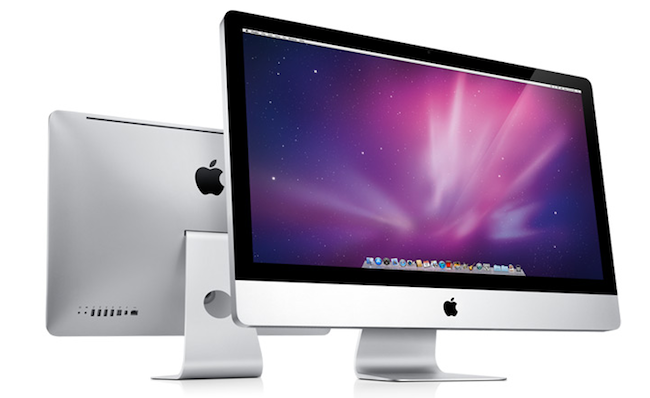
Following this morning’s refresh of the iMac – you can read more about it here – a few technical tidbits have started popping up on the Internet causing some interest and speculation from Apple fans and bloggers. Among the new features of the updated line – such as improved graphics, and new Intel “Sandy Bridge” processors – support for the Thunderbolt technology on the 27-inch iMacs has been extended, as the bigger models now come with two Thunderbolt ports to use for data transfer, daisy-chaining of external drives and peripherals and, as noticed and confirmed with Apple by GigaOM, dual external display output. Support for dual display out through Thunderbolt means you’ll be able to connect two external monitors to the new 27-inch iMac, and output the computer’s screen to the monitors simultaneously. This is great news for those who like external vertical monitor setups, and it’s now made extremely easy by the Thunderbolt ports located on the back of the iMac.

One of the most exciting things about today’s new iMacs (and the thing that will probably result in me buying one) are the dual Thunderbolt ports on the 27-inch iMac. They’re great in that they provide a lot of potential I/O transfer power, but more importantly because it allows the new iMac to output to two external monitors simultaneously, Apple confirmed to me this morning.

Achieving a similar setup was possible before, but it required users to buy USB or VGA adapters that resulted in loss of quality and poor performances when compared to native, wired Mini DisplayPort connections. Thanks to Thunderbolt’s daisy-chaining functionality, using both Thunderbolt ports for dual display output doesn’t mean you’ll be forced to constantly plug in and disconnect peripherals: if you own a Thunderbolt-based external drive, you’ll be able to connect it to the iMac, and then plug a secondary display into the drive’s Thunderbolt port. This way, Thunderbolt is used at its full capacity and you still retain the possibility to output to two different monitors simultaneously. Read more


Adobe Releases CS5.5 and Updates Photoshop To Support Mobile Apps

Today was a big morning for Adobe, releasing Creative Suite 5.5 and updating Photoshop to version 12.0.4. Whilst normally the Photoshop update wouldn’t be of much interest, this update brings support for Photoshop Touch Mobile Apps.

Adobe will sometime today also release its iPad demo apps, Adobe Color Lava, Adobe Eazel and Adobe Nav, onto the iTunes App Store. The apps, which we previously wrote about, are provided as demonstrations of the power of the Photoshop Touch SDK and vary in price from $1.99 to $4.99.

As for the release of CS5.5, being called a mid-cycle update, a big component is the greater ability for users to author and deliver content and applications for any screen, particularly mobile devices using iOS, Android and BlackBerry through enhanced HTML5 compatibility. New in CS5.5 is Adobe Digital Publishing Suite, which provides a hosting service and viewing technology so that publishers can easily deploy content across the iPad, Android Tablets and the BlackBerry PlayBook.

The last major component of CS5.5 is the beginning of Adobe’s subscription plans for the Creative Suite. Beginning at $19 per month for Dreamweaver, ranging up to $129 per month, users can “pay as you use” rather than paying the large lump cost of the products.

[Via MacNN, 9to5 Mac]


Apple Introduces New iMacs with Thunderbolt and New Quad-Core Processors

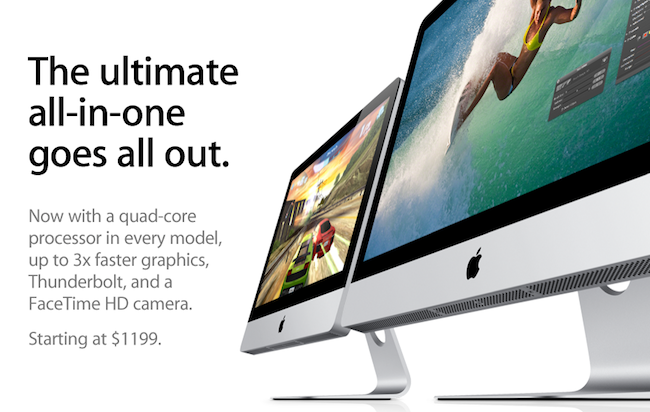
Right on cue, Apple has just introduced an updated line of iMacs on its online store, which notably feature the Thunderbolt technology and come with the new quad-core processors from Intel. The refresh brings the iMacs in line with the MacBook Pros that received an update in February, which also added Thunderbolt and “Sandy Bridge” processors, as well as a general speed bump. The new iMacs also feature a FaceTime HD camera and new AMD Radeon HD graphics for better gaming performances, photo editing and video processing; the 27-inch models come with two Thunderbolt ports for greater expansion with future Thunderbolt-enabled peripherals.  The new iMacs feature quad-core Intel Core i5 “Sandy Bridge” processors, but customers have an option to order a Core i7 in the configuration page (only for high-end 21.5-inch and 27-inch models, base models don’t support Core i7).

With next generation quad-core processors, powerful new graphics, Thunderbolt technology and a FaceTime HD camera, we’ve made the world’s best desktop even better.”
“Our customers love the iMac’s aluminum enclosure, gorgeous display and all-in-one design,” said Philip Schiller, Apple’s senior vice president of Worldwide Product Marketing. “With next generation quad-core processors, powerful new graphics, Thunderbolt technology and a FaceTime HD camera, we’ve made the world’s best desktop even better.”

The new iMac features quad-core Intel Core i5 processors with an option for customers to choose Core i7 processors up to 3.4 GHz. These next generation processors feature an integrated memory controller for an amazingly responsive experience and a powerful new media engine for high-performance video encoding and decoding. With new AMD Radeon HD graphics processors, the new iMac has the most powerful graphics ever in an all-in-one desktop.

Press release is available here and embedded below. The official iMac page on Apple.com has just been updated with a detailed explanation of all the new specs.

As for other specs:

Graphics:

  • 21.5-inch iMac base model: AMD Radeon HD 6750M graphics processor with 512MB of GDDR5 memory
  • 21.5-inch iMac: AMD Radeon HD 6770M graphics processor with 512MB of GDDR5 memory
  • 27-inch iMac base model: AMD Radeon HD 6770M graphics processor with 512MB of GDDR5 memory
  • 27-inch iMac: AMD Radeon HD 6970M graphics processor with 1GB of GDDR5 memory (Configurable to AMD Radeon HD 6970M with 2GB GDDR5, only at the Apple Online Store.)


Video support and Camera:

  • FaceTime HD camera
  • Simultaneously supports full native resolution on the built-in display and up to a 30-inch display (2560 by 1600 pixels) on an external display
  • Support for extended desktop and video mirroring modes

Connections:

  • One Thunderbolt port on 21.5-inch iMac
  • Two Thunderbolt ports on 27-inch iMac
  • Mini DisplayPort output with support for DVI, VGA, and dual-link DVI (adapters sold separately)
  • One FireWire 800 port; 7 watts
  • Four USB 2.0 ports
  • SDXC card slot
  • Slot-loading 8x SuperDrive with 4x double-layer burning (DVD±R DL/DVD±RW/CD-RW)
  • Audio in/out
  • 10/100/1000BASE-T Gigabit Ethernet (RJ-45 connector)
  • IR receiver

Read more


iPad 2 Too Popular In South Korea? Carriers Suspend Online Sales

Apple may still be facing problems with tight supplies for the iPad 2 as South Korea’s two major carriers, SK Telecom and KT Corp, announced that they were forced to suspend online sales of the iPad 2 due to “depleted inventory.” According to Reuters, Korean operators are heavily betting on iPad 2 that went on sale in South Korea last week, as well as smartphones and tablets in general – seen as an incredibly profitable source of income due to data expansion and mobile Internet traffic.

Our iPad 2 inventory has been depleted and we apologize for failing to provide enough supplies due to the product’s global supply shortages,” SK Telecom said in a posting on its website.

The companies declined to reveal sales.

The release of the iPad 2 in additional Asian countries (including Hong Kong and Singapore) was originally announced in March. Recently, Apple has been reportedly facing supply issues with key iPad 2 components due to Japan’s earthquake and tsunami that affected many manufacturers and facilities the company relies on, although at the Q2 2011 earnings call Apple COO Tim Cook confirmed that pre-payment deals and outstanding teamwork from Apple will ensure a steady flow of supplies and iPad 2 shipments throughout the quarter. The iPad 2 still reports waiting times of 1-2 weeks in most Apple online stores (including South Korea), but it’s the first time we hear a carrier had to suspend online sales due to high demand and tight supplies.


Apple: Apps Downloaded Using A Promo Code Can’t Be Reviewed Anymore

As noted by forum poster Therealtrebitsch on TouchArcade, Apple recently tweaked the App Store system to prevent users who downloaded apps using a developer’s promo code from leaving a review or rating. The change comes as an unexpected move as it basically doesn’t count promo code-based downloads as regular purchases anymore, but it’s in line with Apple’s latest efforts to modify the App Store’s ranking algorithm to showcase apps based on quality, rather than raw download numbers.

Hi,

Anand here again from iTunes Store Customer Support. Thanks for writing back and letting me know your concern. I understand that you are still not able to write a review. I know how disappointing it can be when things don't work out the way they should.

I am sorry to inform that it is no longer possible to rate or review an app if it was downloaded using a developer’s promotional code.

However, I took the liberty of submitting your feedback to Apple on your behalf. Please know that Apple takes the feedback from our customers very seriously. This is the reason for our feedback page - to create a forum where our users can vent, praise or share whatever feelings they have to allow us to meet your needs, and grow as a company. I suggest that you use the link in order to share your feedback with us. I would also encourage you to share this link with all of your friends and family who wish to submit the feedback, and have them all submit the same request.”

—–

It is no longer possible to rate or review an app if it was downloaded using a developer’s promotional code.

You can review this app by purchasing it on a different iTunes account using something other than a developer’s promotional code, such as a Gift Card, Gift Certificate, or other payment options.

Two weeks ago, several reports indicated Apple had tweaked its App Store algorithm to better promote apps in the Top Free charts based on “ratings and active usage”, rather than download numbers, which could be easily altered by developers using techniques like pay-per-install networks (which Apple doesn’t accept anymore) and promo codes. It was a common practice, in fact, among many developers to give away promo codes (which are limited in the iTunes Connect developer portal and can’t be generated over and over) hoping that customers who got the app for free would leave a positive review or rating. Clearly Apple must have thought that this was another practice to alter the App Store’s ranking system, and introduced a new rule to prevent apps downloaded through a promo code from being reviewed.

I have tested this personally and, sure enough, an app I downloaded last week with a promo code can’t be reviewed or rated in iTunes. An app I downloaded with a promo code last year, however, can still be reviewed. Same applies for a Mac App Store app I redeemed two months ago. It’s unclear how this new system works (Apple hasn’t posted an update in iTunes Connect yet), but we speculate apps recently downloaded with a promo code can’t be reviewed – quite possibly going back until two weeks ago when the rumors about a new algorithm started.


Google Chrome Canary Lands On OS X

With an unexpected move that was reported earlier today by MG Siegler at TechCrunch, Google decided to (finally) release Chrome Canary for Mac. The new, highly unstable and cutting-edge version of Chrome is available for download here. What made Chrome Canary the proverbial unicorn among Mac users is the fact that this version of the browser is considered a pre-developer build – a step above Chromium, but an anticipation of things to come in the Google Chrome Dev, Beta and Stable channels. Available for several months on Windows, Canary is, put simply, the Chrome version to use if you want to see the latest developments, and try early features that will be implemented on other Chrome channels at a later date. Canary is not meant for daily, stable usage – instead, it’s best to run it alongside a beta or stable Chrome installation.

The Google team writes on the official Chromium blog:

The Mac version of Google Chrome Canary follows the same philosophy: it automatically updates more frequently than the Dev channel, and does not undergo any manual testing before each release. Because we expect it to be unstable and, at times, unusable, you can run it concurrently with a Dev, Beta, or Stable version of Google Chrome. Your Canary data remains separate, but if you set up Sync in each version of Chrome that you use, you can automatically continue using the same set of bookmarks, extensions, themes, and more.

The current stable version of Chrome is labelled 11; meanwhile, the Dev and Beta channels are already using version 12, whilst Canary has already made the jump to version 13 – the one that’s going to come out as stable in at least a couple of months from now. But if you want to test the latest features and experience the bleeding edge, Canary is awaiting here. With a shiny new yellow icon.


Penultimate 3.0 Comes With A Paper Shop For Notebook Templates

Penultimate, the popular handwriting app for iPad that’s been sitting in top-selling App Store productivity list for months, was updated earlier today to version 3.0, a major new version that extends the app’s notebook capabilities by embedding a completely new Paper Shop that, through in-app purchases, allows you to customize the look of Penultimate’s pages to your needs.

After playing around with the Paper Shop for a bit, it seems obvious to me that this was the next step for the Cocoa Box Design developers: as they saw people using Penultimate in the most variegate ways (a blank page and an iPad opens to a world of possibilities), they decided to offer alternative page designs that can turn Penultimate into a music annotation tool (staff papers, tablatures, chord charts), a task manager, a game board (tic-tac-toe papers, hangman, dots and boxes) or a professional writing utility. All these papers are available at different prices in the Paper Shop, which is also powered by a delicious design and attention to detail.

On top of that, Penultimate 3.0 can also import your own custom image for a personalized page design. For instance, I imported some of David Seah’s productivity tools as .png files and they were correctly recognized and converted by Penultimate to native app pages, retaining the original structure of the documents. The importing process works with storyboards, language learning grid papers, design docs – you name it. As long as the image is clear and in high-res, Penultimate will turn it into a custom page file that you can sketch and draw on. Terrific.

Penultimate 3.0 is a great update to the most popular and powerful handwriting app for iPad. Get it here.


Company Promises To Automate Your Home Using iPads

How great would it be to control everything in our homes using only iOS devices? I’ve always dreamed to fire up my Espresso machine remotely using an iPhone app, or being able to close all my windows from an iPad with live webcam feeds. I know, crazy futuristic stuff that current home automation techniques haven’t fully addressed yet, especially when it comes to security concerns and reliability. But ask Solstice Multimedia about it: the Denver-based company with a decade-long experience in telecommunications and residential services thinks that turning your house into a full-featured iPad-controlled system is totally possible. They even promote a 3,400-square- foot model home with two iPads built-in at $718,000. Okay.

Price of the model home itself aside, the iOS-based system relies on a dual-iPad setup that will cost you roughly $5,000. Optional audio, video and security equipment will take the cost to $60,000 – that’s a whole lot of equipment, right? I assume so. Apparently the system’s “brain” is built into the home’s “mechanical room” with WiFi connection to the 2 iPads, but a third device can be used to control everything without having to touch a screen on your wall. So, basically, the iPad is the engine, and mechanical parts take care of lights, motorized blinds, cameras, and other stuff. The Denver Post reports:

A model home in the Overlook neighborhood in Lone Tree’s Heritage Hills is equipped with two built- in iPads that can control all of the electronic systems in the home, including lights, motorized shades, music and television systems, baby monitors and closed-circuit cameras.

“The iPad has brought the entry-level price point down significantly, because an 8-inch in-wall touch screen before cost upwards of $3,000 or more,” Deatherage said. “Now we can get a $500 iPad and still provide most of the functionality that an in-wall touch panel can give.

I’m pretty sure Apple won’t release an iHome anytime soon, so if you’re willing to automate your living room using iPhones and iPads this might be your best chance yet. Go take a look on Solstice Multimedia’s website. [via Cult of Mac]


Caffeinated RSS Reader for Mac Finally Out As Beta

Back in December 2009, I was browsing Ember looking for some cool new apps to cover on MacStories. As I browsed the online gallery to find interesting projects worth a mention on the site, I stumbled upon the first screenshots of a new RSS reader for Mac, Caffeinated. The app looked elegant and super-slick, and as you may remember from my initial coverage of the private alpha version, it was also a fast way to access Google Reader from the desktop. But since then, the app disappeared from our radars and lots of things changed in RSS app landscape: Reeder for Mac was released as beta, Google Reader clients for iOS started proliferating implementing features that weren’t previously possible on the desktop. Caffeinated, however, wasn’t dead at all: it was being rebuilt from the ground up, and that was a long process looking back at my first article. As promised by the developer a few weeks ago, a first beta of Caffeinated is finally available today.

From a design perspective, not much has changed since my initial coverage. The app still looks as slick as ever with minimal sidebars and iOS-like scrolling and cells, but it’s the underlying engine that went under a massive re-construction. The app is way faster than I remembered, perhaps not as fast as the current Reeder for Mac beta but definitely snappy and promising. The app takes less than a second to start up with a neat opening animation, subscriptions can be manually refreshed with a keyboard shortcut but there’s no way to set automatic reload times yet. In fact, this first beta of Caffeinated is so limited there’s no access to the Preferences yet, and sharing options haven’t been implemented. As the developer writes:

Caffeinated was built for speed and customisability. The app is theme-able, the API exists but I have yet to write documentation or build in appropriate preferences, if you are interested in themeing with this beta, just give me a shout and I can walk you through it – its really not that difficult.

This is mainly a usable taster of what is to come…so be patient ( I know you have already! ) but it will be worth the wait in the end.

Overall, this first beta of Caffeinated – quite possibly one of the most anticipated Mac apps of 2010, before some users lost hope and began to think the project went the way of the dodo – is pretty buggy and clearly unfinished, but it’s a sign of interesting things to come in the (hopefully) near future. If you want to take Caffeinated for a spin, go download beta 1 here.