Posts in news

Sparrow Unveils Unified Inbox and Facebook Integration in Version 1.2

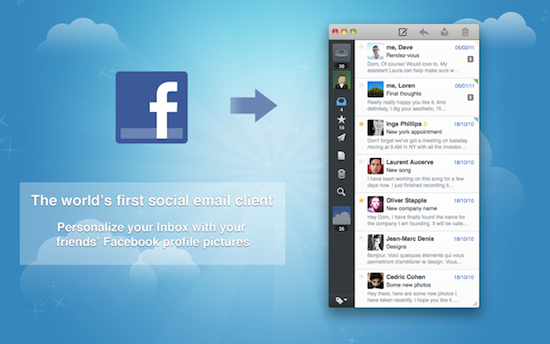
Sparrow, the minimal email client for the Mac that was born as a mix between Mail.app and Tweetie for Gmail and eventually evolved into a full-featured IMAP email application, has just announced version 1.2 at TechCrunch Disrupt, which will add a number of new features including the long-awaited unified inbox and a new social layer for your contacts. Since the app was first revealed as beta in October, Sparrow saw a terrific rise in popularity throughout the release of the various betas, and especially after the launch of a Mac App Store version and lite edition, Sparrow has quickly become many people’s favorite way to access Gmail and any other email provider with a convenient, simple interface that follows the latest trends set by apps like Twitter and Reeder for Mac. With the 1.1 update, the developers added IMAP support and integration with Google’s Priority Inbox, thus turning Sparrow from a lightweight client into a serious alternative to more complex apps like Mail and Postbox. The 1.2 update will bring the possibility to see all email messages in a single inbox without switching between accounts, as well as Facebook Connect integration to automatically add profile pictures to contacts. It’s not clear now if this new Facebook feature will also add photos to people that have emailed you using standard IMAP and Gmail accounts, but CEO Dom Leca says they’re “not adding social layers mail for the sake of it”, and Facebook Connect will let you add people as Facebook friends within the app.

Victor Ageda, Jr. from TUAW further reports Sparrow 1.2 will also add some kind of Tumblr integration. The Sparrow team has raised $250,000 in funding over the last months (funders include Twitter’s Loren Brichter), and the developers are looking forward to bring Twitter and LinkedIn support to Sparrow in future versions, turning an email client into a complete social messaging experience like no other on the Mac. The idea of grouping all kinds of social communication into a single app has always attracted users and developers, but no one really quite nailed it. Hopefully Sparrow will manage to blend it all together, yet retaining its nature of simple and powerful email client.

Sparrow 1.2 should be available later today or tomorrow on the Mac App Store at the regular price of $9.99. We’re looking forward to the update and the full list of changes in version 1.2.



The Daily for iPad Nearing 1 Million Downloads

The Daily, the iPad-only magazine built by News Corp. with help from Apple when the two companies unveiled iTunes app subscriptions in February, is about to hit 1 million App Store downloads, TechCrunch reports. At the TechCrunch Disrupt panel entitled “Disrupting Publishing from Tablets to Links”, The Daily publisher Greg Clayman said the app is nearing the important milestone of 1 million downloads, though he didn’t provide any details on the number of people that decided to subscribe to the app since late March, when The Daily started charging for content after an initial free run sponsored by Verizon Wireless. The Daily currently comes with in-app subscriptions priced at $1 per week or $40 per year; a report from April suggested The Daily, both because of paywall and editorial choices, was seeing a decline in popularity in spite of Apple’s heavy promotion on Apple.com and the App Store homepage. Others suggested the same when News Corp. confirmed 800k downloads in 3 months and a $10 million loss over the last quarter to run The Daily operations.

However, 1 million downloads is a notable milestone that, in the words of Clayman, puts The Daily “in the large pantheon of large news apps.” Our first impressions of the app still hold true today – The Daily isn’t the fastest news app available on the App Store and not even the iPad 2’s beefier processor managed to make The Daily run smoothly without crashes of sorts. The Daily is expected to become available on more devices later this year, including the Android tablets that have been rolling out in the market in the past months.


Twelve South’s BookBook Case Now Available for MacBook Air

We love Twelve South’s Mac and iOS accessories, they make some of the most beautiful third-party accessories for Apple devices. We’ve previously talked about the Compass mobile stand, the BookArc for iPad and MacBook Air. Today we’re showing you the BookBook for MacBook Air.

Twelve South’s new BookBook case was designed for the MacBook Air (11 & 13-inch 2nd Gen). The genuine leather case is only 13.5 ounces and has two hardback covers with reinforced corners and a tough spine for impact protection. The inside of the case is lined with a velvet-like soft padded interior as well. Read more


AT&T Begins LTE Rollout Across 5 Cities

AT&T today released its initial LTE rollout plan, with five markets to get LTE sometime “this summer”. Those lucky cities will be Dallas, Houston, Chicago, Atlanta and San Antonio.

Ten more markets, which are yet to be named, will also be getting AT&T’s LTE network built in the second half of this year. AT&T says in its press release that across those first 15 markets, 70 million Americans will have coverage on their LTE network. Currently AT&T does not offer any LTE compatible devices, but again claims that there will be, by the end of the year, some devices that are LTE capable.

Earlier this year, Apple posted a job listing for someone with cellular protocol experience, who would have the specific duty of implementing, integrating and maintaining various network protocols, including LTE. Whilst in January, China Mobile’s Chairman said “Apple has made it clear they will support TD-LTE.” This year’s iPhone, which is widely expected to be revealed in September, is unlikely to have LTE support. However, with LTE adoption spreading across the world, and multiple Android and soon Windows Phone 7 devices supporting LTE, it seems very plausible that the following iPhone will support LTE.

[Via Engadget]


iPhone 4 Finally Coming to India This Friday

As reported by BGR.in, 337 days after the original release in the United States and other European countries, the iPhone 4 will finally launch in India this Friday, May 27. Back in early April carriers Bharti Airtel and Aircel confirmed they would release the iPhone in India “in the coming months”, though no details were provided about launch costs, subsidies, or effective availability; in spite of Airtel starting iPhone registrations on its website a few weeks ago, it looks like Aircel will be the first mobile operator to launch the popular the device in India.

The iPhone 4 will be available at Rs. 34,500 ($760) for the 16 GB model and Rs. 40,900 ($900) for the 32 GB one. Unlike most carriers worldwide, Aircel will apply a “reverse subsidized” payment model, through which users pay the full cost of the iPhone upfront, and get a full refund with credits over the next two years.

Following an upfront payment of Rs. 34,500 for the 16GB model and Rs. 40,900 for the 32GB model, customers will have the opportunity to recover 100 percent of their upfront iPhone cost in monthly credits on their service plan over a period of 24 months.

A breakdown of the full plans is available after the break. [via The Next Web India] Read more


The Story Behind Hype, An Interactive HTML5 Animation Builder For OS X

Last Friday, a bunch of ex-Apple employees launched Hype, an HTML5 animation builder for OS X. The application aims to let users easily build interactive sites that rival those built with Flash. Already the idea and the implementation has proved successful amongst consumers, with the app currently ranking as the highest grossing app on the Mac App Store. The Startup Foundry met with one of the cofounders, Jonathan Deutsch, and picked his brain on a number of questions surrounding Hype.

Deutsch worked at Apple primarily as the engineering manager for the back-end of Mail.app on OS X but also dabbled in software updates, automation technology, preparing Steve Jobs’ keynotes and various other engineering projects. The other co-founder, Ryan Nielsen was a senior member of the Mac OS X Project management team – central in the development of major OS X releases. Asked why Deutsch would leave a safe job at Apple to build a start-up, he said that he has always wanted to have his own company and wanted to be part of the new HTML5 wave hitting the web.

I was faced with the decision of continuing to work with the great people on my team on a clearly high impact project, living with the “what if” syndrome, or trying to forge my own path.  ”Regret Minimization” is what should win out in life, so it did.

The idea for Hype came after Deutsch returned from a holiday in Europe and wanted to make a website sharing some of the photos he took. Yet coding it with HTML5 would have been a nightmare and he thought there must be a better way. “It stuck with me and eventually I realized this was going to be a great opportunity for a business”.

Deutsch says that Apple’s condemnation of Flash wasn’t really a part of his decision-making, rather it was Apple’s efforts at driving the web forward that played a larger role. He praises WebKit as a great project that whilst initially controversial, has driven innovation in web browsers, particularly on mobile devices that almost exclusively use WebKit.

You can download Hype in the Mac App Store for $29.99.

[Via The Startup Foundry]


Prototypes Turns Mockups Into Tappable iPhone Demoes

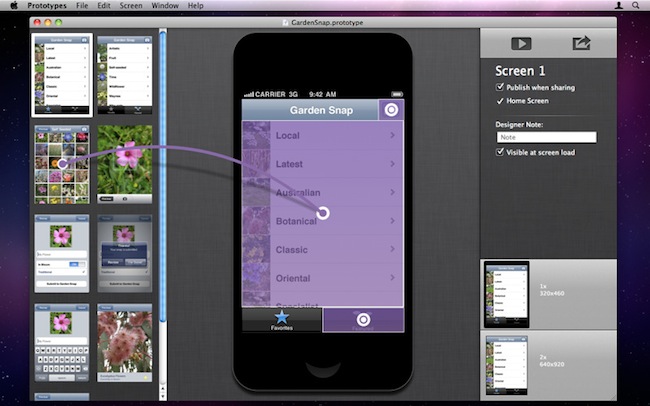
If you’re an iPhone developer, you know how long it takes to turn a mockup realized in Photoshop, Illustrator or Fireworks into a working app that can be tested to see if your idea is actually working on a device’s screen. Whilst an app screen may look good in Photoshop with its fancy graphics and menus you first sketched on your notebook, there’s always the risk that, once running on a real device with an actual multitouch display, your idea will simply suck. Prototypes, a new Mac app released today at $39.99, is a new tool for developers aimed at making the process of converting a mockup into a tappable and shareable application super-simple. Prototypes won’t magically turn your .png’s into Cocoa code, instead it will allow you to display these images on an iPhone or iPod touch screen, and allow users to tap around and get the idea of how an app works.

From Prototypes’ desktop view, developers can import image files and start building a new project. Once all the images are in, Prototypes offers the possibility to create connections and links between objects and pages, add tappable areas and establish dependencies between app menus and sections. What Prototypes basically does is simple: it takes all your app mockups you’ve created in Photoshop, bundles them up in a package, and takes care of including animations, transitions, hotspots, and more to give users the feeling that they’re using a real application while, in fact, they’re just tapping on “smart images” connected by links. It’s genius. Of course you won’t end up using an app on your phone – you’ll simply be running a bookmark saved from the web that’s nothing but a living mockup meant for testing purposes.

Prototypes also offers developers a way to share these mockups with users, their boss, or friends: by hosting a mockup on the free ptyp.es service, devs will be able to easily allow everyone to “install the app” using Mobile Safari and a special PIN code for extra security. You can try one of Prototypes smart mockups by heading over this link with your iPhone, saving the page on your Home screen, and entering 12345678 as PIN.

I think Prototypes is an incredible idea and a great time-saving utility for iOS developers that have been looking for ways to test a mockup without actually writing code. You can get the app here at $39.99.


Evernote Revamps Chrome Extension, Announces Developer Conference

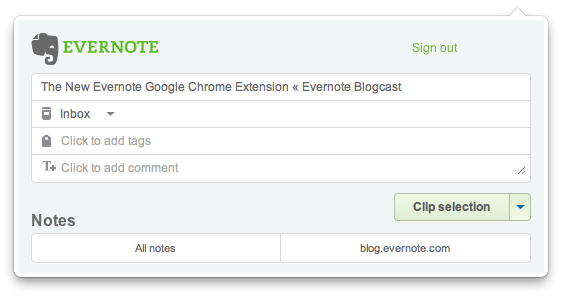
Evernote, the digital capture tool that allows you to save anything from the web and access it from a variety of devices and computers including iPhones and Macs, announced earlier today an updated version of the popular Chrome extension that, following the recent interface changes to the iPhone app, offers a more elegant way to clip content from webpages and have it synchronized with your Evernote account.

The new extension, available here, packs a whole new UI with slick buttons and text entry fields for quick tag and note input, but more importantly adds a new Article Clip feature that, with just one click on the browser’s toolbar, automatically selects the main content of an article to save it as full-text in Evernote. The extension worked perfectly with all the blogs I’ve visited today, and the new extension window makes it easy to edit the title, tags, notes and notebook. If you feel like you don’t want to clip the whole article, but only a portion, the extension is also capable of recognizing a selection and enable you to switch between that and the full article from a dropdown menu. The same menu is also being used to only clip a page’s direct URL, if you prefer to bookmark stuff, rather than archive it as a text document. Read more


Apple Promises OS X Update to Delete Mac Defender Malware

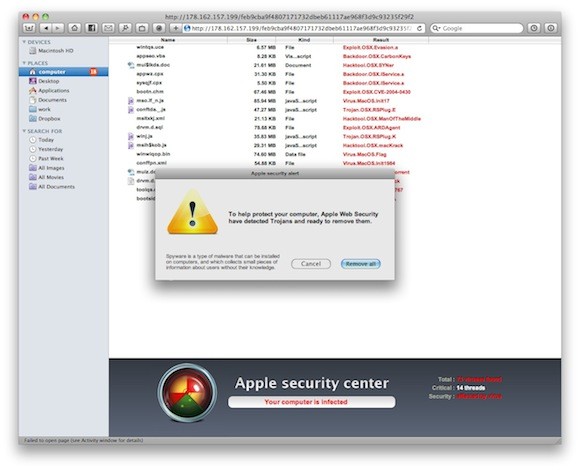
[image via]

A new support document surfaced on Apple’s website today reveals the company will release a Mac OS X software update in the next few days (likely a security update) that will automatically find, block and remove the popular Mac Defender malware from infected OS X machines.

A recent phishing scam has targeted Mac users by redirecting them from legitimate websites to fake websites which tell them that their computer is infected with a virus. The user is then offered Mac Defender “anti-virus” software to solve the issue. This “anti-virus” software is malware (i.e. malicious software).  Its ultimate goal is to get the user’s credit card information which may be used for fraudulent purposes. The most common names for this malware are MacDefender, MacProtector and MacSecurity.

In the coming days, Apple will deliver a Mac OS X software update that will automatically find and remove Mac Defender malware and its known variants.  The update will also help protect users by providing an explicit warning if they download this malware.

Whilst an internal AppleCare document leaked last week suggested Apple was telling employees not to remove the Mac Defender malware from users’ computers (also telling the same employees to redirect users to the Mac App Store to find proper antivirus software), it appears the company is taking the necessary steps to make sure Mac Defender won’t spread even further – they’re also offering in the same support document updated today a handy removal guide to manually find and delete the malicious application. Mac Defender began spreading quickly in early May, when hundreds of users reported online they discovered a malware-scanning utility on their computers that they did not want to have installed. It turned out Mac Defender still required a manual installation to be activated, though downloads effectively happened without a user’s consent when visiting certain webpages, often linked on Google Image Search. [via]