Posts in news

Firefox 11 Released, Features Add-On Sync, New Developer Tools

It’s been about a year since Mozilla shipped Firefox 4 and outlined its intentions to move toward faster and more frequent releases of Firefox. They’ve sure delivered upon that, yesterday releasing Firefox 11 with a handful of notable new features for both consumers and developers.

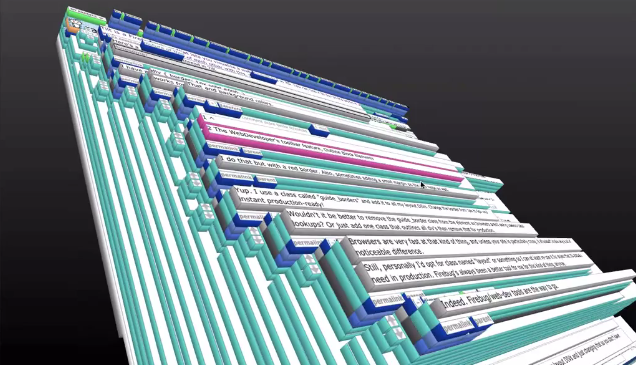
For users, the big new feature is add-on sync. It effectively allows users the option to keep their add-ons in sync across computers. This is an opt-in feature that is available in the Sync tab of the Preferences window. Meanwhile  developers can utilise a new ‘Page Inspector 3D View’ that literally turns a website into a 3D model that highlights how the particular webpage elements are constructed on top of each other.

While developer tools like “view source” have always been useful to learn about how to develop a page, the 3D View more clearly illustrates how the parts of a website are structured. After selecting “3D” View in Page Inspector, just hover your mouse over the elements to get more information about each piece you select.

Firefox 11 also features a ‘Style Editor’, allowing developers to edit CSS stylesheets and view their changes take effect instantly and live - all “entirely within the browser”. It’s sure to make it easy for developers to iterate quickly and efficiently. Once done developers can save the updated stylesheet to their computer.

Jump the break for a short video that demoes the new Page Inspector 3D view. You can download Firefox 11 here.

[via Firefox Blog]

Read more


Rdio Launches Complete Redesign

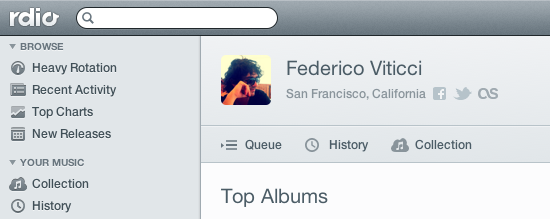
Rdio, a music streaming service that works on the web, Mac, and iOS, is holding a press event today to announce a major redesign that, however, is already available to subscribers in the web browser. Once enabled, “New Rdio”, as the company is calling the new experience, shows a complete rethink of the music browsing and listening workflow behind Rdio.com.

New Rdio is a visually beautiful and dynamic way to play Rdio’s massive catalogue of 15 million songs. New features include the oft requested drag and drop playlist creation, a more personalized Heavy Rotation, and private playlists.

From a first test, it appears the new user interface is heavily based on sidebars and panels to manage your music collection, playlists, queue, and network of friends or people you should follow. Playlists have been updated, and it’s now possible to create them and manage them through drag & drop, as well as make new “private playlists” that you can choose to share with just a few people. A new sidebar on the left organizes people and music influencers by “Your network” and “Who to follow”. The Network tab is similar to Facebook’s own ticker system, in that it shows people you’re currently friends with and the music they’re listening to. Click on an item, and a popover will open allowing you check out a song right away. The suggestions tab is equally interesting, presenting people that Rdio thinks you should invite or follow on the service. The aforementioned drag & drop system has also been enabled for sharing – you can now grab an item from the main panel, head over a friend’s avatar, and share it. Twitter, Facebook, and email sharing are supported.

Search seems a lot faster than before, presenting results for artists, songs, or albums in a few seconds. The overall design feels cleaner, less crowded, and easier to use. As the company stated at its press event “We basically took Rdio apart and put it back together”. The app is more social, puts music and people front and center, and, more importantly, keeps more items and sections within a single page thanks to popups, sidebars, and panels. Furthermore, the new design also allows you to click through items – for instance, an album – and navigate back while maintaining page position, without having to scroll again. What I think is interesting, and will likely take some time getting used to, is that while the Heavy Rotation for your account is harder to access and has been seemingly also incorporated with your network’s rotation, people that are listening to same music as you are now always shown in the UI, your collection included. Top Charts, Recent Activity, Queue, and New Releases keep more or less the same functionalities as before, only with a new design.

The new Rdio experience has also been brought to the official Mac app, which was updated earlier today to version 2.0 and is capable of automatically switching to the new UI once enabled in your account. The app is now smarter at recognizing when music is playing on another location (such as the browser), and offers you a way to quickly switch playback to the desktop.

We will update this story with more screenshots and details from Rdio as the company details the new features at its media event. For now, New Rdio is available only to Web and Unlimited subscribers, with everyone else gaining access sometime in the future. A promo video of the new Rdio is embedded after the break. Read more


Tweetbot Gets Streaming

Tweetbot, Tapbots’ excellent Twitter client for iOS that we recently reviewed for the launch of its long-awaited iPad version and 2.0 update on the iPhone, received today support for one of the most requested functionalities by its users: streaming.

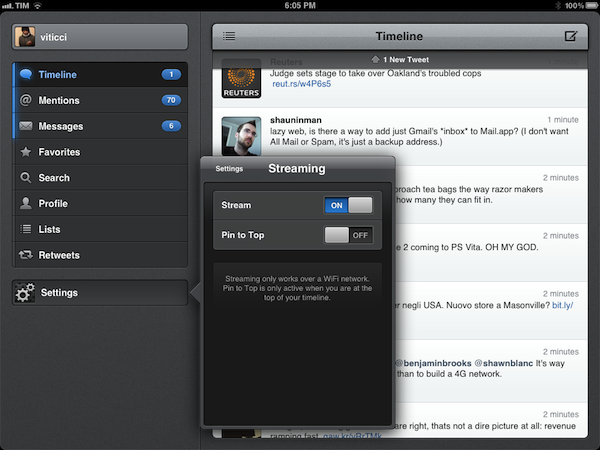
Available today in version 2.1 of the iPad app, live streaming allows users to stay on top of the latest tweets thanks to Twitter’s real-time push technology that can be seen in the new Tweetbot timeline, which, when on WiFi, will constantly check for new tweets and automatically load them above your timeline position. An option is available to disable streaming in the app’s Settings, as well as a switch to enable “Pin to Top”. In my tests, Tweetbot’s new streaming feature has been extremely reliable – that is, unless Twitter itself was experiencing issues – and has enabled me to forego completely the need of manually refreshing or waiting for Tweetbot to update my timeline every few minutes. Like on Twitter for Mac, I think streaming is an invaluable tool if you’re planning on getting the most out of Twitter’s real time nature, and Tweetbot’s implementation doesn’t disappoint.

With streaming come a few other changes to make the experience of fetching and syncing tweets more pleasant. The new tweets sound, for instance, is now limited to mentions, direct messages, and tweets fetched with pull-to-refresh. The Tweet Marker service, which allows you to keep your Tweetbots (and other supporting clients) in sync, has been vastly improved. Generally, this means the process of getting your latest-seen tweet and timeline position should sync faster to the cloud and back to the app – in testing the latest Tweetbot, I can confirm Tweet Marker sync seems a little faster and more “accurate” than before.

Tweetbot is my favorite Twitter client on any platform, and streaming makes it a lot better from a user experience standpoint. You can get iPad update from the App Store now (the app’s graphics are also ready for the new iPad coming out later this week); version 2.1 of the iPhone app, sporting the same new features and Camera+ 3.0 integration, is still waiting for approval in the App Store’s queue.


Apple Releases Safari 5.1.4

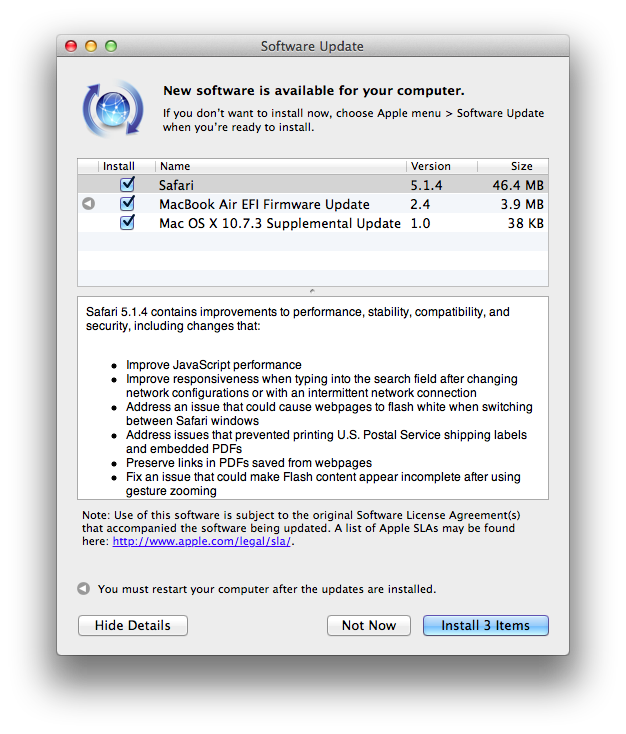
Apple just released an update to Safari on its Downloads website and Software Update, adding a number of improvements for stability, compatibility, and security.

  • Improve JavaScript performance
  • Improve responsiveness when typing into the search field after changing network configurations or with an intermittent network connection
  • Address an issue that could cause webpages to flash white when switching between Safari windows
  • Address issues that prevented printing U.S. Postal Service shipping labels and embedded PDFs
  • Preserve links in PDFs saved from webpages
  • Fix an issue that could make Flash content appear incomplete after using gesture zooming
  • Fix an issue that could cause the screen to dim while watching HTML5 video
  • Improve stability, compatibility and startup time when using extensions
  • Allow cookies set during regular browsing to be available after using Private Browsing
  • Fix an issue that could cause some data to be left behind after pressing the “Remove All Website Data” button

You can find Safari 5.1.4 here. The previous version of Safari, 5.1.3, was released alongside 10.7.3, adding, again, bug fixes and improvements.


New iPad Shipping Times Slip To 2-3 Weeks In Many Apple Online Stores [Update]

Update 3/10: Apple has confirmed in a statement to CNET that initial iPad units available for pre-order are sold out.

Customer response to the new iPad has been off the charts and the quantity available for pre-order has been purchased,” an Apple representative told CNET. “Customers can continue to order online and receive an estimated delivery date. Beginning Friday, March 16, the new iPad will be available for purchase at Apple’s retail stores and select Apple Authorized Resellers on a first come, first-served basis.

As noted by Matthew Panzarino at The Next Web, shipping times for the recently announced new iPad have slipped to 2-3 weeks in several online stores worldwide. The new device, announced at a media event on Wednesday, was made available through online pre-orders immediately after the event; in the hours following the refresh of the Apple online store with new products, the company had to face technical problems with the site not loading correctly due to heavy traffic. That hasn’t stopped customers, however, from sending their orders for the new iPad, whose initial shipments are now sold out in many international versions of the store – shipping times of 2-3 weeks are now reported in the UK, Germany, Japan, France, and Australia. Curiously enough, at the moment of writing this US shipping times had slipped to 2-3 weeks as well, only to go back to March 19 right before publishing.

Other stores of the initial launch countries are now reporting delays as well: in Canada, new iPad orders will be shipped on March 19, in Singapore and Australia on March 22.

On March 16th, the new iPad will go on sale in:

  • US
  • Canada
  • UK
  • France
  • Germany
  • Switzerland
  • Japan
  • Hong Kong
  • Singapore
  • Australia

25 more countries will follow one week later on March 23rd:

  • Austria
  • Belgium
  • Bulgaria
  • Czech Republic
  • Denmark
  • Finland
  • Greece
  • Hungary
  • Iceland
  • Italy
  • Liechtenstein
  • Luxembourg
  • Macau
  • Mexico
  • Netherlands
  • New Zealand
  • Norway
  • Poland
  • Portugal
  • Puerto Rico
  • Romania
  • Slovakia
  • Slovenia
  • Spain
  • Sweden

You can read more about the new iPad, which carries a Retina display, LTE, Bluetooth 4.0 and quad-core GPU, in our overview.


iWork.com Beta To Be Discontinued on July 31

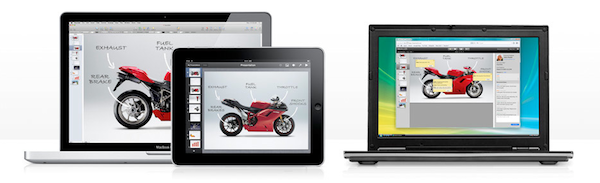
With a support document updated today, Apple has informed users of iWork.com that the public beta of the service will be discontinued on July 31:

After July 31, 2012, you can no longer publish new documents to iWork.com from any iWork application on your Mac or iOS device. Documents already shared on iWork.com will not be available to you or to those you shared documents with.

Moving forward, you can use iCloud to share documents between your computer and your iPhone, iPad, or iPod touch.

Giving instructions to save documents already published on iWork.com, Apple is advising customers to start using iCloud instead. Currently, iCloud offers a functionality to store iWork documents online, and access them from the native iWork apps for iOS. With Mountain Lion, Apple will offer a new iCloud save interface, although it’s not clear yet whether this will translate in a storage UI for iCloud.com as well, or an update to iWork for OS X. Currently, iCloud.com offers no sharing system for documents stored online, either.

Apple never showed too much interest in bringing new features to its iWork.com service, which has always been labelled as “beta” by the company. Some minor additions were brought to iWork.com last year, but the company never specifically mentioned major new functionalities would be introduced. Especially after the launch of iCloud, many had wondered if iWork.com was set to be discontinued, like other MobileMe services, and it now appears those doubts were legitimate, as the company is looking to move every document-related feature to iCloud. Right now, it’s not clear whether native apps will gain new options for publishing and sharing, or if Apple will keep building more powerful web apps for storing and sharing documents online.

Apple has already confirmed that MobileMe will be discontinued later this year, on June 30.


Rovio Officially Announces “Angry Birds Space” with New Trailer

The first new game by Rovio in over a year, Angry Birds Space is the next step in the company’s franchise, and it’s coming out on March 22. Previously teased online, Rovio has now updated the game’s webpage with an official trailer featuring a NASA engineer talking about the game and the new physics engine behind it. Based in a weightless environment, the basic gist of the game seems to be that in such conditions, trajectories are affected by gravity, and objects end up following curves, rather than straight lines. Using a “galactic slingshot” in footage shot on-location at the International Space Station, NASA’s Don Pettit explains how astronauts and scientists have to consider these changes in physics and gravity when they are in outer space; apparently, this mechanic will be brought to Angry Birds Space in a fairly accurate representation.

Angry Birds isn’t new to physics. In fact, we could say that the entire franchise has been so successful thanks to its user-friendly implementation of actual law of physics that take into account gravity, weight, trajectories, and speed through a multitouch interface. From what we can see in the trailer, surprisingly demoed on a Galaxy Note, the new Angry Birds will work as a crossover between the original game and Super Mario Galaxy – those who have played Nintendo’s Wii game might remember how planets affected Mario’s jumps and moves when floating in space. It looks like Angry Birds Space will somehow translate that gameplay in 2D scenes while mixing it with new birds, new pigs, and new actions with the ultimate goal of giving the franchise a new spin and an entirely new set of physics users will have to adapt to.

Angry Birds Space will be released on March 22 on iOS, Android, Mac, and PC. Check out the official video below.

Update: More screenshots and information directly from Rovio.

Features:

  • 60 interstellar levels!
  • Regular free updates!
  • Brand new birds!
  • Brand new superpowers!
  • Zero-gravity space adventures!
  • Trick shots using planets’ gravity!
  • New in-app purchases for iOS!
  • Hidden bonus levels!
  • Beautifully detailed backgrounds!

Description:

After a giant claw kidnaps their eggs, the Angry Birds chase it into a wormhole and find themselves floating in a strange new galaxy – surrounded by space pigs! Luckily the Angry Birds have super powers of their own…

Angry Birds Space features 60 interstellar levels on planets and in zero gravity, resulting in spectacular gameplay ranging from slow-motion puzzles to lightspeed destruction. With regular free updates, new in-app purchases, brand new birds, brand new superpowers, and a whole galaxy to explore, the sky is no longer the limit!

Screenshots


Read more


Apple to Developers: Update Your Apps for iOS 5.1

Following the release of iOS 5.1 earlier today, Apple has updated its developer portal with a new “Create Apps for iOS 5.1” webpage, asking developers to start submitting apps written specifically with the iOS 5.1 SDK. The checklist includes links to the iOS 5.1 SDK release notes, Xcode 4.3.1 for developers, and a detailed explanation of the various functionalities introduced in iOS 5.

iOS 5.1, the latest version of the world’s most advanced mobile operating system is now in the hands of millions of iOS customers. Install iOS 5.1 now and download Xcode 4.3.1 with iOS 5.1 SDK from the Mac App Store, so you can test and submit your iOS 5.1 apps today.

Furthermore, Apple has updated the iOS Human Interface Guidelines with new icon size information, as well as the iOS App Programming Guide.

Developers can head over this page to check out Apple’s resources for developing and submitting iOS 5.1 apps.


Apple Updates Most of Its iOS Apps for the new iPad

Today, during Apple’s Keynote, they showed off updates for iWork, iMovie and GarageBand after revealing the new iPad. After the Keynote, many more of Apple’s iOS apps also received updates as well. All these updates are available now in support of the new iPad. Lucky for you we have the entire list (with direct links) for our loyal readers!

iOS Apps

Find My Friends 1.1:

  • Support for Retina display-capable devices
  • Bug Fixes
  • Stability enhancements

iTunes U 1.1:

  • Now designed for the spectacular Retina display on the all new iPad.
  • This version also includes a number of performance improvements.

GarageBand 1.2:

  • Start a Jam Session to play or record live with up to three of your friends using iPad, iPhone, or iPod touch*
  • Conduct an entire string orchestra using Smart Strings
  • Use the Note Editor to adjust or fine-tune any Touch Instrument recording
  • Combine recordings to free up additional tracks using Track Merge
  • Keep your GarageBand songs up to date across all your iOS devices with iCloud*
  • Share your songs directly to Facebook, YouTube, and SoundCloud
  • Perform retro and modern synth bass lines and grooves with new Smart Bass instruments
  • Play synth melodies and arpeggios with new Smart Keyboard instruments

*Jam Session and iCloud are available on iPhone 4 or later, 4th generation iPod touch, and all iPad models.

iMovie 1.3:

  • Create beautiful movie trailers with stunning graphics and world-class soundtracks*
  • Swipe up on the playhead to freeze a frame in your video
  • Preview music and sound effects in the Audio Browser
  • Create a song in GarageBand and send it directly to iMovie

*Trailers are available on iPhone 4 or later and iPad 2 or later

Find My iPhone 1.4:

  • Support for Retina display-capable devices
  • Bug Fixes
  • Stability enhancements

iBooks 2.1:

  • Read books more easily with sharply detailed text on the new iPad’s amazing Retina display
  • See page numbers that correspond to the printed edition of select titles
  • Search for a page number to jump to a desired page with a single tap
  • Use your finger as a highlighter when swiping over text
  • This version also includes a number of important stability and performance improvements

Numbers 1.6: (Numbers 1.6 requires iOS 5.1 software update or later)

  • Create and view stunning 3D bar, line, area, and pie charts
  • Numbers 1.6 is enhanced to take advantage of the Retina display on the new iPad
  • Includes performance improvements

Keynote 1.6: (Keynote 1.6 requires iOS 5.1 software update or later)

  • Create and view stunning 3D bar, line, area, and pie charts
  • Animate your 3D charts with Crane, Grow, Radial, Rotate, Rotate & Grow, and Z Axis builds
  • Keynote 1.6 is enhanced to take advantage of the Retina display on the new iPad
  • Use new builds and transitions including Iris, Shimmer, Wipe, Flame, Perspective, Swing, Object Push, Object Zoom, and Fade Through Color
  • Includes performance improvements

Pages 1.6: (Pages 1.6 requires iOS 5.1 software update or later)

  • Easily enter text using the landscape keyboard on iPhone and iPod touch
  • Create and view stunning 3D bar, line, area, and pie charts
  • Pages 1.6 is enhanced to take advantage of the Retina display on the new iPad
  • Includes performance improvements

Remote 2.3:

  • Support for iTunes Match on Apple TV
  • Support for Retina display on iPad

Mac Apps

Xcode 4.3.1:

  • Includes SDKs for Mac OS X 10.7 Lion and iOS 5.1
  • New code signing workflow supports signing OS X apps with Developer ID
  • Adds installation of command-line tools to the Downloads preference pane
  • Open Developer Tool menu launches Instruments, File Merge, and other tools
  • ARC migration tool converts both retain/release and garbage collected code
  • Additional bug fixes and stability improvements

iBooks Author 1.1:

  • iBooks Author 1.1 is enhanced to create books that take advantage of the Retina display on the new iPad
  • Includes performance and stability improvements

iPhoto 9.2.2:

  • Photos can now be deleted from Photo Stream